edge beta
18 Topics
Edge beta crashes after 5 seconds on some old versions of Windows 10
We have problems with Edge Beta versions 151.0.4129.15, 151.0.4129.21 and 151.0.4129.35. On launch Microsoft Edge briefly opens and then closes (like in 5 seconds) on Windows 10 RS1/RS2/RS3. I can't reproduce problem on other versions of Windows 10, such as TH1 or RS4954Views0likes6Comments
Video Super Resolution Missing Options in Setting
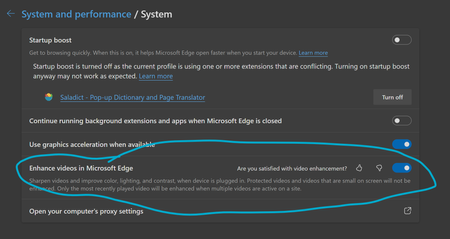
Enhance videos in Microsoft Edge (Flag: #edge-video-super-resolution) is missing critical options in setting, making it impossible to function properly. In Version 136.0.3240.29 (Official build) beta (64-bit), as well as the previous beta build, it is missing the option to choose from three methods of video enhancement, as shown in screenshot. Here is the setting from latest beta build: This is how it is supposed to look: Thus, beta build defaults to Microsoft Super Resolution and I can't find a way to use graphics driver enhancement like RTX Super Resolution, which is critical to my experience. Also, HDR is no longer supported when video enhancement is enabled, which I believe is a limitation of Microsoft Super Resolution.Solved14KViews23likes25Comments--js-flags=--noexpose_wasm launch flag causes STATUS_BREAKPOINT
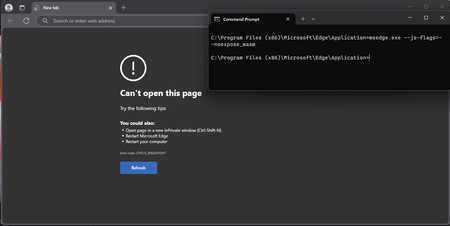
Version 135.0.3179.73 (Official build) (64-bit), Windows 11 Education, also occurs on Windows 10 Education and Windows 10 Pro, been testing this since probably version 129 of Edge. --js-flags=--noexpose_wasm as a launch flag causes STATUS_BREAKPOINT, this is regardless of default configuration and with or without extensions. WASM can be used to discover privileged information about a machine, and this seems to be working in the past according to some users online, but no longer does now. Please can someone advise?356Views0likes1Comment
[SOLVED] Can't login on Edge anymore! (Login and Sync issue)
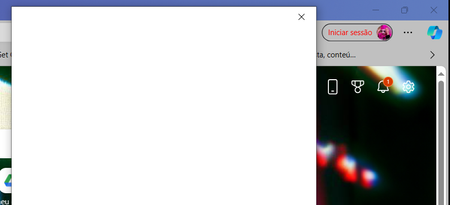
UPDATE 10 APRIL: Finally got a hold on https://support.microsoft.com/, initiated a live chat with support, and they had to install Install Quick Assist (Install Quick Assist - Microsoft Support) and they had to enter my PC and check what was wrong. They had no idea what was happening at the time (this all happened a few weeks ago - sorry for the late reply ut I had a lot of work delayed due to this error) and reinstalled Windows = issue solved. The following day however, windows asked me to update again and the issue returned ahahahaha but I removed it, and then the following system updates didn't carry that sign in issue anymore. Thank you all for your help and support during these VERY STRESSFUL DAYS! Hope the issue got solved for everyone! ____________________________________________________________ UPDATE 25TH - 4:52 GMT: - Run every possible workaround thanks to comments on my Microsoft Community thread and here (Tech) (Thank you everyone!) - Can't get pass the edge login pop-up => can't sync and have access to workspaces; - Already reported twice on Alt + Shift + I (with screen recording video and photos); - No 3rd party antivirus issue; - Some people on the Community post were able to surpass this by uninstalling KB5035853 - but I don't have it; - Using Windows 10 Home version 22H2, with Edge version: 123.0.2420.53 (64 bits) [also tried on Edge Beta version: 123.0.2420.53, but uninstalled it for now] ____________________________________________________________ UPDATE: 22nd OF MARCH: There was already some suggestions left here (https://answers.microsoft.com/en-us/microsoftedge/forum/all/cant-login-on-edge-anymore-sync-issue/6433b1dc-0f99-401f-86e6-90b36c7f2d34but it didn't work. Anyone? Please? _______ original message posted on 20th March _______ Already hit restore on windows' applications and restarted my pc, but every time I open Microsoft Edge now, on the top right corner it says my account is not logged in. And when I try to do it, the pop-up window says it's loading and then just turns to all white. Anyone can help me please? Don't want to lose my favourites, passwords and workspaces ;_; 1) already deleted all cookies 2) already confirmed if it was an issue with the Wi-Fi 3) already hit «repair» twice on the program 4) already tried to add a new account (didn't work cause the issue with the popup to login is the same) 5) already disabled all extensions and tried to login again after that 6) my account is not blocked - in fact I can login on Microsoft with it on my phone and website (otherwise I wouldn't be able to post this question). The issue is only with logging in on the Edge browser. 7) already deleted and reinstalled Edge. And yes, I restarted my pc every time I tried something. What else can I do? I need to access my Edge Workspaces!39KViews2likes29Comments
(MAJOR BUG) Bookmarks dont shift by drag and drop when selected (even multiple selecting is broken).
(MAJOR BUG) Bookmarks dont shift by drag and drop when selected (even multiple selecting is broken). See invalid button when dragging multple bookmarks. I dont face same issues in any browser including chrome and firefox and opera and brave and vivaldi whatsoever. Only edge browser has these unique bugs. And this bug is common in all edge browsers and on all platforms. Checked before posting this.428Views0likes0CommentsBug: "Continue on PC" wrongly opens Edge Stable instead of default browser Edge Beta/Dev/Canary
When Edge Beta (or Dev or Canary) is installed on a computer, and it has been configured to be the default browser in Windows 10, then any webpage sent from a mobile device to the computer, via the "Continue on PC" function on Edge Mobile, should be opened in that version of Edge. However, this is not the case: it is always opened in Edge Stable. This is a bug, or at least it is undesirable behavior.Solved1.3KViews0likes1Commentjust my opinion with edge new icons
as you know edge changed the icons of the mac app. now they looks like https://imgur.com/a/eImIgtl Just my opinion about edge new icons. As you know new icons looks pretty similar especially if you use it in small size on the dock. For me it was much better the old version, we could better understand which version is what. now they seems all identical, there is just a small banner with different colors. obviously if you keep the icon at max size you notice the difference. i make a lot of chaos especially between dev and beta, because other browser use such color inverted. i wish the team could rethinking that and maybe use different icons like other browsers do too PS: i already liked your old version icons. this is not because it was much easier to switch app, but because the old icon was already just fine.1.7KViews0likes2CommentsVarious Edge Versions On MacOS Big Sur Beta 4 Crashes Very Frequently
Hi guys, I have logged this feedback via the browser (whilst I had the time) but I wanted to see if others are having similar problems. I am confident it is linked to Big Sur as Catalina had no issues at all. The issue: - I run Edge and start using it, sometimes it will last maybe an hour, sometimes only a few minutes and it will terminate. - I do not browse the same combination of sites every time. - I have been forced to use Chrome Canary as an alternative, but this doesn't crash at all. (version 86.0.423.0) - This is a problem with Edge, Edge Beta and Edge Dev too as I have installed all of those and it does the same thing. - Interestingly, just before the last force close, I ran Edge Canary via the Terminal script inside the app icon (show package contents > contents > MacOS) it had shown me this in the Terminal window: [0812/102241.519215:WARNING:process_memory_mac.cc(93)] mach_vm_read(0x7ffee6b73000, 0x2000): (os/kern) invalid address (1) [0812/102242.473112:WARNING:crash_report_exception_handler.cc(258)] UniversalExceptionRaise: (os/kern) failure (5) zsh: segmentation fault My stats: - At the time of writing I was running Edge Canary Version 86.0.605.0 and I am on the Insider Fast ring. - Macbook Air 13 Inch Early 2014 - Big Sur Beta Version 20A5343i (the crashes have happening since Developer Beta 1) I am not looking for an immediate fix, but perhaps some contact with devs and fellow Edge lovers to sort this issue out, I HATE having to use Chrome 😞4.5KViews0likes4Comments
Multiple Home Pages
Greetings, I'm looking to add multiple home pages in Edge Chromium. Is this possible without the use of Group Policy, I can see that the homepage field in Settings can accept Javascript, but would this be the only way? Any help is appreciated. Thank you, Louis3.8KViews1like8CommentsItalian translation in edge website microsoftedgeinsider.com
The word Fixed has been translated as Fisso instead of Risolto (Solved). The word Fisso has another meaning in italian. Sorry if this is not the right place, but i can't find any other forum dedicated to the Edge Insider website.2.1KViews1like8Comments