document processing
140 Topics
Excel Desktop App hangs when attempting to open documents from SharePoint to edit
User attempts to open Excel Documents saved in SharePoint by selecting Edit in Desktop App. As the Excel Desktop App begins to open a message displays stating: We have opened this document in Microsoft Excel in your computer. However, the Excel App just hangs without fully opening (see Screenshot). No problem detected when opening the Excel Desktop app directly, Desktop App opens freely. Excel MS365 is up-to-date version 2609 build 16.0.20430 64 Bit (Before reinstall). I have uninstalled the MS365 Office packet and reinstall it directly from the User's Office Portal, to no avail.426Views1like2Comments
Recycle Bin and Site Content Hidden for Site Members and Site Visitors
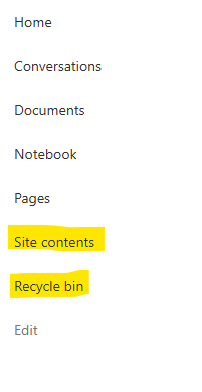
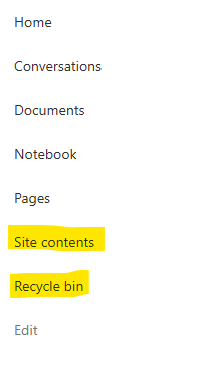
I posted this before but made a mistake with my write up, so I am reposting. I have a requirement that the Recycle bin and Site Contents should be be hidden from the Site Members and Site Visitors. Please how can I achieve this because the Server Infrastructure activation is not working for me. Any workarounds? Please help990Views0likes1CommentBecome a Microsoft advanced content management advocate! [Opportunity]
The Microsoft Next Gen Content Services team is launching an advanced content management and experiences Advocates Initiative. We are looking for thought leaders who can amplify product awareness for the latest innovations from SharePoint Premium, SharePoint Embedded, Microsoft 365 Backup, and Microsoft 365 Archive. As advocates, you can help create content to share with your networks, leveraging Microsoft marketing material and updates. If you or anyone you know would be interested in posting about these solutions, please fill out our interest form. As a member of this initiative, you’ll have opportunities to cross-promote on Microsoft channels, receive marketing updates on the products, and enhance your personal brand.999Views5likes3CommentsDynamic Mandatory Fields
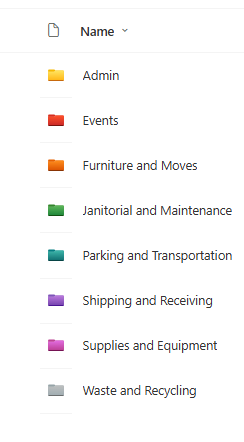
In a SharePoint library, I have folders which are = a. Admin b. Events c. Furniture and Moves d. Janitorial and Maintenance e. Parking and Transportation f. Shipping and Receiving g. Supplies and Equipment h. Waste and Recycling I have Meta data across the library whose data type are all choices and are: a. Document Type = Contract, Financial, planning b. Building = Gym, Garage, Heating c. Asset Category = Office, Playground d. Fiscal Year = FY23, FY24, FY25, FY26, FY27 e. Vendor = Maple Leaf, Canadian Tire, Home Depot f. Status = Active, Pending, Not Active g. Retention Label = 3 years, 5 years h. Service Type = Admin, Events, Furniture and Moves, Janitorial and Maintenance, Parking and Transportation, Shipping and Receiving, Supplies and Equipment, Waste and Recycling Service Type and Retention Label are mandatory fields, with the Rule below for all the files in the various folders: IF Folder Name = Admin, then Service Type = Admin and Retention Label = 5 years; the mandatory fields should be Document Type, Status and Fiscal Year IF Folder Name = Events, then Service Type = Events and Retention Label = 3 years; the mandatory fields should be Document Type, Status and Fiscal Year, Building and Vendor IF Folder Name = Furniture and Moves, then Service Type = Furniture and Moves and Retention Label = 3 years; the mandatory fields should be Document Type, Status and Building IF Folder Name = Janitorial and Maintenance, then Service Type = Janitorial and Maintenance and Retention Label = 3 years; the mandatory fields should be Document Type, Status and Fiscal Year IF Folder Name = Parking and Transportation, then Service Type = Parking and Transportation and Retention Label = 3 years; the mandatory fields should be Document Type, Status and Fiscal Year IF Folder Name = Shipping and Receiving, then Service Type = Shipping and Receiving and Retention Label = 3 years; the mandatory fields should be Document Type, Status IF Folder Name = Supplies and Equipment, then Service Type = Supplies and Equipment and Retention Label = 3 years; the mandatory fields should be Document Type, Status and Fiscal Year IF Folder Name = Waste and Recycling, then Service Type = Waste and Recycling and Retention Label = 3 years; the mandatory fields should be Document Type, Status and Vendor I have used Column Default Value Settings for SharePoint to display Auto-Display the Service Type and Retention Label, but I cannot seem to perform the conditional mandatory fields using Validations setting for the other requirements. Please help708Views0likes1CommentRecycle Bin and Site Content Hidden for Site Members and Site Visitors
I have a requirement that the Recycle bin and Site Contents should not be be hidden from the Site Members and Site Visitors. Please how can I achieve this because the Server Infrastructure activation is not working for me. Any workarounds? Please help667Views0likes2CommentsSharePoint Library Help Needed
I have a SharePoint Library where I would like to implement these requirements below and would appreciate your advise: Folders were created at the library level, which looks like the image below. I do not want people to be able to create any folders or upload documents or folders at the library level, but rather only when they open the folders. I have disabled folder creation and created a PowerApps form, so that users can only upload document, edit documents, view details of the documents when they open any of the folders., but I cannot seem to find the Power Apps form when I open any of the folders and try to upload a document or view a document or edit the document details. 2. I have a choice column called Fiscal Year which has options as = FY22, FY 23, FY24, FY25, FY26. By March 2026, I would like to create an automate flow which will auto create FY27 and remove FY22 from the choice, so that the choice column is always limited to only 5 years.416Views0likes3Comments
Date format in SharePoint eSignature
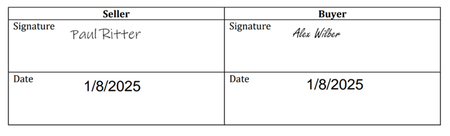
SharePoint eSignature is now available in 28 European countries. Unfortunately, my latest test shows that the date field in a signature uses US format after the document is signed. It does not respect the site collection regional settings. Does someone know from where SharePoint takes the date format or how site owners can change the format? Attached is an example of how it is after the document is signed. It should be at least 8/1/2025 (8 January 2025).576Views1like4Comments
SharePoint Video Playback Quality Defaults to 480p – Horrendous
I manage multimedia training for over 600 locations and two distribution centers, supporting nearly 10,000 team members. We have made a significant investment in producing high-quality training content through professional equipment, structured scripting, and dedicated production and editing time. However, once videos are uploaded to SharePoint, the default playback quality often degrades the experience to what appears to be approximately 480p. As a result, professionally produced content can look noticeably poor on initial playback. Many of our store-level team members are not in a position to manually adjust playback settings, so the default experience matters. The source files are high resolution, but the default playback does not reflect that quality. This also creates issues when leadership reviews training content, because the playback quality can reflect poorly on the production even though the original video is clear. We moved away from third-party hosting due to ad exposure during onboarding and the need for a controlled internal platform. We are intentionally using SharePoint and Stream as part of our existing Microsoft 365 ecosystem for scalability, governance, and centralized access. Introducing additional paid hosting platforms or external streaming solutions is not a direction we are pursuing. From an enterprise training standpoint, defaulting to low-resolution playback undermines engagement and credibility. Are there plans to allow administrators to define a default playback resolution for SharePoint or Stream videos? Are there recommended encoding settings that influence the initial playback quality more reliably? Are there roadmap updates around improving adaptive streaming behavior or default resolution selection? Any guidance or insight would be appreciated.402Views0likes1Comment
PnP Template Error: "Invalid field name {guid}
Hello, I'm trying to apply a site template from one SharePoint Online site to another using PnP PowerShell. I have custom lists, some of them with a specific dependency chain: List X has a lookup to List Y. List Y has a lookup to List Z. All libraries/lists have "Allow management of content types" enabled. The cmdlets I run: Export: Get-PnPSiteTemplate -Out template.pnp -Handlers All -IncludeAllClientSidePages -PersistBrandingFiles Import: Invoke-PnPSiteTemplate -Path template.pnp The Error: During the Invoke process, I get: Invoke-PnPSiteTemplate : Invalid field name {guid} targetsharepoint site What I’ve tried: I attempted to manually remove the ID="{guid}" attributes from the XML inside the .pnp package, but that just makes the template schema invalid. Verified that I am connected to the target site with owner permissions. How can this issue be fixed? Any help would be greatly appreciated! Thanks!170Views0likes0Comments