document library
3265 Topics
PowerPoint Brand Images: folders appear as tabs, but images only show under “All”
Hi, I’m testing PowerPoint Brand Images with a SharePoint Organizational Asset Library and I’m seeing unexpected behaviour with folders. The image library is registered correctly as an ImageDocumentLibrary. PowerPoint detects the library and all images are visible under All. I created several first-level folders in SharePoint, for example: Photos Icons Logos Test PowerPoint correctly reads these folders and shows them as separate tabs in Insert > Pictures > Brand Images. The issue: the tabs remain empty. For example, I created a completely new folder called Test directly in SharePoint and uploaded a new PNG directly into that folder. Result: Test appears as a tab in PowerPoint the PNG appears under All the PNG does not appear under Test I see exactly the same behaviour in PowerPoint Desktop and PowerPoint for the web. I have already checked: OrgAssetType: ImageDocumentLibrary Private CDN: enabled library registered as Private CDN origin CopilotSearchable: enabled SharePoint Online Management Shell: 16.0.27515.12000 PowerPoint Microsoft 365 Beta Channel, version 2609, build 16.0.20416.20004, 64-bit direct upload through SharePoint instead of OneDrive/File Explorer completely new folder and image manual reindexing of the SharePoint library So PowerPoint finds both the folder names and the images, but the folder-to-image relationship does not seem to work in Brand Images. Has anyone successfully used first-level SharePoint folders as working tabs in the new PowerPoint Brand Images experience? Is there an additional configuration step required, or could this be an issue with folder-scoped retrieval in the current rollout?134Views0likes1CommentStrengthening Security in SharePoint Document Libraries: 5 Essential Best Practices
SharePoint Online has become a critical platform for storing, managing, and collaborating on documents across Microsoft 365 environments. Its flexibility and ease of access make it invaluable to modern organisations. However, if document libraries are not properly managed, businesses can face risks such as unauthorised access, accidental sharing of sensitive data, and compliance challenges. Effective SharePoint security is not about restricting productivity. It is about creating a secure framework that allows teams to collaborate confidently while ensuring business information remains protected. This article was written by https://www.bridgeall.com/a leading https://www.bridgeall.com/microsoft-365-consultancy/sharepoint/offering https://www.bridgeall.com/microsoft-365-consultancy/sharepoint/sharepoint-document-management-systems-implementation/ Five Ways to Improve SharePoint Document Library Security Limit Access Using Role-Based Permissions One of the most effective ways to secure SharePoint is by restricting access to only those who genuinely need it. Many organisations grant broad permissions across sites, creating unnecessary exposure. Following a least-access approach ensures users receive only the permissions required for their responsibilities. Rather than assigning permissions to individual files and folders, consider using Microsoft 365 Groups or SharePoint Security Groups to manage access centrally. This not only improves governance but also makes ongoing administration significantly easier. Review and Restrict External Sharing External collaboration is often necessary, but it can also become a source of data leakage if not controlled appropriately. Review sharing settings at both the tenant and site level to ensure they align with your organisation's security requirements. Good practices include: Preventing anonymous sharing links for libraries containing confidential information. Allowing access only to verified external users where appropriate. Applying expiry dates to shared links so access is automatically revoked after a defined period. Regularly auditing active external sharing relationships. By tightening these controls, organisations can reduce the likelihood of sensitive information being exposed outside the business. Protect Content with Sensitivity Labels Protecting the library itself is important, but protecting the documents within it adds another layer of security. Microsoft Purview Sensitivity Labels enable organisations to categorise content according to its sensitivity and automatically apply protection measures. Depending on the classification, labels can: Encrypt files. Restrict downloading, printing, or copying. Display visual markings such as headers, footers, or watermarks. Maintain protection even when a document is shared or moved outside SharePoint. This approach helps ensure security travels with the information rather than relying solely on where it is stored. Strengthen User Authentication Document-level security should always be backed by strong identity protection measures. Multi-Factor Authentication (MFA) remains one of the most effective ways to prevent unauthorised access resulting from compromised credentials. Combining MFA with Microsoft Entra Conditional Access policies provides even stronger protection. For example, organisations can: Block access from unmanaged devices. Restrict downloads on non-compliant endpoints. Trigger additional verification requirements for sign-ins from unfamiliar locations. Apply risk-based access controls based on user behaviour. These safeguards help ensure only trusted users and devices can access critical information. Continuously Monitor and Review Access Security is not a one-off project. Permissions and risks evolve over time, making ongoing monitoring essential. Microsoft Purview auditing capabilities provide visibility into activities such as file sharing, downloads, edits, deletions, and permission changes. Regular access reviews help identify: Outdated permissions. Dormant guest accounts. Excessive access rights. Unnecessary group memberships. Routine governance reviews help maintain a secure SharePoint environment and reduce the risk of privilege creep. Building a Secure and Collaborative SharePoint Environment A well-secured SharePoint platform should balance protection with usability. Organisations that invest in strong governance, identity controls, information protection, and ongoing monitoring are better positioned to support collaboration without compromising sensitive business data. By implementing these best practices, businesses can significantly reduce security risks while ensuring employees continue to work efficiently within Microsoft 365. At Bridgeall we offer a range of https://www.bridgeall.com/microsoft-365-consultancy/sharepoint/sharepoint-document-management-systems-implementation/ that help you build and maintain a secure platform of SharePoint document librarires.68Views0likes0CommentsWhat is the maximum length of a Check-In Comment in a SharePoint document library?
We are using SharePoint document libraries with versioning enabled and users provide comments when checking in documents. Is there a maximum number of characters allowed in the Check-In Comment field, and is this limit documented by Microsoft?Solved236Views0likes1Comment
"labels" in the left navigation pane
Hi, Can anyone advise me if it is possible to add labels in bulk to libraries? What I am asking badly is....I have over a hundred libraries on a site and they need labels adding to them so they are "grouped" in categories. Some of the labels need applying to several libraries. I have been doing smaller sites manually but the bigger ones will be very tedious and time consuming. I hope that makes sense?195Views0likes1Comment
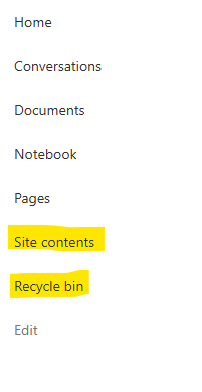
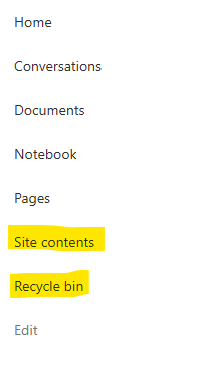
Recycle Bin and Site Content Hidden for Site Members and Site Visitors
I posted this before but made a mistake with my write up, so I am reposting. I have a requirement that the Recycle bin and Site Contents should be be hidden from the Site Members and Site Visitors. Please how can I achieve this because the Server Infrastructure activation is not working for me. Any workarounds? Please help110Views0likes1CommentRecycle Bin and Site Content Hidden for Site Members and Site Visitors
I have a requirement that the Recycle bin and Site Contents should not be be hidden from the Site Members and Site Visitors. Please how can I achieve this because the Server Infrastructure activation is not working for me. Any workarounds? Please help243Views0likes2CommentsDynamic Mandatory Fields
In a SharePoint library, I have folders which are = a. Admin b. Events c. Furniture and Moves d. Janitorial and Maintenance e. Parking and Transportation f. Shipping and Receiving g. Supplies and Equipment h. Waste and Recycling I have Meta data across the library whose data type are all choices and are: a. Document Type = Contract, Financial, planning b. Building = Gym, Garage, Heating c. Asset Category = Office, Playground d. Fiscal Year = FY23, FY24, FY25, FY26, FY27 e. Vendor = Maple Leaf, Canadian Tire, Home Depot f. Status = Active, Pending, Not Active g. Retention Label = 3 years, 5 years h. Service Type = Admin, Events, Furniture and Moves, Janitorial and Maintenance, Parking and Transportation, Shipping and Receiving, Supplies and Equipment, Waste and Recycling Service Type and Retention Label are mandatory fields, with the Rule below for all the files in the various folders: IF Folder Name = Admin, then Service Type = Admin and Retention Label = 5 years; the mandatory fields should be Document Type, Status and Fiscal Year IF Folder Name = Events, then Service Type = Events and Retention Label = 3 years; the mandatory fields should be Document Type, Status and Fiscal Year, Building and Vendor IF Folder Name = Furniture and Moves, then Service Type = Furniture and Moves and Retention Label = 3 years; the mandatory fields should be Document Type, Status and Building IF Folder Name = Janitorial and Maintenance, then Service Type = Janitorial and Maintenance and Retention Label = 3 years; the mandatory fields should be Document Type, Status and Fiscal Year IF Folder Name = Parking and Transportation, then Service Type = Parking and Transportation and Retention Label = 3 years; the mandatory fields should be Document Type, Status and Fiscal Year IF Folder Name = Shipping and Receiving, then Service Type = Shipping and Receiving and Retention Label = 3 years; the mandatory fields should be Document Type, Status IF Folder Name = Supplies and Equipment, then Service Type = Supplies and Equipment and Retention Label = 3 years; the mandatory fields should be Document Type, Status and Fiscal Year IF Folder Name = Waste and Recycling, then Service Type = Waste and Recycling and Retention Label = 3 years; the mandatory fields should be Document Type, Status and Vendor I have used Column Default Value Settings for SharePoint to display Auto-Display the Service Type and Retention Label, but I cannot seem to perform the conditional mandatory fields using Validations setting for the other requirements. Please help238Views0likes1Comment
How to map permission of Dynamics 365 to SharePoint Online ?
How to replicate permission from Dynamics 365 to SharePoint Online ? Is there any out of box approach/custom solution like Power Automate/Azure Functions available to meet this requirement ? And, what kind of limitations may occur in longer run when data grows?217Views0likes1Comment
Automations and AI Skills
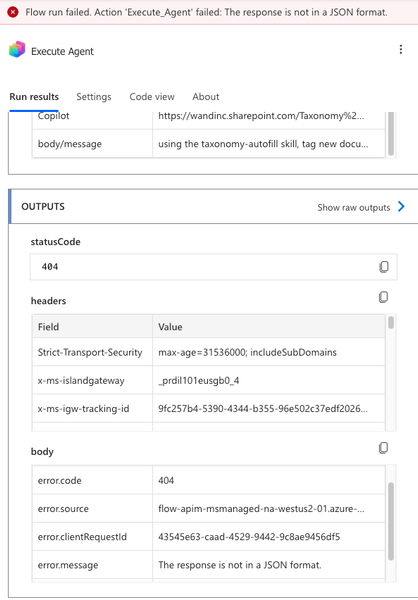
I am attempting to set up one of my AI Skills to automatically activate when a new document is added to my library. From what I can tell, the best way to do this is through SharePoint Workflows and customize via Power Automate. I am not very familiar with Power Automate, but I cannot find a good way to link my AI Skill to the automation! I have tried the "Execute Agent" action, but I am getting a 404 error (response is not in a JSON format) when I try to run it. Has anyone been able to successfully link AI Skills to automations? Is Power Automate the right tool to be using? How do I troubleshoot my 404 error?225Views0likes1Comment