display issue
3 Topics
Steps initially show only first line of text
Currently and for the past year+ on Microsoft To Do Web, after selecting any List, the initial view of the Steps within a Task, only shows the first line of text in each Step. If I select a different Task within the same List and then reselect the original Task, the Steps within display all of the lines of wrapped text. This occurs using both MS Edge and Google Chrome. I rebuild my computer from a new Windows 11 ISO after stripping my SSD to zero partitions last week and this is still a problem. It would be really great if we could get this fixed.301Views0likes5Comments
Surface Dock 2 stopped recognizing external displays
Hey everyone, I've had a Surface Pro 9 with a Surface Dock 2 for a couple of months now with 2 Dell U2723QE monitors connected via USB C. This setup was working great up until this morning where the 2 displays suddenly stopped working. After some messing around, I was able to narrow it down to an issue with the dock because if I connect the monitors to the surface directly they work fine again. I went through the suggestions on this https://support.microsoft.com/en-us/surface/troubleshoot-connecting-surface-to-an-external-display-bc8f5121-a4cb-cf0b-5770-2df7a66a3b28#articleFooterSupportBridge=contactUsBridge tried updating drivers on the graphics card and dock, doing all Windows updates and clearing the display cache, but haven't had any luck yet. It could just be a bad dock I suppose and I need to get a warranty claim setup, but it just seems strange that it happened so suddenly. If anyone has any ideas or suggestions, they'd be super appreciated. Thanks!764Views1like3Comments
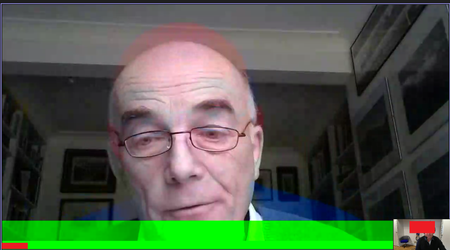
Teams video call - display errors
Hi, we have an issue that is a pain to pin point as it is really intermittent, it will effect one or more of my users each day but attempts to replicate it consistently have been less than successful on my end. Users start a Teams video call and are greeted with an image similar to the attached, the image seems slightly overlaid with a shift in the red and blue colours, there is also usually a green bar highlighting the bottom 10% of the video display.The more users in a Teams call, the more likely this display issue is to appear. I have had this issue myself on some calls, both as a presenter and as a participant. restarting the call will usually remove the issue but other times it wont.. Any idea what is causing this and how I can stop it?1.6KViews0likes0Comments