devops
185 Topics
Introducing AIVANA Decision Intelligence for Azure Boards
A backlog can contain all the right work items and still leave important questions unanswered. Does a user story have acceptance criteria? Who owns a blocked task? Which items have stopped moving? I’m developing AIVANA Decision Intelligence, an extension for Azure Boards that brings these questions into a focused review of backlog quality and delivery signals. The goal is to help teams identify items that need attention and understand the evidence behind each finding. What the current version does AIVANA Decision Intelligence reads work items from an accessible Azure DevOps Services project and applies explainable rules to highlight: Missing descriptions, acceptance criteria or assigned owners. Work items with identical titles that may warrant a duplicate review. Explicitly blocked or stagnant items. Overdue items where a due-date field is available. Each finding includes its source and a suggested next step. Teams can inspect the underlying work item and decide whether the finding matters in their context. An identical title, for example, is a reason to investigate—not proof that two requirements are duplicates. Optional AI-assisted review The extension also includes an optional AI-assisted review of selected work-item text. This requires explicit approval to transmit the selected content and an active organization license. AI suggestions remain subject to review by the team. The extension does not automatically modify work items. The current version focuses on backlog review and explainable findings. It is available as a technical preview, with live installation and commercial release checks still being completed. A practical starting point One way to evaluate AIVANA Decision Intelligence is during backlog refinement: Review the findings for a project. Check the source behind each relevant finding. Agree which items need clarification, ownership or follow-up. Compare the findings with the team’s existing review process. The useful question is whether the extension surfaces issues that deserve attention without creating unnecessary noise. That is something I want to evaluate with real teams. I’d welcome your feedback How does your team currently check backlog quality in Azure Boards? Which checks are useful, and which tend to produce false positives? I’m particularly interested in how teams define stagnation and handle acceptance criteria across different work-item types. Website: https://www.aivana-gmbh.ai Disclosure: I’m involved in developing AIVANA Decision Intelligence.18Views0likes0Comments
Engineering an Azure Data Layer for Odoo Analytics Without Changing the ERP
One thing I have learned from working on ERP-driven data projects is that the ERP is rarely the place where you want to solve every analytics problem. We saw this firsthand in a manufacturing engagement where Odoo was being used across finance, inventory, procurement, and manufacturing, but reporting still involved substantial manual extraction and Excel-based consolidation. The interesting engineering question wasn't “How do we replace the ERP?” It was: “How do we build a reliable analytical layer around it without changing the transactional system?” That shaped the architecture. We used Odoo APIs and Azure Data Factory for ingestion, landing the data in Azure Data Lake Storage Gen2. From there, the data was organized into Bronze, Silver, and Gold layers: Bronze: Source-aligned Odoo data was retained with minimal transformation. Silver: Data was cleansed, standardized, and prepared across finance, inventory, procurement, and manufacturing domains. Gold: Analytics-ready data was prepared for downstream reporting and consumption. Azure Databricks with Spark handled transformation and KPI standardization, while Synapse/SQL layers provided structured analytical models for reporting. Power BI datasets consumed the prepared data, with Row-Level Security applied for role-based access. Why did this separation matter for the project? The important architectural boundary was: Odoo → transactional operations Azure data platform → ingestion, storage, transformation, standardization Power BI → analytical consumption That separation meant the reporting layer did not have to repeatedly extract and reshape data directly from the ERP. It also gave us a dedicated place to handle historical data and standardize information across business domains before it reached the reporting layer. What changed? The implementation automated 15+ Odoo-based reports and provided governed Power BI dashboards to 60+ business users. More importantly, teams moved away from repeated ERP extraction and spreadsheet consolidation toward a reusable analytical data layer. For our team, the bigger takeaway was that ERP modernization does not necessarily mean modifying the ERP. For teams building Azure data platforms around ERP systems, how are you drawing the boundary between API ingestion, historical storage, transformation, and analytical modeling?100Views0likes0Comments
Send Desk365 Ticket information to Azure DevOps
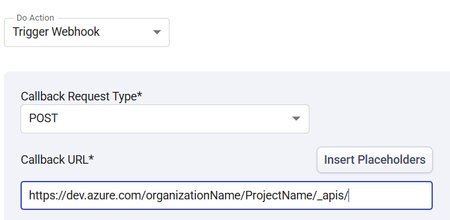
I am trying to send ticket data from Desk365 Helpdesk software to Azure DevOps. I am having trouble with what the Callback URL should be. Any ideas what URL I should be sending the Desk365 data to in order to create a workitem (Feature) in A specific Azure DevOps project? Thank you in advance!272Views0likes4CommentsSyncing Multiple Azure DevOps Orgs to One ServiceNow Instance Without Forcing a Shared Workflow
If your organization runs more than one Azure DevOps org, whether from an acquisition, a spun-up subsidiary, or business units that never consolidated onto one instance, you already know the visibility gap. Central ServiceNow has no idea what's happening in any of them unless someone checks manually. Your team ends up pulling status updates by hand, chasing changes across orgs, and reconciling what got closed where. That works well for a couple of orgs, but it falls apart past that. Why a Shared Workflow Usually Creates a Bigger Problem Migrating everyone onto a single Azure DevOps org would close the visibility gap on paper. Each org's area paths, iterations, states, and processes took years to get right, and a forced migration undoes all of it. A sync layer between each Azure DevOps org and your central ServiceNow instance closes the same gap without touching how any individual org works day to day. Each org keeps its own configuration. ServiceNow ends up with a rolled-up view across all of them. Common Use Cases Post-Acquisition Org Sprawl Current Setup: A company acquires another company, or runs several business units, each with its own Azure DevOps org and its own way of working. Problem: Central ops has no single view across orgs, and checking each one by hand doesn't scale past a few teams. Solution: Connect each Azure DevOps org to the central ServiceNow instance separately, each with its own sync rules. ServiceNow gets one rolled-up view, and no org has to change how it works. Bi-Directional Status Sync Between Delivery and Support Current Setup: Support logs incidents in ServiceNow. Development tracks the corresponding work in Azure DevOps, sometimes across several orgs. Problem: Support has to ask developers for status or check Azure DevOps boards directly, and developers end up relaying the same update twice. Solution: Sync status, comments, and priority both ways, so an update in either system shows up automatically on the other side. Field-Level Control Per Org Current Setup: Each business unit or subsidiary has its own rules about what data can leave its Azure DevOps org. Problem: A single shared integration with one set of mapping rules risks exposing fields an org never agreed to share outside its own boundary. Solution: Give each org's connection its own outgoing rules, so a subsidiary decides exactly which fields leave its Azure DevOps org, field by field. Handling Closed and Read-Only Work Items Current Setup: ServiceNow blocks writes to closed incidents through ACLs, and Azure DevOps can hit a similar restriction on closed or read-only work items. Problem: A sync that keeps trying to write to a closed item throws the same error repeatedly, and the real problems get buried under the noise. Solution: Filter closed and read-only states out of the sync, or let the errors surface if operations wants visibility into them. What to Evaluate When Choosing an Approach A few criteria matter more than others once you're running this across multiple orgs. Decentralized configuration: does each Azure DevOps org get its own connection and its own rules, or does everything route through one shared setup? Filtering: can you scope the sync with something like WIQL queries on the Azure DevOps side, by area path, iteration, work item type, or tag? Field mapping: does it handle the difference between ServiceNow's field structure and Azure DevOps work item fields without dropping data? Common pairs are ServiceNow State to Azure DevOps State, ServiceNow Priority to Azure DevOps Priority, and ServiceNow Assignment Group to Azure DevOps Area Path. Custom fields usually need explicit mapping rules. Conflict handling: what happens when both sides update the same field at the same time, and what happens with closed or read-only items specifically? Security: Entra ID or OAuth authentication, PAT management per org, role-based access, audit logging, and whatever compliance certifications your security team asks for during review. Direction: bidirectional where both teams update shared fields, one-way where only one side should ever write. Technical Approaches Service Hooks and REST APIs Azure DevOps Service Hooks paired with the ServiceNow REST API give you sync in both directions. A change in Azure DevOps triggers a Service Hook, which calls the ServiceNow API to update the record, and the same flow runs in reverse. This is the most direct route if you're comfortable building and maintaining the webhook logic yourself. Custom Middleware For anything more complex, custom middleware gives you full control over field transformation, routing, and error handling. Azure Functions, Logic Apps, or a small Node.js or Python service usually does the job. The trade-off is maintenance. You own the retry logic, the error handling, and every update when either platform changes its API. Dedicated Integration Platforms Plenty of teams skip building this from scratch and use a dedicated integration platform instead. These typically come with pre-built connectors for both Azure DevOps and ServiceNow, a way to configure field mapping and filters without writing much code, and managed infrastructure so you're not hosting your own sync server. What they usually cover: Pre-configured connectors that already understand both platforms' data structures Visual or scripting configuration for field mapping and filters Managed infrastructure, so nothing runs on your own servers Built-in retry and error handling for API failures Audit logging for tracking what synced and when Support for multi-org routing and conditional logic out of the box The trade-off runs the other way: a subscription cost instead of a one-time build, less control over the exact implementation, and your data passing through a third party's infrastructure. For teams running more than 2 or 3 orgs against one ServiceNow instance, this usually ends up being less overhead than maintaining custom middleware long-term. Every org here has probably solved a version of this differently. Curious what's worked for you, especially with 3 or more Azure DevOps orgs feeding into one ServiceNow instance, and which part of the setup gave you the most trouble.199Views1like0Comments
Building Production-Ready Pipelines in Azure DevOps: Beyond the Documentation Examples
Hi everyone, When moving from basic Azure DevOps tutorials to enterprise production environments, we all quickly realize that documentation examples don't always cover real-world complexities. Handling multi-stage dependencies, keeping Terraform state secure, and managing secrets across environments requires a highly strategic approach. To help DevOps engineers bridge this gap, I recently put together a deep-dive architecture breakdown detailing how to build a resilient, multi-stage YAML pipeline from scratch. Here is a quick look at the core enterprise architecture I focus on: - Multi-Stage Lifecycle: Safe progression flows through Build, Dev, QA, UAT, and Production stages. - Infrastructure Automation: Clean integration with Terraform, including state and secrets management using Azure Key Vault. - Security Gates: Implementation of SAST scanning, Workload Identity, and automated approval policies. - Team Alignment: Connecting Azure DevOps with project tools like Asana to streamline cross-platform tracking. I wanted to share this pattern here to get some community feedback on the YAML structure. Before I post the full configuration snippets, I would love to hear how your teams handle environment gates and approvals. What are the biggest bottlenecks you run into with multi-stage YAML pipelines? Let's discuss in the comments below! Best regards, Abdullah Shahid167Views0likes0CommentsBuilding Production-Ready Pipelines in Azure DevOps: Beyond the Documentation Examples
Hi everyone, When moving from basic Azure DevOps tutorials to enterprise production environments, we all quickly realize that documentation examples don't always cover real-world complexities. Handling multi-stage dependencies, keeping Terraform state secure, and managing secrets across environments requires a highly strategic approach. To help DevOps engineers bridge this gap, I recently put together a deep-dive architecture breakdown detailing how to build a resilient, multi-stage YAML pipeline from scratch. Here is a quick look at the core enterprise architecture I focus on: - Multi-Stage Lifecycle: Safe progression flows through Build, Dev, QA, UAT, and Production stages. - Infrastructure Automation: Clean integration with Terraform, including state and secrets management using Azure Key Vault. - Security Gates: Implementation of SAST scanning, Workload Identity, and automated approval policies. - Team Alignment: Connecting Azure DevOps with project tools like Asana to streamline cross-platform tracking. I wanted to share this pattern here to get some community feedback on the YAML structure. Before I post the full configuration snippets, I would love to hear how your teams handle environment gates and approvals. What are the biggest bottlenecks you run into with multi-stage YAML pipelines? Let's discuss in the comments below! Best regards, Abdullah Shahid146Views0likes0Comments
How to recover global admin access to tenant
I have already tried posting this to the general Microsoft Q&A forums and received no response. We are desperate to figure something out so if this is not the correct line of communication, please direct me to where I should go. My company is in a bit of a bind right now, and I am at my wit's end after almost a week of trying to get in contact with anyone who could help. We have multiple directories in Azure that belong to us, but they are all independent of each other. As such, some directories have multiple global admins (and thus are not an issue); others -- and quite frankly, the most important ones -- only have one global admin, and it was our DevOps person, who is no longer employed with us. We have no way of accessing his account, and thus no way of accessing a global admin account for these directories/tenants. Access to these directories is critical to our operations. We were informed last Friday by someone from the data protection team that they could not give us access to these tenants we pay thousands of dollars a month for because: Our former DevOps person registered all other users as guests/external users, and DPT "can't give external users admin permissions", and To reset the MFA of the current global admin account, the owner of the account (who no longer works for our company) would need to contact them and verify their identity What options do we have here? We have blobs full of user-uploaded files in these tenants. Starting over from scratch is a doomsday scenario we are trying everything we can to avoid. Surely there has to be something that can be done?950Views1like6CommentsLegacy SSRS reports after upgrading Azure DevOps Server 2020 to 2022 or 25H2
We are currently planning an upgrade from Azure DevOps Server 2020 to Azure DevOps Server 2022 or 25H2, and one of our biggest concerns is reporting. We understand that Microsoft’s recommended direction is to move to Power BI based on Analytics / OData. However, for on-prem environments with a large number of existing SSRS reports, rebuilding everything from scratch would require significant time and effort. Since Warehouse and Analysis Services are no longer available in newer versions, we would like to understand how other on-prem teams are handling legacy SSRS reporting during and after the upgrade. Have you rebuilt your reports in Power BI, moved to another reporting approach, or found a practical way to keep existing SSRS reports available during the transition? Any real-world experience, lessons learned, or recommended approaches would be greatly appreciated.437Views0likes3CommentsBuilding a Production-Ready Azure Lighthouse Deployment Pipeline with EPAC
Recently I worked on an interesting project for an end-to-end Azure Lighthouse implementation. What really stood out to me was the combination of Azure Lighthouse, EPAC, DevOps, and workload identity federation. The deployment model was so compelling that I decided to build and validate the full solution hands-on in my own personal Azure tenants. The result is a detailed article that documents the entire journey, including pipeline design, implementation steps, and the scripts I prepared along the way. You can read the full article here326Views0likes1Comment
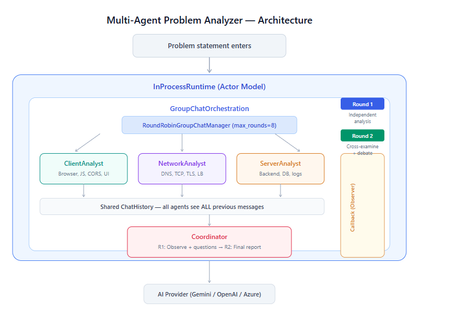
Building Multi-Agent Orchestration Using Microsoft Semantic Kernel: A Complete Step-by-Step Guide
What You Will Build By the end of this guide, you will have a working multi-agent system where 4 specialist AI agents collaborate to diagnose production issues: ClientAnalyst — Analyzes browser, JavaScript, CORS, uploads, and UI symptoms NetworkAnalyst — Analyzes DNS, TCP/IP, TLS, load balancers, and firewalls ServerAnalyst — Analyzes backend logs, database, deployments, and resource limits Coordinator — Synthesizes all findings into a root cause report with a prioritized action plan These agents don't just run in sequence — they debate, cross-examine, and challenge each other's findings through a shared conversation, producing a diagnosis that's better than any single agent could achieve alone. Table of Contents Why Multi-Agent? The Problem with Single Agents Architecture Overview Understanding the Key SK Components The Actor Model — How InProcessRuntime Works Setting Up Your Development Environment Step-by-Step: Building the Multi-Agent Analyzer The Agent Interaction Flow — Round by Round Bugs I Found & Fixed — Lessons Learned Running with Different AI Providers What to Build Next 1. Why Multi-Agent? The Problem with Single Agents A single AI agent analyzing a production issue is like having one doctor diagnose everything — they'll catch issues in their specialty but miss cross-domain connections. Consider this problem: "Users report 504 Gateway Timeout errors when uploading files larger than 10MB. Started after Friday's deployment. Worse during peak hours." A single agent might say "it's a server timeout" and stop. But the real root cause often spans multiple layers: The client is sending chunked uploads with an incorrect Content-Length header (client-side bug) The load balancer has a 30-second timeout that's too short for large uploads (network config) The server recently deployed a new request body parser that's 3x slower (server-side regression) The combination only fails during peak hours because connection pool saturation amplifies the latency No single perspective catches this. You need specialists who analyze independently, then debate to find the cross-layer causal chain. That's what multi-agent orchestration gives you. The 5 Orchestration Patterns in SK Semantic Kernel provides 5 built-in patterns for agent collaboration: SEQUENTIAL: A → B → C → Done (pipeline — each builds on previous) CONCURRENT: ↗ A ↘ Task → B → Aggregate ↘ C ↗ (parallel — results merged) GROUP CHAT: A ↔ B ↔ C ↔ D ← We use this one (rounds, shared history, debate) HANDOFF: A → (stuck?) → B → (complex?) → Human (escalation with human-in-the-loop) MAGENTIC: LLM picks who speaks next dynamically (AI-driven speaker selection) We use GroupChatOrchestration with RoundRobinGroupChatManager because our problem requires agents to see each other's work, challenge assumptions, and build on each other's analysis across two rounds. 2. Architecture Overview Here's the complete architecture of what we're building: 3. Understanding the Key SK Components Before we write code, let's understand the 5 components we'll use and the design pattern each implements: ChatCompletionAgent — Strategy Pattern The agent definition. Each agent is a combination of: name — unique identifier (used in round-robin ordering) instructions — the persona and rules (this is the prompt engineering) service — which AI provider to call (Strategy Pattern — swap providers without changing agent logic) description — what other agents/tools understand about this agent agent = ChatCompletionAgent( name="ClientAnalyst", instructions="You are ONLY ClientAnalyst...", service=gemini_service, # ← Strategy: swap to OpenAI with zero changes description="Analyzes client-side issues", ) GroupChatOrchestration — Mediator Pattern The orchestration defines HOW agents interact. It's the Mediator — agents don't talk to each other directly. Instead, the orchestration manages a shared ChatHistory and routes messages through the Manager. RoundRobinGroupChatManager — Strategy Pattern The Manager decides WHO speaks next. RoundRobinGroupChatManager cycles through agents in a fixed order. SK also provides AutomaticGroupChatManager where the LLM decides who speaks next. max_rounds is the total number of messages per agent or cycle. With 4 agents and max_rounds=8, each agent speaks exactly twice. InProcessRuntime — Actor Model Abstraction The execution engine. Every agent becomes an "actor" with its own kind of mailbox (message queue). The runtime delivers messages between actors. Key properties: No shared state — agents communicate only through messages Sequential processing — each agent processes one message at a time Location transparency — same code works in-process today, distributed tomorrow agent_response_callback — Observer Pattern A function that fires after EVERY agent response. We use it to display each agent's output in real-time with emoji labels and round numbers. 4. The Actor Model — How InProcessRuntime Works The Actor Model is a concurrency pattern where each entity is an isolated "actor" with a private mailbox. Here's what happens inside InProcessRuntime when we run our demo: runtime.start() │ ├── Creates internal message loop (asyncio event loop) │ orchestration.invoke(task="504 timeout...", runtime=runtime) │ ├── Creates Actor[Orchestrator] → manages overall flow ├── Creates Actor[Manager] → RoundRobinGroupChatManager ├── Creates Actor[ClientAnalyst] → mailbox created, waiting ├── Creates Actor[NetworkAnalyst] → mailbox created, waiting ├── Creates Actor[ServerAnalyst] → mailbox created, waiting └── Creates Actor[Coordinator] → mailbox created, waiting Manager receives "start" message │ ├── Checks turn order: [Client, Network, Server, Coordinator] ├── Sends task to ClientAnalyst mailbox │ → ClientAnalyst processes: calls LLM → response │ → Response added to shared ChatHistory │ → callback fires (displayed in Notebook UI) │ → Sends "done" back to Manager │ ├── Manager updates: turn_index=1 ├── Sends to NetworkAnalyst mailbox │ → Same flow... │ ├── ... (ServerAnalyst, Coordinator for Round 1) │ ├── Manager checks: messages=4, max_rounds=8 → continue │ ├── Round 2: same cycle with cross-examination │ └── After message 8: Manager sends "complete" → OrchestrationResult resolves → result.get() returns final answer runtime.stop_when_idle() → All mailboxes empty → clean shutdown The Actor Model guarantees: No race conditions (each actor processes one message at a time) No deadlocks (no shared locks to contend for) No shared mutable state (agents communicate only via messages) 5. Setting Up Your Development Environment Prerequisites Python 3.11 or 3.12 (3.13+ may have compatibility issues with some SK connectors) Visual Studio Code with the Python and Jupyter extensions An API key from one of: Google AI Studio (free), OpenAI Step 1: Install Python Download from python.org. During installation, check "Add Python to PATH". Verify: python --version # Python 3.12.x Step 2: Install VS Code Extensions Open VS Code, go to Extensions (Ctrl+Shift+X), and install: Python (by Microsoft) — Python language support Jupyter (by Microsoft) — Notebook support Pylance (by Microsoft) — IntelliSense and type checking Step 3: Create Project Folder mkdir sk-multiagent-demo cd sk-multiagent-demo Open in VS Code: code . Step 4: Create Virtual Environment Open the VS Code terminal (Ctrl+`) and run: # Create virtual environment python -m venv sk-env # Activate it # Windows: sk-env\Scripts\activate # macOS/Linux: source sk-env/bin/activate You should see (sk-env) in your terminal prompt. Step 5: Install Semantic Kernel For Google Gemini (free tier — recommended for getting started): pip install semantic-kernel[google] python-dotenv ipykernel For OpenAI (paid API key): pip install semantic-kernel openai python-dotenv ipykernel For Azure AI Foundry (enterprise, Entra ID auth): pip install semantic-kernel azure-identity python-dotenv ipykernel Step 6: Register the Jupyter Kernel python -m ipykernel install --user --name=sk-env --display-name="Semantic Kernel (Python 3.12)" You can also select if this is already available from your environment from VSCode as below: Step 7: Get Your API Key Option A — Google Gemini (FREE, recommended for demo): Go to https://aistudio.google.com/apikey Click "Create API Key" Copy the key Free tier limits: 15 requests/minute, 1 million tokens/minute — more than enough for this demo. Option B — OpenAI: Go to https://platform.openai.com/api-keys Create a new key Copy the key Option C — Azure AI Foundry: Deploy a model in Azure AI Foundry portal Note the endpoint URL and deployment name If key-based auth is disabled, you'll need Entra ID with permissions Step 8: Create the .env File In your project root, create a file named .env: For Gemini: GOOGLE_AI_API_KEY=AIzaSy...your-key-here GOOGLE_AI_GEMINI_MODEL_ID=gemini-2.5-flash For OpenAI: OPENAI_API_KEY=sk-...your-key-here OPENAI_CHAT_MODEL_ID=gpt-4o For Azure AI Foundry: AZURE_OPENAI_ENDPOINT=https://your-resource.cognitiveservices.azure.com AZURE_OPENAI_CHAT_DEPLOYMENT_NAME=gpt-4o AZURE_OPENAI_API_KEY=your-key Step 9: Create the Notebook In VS Code: Click File > New File Save as multi_agent_analyzer.ipynb In the top-right of the notebook, click Select Kernel Choose Semantic Kernel (Python 3.12) (or your sk-env) Your environment is ready. Let's build. 6. Step-by-Step: Building the Multi-Agent Analyzer Cell 1: Verify Setup import semantic_kernel print(f"Semantic Kernel version: {semantic_kernel.__version__}") from semantic_kernel.agents import ( ChatCompletionAgent, GroupChatOrchestration, RoundRobinGroupChatManager, ) from semantic_kernel.agents.runtime import InProcessRuntime from semantic_kernel.contents import ChatMessageContent print("All imports successful") Cell 2: Load API Key and Create Service For Gemini: import os from dotenv import load_dotenv load_dotenv() from semantic_kernel.connectors.ai.google.google_ai import ( GoogleAIChatCompletion, GoogleAIChatPromptExecutionSettings, ) from semantic_kernel.contents import ChatHistory GEMINI_API_KEY = os.getenv("GOOGLE_AI_API_KEY") GEMINI_MODEL = os.getenv("GOOGLE_AI_GEMINI_MODEL_ID", "gemini-2.5-flash") service = GoogleAIChatCompletion( gemini_model_id=GEMINI_MODEL, api_key=GEMINI_API_KEY, ) print(f"Service created: Gemini {GEMINI_MODEL}") # Smoke test settings = GoogleAIChatPromptExecutionSettings() test_history = ChatHistory(system_message="You are a helpful assistant.") test_history.add_user_message("Say 'Connected!' and nothing else.") response = await service.get_chat_message_content( chat_history=test_history, settings=settings ) print(f"Model says: {response.content}") For OpenAI: import os from dotenv import load_dotenv load_dotenv() from semantic_kernel.connectors.ai.open_ai import ( OpenAIChatCompletion, OpenAIChatPromptExecutionSettings, ) from semantic_kernel.contents import ChatHistory service = OpenAIChatCompletion( ai_model_id=os.getenv("OPENAI_CHAT_MODEL_ID", "gpt-4o"), ) print(f"Service created: OpenAI {os.getenv('OPENAI_CHAT_MODEL_ID', 'gpt-4o')}") # Smoke test settings = OpenAIChatPromptExecutionSettings() test_history = ChatHistory(system_message="You are a helpful assistant.") test_history.add_user_message("Say 'Connected!' and nothing else.") response = await service.get_chat_message_content( chat_history=test_history, settings=settings ) print(f"Model says: {response.content}") Cell 3: Define All 4 Agents This is the most important cell — the prompt engineering that makes the demo work: from semantic_kernel.agents import ChatCompletionAgent # ═══════════════════════════════════════════════════ # AGENT 1: Client-Side Analyst # ═══════════════════════════════════════════════════ client_agent = ChatCompletionAgent( name="ClientAnalyst", description="Analyzes problems from the client-side: browser, JS, CORS, caching, UI symptoms", instructions="""You are ONLY **ClientAnalyst**. You must NEVER speak as NetworkAnalyst, ServerAnalyst, or Coordinator. Every word you write is from ClientAnalyst's perspective only. You are a senior front-end and client-side diagnostics expert. When given a problem statement, analyze it EXCLUSIVELY from the client side: 1. **Browser & Rendering**: DOM issues, JavaScript errors, CSS rendering, browser compatibility, memory leaks, console errors. 2. **Client-Side Caching**: Stale cache, service worker issues, local storage corruption. 3. **Network from Client View**: CORS errors, preflight failures, request timeouts, client-side retry storms, fetch/XHR configuration. 4. **Upload Handling**: File API usage, chunk upload implementation, progress tracking, FormData construction, content-type headers. 5. **UI/UX Symptoms**: What the user sees, error messages displayed, loading states. ROUND 1: Provide your independent analysis. Do NOT reference other agents. List your top 3 most likely causes with evidence. Every response MUST be at least 200 words. ROUND 2: You MUST: - Reference NetworkAnalyst and ServerAnalyst BY NAME - State specifically where you AGREE or DISAGREE with their findings - Answer the Coordinator's questions from your perspective - Add NEW cross-layer insights you see from the client perspective - Do NOT just say 'I agree' — provide substantive technical reasoning Be specific, evidence-based, and prioritize findings by likelihood.""", service=service, ) # ═══════════════════════════════════════════════════ # AGENT 2: Network Analyst # ═══════════════════════════════════════════════════ network_agent = ChatCompletionAgent( name="NetworkAnalyst", description="Analyzes problems from the network side: DNS, TCP, TLS, firewalls, load balancers, latency", instructions="""You are ONLY **NetworkAnalyst**. You must NEVER speak as ClientAnalyst, ServerAnalyst, or Coordinator. Every word you write is from NetworkAnalyst's perspective only. You are a senior network infrastructure diagnostics expert. When given a problem statement, analyze it EXCLUSIVELY from the network layer: 1. **DNS & Resolution**: DNS TTL, propagation delays, record misconfigurations. 2. **TCP/IP & Connections**: Connection pooling, keep-alive, TCP window scaling, connection resets, SYN floods. 3. **TLS/SSL**: Certificate issues, handshake failures, protocol version mismatches. 4. **Load Balancers & Proxies**: Sticky sessions, health checks, timeout configs, request body size limits, proxy buffering. 5. **Firewall & WAF**: Rule blocks, rate limiting, request inspection delays, geo-blocking, DDoS protection interference. ROUND 1: Provide your independent analysis. Do NOT reference other agents. List your top 3 most likely causes with evidence. Every response MUST be at least 200 words. ROUND 2: You MUST: - Reference ClientAnalyst and ServerAnalyst BY NAME - State specifically where you AGREE or DISAGREE with their findings - Answer the Coordinator's questions from your perspective - Add NEW cross-layer insights you see from the network perspective - Do NOT just say 'I am ready to proceed' — provide substantive technical analysis Be specific, evidence-based, and prioritize findings by likelihood.""", service=service, ) # ═══════════════════════════════════════════════════ # AGENT 3: Server-Side Analyst # ═══════════════════════════════════════════════════ server_agent = ChatCompletionAgent( name="ServerAnalyst", description="Analyzes problems from the server side: backend app, database, logs, resources, deployments", instructions="""You are ONLY **ServerAnalyst**. You must NEVER speak as ClientAnalyst, NetworkAnalyst, or Coordinator. Every word you write is from ServerAnalyst's perspective only. You are a senior backend and infrastructure diagnostics expert. When given a problem statement, analyze it EXCLUSIVELY from the server side: 1. **Application Server**: Error logs, exception traces, thread pool exhaustion, memory leaks, CPU spikes, garbage collection pauses. 2. **Database**: Slow queries, connection pool saturation, lock contention, deadlocks, replication lag, query plan changes. 3. **Deployment & Config**: Recent deployments, configuration changes, feature flags, environment variable mismatches, rollback candidates. 4. **Resource Limits**: File upload size limits, request body limits, disk space, temporary file cleanup, storage quotas. 5. **External Dependencies**: Upstream API timeouts, third-party service degradation, queue backlogs, cache (Redis/Memcached) issues. ROUND 1: Provide your independent analysis. Do NOT reference other agents. List your top 3 most likely causes with evidence. Every response MUST be at least 200 words. ROUND 2: You MUST: - Reference ClientAnalyst and NetworkAnalyst BY NAME - State specifically where you AGREE or DISAGREE with their findings - Answer the Coordinator's questions from your perspective - Add NEW cross-layer insights you see from the server perspective - Do NOT just say 'I agree' — provide substantive technical reasoning Be specific, evidence-based, and prioritize findings by likelihood.""", service=service, ) # ═══════════════════════════════════════════════════ # AGENT 4: Coordinator # ═══════════════════════════════════════════════════ coordinator_agent = ChatCompletionAgent( name="Coordinator", description="Synthesizes all specialist analyses into a final root cause report with prioritized action plan", instructions="""You are ONLY **Coordinator**. You must NEVER speak as ClientAnalyst, NetworkAnalyst, or ServerAnalyst. You synthesize — you do NOT do domain-specific analysis. You are the lead engineer who synthesizes the team's findings. ═══ ROUND 1 BEHAVIOR (your first turn, message 4) ═══ Keep this SHORT — maximum 300 words. - Note 2-3 KEY PATTERNS across the three analyses - Identify where specialists AGREE (high-confidence) - Identify where they CONTRADICT (needs resolution) - Ask 2-3 SPECIFIC QUESTIONS for Round 2 Round 1 MUST NOT: assign tasks, create action plans, write reports, or tell agents what to take lead on. Observation + questions ONLY. ═══ ROUND 2 BEHAVIOR (your final turn, message 8) ═══ Keep this FOCUSED — maximum 800 words. Produce a structured report: 1. **Root Cause** (1 paragraph): The #1 most likely cause with causal chain across layers. Reference specific findings from each specialist. 2. **Confidence** (short list): - HIGH: Areas where all 3 agreed - MEDIUM: Areas where 2 of 3 agreed - LOW: Disagreements needing investigation 3. **Action Plan** (numbered, max 6 items): For each: - What to do (specific) - Owner (Client/Network/Server team) - Time estimate 4. **Quick Wins vs Long-term** (2 short lists) Do NOT repeat what specialists already said verbatim. Synthesize, don't echo.""", service=service, ) # ═══════════════════════════════════════════════════ # All 4 agents — order = RoundRobin order # ═══════════════════════════════════════════════════ agents = [client_agent, network_agent, server_agent, coordinator_agent] print(f"{len(agents)} agents created:") for i, a in enumerate(agents, 1): print(f" {i}. {a.name}: {a.description[:60]}...") print(f"\nRoundRobin order: {' → '.join(a.name for a in agents)}") Cell 4: Run the Analysis from semantic_kernel.agents import GroupChatOrchestration, RoundRobinGroupChatManager from semantic_kernel.agents.runtime import InProcessRuntime from semantic_kernel.contents import ChatMessageContent from IPython.display import display, Markdown # ╔══════════════════════════════════════════════════════════╗ # ║ EDIT YOUR PROBLEM STATEMENT HERE ║ # ╚══════════════════════════════════════════════════════════╝ PROBLEM = """ Users are reporting intermittent 504 Gateway Timeout errors when trying to upload files larger than 10MB through our web application. The issue started after last Friday's deployment and seems worse during peak hours (2-5 PM EST). Some users also report that smaller file uploads work fine but the progress bar freezes at 85% for large files before timing out. """ # ════════════════════════════════════════════════════════════ agent_responses = [] def agent_response_callback(message: ChatMessageContent) -> None: name = message.name or "Unknown" content = message.content or "" agent_responses.append({"agent": name, "content": content}) emoji = { "ClientAnalyst": "🖥️", "NetworkAnalyst": "🌐", "ServerAnalyst": "⚙️", "Coordinator": "🎯" }.get(name, "🔹") round_num = (len(agent_responses) - 1) // len(agents) + 1 display(Markdown( f"---\n### {emoji} {name} (Message {len(agent_responses)}, Round {round_num})\n\n{content}" )) MAX_ROUNDS = 8 # 4 agents × 2 rounds = 8 messages exactly task = f"""## Problem Statement {PROBLEM.strip()} ## Discussion Rules You are in a GROUP DISCUSSION with 4 members. You can see ALL previous messages. There are exactly 2 rounds. ### ROUND 1 (Messages 1-4): Independent Analysis - ClientAnalyst, NetworkAnalyst, ServerAnalyst: Analyze from YOUR domain only. Give your top 3 most likely causes with evidence and reasoning. - Coordinator: Note patterns across the 3 analyses. Ask 2-3 specific questions. Do NOT assign tasks yet. ### ROUND 2 (Messages 5-8): Cross-Examination & Final Report - ClientAnalyst, NetworkAnalyst, ServerAnalyst: You MUST reference the OTHER specialists BY NAME. State where you agree, disagree, or have new insights. Answer the Coordinator's questions. Provide SUBSTANTIVE analysis. - Coordinator: Produce the FINAL structured report: root cause, confidence levels, prioritized action plan with owners and time estimates. IMPORTANT: Each agent speaks as THEMSELVES only. Never impersonate another agent.""" display(Markdown(f"## Problem Statement\n\n{PROBLEM.strip()}")) display(Markdown(f"---\n## Discussion Starting — {len(agents)} agents, {MAX_ROUNDS} rounds\n")) # Build and run orchestration = GroupChatOrchestration( members=agents, manager=RoundRobinGroupChatManager(max_rounds=MAX_ROUNDS), agent_response_callback=agent_response_callback, ) runtime = InProcessRuntime() runtime.start() result = await orchestration.invoke(task=task, runtime=runtime) final_result = await result.get(timeout=300) await runtime.stop_when_idle() display(Markdown(f"---\n## FINAL CONCLUSION\n\n{final_result}")) Cell 5: Statistics and Validation print("═" * 55) print(" ANALYSIS STATISTICS") print("═" * 55) emojis = {"ClientAnalyst": "🖥️", "NetworkAnalyst": "🌐", "ServerAnalyst": "⚙️", "Coordinator": "🎯"} agent_counts = {} agent_chars = {} for r in agent_responses: agent_counts[r["agent"]] = agent_counts.get(r["agent"], 0) + 1 agent_chars[r["agent"]] = agent_chars.get(r["agent"], 0) + len(r["content"]) for agent, count in agent_counts.items(): em = emojis.get(agent, "🔹") chars = agent_chars.get(agent, 0) avg = chars // count if count else 0 print(f" {em} {agent}: {count} msg(s), ~{chars:,} chars (avg {avg:,}/msg)") print(f"\n Total messages: {len(agent_responses)}") total_chars = sum(len(r['content']) for r in agent_responses) print(f" Total analysis: ~{total_chars:,} characters") # Validation print(f"\n Validation:") import re identity_issues = [] for r in agent_responses: other_agents = [a.name for a in agents if a.name != r["agent"]] for other in other_agents: pattern = rf'(?i)as {re.escape(other)}[,:]?\s+I\b' if re.search(pattern, r["content"][:300]): identity_issues.append(f"{r['agent']} impersonated {other}") if identity_issues: print(f" Identity confusion: {identity_issues}") else: print(f" No identity confusion detected") thin = [r for r in agent_responses if len(r["content"].strip()) < 100] if thin: for t in thin: print(f" Thin response from {t['agent']}") else: print(f" All responses are substantive") Cell 6: Save Report from datetime import datetime timestamp = datetime.now().strftime("%Y%m%d_%H%M%S") filename = f"analysis_report_{timestamp}.md" with open(filename, "w", encoding="utf-8") as f: f.write(f"# Problem Analysis Report\n\n") f.write(f"**Generated:** {datetime.now().strftime('%Y-%m-%d %H:%M:%S')}\n") f.write(f"**Agents:** {', '.join(a.name for a in agents)}\n") f.write(f"**Rounds:** {MAX_ROUNDS}\n\n---\n\n") f.write(f"## Problem Statement\n\n{PROBLEM.strip()}\n\n---\n\n") for i, r in enumerate(agent_responses, 1): em = emojis.get(r['agent'], '🔹') round_num = (i - 1) // len(agents) + 1 f.write(f"### {em} {r['agent']} (Message {i}, Round {round_num})\n\n") f.write(f"{r['content']}\n\n---\n\n") f.write(f"## Final Conclusion\n\n{final_result}\n") print(f"Report saved to: {filename}") 7. The Agent Interaction Flow — Round by Round Here's what actually happens during the 8-message orchestration: Round 1: Independent Analysis (Messages 1-4) Msg Agent What They See What They Do 1 ClientAnalyst Problem statement only Analyzes from client perspective: upload chunking, progress bar freezing at 85%, CORS, content-type headers 2 NetworkAnalyst Problem + ClientAnalyst's analysis Gives INDEPENDENT analysis despite seeing msg 1: load balancer timeouts, proxy body size limits, TCP window scaling 3 ServerAnalyst Problem + msgs 1-2 Gives INDEPENDENT analysis: recent deployment regression, request body parser, thread pool exhaustion, disk space 4 Coordinator Problem + msgs 1-3 Observes patterns: "All three mention timeout configuration. ClientAnalyst and NetworkAnalyst both point to body size. Question: Was the deployment a backend-only change or did it include infra?" Round 2: Cross-Examination (Messages 5-8) Msg Agent What They Do 5 ClientAnalyst "I agree with NetworkAnalyst that the load balancer timeout is likely a factor — the 85% freeze point matches the 30-second LB timeout for a 10MB upload on our average upload speed. However, I disagree with ServerAnalyst about thread pool exhaustion because the UI shows a clean 504, not a connection reset." 6 NetworkAnalyst "ServerAnalyst's point about the recent deployment is critical — if the new request parser is 3x slower, that would push uploads past the LB timeout. I can confirm the LB has a 30s idle timeout. The fix is both: increase LB timeout AND optimize the parser." 7 ServerAnalyst "Responding to Coordinator's question: The deployment was backend-only — a new multipart parser using streaming instead of buffered reads. ClientAnalyst is correct that the 504 is from the LB, not the app. The app itself returns 200 after 45 seconds, but the LB kills the connection at 30." 8 Coordinator Produces final structured report with root cause: "The backend deployment introduced a slower multipart parser (45s vs 15s for 10MB). The load balancer's 30s timeout kills the connection at ~85% progress. Fix: immediate — increase LB timeout to 120s. Short-term — optimize parser. Long-term — implement chunked uploads with progress resumption." Notice: The Round 2 analysis is dramatically better than Round 1. Agents reference each other by name, build on each other's findings, and the Coordinator can synthesize a cross-layer causal chain that no single agent could have produced. I made a small adjustment to the issue with Azure Web Apps. Please find the details below from testing carried out using Google Gemini: 8. Bugs I Found & Fixed — Lessons Learned Building this demo taught me several important lessons about multi-agent systems: Bug 1: Agents Speaking Only Once Symptom: Only 4 messages instead of 8. Root cause: The agents list was missing the Coordinator. It was defined in a separate cell and wasn't included in the members list. Fix: All 4 agents must be in the same list passed to GroupChatOrchestration. Bug 2: NetworkAnalyst Says "I'm Ready to Proceed" Symptom: NetworkAnalyst's Round 2 response was just "I'm ready to proceed with the analysis" — no actual content. Root cause: The Coordinator's Round 1 message was assigning tasks ("NetworkAnalyst, please check the load balancer config"), and the agent was acknowledging the assignment instead of analyzing. Fix: Added explicit constraint to Coordinator: "Round 1 MUST NOT assign tasks — observation + questions ONLY." Bug 3: ServerAnalyst Says "As NetworkAnalyst, I..." Symptom: ServerAnalyst's response started with "As NetworkAnalyst, I believe..." Root cause: LLM identity bleeding. When agents share ChatHistory, the LLM sometimes loses track of which agent it's currently playing. This is especially common with Gemini. Fix: Identity anchoring at the very top of every agent's instructions: "You are ONLY ServerAnalyst. You must NEVER speak as ClientAnalyst, NetworkAnalyst, or Coordinator." Bug 4: Gemini Gives Thin/Empty Responses Symptom: Some agents responded with just one sentence or "I concur." Root cause: Gemini 2.5 Flash is more concise than GPT-4o by default. Without explicit length requirements, it takes shortcuts. Fix: Added "Every response MUST be at least 200 words" and "Answer the Coordinator's questions" to every specialist's instructions. Bug 5: Coordinator's Report is 18K Characters Symptom: The Coordinator's Round 2 response was absurdly long — repeating everything every specialist said. Fix: Added word limits: "Round 1 max 300 words, Round 2 max 800 words" and "Synthesize, don't echo." Bug 6: MAX_ROUNDS Math Symptom: With MAX_ROUNDS=9, ClientAnalyst spoke a 3rd time after the Coordinator's final report — breaking the clean 2-round structure. Fix: MAX_ROUNDS must equal (number of agents × number of rounds). For 4 agents × 2 rounds = 8. 9. Running with Different AI Providers The beauty of SK's Strategy Pattern is that you change ONE LINE to switch providers. Everything else — agents, orchestration, callbacks, validation — stays identical. Gemini setup: from semantic_kernel.connectors.ai.google.google_ai import GoogleAIChatCompletion service = GoogleAIChatCompletion( gemini_model_id="gemini-2.5-flash", api_key=os.getenv("GOOGLE_AI_API_KEY"), ) OpenAI Setup from semantic_kernel.connectors.ai.open_ai import OpenAIChatCompletion service = OpenAIChatCompletion( ai_model_id="gpt-4o", api_key=os.getenv("OPEN_AI_API_KEY"), ) 10. What to Build Next Add Plugins to Agents Give agents real tools — not just LLM reasoning - looks exciting right ;) class NetworkDiagnosticPlugin: (description="Pings a host and returns latency") def ping(self, host: str) -> str: result = subprocess.run(["ping", "-c", "3", host], capture_output=True, text=True) return result.stdout class LogSearchPlugin: (description="Searches server logs for error patterns") def search_logs(self, pattern: str, hours: int = 1) -> str: # Query your log aggregator (Splunk, ELK, Azure Monitor) return query_logs(pattern, hours) Add Filters for Governance Intercept every agent call for PII redaction and audit logging: .filter(filter_type=FilterTypes.FUNCTION_INVOCATION) async def audit_filter(context, next): print(f"[AUDIT] {context.function.name} called by agent") await next(context) print(f"[AUDIT] {context.function.name} returned") Try Different Orchestration Patterns Replace GroupChat with Sequential for a pipeline approach: # Instead of debate, each agent builds on the previous orchestration = SequentialOrchestration( members=[client_agent, network_agent, server_agent, coordinator_agent] ) Or Concurrent for parallel analysis: # All specialists analyze simultaneously, Coordinator aggregates orchestration = ConcurrentOrchestration( members=[client_agent, network_agent, server_agent] ) Deploy to Azure Move from InProcessRuntime to Azure Container Apps for production scaling. The agent code doesn't change — only the runtime. Summary The key insight from building this demo: multi-agent systems produce better results than single agents not because each agent is smarter, but because the debate structure forces cross-domain thinking that a single prompt can never achieve. The Coordinator's final report consistently identifies causal chains that span client, network, and server layers — exactly the kind of insight that production incident response teams need. Semantic Kernel makes this possible with clean separation of concerns: agents define WHAT to analyze, orchestration defines HOW they interact, the manager defines WHO speaks when, the runtime handles WHERE it executes, and callbacks let you OBSERVE everything. Each piece is independently swappable — that's the power of SK from Microsoft. Resources: GitHub: github.com/microsoft/semantic-kernel Docs: learn.microsoft.com/semantic-kernel Orchestration Patterns: learn.microsoft.com/semantic-kernel/frameworks/agent/agent-orchestration Discord: aka.ms/sk/discord Disclaimer: The sample scripts provided in this article are provided AS IS without warranty of any kind. The author is not responsible for any issues, damages, or problems that may arise from using these scripts. Users should thoroughly test any implementation in their environment before deploying to production. Azure services and APIs may change over time, which could affect the functionality of the provided scripts. Always refer to the latest Azure documentation for the most up-to-date information. Thanks for reading this blog! I hope you found it helpful and informative for building AI agents with SK (Semantic Kernel) 😀970Views3likes1Comment