devops
185 Topics
Introducing AIVANA Decision Intelligence for Azure Boards
A backlog can contain all the right work items and still leave important questions unanswered. Does a user story have acceptance criteria? Who owns a blocked task? Which items have stopped moving? I’m developing AIVANA Decision Intelligence, an extension for Azure Boards that brings these questions into a focused review of backlog quality and delivery signals. The goal is to help teams identify items that need attention and understand the evidence behind each finding. What the current version does AIVANA Decision Intelligence reads work items from an accessible Azure DevOps Services project and applies explainable rules to highlight: Missing descriptions, acceptance criteria or assigned owners. Work items with identical titles that may warrant a duplicate review. Explicitly blocked or stagnant items. Overdue items where a due-date field is available. Each finding includes its source and a suggested next step. Teams can inspect the underlying work item and decide whether the finding matters in their context. An identical title, for example, is a reason to investigate—not proof that two requirements are duplicates. Optional AI-assisted review The extension also includes an optional AI-assisted review of selected work-item text. This requires explicit approval to transmit the selected content and an active organization license. AI suggestions remain subject to review by the team. The extension does not automatically modify work items. The current version focuses on backlog review and explainable findings. It is available as a technical preview, with live installation and commercial release checks still being completed. A practical starting point One way to evaluate AIVANA Decision Intelligence is during backlog refinement: Review the findings for a project. Check the source behind each relevant finding. Agree which items need clarification, ownership or follow-up. Compare the findings with the team’s existing review process. The useful question is whether the extension surfaces issues that deserve attention without creating unnecessary noise. That is something I want to evaluate with real teams. I’d welcome your feedback How does your team currently check backlog quality in Azure Boards? Which checks are useful, and which tend to produce false positives? I’m particularly interested in how teams define stagnation and handle acceptance criteria across different work-item types. Website: https://www.aivana-gmbh.ai Disclosure: I’m involved in developing AIVANA Decision Intelligence.18Views0likes0Comments
Send Desk365 Ticket information to Azure DevOps
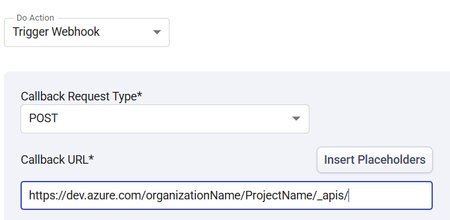
I am trying to send ticket data from Desk365 Helpdesk software to Azure DevOps. I am having trouble with what the Callback URL should be. Any ideas what URL I should be sending the Desk365 data to in order to create a workitem (Feature) in A specific Azure DevOps project? Thank you in advance!272Views0likes4Comments
Engineering an Azure Data Layer for Odoo Analytics Without Changing the ERP
One thing I have learned from working on ERP-driven data projects is that the ERP is rarely the place where you want to solve every analytics problem. We saw this firsthand in a manufacturing engagement where Odoo was being used across finance, inventory, procurement, and manufacturing, but reporting still involved substantial manual extraction and Excel-based consolidation. The interesting engineering question wasn't “How do we replace the ERP?” It was: “How do we build a reliable analytical layer around it without changing the transactional system?” That shaped the architecture. We used Odoo APIs and Azure Data Factory for ingestion, landing the data in Azure Data Lake Storage Gen2. From there, the data was organized into Bronze, Silver, and Gold layers: Bronze: Source-aligned Odoo data was retained with minimal transformation. Silver: Data was cleansed, standardized, and prepared across finance, inventory, procurement, and manufacturing domains. Gold: Analytics-ready data was prepared for downstream reporting and consumption. Azure Databricks with Spark handled transformation and KPI standardization, while Synapse/SQL layers provided structured analytical models for reporting. Power BI datasets consumed the prepared data, with Row-Level Security applied for role-based access. Why did this separation matter for the project? The important architectural boundary was: Odoo → transactional operations Azure data platform → ingestion, storage, transformation, standardization Power BI → analytical consumption That separation meant the reporting layer did not have to repeatedly extract and reshape data directly from the ERP. It also gave us a dedicated place to handle historical data and standardize information across business domains before it reached the reporting layer. What changed? The implementation automated 15+ Odoo-based reports and provided governed Power BI dashboards to 60+ business users. More importantly, teams moved away from repeated ERP extraction and spreadsheet consolidation toward a reusable analytical data layer. For our team, the bigger takeaway was that ERP modernization does not necessarily mean modifying the ERP. For teams building Azure data platforms around ERP systems, how are you drawing the boundary between API ingestion, historical storage, transformation, and analytical modeling?100Views0likes0Comments
How to recover global admin access to tenant
I have already tried posting this to the general Microsoft Q&A forums and received no response. We are desperate to figure something out so if this is not the correct line of communication, please direct me to where I should go. My company is in a bit of a bind right now, and I am at my wit's end after almost a week of trying to get in contact with anyone who could help. We have multiple directories in Azure that belong to us, but they are all independent of each other. As such, some directories have multiple global admins (and thus are not an issue); others -- and quite frankly, the most important ones -- only have one global admin, and it was our DevOps person, who is no longer employed with us. We have no way of accessing his account, and thus no way of accessing a global admin account for these directories/tenants. Access to these directories is critical to our operations. We were informed last Friday by someone from the data protection team that they could not give us access to these tenants we pay thousands of dollars a month for because: Our former DevOps person registered all other users as guests/external users, and DPT "can't give external users admin permissions", and To reset the MFA of the current global admin account, the owner of the account (who no longer works for our company) would need to contact them and verify their identity What options do we have here? We have blobs full of user-uploaded files in these tenants. Starting over from scratch is a doomsday scenario we are trying everything we can to avoid. Surely there has to be something that can be done?950Views1like6CommentsSyncing Multiple Azure DevOps Orgs to One ServiceNow Instance Without Forcing a Shared Workflow
If your organization runs more than one Azure DevOps org, whether from an acquisition, a spun-up subsidiary, or business units that never consolidated onto one instance, you already know the visibility gap. Central ServiceNow has no idea what's happening in any of them unless someone checks manually. Your team ends up pulling status updates by hand, chasing changes across orgs, and reconciling what got closed where. That works well for a couple of orgs, but it falls apart past that. Why a Shared Workflow Usually Creates a Bigger Problem Migrating everyone onto a single Azure DevOps org would close the visibility gap on paper. Each org's area paths, iterations, states, and processes took years to get right, and a forced migration undoes all of it. A sync layer between each Azure DevOps org and your central ServiceNow instance closes the same gap without touching how any individual org works day to day. Each org keeps its own configuration. ServiceNow ends up with a rolled-up view across all of them. Common Use Cases Post-Acquisition Org Sprawl Current Setup: A company acquires another company, or runs several business units, each with its own Azure DevOps org and its own way of working. Problem: Central ops has no single view across orgs, and checking each one by hand doesn't scale past a few teams. Solution: Connect each Azure DevOps org to the central ServiceNow instance separately, each with its own sync rules. ServiceNow gets one rolled-up view, and no org has to change how it works. Bi-Directional Status Sync Between Delivery and Support Current Setup: Support logs incidents in ServiceNow. Development tracks the corresponding work in Azure DevOps, sometimes across several orgs. Problem: Support has to ask developers for status or check Azure DevOps boards directly, and developers end up relaying the same update twice. Solution: Sync status, comments, and priority both ways, so an update in either system shows up automatically on the other side. Field-Level Control Per Org Current Setup: Each business unit or subsidiary has its own rules about what data can leave its Azure DevOps org. Problem: A single shared integration with one set of mapping rules risks exposing fields an org never agreed to share outside its own boundary. Solution: Give each org's connection its own outgoing rules, so a subsidiary decides exactly which fields leave its Azure DevOps org, field by field. Handling Closed and Read-Only Work Items Current Setup: ServiceNow blocks writes to closed incidents through ACLs, and Azure DevOps can hit a similar restriction on closed or read-only work items. Problem: A sync that keeps trying to write to a closed item throws the same error repeatedly, and the real problems get buried under the noise. Solution: Filter closed and read-only states out of the sync, or let the errors surface if operations wants visibility into them. What to Evaluate When Choosing an Approach A few criteria matter more than others once you're running this across multiple orgs. Decentralized configuration: does each Azure DevOps org get its own connection and its own rules, or does everything route through one shared setup? Filtering: can you scope the sync with something like WIQL queries on the Azure DevOps side, by area path, iteration, work item type, or tag? Field mapping: does it handle the difference between ServiceNow's field structure and Azure DevOps work item fields without dropping data? Common pairs are ServiceNow State to Azure DevOps State, ServiceNow Priority to Azure DevOps Priority, and ServiceNow Assignment Group to Azure DevOps Area Path. Custom fields usually need explicit mapping rules. Conflict handling: what happens when both sides update the same field at the same time, and what happens with closed or read-only items specifically? Security: Entra ID or OAuth authentication, PAT management per org, role-based access, audit logging, and whatever compliance certifications your security team asks for during review. Direction: bidirectional where both teams update shared fields, one-way where only one side should ever write. Technical Approaches Service Hooks and REST APIs Azure DevOps Service Hooks paired with the ServiceNow REST API give you sync in both directions. A change in Azure DevOps triggers a Service Hook, which calls the ServiceNow API to update the record, and the same flow runs in reverse. This is the most direct route if you're comfortable building and maintaining the webhook logic yourself. Custom Middleware For anything more complex, custom middleware gives you full control over field transformation, routing, and error handling. Azure Functions, Logic Apps, or a small Node.js or Python service usually does the job. The trade-off is maintenance. You own the retry logic, the error handling, and every update when either platform changes its API. Dedicated Integration Platforms Plenty of teams skip building this from scratch and use a dedicated integration platform instead. These typically come with pre-built connectors for both Azure DevOps and ServiceNow, a way to configure field mapping and filters without writing much code, and managed infrastructure so you're not hosting your own sync server. What they usually cover: Pre-configured connectors that already understand both platforms' data structures Visual or scripting configuration for field mapping and filters Managed infrastructure, so nothing runs on your own servers Built-in retry and error handling for API failures Audit logging for tracking what synced and when Support for multi-org routing and conditional logic out of the box The trade-off runs the other way: a subscription cost instead of a one-time build, less control over the exact implementation, and your data passing through a third party's infrastructure. For teams running more than 2 or 3 orgs against one ServiceNow instance, this usually ends up being less overhead than maintaining custom middleware long-term. Every org here has probably solved a version of this differently. Curious what's worked for you, especially with 3 or more Azure DevOps orgs feeding into one ServiceNow instance, and which part of the setup gave you the most trouble.199Views1like0Comments
Azure File copy task v4 and later causes 403 error
I've configured a release pipeline in ADO which copies some files to a Storage Account. Using Azure File copy task version 6 consistently fails with a 403 error. RESPONSE Status: 403 This request is not authorized to perform this operation using this permission. After much wasted time checking IP restrictions, checking access and recreating service connections I tried using an earlier version of the task that some other pipelines which do the same thing were using. I found that using version 4 or later of the file copy task causes the issue. Setting the task version to 3 works. Are there any known issues around this?Solved398Views0likes2Comments
Building Production-Ready Pipelines in Azure DevOps: Beyond the Documentation Examples
Hi everyone, When moving from basic Azure DevOps tutorials to enterprise production environments, we all quickly realize that documentation examples don't always cover real-world complexities. Handling multi-stage dependencies, keeping Terraform state secure, and managing secrets across environments requires a highly strategic approach. To help DevOps engineers bridge this gap, I recently put together a deep-dive architecture breakdown detailing how to build a resilient, multi-stage YAML pipeline from scratch. Here is a quick look at the core enterprise architecture I focus on: - Multi-Stage Lifecycle: Safe progression flows through Build, Dev, QA, UAT, and Production stages. - Infrastructure Automation: Clean integration with Terraform, including state and secrets management using Azure Key Vault. - Security Gates: Implementation of SAST scanning, Workload Identity, and automated approval policies. - Team Alignment: Connecting Azure DevOps with project tools like Asana to streamline cross-platform tracking. I wanted to share this pattern here to get some community feedback on the YAML structure. Before I post the full configuration snippets, I would love to hear how your teams handle environment gates and approvals. What are the biggest bottlenecks you run into with multi-stage YAML pipelines? Let's discuss in the comments below! Best regards, Abdullah Shahid167Views0likes0Comments
DevOps REST API - identity picker (query on list of users)
I'm using DevOps REST API via OAuth 2.0 to populate the fields of work item types. For "identity" fields, such as "System.AssignedTo", I'm having a hard time trying to figure out the best API that allows to retrieve a searchable list of users that mirrors what users see on DevOps website. From the browser inspector I saw the website calls this API, which is not documented: [POST] https://dev.azure.com/MY_ORGANIZATION/_apis/IdentityPicker/Identities as also noted on another discussion. But when I call this API (with the very same request body) from my local server I get a 401 response status code, and HTML content instead of the anticipated JSON. In Microsoft Entra Admin Center, I made sure to include "vso.identity" API permission for my app registration. What am I missing here? If I cannot use this API, what's the best alternative? I saw the https://learn.microsoft.com/en-us/rest/api/azure/devops/ims/identities/read-identities?view=azure-devops-rest-7.0&tabs=HTTP, but when I try to load it on the browser I always get zero results. E.g. https://vssps.dev.azure.com/MY_ORGANIZATION/_apis/identities?api-version=7.0&searchFilter=DisplayName&filterValue=SEARCH_TERM { "count": 0, "value": [] } Also, all the REST APIs I used so far are on https://dev.azure.com. How is https://vssps.dev.azure.com any different? Can I call APIs on a different host with the same OAuth access token?748Views0likes2CommentsBuilding Production-Ready Pipelines in Azure DevOps: Beyond the Documentation Examples
Hi everyone, When moving from basic Azure DevOps tutorials to enterprise production environments, we all quickly realize that documentation examples don't always cover real-world complexities. Handling multi-stage dependencies, keeping Terraform state secure, and managing secrets across environments requires a highly strategic approach. To help DevOps engineers bridge this gap, I recently put together a deep-dive architecture breakdown detailing how to build a resilient, multi-stage YAML pipeline from scratch. Here is a quick look at the core enterprise architecture I focus on: - Multi-Stage Lifecycle: Safe progression flows through Build, Dev, QA, UAT, and Production stages. - Infrastructure Automation: Clean integration with Terraform, including state and secrets management using Azure Key Vault. - Security Gates: Implementation of SAST scanning, Workload Identity, and automated approval policies. - Team Alignment: Connecting Azure DevOps with project tools like Asana to streamline cross-platform tracking. I wanted to share this pattern here to get some community feedback on the YAML structure. Before I post the full configuration snippets, I would love to hear how your teams handle environment gates and approvals. What are the biggest bottlenecks you run into with multi-stage YAML pipelines? Let's discuss in the comments below! Best regards, Abdullah Shahid146Views0likes0CommentsLegacy SSRS reports after upgrading Azure DevOps Server 2020 to 2022 or 25H2
We are currently planning an upgrade from Azure DevOps Server 2020 to Azure DevOps Server 2022 or 25H2, and one of our biggest concerns is reporting. We understand that Microsoft’s recommended direction is to move to Power BI based on Analytics / OData. However, for on-prem environments with a large number of existing SSRS reports, rebuilding everything from scratch would require significant time and effort. Since Warehouse and Analysis Services are no longer available in newer versions, we would like to understand how other on-prem teams are handling legacy SSRS reporting during and after the upgrade. Have you rebuilt your reports in Power BI, moved to another reporting approach, or found a practical way to keep existing SSRS reports available during the transition? Any real-world experience, lessons learned, or recommended approaches would be greatly appreciated.437Views0likes3Comments