devices
56 Topics
Skype4Business Crash In Windows 11, But Is Fine On Windows 10 Machines
Hi Community, I'm trying to support one colleague with very unusual Skype4Business (part of Office 2016 Pro.) crash issue. After user has successfully launched and login at S4B, the app will crash and disappear in less than a minute. We've tried some remediation steps, but still unable to determine the cause of the crashes. Re-formatted user's laptop again, then applied all Windows 11 and Office updates, but her S4B profile still crashed. Tried her S4B login to different Windows 11 machine, and S4B app still crashed in less than a minute. Other users tested on her Windows 11 laptop have no issue, as S4B app do not crash. If we test her S4B login at other Windows 10 machines, surprisingly S4B does not crash - so crashes only happen on Windows 11 machines The affected Skype4B build number is 16.0.4266.1001. We collected ".UccApilog" logs when her S4B app/profile crashed in Windows 11 - is this Forum the correct place to share the Skype log ? Thank you.655Views0likes0Comments
Poly Voyager 4220 Series Stuck on mute once muted on Skype Call
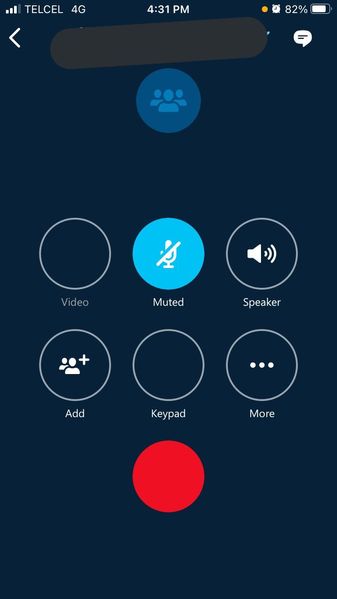
Dear Sir/Madam, I have a Poly Voyager 4220 Series and it's always stuck on mute whenever I muted it. The problem is, once muted, I couldn't unmute it anymore. The workaround is, I had to choose a different device, unmute, then choose Poly BT600 so I can speak again. But I don't have this problem with Microsoft Teams. I used to have another headset Poly blackwire 3220 series, that works just fine. I can mute/unmute as I wish. Best regards, Calvin771Views0likes0CommentsMicrophone fades in and out in Skype for Business group meetings
Hi everyone, I bought a new MSI gaming laptop last month that I also use to work on via Citrix. To be able to use my microphone from my headset I installed Citrix HDX Media Engine (version 2.9.400). So far so good. When I call someone it works perfectly. But when I join a teammeeting, after sometime the other people can’t understand me or very badly. Mostly when I’m talking for a longer period of time. It’s like my microphone output volume just falls out. I’ve tried everything, updating Citrix, downgrading to older Skype versions. Even updating to Windows 11, but nothing works. Please note that on Discord, everything works perfectly. So my hardware isn’t the problem. I’m using Skype for Business in a Citrix Environment. I can call perfectly, without drops, with other people. But when I join teammeetings with multiple people, people often complain that they can hardly understand me. The headset is an usb-headset; plantronics blackwire 5220. On my old laptop everything worked fine. So I guess something new on the MSI laptop is messing with my microphone? So TL;DR: something is causing my microphone to fade out when talking in Skype for Business group meetings. And I’m on the edge of trowing my laptop through the window.697Views0likes0Comments
Lancement de Vidéo via Skype à partir d'un PowerPoint
Bonjour à tous, Je suis actuellement en entreprise et nous organisons beaucoup de meetings et beaucoup de séminaires à partir d'invitation Skype, Voilà ma problématique quand nous parcourons les slides tout se passe très bien, mais quand nous voulons lire une vidéo qui est incorporée dans le PowerPoint aucun son ne fonctionne. Quand je clique sur l'icône du son rien ne se passe. C'est exactement la même chose quand je veux diffuser une vidéo. (l'appel se met en attente et j'ai ce message) Avez-vous une solution ou déjà rencontrer ce problème ? Cordialement, Merci d'avance pour vos réponses.569Views0likes0Comments
Skype for business server error/ network connections on android
Hi all ive been havign this error message on my android whenever i turn on my data and work profile and sign in to skype. My internet is fine as im able to browse other apps on my phone. To fix it the only thing is to uninstall then re install the app and key in all sign in details again- which is very troublesome to do on a daily basis. Please assist!!603Views0likes0Comments
Cannot install Skype for Business
When I click on install now it comes up with the following: We're sorry Microsoft Office installer encountered a problem because you have these Click-to-Run installer based Office programs installed on your computer: Microsoft 365 en-us Windows Installer and Click-to-Run editions of Office programs don't get along for this version, so you can only have one type installed at a time. Please try installing the Click-to-Run edition of Office instead, or uninstall your other Click-to-Run based Office programs and try this installation again. If anyone could help what exact steps I need to take next would be much appreciated. I am wary of uninstalling anything incase I lose any files and the error message itself sounds like its contradicting itself.1.2KViews0likes0Comments
Mobile Integration removal
So the most recent update seems to have removed this option from the settings of Skype for Business's mobile app. This has enabled notifications to go through as well as the Skype for Business call history to be integrated with your personal phone call history. This is entirely unworkable for a variety of reasons. Is this a permanent change and is there any way to change this?546Views0likes0CommentsSkype for Business App behaving wiredly after iOS 14 update
After iOS 14 update the skype for business app has has a weird behavior. When in a conference call some of the buttons won't correctly show up on the screen. Also when in a call or conference you lock the screen, the Skype buttons don't show up, it shows a control widget similar to the one that controls music (pictures attached). Any thoughts on getting this fixed? https://twitter.com/marcosgh/status/1323397309426737152?s=201.2KViews1like0Comments
Skype vs Skype for business when purchasing a Skype number?
(It was requested that I move this post over from the "consumer" Skype questions to business). Hello, I have a small business, its just me and I have no dedicated phone system. I've started using teams (as part of my MS365 account with my dedicated domain name) and it appears to be beneficial for me to have a Skype number so that I can call landlines etc. and not use my mobile number all the time. So which is the right solution for me? When I launch teams or turn on my Mac it immediately launched Skype Business. When I look at the “Skype Business” portion of the website it appears to say that Skype for Business is now directly part of Teams and if one wants to use a Skype number then there is all this talk about integrated phone system hardware which is far more than what my business needs right now. Will a standard (personal/consumer?) Skype number integrate with teams and be enough for me to use or am I entirely missing something with the business aspect of Skype in connection with my account? The big difference is, as I see it, the lack of voicemail in the personal/consumer version. But I don't understanding how that would work in a "business" version if there is no PBX phone system. In either case my assumption is that I need to get a dedicated number via Skype. thanks!511Views0likes0Comments