developer
1261 Topics
SPFx Web Part Not Visible for External User in Client Tenant
Hi everyone, One of our team members has developed an SPFx web part that we have deployed and published in our client's SharePoint tenant using a service account. The web part is working as expected when we access the client tenant using the service account. However, when I access the same client tenant using my external/guest user account, I cannot see or use the SPFx web part. Current setup: The SPFx web part was developed by one of our team members. The solution has been deployed and published in the client's SharePoint tenant using a service account. The service account can see and use the web part successfully. My account has also been added to the client tenant as an external/guest user. However, when I access the same SharePoint site using my external account, the SPFx web part is not visible/available. I would like to understand whether this is expected behavior for SPFx web parts when accessed by external/guest users, or if we are missing some configuration. Could this be related to SharePoint permissions, Entra ID guest-user settings, the App Catalog, API permissions, or the SPFx solution deployment configuration? Are there any specific permissions or tenant-level settings that we should check to allow external users to access the SPFx web part? Is there any Microsoft-side restriction that prevents external/guest users from accessing SPFx web parts? Any guidance on what could be causing this issue and how we can troubleshoot or resolve it would be greatly appreciated. Thanks in advance!118Views0likes0Comments
SharePoint Online – BLANKINTERNET#0 Publishing Portal and Modern Pages
Hi everyone, I’m trying to understand the recommended approach for an existing SharePoint Online site based on the BLANKINTERNET#0 template (Publishing Site / Publishing Portal). The site is still based on the classic SharePoint architecture and currently uses: a custom Master Page; Publishing Pages; custom Web Parts developed with SharePoint Framework (SPFx); the SPFx Web Parts also communicate with a backend/API developed using .NET Framework 4.8. I’ve read Microsoft’s recent announcement regarding the deprecation of classic publishing sites and classic user-created pages. As I understand it: starting March 1, 2027, the creation of new classic publishing sites and activation of the classic publishing features will be disabled; starting October 1, 2028, existing classic user-created pages, including Publishing Pages, will become read-only; existing pages will not be deleted, but users will no longer be able to create or edit them; Microsoft recommends assessing and gradually modernizing classic content to modern SharePoint experiences. However, I’m confused about the recommended modernization path for an existing Publishing Portal. The deprecation announcement made me think that one possible approach would be to progressively replace the existing classic pages with Modern Pages. However, in Microsoft’s documentation about modernizing classic publishing portals, I found the following statement: "For publishing portals (sites based upon BLANKINTERNET#0, ENTERWIKI#0, SRCHCEN#0, SRCHCENTERLITE#0, BICENTERSITE#0, POINTPUBLISHINGHUB#0, POINTPUBLISHINGTOPIC#0 or sites using the “Pages” library) it's not currently supported to connect these to a Microsoft 365 group or to use modern pages. If you want to modernize your publishing portal it's recommended to start from a new communication site and configure that one accordingly." This raises an important question for my scenario. My question For an existing BLANKINTERNET#0 Publishing Portal, is it currently supported to: A) Keep the existing Publishing Portal and progressively create/use Modern Pages within the same site, migrating the content from the existing classic Publishing Pages to Modern Pages so that the content remains editable after 2028? Or: B) Are Modern Pages actually not supported in an existing BLANKINTERNET#0 Publishing Portal, meaning that the supported modernization path is to create a new Communication Site and migrate/configure the content there? I would particularly like to understand what Microsoft currently considers the officially supported approach. In other words: For an existing BLANKINTERNET#0 Publishing Portal, can I progressively replace the classic Publishing Pages with Modern Pages within the same site, or do I need to create a new Communication Site and migrate the content there in order to move away from the classic Publishing architecture? I would like to avoid a full migration to a new Communication Site if it is not necessary, but at the same time I want to make sure that I’m not implementing an approach that Microsoft considers unsupported. Thanks in advance for any clarification!311Views0likes1Comment
Invoke-PnPSiteTemplate slower than it used to be
Hi everyone, Since last Friday, our provisioning engine has become noticeably slower than usual, and it's now blocking site creation for one of our customers. Setup Azure Function App (Windows OS, Consumption plan, hard 10-min timeout) Provisioning engine applies a PnP site template to newly created SharePoint sites via Invoke-PnPSiteTemplate PnP PowerShell: 2.12.0 PowerShell: 7.6 What changed Previously, if a run went over the 10-min limit, it wasn't a real problem: our retry mechanism kicked in, and the second pass was much faster because a large part of the template had already been provisioned. Now, however, every run stays slow and consistently hits the 10-min timeout, so the retry never gets far enough to complete. The result is that the customer's sites are no longer being created. My question Has anyone else seen this same slowdown since last Friday? Could this be related to the recent CSOM issue with Invoke-PnPSiteTemplate / Set-PnPDefaultColumnValues? (Invoke-PnPSiteTemplate AND Set-PnPDefaultColumnValues error since this morning | Microsoft Community Hub) Any confirmation or workarounds would be greatly appreciated. Thanks!269Views0likes1Comment
Invoke-PnPSiteTemplate AND Set-PnPDefaultColumnValues error since this morning
Since this morning we experience a blocking issue with Invoke-PnPSiteTemplate cmdlet which is failing as soon as there are lists included in a pnp site template (which is pretty much every template in our case). We see this behaviour on all of our own tenants and all customer tenants. This is a very important part of our provioning engine so it's blocking all new sites & teams in all tenants. Context We have a provisioning engine that runs in Azure. It automatically creates SharePoint-sites and applies a configured PnP site template (either .pnp or .xml) Expected behavior Normally, the template gets applied correctly without any error Actual behavior An error occurs in our logging, also visible when reproducing this locally: Error applying default column values Microsoft.SharePoint.Client.ServerException: Exception of type 'Microsoft.SharePoint.Client.ServiceUnavailableException' was thrown. Microsoft.SharePoint.Client.ClientRequest.ProcessResponseStream(Stream responseStream) StackTrace: at Microsoft.SharePoint.Client.ListExtensions.SetDefaultColumnValuesImplementation(List list, IEnumerable1 columnValues) at Microsoft.SharePoint.Client.ListExtensions.SetDefaultColumnValues(List list, IEnumerable1 columnValues, Boolean overwriteExistingDefaultColumnValues) at PnP.Framework.Provisioning.ObjectHandlers.ObjectListInstance.ProvisionObjects(Web web, ProvisioningTemplate template, TokenParser parser, ProvisioningTemplateApplyingInformation applyingInformation) at PnP.Framework.Provisioning.ObjectHandlers.SiteToTemplateConversion.ApplyRemoteTemplate(Web web, ProvisioningTemplate template, ProvisioningTemplateApplyingInformation provisioningInfo, Boolean calledFromHierarchy, TokenParser tokenParser) at CallSite.Target(Closure , CallSite , Object , Object , Object , Object ) Steps to reproduce behavior Create a PnP template Apply the template, using invoke-pnpsitetemplate -Path "..." We also see the same error happening when executing this cmdlet: Set-PnPDefaultColumnValues -List "Documents" -Field Status -Value "MyDefaultValue" -Connection $pnpConnTargetSite So it seems related... anyone getting the same issues?923Views6likes10Comments
SharePoint Multi-geo: accessing a user's home-geo custom SharePoint properties from a different geo
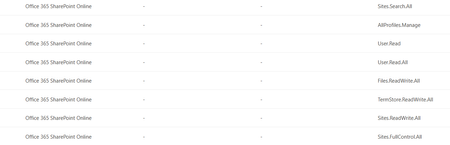
Setup M365 tenant, multi-geo (NAM + EMEA). SharePoint custom user profile properties are synced only in the user’s home geo (their Preferred Data Location). SPFx webparts running on the NAM tenant, using PnP/SP or AadTokenProvider. Goal: when an EMEA user opens a NAM page, read their SharePoint custom properties from the EMEA tenant. Issue 1 — Can’t read profile properties from a different geo-tenant What I’m doing const sp = spfi(emeaTenantUrl).using(SPFx(webpartContext), SPFxToken(webpartContext)); const result = await sp.profiles.getPropertiesFor(basicInfo.data.LoginName); Error Access Denied: This application does not have the required permissions to access profile information. The core problem — token is missing my approved scopes Approved Scopes in webApiPermissionManagement (Office 365 SharePoint Online) in SharePoint Admin Center: Sites.Search.All, AllProfiles.Manage, User.Read, User.Read.All, Files.ReadWrite.All, TermStore.ReadWrite.All, Sites.ReadWrite.All, Sites.FullControl.All. Token issued for the SharePoint resource only contains: Files.ReadWrite.All, M365BillingPlatform.Read.All, Sites.FullControl.All, Sites.ReadWrite.All, TermStore.ReadWrite.All. So AllProfiles.Manage, User.Read.All, Sites.Search.All are not in the token and an unexpected M365BillingPlatform.Read.All is. Also tried calling the SharePoint REST API directly with a token from AadTokenProvider → same Access Denied. Questions Why is the issued token missing my approved scopes (and where is M365BillingPlatform.Read.All coming from)? Is there a supported way to read a user’s SharePoint profile custom properties from a different geo-tenant from an SPFx webpart? Approved Scopes in Admin center Issue 2 — Search query template {User.*} properties not resolving cross-geo What I’m doing A SharePoint Search query in the webpart uses a query template that pulls custom user properties dynamically: {|owstaxidmetadataalltagsinfo:{User.customProperty1}} OR {|owstaxidmetadataalltagsinfo:{User.customProperty2}} The SP object is created the same way as in Issue 1. What’s not working When an EMEA user loads the webpart on the NAM tenant, the {User.*} tokens don’t resolve — the query modification shows the static property name itself instead of the user’s values from EMEA. Question How do I get the query template to resolve {User.customProperty} using the user’s home-geo (EMEA) profile values?164Views0likes0CommentsCan PnP Provisioning preserve SharePoint List GUIDs across environments?
I am using PnP Framework 1.15.1 with the 2022/09 Provisioning Schema to provision SharePoint Online lists. After applying the provisioning template, I noticed that all newly created lists have different SPList.Id (GUID) values compared to the source site. My template contains standard pnp:ListInstance definitions, for example: <pnp:ListInstance Title="Event Types" TemplateType="100" Url="Lists/EventTypes" TemplateFeatureID="00bfea71-de22-43b2-a848-c05709900100"> ... </pnp:ListInstance> I checked the 2022/09 schema and I couldn't find any attribute to specify the list GUID. I also noticed that the provisioning engine registers ListIdToken using createdList.Id, which seems to happen after the list has already been created. My questions are: Is it expected that PnP Provisioning always creates new SharePoint List GUIDs? Is there any supported way to preserve the original SPList.Id during provisioning? Was this ever supported in previous versions of the PnP Provisioning schema or framework? Any official documentation or confirmation from the PnP team would be appreciated.254Views1like2Comments
Clarification on SharePoint Macro Consent Flow and Permissions
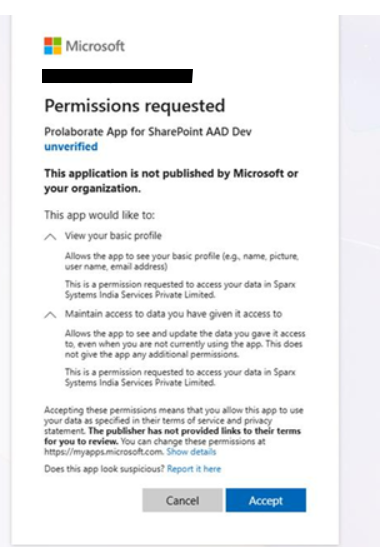
Hi Team, We have a customer using SharePoint in a secure environment. While configuring the Prolaborate SharePoint Macro on their site, a consent popup is displayed during the approval process. Previously, our macro implementation used the Admin Consent flow. Based on the customer’s security and approval requirements, we have modified the consent to use the User Consent flow instead. The customer has requested additional clarification regarding the consent process. Specifically, they would like to understand: The exact API calls triggered for these two consents View your basic profile Maintain access to data you have given it access to The permissions being requested from Microsoft Graph or SharePoint Whether the application requests any tenant-wide or high-privilege permissions Whether minimal permissions such as Sites.Selected can be used instead of broader scopes Current concern: The customer feels the current permission request is too broad for approval within their secure environment (Banking customer). Reason: Their internal approval process requires clear visibility into the exact API and permission scopes being requested, as different permissions are reviewed and approved by different internal teams (for example, User.Read is managed by the Identity team). From our implementation side, we are using only custom APIs and are not directly calling Microsoft Graph APIs. This information will help us provide a clear response to the customer and support their internal approval process.344Views0likes1CommentSPFx CDN URLs not consistently added to Trusted Script Sources (CSP)
Hi everyone, We’re currently investigating an issue related to SharePoint Online Content Security Policy (CSP) and Trusted Script Sources (TSS) for SPFx solutions. [SharePoint Online] [SPFx] [CSP] Scenario We deployed multiple SPFx .sppkg packages via App Catalog These solutions load scripts from an external CDN (cdnBasePath, with includeClientSideAssets: false) Expected Behavior As per documentation, CDN URLs used by SPFx solutions should be available/registered in Trusted Script Sources so that scripts can load under CSP enforcement Observed Behavior Only some CDN URLs (from certain packages) appear in Trusted Script Sources Others are missing, even though they are similarly configured and deployed Due to this, scripts from those missing sources are blocked by CSP, and the extension fails to load Additional Notes No use of eval() or inline scripts in our code Re-deploying packages sometimes resolves the issue (CDN URLs get registered afterward) Behavior appears inconsistent across environments Question Has anyone encountered a similar issue where: Trusted Script Sources were partially auto-populated from App Catalog deployments? CDN URLs from some SPFx packages were not registered automatically? Any insights on: Root cause Known limitations Best practices to ensure consistent registration would be really helpful. Thanks in advance!333Views1like1CommentVisualizing SharePoint List Relationships as ER Diagrams
In several SharePoint-based projects, I encountered the same challenge. As solutions grow, list relationships become increasingly difficult to understand. This is especially true in environments with multiple lookup columns, implicit relational structures, and long-lived tenant environments where schemas evolve over time. Although SharePoint provides rich metadata, there is no built-in way to visualize list relationships as an ER diagram. To explore this problem, I built a small browser extension that extracts list and column metadata from a SharePoint site, detects lookup relationships, and generates PlantUML-based ER diagram code. It can also export structured definitions to Excel. The goal is not only diagram generation, but improving architectural visibility, impact analysis during schema changes, documentation quality in long-term projects, and migration planning such as moving SharePoint lists to Dataverse. I am particularly interested in how other developers document SharePoint list structures in larger environments. The extension itself is available here: https://chromewebstore.google.com/detail/sharepoint-erd-generator/nbjfcilmndpofckndmcadgfcacadgeak I would appreciate any feedback or discussion around approaches to SharePoint schema documentation.446Views0likes1CommentViva Learning – SharePoint content provider configured but content not appearing in Teams
Hi everyone, I’m configuring Viva Learning in Microsoft Teams and I’m trying to use SharePoint as a content provider to publish custom learning content (Word, PowerPoint, Excel, PDF, audio, video, and web links). What I’ve done so far: Created a dedicated SharePoint site. Waited about one hour before adding it as a SharePoint provider in Viva Learning. After the configuration, the “Learning App Content Repository” list was automatically created. In the document library, I uploaded: PDF files a web link I copied the folder URLs and added them to the Learning App Content Repository list. I also followed the official procedure to create and assign a Microsoft 365 Group, as described in this documentation: https://learn.microsoft.com/en-us/viva/learning/sharepoint-permissions The issue: Almost 24 hours have passed, but I still don’t see any content in Viva Learning (Teams). In the sync logs, I can see that synchronization jobs are running, but the content is either not appearing or only partially synchronized. At this point, I’m not sure: if I’m missing something in the SharePoint provider configuration, if the folder URLs are incorrect, or if there’s some additional requirement related to permissions or metadata. Has anyone experienced a similar issue or can suggest what I should check next? Thanks in advance!506Views0likes4Comments