developer
1353 Topics
Is it really impossible to break workbook protection?
Hi, I process personal data and need strict protection (GDPR). My raw data from a survey is copied to several worksheets in a workbook and the processed anonymous data (dashboards) is in other worksheets in the same workbook. Before sending the whole workbook with the visible dashboards to my customers I delete some of the raw data worksheets and hide others. After that I protect the structure of the workbook with a code. Now only the worksheets with the dashboards are visible. Will it at all be possible for my customers to break the protection and get access to the sensitive raw personal data or am I completely safe? Thanks in advance to your reply! Best regards PerSolved6.8KViews16likes28CommentsA generalised Lambda helper function that return arrays of arrays using bisection.
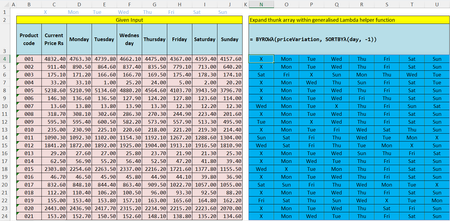
Specifically this required days of the week to be sorted by multiple price criteria. [This is intended as a topic for discussion as opposed to a specific request for help] I used the problem to develop a Lambda function that uses a binary tree to select the rows at the leaf nodes and perform a straightforward sort. The results then get stacked pairwise until the blue table of results is returned BYROWλ "Applies a user-defined function by row and collects array results into a stacked array" =LET(resultϑ, BYROW(array, ThunkFnλ), BinaryTreeλ(ROWS(resultϑ), "", Derefϑarrλ)) The main bisection recursion is hidden from the user BinaryTreeλ "Generates binary numbers stacking blocks pairwise to an upper limit" =LET( maxNode, BASE(nodeCount - 1, 2), maxLevel, LEN(maxNode), level, LEN(parentNode), maxChild, LEFT(maxNode, 1 + level), IF( level < maxLevel - 1, LET( childNode0, BinaryTreeλ(nodeCount, parentNode & 0, FNλ), childNode1, BinaryTreeλ(nodeCount, parentNode & 1, FNλ), IF((parentNode & 0) = maxChild, childNode0, VSTACK(childNode0, childNode1)) ), IF( (parentNode & 0) = maxChild, FNλ(parentNode & 0), VSTACK(FNλ(parentNode & 0), FNλ(parentNode & 1)) ) ) ) but it is intended to non-problem specific and hence reusable. A key feature is that the user provides a Lambda function that performs the required calculation as if BYROW would return the result, but the function is converted to one the returns a thunk and hence avoids the array of arrays problem. ThunkFnλ "Accepts a user-defined Lambda function that returns an array result and generates a related function that returns the corresponding thunk" =LAMBDA(arr, LAMBDA(userFnλ(arr))) Finally Derefϑarrλ "Dereferences a term from a thunk array using a zero-based binary pointer and expands the resulting scalar thunk" =INDEX(resultϑ, DECIMAL(ptr, 2) + 1, 1)() converts the binary node pointer to a decimal index. This is all crazily heavy but, hopefully, would be simple to reuse for other problems since the main processing is problem independent.12KViews6likes21CommentsPlease update Excel to handle more than 15 digit numbers!
I'm a professional database designer, and this limitation has caused me no end of headaches. The problem: numbers that are more than 15 digits long have all digits after the 15th converted into zeros. Microsoft provided workaround: format the the field as text. This workaround is only useful if you are doing data entry directly into an existing Excel spreadsheet that you are able to format the cells ahead of time. It's incredibly unhelpful when you are pushing and pulling data from different data sources. For example, if I need to push data out of a program like FileMaker to Excel, and the system I am pushing from has numeric fields (in particular ID fields), excel sees them as numbers and replaces the digits after the 15th. This jacks up formulas as well as any data synching possibilities. In situations like that, I end up having to export the data as .csv file, and then pull it in to an excel sheet and then do a bunch of conversion options on import (which does not always work, btw). But this is not a practical solution for every day users who are not tech savvy. I should be able to export the data directly to excel without the data being converted. This has been a big problem for every client I have that requires data being pushed to Excel. And this problem has existed for decades. Other spreadsheet programs (like google sheets) do not appear to have this issue. Can someone please explain why Excel continues to cling to this archaic standard? Are there any plans to update Excel to handle more than 15 digits? I know I am not the only one who has run into this problem. I've seen all kinds of posts about it. But trying to let Microsoft know how much of a problem this is has been a challenge. Their article on the subject had a link to give product feedback, and that link led me to this space. So here it is: product feedback for Excel. PLEASE FIX THIS! Thank you. Chris2.5KViews5likes8CommentsExcel Community: Simplifying Spaces and Labels
Hi all, As you may have noticed already, we as the Excel Team have done a bit of "spring/summer cleaning" for the community. We have received feedback that the number of "spaces" was simply too many at nine, so we have pared things down. Now, there are three community spaces: Excel: this will be the primary place for posting content, as many of the old spaces have been migrated as labels will find a good home here BI and Data Analysis: this will be a good place for posting about tasks and questions that cut across Excel, Power BI, and other topics in this realm Resources and Community: this will increasingly become a place for folks to share sample files and templates with each other Q: What happened to the other spaces that used to exist? A: They have since been rolled up as "Labels", which you can find in the "More Resources" sidebar under "Labels" of any of the three spaces mentioned above. Look for these on the right side: Please let us know if you have any other questions. Thanks for reading!4.7KViews5likes25CommentsWrapRows2Dλ / WrapCols2Dλ: Fast, efficient 2D wrapping without flattening
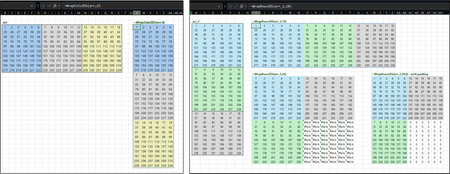
Background One of Excel's biggest weaknesses is in working with 2D arrays as objects that can be re-shaped. WRAPROWS/WRAPCOLS do not accept 2D arrays (#VALUE!) and are strictly for shaping 1D arrays. The usual workarounds involve flattening with TOROW/TOCOL then re-shaping with WRAPROWS/WRAPCOLS, REDUCE used as an iterator to stack (do-able but slow), and even MAKEARRAY (do-able, but not instinctive and slow). The Goal Fast, efficient 2D wrapping without flattening. The Approach Pure deferred i/j indexing with modular math and sequencing. The function and sample workbook is provided below. I welcome any and all feedback: suggestions for improvement, your approach to 2D shaping, etc. // Fast, efficient 2D wrapping without flattening //----------------------------------------------------------------------------------- //---WrapCols2Dλ--- //----------------------------------------------------------------------------------- //Author: Patrick H. //Date: 1/28/2026 //Version: 1.0 // //Description: //Wrap a 2D array into column blocks of a specified width while preserving row height. //The wrapped blocks are stacked vertically in the output. //Jagged or uneven final blocks are padded with NA() by default, unless a fill value //is supplied via the optional pad_with parameter. // //----------------------------------------------------------------------------------- //Parameter Description //array - 2D array to be wrapped (1D arrays not supported) //new_width - Number of columns in each wrapped block // //Optional Description //pad_with - Fill value used to pad incomplete blocks. If omitted, NA() is used. // //Lambda called: Echoλ WrapCols2Dλ= LAMBDA( array, new_width, [pad_with], //Check inputs LET( //Shape h, ROWS(array), w, COLUMNS(array), blocks, CEILING(w/new_width,1), //Optional pad_with, IF(ISOMITTED(pad_with),NA(),pad_with), //Total rows when wrapped r, blocks * h, //Scenarios Is1D?, OR(h = 1,w = 1), IsScalar?, AND(h = 1, w = 1), InvalidDim?,new_width >= w, SpillRisk?, r > 1048576, //Logic gate IF(IsScalar?,#VALUE!, IF(Is1D?,#VALUE!, IF(InvalidDim?,"#WIDTH!", IF(SpillRisk?,#NUM!, //Proceed LET( //Indices - deferred modulo, LAMBDA(MOD(SEQUENCE(r),h)), i, LAMBDA(IF(modulo() = 0, h, modulo()) * SEQUENCE(,new_width,1,0)), j, LAMBDA(Echoλ(SEQUENCE(r / h,,1,new_width),h) + SEQUENCE(,new_width,0,1)), //Wrapped array result, IFERROR(INDEX(array,i(),j()),pad_with), result ))))))); //----------------------------------------------------------------------------------- //---WrapRows2Dλ--- //----------------------------------------------------------------------------------- //Author: Patrick H. //Date: 1/28/2026 //Version: 1.0 // //Description: //Wrap a 2D array into row blocks of a specified height while preserving column width. //The wrapped blocks are stacked horizontally in the output. //Jagged or uneven final blocks are padded with NA() by default, unless a fill value //is supplied via the optional pad_with parameter. // //----------------------------------------------------------------------------------- //Parameter Description //array - 2D array to be wrapped (1D arrays not supported) //new_height - Number of rows in each wrapped block // //Optional Description //pad_with - Fill value used to pad incomplete blocks. If omitted, NA() is used. // //Lambda called: Echoλ WrapRows2Dλ= LAMBDA( array, new_height, [pad_with], //Check inputs LET( //Shape h, ROWS(array), w, COLUMNS(array), blocks, CEILING(h/new_height,1), //Optional pad_with, IF(ISOMITTED(pad_with),NA(),pad_with), //Total columns when unwrapped c, blocks * w, //Scenarios Is1D?, OR(h = 1,w = 1), IsScalar?, AND(h = 1, w = 1), InvalidDim?,new_height >= h, SpillRisk?, c > 16384, //Logic gate IF(IsScalar?,#VALUE!, IF(Is1D?,#VALUE!, IF(InvalidDim?,"#HEIGHT!", IF(SpillRisk?,#NUM!, //Proceed LET( //Indices - deferred i, LAMBDA(TOROW(Echoλ(SEQUENCE(,blocks,1,new_height),w)) + SEQUENCE(new_height,,0,1)), modulo, LAMBDA(MOD(SEQUENCE(,w * blocks),w)), j, LAMBDA(IF(modulo()=0,w,modulo()) * SEQUENCE(new_height,,1,0)), //Wrapped array result, IFERROR(INDEX(array,i(),j()),pad_with), result ))))))); //----------------------------------------------------------------------------------- //Echoλ //----------------------------------------------------------------------------------- //Author: Patrick H. //Date: 11/7/2025 //Version: 1.0 //Description: //Repeat each element in a supplied 1D array by specifying the repeat counts. //Arrays and scalars are supported. //----------------------------------------------------------------------------------- //vector - 1D array or scalar to be echoed //repeat - 1D array of repeat counts (must be numeric and ≥1) Echoλ = LAMBDA( vector, repeat, //Check inputs IF(OR(ISTEXT(repeat),repeat<=0),#VALUE!, LET( //Flatten inputs vector, TOCOL(vector), repeat, TOCOL(repeat), //Dimensions and row indexing V↕, ROWS(vector), R↕,ROWS(repeat), r, IF(V↕<>R↕,EXPAND(repeat,V↕,,@TAKE(repeat,-1)), repeat), i, SEQUENCE(ROWS(r)), m, MAX(r), idx, LAMBDA(TOCOL(IF(SIGN(r-SEQUENCE(,m,0,))=1,i,NA()),2)), //Unwrap idx but defer delivery until function invocation deliver, LAMBDA(INDEX(vector,idx())), deliver ))()); Workbook attached and linked in case this forum gobbles it up! Patrick2788/Excel-Lambda: Excel Lambda modules Excel-Lambda/Wrap2D Demo.xlsx at main · Patrick2788/Excel-Lambda Excel Lambda modules. Contribute to Patrick2788/Excel-Lambda development by creating an account on GitHub. github.com200Views4likes3Comments
Spin Control only increments
I have a sheet that I use for tracking statistics. Each cell contains a simple number with 0 decimal places. I have added a spin controls in my sheet to simply increment and decrement the value of a field by 1. As I have added and tested the spin controls, I have found that many of them will only increment the field, not decrement the value. Both the up and down buttons are visible, but when clicking the down arrow in the control, the field is incremented improperly. Thanks for the help9.4KViews4likes18Comments
REMOVE A CHECKBOX FROM EXCEL WORKSHEET
I was handed an Excel worksheet that has three checkboxes that I wish to remove but cannot seem to remove them. Excel Help says to right click the Box and then hit Delete. There is no Delete in the ensuing dropdown menu and Delete on the keyboard does not work. Any suggestions?343KViews4likes25CommentsWould a FOR.EACH function be useful in Excel 365?
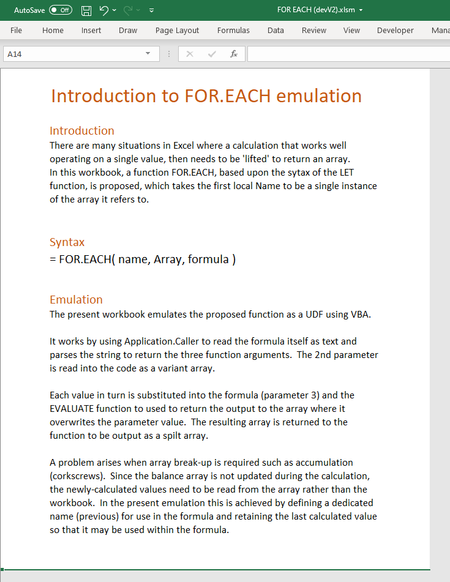
The attached files are based upon a workbook that emulates the proposed function using a VBA macro. There would appear to be many potential applications in situations where the @operator needs to be used to restrict the operation of an array parameter.7.1KViews3likes9CommentsExcel Tools for Network & Windows
Excel Tools for Network & Windows Some time ago I already shared an earlier version of this project. Since then, I have added several new features. These tools are based on functionalities that already exist in Windows and its associated software. I have consolidated them into a single Excel-based interface, allowing all tools to be executed directly from Excel. The files are free for private use. For business or enterprise environments, a more comprehensive toolbox can be developed, enabling direct support, repair, management, monitoring, and control of users and systems. Everything can be customized according to specific requirements — the scope depends solely on the desired functionality, time investment, and budget. I appreciate any positive feedback, suggestions, or constructive tips. If this project is not of interest to you, please feel free to ignore it. Thank you, and I wish everyone happy holidays.232Views2likes2CommentsWhat do you think of thunks?
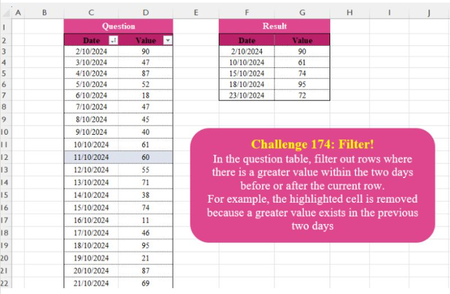
OK, so the most likely response by far is going to be "I don't". However, I tried one of Omid Motamedisedeh's regular challenges and found it a suitable problem for exploring some of the lesser known byways of modern Excel. The challenge is to pick out locally maximum values from a rolling range. What I did was to write a function that used MAP to select one cell at a time, using DROP to remove the initial cells and TAKE to return a range of 5 cells with the active cell in the middle. The direct route to solving the stated problem would be to calculate the maximum value within each range immediately, but I was interested in the more general problem of "could I return the array of ranges in a form that would support further analysis?" As shown, the following formula ROLLINGRANGEλ = LAMBDA(values, n, LET( rows, SEQUENCE(ROWS(values)), MAP(rows, LAMBDA(k, LET( m, QUOTIENT(n, 2), rng, TAKE(DROP(values, k - m - 1), MIN(k + m, n)), rng ) ) ) ) ); gives and array of ranges error, but simply by enclosing the 'rng' variable within a further LAMBDA ... LET( m, QUOTIENT(n, 2), rng, TAKE(DROP(values, k - m - 1), MIN(k + m, n)), LAMBDA(rng) ) will cause Excel to return an array of functions, each one of which would return a range if evaluated. In the attached workbook, a number of formulae are based upon this array of functions = ROLLINGRANGEλ(dataValues, 5) = MAP(ROLLINGRANGEλ(dataValues, 5), LAMBDA(ϑ, ROWS(ϑ()))) = MAP(ROLLINGRANGEλ(dataValues, 5), LAMBDA(ϑ, ISREF(ϑ()))) = MAP(ROLLINGRANGEλ(dataValues, 5), LAMBDA(ϑ, AVERAGE(ϑ()))) = MAP(ROLLINGRANGEλ(dataValues, 5), dataValues, LAMBDA(ϑ,v, MAX(ϑ()))) = LET( rollingMax, MAP(ROLLINGRANGEλ(dataValues, 5), LAMBDA(ϑ, MAX(ϑ()))), FILTER(Data, rollingMax=dataValues) ) The first simply returns #CALC! errors on the worksheet which is the normal response to a Lambda function defined on the grid. The second formulas uses ROWS to show that the ranges are not all the same size, the third shows the returned objects to be range references and not simply arrays of numbers, the forth is a rolling average while the fifth is a rolling MAX. The final formula returns the solution to the problem, being a filtered list. The purpose of this post is to demonstrate that Excel, which started out as a 'simple' spreadsheet program, now contains a very different programming environment that shares a function library and uses the grid for input/output but, other than that, has very little in common with 'normal' spreadsheet practice! A related survey can be found at https://www.linkedin.com/feed/update/urn:li:activity:7285432559902068736/1.1KViews2likes21Comments