deployment
793 Topics
Windows 11 Computer Is Unusually Slow; Task Manager Shows Abnormal Behavior
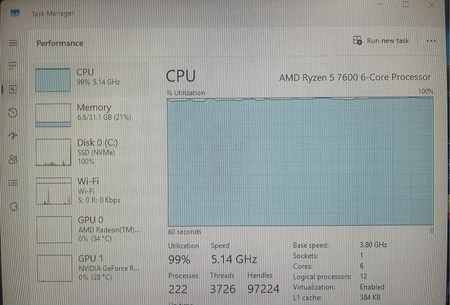
Yesterday, my computer was running perfectly fine, but today it took about two minutes to boot up. Once I reached the desktop, programs loaded extremely slowly, and almost every action required a long wait. The status shown in the screenshot below is what I saw when I opened Task Manager. I'm not sure if this is normal or if there's a problem—could you please help me analyze this?26Views0likes1Comment
Win11 Run as different user option missing from the Start menu right-click context menu
When you right-click an app in the Start menu, the Run as different user option no longer appears. The option is still available when you right-click an executable file directly in File Explorer, but it is not available in the Start menu. Even when using the workaround of pressing Shift + right-click, the option still does not appear in the Start menu.57Views0likes1CommentHow do I stop Windows 11 from reinstalling Copilot and widgets after every update?
I keep removing Copilot, widgets, and other stuff I never asked for, but after almost every major Windows 11 update, they come right back. I've disabled them in Settings and even used group policy for some, but it doesn't seem to stick long-term. It's frustrating having to clean up the same bloat over and over. Is there a reliable way to block these permanently, like a registry tweak or a script that survives updates? Or is this just something we have to deal with now? I'm on 25H2 and would rather not do a clean install just to get a leaner system.125Views0likes1CommentStuck in BIOS on my Windows 11 portable console – touchscreen only
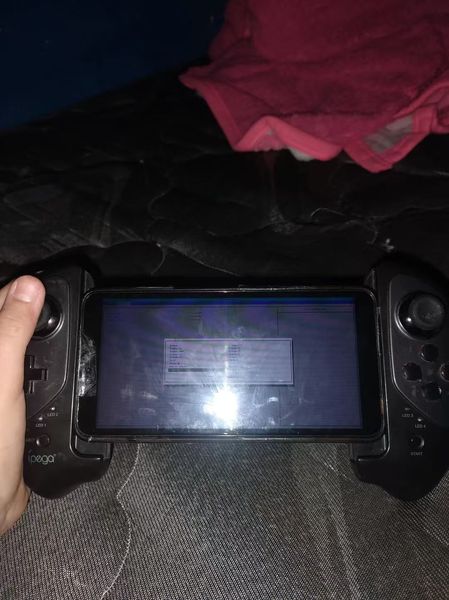
So I was messing around with my Windows 11 handheld console and somehow ended up in the BIOS. Now I can't get out. The only input that works is the touchscreen, and none of the usual exit options seem to do anything. I've tried tapping around, looking for a save and exit or discard changes option, but it's not responding the way I'd expect. Not sure if I accidentally changed something or if it's just being stubborn. Anyone know how to exit BIOS when you're stuck with only touchscreen controls? Really don't want to force shutdown if I don't have to.161Views0likes6CommentsWindows 11 update broke my Wi-Fi again—anyone else dealing with this?
Installed the latest cumulative update for Windows 11 25H2, and now my Wi-Fi keeps dropping every few minutes. It reconnects on its own, but it's annoying as hell during calls and downloads. I tried rolling back the driver and resetting the network stack, but nothing's stuck so far. This isn't the first time an update has messed with my connection either. Anyone else hit this after a recent update? Did you find a driver version or a workaround that actually works, or am I stuck waiting for the next patch? I'm about ready to just use Ethernet and call it a day.1.7KViews0likes0CommentsHow Can I Install Windows 11 24H2 on Any Computer?
I am at a small company and there are dozens of PCs and laptops to be upgraded to Windows 11 per boss request. Unfortunately, some of the PCs meet the Windows 11 24H2 system requirements and some of them are not, because of unsupported CPU and lack of TPM 2.0 or Secure Boot. In addition, some of the hard disk are formatted by MBR but Windows 11 requires GPT. Is there a simple way to create a Windows 11 bootable USB and install Windows 1 24H2 on any computer, including the ones that not supported by Windows 11 24H2? Kindly let me know if this is possible. Thank you!5.2KViews0likes8CommentsWhy Can't I Copy the Text of an Error Message in Windows 11?
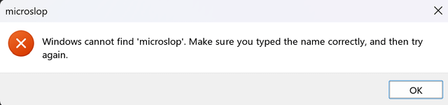
With 2026 almost over, I sincerely suggest that Microsoft step up its game and finally add a feature that should have been available back in the late 1990s: the ability for users to copy all text from error messages.198Views0likes2Comments
802.1x wired network profiles missing after upgrade to Windows 11 24H2
Issue Description: During the upgrade of workstations to Windows 11 24H2, the IEEE 802.1X wired network security profiles are occasionally not restored after the upgrade process completes. As a result, affected devices fail to authenticate against Cisco ISE, leading to a loss of LAN connectivity. The issue appears to occur randomly and does not show any clear correlation with specific hardware models or workstation configurations. We are using Feature Updates to upgrade workstations to Windows 11 24H2, deployed through SUP in SCCM/MECM. This approach works best for us because it does not require any user interaction during the upgrade process. I developed a remediation script that is triggered by a scheduled task based on a specific event ID generated when Cisco ISE rejects authorization. The script successfully restores the locally stored 802.1X profiles and resolves the issue. However, I am wondering whether there is a better or more native way to handle this scenario. Has anyone experienced a similar issue with Windows 11 24H2 and 802.1X profiles? Any advice before we open a support case with Microsoft Support?338Views0likes3CommentsSave the date: Windows office hours - October 15, 2026
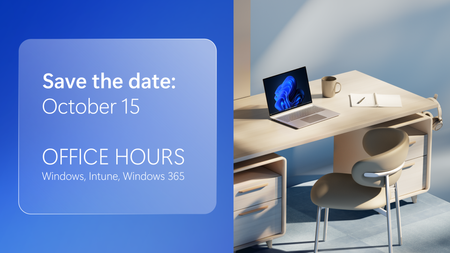
Need answers from the people behind the products you manage every day? Join us for Windows Office Hours on October 15th from 8:00–9:00 AM PT, where experts from Windows, Microsoft Intune, Configuration Manager, Windows 365, Windows Autopilot, security, public sector, FastTrack, and more will be available to answer your questions. This is a live, chat-based event with no video and no meeting link. Simply join the discussion, ask your questions, and participate in conversations with Microsoft engineers and specialists. If you can't attend live, post your questions on the event page in advance and we'll address them during the session.131Views0likes0Comments