data
173 TopicsBring Azure AI to your private workloads on Azure VMware Solution
Overview A global enterprise has migrated thousands of VMware vSphere virtual machines (VMs) to Microsoft Azure as part of their application modernization strategy. Having exited their on-premises data centers and relocated their legacy application VMs to Azure VMware Solution, the next phase of that strategy is no longer about where the workloads run, but about what the organization can do with the data inside them. Those applications hold the enterprise's most valuable data, yet they sit on private networks that Azure AI services cannot reach by default. What should Azure VMware Solution look like when the goal is to make private workloads AI-accessible in place? Azure VMware Solution is a VMware validated first party Azure service from Microsoft that provides private clouds containing VMware vSphere clusters built from dedicated bare-metal Azure infrastructure. It enables customers to leverage their existing investments in VMware skills and tools, allowing them to focus on developing and running their VMware-based workloads on Azure. That is why organizations move their VMware estates to Azure VMware Solution in the first place: they get to modernize on their own terms, lifting and shifting mission-critical applications into Azure exactly as they run today, with no rewrites, no re-platforming, and no big-bang migration. Azure AI Foundry is the Azure platform for building, deploying, and governing AI agents, providing managed model deployments, an agent runtime, tool integration, and end-to-end tracing under Microsoft Entra identity. Agents in Foundry reach external systems through the Model Context Protocol (MCP), an open standard that describes a system to an agent as a small, explicit set of tools. MCP matters here because it turns "connect the agent to a workload" into a contract rather than a custom integration: the agent learns one way to ask, and each workload is fronted by a server that translates it. But the "leave it as it is" strength of Azure VMware Solution has a quiet side effect. The systems holding your most valuable data, such as core databases, file servers, and line-of-business applications, keep running on private networks inside the private cloud. Meanwhile, Azure's AI services live in the Azure control plane and, by default, reach only public endpoints. When the mandate arrives to "add AI everywhere," your Azure VMware Solution workloads are often the one place AI cannot reach. Not because the data isn't valuable, but because it's private by design. In this post, I will introduce the challenge of reaching private workloads with Azure AI, describe the Azure VMware Solution and Azure AI Foundry architectural components that close the gap, and describe the security and design considerations for doing it safely. The pattern is deliberately workload-agnostic: a managed agent in Azure AI Foundry that reaches private Azure VMware Solution systems through small, purpose-built bridges, one per workload type, while your data stays put, read-only, and inside your network. I will prove it with a working SQL example (two private databases behind a single bridge), then show how the same pattern extends to file shares, APIs, and beyond. The full deployment kit is on GitHub, so you can try it in your own environment. In the next section, I will introduce the architectural components of Azure VMware Solution. Architectural Components The diagram below describes the architectural components of the Azure VMware Solution. Figure 1 – Azure VMware Solution Architectural Components Each Azure VMware Solution architectural component has the following function: Azure Subscription: Used to provide controlled access, budget, and quota management for the Azure VMware Solution. Azure Region: Physical locations around the world where we group data centers into Availability Zones (AZs) and then group AZs into regions. Azure Resource Group: Container used to place Azure services and resources into logical groups. Azure VMware Solution Private Cloud: Uses VMware software, including vCenter Server, NSX-T Data Center software-defined networking, vSAN software-defined storage, and Azure bare-metal ESXi hosts to provide compute, networking, and storage resources. Azure NetApp Files, Azure Elastic SAN, and Pure Cloud Block Store are also supported. Azure VMware Solution Resource Cluster: Uses VMware software, including vSAN software-defined storage, and Azure bare-metal ESXi hosts to provide compute, networking, and storage resources for customer workloads by scaling out the Azure VMware Solution private cloud. Azure NetApp Files, Azure Elastic SAN, and Pure Cloud Block Store are also supported. VMware HCX: Provides mobility, migration, and network extension services. VMware Site Recovery: Provides Disaster Recovery automation and storage replication services with VMware vSphere Replication. Third party Disaster Recovery solutions Zerto Disaster Recovery and JetStream Software Disaster Recovery are also supported. Dedicated Microsoft Enterprise Edge (D-MSEE): Router that provides connectivity between Azure cloud and the Azure VMware Solution private cloud instance. Azure Virtual Network (VNet): Private network used to connect Azure services and resources together. Azure Route Server: Enables network appliances to exchange dynamic route information with Azure networks. Azure Virtual Network Gateway: Cross premises gateway for connecting Azure services and resources to other private networks using IPSec VPN, ExpressRoute, and VNet to VNet. Azure ExpressRoute: Provides high-speed private connections between Azure data centers and on-premises or colocation infrastructure. Azure Virtual WAN (vWAN): Aggregates networking, security, and routing functions together into a single unified Wide Area Network (WAN). Those components describe where your workloads run. In the next section, I will introduce the pattern that makes the data inside them reachable by Azure AI, without changing any of it. The idea in one picture One managed agent in Azure AI Foundry talks to your private Azure VMware Solution workloads through a set of small Model Context Protocol (MCP) servers, one bridge per workload type. SQL databases are live today; a file-share bridge or an API bridge is the same shape with different tools. Figure 2: Solution overview A single managed agent in Azure AI Foundry reaches private Azure VMware Solution workloads through per-workload MCP servers running on VNet-integrated Azure Container Apps, connected to the private cloud over ExpressRoute. Three ideas carry the design: MCP is the universal contract. Every workload is exposed through the same small set of tools. For the SQL bridge, that’s list_sources, get_schema, and run_query. The agent learns one way to ask a question; each bridge translates it for its workload. One lightweight bridge per workload type. Each MCP server is a VNet-integrated Azure Container App that can legitimately see both worlds: Azure on one side, the private Azure VMware Solution network over ExpressRoute on the other. Want to make another workload AI-accessible? Add another bridge. The agent doesn’t change. Managed identity end to end. No passwords in code or config. The agent presents a Microsoft Entra token; each bridge pulls the credentials it needs from Azure Key Vault at runtime. One pattern, every workload The power of the design is that it’s workload-agnostic. The agent, the network path, the Entra identity, and the governance model are built once. Each new workload is just a new MCP server that speaks the same tool contract, so you can light up your estate incrementally, highest-value workloads first, without re-architecting anything. Azure VMware Solution workload MCP bridge Example tools What it unlocks SQL databases (SQL Server, PostgreSQL, Oracle, MySQL) SQL MCP server (live in this post) list_sources, get_schema, run_query Natural-language questions and cross-database corroboration File shares (SMB / NFS, document stores) File MCP server list_dirs, search, read_file Q&A and summarization over contracts, drawings, PDFs, logs Line-of-business apps (REST / SOAP) API MCP server list_operations, call_operation Conversational access to ERP, ticketing, claims, orders NoSQL / message systems Connector MCP server list_collections, query, peek Reasoning over document stores and event streams Mainframe / other systems Adapter MCP server workload-specific Bringing legacy systems into modern AI workflows Every bridge is small, independently deployable, and governed the same way: read-only by default, private over ExpressRoute, and locked to your agent’s managed identity. The pattern is the product; the bridges are how you grow it. To make it concrete, here’s the first proof of the pattern: a secure, read-only agent over two private SQL databases in Azure VMware Solution. Reference architecture The reference deployment runs in a single Azure region, with the Azure resources in one resource group alongside the Azure VMware Solution private cloud. Figure 3: Reference architecture A question from the managed agent in Azure AI Foundry crosses into your virtual network, where the MCP server on Azure Container Apps validates the caller's Entra token, reads the database password from Key Vault with its own managed identity, and runs a single read-only SELECT against the SQL Server VMs inside the Azure VMware Solution private cloud. Component Resource Type Azure VMware Solution private cloud avs-private-cloud Microsoft.AVS/privateClouds MCP server avs-mcp-server Microsoft.App/containerApps Container Apps environment avs-mcp-env Microsoft.App/managedEnvironments AI Foundry account avs-sql-foundry Microsoft.CognitiveServices/accounts Foundry project avs-sql-foundry/avs-sql-agent .../accounts/projects Container registry avssqlacr Microsoft.ContainerRegistry/registries Secrets avs-sql-kv-01 Microsoft.KeyVault/vaults Network avs-hub-vnet (10.40.0.0/16) Microsoft.Network/virtualNetworks ExpressRoute gateway avs-ergw virtualNetworkGateways Foundry private endpoint avs-sql-foundry-pe (+ privatelink DNS zones) privateEndpoints Logs avs-sql-logs OperationalInsights/workspaces The data itself lives on VMs inside the Azure VMware Solution private cloud, on a VMware NSX segment (avs-workload-01, 192.168.131.0/24): VM IP Database SQL VM #1 192.168.131.55 SalesDB (Products, Customers, Orders) SQL VM #2 192.168.131.56 InventoryDB (Products, Stock) The bridge works because the Container Apps subnet routes to the Azure VMware Solution private cloud over ExpressRoute, while Foundry is reachable privately through a private endpoint. Figure 4: Network topology The MCP server runs in a delegated aca-subnet and reaches the workload segment over ExpressRoute. Foundry sits behind a private endpoint with privatelink DNS zones, so the portal and jump host reach it privately. The agent’s tool call to the bridge is a single outbound HTTPS request carrying an Entra token. The data bridge: a small, read-only MCP server The first bridge is the SQL MCP server, a small Python service (FastMCP over streamable HTTP) that exposes three read-only tools. It’s engine-agnostic (SQLAlchemy) and pulls its credentials from Key Vault at runtime: @mcp.tool() def list_sources() -> str: """List the databases across the Azure VMware Solution workloads and what each contains.""" @mcp.tool() def get_schema(source: str) -> str: """Return tables and columns for a source (call list_sources first).""" @mcp.tool() def run_query(source: str, query: str) -> str: """Run ONE read-only SELECT and return up to the source's row cap.""" Guardrails are built in. Only SELECT / WITH statements are allowed, one statement at a time; DML and DDL keywords are blocked; and every result set is row-capped. The agent gets to read and reason, but never to mutate. Onboarding a database is configuration, not code. A single sources.yaml catalog describes each source and its governance: sources: sales: type: mssql connection: { host: 192.168.131.55, port: 1433, database: SalesDB } auth: { kind: sql, username: agentreader, secret: sql-agentreader-password } governance: { allow_schemas: [dbo], max_rows: 200 } inventory: type: mssql connection: { host: 192.168.131.56, port: 1433, database: InventoryDB } auth: { kind: sql, username: agentreader, secret: sql-agentreader-password } governance: { allow_schemas: [dbo], max_rows: 200 } The service is containerized (with the ODBC Driver 18 / msodbcsql18), pushed to the container registry, and run on the VNet-integrated Container Apps environment. It has a system-assigned managed identity with Key Vault Secrets User on the vault, so it can fetch the read-only database credential without ever storing it. The managed agent in Azure AI Foundry The agent lives entirely in Azure AI Foundry (avs-sql-foundry, project avs-sql-agent), running on a small, cost-efficient model deployment. It’s configured with: A schema-first workflow. Discover the available sources, read the schema, write a read-only query, then corroborate the results. An MCP tool pointing at the Container App’s /mcp endpoint, authenticated with Microsoft Entra using the project’s managed identity. Generic, source-agnostic instructions. The agent discovers structure at runtime rather than hard-coding any schema, so the same agent works against any workload behind an MCP server, not just these two databases. Figure 5: The agent in Azure AI Foundry The agent is attached as a tool with the private MCP data server and authenticated via managed identity. Once the tool is attached, answering a question is a single, auditable round trip. The agent discovers the available sources, reads only the schema it needs, issues a read-only query, and corroborates the results, all over private connectivity and with managed-identity authentication end to end. Figure 6: How a question becomes an answer. The agent calls list_sources, validates its managed-identity token, reads each schema, and runs read-only SELECTs over ExpressRoute. Key Vault supplies the credentials, and the corroborated answer flows back to the user. Security and governance, by design Because these are your crown-jewel systems, security is the starting point rather than a layer on top: No secrets in code. Database credentials live in Key Vault; the server fetches them through its managed identity (DefaultAzureCredential to SecretClient). Entra managed-identity auth from the agent to the bridge, with no shared keys and automatically rotating tokens. Private connectivity. The bridge reaches Azure VMware Solution over ExpressRoute; the SQL VMs are never exposed to the internet; Foundry sits behind a private endpoint. Read-only guardrails. Only SELECT is allowed; writes and DDL are blocked; result sets are capped. Least-privilege caller lock. The bridge accepts tokens only from the Foundry project’s managed identity. The payoff: answers no single system can give The value here isn’t “query a table.” It’s corroboration, the kind a single database can’t do on its own. Our two databases share a ProductID, so the agent queries both and joins them itself. Ask a plain-language question about stock health, and you get: Widget A: sold 500, stock 40 (below the reorder point of 50), so REORDER NOW Gizmo C: high stock, low sales, so OVERSTOCKED Contraption E: present in Sales, missing from Inventory, flagged as a DISCREPANCY Figure 7: A natural-language question answered from two private Azure VMware Solution databases, with reorder, overstock, and discrepancy flags surfaced directly in the agent’s reply. Figure 8: The run trace Every tool call and query is visible and auditable (list_sources, then get_schema, then run_query on each source), so you can see exactly how the answer was produced. The same shape generalizes far beyond retail: claims versus policy, orders versus fulfillment, and tickets versus assets. Anywhere the truth is split across silos, the agent can bring it back together. Adding the next workload Coverage grows at two levels: within a bridge, and across bridges. Within the SQL bridge (another database), it’s configuration, not code. SQLAlchemy gives one code path for SQL Server, PostgreSQL, MySQL, and Oracle; the source type selects the dialect. Adding a PostgreSQL VM, for example, takes no changes to the server code: add the driver, a source block (type: postgresql, allow_schemas: [public]), and a Key Vault secret, then rebuild. Across workload types (a file share, an API), you add a new bridge that implements the same tool contract with connectors suited to that workload (read_file / search for a document store, call_operation for a REST or SOAP app), then attach it to the same agent. Nothing about the agent, the network, or the identity model changes. Your estate lights up one bridge at a time. Deploy it yourself The entire bridge is packaged as an open, reusable kit on GitHub, Azure VMware Solution AI Data Agent, with a Bicep template (and a compiled ARM equivalent), a parameters file, and a one-command deploy script. # Build and push the MCP image az acr build --registry <your-acr> --image avs-mcp:v4 . # Deploy to the VNet-integrated Container Apps environment az containerapp update -n avs-mcp-server -g avs-sql-rg \ --image "<your-acr>.azurecr.io/avs-mcp:v4" # Store the read-only SQL credential in Key Vault az keyvault secret set --vault-name avs-sql-kv-01 \ --name sql-agentreader-password --value '<password>' The script provisions the delegated subnet, the container registry, Key Vault (with the read-only secret), the VNet-integrated Container Apps environment and MCP server, and the managed-identity role assignments, optionally including the Azure AI Foundry account and model deployment. You point it at the VNet already connected to your Azure VMware Solution private cloud and supply a read-only database credential. All that’s left is creating the read-only login and attaching the MCP tool to your agent in the Foundry portal. What’s next This SQL example is deliberately just the first bridge. A few directions we’re excited about: Meet users where they are. Surface the agent in Microsoft Teams or Microsoft 365 Copilot, so anyone in the organization can ask questions of Azure VMware Solution workloads in natural language. One agent, every workload. Grow from databases to file shares, REST/SOAP apps, NoSQL, and message systems, each a new bridge behind the same agent. A workload catalog. A library of ready-made bridges, so onboarding a new Azure VMware Solution workload becomes a deploy-and-configure step rather than a project. Bringing it together With a managed agent in Azure AI Foundry, lightweight MCP servers on VNet-integrated Azure Container Apps, and private connectivity over ExpressRoute, workloads that used to be “off-limits to AI” become conversational, while staying inside your network, read-only, and credential-less, using the same identity and governance model you already rely on across Azure. The SQL example is just the beginning. Because every workload is reached the same way, enabling AI across your Azure VMware Solution estate becomes a repeatable motion: pick the next workload, add a small bridge, and it’s live, with no data movement, no re-platforming, and no new trust boundary. For organizations on Azure VMware Solution, that reframes what Azure VMware Solution is for. Not just where your VMware workloads run, but where they become AI-accessible, one bridge at a time, securely and in place. Ready to try it? Grab the Azure VMware Solution AI Data Agent kit on GitHub, point it at your Azure VMware Solution-connected VNet, and stand up your first bridge. We’d love to hear what you connect first. Next Steps Start by identifying which Azure VMware Solution workloads hold the highest-value data, typically core databases, document stores, and line-of-business applications, and pick one as your first bridge. Deploy the kit into the virtual network already connected to your Azure VMware Solution private cloud, create a dedicated read-only login for the agent, and validate the full path end to end in a non-production private cloud before going further. With large enterprise solutions for strategic and major customers, an Azure VMware Solution Solutions Architect from Azure, Broadcom, or a trusted VMware Partner should be engaged to review the network path, the identity model, and the data governance boundaries before a production rollout. This should also include a data classification and application dependency assessment, to establish which sources the agent may read, where data gravity lies, and which traffic flows and latency dependencies the ExpressRoute path must support. Beyond the first bridge, a few directions we are excited about: Meet users where they are. Surface the agent in Microsoft Teams or Microsoft 365 Copilot, so anyone in the organization can ask questions of Azure VMware Solution workloads in natural language. One agent, every workload. Grow from databases to file shares, REST/SOAP apps, NoSQL, and message systems, each a new bridge behind the same agent. A workload catalog. A library of ready-made bridges, so onboarding a new Azure VMware Solution workload becomes a deploy-and-configure step rather than a project. Summary In this post, I took a closer look at the challenge of making private Azure VMware Solution workloads reachable by Azure AI, the architectural building blocks that close the gap (a managed agent in Azure AI Foundry, lightweight per-workload MCP servers on VNet-integrated Azure Container Apps, and private connectivity over ExpressRoute), and the security and governance model that keeps your data read-only, credential-less, and inside your network. I also discussed the next steps to continue enabling Azure AI across an Azure VMware Solution estate. The SQL example is just the beginning. Because every workload is reached the same way, enabling AI across your Azure VMware Solution estate becomes a repeatable motion: pick the next workload, add a small bridge, and it's live, with no data movement, no re-platforming, and no new trust boundary. For organizations on Azure VMware Solution, that reframes what the service is for. Not just where your VMware workloads run, but where they become AI-accessible, one bridge at a time, securely and in place. Ready to try it? Grab the Azure VMware Solution AI Data Agent kit on GitHub, point it at your Azure VMware Solution-connected virtual network, and stand up your first bridge. I'd love to hear what you connect first. If you are interested in Azure VMware Solution, please use these resources to learn more about the service and the Azure AI building blocks used in this post: Azure VMware Solution Homepage: Azure VMware Solution Documentation: Azure VMware Solution SLA: SLA for Azure VMware Solution Azure Regions: Azure Products by Region Service Limits: Azure VMware Solution subscription limits and quotas Well-Architected Framework: Azure VMware Solution workloads Cloud Adoption Framework: Introduction to the Azure VMware Solution adoption scenario Enterprise Scale Landing Zone: Enterprise-scale for Microsoft Azure VMware Solution GitHub repository: Azure/azure-vmware-solution Learning Resources: Azure VMware Solution (microsoft.github.io) Networking and connectivity Network connectivity scenarios: Enterprise-scale network topology and connectivity for Azure VMware Solution Network Security: Azure VMware Solution Network Security Internet Connectivity: Internet connectivity design considerations Security and governance Identity & Access Management: Enterprise-scale identity and access management Security Recommendations: Concepts - Security recommendations for Azure VMware Solution Security Baseline: Azure security baseline for Azure VMware Solution WAF: Security considerations for Azure VMware Solution workloads Defender for Cloud: Integrate Microsoft Defender for Cloud with Azure VMware Solution Customer-managed keys: Configure customer-managed key encryption at rest Azure AI and the agent platform Azure AI Foundry: Azure AI Foundry Foundry Agent Service: What is Azure AI Foundry Agent Service? Model Context Protocol: Model Context Protocol specification Azure Container Apps: Azure Container Apps overview VNet integration: Networking in Azure Container Apps environments Managed identities: What are managed identities for Azure resources? Azure Key Vault: About Azure Key Vault Private endpoints: What is Azure Private Endpoint? Deployment kit: Azure VMware Solution AI Data Agent Tooling and automation Azure CLI: Azure Command-Line Interface (CLI) Overview PowerShell module: Az.VMware Module Azure Resource Manager: Microsoft.AVS/privateClouds REST API: Azure VMware Solution REST API Terraform provider: azurerm_vmware_private_cloud Terraform Registry Enterprise Scale GitHub repository: Azure/Enterprise-Scale-for-AVS Author Bio Nivas Narayanasamy is a Senior Software Engineer on the Azure VMware Solution team at Microsoft. He works across the private cloud platform, networking, and automation that customers rely on to run VMware workloads on Azure and is currently focused on secure patterns for bringing Azure AI to private enterprise data.Building an Azure architecture that’s ready for every signature
At Exclaimer, we help organizations manage email signatures at scale, so every message can carry a consistent, compliant, on-brand signature without IT teams manually updating thousands of mailboxes. This is more difficult than it may seem, especially when you're doing it for more than 80,000 customers, around 9.6 million seats, and more than 21 billion emails a year. Every signature must show up in the right place, with the right details, for the right sender, recipient, device, and business rule. Behind that are constantly changing employee records, customer-specific policies, email chains, recipient lists, regional disclaimers, and brand requirements. Because our platform sits directly in the email flow, availability is critical. And because many of our customers operate in regulated industries, they also need confidence that data stays in-region and configured signatures are applied consistently. To support that level of scale and reliability, we’ve spent the last several years evolving our architecture on Microsoft Azure. Today, Azure Kubernetes Service (AKS), Azure SQL Database, Azure Database for PostgreSQL, Azure Cosmos DB, Azure Data Explorer, and Azure Databricks help us run a global platform that’s more responsive, more resilient, and more cost-efficient. Reading the signs that our architecture needed to change In the beginning, our cloud product ran more like a multi-server, on-premises product hosted on Azure Virtual Machines (VMs). The platform was split into a smaller number of core services, and the team relied heavily on VM-based infrastructure to keep those services running. As Exclaimer grew, our architecture had to keep pace with higher volumes, more regions, and more complex customer requirements. Regional demand shifted throughout the day, but scaling infrastructure up and down still relied on scripts, pre-baked VMs, and operational coordination. That created more risk during maintenance and failover. We run parallel data centers in regional pairs so we can move traffic away from one site when needed. But when traffic moves, the receiving environment has to be ready to handle the full load. In the VM world, that meant someone or something had to remember to scale up standby resources at the right moment. At the same time, our product was becoming more service-oriented. We were moving away from a smaller set of larger services toward well over 100 microservices. Every new service created more conversations about VM sizing, images, patching, and operational overhead. It was time for a model that could scale faster, run more efficiently, and reduce the amount of infrastructure work required to ship and operate the product. Signing on to AKS for faster, more efficient scaling By moving many workloads to Linux containers on AKS, we gained a smaller footprint, faster startup times, and a more consistent way to package and deploy services. AKS also gave us a managed Kubernetes foundation for running those containers at global scale, with autoscaling capabilities that better matched our traffic patterns. With Horizontal Pod Autoscaler, services can react to load in seconds rather than minutes. With Cluster Autoscaler, we can add or remove node capacity based on what the platform actually needs. That means we can pack workloads onto nodes more efficiently, scale down during quiet periods, and scale up quickly when demand returns. The operational difference is just as important. During an incident, maintenance event, or regional failover, our teams have fewer manual steps to think about. If traffic shifts, the platform can scale with it. That takes away one more thing for engineers to worry about when they should be focused on keeping the customer experience steady. The move to containers and a more streamlined CI/CD workflow also improved our deployment cadence by making it easier to build, test, and deploy changes across the platform. In 2021, we deployed 285 changes, features, and fixes to production over the course of the entire year. Today, we deploy that many every few days. Cost has improved, too. Since 2024, when the bulk of our migration to containerized services took place, we’ve reduced our average cost per user by about 39 percent, even as the product has grown more complex and we’ve added more capabilities for customers. We achieved that through a combination of containerized architecture, AKS autoscaling, and expanded reservations across compute and storage technologies. Choosing the right database for the right kind of data We started with a strong Microsoft SQL Server foundation, and Azure SQL Database remains core to our platform today. It stores critical customer configuration data and continues to give us the reliability, replication, resizing flexibility, and regional scale we need. But not every workload belongs in the same database. Customer configuration, relational service data, key-value storage, usage events, and business intelligence (BI) all have different access patterns. That principle led us to Azure Database for PostgreSQL flexible server for one of our most important migrations. We had used Azure Table storage for a core service that needed to retrieve customer data quickly. It was cost-effective and stable for a long time, but as the product evolved, the data became more relational, and we found ourselves adding complexity in application code that a relational database could handle more naturally. Azure Database for PostgreSQL gave us that relational model with low management overhead, fast read replicas, reserved instances for predictable workloads, and a path to future scale. After the migration, average request time for a critical service dropped from 18.6 milliseconds to 1.79 milliseconds. That’s a 90 percent improvement across a service that handles around 9 billion requests each month. Azure Cosmos DB plays a different role, supporting key-value and document storage where we need scale, availability, low latency, encryption at rest, and straightforward dev/test support. Optimized for unstructured data and high-performance reads and writes, it gives us a highly scalable foundation for workloads that don't fit a traditional relational model. We use it to store customer assets for signatures and video branding, high-volume metadata for internal message-processing operations, audit events that help customers track account changes, and tokens used to collect data from third-party systems on behalf of customers. It also gives us a clean way to keep data and services aligned. Azure Data Explorer solved another scaling challenge: usage and billing data. We need to be able to audit the number of messages we process for our customers so we can bill accurately, and at more than 20 billion emails a year, our previous SQL-based usage pipeline became difficult to manage. With Azure Data Explorer, we can ingest massive volumes of event data at low storage cost, connect to Azure Event Hubs, and avoid maintaining custom plumbing. That move reduced the cost of the system by around 70 percent. Azure Databricks rounds out the picture as our BI and data platform, giving our teams a shared foundation for transformations, analysis, and reporting across product and business data. Keeping every region ready for business Our customers are everywhere, so our platform has to be, too. Exclaimer runs in seven distinct geographic locations: Australia, Canada, Europe, Germany, the United Arab Emirates, the United Kingdom, and the United States. That global footprint helps us meet customer expectations around availability and data residency. Many organizations want their data to stay in-region, and Azure gives us the coverage we need to support that. Availability is especially important because our platform is part of a live communication flow. When someone sends an email, they expect it to keep moving. Our Azure architecture helps us support that expectation across the stack. AKS lets compute scale with regional demand. Azure SQL and Azure Database for PostgreSQL support critical relational workloads. Azure Cosmos DB gives us scalable, low-latency storage for document and key-value patterns. Azure Data Explorer handles very high-volume usage ingestion without the complexity of our former custom pipeline. Across the board, these managed Azure services reduce the amount of operational work our engineers have to carry. We can spend less time maintaining the basics and more time tuning performance, improving stability, and building the capabilities our customers need next. Building for the future on a stronger foundation The biggest sign that our architecture is working may be how little we have to reinvent when we build something new. As we develop upcoming product capabilities, we already have many of the foundational pieces in place: AKS for compute, Azure Cosmos DB for state, and Azure Service Bus for messaging. We also have Azure SQL for core data, Azure Database for PostgreSQL where relational service data needs room to scale, Azure Data Explorer for high-volume event analysis, and Azure Databricks for BI tooling. Together, these services make our platform faster, more efficient, and more resilient. Email signatures may look simple on the surface. Behind every one, there’s a set of decisions about performance, scale, data, availability, and trust. With Azure, we’ve built an architecture that helps us keep every signature moving, wherever our customers do business. About the authors Phil Vetter started in engineering at Exclaimer as a developer at the start of 2013, and now sits at the helm as VP of Engineering. Lee Jones started at Exclaimer in 2013 in the IT department, and now serves as Director of Platform Engineering, managing the infrastructure and resilience of Exclaimer Cloud.655Views1like0Comments
Help wanted: Refresh articles in Azure Architecture Center (AAC)
I’m the Project Manager for architecture review boards (ARBs) in the Azure Architecture Center (AAC). We’re looking for subject matter experts to help us improve the freshness of the AAC, Cloud Adoption Framework (CAF), and Well-Architected Framework (WAF) repos. This opportunity is currently limited to Microsoft employees only. As an ARB member, your main focus is to review, update, and maintain content to meet quarterly freshness targets. Your involvement directly impacts the quality, relevance, and direction of Azure Patterns & Practices content across AAC, CAF, and WAF. The content in these repos reaches almost 900,000 unique readers per month, so your time investment has a big, global impact. The expected commitment is 4-6 hours per month, including attendance at weekly or bi-weekly sync meetings. Become an ARB member to gain: Increased visibility and credibility as a subject‑matter expert by contributing to Microsoft‑authored guidance used by customers and partners worldwide. Broader internal reach and networking without changing roles or teams. Attribution on Microsoft Learn articles that you own. Opportunity to take on expanded roles over time (for example, owning a set of articles, mentoring contributors, or helping shape ARB direction). We’re recruiting new members across several ARBs. Our highest needs are in the Web ARB, Containers ARB, and Data & Analytics ARB: The Web ARB focuses on modern web application architecture on Azure—App Service and PaaS web apps, APIs and API Management, ingress and networking (Application Gateway, Front Door, DNS), security and identity, and designing for reliability, scalability, and disaster recovery. The Containers ARB focuses on containerized and Kubernetes‑based architectures—AKS design and operations, networking and ingress, security and identity, scalability, and reliability for production container platforms. The Data & Analytics ARB focuses on data platform and analytics architectures—data ingestion and integration, analytics and reporting, streaming and real‑time scenarios, data security and governance, and designing scalable, reliable data solutions on Azure. We’re also looking for people to take ownership of other articles across AAC, CAF, and WAF. These articles span many areas, including application and solution architectures, containers and compute, networking and security, governance and observability, data and integration, and reliability and operational best practices. You don’t need to know everything—deep expertise in one or two areas and an interest in keeping Azure architecture guidance accurate and current is what matters most. Please reply to this post if you’re interested in becoming an ARB member, and I’ll follow up with next steps. If you prefer, you can email me at v-jodimartis@microsoft.com. Thanks! 🙂180Views0likes0CommentsMigrate or modernize your applications using Azure Migrate
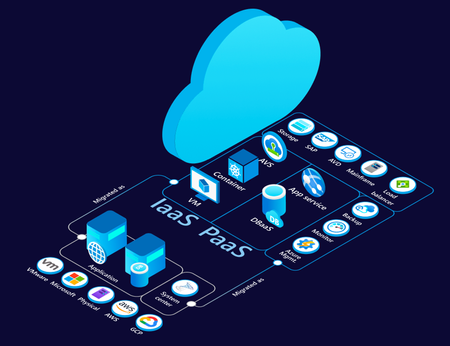
Introduction Moving to cloud is an essential step for enterprises looking to leverage the benefits of security, innovation (AI), scalability, flexibility, and cost-efficiency. To help unlock these benefits migration or modernization to Azure is critical for reasons such as colocation of IT assets. A crucial part of this transformation is understanding the current state of your IT infrastructure, including workloads, applications, and their interdependencies. Cloud migration is most effective when you can decide, plan and execute it holistically focusing on applications rather than focusing on individual servers or workloads in isolation. In our endeavour to both simplify and enrich your cloud adoption journey, we are evolving Application awareness in Azure Migrate that we introduced last year with features summarized below. Overview “The new design of Azure Migrate is much more intuitive, it allows us to group workloads into applications and track them throughout the migration journey. The Business Case Generator is a true game changer, providing insights that are ready for presentation at Leadership meetings. Azure Migrate continues to improve, making the execution of migration programs more seamless, faster, and secure. It has been an invaluable tool for our customers who are in the path of migrating to Azure” - Karthik Balachandran | Architect | EY Azure Migrate delivers a major evolution in cloud migration capabilities with application awareness. Here are key new features and why they matter: Multi-Server Dependency Mapping – Provides a holistic view of application topology, so you understand all server interactions before migrating. This reduces risk by ensuring no server is left behind and dependencies are respected during cloud transition. Software & Security Insights– Offers built-in intelligence on software inventory and vulnerabilities (e.g. highlighting outdated software and missing patches). This helps improve your environment’s security and stability as part of the migration journey, benefiting IT admins and security teams. Application definition & import– Allows you to treat applications as first-class citizens in Azure Migrate (not just tag groupings). You can create and manage app groupings easily, enabling a shift from managing individual workloads to managing whole applications in your migration project. Application migration or modernization RoI – Allows you to identify investments required in respective migration strategies as well as savings that would accrue as application are moved to Azure. Application Assessments– Delivers holistic migration plans per app, including recommended strategies (Rehost, Replatform, Refactor), target Azure services, sizing, cost estimates, and readiness checks. This empowers cloud architects to make informed decisions with an application-level focus. Code insight integration – GitHub Copilot assessment – Enables a developer-driven assessment loop by incorporating GitHub App Modernization Assessment reports. This tightens collaboration with dev teams and can dynamically adjust migration recommendations (e.g., flagging apps that need refactoring). CAST Highlight– Brings code-level analytics at scale into the migration plan. By importing CAST’s code scan results, you can identify technical debt and required code changes upfront, ensuring the recommended cloud approach truly fits the app’s codebase. Wave Planning with 1P Tool Integration– Provides a planning and execution framework to migrate in phases and launch the appropriate migration tools for each component seamlessly. This ensures end-to-end coverage – from migration scheduling to real-time execution – all within Azure Migrate. Capability deep dive Identify your applications using multi-server dependency mapping and subsequently define them One of the first steps in cloud migration planning is identifying application boundaries and dependencies. Azure Migrate’s new multi-server dependency mapping provides a rich visualization of how servers communicate with each other in your environment. This goes beyond the single-server dependency view of the past – now you can visualize an entire datacenter’s topology in one view. When you discover your on-premises environment, Azure Migrate’s agentless dependency analysis automatically begins mapping connections. It even measures connection strength, helping distinguish steady, critical communication from ephemeral connections. You can subsequently define applications, and assign metadata such as Name, type – Custom or Packaged (Commercial off the shelf), Criticality, Complexity (based on the number of dependencies), etc. Additionally, you can export your discovered inventory, assign application names in a spreadsheet, and import it back to quickly create many application grouping. You are free to refine or correct groupings, too. If during analysis you realize a server or workload was grouped incorrectly, simply update the application to add or remove that member (with no need to re-run discovery). Deleting an application grouping will not delete the underlying servers; it just removes the logical app wrapper, so you can reorganize safely as needed. Now, you can plan migrations by application units rather than individual workloads. This leads to more predictable outcomes (since all interdependent pieces move together), and it eliminates guesswork that used to come from manually correlating server relationships. Proactive Software and Security Insights Migration is not just about moving workloads – it’s an opportunity to remediate and improve what you have. The new Software and Security Insights surface critical information about your IT estate early on, so you can address potential issues before migration. Once your inventory is discovered, Azure Migrate now highlights: Software Insights:The portal flags certain software or OS components that might need attention or have cloud-friendly alternatives. For example, it might detect that some VMs run outdated middleware or unsupported OS versions. The tool provides recommendations for replacement or upgrade – e.g. suggesting you Repurchase a legacy product through Azure Marketplace or move to a SaaS solution for that functionality. This helps you plan modernization (repurchasing or upgrading software) as part of the migration project, rather than carrying technical debt to the cloud. Security Insights:Azure Migrate also integrates with security monitoring to detect vulnerabilities and missing updates in your servers. More importantly, it advises how to fix them: e.g. enabling Microsoft Defender for Cloud to address vulnerabilities, and using Azure Update Manager to apply pending updates. In essence, you get a mini security assessment alongside your inventory. These insights empower IT admins and security teams to tackle risks as part of migration planning. Rather than “lift-and-shift and then fix later,” you can remediate issues in parallel with migration, leading to a more secure and optimized environment on Azure. RoI for modernizing applications We are bringing in updates to Azure Migrate Business case to help ascertain the value you stand to gain by modernizing your applications – Custom or Packaged, as well as providing spend analysis across recommended migration strategies – Rehost, Replatform and Refactor. Holistic application assessments covering Infra-Data-Web tiers Application assessment builds on Azure Migrate’s existing server, database and webapp assessments, to give a migration game-plan for an entire application. It analyzes each component and then recommends An overall migration strategyamong Rehost, Replatform and Refactor, for the application under consideration. Migration readiness, and blockers that need to be addressed for respective strategy Target Azure Services and SKUs for workloads comprising the application Monthly cost estimates to run the application on Azure Migration tooling recommendations per workload comprising the application. Instead of piecemeal workload assessments, Cloud architects get a unified view per application – making it much easier to prioritize and plan. For example, you might discover that one application is an easy rehost (quick win), while another would clearly benefit from refactoring to eliminate costly components. Application assessments surface such insights with data, so stakeholders (including application owners and developers) can agree on a path forward with confidence. Ultimately, this leads to high-confidence migration plans and minimizes surprises during execution. Improve analysis with Code-Level Insights from Github Copilot assessment and CAST Most times, whether an application can be easily Replatformed or needs Refactoring depends on the application’s source code. Hence, we are bridging the gap between infrastructure and application development realities and are offering Integration with code analysis tools – GitHub Copilot assessment and CAST Highlight – to incorporate code-level insights into Azure Migrate’s recommendations. Talking about GitHub copilot – it is an indispensable tool for the application development. Developers can identify changes required in the code bases of their applications to make them ready for modernization to PaaS services such as AKS, App Service, etc. The cloud architect running Azure Migrate application assessment can request the application developers to ingest the code change insights from GitHub copilot assessment into Azure Migrate assessment. Once this report is ingested, you’ll see the Azure Migrate assessment refine its recommendations conclusively – such readiness, effort to make the code changes, migration strategy – depending upon whether the code changes are minimal or significant. Similarly, at-scale/ portfolio level code analysis performed using CAST Highlight, a prominent software intelligence platform, can be imported into Azure Migrate to improve the assessment recommendations. In practice, this means Azure Migrate will know if the code has, say, outdated libraries or many hard-coded dependencies that make cloud migration harder. Overall, the integration of code insights leads to more realistic migration plans and smoother hand-offs between cloud infrastructure teams and dev teams. Wave Planning and Integrated Migration Execution After discovering applications, assessing them, and incorporating any code insights, you’re ready to migrate or modernize – but large migrations often happen in phases. That’s where the new Wave Planning feature comes in. Wave planning in Azure Migrate helps you organize and sequence the actual migration execution in waves or batches, plan the migration activities and execute using integrated first party migration tools and track the end-to-end migrations; thereby providing a single place where different users – Cloud architects, developers, application owners, etc. can collaborate and coordinate through the migration journey. If your strategy for an application (or a particular server in the application) is Rehost (lift-and-shift to Azure VMs), Azure Migrate will use its built-in Server Migration capability. You can start the replication of that server to Azure right from the wave plan. If your strategy is Replatform or Refactor and involves migrating data, the wave plan can redirect you to Azure Database Migration Service (DMS). All these integrations mean you can coordinate multi-step migrations from one place. Wave planning is aware of various target strategies and helps orchestrate them, so cloud administrators don’t have to juggle separate tool interfaces for VMs vs. databases vs. web apps. As each part of a wave completes, Azure Migrate updates the wave status for Rehost scenarios and users can manually update the status’ for Refactor or Replatform scenarios where some steps may take out of band. Interested in trying the new feature set and experience? All the above features are available in Azure Migrate now (in preview as of 7 th November, 2025). Just create a new Azure Migrate project and you’ll be greeted with the new interface. From there, you can start defining applications and exploring these capabilities with your own data. About Azure Migrate Azure Migrate is Microsoft’s free platform for migrating and modernizing to Azure. It provides IT resource discovery, assessment, business case analysis, wave planning, migration, and modernization capabilities in a workload agnostic manner. You can run and monitor your migration/ modernization journey from a single, secure portal. Currently, Azure Migrate's application aware experience supports the discovery of following workloads: Windows Server, Linux Server, SQL Server, PostgreSQL, .NET webapp on IIS, and Java on Tomcat running on various platforms including, VMware, Microsoft, Bare-metal, AWS EC2, GCP CE, and Xen. Further, it supports assessments and wave planning for Azure VM, Azure VMware Solution (AVS), Azure SQL Managed Instance, Azure SQL Database, Azure Database for PostgreSQL Flexible Server, App Service Code, App Service Containers, and Azure Kubernetes Service. Last, it supports in-line Lift and Shift migration to Azure VM and Azure Local. Note: MySQL discovery and assessment is available in the classic experience only
Unlock cost savings with utilization-based storage recommendations in Azure Migrate
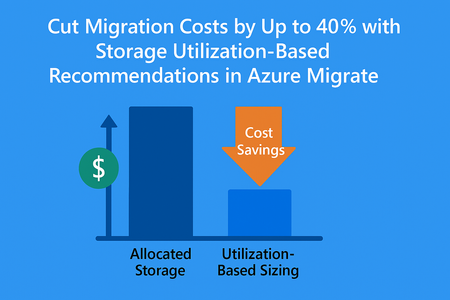
We’re thrilled to announce a game-changing enhancement in Azure Migrate. The storage utilization-based recommendations, a feature designed to help you right-size your storage workloads and maximize savings. By focusing on actual storage usage instead of allocated capacity, you can significantly reduce costs and accelerate their cloud journey. This feature brings a new level of precision to your migration planning and business case. Why This Matters In our analysis across thousands of on-premises environments, we observed a striking trend: nearly 40% of allocated storage is overprovisioned. This means customers are paying for capacity they don’t actually use. Traditional assessments often rely on allocated storage, leading to inflated cost estimates and suboptimal resource planning. What’s New Azure Migrate now honors actual storage utilization rather than allocated capacity when generating: Assessment recommendations for right-sizing your storage workloads. Business case calculations for accurate cost projections. This shift ensures: Lower migration cost projections: Pay for what you use, not what you’ve overprovisioned. Optimized cloud footprint: Reduce unnecessary storage allocation in Azure. Faster ROI: Build a business case that reflects true utilization, accelerating decision-making. Customer Impact By leveraging utilization-based insights, organizations can unlock significant savings and operate with greater efficiency. For example, if 40% of your storage is overprovisioned, this feature could cut your projected Azure storage costs dramatically, freeing up budget for innovation. How to Get Started Deploy an appliance in your on-premises environment. Build the business case or create an Azure Migrate Assessment for your on-premises workloads. Review the utilization-based recommendations in your assessment report or business case. Learn More Visit Azure Migrate documentation for detailed guidance and start optimizing your migration journey today.Preparing for Your Organization’s AI Workloads – Student Learning Pathways
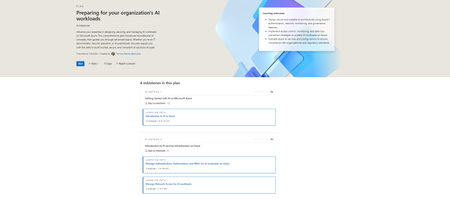
This structured plan helps students: Plans | Microsoft Learn Build foundational knowledge of AI in the cloud. Learn how enterprise-level infrastructure supports responsible, scalable AI deployments. Explore governance and monitoring strategies to ensure security and compliance. And the best part? It’s built using Microsoft’s existing training resources plus some brand-new modules to give you an edge. Your AI Readiness Journey on Azure 🎯 Milestone 1: Getting Started with AI on Azure https://learn.microsoft.com/training/paths/introduction-to-ai-on-azure/ Begin with the basics—from machine learning concepts to practical uses of Azure AI services. 🛡️ Milestone 2: Infrastructure Essentials https://learn.microsoft.com/training/paths/manage-iam-for-ai-workloads-on-azure/ https://learn.microsoft.com/training/paths/manage-network-access-ai-workloads/ Learn how enterprises secure access and manage identities—critical for real-world applications. 📊 Milestone 3: Monitoring AI Services https://learn.microsoft.com/training/paths/monitor-ai-workloads-on-azure/ Discover how businesses ensure their models perform safely and consistently at scale. 🏛️ Milestone 4: Advanced Management & Governance https://learn.microsoft.com/training/paths/ai-workloads-governance/ Master how organizations prevent data leaks and enforce responsible AI usage. 🆕 New Training Content Just for You To make this roadmap even more student-friendly, Microsoft has introduced updated and brand-new modules, including: Azure ML Authentication & Authorization Secure Azure AI Services Restrict Workspace Network Traffic Monitor Azure ML Prevent Data Exfiltration Govern AI Services with Azure Policy 🔗 Ready to Dive In? Whether you're exploring a career in AI or just getting started with Azure, these learning paths will level up your skills while helping you understand how real-world teams manage complex AI workloads. Start your journey on Microsoft Learn and become the architect of tomorrow’s intelligent systems. 💡 Would you like a version formatted for your internal newsletter or maybe something more conversational for social media? I can easily tailor it to fit the tone or medium you're aiming for.491Views0likes0Comments
Cost-effective alternatives to control table for processed files in Azure Synapse
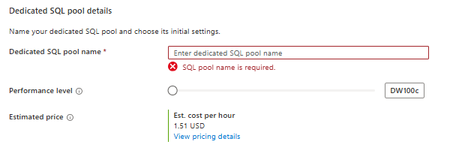
Hello, good morning.In Azure Synapse Analytics, I want to have a control table for the files that have already been processed by the bronze or silver layers. For this, I wanted to create a dedicated pool, but I see that at the minimum performance level it charges 1.51 USD per hour (as I show in the image), so I wanted to know what other more economical alternatives I have, since I will need to do inserts and updates to this control table and with a serverless option this is not possible.512Views1like2Comments