data loss prevention
21 Topics
Insider Risk Level not being correctly picked up by DLP
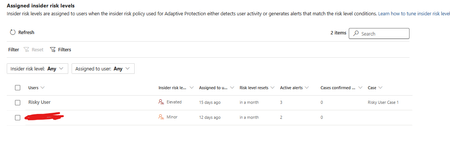
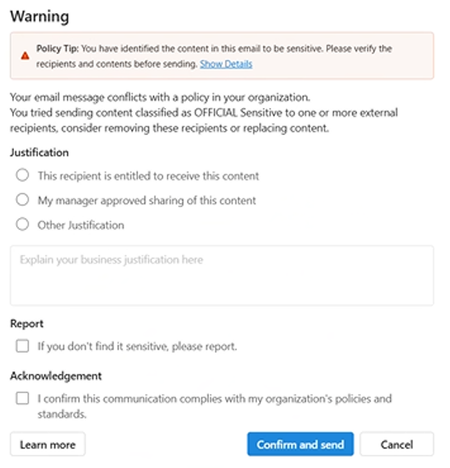
I have two users currently with assigned Insider Risk levels, one elevated and one minor. I have taken the templated DLP policy (DSPM for AI - Block sensitive info from AI sites) which looks for sensitive information being pasted to generative AI sites, and applies a block if the user is an elevated risk user, and a block with override for a moderate/minor risk user (this was audit only originally). For each advanced DLP rule within that policy, I have a separate policy tip which shows so I know which Advanced DLP rule has been hit. However, I'm having some discrepancies with the correct insider risk level being identified by Purview and therefore the wrong advanced DLP rule is being applied. Testing examples: Logged into a Windows 11 PC with the account, and using Medium confidence UK NINO's I try pasting the content into ChatGPT: Elevated risk user: Block with Override Minor Risk user: Block with Override If I try the exact same scenario on a different PC, I can sometimes get to the point where even though its the same set of data, Purview allows me to paste it at after checking the data. Or in another scenario, I was getting both users hitting the "elevated risk" advanced DLP rule. The Devices are all showing as up to date sync wise with DLP policies, and the policy itself is showing as fully synced. Assigned insider risk levels: DLP Rules: Elevated: Moderate/Minor:Solved716Views0likes2Comments
How can we identify the size of a Microsoft Purview DLP policy and individual DLP rules?
Hello Microsoft Community, According to the Microsoft Purview DLP policy reference, the following platform limits apply: Maximum size of a DLP policy: 100 KB Maximum size of an individual DLP rule: 100 KB or 102,400 characters Maximum number of rules within a policy: Limited by the overall policy size I would like to understand how these limits are calculated and how administrators can monitor the current size of an existing DLP policy or rule. Could someone please clarify the following? What exactly is included when calculating the 100 KB DLP policy size? Does the policy size include only policy-level configuration, such as locations, users, groups, administrative units, inclusions and exclusions, or does it also include the combined definitions of all rules associated with the policy? What exactly is included in the 100 KB individual rule size? Sensitive information types and their GUIDs Condition groups Instance-count and confidence-level configurations Exceptions Endpoint DLP restrictions User notifications and policy-tip messages Override options Alert and incident-report settings Recipient lists Advanced rule configuration For example, does it include: The documentation describes the rule limit as “100 KB (102,400 characters).” Is the limit based on: The number of characters The UTF-8 or Unicode byte size The serialized JSON/XML representation An internally generated policy payload Is there a supported method in the Microsoft Purview portal, Security & Compliance PowerShell, Microsoft Graph, or another API to display the current size of: A DLP policy Each DLP rule The remaining available policy capacity Can the size be estimated by exporting the output from Get-DlpCompliancePolicy and Get-DlpComplianceRule? If so, which properties should be included in the calculation, and what encoding or serialization format should be used? Does the 100 KB policy limit represent the combined size of the policy and all its rules, or are the policy and rule limits evaluated independently? What error or warning is generated when a policy or rule approaches or exceeds the limit? Is there any notification before the limit is reached? We are designing global Microsoft Purview DLP policies containing multiple Sensitive Information Types, condition groups and workload-specific rules. We need a reliable method to measure policy and rule sizes during design and ongoing policy governance. Any official guidance, supported script, API property, or calculation method would be appreciated.Solved550Views0likes2CommentsOnboarding Devices to Purview
I am not clear on how can I onboard devices to MDE so that I can enforce EDLP policies. We have CrowdStrike as Primary AV and other policies. Devices are managed through Intune for Bitlocker encryption and all the other settings except they don't have Defender. These devices are not showing up in Purview nor under "Endpoint detection and response" location under Endpoint Security. If we create an EDR onboarding policy and deploy to devices, then it shows the devices and says that AMRUnningMode is Passive, but Antivirus is true. Which I feel like Defender is taking over CrowdStrike? or am I wrong. My goal is to make sure CrowdStrike still primary AV and devices should be onboarded to MDE and then to Purview so that we can scope EDLP policies properly. Can anyone help me to understand or provide right steps?602Views0likes1CommentActivity explorer scoping to AU
I remember that Activity Explorer can be fully scoped to Admin Units, and that the Restricted admin can see activity explorer and DLP matching events for the scoped AU only, is that correct? Cause I was checking and I found the Restricted admin can see the activities also for the users out of the scoped AU. Does that make sense?135Views0likes3CommentsPurview DLP Behaviours in Outlook Desktop
We are currently testing Microsoft Purview DLP policies for user awareness, where sensitive information shared externally triggers a policy tip, with override allowed (justification options enabled) and no blocking action configured. We are observing the following behaviours in Outlook Desktop: Inconsistent policy tip display (across Outlook Desktop Windows clients) – For some users, the policy tip renders correctly, while for others it appears with duplicated/stacked lines of text. This is occurring across users with similar configurations. Override without justification – Users are able to click “Send Anyway/Confirm and send” without selecting any justification option (e.g. business justification, manager approval, etc.), which bypasses the intended control. New Outlook: Classic Outlook: This has been observed on Outlook Desktop (Microsoft 365 Apps), including: Version 2602 (Build 19725.20170 Click-to-Run) Version 2602 (Build 16.0.19725.20126 MSO) Has anyone experienced similar behaviour with DLP policy tips or override enforcement in Outlook Desktop? Keen to understand if this is a known issue or if there are any recommended fixes or workarounds.866Views0likes3Comments
Unable to use MS Graph DLP Api's to use with my Entra Registered App
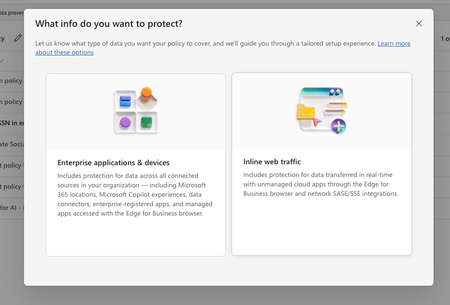
In purview, I have set of policies in DLP, where I have registered to block the US SSN in the text contents and I have created different policies in all of them I have selected the available locations: Exchange email - All accounts SharePoint sites OneDrive accounts - All accounts Teams chat and channel messages - All accounts Devices - All accounts Microsoft Defender for Cloud Apps On-premises repositories And selected action as block all, in all of them for the rule and enabled the rule (not in simulation mode) Now, I have the app registered in Entra and I try to use the following API's https://learn.microsoft.com/en-us/graph/api/userprotectionscopecontainer-compute?view=graph-rest-1.0 https://learn.microsoft.com/en-us/graph/api/userdatasecurityandgovernance-processcontent?view=graph-rest-1.0&tabs=http But whenever I use the compute api I can see i'm only getting curl -X POST https://graph.microsoft.com/v1.0/users/5fd51e08-c5f1-4298-b79b-a357eaa414ff/dataSecurityAndGovernance/protectionScopes/compute\ -H 'Authorization: Bearer <ACCESS_TOKEN>'\ -H 'Content-Type: application/json' -d '{ "activities": "uploadText,downloadText" }' { "@odata.context": "https://graph.microsoft.com/v1.0/$metadata#Collection(microsoft.graph.policyUserScope)", "value": [ { "activities": "uploadText,downloadText", "executionMode": "evaluateOffline", "locations": [ { "@odata.type": "#microsoft.graph.policyLocationApplication", "value": "b48106d9-1cdb-4d90-9485-fe2b6ee78acf" } ], "policyActions": [] } ] } My sample App's Id is showing up but always with `evaluateOffline` I don't know why it always gives 'evaluteOffline' and policyActions is always empty array Also, I can see my Entra registered app is showing up here in the value of the locations And when I use the processContent api , I always get modified in the response and nothing else like below: curl -XPOST https://graph.microsoft.com/v1.0/users/5fd51e08-c5f1-4298-b79b-a357eaa414ff/dataSecurityAndGovernance/processContent \ -H 'Authorization: <ACCESS TOKEN>'\ -H 'Content-Type: application/json' -d '{ "contentToProcess": { "contentEntries": [ { "@odata.type": "microsoft.graph.processConversationMetadata", "identifier": "07785517-9081-4fe7-a9dc-85bcdf5e9075", "content": { "@odata.type": "microsoft.graph.textContent", "data": "Please process this application for John VSmith, his SSN is 121-98-1437 and credit card number is 4532667785213500" }, "name": "Postman message", "correlationId": "d63eafd2-e3a9-4c1a-b726-a2e9b9d9580d", "sequenceNumber": 0, "isTruncated": false, "createdDateTime": "2026-04-06T00:23:20", "modifiedDateTime": "2026-04-06T00:23:20" } ], "activityMetadata": { "activity": "uploadText" }, "deviceMetadata": { "operatingSystemSpecifications": { "operatingSystemPlatform": "Windows 11", "operatingSystemVersion": "10.0.26100.0" }, "ipAddress": "127.0.0.1" }, "protectedAppMetadata": { "name": "Postman", "version": "1.0", "applicationLocation": { "@odata.type": "microsoft.graph.policyLocationApplication", "value": "b48106d9-1cdb-4d90-9485-fe2b6ee78acf" } }, "integratedAppMetadata": { "name": "Postman", "version": "1.0" } } }' In the above request I have mentioned some sample US Security SSN, but the response I get is { "@odata.context": "https://graph.microsoft.com/v1.0/$metadata#microsoft.graph.processContentResponse", "protectionScopeState": "notModified", "policyActions": [], "processingErrors": [] } But Ideally I want to see whether I can get the content is valid or not, for example in the above request, it has SSN, so ideally I should get restrictAction or something right? Or is that evaluateInline is not available or something? Note that I have purchased E5 and assigned to the user who is trying this Also, whenever I choose to create a Policy in DLP , I got two options And Lets say I choose "Enterprise applications & devices", what happens is in the Locations, I'm seeing only these as the options: And If I choose the "Inline Traffic", i'm seeing only these options In Unmanaged, I'm seeing the following And in the Enforcement Options, I have the following : And in the "Advanced DLP rules" I'm seeing only these So, can you tell me the exact steps in the Purview suite, I couldn't where to mention the Entra registered App, I searched and I couldn't find one But in the compute endpoint, https://learn.microsoft.com/en-us/graph/api/userprotectionscopecontainer-compute?view=graph-rest-1.0 I'm getting my app but only with "evaluateOffline" and with that ETag, If I use the processContent Api, its not giving anything except as I mentioned above in the postSolved215Views0likes1Comment
Email to external(trusted user) not require verify user Identity(with Google or One-time passcode)
Dear Expert and Community, I am starting with MS Purview - Data Loss Prevention. I have one point to clarify and seek your advise / comment / contribute or sharing good practice regarding with below: - Firstly, we can send email to externally user contain sensitive information, it is encryption or blocked (result: worked as expected). If remail encrypt, the external receiver require verify the Identity via sign in with google acc / with a one time password. - Second: we plan sending email to external user (only trusted user / domain). Is it possible, do not require these scope user reverify their Identity again and again? If yes, how to do it? If not - why? Well appreciated for update and supporting. Thanks,415Views0likes3CommentsDLP USB Block
Currently we have DLP policies setup to block the use of USB devices and copying data to it. When checking the activity explorer I am still seeing user's able to copy data to USB devices and for the action item it says "Audit" when in the DLP policies we explicitly set it to block. Has anyone run into this issue or seen similar behavior?403Views0likes3CommentsDLP Policy not Working with OCR
Hello Community, i activated the OCR in Microsoft Purview, and scan works fine infact Purview find image that contains sensible data. I have created DLP Policy that not permit print and move to rdp file that containts "Italy Confidential Data" like "Passport Number, Drivers License ecc..." this policy works for xlsx or word that contains data, but if file word contains image with this data not apply the DLP Rule infact i'm able to print or move into rdp this file also only the jpeg file. Policy match correctly i see it into "Activity Explorer" Is this behavior correct? Regards, GuidoSolved199Views0likes1Comment