data loss prevention
21 Topics
DLP rule - Document Property is: 'ComplianceTag:\0'
Is an expression like the one below supported by the "Document Property Is" condition when setting a DLP Policy in Purview? I'm trying to set a rule that applies a DLP alert to files in SharePoint that do not have a retention label applied to them. Would using the null character regex work for this? Document Property is: 'ComplianceTag:\0' Alternatively, is it possible to set a rule when a document property does NOT contain something?1.8KViews0likes4CommentsTeams Private Channels Reengineered: Compliance & Data Security Actions Needed by Sept 20, 2025
You may have missed this critical update, as it was published only on the Microsoft Teams blog and flagged as a Teams change in the Message Center under MC1134737. However, it represents a complete reengineering of how private channel data is stored and managed, with direct implications for Microsoft Purview compliance policies, including eDiscovery, Legal Hold, Data Loss Prevention (DLP), and Retention. 🔗 Read the official blog post here New enhancements in Private Channels in Microsoft Teams unlock their full potential | Microsoft Community Hub What’s Changing? A Shift from User to Group Mailboxes Historically, private channel data was stored in individual user mailboxes, requiring compliance and security policies to be scoped at the user level. Starting September 20, 2025, Microsoft is reengineering this model: Private channels will now use dedicated group mailboxes tied to the team’s Microsoft 365 group. Compliance and security policies must be applied to the team’s Microsoft 365 group, not just individual users. Existing user-level policies will not govern new private channel data post-migration. This change aligns private channels with how shared channels are managed, streamlining policy enforcement but requiring manual updates to ensure coverage. Why This Matters for Data Security and Compliance Admins If your organization uses Microsoft Purview for: eDiscovery Legal Hold Data Loss Prevention (DLP) Retention Policies You must review and update your Purview eDiscovery and legal holds, DLP, and retention policies. Without action, new private channel data may fall outside existing policy coverage, especially if your current policies are not already scoped to the team’s group. This could lead to significant data security, governance and legal risks. Action Required by September 20, 2025 Before migration begins: Review all Purview policies related to private channels. Apply policies to the team’s Microsoft 365 group to ensure continuity. Update eDiscovery searches to include both user and group mailboxes. Modify DLP scopes to include the team’s group. Align retention policies with the team’s group settings. Migration will begin in late September and continue through December 2025. A PowerShell command will be released to help track migration progress per tenant. Migration Timeline Migration begins September 20, 2025, and continues through December 2025. Migration timing may vary by tenant. A PowerShell command will be released to help track migration status. I recommend keeping track of any additional announcements in the message center.1.4KViews2likes1CommentMicrosoft Purview Best Practices
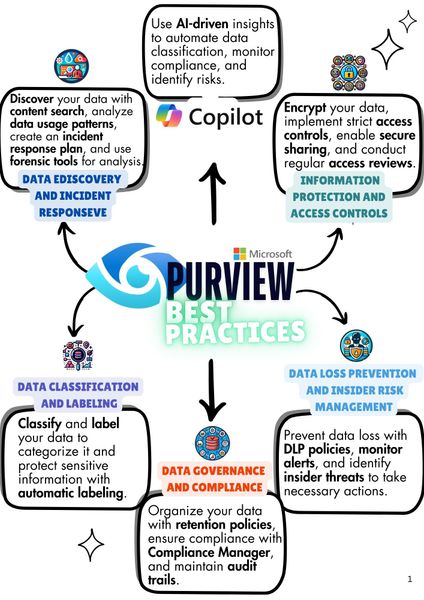
Microsoft Purview is a solution that helps organizations manage data and compliance. It also uses AI to classify data, monitor compliance, and identify risks. Key features include data discovery, classification, governence, retention, compliance management, encryption, and access controls. Purview ensures data security, prevents insider threats, and helps implement data loss prevention policies to meet compliance requirements. Hello everyone - This is just a short introduction, I am Dogan Colak. I have been working as an M365 Consultant for about 5 years, holding certifications such as MCT, SC-100, SC-200, SC-300, and MS-102, with a focus on Security & Compliance. This year, I am excited to share what I have learned with the Microsoft Technology Community. In the coming days, I will be publishing videos and articles based on the training agenda I have created. I will also share these articles on LinkedIn, so feel free to follow me there. I am always open to feedback and suggestions. See you soon!1.4KViews2likes1Comment
Inbound Sensitive Information
Hello All, We currently have some DLP policies to restrict Financial Data, HIPPA, and PII data from leaving our org. However, is there a way to restrict this type of sensitive data from being sent into the org? For example, an external address sends some sensitive data to a specific mailbox. Can a DLP policy be created to block that data from reaching a specific mailbox and reply back the email was blocked due to the content? Thanks for any info!Solved1KViews0likes5Comments
Copilot DLP Policy Licensing
Hi everyone We are currently preparing our tenant for a broader Microsoft 365 Copilot rollout and in preparation to that we were in the progress of hardening our SharePoint files to ensure that sensitive information stays protected. Our original idea was to launch sensitivity labels together with a Purview data loss prevention policy that excludes Copilot from accessing and using files that have confidential sensitivity labels. Some weeks ago when I did an initial setup, everything worked just fine and I was able to create the before mentioned custom DLP policy. However, when I checked the previously created DLP policy a few days back, the action to block Copilot was gone and the button to add a new action in the custom policy is greyed out. I assume that in between the initial setup and me checking the policy, Microsoft must have moved the feature out of our licensing plan (Microsoft 365 E3 & Copilot). Now my question is what the best licensing options would be on top of our existing E3 licences. For cost reasons, a switch to Microsoft 365 E5 is not an option as we have the E3 licences through benefits. Thanks!Solved901Views0likes2CommentsPurview DLP Behaviours in Outlook Desktop
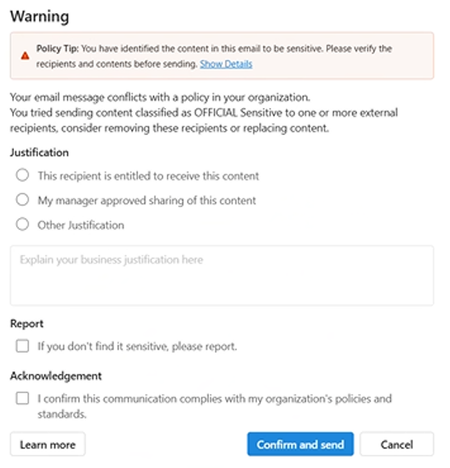
We are currently testing Microsoft Purview DLP policies for user awareness, where sensitive information shared externally triggers a policy tip, with override allowed (justification options enabled) and no blocking action configured. We are observing the following behaviours in Outlook Desktop: Inconsistent policy tip display (across Outlook Desktop Windows clients) – For some users, the policy tip renders correctly, while for others it appears with duplicated/stacked lines of text. This is occurring across users with similar configurations. Override without justification – Users are able to click “Send Anyway/Confirm and send” without selecting any justification option (e.g. business justification, manager approval, etc.), which bypasses the intended control. New Outlook: Classic Outlook: This has been observed on Outlook Desktop (Microsoft 365 Apps), including: Version 2602 (Build 19725.20170 Click-to-Run) Version 2602 (Build 16.0.19725.20126 MSO) Has anyone experienced similar behaviour with DLP policy tips or override enforcement in Outlook Desktop? Keen to understand if this is a known issue or if there are any recommended fixes or workarounds.800Views0likes3Comments
Migrating DLP Policies from one tenant to other
Has anyone successfully migrated DLP policies from a dev tenant (like contoso.onmicrosoft.com) to a production tenant (paid license with custom domain) in Microsoft Purview without third-party tools? We're open to using PowerShell, Power Automate, or other Microsoft technologies—such as exporting policies via PowerShell cmdlets from the source tenant, then importing/recreating them in the target tenant using the Microsoft Purview compliance portal or Security & Compliance PowerShell module. Details: The dev tenant has several active DLP policies across Exchange, Teams, and endpoints that we need to replicate exactly in prod, including sensitive info types, actions, and conditions. Is there a built-in export/import feature, a sample script, or Power Automate flow for cross-tenant migration? Any gotchas with licensing or tenant-specific configs?Solved800Views0likes4CommentsInsider Risk Level not being correctly picked up by DLP
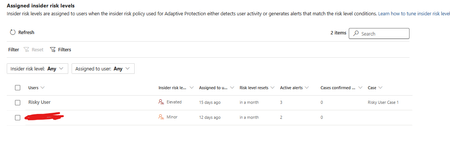
I have two users currently with assigned Insider Risk levels, one elevated and one minor. I have taken the templated DLP policy (DSPM for AI - Block sensitive info from AI sites) which looks for sensitive information being pasted to generative AI sites, and applies a block if the user is an elevated risk user, and a block with override for a moderate/minor risk user (this was audit only originally). For each advanced DLP rule within that policy, I have a separate policy tip which shows so I know which Advanced DLP rule has been hit. However, I'm having some discrepancies with the correct insider risk level being identified by Purview and therefore the wrong advanced DLP rule is being applied. Testing examples: Logged into a Windows 11 PC with the account, and using Medium confidence UK NINO's I try pasting the content into ChatGPT: Elevated risk user: Block with Override Minor Risk user: Block with Override If I try the exact same scenario on a different PC, I can sometimes get to the point where even though its the same set of data, Purview allows me to paste it at after checking the data. Or in another scenario, I was getting both users hitting the "elevated risk" advanced DLP rule. The Devices are all showing as up to date sync wise with DLP policies, and the policy itself is showing as fully synced. Assigned insider risk levels: DLP Rules: Elevated: Moderate/Minor:Solved700Views0likes2Comments
How can we identify the size of a Microsoft Purview DLP policy and individual DLP rules?
Hello Microsoft Community, According to the Microsoft Purview DLP policy reference, the following platform limits apply: Maximum size of a DLP policy: 100 KB Maximum size of an individual DLP rule: 100 KB or 102,400 characters Maximum number of rules within a policy: Limited by the overall policy size I would like to understand how these limits are calculated and how administrators can monitor the current size of an existing DLP policy or rule. Could someone please clarify the following? What exactly is included when calculating the 100 KB DLP policy size? Does the policy size include only policy-level configuration, such as locations, users, groups, administrative units, inclusions and exclusions, or does it also include the combined definitions of all rules associated with the policy? What exactly is included in the 100 KB individual rule size? Sensitive information types and their GUIDs Condition groups Instance-count and confidence-level configurations Exceptions Endpoint DLP restrictions User notifications and policy-tip messages Override options Alert and incident-report settings Recipient lists Advanced rule configuration For example, does it include: The documentation describes the rule limit as “100 KB (102,400 characters).” Is the limit based on: The number of characters The UTF-8 or Unicode byte size The serialized JSON/XML representation An internally generated policy payload Is there a supported method in the Microsoft Purview portal, Security & Compliance PowerShell, Microsoft Graph, or another API to display the current size of: A DLP policy Each DLP rule The remaining available policy capacity Can the size be estimated by exporting the output from Get-DlpCompliancePolicy and Get-DlpComplianceRule? If so, which properties should be included in the calculation, and what encoding or serialization format should be used? Does the 100 KB policy limit represent the combined size of the policy and all its rules, or are the policy and rule limits evaluated independently? What error or warning is generated when a policy or rule approaches or exceeds the limit? Is there any notification before the limit is reached? We are designing global Microsoft Purview DLP policies containing multiple Sensitive Information Types, condition groups and workload-specific rules. We need a reliable method to measure policy and rule sizes during design and ongoing policy governance. Any official guidance, supported script, API property, or calculation method would be appreciated.Solved500Views0likes2CommentsOnboarding Devices to Purview
I am not clear on how can I onboard devices to MDE so that I can enforce EDLP policies. We have CrowdStrike as Primary AV and other policies. Devices are managed through Intune for Bitlocker encryption and all the other settings except they don't have Defender. These devices are not showing up in Purview nor under "Endpoint detection and response" location under Endpoint Security. If we create an EDR onboarding policy and deploy to devices, then it shows the devices and says that AMRUnningMode is Passive, but Antivirus is true. Which I feel like Defender is taking over CrowdStrike? or am I wrong. My goal is to make sure CrowdStrike still primary AV and devices should be onboarded to MDE and then to Purview so that we can scope EDLP policies properly. Can anyone help me to understand or provide right steps?499Views0likes1Comment