data & ai
254 Topics🎉 Fabric Partner Community AI @Work Sweepstakes: How to Enter + Official Rules
🎉 Build Fabric Apps. Win Fabric sneakers. To celebrate Fabric's 3rd birthday, we're launching AI at Work, the biggest giveaway ever in the Fabric Partner Community, with more prizes and more chances to win than ever before. From November 11 through December 15, 2026, build Fabric Apps and share them with the community. Our goal is 2,000 partner-built apps by December 16. Every app moves us closer to the goal and gives you another entry. You don't need to be a developer. Describe what you want in plain English, let AI build it with Fabricator, GitHub Copilot or other tools, and then share it. Fabric Apps go well beyond dashboards: trackers, request forms, calculators, planners, quizzes, games, ops tools and more. ✅ Who can enter You're 18 or older. You work for a Microsoft partner organization. You're a member of the Fabric Partner Community Teams channel. Not a member yet? Join for free at aka.ms/JoinFabricPartnerCommunity. Microsoft employees aren't eligible. See the Official Rules below for all exclusions. 🎁 Birthday Bash (Nov 11 – 23) Build a Fabric App as a birthday gift for the community. Build any Fabric App. Post a gif, video or pic of the app you created to the Fabric Apps Gallery. Title your post Birthday Bash: [Your App Name]. Select the tag Partner | Birthday Bash. ⏰ Entries close: Mon, Nov 23, 2026 at 11:59 PM PT 🎲 Winners drawn: Tue, Nov 24, 2026, at random 👟 Prizes: 5 pairs of custom Fabric sneakers 🎄 12 Days of Fabric Apps (Nov 11 – Dec 15) Twelve festive themes with three winners per theme. You can submit for any theme at any time, and you can enter as many themes as you like. Pick a theme and build a Fabric App inspired by it. Post a gif, video or pic of the app you created to the Fabric Apps Gallery. Title your post 12 Days of Fabric Apps: Day [#] – [Theme], for example 12 Days of Fabric Apps: Day 1 – Cyber Monday Deals. Select the tag Partner | 12 Days of Fabric Apps. # Theme # Theme 1 Cyber Monday Deals 7 Reindeer Games 2 Ugly Sweater Showdown 8 Elf Help Desk 3 North Pole Warehouse 9 Naughty-or-Nice Predictor 4 Cookie Exchange 10 Snow Day Forecaster 5 Holiday Party Planner 11 Resolution Tracker 6 Gift Budget Buddy 12 Year in Review ⏰ Entries close: Tue, Dec 15, 2026 at 11:59 PM PT 🎉 Winners revealed: Live at the Fabric Engineering Connection Holiday call, Wed, Dec 16, 2026 👟 Prizes: 36 pairs of custom Fabric sneakers, 3 per theme 🚀 Community milestone drawings When the community hits these totals, we'll draw bonus winners from all eligible apps submitted since Nov 11: Apps Pairs 500 2 1,000 2 1,500 2 2,000 3 🎯 Good to know Each eligible app counts as one entry. More apps means more chances to win. Limit of one prize per person. Winners are drawn at random, offline. Before any winner is announced, we confirm they work for a Microsoft partner organization and are a Fabric Partner Community member. Posts without the correct title and tag may not be counted. Winners list: email fabricpartnersteam@microsoft.com with the subject "Fabric Partner Community AI at Work Sweepstakes winners" within 30 days of Dec 15, 2026. 🙌 Need help building? Office hours, the AMA, the Fabric Apps help channel, the starter kit and more are all in the Fabric Partner Community. Join today so you don't miss a thing. 📅 Key dates Date What's happening Wed, Nov 11 AI at Work launches; Birthday Bash and 12 Days open Wed, Nov 18 Fabric Apps office hours #1 Mon, Nov 23 Birthday Bash entries close (11:59 PM PT) Tue, Nov 24 Birthday Bash winners drawn Tue, Dec 1 Fabric IQ + Fabric Apps AMA Thu, Dec 10 Fabric Apps office hours #2 Tue, Dec 15 All entries close (11:59 PM PT) Wed, Dec 16 12 Days winners revealed at the Holiday call Let's build 2,000 apps together! 🚀 📜 Official Rules: see the attached PDF below.1.5KViews2likes0Comments
From Inbox to Audit Trail: Automating Compliant Email Export with Purview, Sentinel, and Logic Apps
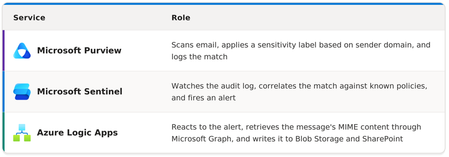
The problem: an AI agent that couldn't touch the mailbox When we architect systems for mission-critical enterprise environments, requirements that appear deceptively simple on paper often reveal the steepest operational cliffs. A customer approached us with a straightforward automation requirement: they were deploying an AI agent to triage incoming regulatory inquiry emails. These are high-consequence communications. They arrive in shared mailboxes, require a rapid operational response, and an audit trail designed to meet the organization's compliance and tamper-resistance requirements for internal and external regulatory review. The core design requirement was simple to state and surprisingly hard to satisfy: export the incoming emails to a SharePoint document library so the agent could work from a governed copy, rather than reaching into the mailbox directly. That requirement quickly hit a platform boundary. Across Microsoft 365, there is no native toggle or out-of-the-box workflow that bridges Exchange Online and SharePoint based on data sensitivity. Exchange Online handles transport; Microsoft Purview evaluates classification and policy compliance; Power Platform offers automation. Yet no single native capability provides the complete workflow: detect a qualifying inbound email, retrieve its MIME content, and store the resulting .eml file in SharePoint. Without a supported and repeatable solution, this requirement became a blocker for the AI initiative. Granting an automated agent broad mailbox permissions conflicted with the goal of least-privilege access. Alternatively, asking compliance officers to run periodic manual exports was unscalable and introduced unacceptable latency. To solve this, we designed an event-driven, three-tier architecture that classifies qualifying email, captures the resulting telemetry, retrieves the message's MIME representation, and stores it as an .eml file. The resulting design avoids scheduled mailbox polling, custodian-run export scripts, and stored application secrets. The architecture in brief The architecture uses three Microsoft cloud services, separating classification and detection from message retrieval and storage. The architecture does not depend on a custom-built service. Its value comes from how Microsoft Purview, Microsoft Sentinel, and Azure Logic Apps are connected, along with design choices such as managed identity, event-driven execution, and separate storage destinations that support operation in a regulated environment. End-to-end pipeline Let's walk through each stage. Stage 1 — Microsoft Purview auto-labeling & audit generation The process begins when Microsoft Purview auto-labeling evaluates qualifying Exchange Online email against the configured policy conditions. We scoped these policies to target sensitive communications originating from external regulatory sender domains. The policies define matching conditions: in this case, the sender domain. When an email matches, Purview applies a sensitivity label and writes an audit event to the Microsoft 365 unified audit log. That audit event, identified by ActionType = "AutoSensitivityLabelRuleMatch", provides the telemetry signal for the downstream workflow. By relying on an existing compliance signal generated by Microsoft 365, the design avoids introducing a separate mailbox-scanning mechanism or third-party journaling integration. Microsoft Sentinel can then detect the targeted activity through CloudAppEvents. This design explicitly tracks three separate auto-labeling policies, distinguished by policy ID: Note: Scoping detection to specific policy IDs narrows the query to the policies used by this workflow, excludes unrelated labeling activity, and makes detected events easier to correlate with their corresponding regulatory controls. Stage 2 — Microsoft Sentinel detection rule (KQL) The relevant activity is available in the CloudAppEvents advanced hunting table when the required Microsoft Defender for Cloud Apps and Microsoft 365 activity integration is configured. Microsoft Sentinel can query this telemetry through its Microsoft Defender XDR integration. A Sentinel analytics rule filters for the targeted auto-labeling activity, parses RawEventData, and projects the message and policy metadata required by the automation workflow. In this implementation, fields such as sender, recipients, subject, workload item ID, and policy details are extracted from RawEventData and its nested ExchangeMetaData value. Because audit payload schemas can evolve, validate these field paths against events in your own tenant before deploying the rule as-is. Sample KQL rule ```kusto // Sentinel Analytics Rule — AutoSensitivityLabelRuleMatch // Table : CloudAppEvents CloudAppEvents | where ActionType == "AutoSensitivityLabelRuleMatch" | where Application == "Microsoft Exchange Online" | extend RawData = parse_json(RawEventData) | where tostring(RawData.PolicyId) in ( "dcd0132b-7117-4466-8be9-880b5652e106", "a3900a77-0025-42e8-84b6-327de32cba6f", "0387080a-3861-45ab-84e1-4dee8d58490e" ) | extend ExchangeMeta = parse_json(tostring(RawData.ExchangeMetaData)) | extend MessageID = tostring(RawData.WorkLoadItemId) | extend Sender = tostring(ExchangeMeta.From) | extend Recipients = tostring(ExchangeMeta.To) | extend Subject = tostring(RawData.ItemName) | extend CC = tostring(ExchangeMeta.CC) | extend BCC = tostring(ExchangeMeta.BCC) | extend SentTime = todatetime(ExchangeMeta.Sent) | extend LabelName = tostring(RawData.LabelName) | extend LabelId = tostring(RawData.LabelId) | extend PolicyName = tostring(RawData.PolicyName) | extend PolicyId = tostring(RawData.PolicyId) | extend ExecutionRuleName = tostring(RawData.ExecutionRuleName) | extend Severity = tostring(RawData.Severity) | extend RuleMode = tostring(RawData.RuleMode) | project TimeGenerated, AccountId, AccountDisplayName, MessageID, Sender, Recipients, Subject, CC, BCC, SentTime, LabelName, LabelId, PolicyName, PolicyId, ExecutionRuleName, Severity, RuleMode ``` Two design decisions are worth emphasizing: Filter before parsing. Filtering on ActionType and Application before calling parse_json() reduces the number of records that require JSON processing. Deterministic entity mapping. Flattening and projecting these fields from RawEventData creates a predictable set of fields that can be mapped into the Sentinel alert and consumed by the Logic App. Map MessageID to the MailMessage entity's Internet Message ID so the Logic App receives an identifier it can use to locate the corresponding Microsoft Graph message before retrieving its MIME content. Stage 3 — Azure Logic Apps & automated EML extraction The automation layer is driven by Azure Logic Apps. A KQL-based Microsoft Sentinel analytics rule detects the targeted activity and generates a Sentinel alert. That alert invokes the Logic App through the Microsoft Sentinel alert trigger, providing the alert and its associated entities as input to the orchestration workflow. When no qualifying alerts are generated, the message-processing workflow does not execute, avoiding the recurring mailbox queries associated with scheduled polling. Once triggered, the Logic App uses the message metadata from the alert to resolve the corresponding message through Microsoft Graph. It then retrieves the message's MIME representation by calling the message endpoint with /$value. That MIME response can be stored with an .eml extension. For regulated communications, credential handling is a core design consideration. This architecture avoids stored client secrets for Microsoft Graph access. The Logic App uses its system-assigned managed identity and the Microsoft Graph application permissions required for the message retrieval operation. For production deployments, do not treat tenant-wide Mail.Read as the final least-privilege boundary. Constrain the application's mailbox scope using the Exchange Online application-access controls supported in your environment and grant only the Graph permissions required by the implementation. Storage architecture: where the emails land Each exported email is saved to two locations and organized by date. Azure Blob Storage supports the automation and storage workflow, while SharePoint provides the governed copy consumed by users and the AI solution. The naming structure is “Timestamp_ShortMessageIdentifier_SanitizedSenderAddress”. It provides a consistent naming convention that helps correlate the stored file with the message processed by the Sentinel alert and Logic App workflow. Date-partitioned folders keep both locations easy to browse, retire, or apply lifecycle or retention policy against. Why this closed the gap for the AI agent The original blocker was access: the AI agent needed a governed SharePoint-resident copy of qualifying regulatory email without receiving direct mailbox access. This pipeline provides that separation. The agent reads from LogicAppUploads/, where access can be controlled with standard SharePoint permissions and the organization's governance configuration. Only mail that enters the targeted Purview policy and Sentinel detection path is exported, so the agent's input is constrained by the same classification workflow used to identify the messages in the first place. One important distinction is that the stored .eml file and the SharePoint item have their own governance context. If the solution requires a SharePoint sensitivity label, retention label, immutable retention, or other records-management control on the exported copy, configure those controls explicitly rather than assuming the original email's Purview label is automatically transferred to the new file. Architectural takeaways for Mission Critical Deployments Use existing compliance signals where they meet the requirement. Purview auto-labeling can provide the event used to start downstream detection without introducing a separate mailbox-scanning service. Match the intended policy IDs. Explicit policy filtering keeps unrelated labeling activity out of the automation path and makes detections easier to audit. Prefer event-driven orchestration to mailbox polling. Triggering the workflow from detection activity avoids unnecessary mailbox queries and scheduled executions when there is no qualifying work. Avoid stored secrets for sensitive pipelines. A Logic App managed identity removes the need to store a client secret for Graph authentication. Combine it with the narrowest practical Graph permission and mailbox scope. Separate runtime storage from user-facing access when their requirements differ. Blob Storage and SharePoint can serve different consumers, but retention, immutability, permissions, and lifecycle requirements should be configured deliberately for each destination. When faced with a capability gap in enterprise architecture, the instinct is often to reach for a bespoke tool or write custom code. More often than not, the answer is already sitting on the board, scattered across services you likely already license and run. By aligning Purview’s classification engine, Sentinel’s event stream, and Logic Apps’ event-driven orchestration, we built a repeatable pattern that not only delivered the email artifact to the AI agent, but also gave the security and compliance team an unyielding architectural boundary. Sometimes the best solutions aren’t about reinventing the wheel; they’re simply about wiring the right signals together with intent.275Views0likes0CommentsJoin the Fabric Partner Community for the next AMA with Fabric LT
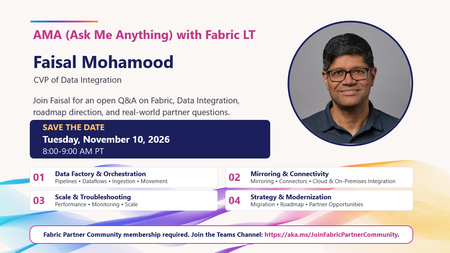
📣 Microsoft Fabric partners, save the date! Have questions about Fabric, Data Integration, roadmap direction, or real-world customer and partner scenarios? This is your chance to ask them directly. Join our AMA (Ask Me Anything) with Fabric LT Faisal Mohamood, CVP of Data Integration, for an open Q&A covering: 🔹 Data Factory & Orchestration: Pipelines, Dataflows, ingestion, and movement 🔹 Mirroring & Connectivity: Connectors, cloud, and on-premises integration 🔹 Scale & Troubleshooting: Performance, monitoring, and scaling 🔹 Strategy & Modernization: Migration, roadmap, and partner opportunities 📅 Tuesday, November 10, 2026 ⏰ 8:00–9:00 AM PT Bring your questions, challenges, feedback, and scenarios. This session is designed to give our Fabric Partner Community direct access to the conversation. 👉 Fabric Partner Community membership is required. https://aka.ms/JoinFabricPartnerCommunity What would you ask at the AMA? Drop your question in the comments. 👇96Views1like0Comments🏨👻 There’s something strange happening at the Fabric Haunted Hotel
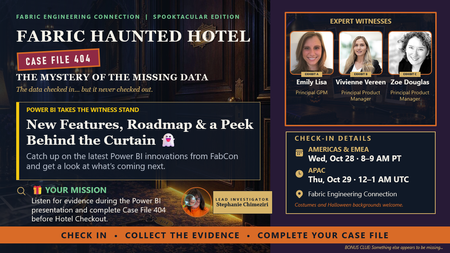
The data checked in. But it never checked out. 👀 So, for our Spooktacular edition of Fabric Engineering Connection, we’re opening: 🔎 CASE FILE 404: The Mystery of the Missing Data And we’ve called in three Power BI Expert Witnesses: 🔍 Emily Lisa, Principal GPM 🔍 Vivienne Vereen, Principal Product Manager 🔍 Zoe Douglas, Principal Product Manager They’ll take the witness stand for: New Features, Roadmap & a Peek Behind the Curtain 👻 Partners will hear about the latest Power BI innovations from FabCon and get a peek at what’s coming next. But this won’t be a sit-back-and-watch investigation. Every Fabric Detective will receive digital Case File 404 and collect evidence while listening to the Power BI team. 🔍 And yes...🎁 There will be prizes. 📅 Americas & EMEA: Oct. 28 | 8–9 AM PT 📅 APAC: Oct. 29 | 12–1 AM UTC 🔑 Want a key to the hotel? This experience is for members of the Fabric Partner Community. If your organization is a Microsoft partner and you’re not already part of the community, join us before check-in: 👉 https://aka.ms/JoinFabricPartnerCommunity Already a member? Tag another Microsoft partner who should join the investigation. 👇 🎃 Costumes encouraged. 🏨 Haunted Hotel backgrounds ready. 🔎 Curiosity required. CHECK IN • COLLECT THE EVIDENCE • COMPLETE YOUR CASE FILE146Views1like0CommentsOpen-Weight Models in Microsoft Foundry
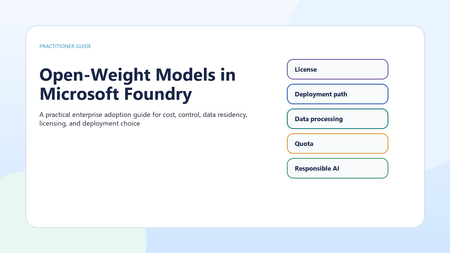
Open-weight models can be valuable, but they are not automatically cheaper, safer, or more controllable. In Microsoft Foundry, the right decision depends on deployment path, licensing, data-processing location, quota, support posture, operational ownership, safety controls, and lifecycle risk. Do not treat all visible or downloadable models as open source; review the license first. Start with Serverless API when a supported Foundry Model meets the workload need. Use partner/community models only after Marketplace, Product Terms, and regional availability checks. Treat managed compute as a preview path for open-source or custom models, not a production default. Validate data processing location, quota, safety controls, support model, and lifecycle before committing. Why this matters Open-weight models are now part of serious enterprise AI planning. Teams consider them for cost control, technical flexibility, transparency, data residency, regulatory pressure, and the ability to build in-house capability. But the useful question is not whether an open-weight model is better than a proprietary managed model. The useful question is which deployment and operating model fits the workload. Use precise language Open source does not simply mean that model weights or code are visible. The Open Source Initiative defines open source through license requirements such as free redistribution, source code access, derived works, non-discrimination, and technology-neutral terms. Many AI models are better described as open-weight: weights may be available or inspectable, but the license can still restrict use, redistribution, or competition. Architecture should not start until license and use rights are reviewed. Four adoption paths Microsoft Foundry gives teams several ways to use models. Foundry Models sold by Azure are hosted and operated by Azure, billed through the Azure subscription, covered by Azure service-level agreements, and supported by Microsoft. This is usually the lowest-friction production path when a supported model meets the requirement. Foundry Models from partners and community expand provider choice, but some are Non-Microsoft Products under Product Terms and can require Azure Marketplace subscription, purchase permissions, billing-country availability, and publisher-term review. Serverless API is documented as the preferred and most capable Foundry deployment option for Foundry Models, including models sold by Azure and select partner/community models. Managed compute is different. It hosts open-source, partner, and custom models on dedicated GPU capacity that Foundry manages. Microsoft owns the GPU topology, runtime, container image, and security patching, while the customer chooses the model, deployment template, accelerator family, and scaling behavior. However, managed compute is public preview, has no SLA, and is not recommended for production workloads in current documentation. A fully self-managed path can offer maximum control, but the organization owns the serving runtime, patching, scaling, observability, safety controls, and cost optimization. Decision criteria Start with workload fit. If a managed model satisfies accuracy, latency, region, and governance needs, avoid extra operational burden. Consider open-weight options when you need specific model behavior, weight-level control, a dedicated GPU path, specialized deployment templates, or a license that supports your intended use. Then test the economics. Token billing, reserved throughput, and hourly accelerator billing behave differently. Open-weight is not automatically cheaper once runtime efficiency, scale-to-zero behavior, GPU quota, engineering time, monitoring, and incident response are included. Data residency and availability Deployment choice also affects data processing. Serverless deployment types can process inferencing data globally, within a Microsoft-specified data zone, or in a single region depending on the selected tier. Model availability varies by provider, deployment type, region, quota, subscription, and cloud. Foundry guidance says to verify project region, feature support, model availability, quota, dependent services, and sovereign cloud constraints before production rollout. Responsible AI and safety Responsible AI is not optional because a model is open-weight. Microsoft Foundry guidance frames production readiness around discovering risks, protecting model and runtime behavior, and governing with monitoring and compliance integrations. In managed compute public preview, built-in content filtering is not part of the managed compute data path; applications that need request or response filtering should call Azure AI Content Safety APIs directly. That limitation can be decisive for production. Lifecycle and procurement risk Model lifecycle matters. Foundry Models move through Preview, Generally Available, Legacy, Deprecated, and Retired stages. Preview models are not recommended for production, and some generally available models from selected providers follow a shorter lifecycle than the standard lifecycle. Procurement also matters. Marketplace plans can require a valid payment method, purchase permissions, review of terms, and country or region availability. A model being visible in a catalog is not the same as being approved for a regulated workload. Recommended operating pattern Use Foundry Models sold by Azure when they meet the requirement and you want the simplest production support model. Use partner/community models when capability or provider choice matters and Marketplace and Product Terms are acceptable. Use managed compute for experimentation, evaluation, controlled preview adoption, or cases where dedicated GPU hosting of open-source or custom models is worth the constraints. Use self-managed hosting only when the organization is prepared to operate the full platform. Decision guide Production checklist Is the model sold by Azure, from a partner/community provider, managed compute, or self-managed? Does the license permit the intended commercial, regulated, or redistribution use case? Is the model GA, Preview, Deprecated, or approaching retirement? Who supports the model and runtime, and what SLA or preview terms apply? Where is inferencing data processed for the selected deployment path? What quota, billing model, accelerator capacity, and fallback option apply? Which safety controls are built in, and which must the application add? What will the team do if the model becomes unavailable, too expensive, or operationally risky? Conclusion Open-weight models should be adopted because they fit a workload, not because they are popular. The strongest enterprise pattern is disciplined choice: verify legal rights, choose the lowest-burden deployment path that satisfies the requirement, validate data and region constraints, measure cost with real traffic, and add safety and monitoring before production use.401Views0likes0CommentsMicrosoft Foundry, Azure Databricks, or Microsoft Fabric?
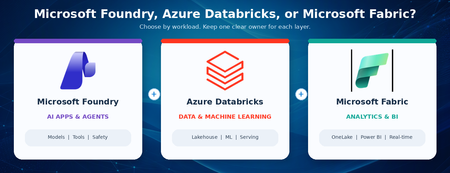
The question customers keep asking Customers often ask: If Azure Databricks already supports data engineering, machine learning, and AI agents, why should we use Microsoft Foundry? And if Microsoft Fabric also includes data science and AI features, where does Fabric fit? The confusion is understandable. All three platforms are adding new AI capabilities, and there is real overlap. A long feature checklist can look useful today and become outdated quickly. The better question is not which platform can do AI. The better question is which platform should own each part of the solution. A simple rule of thumb: use Azure Databricks for large-scale data and machine learning, use Microsoft Fabric for business analytics and shared data experiences, and use Microsoft Foundry for AI applications and agents that connect models, tools, and business systems. Use more than one only when each platform has a clear job. Start with the outcome, not the product name Begin with what the user needs. Is the main goal to prepare data and build models? Is it to deliver dashboards and trusted business insights? Or is it to build an AI application that can use several models, tools, and systems? The answer gives you a practical starting point. It does not create a hard boundary, but it helps you choose a primary owner. What each platform is best at? Azure Databricks: data, machine learning, and AI close to the data Azure Databricks is a strong choice when the solution starts with large amounts of data. Teams use it to collect, clean, transform, and analyze data, then train and run machine learning models. It also provides tools for building and operating AI applications and agents. For customers that already use Databricks, this matters. If an agent mainly works with Databricks data and tools, Databricks may already provide the simplest end-to-end path. The data, models, access controls, monitoring, and production operations can stay close together. Microsoft Fabric: business analytics and shared data experiences Microsoft Fabric is built as a software-as-a-service data and analytics platform. It brings together data movement, engineering, warehousing, real-time analytics, data science, and Power BI over OneLake. This makes it a strong choice when the main outcome is trusted business reporting, shared measures, dashboards, and broad self-service access. Fabric also supports a data agent that lets people ask questions in plain English over selected Fabric data. The agent is read-only and uses each person's permissions, which makes it well suited for governed data questions rather than general business actions. For a customer already using Databricks, Fabric does not have to mean moving everything. Fabric can mirror the Databricks catalog structure and read the underlying data through shortcuts. This provides a path to Power BI and Fabric analytics without copying the table data. The access rules still need to be configured in Fabric because Databricks permissions do not automatically carry across. Microsoft Foundry: AI applications and agents across systems Microsoft Foundry, formerly Azure AI Foundry, is a managed platform for building, running, and scaling AI agents. It supports simple prompt-based agents as well as custom agent code. It also brings models, tools, tracing, evaluations, identity, safety controls, and publishing into one AI application experience. Foundry becomes especially useful when the AI application must work across several systems. For example, an agent might use Databricks data, a Fabric data agent, SharePoint content, a business application, and custom services. Foundry can act as the AI application layer that brings those pieces together without replacing the data platforms underneath. It is also a strong fit when teams want a managed place to run agents, a shared set of tools and connections, consistent quality testing, dedicated agent identity, or delivery through Microsoft 365 Copilot and Teams. If you already use Databricks, do you need Foundry? Not automatically. Databricks has strong capabilities for agents, model access, serving, evaluation, monitoring, and governance. Adding another platform should solve a real problem, not repeat work that Databricks already handles well. Stay Databricks-centric when The agent mainly uses Databricks data, models, and tools. Databricks serving, evaluation, monitoring, and access controls meet the production need. The same data and machine learning team owns development and production. The user experience is delivered through a Databricks application or API. Add Microsoft Foundry when The agent must use data, tools, and business applications across several platforms. You need one managed place to run agents and reuse tools and connections. The experience must be delivered through Microsoft 365, Teams, or several application channels. The solution needs services for document processing, search, speech, vision, or centralized safety controls. Add Foundry for a new responsibility, not because Databricks lacks AI. Where Fabric fits in a Databricks and Foundry architecture Fabric often answers a different question: How will business users find, understand, and use the data? Databricks may remain the system of record for engineering and machine learning, while Fabric provides OneLake access, Power BI, shared business measures, real-time insights, and plain-language questions over trusted data. Foundry can then sit above those data and analytics services when the user experience needs an AI agent that works across them. This creates a clear layered design: Databricks owns the data and machine learning foundation, Fabric owns the analytics and business meaning, and Foundry owns the AI application and agent experience. Not every customer needs all three. Complexity should earn its place. Five questions that make the decision easier What is the main user outcome: data and model building, analytics and reporting, or an AI application that acts across systems? Where does the trusted data live today, and can the solution use it without creating another copy? Which team will build, secure, monitor, and support the production solution? Which systems must the solution connect to, and where will people use it? What clear value justifies another platform, cost model, security boundary, and support responsibility? If there is no clear answer to the last question, do not add another platform yet. Start with the simplest design that meets the need, measure it, and expand only when a real requirement appears. Common mistakes to avoid Using a feature checklist as the main decision method. Features change quickly; ownership and operating needs are more stable. Building the same data pipelines or storing the same data in both Databricks and Fabric without a clear reason. Assuming that Databricks permissions automatically transfer into Fabric. They do not; security must be tested on both sides. Choosing a platform mainly because of one preview feature. Confirm availability, regions, limits, and pricing before making a production commitment. Adding a platform without naming the team that will own the cost, security, monitoring, and support. Practical recommendations: For customers already centered on Databricks Keep Databricks as the primary data and machine learning platform. Add Fabric when Power BI, shared business measures, or broad analytics access create clear value. Add Foundry when the AI application must work across systems or needs a separate agent platform and Microsoft 365 delivery. For customers centered on Fabric Use Fabric for the data and business intelligence experience. Add Foundry when agents need broader models, tools, actions, or delivery channels. Add Databricks when advanced data engineering, open machine learning workflows, or an existing Databricks estate makes it the better execution platform. For new projects Start with one end-to-end business scenario. Choose the smallest set of platforms that can deliver it. Test security, cost, performance, and support ownership before expanding. A simple solution that is easy to operate is usually better than a more impressive architecture with unclear boundaries. Final takeaway You do not need to choose one platform as the winner. You need clear responsibilities. Azure Databricks can remain the home for data and machine learning. Microsoft Fabric can make trusted data easier for the business to use. Microsoft Foundry can power AI applications and agents that work across systems. The best architecture is usually easy to explain: preserve what already works, keep one trusted system of record, give each workload one primary owner, and add another platform only when it brings a clear new capability or operating model.Microsoft Foundry, Azure Databricks, or Microsoft Fabric?
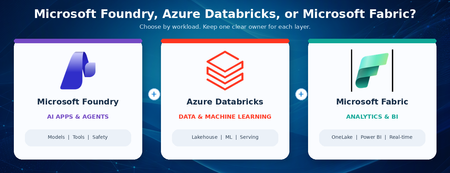
The question customers keep asking Customers often ask: If Azure Databricks already supports data engineering, machine learning, and AI agents, why should we use Microsoft Foundry? And if Microsoft Fabric also includes data science and AI features, where does Fabric fit? The confusion is understandable. All three platforms are adding new AI capabilities, and there is real overlap. A long feature checklist can look useful today and become outdated quickly. The better question is not which platform can do AI. The better question is which platform should own each part of the solution. A simple rule of thumb: use Azure Databricks for large-scale data and machine learning, use Microsoft Fabric for business analytics and shared data experiences, and use Microsoft Foundry for AI applications and agents that connect models, tools, and business systems. Use more than one only when each platform has a clear job. Start with the outcome, not the product name Begin with what the user needs. Is the main goal to prepare data and build models? Is it to deliver dashboards and trusted business insights? Or is it to build an AI application that can use several models, tools, and systems? The answer gives you a practical starting point. It does not create a hard boundary, but it helps you choose a primary owner. What each platform is best at? Azure Databricks: data, machine learning, and AI close to the data Azure Databricks is a strong choice when the solution starts with large amounts of data. Teams use it to collect, clean, transform, and analyze data, then train and run machine learning models. It also provides tools for building and operating AI applications and agents. For customers that already use Databricks, this matters. If an agent mainly works with Databricks data and tools, Databricks may already provide the simplest end-to-end path. The data, models, access controls, monitoring, and production operations can stay close together. Microsoft Fabric: business analytics and shared data experiences Microsoft Fabric is built as a software-as-a-service data and analytics platform. It brings together data movement, engineering, warehousing, real-time analytics, data science, and Power BI over OneLake. This makes it a strong choice when the main outcome is trusted business reporting, shared measures, dashboards, and broad self-service access. Fabric also supports a data agent that lets people ask questions in plain English over selected Fabric data. The agent is read-only and uses each person's permissions, which makes it well suited for governed data questions rather than general business actions. For a customer already using Databricks, Fabric does not have to mean moving everything. Fabric can mirror the Databricks catalog structure and read the underlying data through shortcuts. This provides a path to Power BI and Fabric analytics without copying the table data. The access rules still need to be configured in Fabric because Databricks permissions do not automatically carry across. Microsoft Foundry: AI applications and agents across systems Microsoft Foundry, formerly Azure AI Foundry, is a managed platform for building, running, and scaling AI agents. It supports simple prompt-based agents as well as custom agent code. It also brings models, tools, tracing, evaluations, identity, safety controls, and publishing into one AI application experience. Foundry becomes especially useful when the AI application must work across several systems. For example, an agent might use Databricks data, a Fabric data agent, SharePoint content, a business application, and custom services. Foundry can act as the AI application layer that brings those pieces together without replacing the data platforms underneath. It is also a strong fit when teams want a managed place to run agents, a shared set of tools and connections, consistent quality testing, dedicated agent identity, or delivery through Microsoft 365 Copilot and Teams. If you already use Databricks, do you need Foundry? Not automatically. Databricks has strong capabilities for agents, model access, serving, evaluation, monitoring, and governance. Adding another platform should solve a real problem, not repeat work that Databricks already handles well. Stay Databricks-centric when The agent mainly uses Databricks data, models, and tools. Databricks serving, evaluation, monitoring, and access controls meet the production need. The same data and machine learning team owns development and production. The user experience is delivered through a Databricks application or API. Add Microsoft Foundry when The agent must use data, tools, and business applications across several platforms. You need one managed place to run agents and reuse tools and connections. The experience must be delivered through Microsoft 365, Teams, or several application channels. The solution needs services for document processing, search, speech, vision, or centralized safety controls. Add Foundry for a new responsibility, not because Databricks lacks AI. Where Fabric fits in a Databricks and Foundry architecture Fabric often answers a different question: How will business users find, understand, and use the data? Databricks may remain the system of record for engineering and machine learning, while Fabric provides OneLake access, Power BI, shared business measures, real-time insights, and plain-language questions over trusted data. Foundry can then sit above those data and analytics services when the user experience needs an AI agent that works across them. This creates a clear layered design: Databricks owns the data and machine learning foundation, Fabric owns the analytics and business meaning, and Foundry owns the AI application and agent experience. Not every customer needs all three. Complexity should earn its place. Five questions that make the decision easier What is the main user outcome: data and model building, analytics and reporting, or an AI application that acts across systems? Where does the trusted data live today, and can the solution use it without creating another copy? Which team will build, secure, monitor, and support the production solution? Which systems must the solution connect to, and where will people use it? What clear value justifies another platform, cost model, security boundary, and support responsibility? If there is no clear answer to the last question, do not add another platform yet. Start with the simplest design that meets the need, measure it, and expand only when a real requirement appears. Common mistakes to avoid Using a feature checklist as the main decision method. Features change quickly; ownership and operating needs are more stable. Building the same data pipelines or storing the same data in both Databricks and Fabric without a clear reason. Assuming that Databricks permissions automatically transfer into Fabric. They do not; security must be tested on both sides. Choosing a platform mainly because of one preview feature. Confirm availability, regions, limits, and pricing before making a production commitment. Adding a platform without naming the team that will own the cost, security, monitoring, and support. Practical recommendations: For customers already centered on Databricks Keep Databricks as the primary data and machine learning platform. Add Fabric when Power BI, shared business measures, or broad analytics access create clear value. Add Foundry when the AI application must work across systems or needs a separate agent platform and Microsoft 365 delivery. For customers centered on Fabric Use Fabric for the data and business intelligence experience. Add Foundry when agents need broader models, tools, actions, or delivery channels. Add Databricks when advanced data engineering, open machine learning workflows, or an existing Databricks estate makes it the better execution platform. For new projects Start with one end-to-end business scenario. Choose the smallest set of platforms that can deliver it. Test security, cost, performance, and support ownership before expanding. A simple solution that is easy to operate is usually better than a more impressive architecture with unclear boundaries. Final takeaway You do not need to choose one platform as the winner. You need clear responsibilities. Azure Databricks can remain the home for data and machine learning. Microsoft Fabric can make trusted data easier for the business to use. Microsoft Foundry can power AI applications and agents that work across systems. The best architecture is usually easy to explain: preserve what already works, keep one trusted system of record, give each workload one primary owner, and add another platform only when it brings a clear new capability or operating model.258Views0likes0CommentsMicrosoft 365 Copilot Brand Kits: Making On-Brand Content Easier to Create
Creating a presentation should begin with the message, not with searching for the latest logo, confirming the correct font, or finding a slide deck that looks close enough to the corporate standard. AI can accelerate content creation, but speed alone does not solve brand consistency. Without the right assets and guidance, the result can still require significant cleanup before it is ready to share. Microsoft 365 Copilot Brand Kits bring approved brand assets and guidance into the content creation experience. Employees gain a clearer starting point, while brand managers and IT can control which organizational branding is available and who can manage it. The opportunity is straightforward: make approved branding easier to use, reduce avoidable rework, and help people focus on what they want to communicate. This article explains what Brand Kits include, how personal, shared, and official kits differ, how templates and organizational asset libraries affect PowerPoint results, and what administrators should configure before a pilot. Readers who are evaluating the experience can begin with the PowerPoint and template sections; administrators can start with setup, governance, and storage. What is a Copilot Brand Kit? A Brand Kit is a managed collection of approved brand assets and guidance—such as logos, colors, fonts, imagery, templates, and tone—that helps people create content aligned with an organization’s identity. In Microsoft 365 Copilot, Brand Kits provide a consistent starting point for branded content while allowing organizations to control how those assets are created, shared, and published. A Brand Kit brings together the elements that define an organization’s visual and verbal identity. Depending on how it is configured, that can include: Logos: Primary, secondary, and approved variations. Colors and fonts: Brand palettes and typography. Images and icons: Approved photography, illustrations, and visual assets. Templates and layouts: Reusable structures for creating content. Brand voice: Guidance on tone, terminology, and communication style. Usage guidelines: Rules for how brand elements should—and should not—be used. These elements help connect content creation to the organization’s standards rather than leaving each employee to assemble their own interpretation. For organizations with multiple brands, business units, or product identities, separate kits can help keep the right assets associated with the right content. Think of a Brand Kit as a managed starting point, not a guarantee that every generated result will be publication-ready. Personal, shared, and official: Understanding the three kit types Brand Kits support three different scopes of use. Personal Brand Kits: Personal kits are available only to their creator. They support individual work without exposing those assets across the organization. Creation rights still depend on organizational policy. “Personal” describes the kit’s audience—not an exemption from administrative controls. Shared Brand Kits: Shared kits make assets available to selected people based on the permissions assigned by the creator. They can support a department, project, or other defined group. Giving someone edit permission on a shared kit does not bypass the organization’s restrictions on who may create or edit kits. Official Brand Kits: Official kits are managed by designated brand managers and made available across the tenant. They provide an organization-wide option for approved corporate branding. This distinction matters: a kit shared with a team is not automatically an official organizational kit. How Brand Kits help in PowerPoint For PowerPoint, a Brand Kit provides access to approved assets and presentation templates that help guide generated content. Users can select an available Brand Kit when creating content and ask Copilot to incorporate relevant brand imagery. They can also start from an approved presentation or template. A practical approach is to: Choose the appropriate published Brand Kit. Use an approved template suited to the presentation. Describe the audience, purpose, and desired structure. Generate the content. Review the result for accuracy, readability, accessibility, and brand alignment. Selecting a Brand Kit does not automatically restyle existing slides. If the goal is to update an existing presentation, explicitly request or apply the branding changes. Copilot supports PowerPoint on Windows, Mac, and the web; availability also depends on licensing and organizational settings. Your template is as important as your assets A complete logo library cannot compensate for a weak PowerPoint template. Templates must show how the organization presents information, not merely define a color palette. Representative slides demonstrate how titles, text, images, charts, and other objects work together in realistic layouts. Include representative sample slides You do not need one sample slide for every possible layout. Instead, provide examples that reflect common and specialized presentation needs. A practical collection might include: A title slide and section divider. A straightforward content slide. An image-led slide. A chart or table. A process or timeline. A summary and next-steps slide. Choose examples that reflect how people actually communicate in your organization. A sales presentation and a technical briefing may need different patterns. Make placeholders intentional Copilot uses placeholder type, position, and size to understand the layout. Placeholder text is not a hidden instruction channel. Writing “Insert an executive summary here” inside a placeholder does not make that wording a semantic instruction to Copilot. Use the prompt to explain the communication goal. Use the template to demonstrate the presentation structure. Prepare for varying amounts of content Copilot does not resize the font or placeholder when generated text needs more space. Instead, it may add design elements to accommodate the content. That makes review important. Check for overcrowded slides, awkward text flow, and content that would be clearer if split across multiple slides. Keep instructions separate where possible Instructional slides can remain when they use reusable layouts, but mixing template guidance with normal presentation content can produce unintended results. A better practice is to keep reusable sample slides focused on the desired output and maintain detailed authoring instructions separately. Both .pptx and .potx files are supported as Brand Kit templates. Administrative setup Microsoft’s setup guidance directs administrators to configure the brand manager policy in the Microsoft 365 Apps admin center (config.office.com) using a tenant-wide policy and the designated security group. The setting appears as Elevated role for Brand Managers. Allow up to 24 hours for policy changes to take effect before treating a missing capability as a configuration failure. Restricting kit creation does not prevent users from accessing and using published official kits. Group membership matters Official editing and publishing rights are granted to members of the configured mail-enabled security group. Being a group owner is not enough. If an owner also needs to manage official Brand Kits, ensure that person is a member as well. Governance: Two permission checks, not one One of the most important administrative details is the relationship between two controls: Restrict brand kit creation governs who can create and edit kits. Enterprise Brand Manager governs publishing and management of official kits. When creation restrictions are enabled, a user needs the appropriate permissions under both controls to create and publish an official kit. For example, a person with Enterprise Brand Manager rights who is not in the permitted creation group cannot create or edit kits under that restriction. Conversely, someone allowed to create kits does not automatically have permission to publish an official kit. Storage and organizational asset libraries The implementation guidance supplied with this article describes Brand Kit data as stored in SharePoint Embedded containers: Personal and shared kits use user-based containers. Official kits use the official Brand Kit container. Organizations should verify which governance, labeling, retention, and access controls apply to their SharePoint Embedded containers and configuration. SharePoint Embedded storage does not by itself establish that every policy used for a conventional SharePoint site applies in the same way. An organizational asset library, or OAL, has a related but different role. An OAL can hold approved assets that a Brand Kit references. This lets organizations reuse an established asset collection rather than treating every kit as a separate collection of uploaded files. For PowerPoint, the important distinction is: In PowerPoint, users select the published Brand Kit, while the organizational asset library can supply assets referenced by that kit. Referencing assets also makes source accessibility important. If an asset cannot be found, check that the referenced OAL content remains accessible. Uploading the asset into the kit may be an alternative where appropriate. A practical way to get started Start with a focused pilot rather than loading every brand asset your organization owns into the first kit. Choose one presentation scenario Select a common use case, such as customer updates, internal briefings, or project reviews. This gives the team a concrete way to assess whether generated content meets real needs. Agree on ownership Identify who approves the assets, who maintains the template, who publishes the kit, and who manages the supporting permissions. A clear owner makes it easier to keep the kit current after launch. Prepare the template Review sample slides, placeholders, theme colors, fonts, and reusable layouts. Remove outdated examples and separate instructional material from production-ready samples where possible. Assemble the assets and guidance Include the approved logos, imagery, colors, fonts, and brand guidance needed for the pilot. Use compatible asset formats and sensibly sized images. Avoid unnecessarily large files—particularly images over 10 MB—as a performance precaution, not as a stated product upload limit. Configure permissions and publish Confirm both creation/editing permissions and official publishing rights. Check actual group membership rather than assuming that ownership or another administrative role provides access. Test with realistic prompts Evaluate more than whether the logo appears. Check layout selection, content density, imagery, readability, tone, and factual accuracy. Use the results to improve the kit and template before expanding adoption. An example prompt After selecting the appropriate Brand Kit, try a prompt such as: Create a presentation introducing our proposed customer onboarding approach to business stakeholders. Use the selected Brand Kit and its approved presentation template. Include the business problem, proposed approach, implementation stages, responsibilities, and next steps. Keep each slide focused on one main idea, use approved brand imagery where relevant, and add speaker notes. Do not invent metrics or customer examples; identify any missing information. The prompt explains the audience, purpose, and structure. The selected kit supplies the approved brand context. Four reliable ways to apply branding Choose the method that matches the task: use the organization theme for standard defaults, begin with a seed file when the presentation needs established structure, apply a named theme when that theme is available, or select a brand directly in PowerPoint. Frequently asked questions Do we need a sample slide for every layout? No. Prioritize representative examples across the slide types and specialized scenarios your organization actually uses. Can placeholder text tell Copilot what to generate? Not as semantic guidance. Placeholder type, position, and size inform layout; placeholder wording can influence styling but is not treated as an instruction. What happens when text does not fit? Copilot does not change the font size or placeholder size. It may add design elements. Review the result and simplify or split content where needed. Which template formats are supported? Both .pptx and .potx. Can instructional slides stay in the template? They can, when they use reusable layouts. However, keeping instructions separate reduces the risk of guidance appearing as presentation content. Can existing OAL assets be used? Yes. A Brand Kit can reference approved OAL assets. For PowerPoint Brand Kit selection, publish the kit rather than relying on the OAL alone. Why can a brand manager not create or publish an official kit? Check both permission controls. When creation restrictions are enabled, Enterprise Brand Manager rights alone are insufficient if the person is outside the permitted creation group. Also confirm that the person is a member, not only an owner, of the relevant group. Does selecting a kit update an existing presentation? No. Explicitly request or apply branding to existing slides. What should we check when assets are missing? Confirm that the kit is published, the expected assets are included, and referenced OAL content is accessible. Where appropriate, upload the assets directly into the kit. What most affects the quality of the output? The completeness of the kit and the quality of its template—especially representative sample slides, usable placeholders, and consistent theme settings. The bottom Line Microsoft 365 Copilot Brand Kits can make approved branding easier to use in everyday content creation. The strongest approach combines three things: a well-prepared kit, a well-designed template, and clear ownership. Start with a focused scenario, test realistic output, and refine the underlying assets and guidance. Human review remains essential, but a stronger starting point lets people spend less time correcting formatting and more time communicating clearly. References Create and manage official Brand kits in the Microsoft Copilot app | Microsoft Support Edit with Copilot in PowerPoint | Microsoft Support Use branded templates in the Microsoft Copilot app | Microsoft Support Enterprise brand manager policy setup | Microsoft Learn Set Up the Restrict Brand Kit Creation Policy in Microsoft Copilot | Microsoft Learn Keep your presentation on-brand with Copilot | Microsoft Support1.6KViews1like2CommentsBuild a Tenant-Wide Microsoft Foundry Model Operations Dashboard
As AI projects move from pilots to production, model deployments often spread across subscriptions, regions, and application teams. A practical operations dashboard gives platform, engineering, governance, and finance teams one shared view of what is deployed, how it is used, what it costs, and where quota or capacity risk is forming. The operating problem Microsoft Foundry brings agents, models, tools, monitoring, tracing, evaluations, RBAC, networking, and policy controls under a unified platform surface. That is a strong foundation, but enterprise operations still need a view that cuts across the way Azure is usually organized: multiple subscriptions, resource groups, regions, business units, and application teams. The goal is not to replace product dashboards. The goal is to add a management-group or tenant-wide operating layer that answers simple but urgent questions: Which models are deployed? Which teams own them? Which deployments use Standard, priority, batch, or provisioned throughput? Where are token usage and PTU utilization rising? Which subscriptions are approaching quota pressure? Which costs should be allocated to which product or environment? Design principle: keep the dashboard about deployment and operations metadata. Do not collect prompts, completions, customer data, or other application payloads unless a separate privacy, security, and compliance design explicitly requires it. A practical reference architecture Use three data planes. First, build the inventory plane with Azure Resource Graph, because Resource Graph is designed for efficient, large-scale querying across subscriptions and tenants. Combine account-level resource data with deployment-level data from the Azure AI Services deployments API, which lists deployments associated with a Cognitive Services account. Normalize subscription, resource group, region, account, deployment name, model name, model version, deployment type, SKU or capacity, tags, owner, environment, and business unit. Build the telemetry plane with Azure Monitor. Public Azure OpenAI monitoring guidance describes dashboards for HTTP requests, token-based usage, PTU utilization, and fine-tuning. Azure Monitor supported metrics and resource log references provide the authoritative place to check what is available for each resource type and how exportability works. For exploratory operations views, Azure Workbooks are a good fit because they combine logs, metrics, parameters, Azure Resource Graph, Azure Resource Manager, JSON, and other data sources in one interactive report. Build the finance plane with Cost Management APIs or exports. Cost Management automation guidance supports retrieving and managing cost data, including for larger datasets that need offline analysis. The Cost Management Query API supports usage queries at scopes such as subscription, resource group, billing account, management group, billing profile, and invoice section, subject to permissions. Power BI can be useful for leadership reporting, but the Cost Management connector has agreement constraints; direct connector support is documented for Enterprise Agreement and direct Microsoft Customer Agreement customers, while unsupported agreements should use exports. Separate inventory, usage, cost, and quota Do not treat every signal as the same kind of data. Inventory is mostly current-state metadata. Usage is time-series behavior. Cost is billing-scope data that may lag and must be joined carefully by resource identity, meter, and tags. Quota is a capacity-control signal, not a spend signal. Azure OpenAI quota is not enforced at tenant level; Microsoft Learn states that the highest quota restriction is scoped at the Azure subscription level. That means an executive dashboard can summarize quota posture broadly, but engineering views should still preserve subscription, model, region, and deployment-type detail. Provisioned throughput deserves a dedicated view. Microsoft documents PTU as dedicated model processing capacity for predictable throughput and latency, billed per PTU per hour or through reservations. That makes PTU utilization, idle capacity, traffic predictability, and latency requirement visible design inputs rather than after-the-fact finance questions. Dashboard views that matter Start with a few durable views rather than a large reporting program. The most useful first version usually includes: Executive summary: deployment count, model families, regions, monthly cost trend, and quota risk. Inventory: deployments by subscription, resource group, region, model, version, deployment type, owner, and environment. Operations: request volume, token trends, errors, latency indicators, and PTU utilization where available. Cost allocation: spend by owning team, application, environment, and deployment type. Governance hygiene: missing tags, ownerless deployments, old model versions, and regional concentration. Decision guidance Choose the reporting surface by audience. Platform engineers usually need Workbooks because they support operational drill-down and can combine Azure Monitor and Resource Graph. Finance teams often need Power BI because it supports broader cost modeling and distribution. Application owners need a small scorecard: their deployments, their usage, their costs, their quota posture, and their next required action. Production considerations and limitations Require tags before reporting on ownership. Dashboards cannot create accountability if resources do not carry owner, application, environment, and cost-center metadata. Use least-privilege access. Cost, inventory, and telemetry sources may require different permissions and scopes. Check portal-version language. Some public monitoring guidance is explicitly marked for the Foundry classic portal, so avoid assuming identical behavior in every new portal experience. Verify regional availability. Model availability varies by region, and deployment lifecycle settings such as automatic model updates should be reviewed before making standardization claims. Respect metric export limits. Azure Monitor notes that some metrics have export constraints, especially around multidimensional metrics and diagnostic settings. Implementation checklist Define the dashboard audience and the decisions it must support. Inventory Foundry and Azure OpenAI resources across subscriptions with Azure Resource Graph. List deployments per account and normalize deployment metadata. Route or query Azure Monitor metrics and logs needed for usage and PTU views. Add Cost Management queries or exports at the correct billing scope. Join by resource ID and tags; flag missing ownership metadata. Publish an Azure Workbook for operations and a Power BI model only where agreement support and permissions fit. Review model versions, quota posture, and PTU utilization on a fixed cadence. Conclusion A tenant-wide model operations dashboard is a practical bridge between AI experimentation and AI platform management. It does not need to be complex on day one. Start with inventory, usage, cost, quota, and ownership. Keep application content out of scope. Preserve subscription-level quota detail. Then evolve the dashboard into a repeatable operating rhythm for model lifecycle, cost control, capacity planning, and governance.397Views0likes0CommentsOn the Next Fabric Engineering Connection
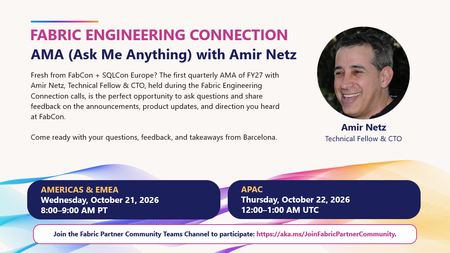
🚀 On the Next Fabric Engineering Connection: AMA with Amir Netz! Fresh from European Microsoft Fabric + SQL Community Conference with questions, feedback, or a few “wait, tell me more about that…” moments? 👀 The next Fabric Engineering Connection is the perfect place to bring them. 🎤 AMA (Ask Me Anything) with Amir Netz, Technical Fellow & CTO This is our first Quarterly AMA of FY27, and partners will have the opportunity to ask questions directly about: ✨ The announcements and product updates coming out of FabCon Europe 💡 What those updates mean for customers and partner practices 🧭 Fabric’s direction and where partners should be focusing 💬 Your own technical questions, feedback, and real-world customer scenarios One of the best parts of the Fabric Partner Community is getting this kind of direct access to the people shaping the product, so come ready with your questions! 📅 Americas & EMEA: Wednesday, October 21 | 8:00–9:00 AM PT 📅 APAC: Thursday, October 22 | 12:00–1:00 AM UTC 🔒 Fabric Engineering Connection is exclusively for members of the Fabric Partner Community. If you’re a Microsoft partner and haven't joined yet, this is a great reason to jump in. 👉 https://aka.ms/JoinFabricPartnerCommunity See you there. I have a feeling this is going to be a good one! 🔥136Views1like0Comments