A simple guide to choosing the right platform without replacing what already works
The question customers keep asking
Customers often ask: If Azure Databricks already supports data engineering, machine learning, and AI agents, why should we use Microsoft Foundry? And if Microsoft Fabric also includes data science and AI features, where does Fabric fit?
The confusion is understandable. All three platforms are adding new AI capabilities, and there is real overlap. A long feature checklist can look useful today and become outdated quickly. The better question is not which platform can do AI. The better question is which platform should own each part of the solution.
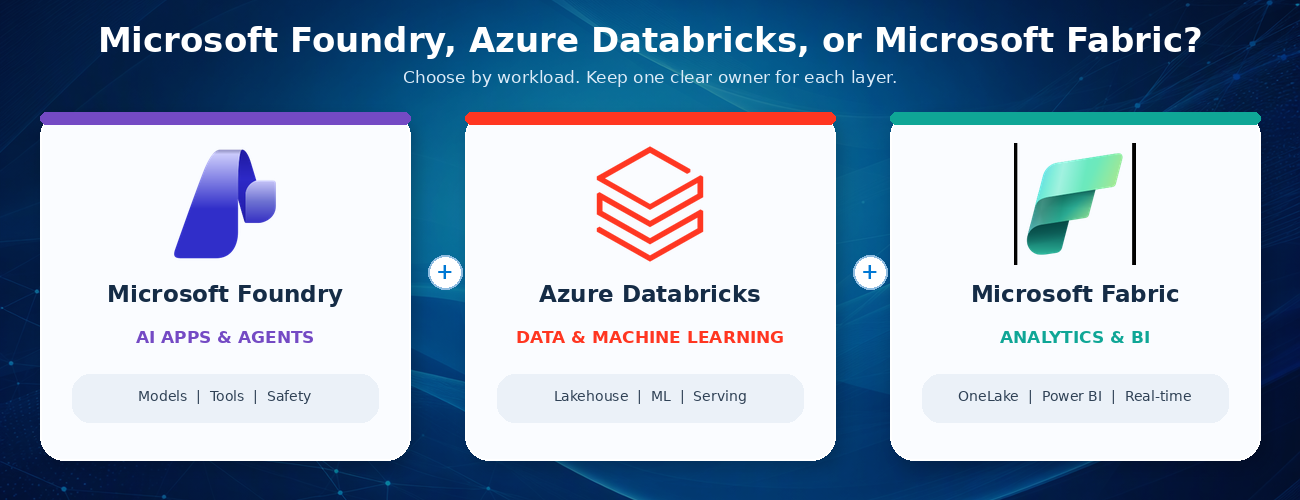
A simple rule of thumb: use Azure Databricks for large-scale data and machine learning, use Microsoft Fabric for business analytics and shared data experiences, and use Microsoft Foundry for AI applications and agents that connect models, tools, and business systems. Use more than one only when each platform has a clear job.
Start with the outcome, not the product name
Begin with what the user needs. Is the main goal to prepare data and build models? Is it to deliver dashboards and trusted business insights? Or is it to build an AI application that can use several models, tools, and systems? The answer gives you a practical starting point. It does not create a hard boundary, but it helps you choose a primary owner.
Start with the dominant outcome, then choose the primary platform owner.
What each platform is best at?
Azure Databricks: data, machine learning, and AI close to the data
Azure Databricks is a strong choice when the solution starts with large amounts of data. Teams use it to collect, clean, transform, and analyze data, then train and run machine learning models. It also provides tools for building and operating AI applications and agents.
For customers that already use Databricks, this matters. If an agent mainly works with Databricks data and tools, Databricks may already provide the simplest end-to-end path. The data, models, access controls, monitoring, and production operations can stay close together.
Microsoft Fabric: business analytics and shared data experiences
Microsoft Fabric is built as a software-as-a-service data and analytics platform. It brings together data movement, engineering, warehousing, real-time analytics, data science, and Power BI over OneLake. This makes it a strong choice when the main outcome is trusted business reporting, shared measures, dashboards, and broad self-service access.
Fabric also supports a data agent that lets people ask questions in plain English over selected Fabric data. The agent is read-only and uses each person's permissions, which makes it well suited for governed data questions rather than general business actions.
For a customer already using Databricks, Fabric does not have to mean moving everything. Fabric can mirror the Databricks catalog structure and read the underlying data through shortcuts. This provides a path to Power BI and Fabric analytics without copying the table data. The access rules still need to be configured in Fabric because Databricks permissions do not automatically carry across.
Microsoft Foundry: AI applications and agents across systems
Microsoft Foundry, formerly Azure AI Foundry, is a managed platform for building, running, and scaling AI agents. It supports simple prompt-based agents as well as custom agent code. It also brings models, tools, tracing, evaluations, identity, safety controls, and publishing into one AI application experience.
Foundry becomes especially useful when the AI application must work across several systems. For example, an agent might use Databricks data, a Fabric data agent, SharePoint content, a business application, and custom services. Foundry can act as the AI application layer that brings those pieces together without replacing the data platforms underneath.
It is also a strong fit when teams want a managed place to run agents, a shared set of tools and connections, consistent quality testing, dedicated agent identity, or delivery through Microsoft 365 Copilot and Teams.
If you already use Databricks, do you need Foundry?
Not automatically. Databricks has strong capabilities for agents, model access, serving, evaluation, monitoring, and governance. Adding another platform should solve a real problem, not repeat work that Databricks already handles well.
Stay Databricks-centric when
- The agent mainly uses Databricks data, models, and tools.
- Databricks serving, evaluation, monitoring, and access controls meet the production need.
- The same data and machine learning team owns development and production.
- The user experience is delivered through a Databricks application or API.
Add Microsoft Foundry when
- The agent must use data, tools, and business applications across several platforms.
- You need one managed place to run agents and reuse tools and connections.
- The experience must be delivered through Microsoft 365, Teams, or several application channels.
- The solution needs services for document processing, search, speech, vision, or centralized safety controls.
Add Foundry for a new responsibility, not because Databricks lacks AI.
Add Foundry when it brings a new operating role to the solution.
Where Fabric fits in a Databricks and Foundry architecture
Fabric often answers a different question: How will business users find, understand, and use the data? Databricks may remain the system of record for engineering and machine learning, while Fabric provides OneLake access, Power BI, shared business measures, real-time insights, and plain-language questions over trusted data.
Foundry can then sit above those data and analytics services when the user experience needs an AI agent that works across them. This creates a clear layered design: Databricks owns the data and machine learning foundation, Fabric owns the analytics and business meaning, and Foundry owns the AI application and agent experience.
Not every customer needs all three. Complexity should earn its place.
A layered pattern keeps the handoffs clear and preserves existing investments.
Five questions that make the decision easier
- What is the main user outcome: data and model building, analytics and reporting, or an AI application that acts across systems?
- Where does the trusted data live today, and can the solution use it without creating another copy?
- Which team will build, secure, monitor, and support the production solution?
- Which systems must the solution connect to, and where will people use it?
- What clear value justifies another platform, cost model, security boundary, and support responsibility?
If there is no clear answer to the last question, do not add another platform yet. Start with the simplest design that meets the need, measure it, and expand only when a real requirement appears.
Common mistakes to avoid
- Using a feature checklist as the main decision method. Features change quickly; ownership and operating needs are more stable.
- Building the same data pipelines or storing the same data in both Databricks and Fabric without a clear reason.
- Assuming that Databricks permissions automatically transfer into Fabric. They do not; security must be tested on both sides.
- Choosing a platform mainly because of one preview feature. Confirm availability, regions, limits, and pricing before making a production commitment.
- Adding a platform without naming the team that will own the cost, security, monitoring, and support.
Practical recommendations:
For customers already centered on Databricks
Keep Databricks as the primary data and machine learning platform. Add Fabric when Power BI, shared business measures, or broad analytics access create clear value. Add Foundry when the AI application must work across systems or needs a separate agent platform and Microsoft 365 delivery.
For customers centered on Fabric
Use Fabric for the data and business intelligence experience. Add Foundry when agents need broader models, tools, actions, or delivery channels. Add Databricks when advanced data engineering, open machine learning workflows, or an existing Databricks estate makes it the better execution platform.
For new projects
Start with one end-to-end business scenario. Choose the smallest set of platforms that can deliver it. Test security, cost, performance, and support ownership before expanding. A simple solution that is easy to operate is usually better than a more impressive architecture with unclear boundaries.
Final takeaway
You do not need to choose one platform as the winner. You need clear responsibilities. Azure Databricks can remain the home for data and machine learning. Microsoft Fabric can make trusted data easier for the business to use. Microsoft Foundry can power AI applications and agents that work across systems.
The best architecture is usually easy to explain: preserve what already works, keep one trusted system of record, give each workload one primary owner, and add another platform only when it brings a clear new capability or operating model.

 Microsoft