data & ai
26 TopicsOpen-Weight Models in Microsoft Foundry
Open-weight models can be valuable, but they are not automatically cheaper, safer, or more controllable. In Microsoft Foundry, the right decision depends on deployment path, licensing, data-processing location, quota, support posture, operational ownership, safety controls, and lifecycle risk. Do not treat all visible or downloadable models as open source; review the license first. Start with Serverless API when a supported Foundry Model meets the workload need. Use partner/community models only after Marketplace, Product Terms, and regional availability checks. Treat managed compute as a preview path for open-source or custom models, not a production default. Validate data processing location, quota, safety controls, support model, and lifecycle before committing. Why this matters Open-weight models are now part of serious enterprise AI planning. Teams consider them for cost control, technical flexibility, transparency, data residency, regulatory pressure, and the ability to build in-house capability. But the useful question is not whether an open-weight model is better than a proprietary managed model. The useful question is which deployment and operating model fits the workload. Use precise language Open source does not simply mean that model weights or code are visible. The Open Source Initiative defines open source through license requirements such as free redistribution, source code access, derived works, non-discrimination, and technology-neutral terms. Many AI models are better described as open-weight: weights may be available or inspectable, but the license can still restrict use, redistribution, or competition. Architecture should not start until license and use rights are reviewed. Four adoption paths Microsoft Foundry gives teams several ways to use models. Foundry Models sold by Azure are hosted and operated by Azure, billed through the Azure subscription, covered by Azure service-level agreements, and supported by Microsoft. This is usually the lowest-friction production path when a supported model meets the requirement. Foundry Models from partners and community expand provider choice, but some are Non-Microsoft Products under Product Terms and can require Azure Marketplace subscription, purchase permissions, billing-country availability, and publisher-term review. Serverless API is documented as the preferred and most capable Foundry deployment option for Foundry Models, including models sold by Azure and select partner/community models. Managed compute is different. It hosts open-source, partner, and custom models on dedicated GPU capacity that Foundry manages. Microsoft owns the GPU topology, runtime, container image, and security patching, while the customer chooses the model, deployment template, accelerator family, and scaling behavior. However, managed compute is public preview, has no SLA, and is not recommended for production workloads in current documentation. A fully self-managed path can offer maximum control, but the organization owns the serving runtime, patching, scaling, observability, safety controls, and cost optimization. Decision criteria Start with workload fit. If a managed model satisfies accuracy, latency, region, and governance needs, avoid extra operational burden. Consider open-weight options when you need specific model behavior, weight-level control, a dedicated GPU path, specialized deployment templates, or a license that supports your intended use. Then test the economics. Token billing, reserved throughput, and hourly accelerator billing behave differently. Open-weight is not automatically cheaper once runtime efficiency, scale-to-zero behavior, GPU quota, engineering time, monitoring, and incident response are included. Data residency and availability Deployment choice also affects data processing. Serverless deployment types can process inferencing data globally, within a Microsoft-specified data zone, or in a single region depending on the selected tier. Model availability varies by provider, deployment type, region, quota, subscription, and cloud. Foundry guidance says to verify project region, feature support, model availability, quota, dependent services, and sovereign cloud constraints before production rollout. Responsible AI and safety Responsible AI is not optional because a model is open-weight. Microsoft Foundry guidance frames production readiness around discovering risks, protecting model and runtime behavior, and governing with monitoring and compliance integrations. In managed compute public preview, built-in content filtering is not part of the managed compute data path; applications that need request or response filtering should call Azure AI Content Safety APIs directly. That limitation can be decisive for production. Lifecycle and procurement risk Model lifecycle matters. Foundry Models move through Preview, Generally Available, Legacy, Deprecated, and Retired stages. Preview models are not recommended for production, and some generally available models from selected providers follow a shorter lifecycle than the standard lifecycle. Procurement also matters. Marketplace plans can require a valid payment method, purchase permissions, review of terms, and country or region availability. A model being visible in a catalog is not the same as being approved for a regulated workload. Recommended operating pattern Use Foundry Models sold by Azure when they meet the requirement and you want the simplest production support model. Use partner/community models when capability or provider choice matters and Marketplace and Product Terms are acceptable. Use managed compute for experimentation, evaluation, controlled preview adoption, or cases where dedicated GPU hosting of open-source or custom models is worth the constraints. Use self-managed hosting only when the organization is prepared to operate the full platform. Decision guide Production checklist Is the model sold by Azure, from a partner/community provider, managed compute, or self-managed? Does the license permit the intended commercial, regulated, or redistribution use case? Is the model GA, Preview, Deprecated, or approaching retirement? Who supports the model and runtime, and what SLA or preview terms apply? Where is inferencing data processed for the selected deployment path? What quota, billing model, accelerator capacity, and fallback option apply? Which safety controls are built in, and which must the application add? What will the team do if the model becomes unavailable, too expensive, or operationally risky? Conclusion Open-weight models should be adopted because they fit a workload, not because they are popular. The strongest enterprise pattern is disciplined choice: verify legal rights, choose the lowest-burden deployment path that satisfies the requirement, validate data and region constraints, measure cost with real traffic, and add safety and monitoring before production use.Microsoft Foundry, Azure Databricks, or Microsoft Fabric?
The question customers keep asking Customers often ask: If Azure Databricks already supports data engineering, machine learning, and AI agents, why should we use Microsoft Foundry? And if Microsoft Fabric also includes data science and AI features, where does Fabric fit? The confusion is understandable. All three platforms are adding new AI capabilities, and there is real overlap. A long feature checklist can look useful today and become outdated quickly. The better question is not which platform can do AI. The better question is which platform should own each part of the solution. A simple rule of thumb: use Azure Databricks for large-scale data and machine learning, use Microsoft Fabric for business analytics and shared data experiences, and use Microsoft Foundry for AI applications and agents that connect models, tools, and business systems. Use more than one only when each platform has a clear job. Start with the outcome, not the product name Begin with what the user needs. Is the main goal to prepare data and build models? Is it to deliver dashboards and trusted business insights? Or is it to build an AI application that can use several models, tools, and systems? The answer gives you a practical starting point. It does not create a hard boundary, but it helps you choose a primary owner. What each platform is best at? Azure Databricks: data, machine learning, and AI close to the data Azure Databricks is a strong choice when the solution starts with large amounts of data. Teams use it to collect, clean, transform, and analyze data, then train and run machine learning models. It also provides tools for building and operating AI applications and agents. For customers that already use Databricks, this matters. If an agent mainly works with Databricks data and tools, Databricks may already provide the simplest end-to-end path. The data, models, access controls, monitoring, and production operations can stay close together. Microsoft Fabric: business analytics and shared data experiences Microsoft Fabric is built as a software-as-a-service data and analytics platform. It brings together data movement, engineering, warehousing, real-time analytics, data science, and Power BI over OneLake. This makes it a strong choice when the main outcome is trusted business reporting, shared measures, dashboards, and broad self-service access. Fabric also supports a data agent that lets people ask questions in plain English over selected Fabric data. The agent is read-only and uses each person's permissions, which makes it well suited for governed data questions rather than general business actions. For a customer already using Databricks, Fabric does not have to mean moving everything. Fabric can mirror the Databricks catalog structure and read the underlying data through shortcuts. This provides a path to Power BI and Fabric analytics without copying the table data. The access rules still need to be configured in Fabric because Databricks permissions do not automatically carry across. Microsoft Foundry: AI applications and agents across systems Microsoft Foundry, formerly Azure AI Foundry, is a managed platform for building, running, and scaling AI agents. It supports simple prompt-based agents as well as custom agent code. It also brings models, tools, tracing, evaluations, identity, safety controls, and publishing into one AI application experience. Foundry becomes especially useful when the AI application must work across several systems. For example, an agent might use Databricks data, a Fabric data agent, SharePoint content, a business application, and custom services. Foundry can act as the AI application layer that brings those pieces together without replacing the data platforms underneath. It is also a strong fit when teams want a managed place to run agents, a shared set of tools and connections, consistent quality testing, dedicated agent identity, or delivery through Microsoft 365 Copilot and Teams. If you already use Databricks, do you need Foundry? Not automatically. Databricks has strong capabilities for agents, model access, serving, evaluation, monitoring, and governance. Adding another platform should solve a real problem, not repeat work that Databricks already handles well. Stay Databricks-centric when The agent mainly uses Databricks data, models, and tools. Databricks serving, evaluation, monitoring, and access controls meet the production need. The same data and machine learning team owns development and production. The user experience is delivered through a Databricks application or API. Add Microsoft Foundry when The agent must use data, tools, and business applications across several platforms. You need one managed place to run agents and reuse tools and connections. The experience must be delivered through Microsoft 365, Teams, or several application channels. The solution needs services for document processing, search, speech, vision, or centralized safety controls. Add Foundry for a new responsibility, not because Databricks lacks AI. Where Fabric fits in a Databricks and Foundry architecture Fabric often answers a different question: How will business users find, understand, and use the data? Databricks may remain the system of record for engineering and machine learning, while Fabric provides OneLake access, Power BI, shared business measures, real-time insights, and plain-language questions over trusted data. Foundry can then sit above those data and analytics services when the user experience needs an AI agent that works across them. This creates a clear layered design: Databricks owns the data and machine learning foundation, Fabric owns the analytics and business meaning, and Foundry owns the AI application and agent experience. Not every customer needs all three. Complexity should earn its place. Five questions that make the decision easier What is the main user outcome: data and model building, analytics and reporting, or an AI application that acts across systems? Where does the trusted data live today, and can the solution use it without creating another copy? Which team will build, secure, monitor, and support the production solution? Which systems must the solution connect to, and where will people use it? What clear value justifies another platform, cost model, security boundary, and support responsibility? If there is no clear answer to the last question, do not add another platform yet. Start with the simplest design that meets the need, measure it, and expand only when a real requirement appears. Common mistakes to avoid Using a feature checklist as the main decision method. Features change quickly; ownership and operating needs are more stable. Building the same data pipelines or storing the same data in both Databricks and Fabric without a clear reason. Assuming that Databricks permissions automatically transfer into Fabric. They do not; security must be tested on both sides. Choosing a platform mainly because of one preview feature. Confirm availability, regions, limits, and pricing before making a production commitment. Adding a platform without naming the team that will own the cost, security, monitoring, and support. Practical recommendations: For customers already centered on Databricks Keep Databricks as the primary data and machine learning platform. Add Fabric when Power BI, shared business measures, or broad analytics access create clear value. Add Foundry when the AI application must work across systems or needs a separate agent platform and Microsoft 365 delivery. For customers centered on Fabric Use Fabric for the data and business intelligence experience. Add Foundry when agents need broader models, tools, actions, or delivery channels. Add Databricks when advanced data engineering, open machine learning workflows, or an existing Databricks estate makes it the better execution platform. For new projects Start with one end-to-end business scenario. Choose the smallest set of platforms that can deliver it. Test security, cost, performance, and support ownership before expanding. A simple solution that is easy to operate is usually better than a more impressive architecture with unclear boundaries. Final takeaway You do not need to choose one platform as the winner. You need clear responsibilities. Azure Databricks can remain the home for data and machine learning. Microsoft Fabric can make trusted data easier for the business to use. Microsoft Foundry can power AI applications and agents that work across systems. The best architecture is usually easy to explain: preserve what already works, keep one trusted system of record, give each workload one primary owner, and add another platform only when it brings a clear new capability or operating model.Microsoft Foundry, Azure Databricks, or Microsoft Fabric?
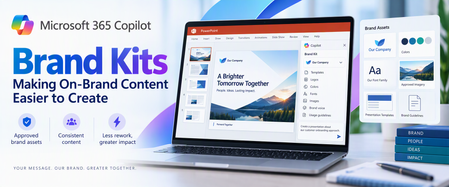
The question customers keep asking Customers often ask: If Azure Databricks already supports data engineering, machine learning, and AI agents, why should we use Microsoft Foundry? And if Microsoft Fabric also includes data science and AI features, where does Fabric fit? The confusion is understandable. All three platforms are adding new AI capabilities, and there is real overlap. A long feature checklist can look useful today and become outdated quickly. The better question is not which platform can do AI. The better question is which platform should own each part of the solution. A simple rule of thumb: use Azure Databricks for large-scale data and machine learning, use Microsoft Fabric for business analytics and shared data experiences, and use Microsoft Foundry for AI applications and agents that connect models, tools, and business systems. Use more than one only when each platform has a clear job. Start with the outcome, not the product name Begin with what the user needs. Is the main goal to prepare data and build models? Is it to deliver dashboards and trusted business insights? Or is it to build an AI application that can use several models, tools, and systems? The answer gives you a practical starting point. It does not create a hard boundary, but it helps you choose a primary owner. What each platform is best at? Azure Databricks: data, machine learning, and AI close to the data Azure Databricks is a strong choice when the solution starts with large amounts of data. Teams use it to collect, clean, transform, and analyze data, then train and run machine learning models. It also provides tools for building and operating AI applications and agents. For customers that already use Databricks, this matters. If an agent mainly works with Databricks data and tools, Databricks may already provide the simplest end-to-end path. The data, models, access controls, monitoring, and production operations can stay close together. Microsoft Fabric: business analytics and shared data experiences Microsoft Fabric is built as a software-as-a-service data and analytics platform. It brings together data movement, engineering, warehousing, real-time analytics, data science, and Power BI over OneLake. This makes it a strong choice when the main outcome is trusted business reporting, shared measures, dashboards, and broad self-service access. Fabric also supports a data agent that lets people ask questions in plain English over selected Fabric data. The agent is read-only and uses each person's permissions, which makes it well suited for governed data questions rather than general business actions. For a customer already using Databricks, Fabric does not have to mean moving everything. Fabric can mirror the Databricks catalog structure and read the underlying data through shortcuts. This provides a path to Power BI and Fabric analytics without copying the table data. The access rules still need to be configured in Fabric because Databricks permissions do not automatically carry across. Microsoft Foundry: AI applications and agents across systems Microsoft Foundry, formerly Azure AI Foundry, is a managed platform for building, running, and scaling AI agents. It supports simple prompt-based agents as well as custom agent code. It also brings models, tools, tracing, evaluations, identity, safety controls, and publishing into one AI application experience. Foundry becomes especially useful when the AI application must work across several systems. For example, an agent might use Databricks data, a Fabric data agent, SharePoint content, a business application, and custom services. Foundry can act as the AI application layer that brings those pieces together without replacing the data platforms underneath. It is also a strong fit when teams want a managed place to run agents, a shared set of tools and connections, consistent quality testing, dedicated agent identity, or delivery through Microsoft 365 Copilot and Teams. If you already use Databricks, do you need Foundry? Not automatically. Databricks has strong capabilities for agents, model access, serving, evaluation, monitoring, and governance. Adding another platform should solve a real problem, not repeat work that Databricks already handles well. Stay Databricks-centric when The agent mainly uses Databricks data, models, and tools. Databricks serving, evaluation, monitoring, and access controls meet the production need. The same data and machine learning team owns development and production. The user experience is delivered through a Databricks application or API. Add Microsoft Foundry when The agent must use data, tools, and business applications across several platforms. You need one managed place to run agents and reuse tools and connections. The experience must be delivered through Microsoft 365, Teams, or several application channels. The solution needs services for document processing, search, speech, vision, or centralized safety controls. Add Foundry for a new responsibility, not because Databricks lacks AI. Where Fabric fits in a Databricks and Foundry architecture Fabric often answers a different question: How will business users find, understand, and use the data? Databricks may remain the system of record for engineering and machine learning, while Fabric provides OneLake access, Power BI, shared business measures, real-time insights, and plain-language questions over trusted data. Foundry can then sit above those data and analytics services when the user experience needs an AI agent that works across them. This creates a clear layered design: Databricks owns the data and machine learning foundation, Fabric owns the analytics and business meaning, and Foundry owns the AI application and agent experience. Not every customer needs all three. Complexity should earn its place. Five questions that make the decision easier What is the main user outcome: data and model building, analytics and reporting, or an AI application that acts across systems? Where does the trusted data live today, and can the solution use it without creating another copy? Which team will build, secure, monitor, and support the production solution? Which systems must the solution connect to, and where will people use it? What clear value justifies another platform, cost model, security boundary, and support responsibility? If there is no clear answer to the last question, do not add another platform yet. Start with the simplest design that meets the need, measure it, and expand only when a real requirement appears. Common mistakes to avoid Using a feature checklist as the main decision method. Features change quickly; ownership and operating needs are more stable. Building the same data pipelines or storing the same data in both Databricks and Fabric without a clear reason. Assuming that Databricks permissions automatically transfer into Fabric. They do not; security must be tested on both sides. Choosing a platform mainly because of one preview feature. Confirm availability, regions, limits, and pricing before making a production commitment. Adding a platform without naming the team that will own the cost, security, monitoring, and support. Practical recommendations: For customers already centered on Databricks Keep Databricks as the primary data and machine learning platform. Add Fabric when Power BI, shared business measures, or broad analytics access create clear value. Add Foundry when the AI application must work across systems or needs a separate agent platform and Microsoft 365 delivery. For customers centered on Fabric Use Fabric for the data and business intelligence experience. Add Foundry when agents need broader models, tools, actions, or delivery channels. Add Databricks when advanced data engineering, open machine learning workflows, or an existing Databricks estate makes it the better execution platform. For new projects Start with one end-to-end business scenario. Choose the smallest set of platforms that can deliver it. Test security, cost, performance, and support ownership before expanding. A simple solution that is easy to operate is usually better than a more impressive architecture with unclear boundaries. Final takeaway You do not need to choose one platform as the winner. You need clear responsibilities. Azure Databricks can remain the home for data and machine learning. Microsoft Fabric can make trusted data easier for the business to use. Microsoft Foundry can power AI applications and agents that work across systems. The best architecture is usually easy to explain: preserve what already works, keep one trusted system of record, give each workload one primary owner, and add another platform only when it brings a clear new capability or operating model.Microsoft 365 Copilot Brand Kits: Making On-Brand Content Easier to Create
Creating a presentation should begin with the message, not with searching for the latest logo, confirming the correct font, or finding a slide deck that looks close enough to the corporate standard. AI can accelerate content creation, but speed alone does not solve brand consistency. Without the right assets and guidance, the result can still require significant cleanup before it is ready to share. Microsoft 365 Copilot Brand Kits bring approved brand assets and guidance into the content creation experience. Employees gain a clearer starting point, while brand managers and IT can control which organizational branding is available and who can manage it. The opportunity is straightforward: make approved branding easier to use, reduce avoidable rework, and help people focus on what they want to communicate. This article explains what Brand Kits include, how personal, shared, and official kits differ, how templates and organizational asset libraries affect PowerPoint results, and what administrators should configure before a pilot. Readers who are evaluating the experience can begin with the PowerPoint and template sections; administrators can start with setup, governance, and storage. What is a Copilot Brand Kit? A Brand Kit is a managed collection of approved brand assets and guidance—such as logos, colors, fonts, imagery, templates, and tone—that helps people create content aligned with an organization’s identity. In Microsoft 365 Copilot, Brand Kits provide a consistent starting point for branded content while allowing organizations to control how those assets are created, shared, and published. A Brand Kit brings together the elements that define an organization’s visual and verbal identity. Depending on how it is configured, that can include: Logos: Primary, secondary, and approved variations. Colors and fonts: Brand palettes and typography. Images and icons: Approved photography, illustrations, and visual assets. Templates and layouts: Reusable structures for creating content. Brand voice: Guidance on tone, terminology, and communication style. Usage guidelines: Rules for how brand elements should—and should not—be used. These elements help connect content creation to the organization’s standards rather than leaving each employee to assemble their own interpretation. For organizations with multiple brands, business units, or product identities, separate kits can help keep the right assets associated with the right content. Think of a Brand Kit as a managed starting point, not a guarantee that every generated result will be publication-ready. Personal, shared, and official: Understanding the three kit types Brand Kits support three different scopes of use. Personal Brand Kits: Personal kits are available only to their creator. They support individual work without exposing those assets across the organization. Creation rights still depend on organizational policy. “Personal” describes the kit’s audience—not an exemption from administrative controls. Shared Brand Kits: Shared kits make assets available to selected people based on the permissions assigned by the creator. They can support a department, project, or other defined group. Giving someone edit permission on a shared kit does not bypass the organization’s restrictions on who may create or edit kits. Official Brand Kits: Official kits are managed by designated brand managers and made available across the tenant. They provide an organization-wide option for approved corporate branding. This distinction matters: a kit shared with a team is not automatically an official organizational kit. How Brand Kits help in PowerPoint For PowerPoint, a Brand Kit provides access to approved assets and presentation templates that help guide generated content. Users can select an available Brand Kit when creating content and ask Copilot to incorporate relevant brand imagery. They can also start from an approved presentation or template. A practical approach is to: Choose the appropriate published Brand Kit. Use an approved template suited to the presentation. Describe the audience, purpose, and desired structure. Generate the content. Review the result for accuracy, readability, accessibility, and brand alignment. Selecting a Brand Kit does not automatically restyle existing slides. If the goal is to update an existing presentation, explicitly request or apply the branding changes. Copilot supports PowerPoint on Windows, Mac, and the web; availability also depends on licensing and organizational settings. Your template is as important as your assets A complete logo library cannot compensate for a weak PowerPoint template. Templates must show how the organization presents information, not merely define a color palette. Representative slides demonstrate how titles, text, images, charts, and other objects work together in realistic layouts. Include representative sample slides You do not need one sample slide for every possible layout. Instead, provide examples that reflect common and specialized presentation needs. A practical collection might include: A title slide and section divider. A straightforward content slide. An image-led slide. A chart or table. A process or timeline. A summary and next-steps slide. Choose examples that reflect how people actually communicate in your organization. A sales presentation and a technical briefing may need different patterns. Make placeholders intentional Copilot uses placeholder type, position, and size to understand the layout. Placeholder text is not a hidden instruction channel. Writing “Insert an executive summary here” inside a placeholder does not make that wording a semantic instruction to Copilot. Use the prompt to explain the communication goal. Use the template to demonstrate the presentation structure. Prepare for varying amounts of content Copilot does not resize the font or placeholder when generated text needs more space. Instead, it may add design elements to accommodate the content. That makes review important. Check for overcrowded slides, awkward text flow, and content that would be clearer if split across multiple slides. Keep instructions separate where possible Instructional slides can remain when they use reusable layouts, but mixing template guidance with normal presentation content can produce unintended results. A better practice is to keep reusable sample slides focused on the desired output and maintain detailed authoring instructions separately. Both .pptx and .potx files are supported as Brand Kit templates. Administrative setup Microsoft’s setup guidance directs administrators to configure the brand manager policy in the Microsoft 365 Apps admin center (config.office.com) using a tenant-wide policy and the designated security group. The setting appears as Elevated role for Brand Managers. Allow up to 24 hours for policy changes to take effect before treating a missing capability as a configuration failure. Restricting kit creation does not prevent users from accessing and using published official kits. Group membership matters Official editing and publishing rights are granted to members of the configured mail-enabled security group. Being a group owner is not enough. If an owner also needs to manage official Brand Kits, ensure that person is a member as well. Governance: Two permission checks, not one One of the most important administrative details is the relationship between two controls: Restrict brand kit creation governs who can create and edit kits. Enterprise Brand Manager governs publishing and management of official kits. When creation restrictions are enabled, a user needs the appropriate permissions under both controls to create and publish an official kit. For example, a person with Enterprise Brand Manager rights who is not in the permitted creation group cannot create or edit kits under that restriction. Conversely, someone allowed to create kits does not automatically have permission to publish an official kit. Storage and organizational asset libraries The implementation guidance supplied with this article describes Brand Kit data as stored in SharePoint Embedded containers: Personal and shared kits use user-based containers. Official kits use the official Brand Kit container. Organizations should verify which governance, labeling, retention, and access controls apply to their SharePoint Embedded containers and configuration. SharePoint Embedded storage does not by itself establish that every policy used for a conventional SharePoint site applies in the same way. An organizational asset library, or OAL, has a related but different role. An OAL can hold approved assets that a Brand Kit references. This lets organizations reuse an established asset collection rather than treating every kit as a separate collection of uploaded files. For PowerPoint, the important distinction is: In PowerPoint, users select the published Brand Kit, while the organizational asset library can supply assets referenced by that kit. Referencing assets also makes source accessibility important. If an asset cannot be found, check that the referenced OAL content remains accessible. Uploading the asset into the kit may be an alternative where appropriate. A practical way to get started Start with a focused pilot rather than loading every brand asset your organization owns into the first kit. Choose one presentation scenario Select a common use case, such as customer updates, internal briefings, or project reviews. This gives the team a concrete way to assess whether generated content meets real needs. Agree on ownership Identify who approves the assets, who maintains the template, who publishes the kit, and who manages the supporting permissions. A clear owner makes it easier to keep the kit current after launch. Prepare the template Review sample slides, placeholders, theme colors, fonts, and reusable layouts. Remove outdated examples and separate instructional material from production-ready samples where possible. Assemble the assets and guidance Include the approved logos, imagery, colors, fonts, and brand guidance needed for the pilot. Use compatible asset formats and sensibly sized images. Avoid unnecessarily large files—particularly images over 10 MB—as a performance precaution, not as a stated product upload limit. Configure permissions and publish Confirm both creation/editing permissions and official publishing rights. Check actual group membership rather than assuming that ownership or another administrative role provides access. Test with realistic prompts Evaluate more than whether the logo appears. Check layout selection, content density, imagery, readability, tone, and factual accuracy. Use the results to improve the kit and template before expanding adoption. An example prompt After selecting the appropriate Brand Kit, try a prompt such as: Create a presentation introducing our proposed customer onboarding approach to business stakeholders. Use the selected Brand Kit and its approved presentation template. Include the business problem, proposed approach, implementation stages, responsibilities, and next steps. Keep each slide focused on one main idea, use approved brand imagery where relevant, and add speaker notes. Do not invent metrics or customer examples; identify any missing information. The prompt explains the audience, purpose, and structure. The selected kit supplies the approved brand context. Four reliable ways to apply branding Choose the method that matches the task: use the organization theme for standard defaults, begin with a seed file when the presentation needs established structure, apply a named theme when that theme is available, or select a brand directly in PowerPoint. Frequently asked questions Do we need a sample slide for every layout? No. Prioritize representative examples across the slide types and specialized scenarios your organization actually uses. Can placeholder text tell Copilot what to generate? Not as semantic guidance. Placeholder type, position, and size inform layout; placeholder wording can influence styling but is not treated as an instruction. What happens when text does not fit? Copilot does not change the font size or placeholder size. It may add design elements. Review the result and simplify or split content where needed. Which template formats are supported? Both .pptx and .potx. Can instructional slides stay in the template? They can, when they use reusable layouts. However, keeping instructions separate reduces the risk of guidance appearing as presentation content. Can existing OAL assets be used? Yes. A Brand Kit can reference approved OAL assets. For PowerPoint Brand Kit selection, publish the kit rather than relying on the OAL alone. Why can a brand manager not create or publish an official kit? Check both permission controls. When creation restrictions are enabled, Enterprise Brand Manager rights alone are insufficient if the person is outside the permitted creation group. Also confirm that the person is a member, not only an owner, of the relevant group. Does selecting a kit update an existing presentation? No. Explicitly request or apply branding to existing slides. What should we check when assets are missing? Confirm that the kit is published, the expected assets are included, and referenced OAL content is accessible. Where appropriate, upload the assets directly into the kit. What most affects the quality of the output? The completeness of the kit and the quality of its template—especially representative sample slides, usable placeholders, and consistent theme settings. The bottom Line Microsoft 365 Copilot Brand Kits can make approved branding easier to use in everyday content creation. The strongest approach combines three things: a well-prepared kit, a well-designed template, and clear ownership. Start with a focused scenario, test realistic output, and refine the underlying assets and guidance. Human review remains essential, but a stronger starting point lets people spend less time correcting formatting and more time communicating clearly. References Create and manage official Brand kits in the Microsoft Copilot app | Microsoft Support Edit with Copilot in PowerPoint | Microsoft Support Use branded templates in the Microsoft Copilot app | Microsoft Support Enterprise brand manager policy setup | Microsoft Learn Set Up the Restrict Brand Kit Creation Policy in Microsoft Copilot | Microsoft Learn Keep your presentation on-brand with Copilot | Microsoft Support629Views0likes0CommentsBuild a Tenant-Wide Microsoft Foundry Model Operations Dashboard
As AI projects move from pilots to production, model deployments often spread across subscriptions, regions, and application teams. A practical operations dashboard gives platform, engineering, governance, and finance teams one shared view of what is deployed, how it is used, what it costs, and where quota or capacity risk is forming. The operating problem Microsoft Foundry brings agents, models, tools, monitoring, tracing, evaluations, RBAC, networking, and policy controls under a unified platform surface. That is a strong foundation, but enterprise operations still need a view that cuts across the way Azure is usually organized: multiple subscriptions, resource groups, regions, business units, and application teams. The goal is not to replace product dashboards. The goal is to add a management-group or tenant-wide operating layer that answers simple but urgent questions: Which models are deployed? Which teams own them? Which deployments use Standard, priority, batch, or provisioned throughput? Where are token usage and PTU utilization rising? Which subscriptions are approaching quota pressure? Which costs should be allocated to which product or environment? Design principle: keep the dashboard about deployment and operations metadata. Do not collect prompts, completions, customer data, or other application payloads unless a separate privacy, security, and compliance design explicitly requires it. A practical reference architecture Use three data planes. First, build the inventory plane with Azure Resource Graph, because Resource Graph is designed for efficient, large-scale querying across subscriptions and tenants. Combine account-level resource data with deployment-level data from the Azure AI Services deployments API, which lists deployments associated with a Cognitive Services account. Normalize subscription, resource group, region, account, deployment name, model name, model version, deployment type, SKU or capacity, tags, owner, environment, and business unit. Build the telemetry plane with Azure Monitor. Public Azure OpenAI monitoring guidance describes dashboards for HTTP requests, token-based usage, PTU utilization, and fine-tuning. Azure Monitor supported metrics and resource log references provide the authoritative place to check what is available for each resource type and how exportability works. For exploratory operations views, Azure Workbooks are a good fit because they combine logs, metrics, parameters, Azure Resource Graph, Azure Resource Manager, JSON, and other data sources in one interactive report. Build the finance plane with Cost Management APIs or exports. Cost Management automation guidance supports retrieving and managing cost data, including for larger datasets that need offline analysis. The Cost Management Query API supports usage queries at scopes such as subscription, resource group, billing account, management group, billing profile, and invoice section, subject to permissions. Power BI can be useful for leadership reporting, but the Cost Management connector has agreement constraints; direct connector support is documented for Enterprise Agreement and direct Microsoft Customer Agreement customers, while unsupported agreements should use exports. Separate inventory, usage, cost, and quota Do not treat every signal as the same kind of data. Inventory is mostly current-state metadata. Usage is time-series behavior. Cost is billing-scope data that may lag and must be joined carefully by resource identity, meter, and tags. Quota is a capacity-control signal, not a spend signal. Azure OpenAI quota is not enforced at tenant level; Microsoft Learn states that the highest quota restriction is scoped at the Azure subscription level. That means an executive dashboard can summarize quota posture broadly, but engineering views should still preserve subscription, model, region, and deployment-type detail. Provisioned throughput deserves a dedicated view. Microsoft documents PTU as dedicated model processing capacity for predictable throughput and latency, billed per PTU per hour or through reservations. That makes PTU utilization, idle capacity, traffic predictability, and latency requirement visible design inputs rather than after-the-fact finance questions. Dashboard views that matter Start with a few durable views rather than a large reporting program. The most useful first version usually includes: Executive summary: deployment count, model families, regions, monthly cost trend, and quota risk. Inventory: deployments by subscription, resource group, region, model, version, deployment type, owner, and environment. Operations: request volume, token trends, errors, latency indicators, and PTU utilization where available. Cost allocation: spend by owning team, application, environment, and deployment type. Governance hygiene: missing tags, ownerless deployments, old model versions, and regional concentration. Decision guidance Choose the reporting surface by audience. Platform engineers usually need Workbooks because they support operational drill-down and can combine Azure Monitor and Resource Graph. Finance teams often need Power BI because it supports broader cost modeling and distribution. Application owners need a small scorecard: their deployments, their usage, their costs, their quota posture, and their next required action. Production considerations and limitations Require tags before reporting on ownership. Dashboards cannot create accountability if resources do not carry owner, application, environment, and cost-center metadata. Use least-privilege access. Cost, inventory, and telemetry sources may require different permissions and scopes. Check portal-version language. Some public monitoring guidance is explicitly marked for the Foundry classic portal, so avoid assuming identical behavior in every new portal experience. Verify regional availability. Model availability varies by region, and deployment lifecycle settings such as automatic model updates should be reviewed before making standardization claims. Respect metric export limits. Azure Monitor notes that some metrics have export constraints, especially around multidimensional metrics and diagnostic settings. Implementation checklist Define the dashboard audience and the decisions it must support. Inventory Foundry and Azure OpenAI resources across subscriptions with Azure Resource Graph. List deployments per account and normalize deployment metadata. Route or query Azure Monitor metrics and logs needed for usage and PTU views. Add Cost Management queries or exports at the correct billing scope. Join by resource ID and tags; flag missing ownership metadata. Publish an Azure Workbook for operations and a Power BI model only where agreement support and permissions fit. Review model versions, quota posture, and PTU utilization on a fixed cadence. Conclusion A tenant-wide model operations dashboard is a practical bridge between AI experimentation and AI platform management. It does not need to be complex on day one. Start with inventory, usage, cost, quota, and ownership. Keep application content out of scope. Preserve subscription-level quota detail. Then evolve the dashboard into a repeatable operating rhythm for model lifecycle, cost control, capacity planning, and governance.255Views0likes0CommentsFabric and Databricks Together
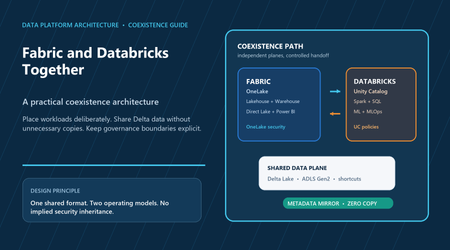
Fabric and Azure Databricks overlap, but optimize different operating experiences. Fabric integrates OneLake, engineering, warehousing, real-time analytics, and Power BI as SaaS. Databricks combines Spark and SQL engineering, Unity Catalog, and a mature ML lifecycle. Delta Lake and ADLS Gen2 enable coexistence; Fabric metadata mirroring and OneLake shortcuts can expose Databricks tables without copying their files. The hard work is assigning ownership, security, compatibility, and service objectives at every handoff. Place workloads by operating responsibility Use Fabric where the product is a governed analytical experience—especially T-SQL marts, semantic models, Direct Lake, and Power BI. Use Databricks where the product is an engineering or ML execution system—especially complex Spark estates, feature engineering, training, and Unity Catalog-governed pipelines. Both can do more; this is a starting boundary, not an exclusivity rule. Add the second platform only when a clear handoff avoids duplicated work. A common brownfield pattern keeps Bronze, Silver, and Gold engineering in Databricks and mirrors selected, BI-ready Gold schemas to Fabric. Fabric then owns its SQL endpoint, semantic model, reports, and consumer permissions. Create a physical Fabric Gold copy only when it changes the contract: security minimization, star-schema reshaping, incompatible Delta features, source isolation, recoverable snapshots, or measured performance value. Use metadata mirroring with precise expectations The mirrored Azure Databricks catalog capability is GA. Fabric represents selected Unity Catalog metadata, creates a read-only SQL analytics endpoint, and reaches the existing Delta files through shortcuts; it does not replicate the table data or create a write path. Supported additions and deletions can appear from seconds to minutes, and endpoint synchronization adds another clock. Mirroring is analytical access, not event transport or a guaranteed-latency replication service. Treat prerequisites as security gates. Unity Catalog must be enabled; a metastore administrator must enable external data access, which is off by default. The connection principal needs explicit USE CATALOG, USE SCHEMA, SELECT, and EXTERNAL USE SCHEMA. EXTERNAL USE SCHEMA is not included in ALL PRIVILEGES or automatically granted to a schema owner. Use a non-personal identity, mirror the minimum useful Gold surface, and run post-deployment discovery, row-count or watermark, SQL, semantic, and deny-user probes. Keep security and catalog boundaries separate Unity Catalog permissions, row filters, column masks, and ABAC policies do not carry into Fabric. Configure Fabric workspace, item, and OneLake permissions independently, and map business-intent Entra groups into both systems. If required policy cannot be reproduced safely, publish a physically curated table whose rows and columns already satisfy the consumer contract. Preserve both lineage domains and record the handoff; public documentation does not promise automatic end-to-end stitching. For firewall-protected external ADLS Gen2, separate two identities. OAuth or a service principal authorizes Databricks and Unity Catalog discovery. Fabric Workspace Identity traverses the storage firewall through trusted workspace access and needs least-privilege data-plane authorization. Trusted workspace access is GA but requires F capacity, is unavailable on Trial, and uses an Azure Storage resource-instance rule. The documented path does not support generalizing mirroring to Databricks workspace storage behind a firewall. Make Delta and BI compatibility a release gate A shared Delta format is a contract, not universal compatibility. Test column mapping, deletion vectors, liquid clustering, type widening, protocol versions, names, and data types through every intended engine. The Fabric SQL analytics endpoint supports name-mode column mapping but not ID mode. Fabric Runtime 1.3 is GA; Runtime 2.0 is public preview with newer Spark and Delta versions. Pin producers and block unreviewed protocol upgrades. Direct Lake still requires semantic design, well-maintained tables, capacity, and concurrency testing. Verify grain, keys, relationships, measures, row-level security, file layout, framing after changes, cold and warm latency, and the selected Direct Lake mode. Zero-copy avoids one storage copy and replication pipeline; it does not eliminate Fabric capacity, source reads, producer compute, network, monitoring, or governance cost. Coexistence decision checklist One owner should accept each producer, consumer, network, security, semantic, incident, and cost contract. Deploy definitions, bind environment-specific connections, start the mirrored item, and verify runtime state; a successful pipeline deployment alone does not prove data is serving. Decision Production evidence Placement Primary platform and one-sentence handoff rationale; authoritative Gold contract named Security Least-privilege principals, firewall rule, Fabric policy mapping, allow and deny personas tested Data Runtime/protocol manifest; every engine passes schema evolution and feature tests Consumption SQL and Direct Lake readiness, semantic ownership, scale, concurrency, and fallback verified Operations Start/probe release steps, lag and failure telemetry, rollback, cost owner, and copy review date Conclusion Fabric and Databricks coexist cleanly when shared data does not blur platform boundaries. Start with a small set of curated Gold tables. Prove identity, denial, metadata freshness, Delta compatibility, Direct Lake behavior, monitoring, deployment, and rollback. Expand by owned data product, not catalog volume. The goal is to minimize duplicate work while giving every workload, policy, service objective, and bill a clear owner.195Views0likes0CommentsFinOps for Data and AI Workloads
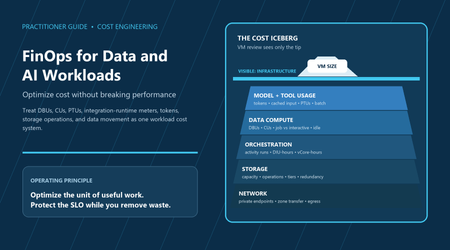
A VM-only review misses the unit economics of managed data and AI services. A useful review asks what it cost to produce one reliable outcome, then includes DBUs, capacity units, activity runs, integration-runtime compute, tokens, storage operations, data movement, and shared platform cost. Make spend attributable first; remove idle demand and unnecessary work; protect the service-level objective (SLO); and buy commitments only against a stable, measured baseline. FinOps is a continuous engineering loop, not a one-time savings exercise. Measure the complete workload Choose a denominator that reflects value: cost per successful pipeline run, terabyte promoted through a quality gate, business refresh, million events, or 1,000 accepted AI outcomes. Keep failed work, retries, and shared-cost allocation in the numerator. A lower hourly rate is a false saving if runtime doubles, freshness slips, quality falls, or spend moves to another team. Tag workload, owner, environment, product, region, and SLO class. Allocate shared Fabric capacity, Databricks compute, integration runtimes, monitoring, and networking directly when reliable telemetry exists; otherwise publish a transparent proxy and retain an unallocated bucket. Budgets notify rather than stop services, and cost data can lag, so pair budgets and anomaly alerts with operational telemetry and an owned triage process. Match the execution contract to demand For Azure Databricks, keep interactive exploration separate from scheduled jobs. Enforce auto-termination, tested VM families, practical autoscaling ranges, and required allocation tags. Compute policies are GA but require the Premium plan; lowering a policy limit does not retroactively terminate existing resources. Benchmark Photon, pools, spot capacity, and serverless on real workloads. Small files and poor clustering turn storage design into compute spend; predictive optimization is GA for eligible Unity Catalog managed tables, while VACUUM LITE remains Public Preview and needs an explicit preview exception. Azure Data Factory meters orchestration, copy DIU-hours, data-flow execution and debug, and integration-runtime choices. Fabric Data Factory is GA and consumes capacity units, with OneLake storage considered separately. Prefer incremental movement, stop debug sessions, consolidate tiny activities only when retry and ownership boundaries remain clear, and count retry cost per successful run. For ADLS Gen2, model capacity, read/write/list operations, tier transitions, retrieval, redundancy, retention penalties, and transfer. Cool, cold, and archive economics include minimum residence periods; archive is offline and rehydration can take hours. A lifecycle rule is not valid until restore, legal-hold, retention, and recovery objectives still pass. Right-size shared capacity and AI requests Fabric capacity must be managed at the timepoint and workspace level. Bursting and smoothing can consume future capacity, so monthly averages can hide interactive delays and throttling. Use the Capacity Metrics app with workload telemetry; isolate incompatible demand and pause nonproduction F capacity only after checking queued work and smoothed usage. Spark Autoscale Billing is a separate pay-as-you-go behavior, not part of bursting and smoothing. For Foundry model deployments, compare Standard, priority processing, provisioned throughput, and Global Batch against the request shape. Provisioned throughput and Global Batch are GA where supported, but PTU quota does not guarantee capacity, and model, region, minimum, and reservation constraints apply. Use the smallest model that passes task-specific quality and safety tests; cap output and retries; batch asynchronous work; and meter search, storage, code, functions, and observability separately from tokens. Protect performance with controlled experiments State the expected meter reduction and freeze the comparison boundary: demand, data volume, model or runtime version, region, quality checks, and SLO. Record baseline cost, latency, freshness, failures, retries, and allocation. Change one major lever where practical, canary it, observe a representative peak and business cycle, and accept or roll back using both cost and SLO evidence. Map the actual network path; private endpoints improve isolation but add DNS, topology, and processing considerations and do not make every cross-region transfer free. Operate on a regular rhythm: triage material anomalies daily, review idle and unallocated spend weekly, assess unit-cost and SLO evidence monthly, and revisit lifecycle, recovery, and commitments quarterly. Re-baseline after a model, runtime, capacity, region, retention, redundancy, or architecture change. This prevents an optimization that was valid for yesterday’s workload from becoming today’s reliability defect. Production decision checklist Commitments come last. Recheck current prices, status, region, quota, networking, and reservation terms at implementation time; none should be copied as a timeless constant. Gate Required evidence Ownership Workload, owner, denominator, SLO, and at least 95% allocation coverage Demand Idle time, retries, execution mode, file/request shape, and peak behavior measured Guardrail Quality, p95 latency, freshness, recovery, and rollback thresholds pass Status GA/Preview, plan, region, quota, capacity, and fallback recorded Commitment Only the post-optimization stable floor is reserved; renewal owner named Conclusion Durable FinOps joins the meter, owner, useful outcome, and SLO in one evidence chain. Start with visibility and allocation, choose the right execution model, remove waste, improve data and request shape, and right-size from peaks rather than averages. Apply rate optimization only afterward, then repeat whenever demand, architecture, model, region, or service behavior changes.195Views0likes0CommentsGovernance Boundaries in Microsoft Foundry
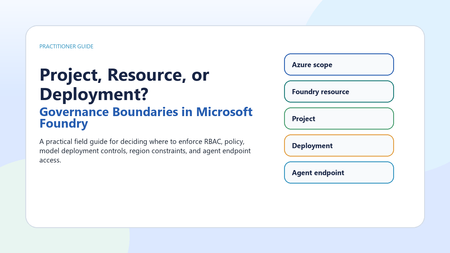
Microsoft Foundry governance works best when teams separate broad Azure controls from Foundry resource controls, project access, model deployment configuration, and agent endpoint permissions. This article provides a practical boundary map for production decisions, with public references and a checklist for implementation. Use Azure subscription and resource group scope for enterprise-wide policy, allowed regions, tagging, budgets, and inherited access. Use the Foundry resource as the administrative, security, networking, monitoring, and shared deployment boundary. Use projects for team and workload organization, not as the only place to enforce enterprise controls. Use model deployments to govern runtime model version, deployment type, capacity, filters, and rate behavior. Use agent-scope access for narrow endpoint consumption, and prefer Microsoft Entra ID over API keys for production. Why this matters Microsoft Foundry is becoming the shared place where teams build agents, deploy models, connect tools, evaluate behavior, and operate AI systems. That consolidation is useful, but it also creates a practical governance question: should a control live at the Azure subscription, the Foundry resource, the project, the model deployment, or the agent endpoint? The answer matters because each boundary enforces a different kind of decision. A five-boundary mental model Start with the broadest boundary and move inward. The subscription or resource group is where enterprise Azure governance usually begins: allowed regions, required tags, cost grouping, resource locks, inherited role assignments, and Azure Policy initiatives. The Foundry resource is the administrative and security boundary for a Foundry environment. Microsoft describes it as the single management plane for agents, models, and tools, with unified RBAC, networking, and policies. Separate control plane from data plane The cleanest design conversations separate management actions from runtime actions. Control-plane decisions include creating resources and projects, assigning roles, configuring networking, creating connections, and deploying models. Data-plane activity includes inference, agent interaction, evaluation jobs, content safety calls, tracing, and monitoring. A role or lock that protects a resource from deletion does not automatically govern every runtime action. Production governance should deliberately combine Azure RBAC, Foundry RBAC, Azure Policy, network controls, deployment settings, and application logic. RBAC guidance Use Microsoft Entra ID for production wherever possible. Microsoft states that API keys are convenient for prototyping but coarse-grained, hard to audit per user, and not recommended for production least-privilege scenarios. Foundry roles are designed for Foundry-specific workflows: for example, builders, project managers, account owners, and agent consumers. Azure roles still matter for subscription, resource group, and role-assignment authority. Be conservative: check the current role table for the exact operation because model deployment, project building, agent publishing, and inference can use different permission surfaces. Deployment governance is runtime governance A model deployment is not just a model choice. It is where runtime posture becomes concrete. Deployment type affects where inferencing data can be processed: Global deployments may process in any Azure region, Data Zone deployments keep processing within the Microsoft-specified US, EU, or APAC data zone, and Standard deployments process in the deployment region. That makes deployment type a compliance and architecture decision, not only a performance or price decision. Policy, preview, and availability Azure Policy can enforce or audit important Foundry-adjacent requirements, including key access, customer-managed keys, private link, network restrictions, managed identity, model eligibility, and content filtering. Several AI/model-specific policy definitions are marked Preview, so treat them as promising controls rather than production defaults unless your organization accepts preview terms. Foundry also documents a tag to hide preview surfaces and custom RBAC patterns to block selected preview operations. Recommended operating pattern Use resource groups and subscriptions for enterprise policy, cost, and environment separation. Use separate Foundry resources when environments need different networking, keys, quotas, or administrative ownership. Use projects for team and workload separation inside a governed resource. Use model deployments to isolate runtime configuration, model version, data-processing posture, filters, and capacity. Use agent-scope access only when a consumer needs one agent endpoint, not the whole project. Prefer Entra ID and managed identities, and disable or tightly govern local key access where production controls require it. Decision guide Production checklist Which boundary owns this control: Azure scope, Foundry resource, project, deployment, or agent endpoint? Is the action control plane or data plane? Is the model or feature generally available or Preview? Where can inferencing data be processed for the chosen deployment type? Which role grants only the needed permission at the narrowest useful scope? Is enforcement handled by RBAC, Azure Policy, network isolation, deployment configuration, or application code? Have region, quota, model availability, dependent services, Marketplace terms, and cloud environment been verified? Conclusion Governance in Microsoft Foundry is not a single switch. It is a layered design. Put enterprise constraints at Azure scope, shared platform controls at the Foundry resource, team workflows in projects, runtime posture in deployments, and consumer permissions at the agent endpoint. That separation keeps governance understandable, auditable, and easier to change as models, regions, deployment types, and platform features evolve.187Views0likes0CommentsIdentity at Every Hop
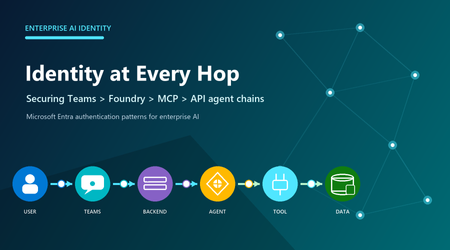
Use delegated On-Behalf-Of access only when a downstream service must enforce the signed-in user's permissions. Use a managed or agent identity for unattended work. At every hop, obtain a token for the intended audience instead of forwarding one issued for another service. Model every hop as a boundary A Teams request can involve a user, Teams app or bot, application backend, Foundry project or agent, MCP server, and protected API. Each component may use a different principal, token audience, permission model, and consent boundary. Decide whose authority each downstream resource should evaluate, then grant that principal only the required access. For a Teams tab, getAuthToken() returns a JWT whose audience is the application's client ID. Send it to the backend over HTTPS and validate signature, issuer, audience, expiry, and tenant. It is not a general-purpose Microsoft Graph token. Bot SSO uses the Bot Framework token service; documented SSO supports one-to-one and group chats, not channel scope. Do not authorize from a display name, email, or client-parsed claim. The backend must establish the trusted principal first, then apply application authorization. Teams SSO gets identity into the application; it does not grant automatic access to Foundry, a tool, Graph, or business data. Exchange tokens when user authority must travel OAuth 2.0 OBO is for a middle-tier API calling another API under a signed-in user's delegated authority. The backend validates Token A, authenticates as a confidential client, and exchanges Token A at the tenant-specific Entra endpoint. Entra returns Token B for the downstream audience and scopes. Present Token B only to that resource. OBO requires a user principal and delegated scopes. An app-only token cannot be used as the OBO assertion; use client credentials or managed identity when no user is present. Never relay the backend token to Graph, MCP, or another API. Relay breaks audience enforcement and can conflict with Conditional Access. Surface interaction-required claims challenges back to the client instead of hiding them as generic server failures. Assign the correct Foundry identity An agent identity is a specialized Entra service principal. Unpublished agents share a project-level development identity; publishing creates a distinct production agent identity. Permissions do not transfer automatically, so assign downstream roles to the published identity. At runtime, Agent Service obtains a scoped token for the target service; the audience is that service's resource identifier, not necessarily the MCP endpoint URL. Apply Foundry RBAC at the narrowest useful scope. Foundry Agent Consumer is for invocation, Foundry User is for building and testing, and Foundry Project Manager supports project management and publishing. Prefer Entra authentication: resource keys provide coarse access and bypass these role distinctions. Role names may still appear under older Azure AI labels during rollout. Treat MCP authorization as an explicit design MCP defines tool discovery and invocation; it does not make a server trusted. For remote servers, choose no authentication only for intentionally public services. Otherwise use custom keys, custom OAuth, a user Entra token, project managed identity, or agent identity according to who must be authorized. A configured connection does not grant downstream permission by itself. Toolbox can centralize credential injection, refresh, versioning, and policy behind an MCP-compatible endpoint. Allow-list required tools, require approval for risky writes, and log tool names, authorization outcomes, and approvals without logging tokens. Prefer managed identities or federated credentials to stored secrets. For user-owned mail, files, or other delegated resources, choose supported user passthrough or OBO. For background jobs, use workload identity. When every published agent needs distinct permissions and audit, use its distinct agent identity. Use project managed identity only when all agents in that project should share the same Azure access after explicit risk review. Practical identity checklist Multitenant sign-in does not make every downstream exchange cross-tenant. Customer consent creates a service principal in the customer tenant, but Foundry's built-in OAuth identity passthrough requires the user's tenant to match the Foundry project tenant. Define tenant placement, administrator consent, issuer validation, and offboarding; use a validated custom OAuth design when built-in passthrough cannot meet the requirement. Troubleshoot from the resource that rejected the request. A 401 usually points to a missing, expired, malformed, or wrong-audience token. A 403 usually means the identity is recognized but lacks permission, although service firewalls can also return 403. DNS failures, TCP timeouts, and private-endpoint routing errors are not repaired by adding RBAC. Question Production decision Whose authority? User: delegated OBO. Workload: managed or agent identity. Correct token? Validate issuer, audience, tenant, lifetime, scopes, and claims. Correct principal? Reassign target RBAC after publishing creates a new identity. Tool governance? Allow-list tools; approve side effects; broker shared credentials. Cross-tenant? Design consent and offboarding; built-in passthrough requires matching user and Foundry tenants. Failure class? Separate 401, 403, consent, DNS, firewall, routing, and timeout evidence. Conclusion Design identity before connecting tools. Ask who the downstream service should authorize, exchange tokens for the correct audience, and scope RBAC to the resulting principal. Validate consent, renewal, revocation, tool approval, and network reachability one hop at a time.173Views0likes0CommentsManaging SharePoint Online Version History at Scale to Recover Storage
Summay SharePoint Online version history is one of those features that users love, but admins eventually have to govern. Versioning protects users from accidental edits, bad changes, and overwritten content. It gives people a way to restore previous versions of documents without opening a ticket. That is a good thing. But at tenant scale, version history can also consume a surprising amount of storage. Highly active libraries, large Office files, frequent edits, migrations, sync activity, and years of retained versions can quietly add up. Eventually, admins need to answer a few practical questions: How many file versions do we have? How much storage are those versions consuming? Which sites would benefit most from cleanup? What policy should we apply going forward? How much space could we recover before making changes? How do we clean up versions safely across many sites? That is why I built this tool: SPOVersions-ApplicationTools The main script is: Apply-SPOVersions-Tool.ps1 Why version history planning matters Microsoft's official guidance for SharePoint version storage makes an important point: version limits should support your organization's recovery objectives while also controlling storage consumption. Microsoft documents this here: Plan version storage for document libraries in SharePoint The key idea is balance. If you keep too many versions for too long, storage consumption can grow quickly. If you trim too aggressively, users may lose the ability to recover from accidental or unwanted changes. A good version history strategy needs to consider both: Goal Why it matters Recovery Users need enough version history to restore useful prior versions. Storage control Admins need to prevent version history from consuming excessive quota. Consistency Tenant defaults and site-level policies should be understandable and repeatable. Exceptions Some business areas may need different version retention behavior. Safe cleanup Existing versions should be analyzed before deletion jobs are created. The goal is not simply to delete versions. The goal is to understand version storage, set the right policy, and clean up intentionally. What Microsoft recommends admins consider Microsoft's documentation calls out three major planning questions: Determine the default version history limits for new document libraries. Identify exceptions needed from organization default limits. Decide whether existing content should be updated to align with the organization limits. That third point is where many admins need tooling. It is one thing to configure a tenant default for new libraries. It is another thing to understand what already exists across hundreds or thousands of sites. Existing content is often where the storage opportunity is. Automatic vs. manual version limits SharePoint provides different ways to manage version history. Mode What it does Best fit Automatic SharePoint uses intelligent trimming based on version age. Recent versions are preserved more densely, while older versions are thinned over time. Recommended default for many organizations that want Microsoft-managed optimization. Manual with count and expiration Admins specify how many major versions to keep and how long versions should remain. Useful when you want more direct control and predictable cleanup. Manual with count only Admins keep a configured number of versions without age-based expiration. Useful when a fixed restore count matters, but it can consume more storage. Microsoft's guidance highlights that automatic trimming is designed to preserve high-value versions while optimizing storage. Manual policies can be useful, but they require careful planning because low limits or short expiration windows can affect restore scenarios. That is why I wanted this tool to include reporting and What-If analysis before cleanup. What the tool does Apply-SPOVersions-Tool.ps1 is an interactive PowerShell tool built with PnP PowerShell to help admins manage SharePoint Online version policies across multiple site collections. At a high level, the tool helps admins: Audit current version policies across sites. Apply automatic or manual version limits. Review version policy status. Generate version history reports. Run What-If analysis to estimate storage recovery. Create batch delete jobs for cleanup. Monitor cleanup job status. Set tenant-level defaults for new sites. This makes it useful for both planning and implementation. Why I built it as an admin workflow Version cleanup should not start with deletion. The safer workflow is: Discover current settings. Generate version history reports. Estimate storage recovery. Decide the right policy. Apply policy to selected sites. Queue cleanup jobs. Monitor job status. Repeat as part of governance. That is how the tool is structured. It is not just a cleanup script. It is a planning and execution tool. Site discovery options The tool can work from a defined list of site URLs or discover sites automatically. For larger tenants, I usually prefer a site list because it gives admins better control over rollout scope. You can start with a pilot group, validate results, then expand. For smaller tenants or discovery scenarios, auto-discovery can be useful. The tool supports: SharePoint sites OneDrive for Business sites Exclusion of common system sites Confirmation before processing discovered sites That confirmation step matters. When a script can operate across many sites, admins should have a checkpoint before changes are made. Key operations: Get current version policies Before changing anything, admins can retrieve current version policy settings for all selected sites. This helps answer: Which sites already use automatic trimming? Which sites use manual limits? Which sites have inconsistent settings? Which sites may need exceptions? This is useful for building a baseline. Set version policies across sites After planning, admins can apply version policies across site collections. The tool supports: Automatic version trimming Manual major version limits Optional expiration after a specified number of days Automatic trimming is useful when you want SharePoint to optimize storage intelligently. Manual limits are useful when the organization has a defined policy, such as keeping a specific number of major versions or expiring versions after a specific period. Check version policy status Policy changes may take time to apply. The tool can check propagation status, so admins can verify whether pending changes are completed successfully. This is important during staged rollouts because you want to confirm policy state before moving on to cleanup. Generate version history reports This is one of the most important parts of the workflow. The tool can submit version history report jobs for each site. Those reports are written to a dedicated document library created by the tool: Admin_SiteCollection_VersionReport_DONOTDELETE Using a dedicated library avoids some of the issues that can happen when report files are written into normal user-facing document libraries. The reports provide the raw data needed to understand version storage usage. Run What-If analysis This is the feature I think most admins should start with. The What-If analysis downloads completed version history reports and simulates a version policy without making changes. That means admins can estimate: Total versions analyzed Versions that would be deleted Total version storage Storage that could be recovered Percent of version storage that could be freed Per-site savings This gives admins data before they commit to a cleanup policy. For example, a What-If analysis might show that one site can recover a large amount of storage while another site has very little benefit. That helps prioritize action. Create batchdeletejobs Once the admin understands the impact and chooses a policy, the tool can create batch delete jobs to remove excess versions. This is the destructive part of the workflow, so it should come after reporting and What-If analysis. Admins can use automatic or manual cleanup criteria depending on the desired policy. Important reminder: deleted versions are not recovered from the Recycle Bin. Treat batch delete jobs as permanent cleanup operations. Monitor batchdeletejob status After cleanup jobs are created, admins need to know whether they completed and how much storage was released. The tool can check batch delete job status across sites, including completion state and storage released where available. This closes the loop from planning to execution. Tenant-level defaults vs. existing content One important distinction in SharePoint version management is the difference between tenant-level defaults and existing content. Tenant-level settings affect new sites or new libraries going forward. Existing sites and existing file versions may need additional steps. Microsoft's guidance describes multiple approaches: Scenario What it means Apply defaults to new libraries only Least disruptive; existing settings and versions remain unchanged. Update existing library settings without trimming versions Future versions follow the new policy, but existing versions are not deleted. Update settings and trim existing versions Aligns current and future behavior but requires careful planning and cleanup jobs. This tool helps with the third scenario, where admins need to understand and manage existing version storage across sites. A practical rollout approach For most tenants, I would not recommend starting with the entire environment. A safer rollout looks like this: Phase Action Phase 1: Baseline Get current version policies across a small set of sites. Phase 2: Report Generate version history reports for pilot sites. Phase 3: What-If Estimate storage recovery under automatic or manual policies. Phase 4: Decide Choose default policy and identify exceptions. Phase 5: Apply Apply policy to selected pilot sites. Phase 6: Cleanup Queue batch delete jobs only after review. Phase 7: Monitor Check job status and storage released. Phase 8: Expand Repeat across additional sites or workloads. This creates a defensible admin process instead of a one-time cleanup event. Where this helps most This tool is especially useful in tenants with: Large document libraries Heavy collaboration sites Long-running project sites Migration history Large Office files with frequent edits Storage pressure Inconsistent site-level version policies Need for tenant-wide governance reporting It can also help organizations that want to move toward automatic trimming but need to understand the impact first. Permissions and prerequisites The tool uses PnP PowerShell and interactive authentication. Typical prerequisites include: PowerShell 5.1 or later PnP.PowerShell 3.1.0 or later SharePoint Administrator role Entra ID app registration Delegated SharePoint permissions required for version policy and report operations Important: Ensure that the account running this tool has site collection admin rights on all sites If you need to add your Admin account to all OneDrive and SPO sites, check out this scripts: Add-GroupToSPOSites.ps1 Add-GroupToOneDriveSites.ps1 The repository README includes setup details and permission guidance: Apply-SPOVersions-Tool README As always, review permissions carefully before using any tenant-wide admin automation. Safety notes Version cleanup can permanently remove version history. Before creating cleanup jobs: Run reports first. Run What-If analysis. Start with pilot sites. Review business requirements. Identify exceptions. Communicate expected behavior to site owners. Keep exported results for audit and planning. Avoid opening or modifying report CSV files while report jobs are still running. The tool is designed to support safe planning, but admins still need to make policy decisions carefully. Why this belongs in your governance toolkit SharePoint storage management is not just about quota. Version history touches: User recovery expectations Records and retention requirements Collaboration patterns Site lifecycle Migration cleanup Storage forecasting Governance consistency If version history is unmanaged, storage growth can feel mysterious. Once you report on it, it becomes something you can plan and control. That is the point of this tool: help admins move from guessing to measuring, then from measuring to controlled action. Final thoughts SharePoint version history is valuable, but it needs governance at scale. Microsoft provides flexible version storage options, including automatic trimming and manual limits. The challenge for admins is understanding what exists today and how much storage could be recovered before applying changes. Apply-SPOVersions-Tool.ps1 helps with that process by combining policy discovery, report generation, What-If analysis, policy application, cleanup jobs, and job monitoring into a single admin workflow. More Information You can find the tool here: SPOVersions-ApplicationTools Microsoft's official planning guidance is here: Plan version storage for document libraries in SharePoint Suggested Reading for More Information: SharePoint Automatic Version History Cleanup (Intelligent Versioning)759Views0likes0Comments