cost management
111 Topics
Azure Cost Management Power BI for MCA - Reader Access
Just migrated from an Enterprise Agreement where Enrolment Reader Access allowed users to access Cost Management Data via PowerBI and the Azure Calculator. Under the new MCA, the closest role appears to be Billing Account Reader yet it doesn't authorise access via Power BI or Azure Calculator. Why is there not an equivalent Reader role for an MCA which allows access to this data? All of this data is visible within the Azure Portal so there should be no issue.102Views0likes5Comments
AI for FinOps: bringing the cost answer to where decisions are made
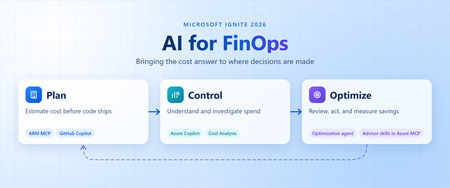
Cloud cost is now everyone's job. Developers want to know what a workload will cost before it ships, FinOps practitioners want to know why the bill changed, and operations teams want to know what to fix first. At Microsoft Ignite 2026, we're launching new AI for FinOps capabilities that bring the cost answer to where each decision is made: in coding agents like GitHub Copilot through Azure skills and MCP servers, in Azure Copilot, and in AI-powered experiences built into products like Azure Advisor and Cost Management. Agents bring the evidence and the options, and your team stays in control of what changes. What we're launching FinOps is a continuous loop. Teams plan a workload, control its spend once it's running, and optimize it over time, and what they measure feeds the next plan. Here's what each stage involves, and what we're launching for it at Ignite. Plan: estimate cost before code ships Planning is when cost is easiest to change. Before a workload ships, developers and architects need to know what it will cost, which design choices drive that cost, and whether it fits the budget. FinOps capabilities in Azure Resource Manager (ARM) MCP. Developers can use GitHub Copilot or other coding agents to estimate deployment costs, investigate spending, analyze AKS costs, and identify optimization opportunities. ARM MCP brings together Cost Management tools and built-in skills that guide agents through these workflows, making it easier to build cost-aware experiences without developing the underlying capabilities from scratch. Azure Cost plugin for GitHub Copilot makes these capabilities readily available in GitHub Copilot. Built on ARM MCP, the plugin combines cost tools and skills for analysis, estimation, optimization, and governance, helping developers understand and manage costs without leaving their development workflow. Control: understand and investigate spend Once a workload is running, FinOps practitioners need to see where spend is going, catch changes early, and explain what's driving them before small surprises become big ones. Built-in cost expertise in Azure Copilot. Azure Copilot's new chat agent, powered by the GitHub Copilot SDK, uses Cost Management tools and skills to help with cost analysis, investigation, AKS costs down to the namespace, budgets, commitments, and planning. Contextual entry points in Cost Analysis. Carry your current view, scope, and timeframe into Azure Copilot with prompts to show cost details, explain cost changes, or recommend ways to lower costs, so you can ask what's driving a change without restating context. FinOps workflows with Azure SRE Agent can use Cost Management capabilities through ARM MCP for on-demand cost investigations and recurring work, such as scheduled cost reviews and anomaly investigations. Optimize: review, act, and measure savings Optimization turns insight into savings. Teams need to decide what to fix first, trust the evidence behind each recommendation, make the change without disrupting what they depend on, and confirm it paid off. The Optimization agent in Azure Copilot summarizes your optimization posture in one view, including cost trend, utilization, budget status, anomalies, and Advisor insights. It ranks recommendations by savings, confidence, and risk, explains the evidence behind each one, such as CPU utilization over the lookback period, and tailors alternatives to your constraints, such as an approved VM family. It then generates a reviewable script, and your team decides when to run it. Azure Advisor cost optimization skills in Azure MCP find unused resources across subscriptions and show what each one has already cost and what cleanup would save. Advisor validates them with read-only checks for attachments, idle time, recent changes, locks, and dependencies, then groups them into passed, needs review, or blocked, with the reason for each. Teams get step-by-step remediation guidance and script templates, create Jira work items through the Jira MCP server, and track savings as cleanup completes, in GitHub Copilot through Advisor skills in Azure MCP. Across these experiences, teams can access FinOps capabilities through Azure MCP and ARM skills in addition to the Azure portal and Azure Copilot, so the same workflow is available wherever work is happening. See these capabilities in action at Ignite Join us at Moscone Center or catch up on demand: THR895: AI for FinOps, continuous optimization for every workload. See how Azure Copilot, GitHub Copilot, and coding agents bring cost insights and optimization guidance right where decisions are made. Thursday, November 19, 3:25 PM PT. BRK415: Put AI agents to work in Azure cloud operations. See Azure agents investigate incidents, uncover cost optimization opportunities, and take corrective action with granular controls. Wednesday, November 18, 11:30 AM PT. You can also see demos and talk with the product teams at the Cloud & AI Expert Meet-up in the Hub (Level 0, Moscone North/South). Learn more FinOps capabilities in Azure Resource Manager MCP Use experimental skills with the ARM MCP server - Azure Resource Manager | Microsoft Learn Azure Cost plugin for GitHub Copilot FinOps workflows in Azure SRE Agent Built-in Cost Expertise in Azure Copilot and Contextual entry points in Cost Analysis Advisor MCP Tools Azure Copilot Optimization Agent (preview)598Views0likes0Comments
Build agentic FinOps workflows with Azure SRE Agent and Azure Resource Manager MCP
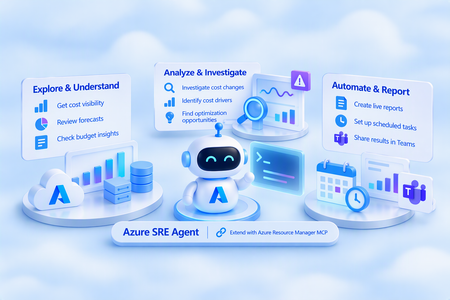
Today, we’re showing how FinOps teams can use Azure SRE Agent with Azure Resource Manager MCP (ARM MCP) to make cost analysis and investigation part of their day-to-day work. ARM MCP gives the agent access to Microsoft Cost Management capabilities. Azure SRE Agent gives teams a way to ask questions, build dashboards, and configure scheduled tasks. Together, they can help teams uncover deeper cost insights, automate recurring analysis, and shape workflows around the questions their organization needs to answer. Build the workflow your team needs One advantage of Azure SRE Agent is a highly extensible platform. You can configure it with the tools, data, instructions and workflows that best meet your needs. Here are a few capabilities you can utilize for FinOps. Component Why use it for FinOps? Azure Resource Manager MCP connector Provides access to Azure data and capabilities for questions about spend, changes, forecasts, budgets, and more. Scheduled tasks Automates execution of FinOps workflows. Simple to set up using natural language prompts. Microsoft Teams connector Sends cost details to collaborators through Teams channels. Skills Extends your agent with reusable guidance and workflows to improve the quality of the response. Plugins Extends your agent through reusable guidance and pre-packaged FinOps tools. Live Reports Generates customizable FinOps dashboards through conversational interaction with Azure SRE agent. Let’s explore a few FinOps use cases with Azure SRE Agent. Find out what caused a cost spike An anomaly alert tells you costs went up. Now you need to know why. You can use Azure SRE Agent to investigate the affected resources and bring the findings back to the team. How to do it: Set up Azure Resource Manager MCP connector Ask your Azure SRE Agent for assistance Get a cost report before the review meeting It’s time for the weekly cost review. Rather than pulling together the same report again, you can configure a scheduled task in Azure SRE Agent to examine costs, call out changes, and send the results to Teams. Your team chooses the questions and the cadence, whether that’s daily, weekly, monthly, or quarterly. All the relevant information is ready for the review meeting. How to do it Set up Azure Resource Manager MCP connector Set up Teams Connector Create a new scheduled task Run scheduled task Create and update dashboards on the go Azure SRE Agent lets you create Live Reports for the cost analysis you need. Describe what you want to see in natural language and Azure SRE agent will create the report. You can also update the report easily by conversing the agent. How to do it: Set up Azure Resource Manager MCP connector Create a new Live Report Getting started Below we cover a basic setup with a few Azure SRE agent capabilities of so you can begin exploring core FinOps use cases. Create Your Azure SRE Agent (Prerequisite): Follow the agent setup guide (Step 1A) to create an Azure SRE Agent in your chosen subscription and resource group. Once it’s created, open Settings at sre.azure.com to review its configuration. If you run into a permissions issue, check these things: Your access to create the agent: You need Contributor or Owner role on the target resource group or subscription. Your access to manage the agent: You need Role Based Access Control Administrator or User Access Administrator role. Your team’s access to use the agent: Assign an appropriate user role on the agent resource. Note: only users with the SRE Agent Administrator role can create schedule tasks, chat, add code repositories, and approve actions. The agent’s access to Azure resources: Check that the agent has access to the resource groups it needs. You can update its agent permissions after creation. Setting up Azure Resource Manager MCP Connector Navigate to Build + Setup in sre.azure.com Open Connectors and add connector Choose MCP server as connector type Name the MCP server Input URL: https://mcp.management.azure.com/ Authentication type: Choose Managed Identity Copy the generated Managed identity for Step 10 Azure AD Token Scope: https://mcp.management.azure.com/.default Custom header: Header key: x-mcp-toolset Header value: CostManagement Save connector Open Edit >MCP tools and enable Cost Management tools to activate tools In Azure Portal ensure the MCP’s Managed identity has the following IAM access, depending on the scope: Subscription or Resource Group Scope: Cost Management Reader and Reader access. Additionally, Cost Management Contributor access (if creating a budget) Enterprise agreement (EA) billing scope: EnrollmentReader Microsoft Customer Agreement (MCA scope): Billing Account Reader, Billing Profile Reader or Invoice Section Learn more: Set Up MCP Connector | Azure SRE Agent Setting up Teams Connector Navigate to Build + Setup in sre.azure.com Open Connectors and add connector Navigate to Notifications > Teams Authenticate in Teams Define the tools you want your agent to access in Teams. Minimum recommendation: Post message in a chat or channel, Reply to message in a chat or channel, GetUnifiedAction Schema Copy the URL of the Teams channel you want the agent to post in Reference the channel you want to the agent to post in by the Teams Channel URL (e.g in a scheduled task, in a message to Azure SRE agent). Learn more: Set Up Teams Connector | Azure SRE Agent Setting up Scheduled Task Navigate to Automation in sre.azure.com Create a scheduled task Add details in the task description to specify what the task should do and how it should accomplish it (“use the ARM MCP connector”, “post results into this Teams Channel: {url}”) Set frequency and start/end date of task. Learn more: Create and Edit Scheduled Tasks | Azure SRE Agent Setting up Live Report Navigate to Live Report in sre.azure.com Talk with Azure SRE Agent to prompt it to create and update the report as you desire. Learn more: Live Reports | Azure SRE Agent You now have three ways to work with cost data in Azure SRE Agent: ask a question, receive a scheduled review in Teams, and build a Live Report. In Part 2, we’ll extend this basic setup with a preconfigured recipe for deeper investigations and more tailored FinOps workflows.198Views0likes0CommentsYour Azure costs, in context: What’s new in Cost Analysis and Azure Copilot
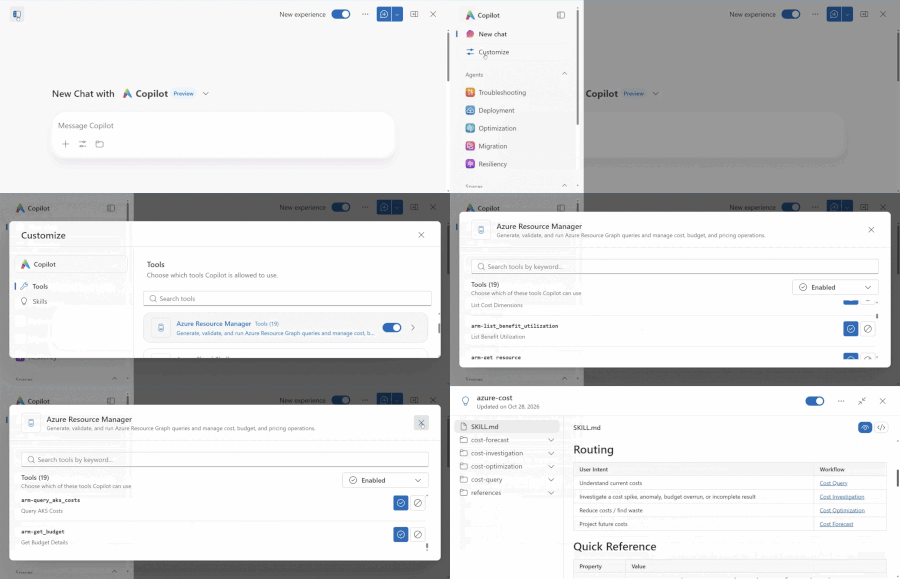
Bringing cost intelligence to Azure Copilot and Cost Analysis Today, we’re expanding Microsoft Cost Management’s AI capabilities in the Azure portal, with deeper cost expertise in Azure Copilot and new context-aware entry points from Cost Analysis experiences. These feature updates make it easier to get answers to your common cost questions by asking Azure Copilot directly and using the cost context customers are already viewing and bringing it directly into Copilot. Cost expertise built into Azure Copilot Azure Copilot’s recent integration with the GitHub Copilot SDK and Azure Resource Manager MCP (ARM MCP) enables us to bring improved FinOps capabilities directly into the conversational experience. Cost tools provide access to Microsoft Cost Management capabilities and data, while the Azure cost skill provide workflow guidance and guardrails for applying those tools across multi-step FinOps scenarios. Customers can now benefit from more specialized, workflow-oriented support across cost analysis, investigation, AKS costs, budgets, commitments, and planning. FinOps capabilities available today Capability What it helps you do Supported tools Supported workflows in Azure Cost skill Cost visibility Understand spend, trends, and key cost drivers query_costs list_dimensions cost-query AKS cost analysis Break down AKS costs by cluster, namespace, and utilization aks_query_costs Cost Forecast Project future costs forecast_costs cost-forecast Cost investigation Explain changes, anomalies, and likely cost drivers query_costs list_alerts cost-investigation Budget health Track spend against budgets and notification thresholds get_budget list_budgets Commitment analysis Review utilization, purchases, and projected savings get_recommendations list_reservation_transactions list_benefit_utilization cost-optimization Pricing & estimates Look up retail pricing and estimate deployment costs get_retail_prices Azure Cost Skills and Tools in action Azure Copilot From Cost Analysis to Copilot, with context New contextual entry points connect what you’re viewing in Cost Analysis directly to Azure Copilot. Targeted prompts help you quickly explore common cost management needs, such as getting more detail on your costs, understanding what’s driving them, or finding opportunities to lower spending, without having to restate the context of what you’re already viewing. The experience carries forward relevant context, including your cost view, scope, and timeframe, so you can continue exploring with Azure Copilot from where you left off. The following views are supported with the new contextual entry points: Overview, Resources, Accumulated costs, Daily costs, Resource groups, Services, Subscriptions, and Kubernetes clusters. Get started To explore these capabilities in Azure Portal: Enable the New Experience in Azure Copilot For Azure Copilot: Open up Azure Copilot and ask your FinOps questions directly. For Cost Analysis: Navigate to Cost analysis in the Cost Management blade , click into a supported view, click a nudge relevant to your intent to explore further with Azure Copilot.223Views0likes0CommentsYour guide to FinOps for AI at Microsoft Ignite 2026
AI has moved from pilots to production, and the questions have changed with it. It is no longer enough to know what AI costs. Leaders want to know whether spend is predictable, who is driving it, and which investments are delivering real business value. That is the job of FinOps for AI: bringing finance, IT, engineering and business teams together to plan, control and optimize AI spend and value. At Microsoft Ignite, November 17–20, 2026, in San Francisco and online, FinOps for AI shows up across the agenda, from keynotes to breakouts, demos, lightning talks, table talks and hands-on labs. Whether you manage Microsoft 365 Copilot and agents, build on Microsoft Foundry and GitHub, or own the AI budget, there is a session for you. We've gathered them all in one place so you can plan your week. Innovation sessions Start with the big picture. These sessions will showcase how cost and value fit into Microsoft's broader AI vision, and what's new across the stack. INV642: Observability at every layer of the stack As AI and agents scale, visibility, trust, and security become business imperatives. Join Charles Lamanna, Executive Vice President, Copilot, Agents, and Platform, and Hayete Gallot, Executive Vice President, Microsoft Security, to explore how observability at every layer of the stack helps organizations understand where AI is being used, how agents are operating, what risks are emerging, and whether investments are delivering results. See how organizations can turn visibility into action to scale AI with confidence. Session page: https://ignite.microsoft.com/en-US/sessions/INV642 INV641: Harnessing Your IQ with a continuously improving agent platform Join Arun Ulag and Jay Parikh to discover how Microsoft IQ helps your organization activate, protect, and build on the knowledge that makes it unique. Learn how to keep improving as models evolve, with model choice and control intact. Explore how your data and expertise become AI that understands your business, so work runs faster, more accurately, and at lower cost. Session page: https://ignite.microsoft.com/en-US/sessions/INV641 Breakout sessions Breakouts go deeper, with technical content and live demos. We've grouped them by topics and scopes. Understand economics and value BRK537: From AI Ambition to Value at Scale As AI moves from experimentation into everyday business operations, growing usage alone does not tell leaders whether an investment is working. Learn how organizations can connect AI consumption to measurable business value, establish the visibility and accountability needed to manage it, and determine whether the economics continue to hold as adoption grows. Leave with a practical approach for deciding where AI has earned the right to scale, where to adjust, and where continued investment may not be justified. Session page: https://ignite.microsoft.com/en-US/sessions/BRK537 BRK308: How Microsoft IQ shapes the cost of enterprise AI Enterprise AI does not have one cost model. It has three: people, consumption, and capacity. Through a retail AI scenario and a live cost estimation demo, this session shows how Work IQ, Foundry IQ, Fabric IQ, and Web IQ create different cost shapes, and how to optimize each one for scale, value, and control. Session page: https://ignite.microsoft.com/en-US/sessions/BRK308 BRK260: The next evolution of AI FinOps: From cost to value Visibility into AI spend is just the beginning. Learn how leading organizations optimize investments across Microsoft 365 Copilot, Copilot Studio, and GitHub Copilot to maximize business impact. Discover how new capabilities, help you manage costs, prove value, and scale the AI initiatives that deliver the biggest results. Session page: https://ignite.microsoft.com/en-US/sessions/BRK260 Establish governance and guardrails BRK263: Master AI spend management with Agent 365: Govern your AI budget See the tools IT needs to govern, control, and optimize AI spend at scale. Join this deep dive into Agent 365 and Microsoft 365 Admin Center capabilities for AI FinOps. Learn how to establish guardrails with policies, monitor consumption across AI vendors, measure value, and confidently scale AI across your organization. This is the essential session for IT to understand the latest innovations in AI cost management and governance. Session page: https://ignite.microsoft.com/en-US/sessions/BRK263 BRK262: Scale agents, not risk: Governance and FinOps for the enterprise As agents move from experimentation to enterprise-wide deployment, IT needs a new approach to governance and FinOps. Learn how to build a scalable operating model across agent inventory, lifecycle, security, cost management, and optimization, giving teams the freedom to innovate while maintaining the visibility, guardrails, and financial discipline IT needs. Session page: https://ignite.microsoft.com/en-US/sessions/BRK262 BRK290: Humans, agents, and a game plan: AI governance with GitHub Enterprise Give developers, knowledge workers, and AI agents room to innovate with enterprise control. Follow an admin journey in GitHub Enterprise and Copilot: set model policies and managed settings, customize for teams, onboard fast, and manage access and spend. Review config changes via pull requests and use agent activity data to assess governance. See the roadmap linking policy, usage, and cost. Leave with a plan to set guardrails, measure impact, and grow AI adoption without friction. Session page: https://ignite.microsoft.com/en-US/sessions/BRK290 Optimize spend and technical choices BRK266: Maximize your Copilot Investment: Scale with flexibility and control AI investments are growing, but are organizations getting the most value from them? Learn not only how to gain visibility and control over AI spend, but also how to measure business value and continuously optimize. Explore new capabilities designed to help organizations manage spend against budget, allocate resources effectively, and maximize the value of their AI investments. Session page: https://ignite.microsoft.com/en-US/sessions/BRK266 BRK271: Manage GitHub Copilot spending and understand team adoption Make informed decisions about your Copilot investment. Explore how model choices, agent workflows, and GitHub Actions contribute to development costs, then use billing reports, budgets, and alerts to manage spending. Learn to interpret adoption and engagement trends, spot underused capabilities, and target support where teams need it. IT admins and engineering leaders will leave with practical steps to manage costs and help developers use Copilot effectively. Session page: https://ignite.microsoft.com/en-US/sessions/BRK271 BRK216: Multi-model AI in Copilot: Performance and value with built-in trust No single AI model is best for every task. As AI advances, organizations need access to the latest models without adding complexity for users, cost uncertainty for leaders, or administrative risk for administrators. Join us to see how Microsoft Copilot provides one governed front door to multi-model AI, with Microsoft evaluation and integration, intelligent routing with Auto, and cost management tools to you optimize AI value while maintaining security, compliance, and control. Session page: https://ignite.microsoft.com/en-US/sessions/BRK216 BRK280: Designing an agent harness that orchestrates models Choosing a model is becoming less important than deciding how and when models are used. Explore how routing can match models to different tasks, constraints, and stages of development. We’ll examine the signals and tradeoffs that guide these decisions, and approaches such as HydraFusion that coordinate models as a portfolio. Leave with a framework for building adaptable agent systems across quality, latency, cost, and control. Session page: https://ignite.microsoft.com/en-US/sessions/BRK280 BRK249: From traces to better agents: The Foundry improvement loop Building an agent is the start. Improving it in production is the real work. See how Microsoft Foundry connects traces, evaluations, and optimization to help teams find high-impact issues, test improvements, and re-measure results. Learn a repeatable loop to improve quality, manage cost, and ship better agents while developers stay in control. Session page: https://ignite.microsoft.com/en-US/sessions/BRK249 Session for partners BRK482: FinOps for AI: Partner Playbook for Building AI Solutions and Services AI is creating unprecedented opportunities for partners, but success requires more than innovative solutions. It requires managing the economics behind AI. In this session, Microsoft leaders and industry experts share a practical FinOps framework for AI to help partners anticipate and govern costs, optimize token consumption, and build repeatable, profitable services. Hear real-world partner examples and leave with actionable guidance to turn AI cost management into a competitive advantage. Session page: https://ignite.microsoft.com/en-US/sessions/BRK482 Theater sessions, lightning talks, table talks and labs Short on time or want to get hands-on? These shorter formats include product demos, focused talks, small-group discussions and labs. Labs require an RSVP, so reserve your seat early. Code Session Format Session page PREB23 Optimize your Copilot Investment Pre-day session https://ignite.microsoft.com/en-US/sessions/PREB23 THR865 Navigating AI spend across your organization Theater https://ignite.microsoft.com/en-US/sessions/THR865 THR895 AI for FinOps, continuous optimization for every workload Theater https://ignite.microsoft.com/en-US/sessions/THR895 THR967 AI FinOps in practice: what IT and business owe each other Theater https://ignite.microsoft.com/en-US/sessions/THR967 LTG1170 AI That Pays Off: New Ways to Measure Value and Optimize Spend Lightning talk https://ignite.microsoft.com/en-US/sessions/LTG1170 LTG1165 Preparing for usage-based billing Lightning talk https://ignite.microsoft.com/en-US/sessions/LTG1165 LTG1193 A practical guide to FinOps for GitHub Copilot Lightning talk https://ignite.microsoft.com/en-US/sessions/LTG1193 LTG1342 FinOps for AI: Unlocking value across the AI lifecycle Lightning talk https://ignite.microsoft.com/en-US/sessions/LTG1342 LTG1206 Agent FinOps: Designing agents that scale responsibly Lightning talk https://ignite.microsoft.com/en-US/sessions/LTG1206 TT1669 Agent ROI, optimization and FinOps Table talk https://ignite.microsoft.com/en-US/sessions/TT1669 LAB660 Configuring, monitoring, and managing AI spend with Agent 365 Hands-on lab https://ignite.microsoft.com/en-US/sessions/LAB660 LTG1201 Optimizing AI decisions with the model router in Foundry Models Lightning talk https://ignite.microsoft.com/en-US/sessions/LTG1201 Plan your FinOps for AI week Every session above maps to the same journey: plan AI spend so it's predictable, control it so costs stay visible and accountable, and optimize it to get more value from every AI investment. Add the sessions that match your role to your Ignite schedule and stop by to talk with our team. We look forward to seeing you at Ignite. Next steps Join us at Microsoft Ignite, November 17–20 in San Francisco to see it in action and go hands-on with the team that built it. Catch us on 'Live at Microsoft Ignite' which will be broadcasted on Ignite.com, starting Tuesday, November 17th, through Thursday, November 19th.2.1KViews0likes1CommentWhat's new in FinOps toolkit 15 – October 2026
FinOps toolkit 15 brings FinOps expertise and your cost data to the AI tools you already use with a new agent plugin, adds a guide to run FinOps hubs locally, adds NAT Gateway support for private FinOps hubs, and delivers new reservation and commitment discount data.1.1KViews0likes0Comments
You Get One Exchange Left: Rethinking Azure Commitments Before February 2027
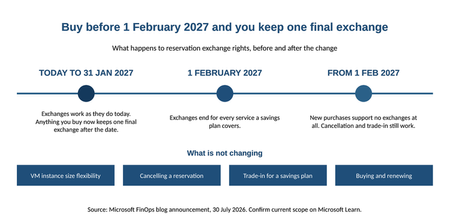
Azure gives you two main ways to pay less by committing up front. A reservation gets you the deepest discount, but you are locking in a specific SKU in a specific region. A savings plan gives up some of that discount in exchange for freedom: you are only committing to spend a certain amount per hour on compute and database services, and it does not care which region you spend it in. Until now, a reservation could move with you. If your infrastructure or database environment changed, or a workload had to move to a new region, you exchanged the reservation for one that matched where things had landed. That flexibility is why teams could commit early and adjust as the environment evolved. That flexibility is changing. From February 1, 2027, you can no longer exchange a reservation for any service that a savings plan covers. Neither product is changing. What is changing is how much room you have to adjust a commitment after your environment shifts, which means the order you make these decisions in matters a lot more than it used to. What's changing Here is what is affected as of the announcement. Compute: Azure Virtual Machines (including swapping between non-premium and premium storage), Azure Dedicated Host, and Azure App Service. Databases: Azure Database for PostgreSQL, Azure Database for MySQL, Azure DocumentDB, Azure Cosmos DB, Azure SQL Database, and Azure SQL Managed Instance. That list will grow. As savings plans start covering more services, reservations for those services automatically fall under the same rule. Products that are being retired are excluded, and so are clouds where savings plans are not offered. Two details really matter. If you own a reservation for one of these services and you bought it before February 1, 2027, you get one final exchange after that date. Just one. Buy on or after that date and you get none. Full details, including the FAQ, are in the official announcement: "Reservation exchanges for Azure services covered by savings plans end starting Feb. 1, 2027". What's staying exactly the same This is worth spelling out, because it is easy to read more into the announcement than is actually there. All of this still works. VM instance size flexibility is untouched. Cancelling a reservation is untouched. Trading a reservation in for a savings plan is still there. Buying and renewing reservations is still available, and still the right call for steady workloads. Reservations are not going anywhere. The only thing changing is your ability to swap one for another when your environment moves underneath it. The part most teams get backwards You cannot think clearly about timing without this, and it is the thing people most often have wrong: reservations and savings plans are not a choice between two options. You can use both. They stack, and they apply in a set order every hour. Reservations go first, on anything they match. The savings plan picks up what is left, up to your hourly commitment. Whatever is still uncovered bills at pay-as-you-go, using your negotiated rate. Here is one hour, made concrete. Say you have reservations covering $10 an hour of matching VMs, plus a savings plan committed at $5 an hour. In an hour where you use $18 of eligible compute, $10 gets reservation pricing, $5 gets savings plan pricing, and the last $3 bills pay-as-you-go. The savings plan did not fight the reservation for that spend. It caught the overflow. Two things people assume that are not true. The terms do not have to match: a three-year reservation and a one-year savings plan work fine side by side. And you do not tag or assign anything. Once you buy a savings plan, it looks across whatever scope you bought it at and applies itself wherever it finds a fit. That flexibility is the whole point. A savings plan ties you to an hourly amount, not to a SKU or a region. A reservation ties you to both. Before February 2027 that difference was mostly about how big a discount you got. After, it also decides how easily your commitment can follow the environment as it changes. Three rules for buying from here on Lean on savings plans while things are still moving Before you commit to anything, ask what is going to change in the next ninety days. If a team is midway through centralizing their networking and is about to delete every per-subscription VPN gateway, any recommendation you generate this week will be wrong next month. Azure Advisor rescans every day and rewrites its recommendations as your environment shifts. If a workload is mid-migration, mid-consolidation, or mid-anything, a savings plan gets you a similar discount without locking you in. Move it to a reservation once it is genuinely settled. A domain controller running around the clock in one region is the textbook reservation. Something still being actively built is not. Start short, and know why that matters now Three years gets you the best rate. Starting with one year and extending as you get more confident was always the sensible approach. Now it carries more weight, because a reservation can no longer be exchanged when your environment moves. If one stops matching, your options are to cancel it under the existing policy, or trade it in for a savings plan. That is the whole list. Buy at the business-unit level, not the tenant level Buy everything centrally and you take away each team's ability to pick what suits their own workloads. Then, when a team wants more coverage than the central purchase gives them, they go and buy their own at subscription level, and now you are paying for the same thing twice. Buying per business unit also makes chargeback far easier, because the discount ends up sitting where the spending happens. Clean up before you commit There is a step that comes before all of this, and it is not new advice. Azure Advisor already flags unattached disks, idle virtual network gateways, and VMs that should be resized or switched off. If you have not done that sweep, "Identify your savings potential in Azure" walks through the tools properly. What is new is what happens if you skip it. Leftover and idle resources do not just eat into your savings. They inflate the number you size your commitment against. Commit against a messy environment and you have just locked in one to three years of spend on resources that should not be running. Up to now, an exchange gave you a way to adjust that later. Cleaning up used to be good housekeeping. Once you cannot exchange out of a reservation, it is genuinely about limiting risk. The same goes for the workloads you are keeping. Switch off VMs outside business hours before you buy a reservation, not after. Reservations only pay off on workloads that run constantly, and once you have bought one you owe the money whether the VM is running or deallocated. Scaling up and never scaling back down is the same problem wearing a different hat. How to check it actually worked Your reservation and savings plan discounts show up on the invoice under amortized cost. Three columns tell the story. Pay-as-you-go price is the list price. Unit price is your negotiated discount, before reservations are applied. Effective price is what you genuinely paid once reservations and savings plans were counted. There is no neat query for this. You read it off the invoice. It is the clunkiest part of the whole process and it is the first thing your finance partner will ask about, so get it into your reporting now rather than during your first chargeback cycle. What to do in the next ninety days List every active reservation you hold for an affected service. Work out which ones no longer match the workload. Those are your candidates for that one remaining exchange. Decide deliberately where that one exchange does the most good. Clean up orphaned disks, idle gateways, over-replicated storage, and scale-ups nobody scaled back down. Re-baseline your commitment sizing against the tidied-up environment. Buy at business-unit level, leaning toward savings plans anywhere the workload is still changing. The takeaway Reservations and savings plans both still work, and both still save you real money. What changes on February 1, 2027 is that a reservation can no longer be exchanged when your environment moves, so the decision has to be right at the point you make it rather than adjusted afterwards. That puts the weight on sequence: clean up first, size the commitment against what is actually running, use savings plans while a workload is still settling, and move to a reservation once it has stopped moving. The deadline is not something to panic about. It is a good excuse to finally do the bit most cost programs skip.1.3KViews1like1Comment
Now Available: Management Group–Scoped Savings Plan and Reservation Recommendations in Azure
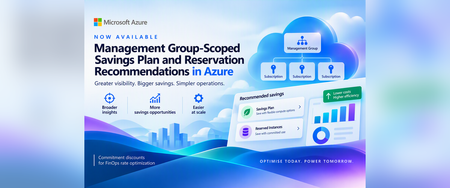
Smarter commitments, at the scope that matters We're excited to announce that both savings plan and reservation (including P3) recommendations are now available at the management group scope in the Azure Portal and via REST API. With management group–scoped recommendations, you can now evaluate and act on both your savings plan and reservation opportunities across an entire organizational hierarchy in a single, unified view. If you manage cost and commitments across a multi-subscription estate, this is another way to maximize both your savings plan and reservation commitment coverage with confidence. The value proposition Management groups are how enterprises organize subscriptions to reflect their real business structure — by department, environment, geography, or line of business. Bringing savings plan and reservation recommendations to this scope delivers three key benefits: Aggregated purchasing power. Recommendations account for the combined, steady-state usage and spend across the subscriptions under a management group. For both reservations and savings plans, this surfaces commitment levels that better reflect true aggregate consumption. Governance-aligned decisions. FinOps teams and central IT can generate and review both savings plan and reservation recommendations at the exact organizational boundary where budget and commitment decisions are actually made — no more reconciling dozens of separate subscription-level recommendations. Reduced analysis overhead. A single API call or portal view returns recommendations for an entire management group, with configurable term and look-back period. Less manual aggregation, faster time to a confident purchase decision. How it works The recommendation engine analyzes your historical usage over your selected look-back window, models the optimal commitment, and projects the expected savings versus pay-as-you-go pricing — now with the management group as a first-class scope for both savings plans and reservations. In the Azure Portal: Navigate to the Savings plans or Reservations purchasing experience, then select a management group scope to view aggregated recommendations. Via the REST API: For savings plans, call the Savings Plan Recommendations endpoint with a management group scope. For reservations — including P3 — call the Reservation Recommendations endpoint with a management group scope. Get started today Explore the Benefit Recommendations and Reservation Recommendations API references to start integrating management group recommendations into your FinOps tooling today.963Views0likes2Comments
Announcing savings plan for databases: flexible savings for modern, evolving workloads
As organizations modernize their data platforms, database environments are constantly changing. Teams migrate between services, scale across regions, and evolve architectures to support new applications and AI driven workloads. But optimizing costs in these environments can be challenging, especially when savings options require locking into specific services, regions, or configurations. To help with these challenges, we’re introducing savings plan for databases, a new way to save on eligible database services while maintaining the flexibility needed to modernize and grow your business. Savings plan for databases helps IT, engineering, and FinOps teams reduce database costs with a simple, spend based commitment—without slowing down architectural change. New: Choose a 3-year term for longer-term planning Savings plan for databases now gives you more choice in how you plan for your database investments, with 1-year and 3-year commitment options. Both terms provide the same discounted pricing, so the choice is less about finding a different discount and more about selecting the commitment period that best aligns with your business plans, workload lifecycle, and cloud strategy. The 3-year option can be a strong fit for organizations with longer-term database migration, modernization, or optimization initiatives. It provides a longer planning horizon for organizations that want predictable savings aligned to a multi-year database roadmap, while reducing the need to make a new commitment decision each year. If your database needs are changing more quickly or you prefer to reassess your commitments annually, the 1-year option may be a better fit. Choose the commitment term that matches your planning horizon: 1 year: Greater flexibility to reassess your database strategy and commitments annually. 3 years: Greater continuity for longer-term database strategies, migration and modernization programs, and multi-year planning. Whichever term you choose, savings plan for databases continues to give you the flexibility to save as your eligible database usage evolves. What is savings plan for databases? Savings plan for databases is a spend based pricing model that enables customers to save on eligible database services by committing to a fixed hourly spend for one year. In return, customers receive lower prices—up to 35% compared to pay-as-you go pricing on select services*. Instead of committing to a specific database service, region, or configuration, customers commit to an hourly dollar amount (for example, $5 per hour). The plan automatically applies savings to eligible database usage each hour, prioritizing the usage that delivers the greatest savings first—across services and regions—until the hourly commitment is met. Any usage beyond the commitment continues at pay-as-you go rates, ensuring flexibility as needs change. Pricing is for illustrative purposes only. Benefits designed for modern database workloads Flexibility as environments evolve Savings plan for databases is designed for change. Savings continue to apply as workloads modernize or move across regions—without requiring customers to repurchase or reconfigure commitments. This makes it well suited for dynamic environments where architectures are expected to evolve over time. Automatic cost optimization With a single hourly commitment, customers unlock discounted prices on eligible database usage. Savings are applied automatically each hour, ensuring customers get the most value from their commitment without manual management or constant tuning. Predictable budgeting and forecasting A fixed hourly spend replaces variable pay-as-you-go costs with a predictable commitment, making it easier for FinOps and IT finance teams to forecast spend, plan budgets, and manage cloud investments with confidence. What services that are covered with the savings plan for databases: Savings plan for databases pricing How to purchase a savings plan for databases Getting started is simple: Review personalized recommendations in the Azure portal based on recent database usage. Choose an hourly commitment and scope it into a subscription, resource group, management group, or entire account. Select a payment option—pay monthly or upfront at no additional cost—and optionally enable auto‑renewal. Once purchased, savings are applied automatically to eligible database usage every hour. Learn more here on how to purchase a savings plans here. Example: saving while modernizing Consider a team running a global application that uses Azure SQL Database and Azure Database for PostgreSQL today, with plans to expand into additional regions over the next year. Instead of purchasing individual reservations tied to specific services or regions, the team purchases a 1‑year savings plan for databases with a $5/hour commitment. As usage shifts across database services and regions, Azure automatically applies discounted prices to eligible usage up to the hourly commitment. The team continues modernizing without disruption—while benefiting from predictable savings. Summary Savings plan for databases provides a new way to optimize database costs —without locking into fixed architectures. With hourly commitments, automatic optimization, and predictable costs, it’s designed to support modernization today and continued growth tomorrow. Get started You can begin saving today: View your recommendation in Azure Advisor Purchase a plan in Azure portal Visit the Savings plan homepage Review the Microsoft Documentation Watch demo videos at the Azure Essentials Show *Customers may see savings estimated to be between 0% and 35%. The 35% savings estimate is based on one Azure SQL Database serverless running for 12 months at a pay-as-you-go rate vs. a reduced rate for a 1-year savings plan. Based on Azure pricing as of March 2026. Prices are subject to change. Actual savings may vary based on location, database service, and/or usage. ** Note that savings plan for databases will also be consumed by SQL Server on Azure Virtual Machines and SQL Server enabled by Azure Arc hourly license at the normal pay-go price.10KViews2likes0CommentsCost increases when selecting Amortised cost in cost analysis
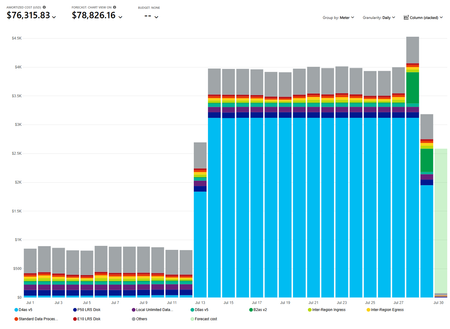
Hi, this seems like a bug. When i select Amortized cost in Cost analysis, our monthly cost jumps from $25,664.54 to $76,315.83. The resource that causes the jump is a Reservation for a D4asv5 virtual machine. It jumps to $3,120.09 per day. Can someone please try it their side.Solved418Views0likes4Comments