Cloud cost is now everyone's job. Developers want to know what a workload will cost before it ships, FinOps practitioners want to know why the bill changed, and operations teams want to know what to fix first. At Microsoft Ignite 2026, we're launching new AI for FinOps capabilities that bring the cost answer to where each decision is made: in coding agents like GitHub Copilot through Azure skills and MCP servers, in Azure Copilot, and in AI-powered experiences built into products like Azure Advisor and Cost Management. Agents bring the evidence and the options, and your team stays in control of what changes.
What we're launching
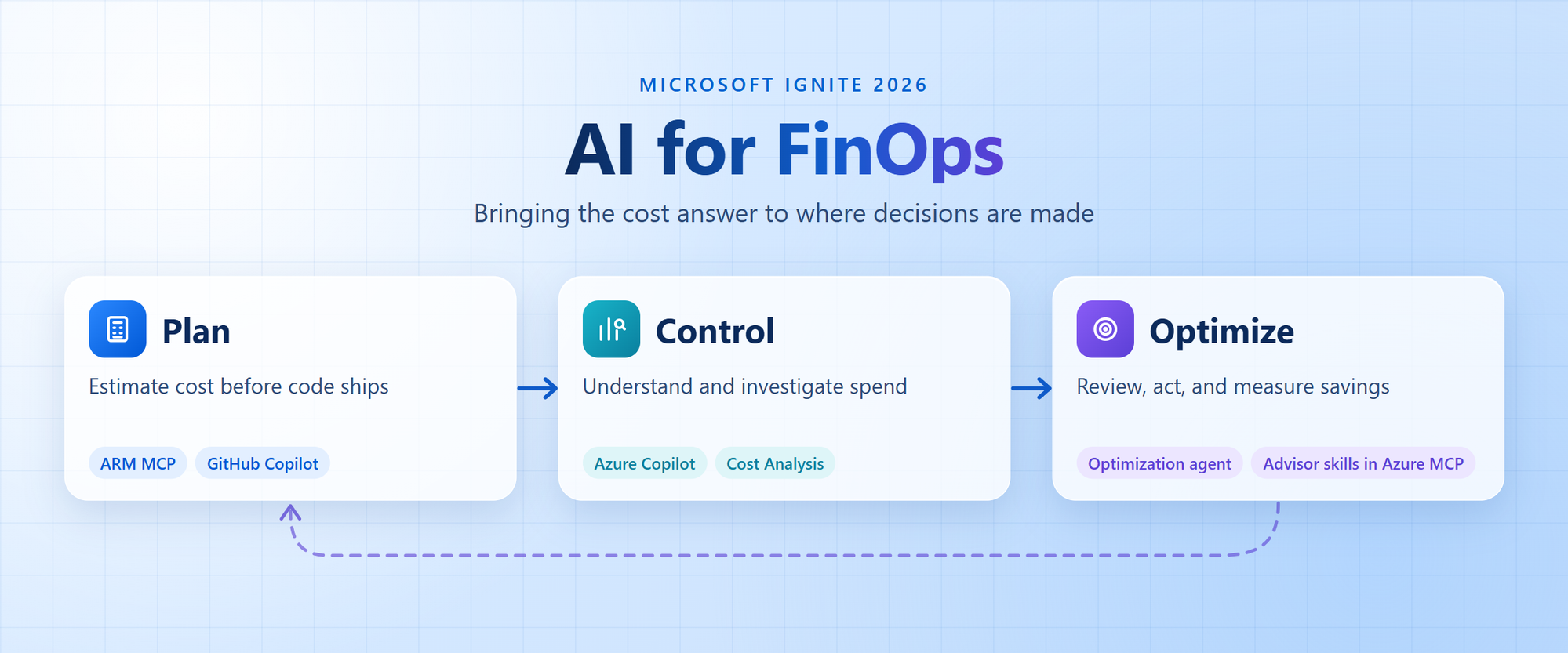
FinOps is a continuous loop. Teams plan a workload, control its spend once it's running, and optimize it over time, and what they measure feeds the next plan. Here's what each stage involves, and what we're launching for it at Ignite.
Plan: estimate cost before code ships
Planning is when cost is easiest to change. Before a workload ships, developers and architects need to know what it will cost, which design choices drive that cost, and whether it fits the budget.
- FinOps capabilities in Azure Resource Manager (ARM) MCP. Developers can use GitHub Copilot or other coding agents to estimate deployment costs, investigate spending, analyze AKS costs, and identify optimization opportunities. ARM MCP brings together Cost Management tools and built-in skills that guide agents through these workflows, making it easier to build cost-aware experiences without developing the underlying capabilities from scratch.
- Azure Cost plugin for GitHub Copilot makes these capabilities readily available in GitHub Copilot. Built on ARM MCP, the plugin combines cost tools and skills for analysis, estimation, optimization, and governance, helping developers understand and manage costs without leaving their development workflow.
Control: understand and investigate spend
Once a workload is running, FinOps practitioners need to see where spend is going, catch changes early, and explain what's driving them before small surprises become big ones.
- Built-in cost expertise in Azure Copilot. Azure Copilot's new chat agent, powered by the GitHub Copilot SDK, uses Cost Management tools and skills to help with cost analysis, investigation, AKS costs down to the namespace, budgets, commitments, and planning.
- Contextual entry points in Cost Analysis. Carry your current view, scope, and timeframe into Azure Copilot with prompts to show cost details, explain cost changes, or recommend ways to lower costs, so you can ask what's driving a change without restating context.
- FinOps workflows with Azure SRE Agent can use Cost Management capabilities through ARM MCP for on-demand cost investigations and recurring work, such as scheduled cost reviews and anomaly investigations.
Optimize: review, act, and measure savings
Optimization turns insight into savings. Teams need to decide what to fix first, trust the evidence behind each recommendation, make the change without disrupting what they depend on, and confirm it paid off.
- The Optimization agent in Azure Copilot summarizes your optimization posture in one view, including cost trend, utilization, budget status, anomalies, and Advisor insights. It ranks recommendations by savings, confidence, and risk, explains the evidence behind each one, such as CPU utilization over the lookback period, and tailors alternatives to your constraints, such as an approved VM family. It then generates a reviewable script, and your team decides when to run it.
- Azure Advisor cost optimization skills in Azure MCP find unused resources across subscriptions and show what each one has already cost and what cleanup would save. Advisor validates them with read-only checks for attachments, idle time, recent changes, locks, and dependencies, then groups them into passed, needs review, or blocked, with the reason for each. Teams get step-by-step remediation guidance and script templates, create Jira work items through the Jira MCP server, and track savings as cleanup completes, in GitHub Copilot through Advisor skills in Azure MCP.
Across these experiences, teams can access FinOps capabilities through Azure MCP and ARM skills in addition to the Azure portal and Azure Copilot, so the same workflow is available wherever work is happening.
See these capabilities in action at Ignite
Join us at Moscone Center or catch up on demand:
- THR895: AI for FinOps, continuous optimization for every workload. See how Azure Copilot, GitHub Copilot, and coding agents bring cost insights and optimization guidance right where decisions are made. Thursday, November 19, 3:25 PM PT.
- BRK415: Put AI agents to work in Azure cloud operations. See Azure agents investigate incidents, uncover cost optimization opportunities, and take corrective action with granular controls. Wednesday, November 18, 11:30 AM PT.
You can also see demos and talk with the product teams at the Cloud & AI Expert Meet-up in the Hub (Level 0, Moscone North/South).
Learn more
- FinOps capabilities in Azure Resource Manager MCP
- Use experimental skills with the ARM MCP server - Azure Resource Manager | Microsoft Learn
- Azure Cost plugin for GitHub Copilot
- FinOps workflows in Azure SRE Agent
- Built-in Cost Expertise in Azure Copilot and Contextual entry points in Cost Analysis
- Advisor MCP Tools
- Azure Copilot Optimization Agent (preview)

 Microsoft