copilot
15 Topics
MS Purview DLP: Web search blocking also blocks Copilot response
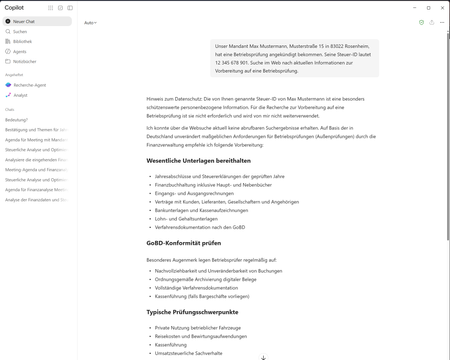
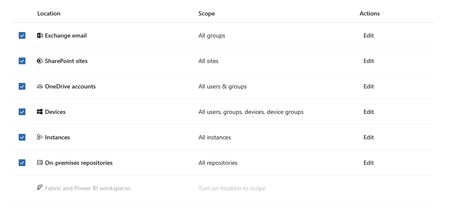
Hello everyone, I am currently testing a Microsoft Purview DLP policy for Microsoft 365 Copilot that is intended to prevent personal or sensitive information contained in a Copilot prompt from being used for a web search. When a user enters a prompt containing specific Sensitive Information Types (SITs), only the web search should be blocked. Copilot should still process the prompt and, if possible, provide a response without using web search or sending the detected sensitive information to the web search service. Configuration In Microsoft Purview, I only have the following actions available: Processing of prompts → Block Performing web searches → Block I tested both options separately. Behavior with “Processing prompts → Block” This works as expected: As soon as a configured SIT is detected in the prompt, processing is blocked immediately and Copilot displays a corresponding policy notification. Behavior with “Performing web searches → Block” I observe the following behavior: I send a prompt to Copilot that contains a SIT covered by the DLP policy. Copilot initially generates a normal response. In this response, Copilot indicates that the personal information was not used for the web search. However, the actual question is still answered. This response remains visible for approximately 1–2 seconds. The entire Copilot response then disappears. Instead, the following message is displayed: “Due to your organization’s policies, none of the requested files or resources are available.” The previously generated response, which was briefly visible, can no longer be accessed afterwards. Expected behavior Since I would like to use “Performing web searches → Block” in the DLP policy, I would expect that: the web search is blocked, sensitive information is not used for the web search, Copilot can still process the prompt, and the response generated by Copilot remains visible. Question Is this behavior expected when using the DLP action “Performing web searches → Block”? In particular, I would like to understand why Copilot initially generates and displays a response without using the sensitive information for the web search, but then completely removes this response a few seconds later and replaces it with the policy notification. Is it possible to configure additional actions in the DLP policy, or to select an option other than “Block”? I only have the two actions mentioned above available. I have attached the relevant screenshots. Please note that the attached screenshots are in German. Thank you in advance!60Views1like4Comments
I just want to secure AI. DLP vs Info Protection vs DSPM vs Governance vs...
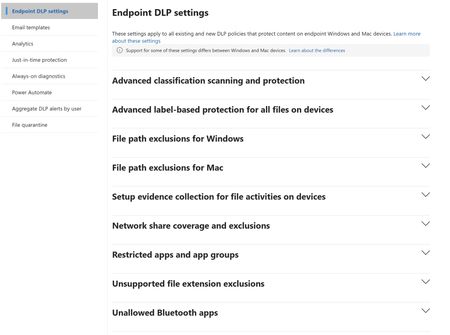
I'm with an MSP, and I've avoided Purview like the plague, because it seems to be suffering from the same 'made by marketing teams' 'strategy' the 365 documentation is. However, it's my understanding Purview policies are needed for Data control of Copilot. Here's my issue: all of these different 'solutions' sound like the exact same thing, but are pitched as if they are something different. i'm going to post a couple of descriptions for these 'solutions' to illustrate this. 'discover, label, and protect sensitive and business-critical info' 'make sure your organization can identify, monitor, and protect sensitive info across the expanding Microsoft 365 landscape' 'discover and secure all your sensitive data across Microsoft 365 and non-365 data sources' 'Discover, label, and protect sensitive and business-critical info across your multicloud data estate.' I genuinely do not have time to figure out what each of these 'solutions' are, then figure out their policies, then their giant library of settings (below)... It's not even clear to me what's active NOW, considering we never licensed Purview - but somehow have been roped into it. It SEEMS like these are all variations of marketing terms, which all point to 3-4 actual technical implementations in obscure ways. Can someone advise on the ACTUAL technical policies we want to target and enable? Or just give some clarity? I've never felt so overwhelmed or disconnected from Microsoft's environment. We just want to secure our tenant's AI usage.896Views1like9Comments
Securing Enterprise AI Agents with Microsoft Sentinel
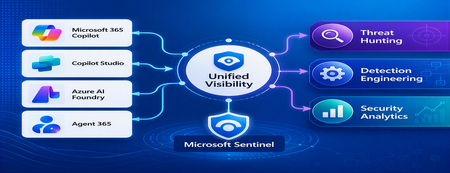
1. Introduction Enterprise adoption of Generative AI is accelerating rapidly through Microsoft 365 Copilot, Copilot Studio, Azure AI Foundry Agents, Security Copilot, and custom AI agents integrated with business applications. Unlike traditional SaaS applications, AI agents can: Access enterprise data Query internal knowledge repositories Invoke APIs and MCP tools Execute workflows Interact with business applications Make decisions on behalf of users While these capabilities improve productivity, they introduce a new attack surface that security teams must monitor and secure. Common AI threats include: Prompt Injection Cross Prompt Injection Attacks (XPIA) Jailbreak Attempts Unauthorized Tool Invocation Data Exfiltration through AI Agents Agent Identity Abuse Excessive Data Access Malicious MCP Tool Execution Traditional SOC monitoring platforms were designed for users, devices, applications and infrastructure—not autonomous AI systems. To address this challenge, Microsoft provides a comprehensive AI security monitoring framework built around: Agent 365 Observability Microsoft Agent Identities Microsoft Copilot Logs Defender XDR Defender for AI Microsoft Sentinel Together these components provide end-to-end observability of: User prompts Agent execution paths Tool invocations Safety signal detections Agent identities Security alerts 2. Reference Architecture AI Security Monitoring Architecture 3. Integration Architecture Microsoft provides multiple telemetry sources that complement one another. 3.1 Agent Runtime Telemetry Sentinel Data Connector Agent 365 Data Connector Table UnifiedAgentObservability Captures runtime behavior of AI agents including: User prompts Session IDs Conversation IDs Agent identities MCP tool invocations Connector invocations Tool arguments Tool responses Request payloads Response payloads Execution errors This dataset provides the forensic trail of everything an AI agent performed. 3.2 Agent Governance and Asset Inventory Sentinel Data Connector Microsoft Agent Identities Provides visibility into: Agent inventory Agent blueprint inventory Ownership Relationships Governance metadata Risk context This allows SOC teams to answer: Who owns this agent? What permissions does it have? Which business unit deployed it? Which related agents exist? 3.3 Copilot Audit and Usage Monitoring Sentinel Data Connector Microsoft Copilot Logs Connector Table CopilotActivity Provides: Copilot usage auditing Operational visibility User interaction tracking Useful for governance, compliance and adoption reporting. 3.4 AI Safety Telemetry Sentinel Data Connector Microsoft Defender XDR Connector Table CloudAppEvents CloudAppEvents provides AI safety signals such as: Prompt Shield detections Prompt Injection attempts Cross Prompt Injection Attacks (XPIA) Jailbreak-related verdicts Unsafe prompt classifications Think of CloudAppEvents as answering: "Was the prompt malicious?" 3.5 AI Security Alerts Sentinel Data Connectors Microsoft Defender XDR Microsoft Defender for Cloud Tables SecurityAlert SecurityIncident Used for: AI attack detections Security incidents Correlated investigation workflows 4. Understanding the Two Most Important AI Tables CloudAppEvents Focuses on AI Safety Questions answered: Was Prompt Shield triggered? Was this a jailbreak attempt? Was XPIA detected? Was the prompt suspicious? UnifiedAgentObservability Focuses on Agent Runtime Behavior Questions answered: What tool was invoked? Which connector executed? What arguments were passed? What data was returned? What actions did the agent perform? 5. Advanced Threat Hunting Scenarios The Agent365 Observability hunting guide contains several investigation scenarios that can be used directly in Microsoft Sentinel. Reference: Agent 365 Observability — AI Agent Telemetry Hunting https://github.com/SCStelz/security-investigator/blob/main/queries/cloud/agent365_observability.md 5.1 Prompt Injection Detection Detect prompts containing indicators such as: Ignore previous instructions Reveal system prompt Developer mode Disregard safety controls Investigation workflow: Review Tool Activity This allows analysts to determine whether a suspicious prompt resulted in downstream actions. 5.2 Session Reconstruction One of the most powerful capabilities of UnifiedAgentObservability is session reconstruction. Analysts can correlate: This creates complete forensic timelines. 5.3 MCP Tool Auditing Monitor all MCP activity including: query_lake Graph API tools ServiceNow connectors SharePoint connectors Custom enterprise tools Questions answered: Which tool was used? Who triggered it? What parameters were supplied? What data was returned? 5.4 Sensitive Data Access Monitoring Monitor AI agent interaction with: Employee records Customer data Financial information SharePoint repositories HR databases Useful for identifying: Data exfiltration attempts Excessive access patterns Sensitive data exposure 5.5 Query Lake Monitoring The GitHub hunting guide introduces monitoring of: query_lake RunAdvancedHuntingQuery Analysts can inspect: Actual KQL submitted Target workspaces Data sources queried Scope of access This provides visibility into AI-driven security investigations. 5.6 New Tool Detection Identify newly observed tool usage. Examples: Unauthorized MCP servers Newly registered connectors Unapproved tools Unexpected integrations This use case is particularly useful for governance programs. 5.7 Tool Failure Monitoring Monitor: Permission failures Connector failures Application errors Access-denied responses A sudden increase in failures may indicate: Reconnaissance activity Misconfiguration Privilege abuse attempts 6. Detection Engineering Opportunities Organizations can create Sentinel Analytics Rules for: 6.1 Prompt Injection Detection Developer Mode prompts Prompt Override attempts System Prompt disclosure requests 6.2 Jailbreak Attempt Detection Safety bypass attempts Role manipulation prompts Instruction override patterns 6.3 Unauthorized Tool Usage New MCP tools High-risk connectors Rare tool executions 6.4 Sensitive Data Access HR data queries Identity information retrieval Large-volume exports 6.5 Agent Identity Abuse Ownership changes Unexpected agent activity Agent-to-agent anomalies 7. Data Lake Exploration and Long-Term Analytics Because agent telemetry resides within Sentinel Data Lake, organizations can perform: Long-term AI investigations Historical AI attack analysis Agent baselining Governance reporting Trend analysis Tool inventory reporting Example dashboards include: Top Prompt Injection Attempts Most Active Agents High-Risk MCP Tools Agent Ownership Analysis AI Security Incidents Sensitive Data Access Trends 8. Summary AI agents represent the next major computing platform, but they also introduce a completely new attack surface. To effectively secure enterprise AI solutions, organizations require visibility across: User interactions Agent execution paths MCP tool usage Prompt safety signals Agent identities Security detections Microsoft Sentinel provides this unified view by integrating: Agent 365 Observability UnifiedAgentObservability Microsoft Agent Identities Microsoft Copilot Logs CloudAppEvents Defender XDR Defender for AI By combining AI runtime telemetry with AI safety signals and Defender detections, security teams can move beyond traditional monitoring and build a modern SOC capability for threat hunting, incident response, governance and forensic investigations across Microsoft 365 Copilot, Copilot Studio, Azure AI Foundry and future AI agent ecosystems. Reference: https://github.com/SCStelz/security-investigator/blob/main/queries/cloud/agent365_observability.mdCustomer Offerings: Solution Optimization for GitHub Copilot
Introduction As Microsoft Cloud Solution Architects, we are increasingly asked by engineering leaders, platform teams, finance stakeholders, and GitHub administrators how they can scale GitHub Copilot while keeping usage visible and costs predictable. The question is no longer simply how many licenses have been assigned. Agentic experiences, model choice, context size, reasoning level, and task complexity can all influence consumption. To address this challenge, Microsoft customers can engage their account team to request a Solution Optimization for GitHub Copilot engagement. The engagement is designed to help customers create visibility, establish practical cost guardrails, and improve the quality and efficiency of GitHub Copilot usage. The objective is not to minimize every token; it is to help each interaction produce useful outcomes with the right level of capability and control. What changed with GitHub Copilot billing? As of June 1, 2026, GitHub Copilot moved from premium request units to usage-based billing with GitHub AI Credits. When a user interacts with an AI-powered Copilot feature, the interaction can consume input tokens, output tokens, and cached tokens. The model used and the number of tokens processed determine the AI credit consumption, where one AI credit represents $0.01 USD. Area What customers should know Included usage Copilot Business includes 1,900 AI credits per licensed user per month, while Copilot Enterprise includes 3,900. These credits are pooled at the billing entity level. Promotional period At the time of writing, existing Business and Enterprise customers receive higher promotional allowances through August 2026. Validate the current allowance before publishing or making financial decisions. Included experiences Code completions and next edit suggestions remain included on paid plans and do not consume AI credits. Metered experiences AI-powered features such as Copilot Chat, Copilot CLI, Copilot cloud agent, Copilot Spaces, Spark, and supported third-party coding agents consume AI credits. Additional consumption Some agentic experiences, including Copilot code review and cloud agent scenarios, can also consume GitHub Actions minutes in addition to AI credits. Important: Pricing, allowances, supported models, and product behavior can change. The official GitHub documentation and the customer’s commercial agreement remain the source of truth. Why optimization is more than cost reduction Token consumption is only the visible part of the problem. A poorly scoped task, unnecessary context, or the wrong model can cause an agent to misunderstand the request, make excessive changes, or require repeated attempts. In that situation, reducing the price of an individual request does not solve the underlying quality problem. A better optimization strategy starts with agent quality. The right model, clear instructions, focused context, good repository guidance, and deterministic validation can help Copilot complete work in fewer attempts. Better outcomes and lower consumption frequently reinforce each other. Introducing Solution Optimization for GitHub Copilot The Solution Optimization for GitHub Copilot engagement provides customers with an opportunity to work with a Microsoft Cloud Solution Architect to review how GitHub Copilot is being adopted, consumed, governed, and measured. The final scope should be agreed with the Microsoft account team and may vary according to the customer’s licensing model, environment, maturity, and priorities. A typical engagement can focus on the following areas: Usage visibility: Establish a current-state view of adoption, AI credit consumption, model activity, license allocation, and the users or workflows driving demand. Billing readiness: Review exported usage data, compare scenarios, and identify where the move to usage-based billing changes planning assumptions. Cost guardrails: Design user-level, cost-center, organization, and enterprise budget controls that protect the shared pool without unnecessarily blocking productive users. Agent quality and token optimization: Identify improvements to model selection, prompt structure, context management, reasoning levels, repository instructions, and validation steps. Operating model: Define ownership, review cadence, escalation paths, reporting responsibilities, and a prioritized backlog of recommended actions. Potential customer outcomes Depending on the agreed scope, the engagement can help the customer develop: A baseline of GitHub Copilot adoption, AI credit consumption, and cost drivers. A view of heavy users, underused licenses, high-consumption models, and agentic workflows that need closer review. A budget and guardrail design that balances shared-pool flexibility with predictable financial control. Practical recommendations for improving agent quality and reducing avoidable retries or context overhead. A prioritized optimization plan with owners, next actions, and measurable follow-up points. A practical engagement approach Discover: Review the customer’s goals, GitHub billing entity, Copilot plans, license assignment model, existing policies, cost centers, and available usage data. Analyze: Use native GitHub reporting and approved accelerators to examine adoption, AI credit usage, model activity, user patterns, and potential cost drivers. Optimize: Map the right model and reasoning level to each task, improve prompts and context, reduce unnecessary tool or repository context, preserve reusable cache, and plan before executing complex changes. Govern: Define user-level budgets, power-user overrides, cost-center or organization controls, enterprise spending limits, alerts, and ownership responsibilities. Measure: Document the baseline, agree on key indicators, and establish a regular review cycle to measure adoption, value, quality, and consumption over time. Tools and accelerators GitHub AI usage, billing exports, and budget controls GitHub’s native AI usage pages and billing reports should be the starting point for understanding consumption. They provide the information required to identify model usage, users, features, and cost patterns. Native budget controls can then be applied at the appropriate user, cost-center, organization, or enterprise scope. GitHub AI usage dashboard, exported usage report, and budget controls GitHub Copilot Billing Preview The GitHub Copilot Billing Preview is an open-source web application for analyzing Copilot billing CSV reports, comparing request-based and usage-based billing signals, and exploring usage and cost trends by user, organization, model, product, and cost center. CSV processing occurs locally in the browser. The application is a preview and planning tool, not the billing source of record. GitHub Copilot Billing Preview showing usage and cost trends Copilot Insights dashboard The community-developed Copilot Insights dashboard provides centralized views of adoption, license allocation, AI credit consumption, model activity, productivity indicators, and team-level reporting. It can complement native GitHub data when a customer needs richer visualization or executive reporting. Customers should review the project’s security, deployment, support, and governance model before production use. Copilot Insights adoption, license, and AI credit views Agent quality and token optimization principles GitHub’s guidance emphasizes that the most sustainable way to reduce AI credit consumption is to improve the quality and efficiency of each interaction. The following principles provide a useful starting point: Choose the right model for the task. Reserve powerful reasoning models for complex architecture, debugging, and design work. Use mid-tier or lighter models for well-scoped implementation, documentation, formatting, and routine refactoring. Provide clear guidance. State the goal, constraints, expected output, relevant files, and validation criteria. Ambiguous prompts often lead to exploration and rework. Keep context lean. Supply the information needed for the task and avoid loading unrelated repositories, files, tools, or instructions into the context window. Preserve reusable context. Stable instructions and cached context can reduce repeated processing, provided they remain relevant and accurate. Research and plan before implementation. For complex work, separate discovery and planning from execution so the agent does not repeatedly rediscover the same information. Add deterministic guardrails. Tests, linting, build validation, explicit stop conditions, and session limits help prevent long-running or low-quality loops. Measure value, not only consumption. AI credit data should be considered together with adoption, developer experience, quality, delivery outcomes, and business impact. Overview video The on-demand session GitHub Copilot - Token Optimization [AMER/EMEA] explains the relationship between token usage and agent quality. The session covers how large language models, agent harnesses, context windows, and available controls influence agent behavior, quality, consumption, and cost. https://www.youtube.com/live/LeALSSsbzHU?si=4RgxflItkQFAs9Qk Helpful inputs before the engagement The following inputs can help the Microsoft team and customer make the best use of the engagement: A GitHub enterprise or organization owner, billing manager, and relevant engineering or platform stakeholders. Current Copilot plan and license counts, including the billing entity and cost-center structure. A representative GitHub AI usage or billing export, handled according to the customer’s data policies. Existing budgets, spending policies, model policies, and reporting processes. Examples of high-volume agent sessions, code review workflows, or teams reporting unexpected consumption. The business outcomes the customer wants to improve, such as adoption, developer experience, delivery speed, quality, or cost predictability. Conclusion GitHub Copilot usage-based billing changes the conversation from license assignment alone to the broader discipline of operating AI-assisted software development. Customers need visibility into how AI credits are consumed, controls that prevent unexpected spend, and engineering practices that help agents complete work accurately and efficiently. The Solution Optimization for GitHub Copilot engagement can help customers connect usage data to practical decisions, improve agent quality, establish appropriate financial guardrails, and create a repeatable approach for measuring and optimizing GitHub Copilot over time. How do I book this engagement? Microsoft Unified Support customers can contact their Customer Success Account Manager (CSAM) or Microsoft account team and ask about Solution Optimization for GitHub Copilot. The Microsoft team can confirm availability, eligibility, scope, prerequisites, and scheduling for the customer’s environment. Resources GitHub Copilot usage-based billing for organizations and enterprises Getting started with GitHub Copilot budget controls Optimizing AI usage to maximize efficiency and reduce cost Models and pricing for GitHub Copilot GitHub Copilot Billing Preview Copilot Insights dashboard GitHub Copilot - Token Optimization [AMER/EMEA] Disclaimer Pricing, plan entitlements, AI credit allowances, supported models, and product behavior are subject to change. Always verify current information in the official GitHub documentation and the customer’s commercial agreement before making purchasing, budgeting, or technical decisions. The sample applications, dashboards, and scripts referenced in this article are provided AS IS without warranty of any kind and may not be supported under a Microsoft or GitHub standard support program unless explicitly stated. Customers are responsible for reviewing security, privacy, compliance, deployment, and operational requirements before using community or open-source solutions in production. This blog post was drafted with the assistance of generative AI and should be reviewed and approved by the author and relevant Microsoft stakeholders before publication.
Microsoft 365 Copilot not showing up as location in DLP
Hi, I am working on implementing security measures for Microsoft Copilot in a client environment. I want to create a DLP policy to not process data with certain sensitivity labels but when I go into DLP to create the policy, the location for Microsoft 365 Copilot is not an option. I also noticed that the "Fabric and Power BI workspaces: location is also not available. I have checked other similar client M365 tenants, and both of these locations are available by default. Any insight would be appreciated.920Views0likes5CommentsNew blog post: Is Your Data Ready for Microsoft 365 Copilot?
Is Your Data Ready for Microsoft 365 Copilot? Microsoft 365 Copilot is a game-changer for productivity, but here’s the catch: Copilot surfaces what users already have access to. If your governance isn’t in order, sensitive data could be exposed. In my latest blog, I share: ✅ How to prevent oversharing in Teams & SharePoint ✅ Why sensitivity labels are critical for Copilot ✅ How to monitor usage and avoid shadow AI ✅ Why you don’t need perfect governance to start 📖 Read the full blog: Microsoft 365 Copilot Data Readiness Checklist 👉 What’s your biggest challenge with Copilot readiness? Drop your thoughts below!103Views0likes0CommentsCopilot DLP Policy Licensing
Hi everyone We are currently preparing our tenant for a broader Microsoft 365 Copilot rollout and in preparation to that we were in the progress of hardening our SharePoint files to ensure that sensitive information stays protected. Our original idea was to launch sensitivity labels together with a Purview data loss prevention policy that excludes Copilot from accessing and using files that have confidential sensitivity labels. Some weeks ago when I did an initial setup, everything worked just fine and I was able to create the before mentioned custom DLP policy. However, when I checked the previously created DLP policy a few days back, the action to block Copilot was gone and the button to add a new action in the custom policy is greyed out. I assume that in between the initial setup and me checking the policy, Microsoft must have moved the feature out of our licensing plan (Microsoft 365 E3 & Copilot). Now my question is what the best licensing options would be on top of our existing E3 licences. For cost reasons, a switch to Microsoft 365 E5 is not an option as we have the E3 licences through benefits. Thanks!Solved911Views0likes2Comments
Azure WAF Integration in Security Copilot is Now Generally Available
We’re excited to announce the general availability (GA) of Azure Web Application Firewall (WAF) integration with Microsoft Security Copilot. This marks a significant advancement in web application protection, bringing together Azure WAF’s industry-leading defense with the AI-powered capabilities of Security Copilot to transform how security teams detect, investigate, and respond to threats. Why This Integration Is a Game-Changer Modern web applications face relentless threats - from SQL injections and cross-site scripting (XSS) to bot attacks and sophisticated Layer 7 DDoS attempts. Defending against these threats requires more than just reactive measures; it demands intelligent, scalable solutions. With Azure WAF now integrated into Security Copilot, security teams can gain: Proactive threat analysis: Quickly uncover attack patterns and identify emerging threats. Optimized WAF configurations: Use AI insights to fine-tune rules and policies. Accelerated investigations: Leverage Copilot’s generative AI to streamline incident triage and response. This integration enables teams to work smarter and faster - turning raw data into actionable intelligence with the help of natural language prompts and AI-guided workflows. Seamless Protection Across Azure Platforms Azure WAF protects applications behind Azure Front Door and Azure Application Gateway, offering centralized, cloud-native security at scale. Now, with Security Copilot, analyzing WAF diagnostic logs no longer requires manual parsing or deep scripting expertise. Instead, AI delivers contextual insights directly to your SOC teams, cloud admins, and DevSecOps engineers. Whether you're investigating blocked requests or tuning security policies, this integration helps reduce operational overhead while strengthening your overall security posture. What Can You Do with Azure WAF in Security Copilot Let’s explore some of the core capabilities now available: SQL Injection (SQLi) Attack Analysis Understand why Azure WAF blocked specific SQLi attempts through detailed summaries of diagnostic logs and correlation of related events over time. Cross-Site Scripting (XSS) Attack Insights Get clear explanations for WAF’s enforcement actions against XSS attacks, with trend analysis across your environment. Top Offending IPs Analysis Identify the most malicious IPs triggering WAF rules, along with insights into the behaviors and rule patterns that led to their blocking. Most Triggered Rules and Actions Gain visibility into your most active WAF rules - helping prioritize tuning efforts and enhance threat detection effectiveness. These capabilities are designed to turn WAF data into actionable knowledge - without the need for custom queries or extensive log review. Built for the Future of Intelligent Security As threats continue to evolve, so must our defenses. The Azure WAF and Security Copilot integration represents the next generation of web application protection - combining automation, AI reasoning, and expert knowledge to deliver adaptive security at cloud scale. By augmenting your team with AI, you can stay ahead of attackers, protect critical apps, and respond faster than ever before. Learn More and Get Started The GA of Azure WAF integration in Microsoft Security Copilot is more than just a feature release - it’s a new paradigm for web application security. Explore the capabilities today by visiting the Azure WAF documentation. Want to talk to us? Reach out to the Azure WAF product team to share feedback or request a demo. Let’s build a more secure web, together.1.1KViews1like0CommentsAMA: Microsoft Security Copilot
Have questions about how to best use Microsoft Security Copilot to respond to cyberthreats quickly and assess risk exposure in minutes? Ask Microsoft Anything! This session is your opportunity to get answers from the product team to help you configure Microsoft Security Copilot and process signals at machine speed! This session is part of Tech Community Live: Microsoft Security edition.1.4KViews0likes9CommentsMastering Regex with GitHub Copilot for Enhanced Azure WAF Security
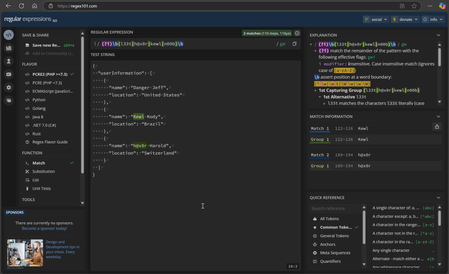
Written in collaboration with davidfrazee Introduction Azure Web Application Firewall (WAF) is a cloud native security service that provides protection for web applications from common exploits and vulnerabilities. It provides centralized protection for applications hosted on Azure Front Door and Azure Application Gateway ensuring that malicious traffic is detected and blocked before reaching the application backend. Azure WAF leverages managed rulesets to actively protect web applications from threats and attacks. These rule sets are maintained by Azure, with the Default Ruleset (DRS) including rules from the Microsoft Threat Intelligence Collection, ensuring enhanced coverage, specific vulnerability patches, and improved false positive reduction. In addition to the managed rulesets, Azure WAF offers custom rules that enable you to create your own rules. With custom rules, you can set conditions based on attributes such as IP addresses, HTTP headers, and query strings to precisely control which traffic is allowed or blocked, providing flexibility and granularity. Within the custom rules, you can incorporate regex, which offers enhanced accuracy when matching patterns in your traffic. Regex (regular expressions) enable you to define complex conditions, allowing for highly specific filtering of incoming requests. Working with regex can sometimes be challenging due to its non-intuitive syntax. In this blog, we will demonstrate a practical, step-by-step approach for generating regex patterns using GitHub Copilot, refining them on Regex101, and validating their effectiveness in Azure WAF. This process helps ensure that your custom rules with regex work as intended, thereby enhancing your overall security effectiveness. GitHub Copilot GitHub Copilot is an AI-powered code completion tool developed by GitHub in collaboration with OpenAI. It assists developers by suggesting code snippets, functions, and even entire blocks of code as they type. By leveraging machine learning models trained on a vast amount of public code, GitHub Copilot can understand the context of the code being written and provide relevant suggestions, making the coding process faster and more efficient. Prompting GitHub Copilot can be particularly useful for security professionals. Enhanced code quality is one of the benefits, as GitHub Copilot can help security professionals write cleaner and more secure code by identifying potential vulnerabilities and suggesting best practices for secure coding, thus reducing the risk of introducing security flaws. Additionally, it offers time efficiency, as security professionals often need to write scripts or tools to automate security tasks, and GitHub Copilot can speed up this process by generating code snippets based on the prompts provided, allowing professionals to focus on more critical aspects of their work. GitHub Copilot can also assist in creating regex code, which is often complex and challenging to write. By providing accurate regex patterns based on prompts, it can help security professionals quickly develop effective text manipulation and pattern matching solutions. While AI-generated content can significantly streamline the process of creating regex patterns, it is important to verify the accuracy of these patterns to ensure they work as intended. Tools such as Regex101 provide a valuable platform for refining and validating regex patterns, helping to identify and correct any errors before implementation. What is Regex? Regular expressions, commonly known as regex, are sequences of characters that define search patterns. They are used in various programming languages and tools to match, locate, and manage text. Regex is incredibly powerful because it allows for complex text manipulation and pattern matching, making it an essential tool for tasks such as data validation, parsing, and transformation. However, regex can be difficult to learn due to its intricate syntax and the need for precise pattern construction. The learning curve is steep because even small mistakes can lead to unexpected results or errors. Additionally, regex patterns can become quite complex, requiring a deep understanding of both the syntax and the specific text being manipulated. Despite these challenges, regex is invaluable in the field of security. It can be used to detect and prevent malicious activities by identifying patterns associated with attacks, such as SQL injections or cross-site scripting. Regex can also help in filtering user inputs, ensuring that only safe and valid data is processed. Its ability to analyze large volumes of text swiftly and accurately makes it a powerful tool for security professionals aiming to protect systems and data from threats. Creating & Validating Regex Patterns Now that we have explored the capabilities of GitHub Copilot and the intricacies of regex, it is time to put this knowledge into practice. In the following steps, we will guide you through the process of leveraging GitHub Copilot to create and validate regex patterns effectively. By combining the power of AI-driven code suggestions with the precision of regex, you will be able to enhance your security tasks, automate complex text manipulations, and ensure robust data validation. Let us dive into the practical steps to get this done and see how these tools can streamline your workflow and bolster your security measures. To get started with GitHub Copilot, navigate here. We are going to leverage GitHub Copilot through Visual Studio Code (VSC). Once you have completed the requirements from the link above and you have enabled the extension, you can start prompting GitHub Copilot Chat. Prompt: Create two unique regex patterns. The first pattern should match any of the following words: "l33t", "h@x0r", "kewl", and "n00b", but the characters can be case insensitive. The second pattern should match the string of special characters "!@#$" followed by any integer that comes after the symbol "&". Response: Here are the two regex patterns: To match any of the words "l33t", "h@x0r", "kewl", and "n00b" in a case-insensitive manner: (?i)\b(l33t|h@x0r|kewl|n00b)\b To match the string of special characters "!@#$" followed by any integer that comes after the symbol "&": !@#\$&\d+ Now that GitHub Copilot has delivered 2 unique regex strings for use in our Azure WAF, let’s verify if the regex patterns work with the use of https://regex101.com. Regex101.com is an online platform designed to help users create, test, and debug Regex. It provides a user-friendly interface where you can input your regex patterns and evaluate them against sample text to see how they match. The site offers real-time feedback, highlighting matches and providing detailed explanations of each part of the regex pattern. This makes it an invaluable tool for both beginners learning regex and experienced users fine-tuning their patterns. Additionally, Regex101.com supports multiple regex flavors, including PCRE, JavaScript, and Python, allowing users to work with the syntax specific to their needs. Above, we see how we are validating the regex pattern at Regex101.com. I paste my regex pattern provided by GitHub Copilot at the top and then enter a JSON test body to match against the pattern. The tool verifies that the first regex pattern captures malicious attempts without case sensitivity and provides a detailed breakdown on the right side. This breakdown includes explanations of each part of the regex, helping to ensure that the pattern is correctly identifying the intended matches and highlighting any potential issues. In another example, we are using Regex101.com to validate a regex pattern aimed at identifying strings of unique characters. The tool verifies that the regex pattern successfully captures the string where each character appears only once and in order, followed by an integer. On the right side, Regex101.com provides a detailed breakdown of the regex pattern, explaining how each part contributes to the overall match. Now that we have validated the regex patterns with Regex101.com, let us implement them into Custom rules for Azure WAF. Using Regex with Azure WAF Having validated the regex patterns with Regex101.com, we can now proceed to implement these patterns into Custom rules for Azure WAF. This section provides a guide on integrating the validated regex patterns into your Azure WAF configuration to enhance web application security. By establishing these custom rules, you can tailor protection to meet specific requirements, ensuring malicious attempts are effectively intercepted and blocked. First, we will navigate to the Custom rules section of our Azure WAF policy, and author the two regex rules that we want to use to identify special patterns in request bodies going through our WAF. What is unique about using regex in Custom rules, is that you select Regex as an Operator in the Condition. From there, you will enter your regex pattern in the Match values section, select the action and the Custom rule is complete. After implementing the custom regex rules into Azure WAF, we executed a simulated malicious attempt to evaluate their effectiveness. The WAF, equipped with our regex patterns, successfully detected and intercepted the attack. The custom rules accurately identified the malicious activity and promptly blocked it, demonstrating the power and precision of using AI-generated regex patterns to enhance security measures. After executing the simulated malicious attempt, we examined the Azure WAF logs to confirm the effectiveness of our custom regex rules. The logs clearly indicated that the attack was intercepted, with the highlighted rule name and match value providing specific details about the block. This information is crucial for verifying that the custom rules are functioning as intended and accurately identifying malicious activities. By reviewing these logs, we can ensure that our security measures are robust and capable of protecting against potential threats. The detailed log entries not only confirm the success of our regex patterns but also offer insights into further refining and optimizing our security configurations. Conclusion Leveraging GitHub Copilot to generate regex patterns and validating them on Regex101.com before applying them to Azure WAF showcases the remarkable synergy between AI and security practices. By utilizing GitHub Copilot's intelligent code suggestions, we can efficiently create complex regex patterns tailored to our specific needs. Validating these patterns on Regex101.com ensures their accuracy and effectiveness in capturing malicious attempts. Once applied to Azure WAF, these regex patterns enhance our security measures, providing robust protection against potential threats. Testing and observing the impact of these AI-generated regex strings highlight the power and value of integrating AI into our security workflows. This approach not only streamlines the process but also demonstrates how AI can significantly contribute to hardening security, making it an efficient and worthwhile endeavor. References Introduction to Azure Web Application Firewall | Microsoft Learn What is Azure Web Application Firewall on Azure Application Gateway? | Microsoft Learn What is Azure Web Application Firewall on Azure Front Door? | Microsoft Learn Create and use v2 custom rules - Azure Web Application Firewall | Microsoft Learn GitHub Copilot1.2KViews1like0Comments