copilot
79 TopicsIntroducing GitHub Copilot for Azure: Your Cloud Coding Companion in VS Code!
🚀 Ready to Elevate Your Cloud Coding Game? Meet “@azure” – your companion in GitHub Copilot Chat. Get personalized answers about Azure resources, streamline deployments, and improve your troubleshooting. Early access awaits – sign up now! 🌟50KViews15likes17CommentsAgents That Build Agents: A SKILL-first Blueprint with MS Agent Framework & Foundry
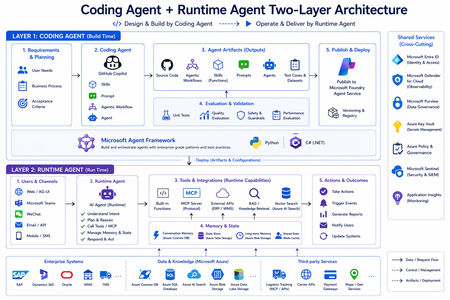
The single insight that changes everything Most "build an AI agent" tutorials collapse two completely different jobs into one tangled mess: the job of building an agent (writing the code, defining its tools, evaluating it, packaging it), and the job of running an agent (planning, reasoning, calling tools, remembering users, delivering outcomes). Once you separate them, modern agent development becomes a clean two-layer architecture: A Coding Agent sits on top — that's how you produce an agent. A Runtime Agent sits below — that's the agent your business operates. Microsoft Agent Framework is the SDK that ties them together; Microsoft Foundry is the platform both layers publish to and run on. But the secret ingredient — the thing that turns a generic Copilot into a domain-aware engineer — is the SKILL. SKILL is what the Coding Agent reads before writing a single line. It's how requirements become artifacts that actually match your framework, your conventions, and your fixtures. This post walks the entire two-layer architecture, in the order you should learn it — with SKILL as the star of Layer 1. We ground every concept in ZavaShop, a fictional global e-commerce company with 5 fulfillment centers, dozens of suppliers, and a CEO who wants one live dashboard for all of it. Both Python and .NET (C#) are first-class — pick the language your team will run in production. LAYER 1 — The Coding Agent (Build Time) The Coding Agent is not the agent your customer talks to. It's the agent that constructs the agent your customer talks to. Its output is a bundle of artifacts — code, agent definitions, workflows, skills, connectors, evals, tests, configs, docs — that flow through validation and into Foundry. Build time has five movements. Movement 1 — Requirements & Planning Before the Coding Agent writes a single line, you owe it three things: A real business pain. Not "let's build an agent." Rather: "Mei, the supervisor at Seattle DC, gets interrupted 60 times a day by stock-level questions." A list of acceptance criteria. What does "done" look like? "Agent answers stock questions for SKUs in our 10-SKU catalog. P95 latency under 4s. Wrong-tool rate under 5% on the eval set." The fixtures it'll run on. Real or realistic data — warehouses, SKUs, POs, customers — so the Coding Agent isn't reasoning about a vacuum. ZavaShop context. The workshop ships workshop/data/ — 5 warehouses, 10 SKUs, 6 POs, 8 suppliers, 5 contracts, 4 customers (3 VIP), 6 orders, 5 carriers, 4 open exceptions. Every artifact the Coding Agent generates is anchored to this shared fixture set, so numbers stay consistent across the entire system. Movement 2 — The Coding Agent + its SKILL (the star of build time) This is the movement most teams skip — and it's the one that decides whether your build-time output is professional code or "ChatGPT-shaped" code. What a Coding Agent actually is The Coding Agent is GitHub Copilot Chat in Agent Mode, configured with a domain-aware agent definition. In the ZavaShop workshop, it lives at .github/agents/zavashop-coding-agent.agent.md and is activated from the VS Code Agent picker. You start each session with one plain sentence: "I'm working on the inventory agent in Python — wire up stock and PO lookups against the fixtures, plus a HostedMCPTool for the warehouse handbook." Notice what's not in that sentence: no library names, no class names, no file paths. The Coding Agent has to fill all of that in. The mechanism it uses is the SKILL. What a SKILL is A SKILL is a structured contract that teaches the Coding Agent how to write code in your framework, your conventions, and your domain. It is the most important file in the entire build-time layer — without it, GitHub Copilot is a fluent generalist; with it, it becomes a domain-aware specialist that writes code your tech leads would have written. Conceptually, a SKILL contains: Section Purpose Scope & when to use "Use this SKILL for building agents on Foundry / Azure AI — tools, MCP, Toolbox, Skills, Memory, Threads" Framework idioms The exact way to construct AzureAIAgentClient, register function tools, wire HostedMCPTool, create a Thread Code patterns Reference snippets the Coding Agent imitates — naming, import order, error handling, type hints Fixture/data contract How to load workshop/data/, which loaders exist (find_stock, find_po, etc.), where to add sys.path Anti-patterns What not to do — don't hardcode the model name, don't write inline mock dicts, don't bypass the data loader Acceptance heuristics How to map a LAB's acceptance criteria to runnable checks (eval rows, smoke tests) A SKILL is versioned with the codebase. When the framework releases a new idiom, you update the SKILL once; every agent built afterwards picks it up automatically. This is the single biggest reason convention drift disappears. The six SKILLs in the ZavaShop workshop The workshop ships six SKILLs — three for each language track — and they cover three orthogonal capability surfaces: Track SKILL Use it for 🐍 Python agent-framework-azure-ai-py Single agent on Foundry: tools, MCP, Toolbox, Skills, Memory, Threads 🐍 Python agent-framework-workflows-py Multi-agent workflows: WorkflowBuilder, executors, HITL, Checkpoint 🐍 Python agent-framework-agui-py AG-UI server + client: SSE, frontend/backend tools, shared state, HITL 🟦 .NET agent-framework-azure-ai-csharp Same as the Python azure-ai SKILL, for C# 🟦 .NET agent-framework-workflows-csharp Same as the Python workflows SKILL, for C# 🟦 .NET agent-framework-agui-csharp AG-UI in ASP.NET Core: MapAGUI, AGUIChatClient, HITL How the Coding Agent uses SKILL The Coding Agent's loop is SKILL-first, code-second: The discipline is captured in the workshop's one mantra: "Read the SKILL first." It is not optional. Skip it and you're back to generic Copilot output. Movement 3 — A worked example: from a single sentence to a runnable agent Let's trace what happens when you sit down in front of the Coding Agent and say: "I'm working on the inventory agent in Python — wire up stock and PO lookups against the fixtures, plus a HostedMCPTool for the warehouse handbook." Step 1 — The Coding Agent routes The Coding Agent's definition (.github/agents/zavashop-coding-agent.agent.md) contains a routing table: It loads both files into context before doing anything else. Step 2 — The Coding Agent plans Using the SKILL's patterns and the LAB's acceptance criteria, it generates a plan: Every item in the plan traces back to either the SKILL (how) or the LAB README (what). No invention, no guessing. Step 3 — The Coding Agent generates Now — and only now — it writes code. Because the SKILL specified the patterns, what comes out is shaped like the rest of your codebase: # scripts/inventory_agent.py import os import sys from pathlib import Path # Pattern from SKILL: add data folder to sys.path, import named loaders sys.path.insert(0, str(Path(__file__).resolve().parents[1] / "data")) from zava_data import find_stock, find_po # noqa: E402 from agent_framework import HostedMCPTool from agent_framework_azure_ai import AzureAIAgentClient from azure.identity import DefaultAzureCredential def stock_lookup(sku: str, warehouse: str) -> dict: """Return on-hand quantity for a SKU at a warehouse.""" return find_stock(sku, warehouse) def po_lookup(po_id: str) -> dict: """Return the status of a purchase order.""" return find_po(po_id) async def main() -> None: client = AzureAIAgentClient( project_endpoint=os.environ["FOUNDRY_PROJECT_ENDPOINT"], model_deployment_name=os.environ["FOUNDRY_MODEL"], # gpt-5.5 from env async_credential=DefaultAzureCredential(), ) agent = client.create_agent( name="Zara", instructions=( "You are Zara, the warehouse assistant for Seattle DC (SEA-01). " "Use the tools when asked about stock or POs. " "Answer briefly." ), tools=[ stock_lookup, po_lookup, HostedMCPTool( name="warehouse-docs", url=os.environ["WAREHOUSE_DOCS_MCP_URL"], ), ], ) thread = agent.get_new_thread() print(await agent.run("How many SKU-7421 are at SEA-01?", thread=thread)) Notice the things the SKILL enforced without you having to ask: env-var-driven config, named function tools with docstrings, sys.path data-loader pattern, HostedMCPTool placed alongside function tools, Thread for multi-turn. Step 4 — The Coding Agent validates The SKILL also told it how to validate. The Coding Agent runs: a smoke test against fixtures (SKU-7421 @ SEA-01 → 312), the eval set (eval_queries.jsonl) — was the right tool called? did the answer contain the expected fact? a red-team probe round. It reports back: "3/3 acceptance criteria pass. Eval score 5/5. Red-team: no successful prompt injections." Step 5 — Done What landed in your repo is not just a script. It's an artifact bundle — code + agent definition + tools + eval rows + a one-page README — that matches the way your team writes agents. That bundle is what flows into the next three movements. Movement 4 — Agent Artifacts (the outputs) A well-instructed Coding Agent produces eight kinds of artifact. Together they make up "an agent" in the deployable sense: Artifact What it is Why it matters Source code The Agent / Workflow program Versioned, reviewable, diffable Agent definitions Name, instructions, tool list The "personality" — independently editable Workflows WorkflowBuilder graphs Multi-agent orchestration as code Skills Named, packaged behaviors Reusable capabilities — one Skill, many agents Connectors MCP servers, Toolbox registrations Where the agent reaches into the world Evals eval_queries.jsonl and harness Regression target for every prompt change Tests & configs Unit tests, .env schema, deployment manifests Reproducibility Documentation READMEs, runbooks The agent your future self can operate Don't confuse two senses of "skill" here. A SKILL file (uppercase, in .github/skills/) instructs the Coding Agent at build time. An Agent Skill (a Foundry concept) is a named runtime capability the Runtime Agent calls. Both names are deliberate — Layer 1's SKILL produces, among other artifacts, Layer 2's Skills. Movement 5 — Validation Before any artifact reaches Foundry, four gates run: Tests — unit + integration. Did find_stock("SKU-7421", "SEA-01") return 312, the value in the fixture? Lint & types — ruff/mypy on Python, dotnet build warnings on .NET. The model has to read these signatures; sloppy ones cause real bugs. Evaluation — run the eval set. Did the right tool get called? Did the answer contain the expected fact? You need a score, not a vibe. Red-Team probes — adversarial inputs that try to drift the agent off topic or extract another customer's data. The Foundry red-team SDK ships a battery of these. Evangelist takeaway. "We built an agent" is not a deliverable. "We built an agent and here is its pass rate on a versioned eval set, plus a red-team report" is a deliverable. Validation belongs at build time, not "we'll add it later." Movement 6 — Publish & Deploy When validation is green, the Coding Agent's outputs flow into Foundry and Azure: Push to Microsoft Foundry — agent definitions, Skills, Toolbox tools, and custom evals register against your Foundry project. They are now governed, versioned, and observable. Deploy to Azure — the runtime host (AG-UI server, workflow worker, Teams app, API surface) ships to your Azure target (App Service, Container Apps, AKS, Functions). Same env vars drive local dev and cloud. The same artifact set deploys to dev, staging, and production. There is no "production-only" code in your agent. LAYER 2 — The Runtime Agent (Runtime) Now the agent is live. Every conversation, every action against your data, every memory it writes — that's Layer 2. Five concerns define it. Concern 1 — Users & Channels A Runtime Agent reaches users through the channels they already use: Microsoft Teams — the agent shows up where work already happens. Outlook — triage, reply, summarize, schedule. Custom web / mobile / voice — built on AG-UI, which ships a React client covering streaming text, frontend tools, backend tools, shared state, generative UI, predictive updates, HITL prompts. The channel is a deployment choice, not an architectural choice. The same agent definition can surface in Teams and on a React dashboard. ZavaShop context. Mei's agent shows up in Teams. The CEO's control tower is a React app on top of AG-UI. The agent definition behind both is the same artifact set the Coding Agent produced. Concern 2 — The Runtime Agent itself The Runtime Agent is the loop you've heard about a thousand times — now it's a concrete piece of architecture: AIAgent = model + instructions + tools + thread Inside the loop: The model plans & reasons about the next step. It calls tools through MCP, Toolbox, or local functions. It reads & writes memory. It streams output back to the channel. # Python — the runtime shape (exactly what the Coding Agent produced) agent = client.create_agent( name="Zara", instructions="You are Zara, the warehouse assistant for Seattle DC.", tools=[stock_lookup, po_lookup, warehouse_docs_mcp], ) Concern 3 — Tools & Integrations (the runtime capability surface) At runtime, a Runtime Agent reaches the outside world through four kinds of capabilities — and which one to use is a real engineering decision: Capability Lives in Use when Function tool The agent's own process Local code: a calculation, a DB query, a fixture lookup MCP tool An external MCP server The capability is owned by another system, exposed via MCP Toolbox tool The Foundry project (server-side, tenant-wide) Capability is shared by multiple agents, must be governed Agent Skill The Foundry project A combination of tools + policy as one named capability Mental progression: You don't have to start with Toolbox — but the moment a second agent touches the same domain, migrate. ZavaShop context. Local fixtures → function tools. The warehouse handbook → MCP. Supplier-portal connectors shared by procurement, fulfillment, and finance → Toolbox tools. "Validate-PO-against-contract" → an Agent Skill. Concern 4 — Memory & State State at runtime comes in two flavors: Thread = state inside one conversation thread = agent.get_new_thread() await agent.run("Look up PO-1043.", thread=thread) await agent.run("And its supplier?", thread=thread) # knows which PO Memory = state across conversations Foundry Memory is durable, retrievable knowledge about a user — VIP status, packaging preferences, delivery windows. Memory holds stable preferences and facts, not chat transcripts. ZavaShop context. Customer service agent Aria remembers across sessions that C-204 is VIP, prefers no cardboard, and wants 6–8pm delivery. Concern 5 — Actions & Outcomes Real systems take actions that change state and produce outcomes other systems observe: Trigger events — kick off a workflow, page a human. Generate outputs — write a PO, draft an email, push to a record. Notify channels — send back to Teams, update a dashboard, hit a webhook. Observability — every action streams to Application Insights / Azure Monitor. This is also where Workflows live. WorkflowBuilder is Agent Framework's orchestration primitive: Three workflow features matter most: Reuse, don't rebuild — tools written at build time are workflow nodes at runtime. Human-in-the-Loop (HITL) — pauses, asks a human, resumes from the exact step. Checkpointing — workflows survive process restarts. ZavaShop context. Fulfillment director Diego's team handles a $10K+ exception every day. Before: an email chain across 5 teams. After: a WorkflowBuilder graph with one HITL approval and full audit trail. Cross-cutting: the shared services that make this safe Both layers sit on top of platform services non-negotiable for enterprise deployment: Service What it does for your agents Microsoft Entra ID Who is the user? Who is the agent? Managed identity for tool calls Microsoft Defender for Cloud Threat detection across the agent's compute + data plane Microsoft Sentinel SIEM — correlate agent actions with security signals Azure Key Vault Secrets, keys, connection strings — never in code, never in .env checked to git Azure Monitor / App Insights Every agent turn, every tool call, every workflow step — observable and queryable Azure Policy & governance Guardrails on what can be deployed where, by whom Skip this row and you have a demo that has not yet failed. Mapping the ZavaShop workshop to the architecture Layer 1 artifacts shipped in the repo: .github/agents/zavashop-coding-agent.agent.md — the Coding Agent definition .github/skills/agent-framework-{azure-ai,workflows,agui}-{py,csharp}/ — the six SKILLs workshop/data/ — shared fixtures every artifact grounds in Per-lab READMEs + eval_queries.jsonl — Layer 1 validation inputs Layer 2 artifacts produced over the course of the workshop: A single agent (Zara) — function tools + HostedMCPTool + Thread A procurement agent (Pierre) — Toolbox + Agent Skills + approval policy A customer-service agent (Aria) — Foundry Memory + Evaluation + Red-Team A multi-agent fulfillment workflow (Diego) — WorkflowBuilder + HITL + Checkpoint An AG-UI control tower for the CEO — covering all 7 AG-UI features Same model across the stack — gpt-5.5 on Foundry + text-embedding-3-small. Change one env var, run the same artifact in the other language. Three habits that separate strong agent engineers Read the SKILL first. Make it ritual. The Coding Agent does it automatically; you should do it manually when reviewing the agent's output. Treat tools as a public API. Names, signatures, docstrings, return shapes — they are how the model sees your system at runtime. Refactor them like any other API. Measure before you tune. A prompt change without an eval delta is a vibe. With one, it's engineering. Getting started in 60 seconds git clone https://github.com/microsoft/Learn-Microsoft-Agent-Framework-with-Foundry-ZavaShop-Supply-Chain-Workshop cd Learn-Microsoft-Agent-Framework-with-Foundry-ZavaShop-Supply-Chain-Workshop # Foundry prereqs: gpt-5.5 + text-embedding-3-small deployed in your Foundry project az login --use-device-code # Python track python -m venv .venv && source .venv/bin/activate pip install agent-framework agent-framework-azure-ai agent-framework-ag-ui \ azure-identity python-dotenv fastapi "uvicorn[standard]" # .NET track dotnet --version # ≥ 10.0.100 # .env at repo root cat > .env <<EOF FOUNDRY_PROJECT_ENDPOINT=https://<your-project>.services.ai.azure.com/api/projects/<project-name> FOUNDRY_MODEL=gpt-5.5 AZURE_OPENAI_EMBEDDING_MODEL=text-embedding-3-small AGUI_SERVER_URL=http://127.0.0.1:5100/ AG_UI_API_KEY=zava-control-tower-demo-key EOF # In VS Code → Copilot Chat → Agent Mode → pick zavashop-coding-agent # Then say: "I'm working on the inventory agent in Python — meet Mei." The one mantra: "Read the SKILL first." Closing thought Modern agent development is not one job — it's two. The Coding Agent designs and builds; the Runtime Agent operates and delivers. Microsoft Agent Framework is the SDK that makes both layers feel like the same conceptual model. Microsoft Foundry is the platform both layers publish to and run on. And the engine that turns a generic Copilot into a domain-aware engineer — that takes a sentence-long requirement and lands a runnable, validated, deployable artifact — is the SKILL. Write a good SKILL once, and every agent built afterwards inherits your team's taste, your fixtures, your patterns, your discipline. The ZavaShop workshop is the smallest end-to-end example I can give you that actually exercises both layers, with six SKILLs ready to read. Walk it once, and the next time someone asks "how do we build agents in our org?", you won't be pointing at a tutorial — you'll be pointing at an architecture. 👉 Start with the workshop on GitHub33KViews3likes0CommentsChoosing the Right Model in GitHub Copilot: A Practical Guide for Developers
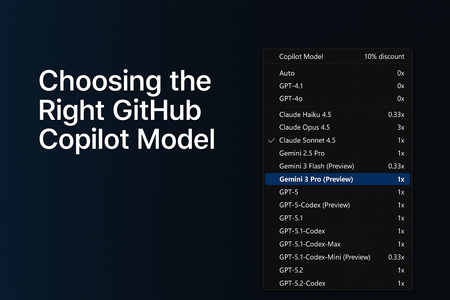
AI-assisted development has grown far beyond simple code suggestions. GitHub Copilot now supports multiple AI models, each optimized for different workflows, from quick edits to deep debugging to multi-step agentic tasks that generate or modify code across your entire repository. As developers, this flexibility is powerful… but only if we know how to choose the right model at the right time. In this guide, I’ll break down: Why model selection matters The four major categories of development tasks A simplified, developer-friendly model comparison table Enterprise considerations and practical tips This is written from the perspective of real-world customer conversations, GitHub Copilot demos, and enterprise adoption journeys Why Model Selection Matters GitHub Copilot isn’t tied to a single model. Instead, it offers a range of models, each with different strengths: Some are optimized for speed Others are optimized for reasoning depth Some are built for agentic workflows Choosing the right model can dramatically improve: The quality of the output The speed of your workflow The accuracy of Copilot’s reasoning The effectiveness of Agents and Plan Mode Your usage efficiency under enterprise quotas Model selection is now a core part of modern software development, just like choosing the right library, framework, or cloud service. The Four Task Categories (and which Model Fits) To simplify model selection, I group tasks into four categories. Each category aligns naturally with specific types of models. 1. Everyday Development Tasks Examples: Writing new functions Improving readability Generating tests Creating documentation Best fit: General-purpose coding models (e.g., GPT‑4.1, GPT‑5‑mini, Claude Sonnet) These models offer the best balance between speed and quality. 2. Fast, Lightweight Edits Examples: Quick explanations JSON/YAML transformations Small refactors Regex generation Short Q&A tasks Best fit: Lightweight models (e.g., Claude Haiku 4.5) These models give near-instant responses and keep you “in flow.” 3. Complex Debugging & Deep Reasoning Examples: Analyzing unfamiliar code Debugging tricky production issues Architecture decisions Multi-step reasoning Performance analysis Best fit: Deep reasoning models (e.g., GPT‑5, GPT‑5.1, GPT‑5.2, Claude Opus) These models handle large context, produce structured reasoning, and give the most reliable insights for complex engineering tasks. 4. Multi-step Agentic Development Examples: Repo-wide refactors Migrating a codebase Scaffolding entire features Implementing multi-file plans in Agent Mode Automated workflows (Plan → Execute → Modify) Best fit: Agent-capable models (e.g., GPT‑5.1‑Codex‑Max, GPT‑5.2‑Codex) These models are ideal when you need Copilot to execute multi-step tasks across your repository. GitHub Copilot Models - Developer Friendly Comparison The set of models you can choose from depends on your Copilot subscription, and the available options may evolve over time. Each model also has its own premium request multiplier, which reflects the compute resources it requires. If you're using a paid Copilot plan, the multiplier determines how many premium requests are deducted whenever that model is used. Model Category Example Models (Premium request Multiplier for paid plans) What they’re best at When to Use Them Fast Lightweight Models Claude Haiku 4.5, Gemini 3 Flash (0.33x) Grok Code Fast 1 (0.25x) Low latency, quick responses Small edits, Q&A, simple code tasks General-Purpose Coding Models GPT‑4.1, GPT‑5‑mini (0x) GPT-5-Codex, Claude Sonnet 4.5 (1x) Reliable day‑to‑day development Writing functions, small tests, documentation Deep Reasoning Models GPT-5.1 Codex Mini (0.33x) GPT‑5, GPT‑5.1, GPT-5.1 Codex, GPT‑5.2, Claude Sonnet 4.0, Gemini 2.5 Pro, Gemini 3 Pro (1x) Claude Opus 4.5 (3x) Complex reasoning and debugging Architecture work, deep bug diagnosis Agentic / Multi-step Models GPT‑5.1‑Codex‑Max, GPT‑5.2‑Codex (1x) Planning + execution workflows Repo-wide changes, feature scaffolding Enterprise Considerations For organizations using Copilot Enterprise or Business: Admins can control which models employees can use Model selection may be restricted due to security, regulation, or data governance You may see fewer available models depending on your organization’s Copilot policies Using "Auto" Model selection in GitHub Copilot GitHub Copilot’s Auto model selection automatically chooses the best available model for your prompts, reducing the mental load of picking a model and helping you avoid rate‑limiting. When enabled, Copilot prioritizes model availability and selects from a rotating set of eligible models such as GPT‑4.1, GPT‑5 mini, GPT‑5.2‑Codex, Claude Haiku 4.5, and Claude Sonnet 4.5 while respecting your subscription level and any administrator‑imposed restrictions. Auto also excludes models blocked by policies, models with premium multipliers greater than 1, and models unavailable in your plan. For paid plans, Auto provides an additional benefit: a 10% discount on premium request multipliers when used in Copilot Chat. Overall, Auto offers a balanced, optimized experience by dynamically selecting a performant and cost‑efficient model without requiring developers to switch models manually. Read more about the 'Auto' Model selection here - About Copilot auto model selection - GitHub Docs Final Thoughts GitHub Copilot is becoming a core part of the developer workflows. Choosing the right model can dramatically improve your productivity, the accuracy of Copilot’s responses, your experience with multi-step agentic tasks, your ability to navigate complex codebases Whether you’re building features, debugging complex issues, or orchestrating repo-wide changes, picking the right model helps you get the best out of GitHub Copilot. References and Further Reading To explore each model further, visit the GitHub Copilot model comparison documentation or try switching models in Copilot Chat to see how they impact your workflow. AI model comparison - GitHub Docs Requests in GitHub Copilot - GitHub Docs About Copilot auto model selection - GitHub DocsCopilot Learning Hub: Your Gateway to Mastering Microsoft Copilot
Have you ever wanted a single place to go to learn all about Microsoft Copilot? The Copilot Learning Hub is designed to be your go-to source for everything related to Microsoft Copilot, with articles, videos, and hands-on labs for all tech areas.Demystifying GitHub Copilot Security Controls: easing concerns for organizational adoption
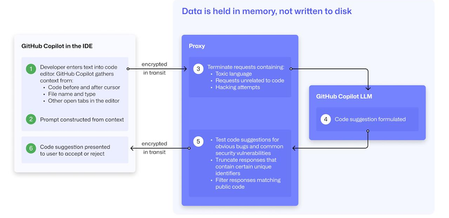
At a recent developer conference, I delivered a session on Legacy Code Rescue using GitHub Copilot App Modernization. Throughout the day, conversations with developers revealed a clear divide: some have fully embraced Agentic AI in their daily coding, while others remain cautious. Often, this hesitation isn't due to reluctance but stems from organizational concerns around security and regulatory compliance. Having witnessed similar patterns during past technology shifts, I understand how these barriers can slow adoption. In this blog, I'll demystify the most common security concerns about GitHub Copilot and explain how its built-in features address them, empowering organizations to confidently modernize their development workflows. GitHub Copilot Model Training A common question I received at the conference was whether GitHub uses your code as training data for GitHub Copilot. I always direct customers to the GitHub Copilot Trust Center for clarity, but the answer is straightforward: “No. GitHub uses neither Copilot Business nor Enterprise data to train the GitHub model.” Notice this restriction also applies to third-party models as well (e.g. Anthropic, Google). GitHub Copilot Intellectual Property indemnification policy A frequent concern I hear is, since GitHub Copilot’s underlying models are trained on sources that include public code, it might simply “copy and paste” code from those sources. Let’s clarify how this actually works: Does GitHub Copilot “copy/paste”? “The AI models that create Copilot’s suggestions may be trained on public code, but do not contain any code. When they generate a suggestion, they are not “copying and pasting” from any codebase.” To provide an additional layer of protection, GitHub Copilot includes a “duplicate detection filter”. This feature helps prevent suggestions that closely match public code from being surfaced. (Note: This duplicate detection currently does not apply to the Copilot coding agent.) More importantly, customers are protected by an Intellectual Property indemnification policy. This means that if you receive an unmodified suggestion from GitHub Copilot and face a copyright claim as a result, Microsoft will defend you in court. GitHub Copilot Data Retention Another frequent question I hear concerns GitHub Copilot’s data retention policies. For organizations on GitHub Copilot Business and Enterprise plans, retention practices depend on how and where the service is accessed from: Access through IDE for Chat and Code Completions: Prompts and Suggestions: Not retained. User Engagement Data: Kept for two years. Feedback Data: Stored for as long as needed for its intended purpose. Other GitHub Copilot access and use: Prompts and Suggestions: Retained for 28 days. User Engagement Data: Kept for two years. Feedback Data: Stored for as long as needed for its intended purpose. For Copilot Coding Agent, session logs are retained for the life of the account in order to provide the service. Excluding content from GitHub Copilot To prevent GitHub Copilot from indexing sensitive files, you can configure content exclusions at the repository or organization level. In VS Code, use the .copilotignore file to exclude files client-side. Note that files listed in .gitignore are not indexed by default but may still be referenced if open or explicitly referenced (unless they’re excluded through .copilotignore or content exclusions). The life cycle of a GitHub Copilot code suggestion Here are the key protections at each stage of the life cycle of a GitHub Copilot code suggestion: In the IDE: Content exclusions prevent files, folders, or patterns from being included. GitHub proxy (pre-model safety): Prompts go through a GitHub proxy hosted in Microsoft Azure for pre-inference checks: screening for toxic or inappropriate language, relevance, and hacking attempts/jailbreak-style prompts before reaching the model. Model response: With the public code filter enabled, some suggestions are suppressed. The vulnerability protection feature blocks insecure coding patterns like hardcoded credentials or SQL injections in real time. Disable access to GitHub Copilot Free Due to the varying policies associated with GitHub Copilot Free, it is crucial for organizations to ensure it is disabled both in the IDE and on GitHub.com. Since not all IDEs currently offer a built-in option to disable Copilot Free, the most reliable method to prevent both accidental and intentional access is to implement firewall rule changes, as outlined in the official documentation. Agent Mode Allow List Accidental file system deletion by Agentic AI assistants can happen. With GitHub Copilot agent mode, the "Terminal auto approve” setting in VS Code can be used to prevent this. This setting can be managed centrally using a VS Code policy. MCP registry Organizations often want to restrict access to allow only trusted MCP servers. GitHub now offers an MCP registry feature for this purpose. This feature isn’t available in all IDEs and clients yet, but it's being developed. Compliance Certifications The GitHub Copilot Trust Center page lists GitHub Copilot's broad compliance credentials, surpassing many competitors in financial, security, privacy, cloud, and industry coverage. SOC 1 Type 2: Assurance over internal controls for financial reporting. SOC 2 Type 2: In-depth report covering Security, Availability, Processing Integrity, Confidentiality, and Privacy over time. SOC 3: General-use version of SOC 2 with broad executive-level assurance. ISO/IEC 27001:2013: Certification for a formal Information Security Management System (ISMS), based on risk management controls. CSA STAR Level 2: Includes a third-party attestation combining ISO 27001 or SOC 2 with additional cloud control matrix (CCM) requirements. TISAX: Trusted Information Security Assessment Exchange, covering automotive-sector security standards. In summary, while the adoption of AI tools like GitHub Copilot in software development can raise important questions around security, privacy, and compliance, it’s clear that existing safeguards in place help address these concerns. By understanding the safeguards, configurable controls, and robust compliance certifications offered, organizations and developers alike can feel more confident in embracing GitHub Copilot to accelerate innovation while maintaining trust and peace of mind.Building a RAG Pattern chat bot with Azure OpenAI and LangChain.js | Azure Developers JavaScript Day
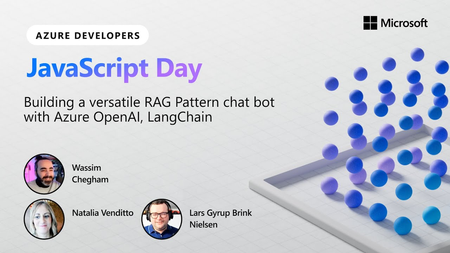
In the digital realm where the integration of AI and web development is constantly evolving, the JavaScript Developer Days witnessed a fascinating session dedicated to unveiling the intricacies of creating a RAG (Retrieval Augmentation Generation) pattern chatbot utilizing Azure OpenAI and LangChain. The session was enriched by the insights of special guest Lars, a Denmark-based Microsoft MVP, GitHub star, NX Champion, Angular hero of education, and a fervent community organizer. Wassim, a Senior Developer Advocate Engineer at Microsoft, and Natalia, a Principal Product Manager at Microsoft, also shared their expertise, offering a comprehensive guide to developing AI-driven applications with Azure services and Developer Tools.Referencing a file in GitHub Copilot for Visual Studio
A project never consists of one single file. In fact, most applications have multiple code files, as well as additional configuration files, test files, data and other helpers. In the new video we just posted, Gwyn "GPS" Peña-Siguenza shows how Copilot uses the "#" shortcut to add one or more files to the context.Creating Tests with GitHub Copilot for Visual Studio
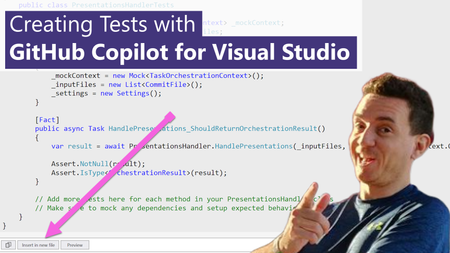
One of the recurring jokes in our industry is that developers are not very good at two things when coding: Documenting code, and creating unit tests. These are two areas where GitHub Copilot can help! Let's see how in the new short video that I just published.Building your own copilot – yes, but how? (Part 1 of 2)
Today, there’s a wide range of built-in services and features designed to enable organizations and developers to build their own copilots, able to answer questions based on their own knowledge bases and data sources. But how to choose the most suitable one for each scenario? This blog post wants to provide an overview of some of the main choices you have in the Microsoft technology ecosystem. Part 1 will look into low-code tools and out-of-the-box features, while part 2 will focus on code-heavy and extensible options.