copilot in excel
118 Topics
Looking for advice on leveraging AI for Excel in a price-sensitive, third-world country
I work for a training company in a price-sensitive, third-world country and have been conducting training in MS Excel for close to 2 decades. My company has asked me to design Excel training that teaches how to use AI to improve productivity. Ethical considerations aside, it’s something I have been thinking about for a while. The main roadblock I see is the average purchasing power of participants in our market. Right now the cheapest Copilot plan is USD 99.99/yr for MS 365 Personal. The cheapest plan for Business or Enterprise is USD 18/user/month for MS 365 Copilot business (billed at USD 216/user/year). I’ve been casually speaking with the participants in training sessions and most are happy with the free chatbot versions of Copilot/ChatGPT/Gemini that almost no one would upgrade to a paid subscription to integrate AI with Excel - they describe their problem to the AI, send screenshots or upload files and then try and implement the solution that’s returned. It’s similar in the business/enterprise context. Larger organisations may have paid for AI subscriptions for their employees but those are few in number. Most businesses in this market are classified as Small-Medium-Enterprises (SMEs) and feedback from participants is that their management would not likely approve of the cost. It’s worth mentioning that my training company does not provide computers instead requiring participants to bring their own laptops with valid Excel licences though we standardize things as much as possible e.g. Windows only, no tablets etc… This means if we design a training that requires a paid Copilot subscription, then it is up to the participants to buy it for themselves which I don’t think many of them will. After speaking with management, they are open to designing a training that uses the free AI chatbots. I’m fine with that but don’t know how much value that would add to what people are already doing. I’m quite sure this strategy is management trying to revive Excel training which used to be top-sellers (demand fell off ever since COVID) and they see other Excel training incorporating AI so want to follow suit. So right now the most viable option is to create training that teaching using free AI chatbots. But I’d like to hear the opinions of others - what other options do you see for a price-sensitive, third-world market? And yes, I did ask AI how Excel users can leverage AI without paying for expensive subscriptions and it basically said “use the free chatbots”.55Views0likes0CommentsHow to Create Your Own Copilot Skills in Excel and Work Smarter
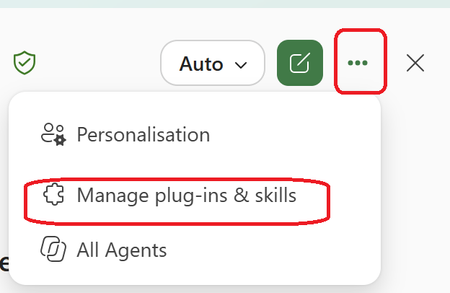
Many Excel users know how to work with formulas, pivot tables, and dashboards, but far fewer know that they can create Copilot Skills that help automate repetitive tasks and standardize business processes. Benefits of Copilot Skills in Excel ✅Save time on repetitive analysis ✅Standardize calculations and reporting ✅Reduce manual errors ✅Make advanced Excel capabilities accessible to everyone ✅Improve productivity across teams 💡 Best Use Cases ✅Sales performance analysis ✅Financial reporting ✅Data cleansing and transformation ✅Forecasting and trend analysis ✅Creating recurring management reports The real power comes from turning your organization's knowledge and best practices into reusable skills that anyone can use directly from Excel. 🎥 I recently created a video showing how to create and use Copilot Skills in Excel, with practical examples and step-by-step guidance. 👉 Watch the video and let me know what Excel task you would automate first! https://www.youtube.com/watch?v=uPfMQjlNhXY How do we create the skill? Within the Copilot Chat in Excel Go choose the 3 Dots Then Choose Manage Plugins & and Skills Choose the Custom Skills Here you will see the location that you can upload your skill that are stored in your OneDrive (Click on the Hyperlink "Skill OneDrive Folder") In my case this is the location in My OneDrive Now you need to Create a Folder with the name of the Skill and the Skill.MD file that includes the Name and description and instruction It will look like this A good approach is to use Copilot Chat to generate the entire skill package, including the required folder name and structure. Once Uploaded to OneDrive , Refresh the Custom skill Screen and you will see it and use it #Microsoft365 #Copilot #Excel #MicrosoftCopilot #Productivity #DataAnalysis #AI #ExcelTips #M365198Views0likes0Comments
Copilot in Excel
a { text-decoration: none; color: #464feb; } tr th, tr td { border: 1px solid #e6e6e6; } tr th { background-color: #f5f5f5; } Hi everyone, I’m starting to explore Copilot in Excel. I’m an Excel enthusiast, so I’m already quite comfortable with the application. I was wondering which Copilot features you find really useful, particularly those that save time or help solve problems. Do you also think Copilot can help beginners use Excel more easily and effectively? Thank you for sharing your thoughts and experience!215Views1like2Comments
What's the simplest way to make a genuinely random name selection system using Microsoft tools?
For example, suppose I have a list of participants in Excel and want to randomly select one winner without manually choosing from the list. Would you use RAND/RANDBETWEEN in Excel, Power Automate, or another Microsoft 365 approach? I'm also interested in preventing the same person from being selected twice when several winners are needed. I'd appreciate an approach that's easy for someone without much Excel or Power Automate experience to understand.361Views0likes5CommentsIs it really impossible to break workbook protection?
Hi, I process personal data and need strict protection (GDPR). My raw data from a survey is copied to several worksheets in a workbook and the processed anonymous data (dashboards) is in other worksheets in the same workbook. Before sending the whole workbook with the visible dashboards to my customers I delete some of the raw data worksheets and hide others. After that I protect the structure of the workbook with a code. Now only the worksheets with the dashboards are visible. Will it at all be possible for my customers to break the protection and get access to the sensitive raw personal data or am I completely safe? Thanks in advance to your reply! Best regards PerSolved6.7KViews16likes28Comments
GLSU Excel add-in fails to load after Office update from Version 2607 to 2608
Our Excel add-in, Process Runner GLSU , fails to load after Microsoft Office updates from Version 2607 to Version 2608. This started August 17, 2026 and is actively growing in scope. Error messages: Excel: Cannot run the macro 'onLoad' VBA: System Error &H80004005 (-2147467259). Unspecified error VBA: Compile error in hidden module: ThisWorkbook Has anyone encountered similar issue with their own custom add-on. If yes, any pointers to fix it. We are seeking help on priority. Thanks, Vrushali Pawale, Sr. Manager, Insightsoftware.991Views0likes1CommentExcel Copilot fails when local workbook filename contains #
Excel Copilot does not work with locally stored workbooks whose filename contains the '#' character. The same workbook works correctly after renaming the file to remove '#'. The same workbook also works when stored on OneDrive with '#' in the filename. The issue appears specific to local files and filename parsing. Specifically, when clicking on Copilot in Excel, Copilot says "This file type is not supported for editing with Copilot. Please save this file as a modern file format, such as ".xlsx", to be able to edit it with Copilot." Interestingly, Copilot works fine if the Excel file name contains, for example, % or &, the problem only occurs if the name contains #. We suspect this is a bug. In our workflows, we work a lot with files that have # in their names and we would be very happy if this was indeed a bug and if it was fixed. Tnx.454Views0likes8Comments
Data Analysis in Excel! Help...
Help! I am starting an applied statistics class for my doctoral study and my professor is asking for a feature that does not appear on my Microsoft 365 account. According to the professor I need data analysis on the Excel page, but cannot change the options.110Views0likes1CommentGetting data from Snowflake to Excel
Hello I have multiple no technical users and am trying to find a way to setup a snowflake query for them and then let them refresh it whenever they want or on a schedule, but I couldn't find a good solution this what i found so far: ODBC (Not great for non technical users needs setup on each user desktop) Power Automate (Needs Power Automate Premium which we don't have) Third Party tools (Expensive pricing models) Through Power BI (We want to separate this process from power bi) Any suggested solution please!Solved764Views0likes3Comments