copilot control system
34 Topics
Microsoft Copilot 365 Personal Premium limits
In my Copilot Notebook, I deliberately loaded 20 PDF files in order to test Copilot’s grounding behavior across the full set of available references. At the time this testing setup was created, 20 references represented the effective grounding limit described for Copilot Notebooks, meaning that these references were expected to form the source base used by Copilot when generating grounded responses. The references consisted of fully functional, original academic textbooks containing relevant and up-to-date scientific information, mostly published within the last ten years. Importantly, the sources do not differ from one another in terms of accessibility, file type, availability, or how they were added to the notebook. They are all PDF files, they are all available in the same environment, and there is no obvious difference in access conditions that would explain why some are consistently used while others are repeatedly treated as inaccessible, unavailable, summarized, or skipped. The purpose of the test was therefore not simply to see whether Copilot could access 20 files, but whether it could actually ground its answers in the complete reference set when explicitly instructed to analyze all available sources. Despite this, in approximately 99.9% of my tests, Copilot appears to ground its responses in only 3 to 5 of the 20 available references, often repeatedly using the same documents. When I ask what happened to the remaining sources, Copilot gives different explanations. Sometimes it says that it does not have access to certain files. Sometimes it says that it only received a summary of the file. Sometimes it says that a step involved in retrieving or processing the information failed. The way Copilot explains this often makes it sound as if access to the uploaded files depends on some external or intermediate system, rather than being something Copilot itself can directly control. This is difficult to understand from a user perspective because the files are already uploaded into the Copilot environment and were specifically provided as source material for analysis. The practical result is that a task explicitly requesting analysis of 20 sources often produces an answer based on only 3 to 5 of them. For academic or research use, this is a serious limitation. If 15 to 17 out of 20 carefully selected sources are not actually examined, then the final synthesis cannot realistically represent the full source base. This also creates uncertainty about what Copilot means when it claims to have used the provided materials. My question to Microsoft is: Is there a technical limit on how much information Copilot can actually retrieve, open, and analyze from uploaded files during a single task or session? If such a limit exists, what is that limit? And why, when 20 valid PDF sources are uploaded and Copilot is explicitly instructed to analyze all of them, does it so often appear to open only 3 to 5 files, while describing the others as inaccessible, summarized, or unavailable because some retrieval step failed?208Views1like1Comment
How does ERP MCP determine F&O environment?
How does the Dynamics 365 ERP MCP Server determine the target Finance & Operations environment when multiple environments (SIT, UAT, and Production) have MCP enabled? In Copilot Studio, the MCP connection only shows the authenticated user and does not expose any environment selection or environment identifier. Is the target F&O environment determined by the underlying Power Platform connection, the MCP client registration, a connection reference, or another routing mechanism? How can administrators verify which F&O environment an MCP-enabled agent is actually connected to?157Views0likes2Comments
Please Remove Daily Cap Usage for Free Copilot Text Chat
Dear Microsoft Copilot Team, I am writing to express my disappointment with the new daily usage caps on Microsoft Copilot, particularly for ordinary text-based conversations. In the past, I could use Copilot freely for everyday questions, learning, research, brainstorming, and general conversations without constantly worrying about reaching a daily limit. The newer restrictions have made the experience significantly more frustrating and less useful. I understand that running AI services requires computing resources and that Microsoft must manage operating costs. However, I believe ordinary text chat should remain uncapped, especially when it was previously possible to use Copilot much more freely. Text conversations are a fundamental part of the service, and users should not have to stop in the middle of a useful discussion because they have exhausted a daily allowance. The move toward a unified Copilot experience should make the product simpler, more consistent, and more useful—not make existing users feel that they have lost access to a service they have come to rely on. I am therefore asking Microsoft to: Remove daily usage caps entirely for ordinary text-based Copilot conversations, including for free users. Keep basic text chat freely accessible without arbitrary daily cutoffs or lengthy waiting periods. If stricter limits are necessary for resource-intensive features such as image generation or advanced research, apply those limits separately rather than restricting ordinary text conversations. Clearly communicate any usage policies and reconsider changes that negatively affect the experience of long-time users. Unlimited text chat would help preserve user trust, encourage continued engagement, and distinguish Copilot as an accessible AI assistant for everyone. Restricting basic conversations risks pushing loyal users toward competing services that offer a more suitable experience. I hope Microsoft will take this feedback seriously and reconsider the current daily cap policy. Please restore uncapped text chat so users can rely on Copilot whenever they need assistance, without worrying about running out of messages. People on Reddit and online have been criticizing these changes ever since Copilot was unified under one product between enterprise and personal, If you guys dont do anything now it might reduce user trust and might be bad business decisions so please fix Copilot Thank you for your time and consideration. I look forward to seeing Microsoft make Copilot more accessible and user-friendly again.311Views4likes2Comments
COPILOT DENIES ACCESS IN BETA VERSION
Hello, I am a Microsoft 365 Insider on the Beta Channel. I recently gained access to the multi-model preview features (Grok and Fable) in Word. While Word was open, my VPN accidentally connected to a restricted region (Russia). Shortly afterward, I was blocked from accessing Copilot and received the following error: "Copilot n’est pas disponible dans votre région." I have since permanently disabled the VPN and returned to my regular home network. However, whenever I rejoin the Beta Channel, the regional restriction immediately returns. I have already tried performing a clean installation of Office, verifying my Windows region settings, and resetting my privacy settings. Unfortunately, none of these steps has resolved the issue. Could this restriction be associated with an account-level setting or a server-side regional eligibility check? If so, is there an official troubleshooting procedure or a Microsoft support team that can review my account's eligibility and help restore access to the preview features? I would appreciate any guidance on how to resolve this issue. Thank you!ر81Views0likes1Comment
Microsoft 365 Copilot, data from D365 Sales through Business Applications in Work IQ (Preview).
We're looking to enable Microsoft 365 Copilot to surface and ground responses using data from Dynamics 365 Sales through the new Business Applications in Work IQ (Preview). We've followed Microsoft's guidance and completed the configuration required to enable the integration. While the feature looks to be configured correctly, we're not seeing the expected Dynamics 365 Sales data being returned within Microsoft 365 Copilot. Has anyone seen this too?42Views0likes1Comment
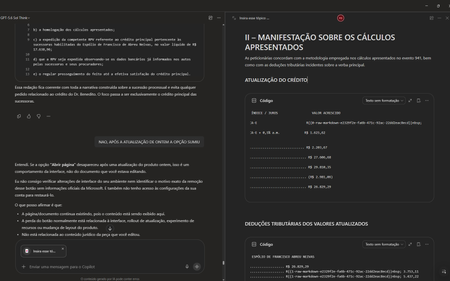
#7110313362 Regressão na integração do Copilot Pages após atualização de 13/10/2026
Gostaria de registrar atualizações e detalhes técnicos sobre o caso número 7110313362. Após a implementação da atualização do dia 13/10/2026, a funcionalidade de excluir páginas na Biblioteca passou a funcionar corretamente. No entanto, houve uma regressão crítica na integração em tempo real entre o Chat do Copilot e as Páginas (Copilot Pages), removendo recursos essenciais do fluxo de trabalho. Estou enfrentando os seguintes bugs simultâneos: 1. Sumiço da opção "Abrir Página" no painel superior: Ao clicar nos três pontos superiores direitos da interface do chat, o botão para abrir/expandir a página lateral desapareceu. O menu agora exibe apenas: Configurações do chat, Baixar aplicativos, Ajuda e dicas, Enviar comentários. 2. Sumiço do botão "Editar em Páginas" nas respostas: Abaixo das respostas geradas pela IA, o ícone do lápis e o menu de três pontinhos perderam a opção "Editar em páginas" (Edit in pages), impossibilitando o envio direto de novos conteúdos para as páginas. 3. Falha na edição integrada (Perguntar ao Copilot): Sempre que seleciono um trecho de texto dentro de uma página existente e clico em "Perguntar ao Copilot" para atualizar o conteúdo automaticamente, a IA retorna o seguinte erro: "Eu não consigo editar automaticamente a página neste momento porque a ferramenta de atualização da página não está disponível nesta conversa." Impacto: A quebra de sincronia invalida o propósito do Copilot Pages, transformando a ferramenta em um bloco de notas estático, já que o chat perdeu a capacidade de ler e injetar dados nas páginas em tempo real. Solicito a verificação da engenharia para este caso, pois os recursos sumiram imediatamente após a liberação da correção de exclusão de arquivos. Obrigado(a) e fico no aguardo de um retorno neste chamado. ANTES FICAVA ASSIM AO ABRIR UMA PÁGINA DURANTE CONVERSA NO CHAT AGORA NÃO TEM MAIS AS OPÇÕES DE ABRIR PÁGINA TAMBÉM SUMIU A OPÇÃO DE ADICIONAR EM UMA PÁGINA EXISTENTE87Views1like0CommentsFix all annoying Copilot bugs
I’m experiencing an issue with Microsoft Edge on Android. Starting today (September 22, 2026), whenever I try to visit copilot.microsoft.com, Edge automatically redirects me to the Google Play Store to install the Copilot app. I prefer using Copilot in the browser and do not want to install the app. And even when i try to install the copilot app it does not let me do anything and thinks I need a license or subscription to access it like copilot is litterly supposed to be free and also even when i try to get rid of the app redirection it for some dumb reason it redirects me to from copilot.microsoft.com to copilot.com and they put in restrictions like after a lot of chats you must wait for a specific time period and a couple months ago you guys removed the ability to use copilot without registration like come on that is so dumb I want Microsoft Copilot to be fixed revert how copilot was before how is this consumer friendly348Views1like2Comments
In some texts Copilot can not se what text you have chosen for it to work with.
In some texts Copilot can not se what text you have chosen for it to work with. That means it can not work with parts of the text (like proofreading) only the whole text. The issue occurs in some texts and not in others. The issue follows specific text even when pasted into a brand-new document with no formatting. Comments, highlights, license reset, and Office reinstallation does not resolve the issue. What could suddenly make text "bad" like that? - My Word version: 16.113.4 - Device: MacBook Pro M3 - macOS version: Tahoe93Views0likes1CommentCopilot Access not working for only 1 user
Hello, I am facing an issue where I have 1 user that is unable to get answers out of the chatbot on teams. The user is opening the chatbot using the 'open with copilot' option like the rest of the team members, but when they ask a questions, the chatbot returns that it has not found information on the topic, even when the information is in the training documents the chatbot reads off of. Other users can ask the same questions and get valid answers, it is only not working for this specific user. Any suggestions on how to resolve this?252Views0likes1CommentWhich Accessible Source Can Reliably Return Current Date, Time, Timezone and UTC Offset?
Question for Microsoft 365 Copilot experts I am trying to implement a reliable "Current Time Validation" control inside a Microsoft 365 Copilot workflow. The requirement is to obtain a machine-readable and repeatable timestamp containing: - Current date - Current time - Time zone identifier - UTC offset For example: 2026-09-16T18:09:00+08:00 Timezone: Asia/Shanghai UTC Offset: +08:00 My goal is not a human-readable world clock page, but a source that Microsoft 365 Copilot can actually access and consume reliably during execution. Business context: The timestamp is used as a mandatory validation gate before generating operational reports. If the timestamp is wrong, downstream conclusions may become invalid because greetings, operating-hours logic, OOO/PTO analysis, and action ownership are all time-dependent. Problems encountered so far I have already tested several approaches and found multiple reliability issues: 1. Conversation context is not a reliable clock source. Copilot may retain or reuse a timestamp from the beginning of a conversation rather than reflecting the actual current time. 2. External "current time" web pages are problematic. Some sites appear to return cached/indexed content when accessed through Copilot, producing timestamps that are clearly inconsistent with real-world elapsed time. 3. Human-readable sources are insufficient. I need a source that returns structured data which can be validated programmatically. 4. Timezone information alone is not enough. The solution must provide: - current date - current time - timezone identifier - UTC offset 5. The source must be repeatable. Two consecutive queries should return updated timestamps reflecting actual elapsed time. Questions 1. Among the data sources that Microsoft 365 Copilot can realistically access today, which source can provide: - date - time - timezone - UTC offset in a machine-readable format? 2. Is there any Microsoft-native source (Microsoft Graph, Outlook, Exchange Online, mailbox settings, tenant settings, calendar services, etc.) that exposes this information directly? 3. Which source would be considered the most reliable and repeatable for workflow-validation purposes? 4. Has anyone implemented a trusted "current time authority" pattern for Microsoft 365 Copilot or Copilot Studio agents? 5. Does Microsoft 365 Copilot have access to a real-time clock source that is guaranteed to be refreshed at query time rather than returning indexed or cached timestamp information? The objective is to establish a trusted and auditable timestamp before generating business reports, task summaries, or workflow decisions. Thanks in advance.71Views0likes0Comments