container networking
23 Topics
Azure CNI Powered by Cilium for Azure Kubernetes Service (AKS)
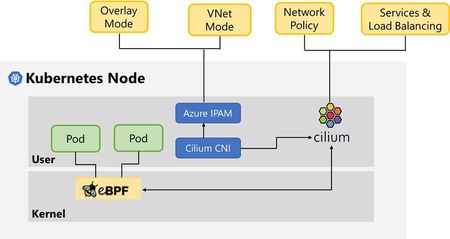
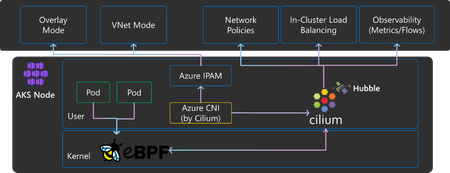
Azure CNI powered by Cilium integrates the scalable and flexible Azure IPAM control plane with the robust dataplane offered by Cilium OSS to create a modern container networking stack that meets the demands of cloud native workloads.17KViews3likes1CommentUse cases of Advanced Network Observability for your Azure Kubernetes Service clusters
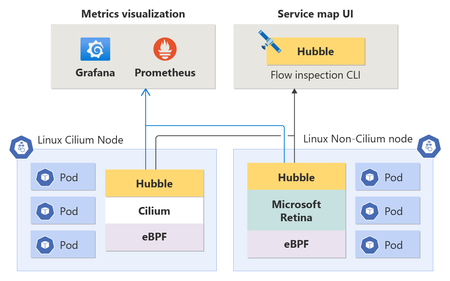
The blog explores the use cases of Advanced Network Observability for Azure Kubernetes Service (AKS) clusters. It introduces the Advanced Network Observability feature, which brings Hubble's control plane to both Cilium and Non-Cilium Linux data planes. This feature provides deep insights into containerized workloads, enabling precise detection and root-cause analysis of network-related issues in Kubernetes clusters. The document also includes customer scenarios that demonstrate the benefits of Advanced Network Observability, such as DNS metrics, network policy drops at the pod level, and traffic imbalance for pods within a workload4.3KViews4likes2Comments
Overlay Network Driver with Support for Docker Swarm Mode Now Available to Windows Insiders on Windows 10
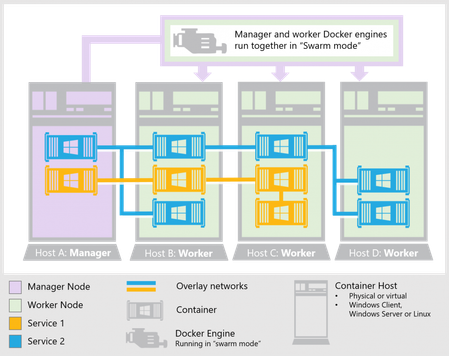
First published on TECHNET on Feb 09, 2017 Windows 10 Insiders can now take advantage of overlay networking and Docker swarm mode to manage containerized applications in both single-host and clustering scenarios.3.4KViews0likes0CommentsSecuring Microservices with Cilium and Istio
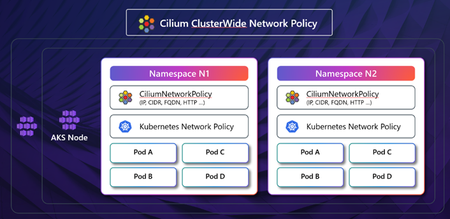
The adoption of Kubernetes and containerized applications is booming, leading to new challenges in visibility and security. As the landscape of cloud-native applications is rapidly evolving so are the number of sophisticated attacks targeting containerized workloads. Traditional tools often fall short in tracking the usage and traffic flows within these applications. The immutable nature of container images and the short lifespan of containers further necessitate addressing vulnerabilities early in the delivery pipeline. Comprehensive Security Controls in Kubernetes Microsoft Azure offers a range of security controls to ensure comprehensive protection across various layers of the Kubernetes environment. These controls include but are not limited to: Cluster Security: Features such as private clusters, managed cluster identity, and API server authorized ranges enhance security at the cluster level. Node and Pod Security: Hardened bootstrapping, confidential nodes, and pod sandboxing are implemented to secure the nodes and pods within a cluster. Network Security: Advanced Container Networking Services and Cilium Network policies offer granular control over network traffic. Authentication and Authorization: Azure Policy in-cluster enforcement, Entra authentication, and Istio mTLS and authorization policies provide robust identity and access management. Image Scanning: Microsoft Defender for Cloud provides both image and runtime scanning to identify vulnerabilities and threats. Let’s highlight how you can secure micro services while scaling your applications running on Azure Kubernetes Service (AKS) using service mesh for robust traffic management, and network policies for security. Micro segmentation with Network Policies Micro segmentation is crucial for enhancing security within Kubernetes clusters, allowing for the isolation of workloads and controlled traffic between microservices. Azure CNI by Cilium leverages eBPF to provide high-performance networking, security, and observability features. It dynamically inserts eBPF bytecode into the Linux kernel, offering efficient and flexible control over network traffic. Cilium Network Policies enable network isolation within and across Kubernetes clusters. Cilium also provides an identity-based security model, offering Layer 7 (L7) traffic control, and integrates deep observability for L4 to L7 metrics in Kubernetes clusters. A significant advantage of using Azure CNI based on Cilium is its seamless integration with existing AKS environments, requiring minimal modifications to your infrastructure. Note that Cilium Clusterwide Network Policy (CCNP) is not supported at the time of writing this blog post. FQDN Filtering with Advanced Container Networking Services (ACNS) Traditional IP-based policies can be cumbersome to maintain. ACNS allows for DNS-based policies, providing a more granular and user-friendly approach to managing network traffic. This is supported only with Azure CNI powered by Cilium and includes a security agent DNS proxy for FQDN resolution even during upgrades. It’s worth noting that with Cilium’s L7 enforcement, you can control traffic based on HTTP methods, paths, and headers, making it ideal for APIs, microservices, and services that use protocols like HTTP, gRPC, or Kafka. At the time of writing this blog, this capability is not supported via ACNS. More on this in a future blog! AKS Istio Add-On: Mutual TLS (mTLS) and Authorization Policy Istio enhances the security of microservices through its built-in features, including mutual TLS (mTLS) and authorization policies. The Istiod control plane, acting as a certificate authority, issues X.509 certificates to the Envoy sidecar proxies via the Secret Discovery Service (SDS). Integration with Azure Key Vault allows for secure management of root and intermediate certificates. The PeerAuthentication Custom Resource in Istio controls the traffic accepted by workloads. By default, it is set to PERMISSIVE to facilitate migration but can be set to STRICT to enforce mTLS across the mesh. Istio also supports granular authorization policies, allowing for control over IP blocks, namespaces, service accounts, request paths, methods, and headers. The Istio add-on also supports integration with Azure Key Vault (AKV) and the AKV Secrets Store CSI Driver Add-On for plug-in CA certificates, where the root CA lives on a secure machine offline, and the intermediate certs for the Istiod control plane are synced to the cluster by the CSI Driver Add-On. Additionally, certificates for the Istio ingress gateway for TLS termination or SNI passthrough can also be stored in AKV. Defense-In-Depth with Cilium, ACNS and Istio Combining the capabilities of Cilium's eBPF technologies through ACNS and AKS managed Istio addon, AKS provides a defense-in-depth strategy for securing Kubernetes clusters. Azure CNI's Cilium Network Policies and ACNS FQDN filtering enforce Pod-to-Pod and Pod-to-egress policies at Layer 3 and 4, while Istio enforces STRICT mTLS and Layer 7 authorization policies. This multi-layered approach ensures comprehensive security coverage across all layers of the stack. Now, let’s highlight the key steps in achieving this: Step 1: Create an AKS Cluster with Azure CNI (by Cilium), ACNS and Istio Addon enabled. az aks create \ --resource-group $RESOURCE_GROUP \ --name $CLUSTER_NAME \ --location $LOCATION \ --kubernetes-version 1.30.0 \ --node-count 3 \ --node-vm-size standard_d16_v3 \ --enable-managed-identity \ --network-plugin azure \ --network-dataplane cilium \ --network-plugin-mode overlay \ --pod-cidr 192.168.0.0/16 \ --enable-asm \ --enable-acns \ --generate-ssh-keys Step 2: Create Cilium FQDN policy that allows egress traffic to google.com while blocking traffic to httpbin.org. Sample Policy (fqdn-filtering-policy.yaml): apiVersion: cilium.io/v2 kind: CiliumNetworkPolicy metadata: name: sleep-network-policy namespace: foo spec: endpointSelector: matchLabels: app: sleep egress: - toFQDNs: - matchPattern: "*.google.com" - toEndpoints: - matchLabels: "k8s:io.kubernetes.pod.namespace": foo "k8s:app": helloworld - toEndpoints: - matchLabels: "k8s:io.kubernetes.pod.namespace": kube-system "k8s:k8s-app": kube-dns toPorts: - ports: - port: "53" protocol: ANY Apply policy: kubectl apply -f fqdn-filtering-policy.yaml Step 3: Create an Istio deny-by-default AuthorizationPolicy. This denies all requests across the mesh unless specifically authorized with an “ALLOW” policy. Sample Policy (istio-deny-all-authz.yaml): apiVersion: security.istio.io/v1 kind: AuthorizationPolicy metadata: name: allow-nothing namespace: aks-istio-system spec: {} Apply policy: kubectl apply -f istio-deny-all-authz.yaml Step 4: Deploy an Istio L7 AuthorizationPolicy to explicitly allow traffic to the “sample” pod in namespace foo for http “GET” requests. Sample Policy (istio-L7-allow-policy.yaml): apiVersion: security.istio.io/v1 kind: AuthorizationPolicy metadata: name: allow-get-requests namespace: foo spec: selector: matchLabels: app: sample action: ALLOW rules: - to: - operation: methods: [“GET”] Apply policy: kubectl apply -f istio-L7-allow-policy.yaml Step 5: Deploy an Istio strict mTLS PeerAuthentication Resource to enforce that all workloads in the mesh only accept Istio mTLS traffic. Sample PeerAuthentication (istio-peerauth.yaml): apiVersion: security.istio.io/v1 kind: PeerAuthentication metadata: name: strict-mtls namespace: aks-istio-system spec: mtls: mode: STRICT Apply policy: kubectl apply -f istio-peerauth.yaml These examples demonstrate how you can manage traffic to specific FQDNs and enforce L7 authorization rules in your AKS cluster. Conclusion Traditional IP and perimeter security models are insufficient for the dynamic nature of cloud-native environments. More sophisticated security mechanisms, such as identity-based policies and DNS names, are required. Azure CNI, powered by Cilium and ACNS, provides robust FQDN filtering and Layer 3/4 Network Policy enforcement. The Istio add-on offers mTLS for identity-based encryption and Layer7 authorization policies. A defense-in-depth model, incorporating both Azure CNI and service mesh mechanisms, is recommended for maximizing security posture. So, give these a try and let us know (Azure Kubernetes Service Roadmap (Public)) how we can evolve our roadmap to help you build the best with Azure. Credit(s): Niranjan Shankar, Sr. Software Engineer, Microsoft2.6KViews3likes0Comments
Accelerate designing, troubleshooting & securing your network with Gen-AI powered tools, now GA.
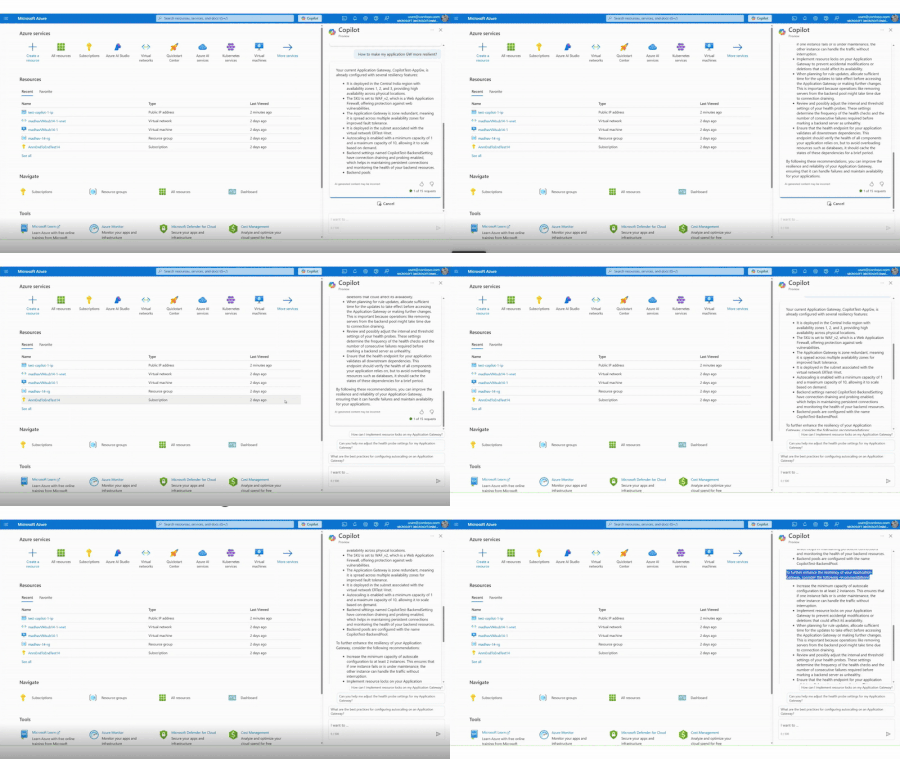
We are thrilled to announce the general availability of Azure Networking skills in Copilot, an extension of Copilot in Azure and Security Copilot designed to enhance cloud networking experience. Azure Networking Copilot is set to transform how organizations design, operate, and optimize their Azure Network by providing contextualized responses tailored to networking-specific scenarios and using your network topology.2KViews1like1CommentSecure, High-Performance Networking for Data-Intensive Kubernetes Workloads
In today’s data-driven world, AI and high-performance computing (HPC) workloads demand a robust, scalable, and secure networking infrastructure. As organizations rely on Kubernetes to manage these complex workloads, the need for advanced network performance becomes paramount. In this blog series, we explore how Azure CNI powered by Cilium, built on eBPF technology, is transforming Kubernetes networking. From high throughput and low latency to enhanced security and real-time observability, discover how these cutting-edge advancements are paving the way for secure, high-performance AI workloads. Ready to optimize your Kubernetes clusters?1.9KViews2likes0Comments
Introducing eBPF Host Routing: High performance AI networking with Azure CNI powered by Cilium
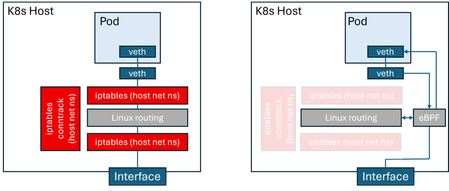
AI-driven applications demand low-latency workloads for optimal user experience. To meet this need, services are moving to containerized environments, with Kubernetes as the standard. Kubernetes networking relies on the Container Network Interface (CNI) for pod connectivity and routing. Traditional CNI implementations use iptables for packet processing, adding latency and reducing throughput. Azure CNI powered by Cilium natively integrates Azure Kubernetes service (AKS) data plane with Azure CNI networking modes for superior performance, hardware offload support, and enterprise-grade reliability. Azure CNI powered by Cilium delivers up to 30% higher throughput in both benchmark and real-world customer tests compared to a bring-your-own Cilium setup on AKS. The next leap forward: Now, AKS data plane performance can be optimized even further with eBPF host routing, which is an open-source Cilium CNI capability that accelerates packet forwarding by executing routing logic directly in eBPF. As shown in the figure, this architecture eliminates reliance on iptables and connection tracking (conntrack) within the host network namespace. As a result, significantly improving packet processing efficiency, reducing CPU overhead and optimized performance for modern workloads. Comparison of host routing using the Linux kernel stack vs eBPF Azure CNI powered by Cilium is battle-tested for mission-critical workloads, backed by Microsoft support, and enriched with Advanced Container Networking Services features for security, observability, and accelerated performance. eBPF host routing is now included as part of Advanced Container Networking Services suite, delivering network performance acceleration. In this blog, we highlight the performance benefits of eBPF host routing, explain how to enable it in an AKS cluster, and provide a deep dive into its implementation on Azure. We start by examining AKS cluster performance before and after enabling eBPF host routing. Performance comparison Our comparative benchmarks measure the difference in Azure CNI Powered by Cilium, by enabling eBPF host routing. To perform these measurements, we use AKS clusters on K8s version 1.33, with host nodes of 16 cores, running Ubuntu 24.04. We are interested in throughput and latency numbers for pod-to-pod traffic in these clusters. For throughput measurements, we deploy netperf client and server pods, and measure TCP_STREAM throughput at varying message sizes in tests running 20 seconds each. The wide range of message sizes are meant to capture the variety of workloads running on AKS clusters, ranging from AI training and inference to messaging systems and media streaming. For latency, we run TCP_RR tests, measuring latency at various percentiles, as well as transaction rates. The following figure compares pods on the same node; eBPF-based routing results in a dramatic improvement in throughput (~30%). This is because, on the same node, the throughput is not constrained by factors such as the VM NIC limits and is almost entirely determined by host routing performance. For pod-to-pod throughput across different nodes in the cluster. eBPF host routing results in better pod-to-pod throughput across nodes, and the difference is more pronounced with smaller message sizes (3x more). This is because, with smaller messages, the per-message overhead incurred in the host network stack has a bigger impact on performance. Next, we compare latency for pod-to-pod traffic. We limit this benchmark to intra-node traffic, because cross-node traffic latency is determined by factors other than the routing latency incurred in the hosts. eBPF host routing results in reduced latency compared to the non-accelerated configuration at all measured percentiles. We have also measured the transaction rate between client and server pods, with and without eBPF host routing. This benchmark is an alternative measurement of latency because a transaction is essentially a small TCP request/response pair. We observe that eBPF host routing improves transactions per second by around 27% as compared to legacy host routing. Transactions/second (same node) Azure CNI configuration Transactions/second eBPF host routing 20396.9 Traditional host routing 16003.7 Enabling eBPF routing through Advanced Container Networking Services eBPF host routing is disabled by default in Advanced Container Networking Services because bypassing iptables in the host network namespace can ignore custom user rules and host-level security policies. This may lead to visible failures such as dropped traffic or broken network policies, as well as silent issues like unintended access or missed audit logs. To mitigate these risks, eBPF host routing is offered as an opt-in feature, enabled through Advanced Container Networking Services on Azure CNI powered by Cilium. The Advanced Container Networking Services advantage: Built-in safeguards: Enabling eBPF Host Routing in ACNS enhances the open-source offering with strong built-in safeguards. Before activation, ACNS validates existing iptables rules in the host network namespace and blocks enablement if user-defined rules are detected. Once enabled, kernel-level protections prevent new iptables rules and generate Kubernetes events for visibility. These measures allow customers to benefit from eBPF’s performance gains while maintaining security and reliability. Thanks to the additional safeguards, eBPF host routing in Advanced Container Networking Services is a safer and more robust option for customers who wish to obtain the best possible networking performance on their Kubernetes infrastructure. How to enable eBPF Host Routing with ACNS Visit the documentation on how to enable eBPF Host Routing for new and existing Azure CNI Powered by Cilium clusters. Verify the network profile with the new performance `accelerationMode`field set to `BpfVeth`. "networkProfile": { "advancedNetworking": { "enabled": true, "performance": { "accelerationMode": "BpfVeth" }, … For more information on Advanced Container Networking Services and ACNS Performance, please visit https://aka.ms/acnsperformance. Resources For more info about Advanced Container Networking Services please visit (Container Network Security with Advanced Container Networking Services (ACNS) - Azure Kubernetes Service | Microsoft Learn). For more info about Azure CNI Powered by Cilium please visit (Configure Azure CNI Powered by Cilium in Azure Kubernetes Service (AKS) - Azure Kubernetes Service | Microsoft Learn).1.7KViews1like2Comments
Announcing public preview: Cilium mTLS encryption for Azure Kubernetes Service
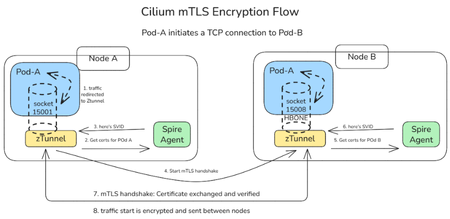
We are thrilled to announce the public preview of Cilium mTLS encryption in Azure Kubernetes Service (AKS), delivered as part of Advanced Container Networking Services and powered by the Azure CNI dataplane built on Cilium. This capability is the result of a close engineering collaboration between Microsoft and Isovalent (now part of Cisco). It brings transparent, workload‑level mutual TLS (mTLS) to AKS without sidecars, without application changes, and without introducing a separate service mesh stack. This public preview represents a major step forward in delivering secure, high‑performance, and operationally simple networking for AKS customers. In this post, we’ll walk through how Cilium mTLS works, when to use it, and how to get started. Why Cilium mTLS encryption matters Traditionally, teams looking to in-transit traffic encryption in Kubernetes have had two primary options: Node-level encryption (for example, WireGuard or virtual network encryption), which secures traffic in transit but lacks workload identity and authentication. Service meshes, which provide strong identity and mTLS guarantees but introduce operational complexity. This trade‑off has become increasingly problematic, as many teams want workload‑level encryption and authentication, but without the cost, overhead, and architectural impact of deploying and operating a full-service mesh. Cilium mTLS closes this gap directly in the dataplane. It delivers transparent, inline mTLS encryption and authentication for pod‑to‑pod TCP traffic, enforced below the application layer. And implemented natively in the Azure CNI dataplane built on Cilium, so customers gain workload‑level security without introducing a separate service mesh, resulting in a simpler architecture with lower operational overhead. To see how this works under the hood, the next section breaks down the Cilium mTLS architecture and follows a pod‑to‑pod TCP flow from interception to authentication and encryption. Architecture and design: How Cilium mTLS works Cilium mTLS achieves workload‑level authentication and encryption by combining three key components, each responsible for a specific part of the authentication and encryption lifecycle. Cilium agent: Transparent traffic interception and wiring Cilium agent which already exists on any cluster running with Azure CNI powered by cilium, is responsible for making mTLS invisible to applications. When a namespace is labelled with “io.cilium/mtls-enabled=true”, The Cilium agent enrolls all pods in that namespace. It enters each pod's network namespace and installs iptables rules that redirect outbound traffic to ztunnel on port 15001. It is also responsible for passing workload metadata (such as pod IP and namespace context) to ztunnel. Ztunnel: Node‑level mTLS enforcement Ztunnel is an open source, lightweight, node‑level Layer 4 proxy that was originally created by Istio. Ztunnel runs as a DaemonSet, on the source node it looks up the destination workload via XDS (streamed from the Cilium agent) and establishes mutually authenticated TLS 1.3 sessions between source and destination nodes. Connections are held inline until authentication is complete, ensuring that traffic is never sent in plaintext. The destination ztunnel decrypts the traffic and delivers it into the target pod, bypassing the interception rules via an in-pod mark. The application sees a normal plaintext connection — it is completely unaware encryption happened. SPIRE: Workload identity and trust SPIRE (SPIFFE Runtime Environment) provides the identity foundation for Cilium mTLS. SPIRE acts as the cluster Certificate Authority, issuing short‑lived X.509 certificates (SVIDs) that are automatically rotated and validated. This is a key design principle of Cilium mTLS - trust is based on workload identity, not network topology. Each workload receives a cryptographic identity derived from: Kubernetes namespace Kubernetes ServiceAccount These identities are issued and rotated automatically by SPIRE and validated on both sides of every connection. As a result: Identity remains stable across pod restarts and rescheduling Authentication is decoupled from IP addresses Trust decisions align naturally with Kubernetes RBAC and namespace boundaries This enables a zero‑trust networking model that fits cleanly into existing AKS security practices. End‑to‑End workflow example To see how these components work together, consider a simple pod‑to‑pod connection: A pod initiates a TCP connection to another pod. Traffic intercepted inside the pod network namespace and redirected to the local ztunnel instance. ztunnel retrieves the workload identity using certificates issued by SPIRE. ztunnel establishes a mutually authenticated TLS session with the destination node’s ztunnel. Traffic is encrypted and sent between pods. The destination ztunnel decrypts the traffic and delivers it to the target pod. Every packet from an enrolled pod is encrypted. There is no plaintext window, and no dropped first packets. The connection is held inline by ztunnel until the mTLS tunnel is established, then traffic flows bidirectionally through an HBONE (HTTP/2 CONNECT) tunnel. Workload enrolment and scope Cilium mTLS in AKS is opt‑in and scoped at the namespace level. Platform teams enable mTLS by applying a single label to a namespace. From that point on: All pods in that namespace participate in mTLS Authentication and encryption are mandatory between enrolled workloads Non-enrolled namespaces continue to operate unchanged Encryption is applied only when both pods are enrolled. Traffic between enrolled and non‑enrolled workloads continues in plaintext without causing connectivity issues or hard failures. This model enables gradual rollout, staged migrations, and low-risk adoption across environments. Getting started in AKS Cilium mTLS encryption is available in public preview for AKS clusters that use: Azure CNI powered by Cilium Advanced Container Networking Services You can enable mTLS: When creating a new cluster, or On an existing cluster by updating the Advanced Container Networking Services configuration Once enabled, enrolling workloads is as simple as labelling a namespace. 👉 Learn more Concepts: How Cilium mTLS works, architecture, and trust boundaries How-to guide: Step-by-step instructions to enable and verify mTLS in AKS Looking ahead This public preview represents an important step forward in simplifying network security for AKS and reflects a deep collaboration between Microsoft and Isovalent to bring open, standards‑based innovation into production‑ready cloud platforms. We’re continuing to work closely with the community to improve the feature and move it toward general availability. If you’re looking for workload‑level encryption without the overhead of a traditional service mesh, we invite you to try Cilium mTLS in AKS and share your experience.1.7KViews3likes0CommentsIntroducing Container Network Logs with Advanced Container Networking Services for AKS
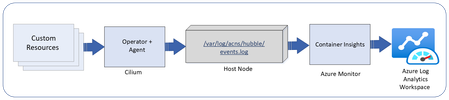
Overview of container network logs Container network logs offer a comprehensive way to monitor network traffic in AKS clusters. Two modes of support, stored-logs and on-demand logs, provides debugging flexibility with cost optimization. The on-demand mode provides a snapshot of logs with queries and visualization with Hubble CLI UI for specific scenarios and does not use log storage to persist the logs. The stored-logs mode when enabled continuously collects and persists logs based on user-defined filters. Logs can be stored either in Azure Log Analytics (managed) or locally (unmanaged). Managed storage: Logs are forwarded to Azure Log Analytics for secure, scalable, and compliant storage. This enables advanced analytics, anomaly detection, and historical trend analysis. Both basic and analytics table plans are supported for storage. Unmanaged storage: Logs are stored locally on the host nodes under /var/log/acns/hubble. These logs are rotated automatically at 50 MB to manage storage efficiently. These logs can be exported to external logging systems or collectors for further analysis. Use cases Connectivity monitoring: Identify and visualize how Kubernetes workloads communicate within the cluster and with external endpoints, helping to resolve application connectivity issues efficiently. Troubleshooting network errors: Gain deep granular visibility into dropped packets, misconfigurations, or errors with details on where and why errors are occurring (TCP/UDP, DNS, HTTP) for faster root cause analysis. Security policy enforcement: Detect and analyze suspicious traffic patterns to strengthen cluster security and ensure regulatory compliance. How it works Container network logs use eBPF technology with Cilium to capture network flows from AKS nodes. Log collection is disabled by default. Users can enable log collection by defining custom resources (CRs) to specify the types of traffic to monitor, such as namespaces, pods, services, or protocols. The Cilium agent collects and processes this traffic, storing logs in JSON format. These logs can either be retained locally or integrated with Azure Monitoring for long-term storage and advanced analytics and visualization with Azure managed Grafana. Fig1: Container network logs overview If using managed storage, users will enable Azure monitor log collection using Azure CLI or ARM templates. Here’s a quick example of enabling container network logs on Azure monitor using the CLI: az aks enable-addons -a monitoring --enable-high-log-scale-mode -g $RESOURCE_GROUP -n $CLUSTER_NAME az aks update --enable-acns \ --enable-retina-flow-logs \ -g $RESOURCE_GROUP \ -n $CLUSTER_NAME Key benefits Faster issue resolution: Detailed logs enable quick identification of connectivity and performance issues. Operational efficiency: Advanced filtering reduces data management overhead. Enhanced application reliability: Proactive monitoring ensures smoother operations. Cost optimization: Customized logging scopes minimize storage and data ingestion costs. Streamlined compliance: Comprehensive logs support audits and security requirements. Observing logs in Azure managed Grafana dashboards Users can visualize container network logs in Azure managed Grafana dashboards, which simplify monitoring and analysis: Flow logs dashboard: View internal communication between Kubernetes workloads. This dashboard highlights metrics such as total requests, dropped packets, and error rates. Error logs dashboard: Easily zoom in only on the logs which show errors for faster log parsing. Service dependency graph: Visualize relationships between services, detect bottlenecks, and optimize network flows. These dashboards provide filtering options to isolate specific logs, such as DNS errors or traffic patterns, enabling efficient root cause analysis. Summary statistics and top-level metrics further enhance understanding of cluster health and activity. Fig 2: Azure managed Grafana dashboard for container network logs Conclusion Container network logs for AKS offer a powerful and cost optimized way to monitor and analyze network activity, enhance troubleshooting, security, and ensure compliance. To get started, enable Advanced Container Networking Services in your AKS cluster and configure custom resources for logging. Visualize your logs in Grafana dashboards and Azure Log Analytics to unlock actionable insights. Learn more here.1.5KViews3likes0Comments