container networking
23 Topics
Multi-NIC Support on AKS powered by DRANET – Now in Public Preview
Kubernetes was designed around a simple networking model, every pod gets one network interface, and every pod on a node shares the same flat network. For most stateless microservices, this works well as it keeps the model simple and the platform portable. But a large class of workloads don't fit that shape. Some need network separation, with management, control, and data traffic on separate and isolated networks rather than multiplexed over one interface. Other workloads need predictable performance, a dedicated path for high-throughput or latency-sensitive traffic. Until now, meeting these requirements on Kubernetes meant adding and manually integrating multiple components, or keeping the workload on VMs. Today we're announcing the public preview of multi-NIC support for pods on AKS, powered by the AKS managed DRANET driver. You can now provision worker nodes with multiple network interfaces connected to different subnets, and attach a dedicated interface directly to a pod using standard upstream Kubernetes APIs, with no Multus, no custom CNI extensions, and no manual interface wiring. Two ways to use multi-NIC on AKS Use case 1: A dedicated NIC attached directly to a pod “As a networking engineer, I want to attach a dedicated network interface directly to a Kubernetes pod so the workload can connect to different networks and route traffic natively, without relying on host-level DPDK/VPP forwarding, custom routing rules, or gateway-based NAT.” “I also want the secondary interface on my pod to send and receive traffic on a specific, known public IP address, so that downstream partners can allow-list my traffic by IP and no NAT hop adds latency to time-sensitive streams." This is the pattern where the workload itself expects to see multiple interfaces. The pod asks for a network device the same way it would ask for any other resource, and the interface shows up inside the container alongside the standard CNI interface. No host-level forwarding layer, no NAT gateway in the middle. What you get The DRANET driver is deployed automatically. Once a node pool is configured with secondary interfaces, AKS installs and manages the driver for you; there is no add-on to install and no CRDs to author by hand. Declarative, scheduler-aware requests. Interfaces are advertised to Kubernetes as allocatable devices, so a pod that asks for one is placed on a node that can actually provide it, using standard Dynamic Resource Allocation (DRA) objects rather than vendor-specific annotations. A predictable interface lifecycle. The driver handles attach, release, and recovery as pods are rescheduled or restarted. A public IP address can be assigned directly to a secondary interface, configured at node pool creation time using IP tags. The pod's secondary interface talks to the outside world without going through the load balancer or any address translation layer. Both IPv4 and IPv6 addresses are supported on the secondary interface. What to plan around Interfaces are dedicated, not shared. When a NIC is attached to a pod, it moves into that pod's network namespace and is no longer available to the node or to any other pod. Sharing a secondary NIC across pods isn't supported in this release. Because of that, pod density on a multi-NIC node pool is bounded by the number of interfaces on the node. All interfaces must be attached to the same virtual network as the primary NIC. On a bring-your-own VNet cluster, different subnets within that VNet are supported, but different VNets are not, in this preview. On an AKS-managed VNet, secondary interfaces are currently limited to the same subnet as the primary NIC , since creating a new subnet on a managed VNet isn't supported yet. Each pod's secondary interface gets its own dedicated public IP, so plan node pool sizing around how many pods need a tagged public IP of their own. Public IP assignment is configured at node pool creation time through IP tags, so decide your IP range and tagging strategy before you provision the node pool. Kubernetes network policy is enforced on the primary interface only. Plan isolation for secondary interfaces at the subnet and NSG layer. Use Case 2: Multi-NIC nodes with your own NIC management “As a platform/networking engineer, I want to provision Kubernetes worker nodes with multiple network interfaces connected to different networks and use my own VPP, DPDK, or any custom routing logic to steer traffic at the node level, without attaching additional interfaces to pods.” This is the pattern for teams who already own their dataplane. The node is multi-homed, each interface lands on its own subnet, and your own software decides which traffic goes where. Pods keep a single CNI-assigned interface and stay unaware of the underlying topology. What you get Depending on the selected SKU size, you can configure nodes with multiple network interfaces. Full control, and full ownership of the additional nics. AKS provisions the interfaces and keeps them attached to the node. How traffic is steered across them is entirely yours to design, configure, operate, and support. That includes your routing rules, your userspace dataplane, and any troubleshooting of the forwarding path itself. The same-VNet constraint applies here too, secondary interfaces can span subnets, but not virtual networks. This applies to bring-your-own VNet clusters. On an AKS-managed VNet, secondary interfaces are restricted to the primary NIC's subnet for now. Both patterns start from the same node pool configuration. The difference is whether you stop there and manage the interfaces yourself, or let the DRANET hand them to your pods. How it works Multi-NIC on AKS starts with a single configuration step: you add secondary network interfaces to a node pool. AKS provisions the NICs on every VM in the pool and installs the DRANET driver alongside them. From there, what happens to those NICs depends on your workload. Reference a resource claim in your pod spec, and DRANET moves an interface into the pod Or Leave them on the node and steer traffic yourself with VPP, DPDK, or custom routing. Step 1: Provision the node pools with secondary NICs Secondary interfaces are declared when you create the node pool. The agent pool's network profile carries a secondaryNetworkInterfaces array, and each entry points at a subnet in the same virtual network as the primary NIC: "networkProfile": { "secondaryNetworkInterfaces": [ { "type": "Standard", "vnetSubnetId": "<VNET_SUBNET_ID>" } { "type": "Standard", "vnetSubnetId": "<VNET_SUBNET_ID>" } ] } AKS extends VMSS provisioning to attach those NICs to every VM in the pool. Add more entries for more interfaces, up to what the VM SKU allows. The array length is validated against the SKU at creation time, so a pool with mixed sizes has to be planned around the smallest one. The node is now multi-homed and the interfaces are visible on the host. If you are building for use case 2, this is where you stop. AKS provisions and keeps the interfaces attached to the node, and how traffic is steered across them, the routing rules, the userspace dataplane, the troubleshooting of the forwarding path, is yours to design, operate, and support. Step 2: Using AKS managed DRANET driver to hand an interface to the pod Once a node pool has secondary interfaces configured, and the cluster is using AKS-managed CNI (Azure CNI or Azure CNI Powered by Cilium), AKS automatically installs the DRANET driver as a DaemonSet, packaged and delivered through an AKS-managed Helm chart. There is nothing to deploy yourself and no CRDs to author by hand. If you're running a BYO CNI cluster, AKS still provisions the secondary NICs, but you're responsible for deploying DRANET (or your own driver of choice) yourself. The driver does three things: Discovers the additional interfaces present on each node. Advertises them to Kubernetes as allocatable DRA devices, published in a ResourceSlice. Manages the lifecycle: exclusive per-pod allocation, attachment, release, and recovery as pods move or restart. Inspect the DRANET deamonset, pods, and deviceclass using the following commands: kubectl get deviceclasses kubectl get daemonset -A kubectl get pods -A -o wide Now you can create a “ResourceClaimTemplate” that defines how each pod requests a device. apiVersion: resource.k8s.io/v1 kind: ResourceClaimTemplate metadata: name: nic-dev-template spec: spec: devices: requests: - name: nic exactly: deviceClassName: standard-secondary-nic allocationMode: ExactCount count: 1 Configure the pod references the template, and the scheduler places it on a node that has a matching NIC available: apiVersion: v1 kind: Pod metadata: name: multi-nic-test spec: containers: - name: multi-nic image: nicolaka/netshoot resources: claims: - name: nic resourceClaims: - name: nic resourceClaimTemplateName: nic-dev-template A pod referencing a claim comes up with its usual CNI-assigned eth0 plus the allocated secondary interface, and you can confirm both from inside the container. When DRANET attaches a secondary NIC to a pod, that interface moves into the pod's network namespace and is no longer available on the node or to any other pod. It returns to the node's pool of available devices when the pod terminates. That gives you a clean isolation boundary and deterministic performance, with the trade-off that pod density on a multi-NIC pool is bounded by interface count, not just CPU and memory. For the full walkthrough including feature flag registration, more examples visit https://aka.ms/aks/multi-nic. Try it now Multi-NIC support for pods on AKS is available now in public preview. Start with the documentation for the full walkthrough: provisioning a node pool with secondary interfaces, defining a resource claim, and validating that both interfaces appear inside the pod. Documentation: https://aka.ms/aks/multi-nic Upstream project: DRANET on GitHub Preview is when your input can actually shape the feature. If you hit a limitation or have a use case we haven’t covered, comment below and share your feedback. 532Views3likes0Comments
Pod CIDR Expansion Generally Available and IP Address Planning on Azure CNI Overlay
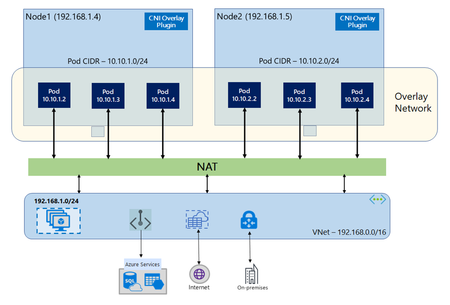
In networking with Azure CNI Overlay, the cluster-wide pod CIDR is logically partitioned into smaller “node” blocks where each node is assigned a fixed CIDR slice (/24) by Azure. This decouples pod networking from the VNet address space entirely because pods receive addresses from a private CIDR that is separate from the VNet. By default, Azure CNI Overlay uses a pod CIDR of 10.244.0.0/16 which provides 65,536 addresses. Since each node consumes 256 addresses from the /24 slice, the default cluster has a node scaling limit of 65,536 divided by 256, or 256 nodes. Choosing a pod CIDR at cluster creation effectively sets an upper bound on how many nodes the cluster can accommodate. Pod CIDR Per-Node Block Max Nodes Supported /16 /24 256 /15 /24 512 /14 /24 1,024 What does Pod CIDR Expansion enable? Even with careful upfront planning, long-lived clusters grow in ways that are difficult to anticipate. For organizations using Azure CNI Overlay, this previous represents a difficult migration without meticulous IP planning. Pod CIDR expansion allows you to expand the existing CIDR without downtime or node reimaging. Instead of being locked to the range chosen at cluster creation, operators can expand the available pod address space with minimal operational burden. Choosing a Pod CIDR In addition to node scaling limits, there are other considerations for pod CIDR planning: Overlapping pod CIDRs across clusters – even though pod IPs are not directly routable between clusters, overlapping CIDRs can cause problems with observability tooling or cross-cluster networking on top of the overlay. Careful planning can prevent having to recreate the cluster down the road. Accounting for system node pools – each system node also consumes a /24 block. IP address planning should factor nodes running cluster control plane components in addition to existing workloads. Learn More Read more about Azure CNI Overlay: Overview of Azure CNI Overlay Networking in Azure Kubernetes Service (AKS) Try pod CIDR expansion: Expand Pod CIDR Space in Azure CNI Overlay Azure Kubernetes Service (AKS) Clusters766Views1like1CommentMetrics Filtering and Log Aggregation Now GA for Advanced Container Networking Services
We are thrilled to announce that Advanced Container Networking Services (ACNS) for Azure Kubernetes Service (AKS) now delivers two powerful observability features in General Availability: container network metrics filtering and container network log filtering and aggregation. Together, these capabilities set a new standard for Kubernetes network observability, giving you high-fidelity visibility at dramatically lower cost and noise. These capabilities fundamentally redefine how network observability works at scale while delivering up to 97% cost reduction. Why this is a Milestone? Most Kubernetes observability solutions face a fundamental tension: collect everything and drown in noise and cost, or sample and miss the signals that matter, with new features of Advanced Container Networking Services that tradeoff has been eliminated. With this release, Azure becomes the first cloud provider to deliver on-node metrics filtering and flow log aggregation for Kubernetes networking, capabilities now also contributed to the upstream Hubble project, making them available to the broader open-source community. For AKS customers running Cilium-based clusters, this means: Every flow you care about is captured. Everything else is dropped at the source. Log volume is compressed by up to 45% through aggregation, without losing security verdicts or error context. Costs scale with what you monitor, not with cluster size. What’s been improved in observability? This release introduces two capabilities that work together: container network metrics filtering and container network log filtering and aggregation. Both are available on AKS clusters with the Cilium data plane and give you precise controls to keep observability costs predictable while maintaining the visibility you need. Container Network Metrics Filtering Container network metrics are generated for all pods by default whenever Advanced Container Networking Services is enabled. With metrics filtering, you now control what gets collected at the point of ingestion, on the node, before anything is scraped or transmitted. A single ContainerNetworkMetric CRD per cluster defines which metric types (dns, flow, tcp, drop), namespaces, pod labels, and protocols to ingest. It supports both include and exclude filters, so you can maintain broad collection while carving out specific workloads or namespaces. Anything that doesn't match is dropped on the node. Changes reconcile in a few seconds, with no Cilium agent or Prometheus restarts required. Container Network Log Filtering and Aggregation Unlike metrics, container network logs are not generated automatically. You start capturing network flows only after applying a ContainerNetworkLog CRD that defines exactly which traffic to capture-by namespace, pod, service, protocol, or verdict. Only matching flows are logged, giving you a precise, targeted view rather than a fire hose. This is where Azure's first-to-market innovation comes in. Flow log aggregation, now built into Advanced Container Networking Services and contributed upstream to Hubble for the open-source community, groups similar flows into summarized records every 30 seconds. The result is dramatically reduced data volume while preserving security verdicts, service identity, and error context. What previously required custom post-processing pipelines is now built directly into the platform before storage costs are incurred. Every matched flow log captures: source and destination pods, namespaces, ports, protocols, traffic direction, and policy verdicts. Logs are stored in a Log Analytics workspace (ContainerNetworkLogs table) with a choice of using the Analytics or Basic tier. Built-in Azure portal dashboards are available for both tiers. Logs can also be exported to external log collectors such as Splunk or Datadog. First to Market: Azure and the upstream Hubble Contribution Advanced Container Networking Services built-in filtering and aggregation capabilities were engineered from the ground up to solve real production observability challenges at scale. Rather than keeping this innovation proprietary, Azure contributed the log aggregation and filtering capabilities to the upstream Hubble project, the observability layer of the Cilium ecosystem. This means: AKS customers get a fully managed, Azure-native experience with portal dashboards, Log Analytics integration, and Grafana visualization, out of the box. The broader open-source community gains access to the same filtering and aggregation primitives through upstream Hubble. Azure is the first to ship this capability in a managed Kubernetes service, and the first to give it back to the community. Key Benefits 💰 Lower observability cost. Metrics filtering drops unwanted data on the node before Prometheus ever scrapes it. Flow log aggregation compresses log data by up to 97% in lab testing. Your cost scales with what you choose to monitor, not with cluster size. 📉 Less noise, more signal. Metrics filtering carves out the namespaces and workloads that matter, so dashboards show only relevant signals. Log filters scope collection to specific pods and verdicts. Engineers start every investigation with data that's already relevant. ⚡ Faster root-cause isolation. Every metric carries source and destination pod context. Targeted flow logs add the forensic detail, which policy, destination, or port is involved. Together, they cut mean time to resolution from hours of guesswork to minutes of structured investigation. 🔒 Full signal, zero gaps. Within the scope you define, every flow is captured and every pattern is preserved. Aggregation compresses volume without losing security verdicts or error context. Who Benefits Platform engineers managing multi-tenant clusters can scope data collection per namespace, so each team gets visibility into their own traffic without contributing to a shared cost pool. SREs can isolate packet drops, TCP resets, or DNS failures to a specific workload in minutes, starting with data that's already scoped to what matters. Decision-makers evaluating observability spend get predictable, controllable ingestion costs that scale with intent, not infrastructure size. How to optimize metrics and logs with filtering? Enable Advanced Container Networking Services ( ACNS) on your AKS cluster with the Cilium data plane: az aks create --enable-acns Or on an existing cluster: az aks update --resource-group $RESOURCE_GROUP --name $CLUSTER --enable-acns Apply a ContainerNetworkMetric CRD to filter which metrics are collected on each node. Start by excluding noisy system namespaces, then scope to business-critical workloads. Apply a ContainerNetworkLog CRD to define which flows to capture. Enable Azure Monitor integration with --enable-container-network-logs to send logs to a Log Analytics workspace, or export logs from the node to an external logging system such as Splunk or Datadog. Check your dashboards. Open your cluster in the Azure portal and go to Monitor > Insights > Networking for bytes, drops, DNS errors, and flows. For flow logs, use the built-in Azure portal dashboards available for both Basic and Analytics tiers. Conclusion Kubernetes network observability has long meant choosing between visibility and cost. With container network metrics filtering and log filtering and aggregation now GA in Advanced Container Networking Services (ACNS) and contributed to upstream Hubble for the open-source community, that tradeoff is gone. Azure is first to market with this capability. AKS customers get it fully managed, out of the box, with built-in dashboards with Log Analytics integration. And the broader Cilium ecosystem gets it through upstream Hubble. High-fidelity visibility. Lower cost. No compromise. Learn more: Container network metrics overview: Container network metrics overview - Azure Kubernetes Service | Microsoft Learn Container network logs overview: Container Network Logs Overview - Azure Kubernetes Service | Microsoft Learn Configure container network metrics filtering: Configure Container network metrics filtering for Azure Kubernetes Service (AKS) - Azure Kubernetes Service | Microsoft Learn Set up container network logs: Set up container network logs - Azure Kubernetes Service | Microsoft Learn 576Views0likes0Comments
Introducing WireGuard In-Transit Encryption for AKS (Generally Available)
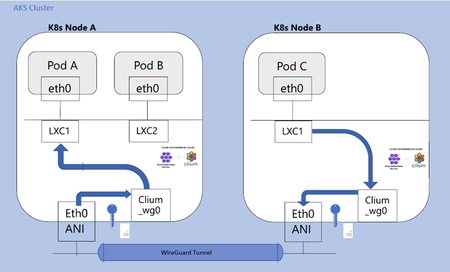
Update (Generally Available) WireGuard in‑transit encryption for Azure Kubernetes Service (AKS) is now generally available for clusters using Azure CNI powered by Cilium and Advanced Container Networking Services. The feature is production‑ready and no longer requires preview enrollment. The core behavior, scope, and configuration model remain unchanged from the public preview. As organizations continue to scale containerized workloads in Azure Kubernetes Service (AKS), securing network traffic between applications and services is critical—especially in regulated or security‑sensitive environments. WireGuard in‑transit encryption is now generally available in AKS, delivering transparent, node‑level encryption for inter‑node pod traffic as part of Advanced Container Networking Services, powered by Azure CNI built on Cilium. What is WireGuard? WireGuard is a modern, high-performance VPN protocol known for its simplicity, and robust cryptography. Integrated into the Cilium data plane and managed as part of AKS networking, WireGuard offers an efficient way to encrypt traffic transparently within your cluster. With this new feature, WireGuard is now natively supported as part of Azure CNI powered by Cilium with Advanced Container Networking services, no need for third-party encryption tools or custom key management systems. What Gets Encrypted? The WireGuard integration in AKS focuses on the most critical traffic path: ✅ Encrypted: Inter-node pod traffic: Network communication between pods running on different nodes in the AKS cluster. This traffic traverses the underlying network infrastructure and is encrypted using WireGuard to ensure confidentiality and integrity. ❌ Not encrypted: Same-node pod traffic: Communication between pods that are running on the same node. Since this traffic does not leave the node, it bypasses WireGuard and remains unencrypted. Node-generated traffic: Traffic initiated by the node itself, which is currently not routed through WireGuard and thus not encrypted. This scope is designed to strike the right balance between strong protection and performance by securing the most critical traffic, which is data that leaves the host and traverses the network. Key Benefits Simple Configuration: Enable WireGuard with just a few flags during AKS cluster creation or update. Automatic Key Management: Each node generates and exchanges WireGuard keys automatically, no need for manual configuration. Transparent to Applications: No application-level changes are required. Encryption happens at the network layer. Cloud-Native Integration: Fully managed as part of Advanced Container Networking Services and Cilium, offering a seamless and reliable experience Architecture: How It Works When WireGuard is enabled: Each node generates a unique public/private key pair. The public keys are securely shared between nodes via the CiliumNode custom resource. A dedicated network interface (cilium_wg0) is created and managed by the Cilium agent running on each node. Peers are dynamically updated, and keys are rotated automatically every 120 seconds to minimize risk. This mechanism ensures that only validated nodes can participate in encrypted communication. WireGuard and VNet Encryption AKS now offers two powerful in-transit encryption options: Feature WireGuard Encryption VNet Encryption Scope Pod-to-pod inter-node traffic All traffic in the VNet VM Support Works on all VM SKUs Requires hardware support (e.g., Gen2 VMs) Deployment Flexibility Cloud-agnostic, hybrid ready Azure-only Performance Software-based, moderate CPU usage Hardware-accelerated, low overhead Choose WireGuard if you want encryption flexibility across clouds or have VM SKUs that don’t support VNet encryption . Choose VNet Encryption for full-network coverage and ultra-low CPU overhead. Conclusion and Next Steps With WireGuard now generally available in AKS, customers can secure inter‑node pod traffic using a lightweight, cloud‑native encryption mechanism that requires no application changes and minimal operational overhead Ready to get started? Check out our how-to guide for step-by-step instructions on enabling WireGuard in your cluster and securing your container networking with ease. Explore more about Advanced Container Networking Services: Container Network Observability L7 network policies FQDN-based Policy968Views0likes0CommentsIntroducing the Container Network Insights Agent for AKS: Now in Public Preview
We are thrilled to announce public preview of Container Network Insights Agent - Agentic AI network troubleshooting for your workloads running in Azure Kubernetes Service (AKS). The Challenge AKS networking is layered by design. Azure CNI, eBPF, Cilium, CoreDNS, NetworkPolicy, CiliumNetworkPolicy, Hubble. Each layer contributes capabilities, and some of these can fail silently in ways the surrounding layers cannot observe. When something breaks, the evidence usually exists. Operators already have the tools such as Azure Monitor for metrics, Container Insights for cluster health, Prometheus and Grafana for dashboarding, Cilium and Hubble for pod network observation, and Kubectl for direct inspection. However, correlating different signals and identifying the root cause takes time. Imagine this scenario: An application performance alert fires. The on-call engineer checks dashboards, reviews events, inspects pod health. Each tool shows its own slice. But the root cause usually lives in the relationship between signals, not in any single tool. So the real work begins to manually cross-reference Hubble flows, NetworkPolicy specs, DNS state, node-level stats, and verdicts. Each check is a separate query, a separate context switch, a separate mental model of how the layers interact. This process is manual, it is slow, needs domain knowledge, and does not scale. Mean time to resolution (MTTR) stays high not because engineers lack skill, but because the investigation surface is wide and the interactions between the layers are complex. The solution: Container Network Insights Agent Container Network Insights Agent is agentic AI to simplify and speed up AKS network troubleshooting Rather than replacing your existing observability tools, the container network insights agent correlates signals on demand to help you quickly identify and resolve network issues. You describe a problem in natural language, and the agent runs a structured investigation across layers. It delivers a diagnosis with the evidence, the root cause, and the exact commands to fix it. The container network insights agent gets its visibility through two data sources: - AKS MCP server container network insight agent integrates with the AKS MCP (Model Context Protocol) server, a standardized and secure interface to kubectl, Cilium, and Hubble. Every diagnostic command runs through the same tools operators already use, via a well-defined protocol that enforces security boundaries. No ad-hoc scripts, no custom API integrations. - Linux Networking plugin For diagnostics that require visibility below the Kubernetes API layer, container network insights agent collects kernel-level telemetry directly from cluster nodes. This includes NIC ring buffer stats, kernel packet counters, SoftIRQ distribution, and socket buffer utilization. This is how it pinpoints packet drops and network saturation that surface-level metrics cannot explain. When you describe a symptom, the container network insights agent: - Classifies the issue and plans an investigation tailored to the symptom pattern - Gathers evidence through the AKS MCP server and its Linux networking plugin across DNS, service routing, network policies, Cilium, and node-level statistics - Reasons across layers to identify how a failure in one component manifests in another - Delivers a structured report with pass/fail evidence, root cause analysis, and specific remediation guidance The container network insight agent is scoped to AKS networking: DNS failures, packet drops, connectivity issues, policy conflicts, and Cilium dataplane health. It does not modify workloads or change configurations. All remediation guidance is advisory. The agent tells you what to run, and you decide whether to apply it. What makes the container network insights agent different Deep telemetry, not just surface metrics Most observability tools operate at the Kubernetes API level. container network insight agent goes deeper, collecting kernel-level network statistics, BPF program drop counters, and interface-level diagnostics that pinpoint exactly where packets are being lost and why. This is the difference between knowing something is wrong and knowing precisely what is causing it. Cross-layer reasoning Networking incidents rarely have single-layer explanations. The container network insights agent correlates evidence from DNS, service routing, network policy, Cilium, and node-level statistics together. It surfaces causal relationships that span layers. For example: node-level RX drops caused by a Cilium policy denial triggered by a label mismatch after a routine Helm deployment, even though the pods themselves appear healthy. Structured and auditable Every conclusion traces to a specific check, its output, and its pass/fail status. If all checks pass, container network insights agent reports no issue. It does not invent problems. Investigations are deterministic and reproducible. Results can be reviewed, shared, and rerun. Guidance, not just findings The container network insights agent explains what the evidence means, identifies the root cause, and provides specific remediation commands. The analysis is done; the operator reviews and decides. Where the container network insights agent fits The container network insights agent is not another monitoring tool. It does not collect continuous metrics or replace dashboards. Your existing observability stack, including Azure Monitor, Prometheus, Grafana, Container Insights, and your log pipelines, keeps doing what it does. The agent complements those tools by adding an intelligence layer that turns fragmented signals into actionable diagnosis. Your alerting detects the problem; this agent helps you understand it. Safe by Design The container network insights agent is built for production clusters. - Read-only access Minimal RBAC scoped to pods, services, endpoints, nodes, namespaces, network policies, and Cilium resources. container network insight agent deploys a temporary debug DaemonSet only for packet-drop diagnostics that require host-level stats. - Advisory remediation only The container network insights agent tells you what to run. It never executes changes. - Evidence-backed conclusions Every root cause traces to a specific failed check. No speculation. - Scoped and enforced The agent handles AKS networking questions only. It does not respond to off-topic requests. Prompt injection defenses are built in. - Credentials stay in the cluster The container network insights agent authenticates via managed identity with workload identity federation. No secrets, no static credentials. Only a session ID cookie reaches the browser. Get Started Container network insights agent is available in Public Preview in **Central US, East US, East US 2, UK South, and West US 2**. The agent deploys as an AKS cluster extension and uses your own Azure OpenAI resource, giving you control over model configuration and data residency. Full capabilities require Cilium and Advanced Container Networking Services. DNS and packet drop diagnostics work on all supported AKS clusters. To try it: - Review the Container Network Insights Agent overview on Microsoft Learn https://learn.microsoft.com/en-us/azure/aks/container-network-insights-agent-overview - Follow the quickstart to deploy container network insights agent and run your first diagnostic - Share feedback via the Azure feedback channel or the thumbs-up and thumbs-down feedback controls on each response Your feedback shapes the roadmap. If the agent gets something wrong or misses a scenario you encounter, we want to hear about it. 879Views0likes0Comments
Announcing public preview: Cilium mTLS encryption for Azure Kubernetes Service
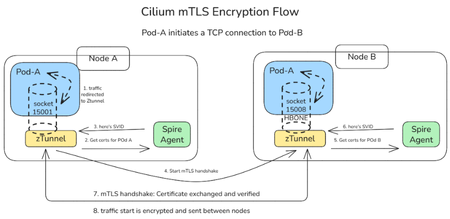
We are thrilled to announce the public preview of Cilium mTLS encryption in Azure Kubernetes Service (AKS), delivered as part of Advanced Container Networking Services and powered by the Azure CNI dataplane built on Cilium. This capability is the result of a close engineering collaboration between Microsoft and Isovalent (now part of Cisco). It brings transparent, workload‑level mutual TLS (mTLS) to AKS without sidecars, without application changes, and without introducing a separate service mesh stack. This public preview represents a major step forward in delivering secure, high‑performance, and operationally simple networking for AKS customers. In this post, we’ll walk through how Cilium mTLS works, when to use it, and how to get started. Why Cilium mTLS encryption matters Traditionally, teams looking to in-transit traffic encryption in Kubernetes have had two primary options: Node-level encryption (for example, WireGuard or virtual network encryption), which secures traffic in transit but lacks workload identity and authentication. Service meshes, which provide strong identity and mTLS guarantees but introduce operational complexity. This trade‑off has become increasingly problematic, as many teams want workload‑level encryption and authentication, but without the cost, overhead, and architectural impact of deploying and operating a full-service mesh. Cilium mTLS closes this gap directly in the dataplane. It delivers transparent, inline mTLS encryption and authentication for pod‑to‑pod TCP traffic, enforced below the application layer. And implemented natively in the Azure CNI dataplane built on Cilium, so customers gain workload‑level security without introducing a separate service mesh, resulting in a simpler architecture with lower operational overhead. To see how this works under the hood, the next section breaks down the Cilium mTLS architecture and follows a pod‑to‑pod TCP flow from interception to authentication and encryption. Architecture and design: How Cilium mTLS works Cilium mTLS achieves workload‑level authentication and encryption by combining three key components, each responsible for a specific part of the authentication and encryption lifecycle. Cilium agent: Transparent traffic interception and wiring Cilium agent which already exists on any cluster running with Azure CNI powered by cilium, is responsible for making mTLS invisible to applications. When a namespace is labelled with “io.cilium/mtls-enabled=true”, The Cilium agent enrolls all pods in that namespace. It enters each pod's network namespace and installs iptables rules that redirect outbound traffic to ztunnel on port 15001. It is also responsible for passing workload metadata (such as pod IP and namespace context) to ztunnel. Ztunnel: Node‑level mTLS enforcement Ztunnel is an open source, lightweight, node‑level Layer 4 proxy that was originally created by Istio. Ztunnel runs as a DaemonSet, on the source node it looks up the destination workload via XDS (streamed from the Cilium agent) and establishes mutually authenticated TLS 1.3 sessions between source and destination nodes. Connections are held inline until authentication is complete, ensuring that traffic is never sent in plaintext. The destination ztunnel decrypts the traffic and delivers it into the target pod, bypassing the interception rules via an in-pod mark. The application sees a normal plaintext connection — it is completely unaware encryption happened. SPIRE: Workload identity and trust SPIRE (SPIFFE Runtime Environment) provides the identity foundation for Cilium mTLS. SPIRE acts as the cluster Certificate Authority, issuing short‑lived X.509 certificates (SVIDs) that are automatically rotated and validated. This is a key design principle of Cilium mTLS - trust is based on workload identity, not network topology. Each workload receives a cryptographic identity derived from: Kubernetes namespace Kubernetes ServiceAccount These identities are issued and rotated automatically by SPIRE and validated on both sides of every connection. As a result: Identity remains stable across pod restarts and rescheduling Authentication is decoupled from IP addresses Trust decisions align naturally with Kubernetes RBAC and namespace boundaries This enables a zero‑trust networking model that fits cleanly into existing AKS security practices. End‑to‑End workflow example To see how these components work together, consider a simple pod‑to‑pod connection: A pod initiates a TCP connection to another pod. Traffic intercepted inside the pod network namespace and redirected to the local ztunnel instance. ztunnel retrieves the workload identity using certificates issued by SPIRE. ztunnel establishes a mutually authenticated TLS session with the destination node’s ztunnel. Traffic is encrypted and sent between pods. The destination ztunnel decrypts the traffic and delivers it to the target pod. Every packet from an enrolled pod is encrypted. There is no plaintext window, and no dropped first packets. The connection is held inline by ztunnel until the mTLS tunnel is established, then traffic flows bidirectionally through an HBONE (HTTP/2 CONNECT) tunnel. Workload enrolment and scope Cilium mTLS in AKS is opt‑in and scoped at the namespace level. Platform teams enable mTLS by applying a single label to a namespace. From that point on: All pods in that namespace participate in mTLS Authentication and encryption are mandatory between enrolled workloads Non-enrolled namespaces continue to operate unchanged Encryption is applied only when both pods are enrolled. Traffic between enrolled and non‑enrolled workloads continues in plaintext without causing connectivity issues or hard failures. This model enables gradual rollout, staged migrations, and low-risk adoption across environments. Getting started in AKS Cilium mTLS encryption is available in public preview for AKS clusters that use: Azure CNI powered by Cilium Advanced Container Networking Services You can enable mTLS: When creating a new cluster, or On an existing cluster by updating the Advanced Container Networking Services configuration Once enabled, enrolling workloads is as simple as labelling a namespace. 👉 Learn more Concepts: How Cilium mTLS works, architecture, and trust boundaries How-to guide: Step-by-step instructions to enable and verify mTLS in AKS Looking ahead This public preview represents an important step forward in simplifying network security for AKS and reflects a deep collaboration between Microsoft and Isovalent to bring open, standards‑based innovation into production‑ready cloud platforms. We’re continuing to work closely with the community to improve the feature and move it toward general availability. If you’re looking for workload‑level encryption without the overhead of a traditional service mesh, we invite you to try Cilium mTLS in AKS and share your experience.1.8KViews3likes0CommentsIntroducing eBPF Host Routing: High performance AI networking with Azure CNI powered by Cilium
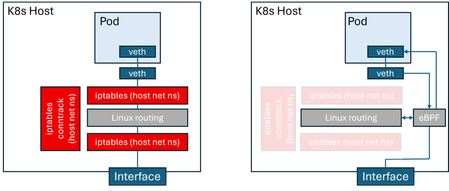
AI-driven applications demand low-latency workloads for optimal user experience. To meet this need, services are moving to containerized environments, with Kubernetes as the standard. Kubernetes networking relies on the Container Network Interface (CNI) for pod connectivity and routing. Traditional CNI implementations use iptables for packet processing, adding latency and reducing throughput. Azure CNI powered by Cilium natively integrates Azure Kubernetes service (AKS) data plane with Azure CNI networking modes for superior performance, hardware offload support, and enterprise-grade reliability. Azure CNI powered by Cilium delivers up to 30% higher throughput in both benchmark and real-world customer tests compared to a bring-your-own Cilium setup on AKS. The next leap forward: Now, AKS data plane performance can be optimized even further with eBPF host routing, which is an open-source Cilium CNI capability that accelerates packet forwarding by executing routing logic directly in eBPF. As shown in the figure, this architecture eliminates reliance on iptables and connection tracking (conntrack) within the host network namespace. As a result, significantly improving packet processing efficiency, reducing CPU overhead and optimized performance for modern workloads. Comparison of host routing using the Linux kernel stack vs eBPF Azure CNI powered by Cilium is battle-tested for mission-critical workloads, backed by Microsoft support, and enriched with Advanced Container Networking Services features for security, observability, and accelerated performance. eBPF host routing is now included as part of Advanced Container Networking Services suite, delivering network performance acceleration. In this blog, we highlight the performance benefits of eBPF host routing, explain how to enable it in an AKS cluster, and provide a deep dive into its implementation on Azure. We start by examining AKS cluster performance before and after enabling eBPF host routing. Performance comparison Our comparative benchmarks measure the difference in Azure CNI Powered by Cilium, by enabling eBPF host routing. To perform these measurements, we use AKS clusters on K8s version 1.33, with host nodes of 16 cores, running Ubuntu 24.04. We are interested in throughput and latency numbers for pod-to-pod traffic in these clusters. For throughput measurements, we deploy netperf client and server pods, and measure TCP_STREAM throughput at varying message sizes in tests running 20 seconds each. The wide range of message sizes are meant to capture the variety of workloads running on AKS clusters, ranging from AI training and inference to messaging systems and media streaming. For latency, we run TCP_RR tests, measuring latency at various percentiles, as well as transaction rates. The following figure compares pods on the same node; eBPF-based routing results in a dramatic improvement in throughput (~30%). This is because, on the same node, the throughput is not constrained by factors such as the VM NIC limits and is almost entirely determined by host routing performance. For pod-to-pod throughput across different nodes in the cluster. eBPF host routing results in better pod-to-pod throughput across nodes, and the difference is more pronounced with smaller message sizes (3x more). This is because, with smaller messages, the per-message overhead incurred in the host network stack has a bigger impact on performance. Next, we compare latency for pod-to-pod traffic. We limit this benchmark to intra-node traffic, because cross-node traffic latency is determined by factors other than the routing latency incurred in the hosts. eBPF host routing results in reduced latency compared to the non-accelerated configuration at all measured percentiles. We have also measured the transaction rate between client and server pods, with and without eBPF host routing. This benchmark is an alternative measurement of latency because a transaction is essentially a small TCP request/response pair. We observe that eBPF host routing improves transactions per second by around 27% as compared to legacy host routing. Transactions/second (same node) Azure CNI configuration Transactions/second eBPF host routing 20396.9 Traditional host routing 16003.7 Enabling eBPF routing through Advanced Container Networking Services eBPF host routing is disabled by default in Advanced Container Networking Services because bypassing iptables in the host network namespace can ignore custom user rules and host-level security policies. This may lead to visible failures such as dropped traffic or broken network policies, as well as silent issues like unintended access or missed audit logs. To mitigate these risks, eBPF host routing is offered as an opt-in feature, enabled through Advanced Container Networking Services on Azure CNI powered by Cilium. The Advanced Container Networking Services advantage: Built-in safeguards: Enabling eBPF Host Routing in ACNS enhances the open-source offering with strong built-in safeguards. Before activation, ACNS validates existing iptables rules in the host network namespace and blocks enablement if user-defined rules are detected. Once enabled, kernel-level protections prevent new iptables rules and generate Kubernetes events for visibility. These measures allow customers to benefit from eBPF’s performance gains while maintaining security and reliability. Thanks to the additional safeguards, eBPF host routing in Advanced Container Networking Services is a safer and more robust option for customers who wish to obtain the best possible networking performance on their Kubernetes infrastructure. How to enable eBPF Host Routing with ACNS Visit the documentation on how to enable eBPF Host Routing for new and existing Azure CNI Powered by Cilium clusters. Verify the network profile with the new performance `accelerationMode`field set to `BpfVeth`. "networkProfile": { "advancedNetworking": { "enabled": true, "performance": { "accelerationMode": "BpfVeth" }, … For more information on Advanced Container Networking Services and ACNS Performance, please visit https://aka.ms/acnsperformance. Resources For more info about Advanced Container Networking Services please visit (Container Network Security with Advanced Container Networking Services (ACNS) - Azure Kubernetes Service | Microsoft Learn). For more info about Azure CNI Powered by Cilium please visit (Configure Azure CNI Powered by Cilium in Azure Kubernetes Service (AKS) - Azure Kubernetes Service | Microsoft Learn).1.8KViews1like2Comments
Simplify container network metrics filtering in Azure Container Networking Services for AKS
We’re excited to introduce container network metrics filtering in Azure Container Networking Services for Azure Kubernetes Service (AKS) is now in public preview! This capability transforms how you manage network observability in Kubernetes clusters by giving you control over what metrics matter most. Why excessive metrics are a problem (and how we’re fixing it) In today’s large-scale, microservices-driven environments, teams often face metrics bloat, collecting far more data than they need. The result? High storage & ingestion costs: Paying for data you’ll never use. Cluttered dashboards: Hunting for critical latency spikes in a sea of irrelevant pod restarts. Operational overhead: Slower queries, higher maintenance, and fatigue. Our new filtering capability solves this by letting you define precise filters at the pod level using standard Kubernetes custom resources. You collect only what matters, before it ever reaches your monitoring stack. Key Benefits: Signal Over Noise Benefit Your Gain Fine-grained control Filter by namespace or pod label. Target critical services and ignore noise. Cost optimization Reduce ingestion costs for Prometheus, Grafana, and other tools. Improved observability Cleaner dashboards and faster troubleshooting with relevant metrics only. Dynamic & zero-downtime Apply or update filters without restarting Cilium agents or Prometheus. How it works: Filtering at the source Unlike traditional sampling or post-processing, filtering happens at the Cilium agent level—inside the kernel’s data plane. You define filters using the ContainerNetworkMetric custom resource to include or exclude metrics such as: DNS lookups TCP connection metrics Flow metrics Drop (error) metrics This reduces data volume before metrics leave the host, ensuring your observability tools receive only curated, high-value data. Example: Filtering flow metrics to reduce noise Here’s a sample ContainerNetworkMetric CRD that filters only dropped flows from the traffic/http namespace and excludes flows from traffic/fortio pods: apiVersion: acn.azure.com/v1alpha1 kind: ContainerNetworkMetric metadata: name: container-network-metric spec: filters: - metric: flow includeFilters: # Include only DROPPED flows from traffic namespace verdict: - "dropped" from: namespacedPod: - "traffic/http" excludeFilters: # Exclude traffic/fortio flows to reduce noise from: namespacedPod: - "traffic/fortio" Before filtering: After applying filters: Getting started today Ready to simplify your network observability? Enable Advanced Container Networking Services: Make sure Advanced Container Networking Services is enabled on your AKS cluster. Define Your Filter: Apply the ContainerNetworkMetric CRD with your include/exclude rules. Validate: Check your settings via ConfigMap and Cilium agent logs. See the Impact: Watch ingestion costs drop and dashboards become clearer! 👉 Learn more in the Metrics Filtering Guide. Try the public preview today and take control of your container network metrics.565Views0likes0CommentsLayer 7 Network Policies for AKS: Now Generally Available for Production Security and Observability!
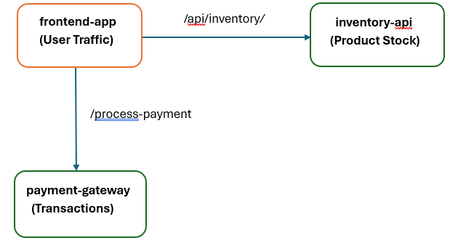
We are thrilled to announce that Layer 7 (L7) Network Policies for Azure Kubernetes Service (AKS), powered by Cilium and Advanced Container Networking Services (ACNS), has reached General Availability (GA)! The journey from public preview to GA signifies a critical step: L7 Network Policies are now fully supported, highly optimized, and ready for your most demanding, mission-critical production workloads. A Practical Example: Securing a Multi-Tier Retail Application Let's walk through a common production scenario. Imagine a standard retail application running on AKS with three core microservices: frontend-app: Handles user traffic and displays product information. inventory-api: A backend service that provides product stock levels. It should be read-only for the frontend. payment-gateway: A highly sensitive service that processes transactions. It should only accept POST requests from the frontend to a specific endpoint. The Security Challenge: A traditional L4 policy would allow the frontend-app to talk to the inventory-api on its port, but it couldn't prevent a compromised frontend pod from trying to exploit a potential vulnerability by sending a DELETE or POST request to modify inventory data. The L7 Policy Solution: With GA L7 policies, you can enforce the Principle of Least Privilege at the application layer. Here's how you would protect the inventory-api: apiVersion: cilium.io/v2 kind: CiliumNetworkPolicy metadata: name: protect-inventory-api spec: endpointSelector: matchLabels: app: inventory-api ingress: - fromEndpoints: - matchLabels: app: frontend-app toPorts: - ports: - port: "8080" # The application port protocol: TCP rules: http: - method: "GET" # ONLY allow the GET method path: "/api/inventory/.*" # For paths under /api/inventory/ The Outcome: Allowed: A legitimate request from the frontend-app (GET /api/inventory/item123) is seamlessly forwarded. Blocked: Assuming frontend-app is compromised, any malicious request (like DELETE /api/inventory/item123) originating from it is blocked at the network layer. This Zero Trust approach protects the inventory-api service from the threat, regardless of the security state of the source service. This same principle can be applied to protect the payment-gateway, ensuring it only accepts POST requests to the /process-payment endpoint, and nothing else. Beyond L7: Supporting Zero Trust with Enhanced Security In addition, toL7 application-level policies to ensure Zero Trust, we support Layer 3/4 network security and advanced egress controls like Fully Qualified Domain Name (FQDN) filtering. This comprehensive approach allows administrators to: Restrict Outbound Connections (L3/L4 & FQDN): Implement strict egress control by ensuring that workloads can only communicate with approved external services. FQDN filtering is crucial here, allowing pods to connect exclusively to trusted external domains (e.g., www.trusted-partner.com), significantly reducing the risk of data exfiltration and maintaining compliance. To learn more, visit the FQDN Filtering Overview. Enforce Uniform Policy Across the Cluster (CCNP): Extend protections beyond individual namespaces. By defining security measures as a Cilium Clusterwide Network Policy (CCNP), thanks to its General Availability (GA), administrators can ensure uniform policy enforcement across multiple namespaces or the entire Kubernetes cluster, simplifying management and strengthening the overall security posture of all workloads. To learn CCNP Example: L4 Egress Policy with FQDN Filtering This policy ensures that all pods across the cluster (CiliumClusterwideNetworkPolicy) are only allowed to establish outbound connections to the domain *.example.com on the standard web ports (80 and 443). apiVersion: cilium.io/v2 kind: CiliumClusterwideNetworkPolicy metadata: name: allow-egress-to-example-com spec: endpointSelector: {} # Applies to all pods in the cluster egress: - toFQDNs: - matchPattern: "*.example.com" # Allows access to any subdomain of example.com toPorts: - ports: - port: "443" protocol: TCP - port: "80" protocol: TCP Operational Excellence: Observability You Can Trust A secure system must be observable. With GA, the integrated visibility of your L7 traffic is production ready. In our example above, the blocked DELETE request isn't silent. It is immediately visible in your Azure Managed Grafana dashboards as a "Dropped" flow, attributed directly to the protect-inventory-api policy. This makes security incidents auditable and easy to diagnose, enabling operations teams to detect misconfigurations or threats in real time. Below is a sample dashboard layout screenshot. Next Steps: Upgrade and Secure Your Production! We encourage you to enable L7 Network Policies on your AKS clusters and level up your network security controls for containerized workloads. We value your feedback as we continue to develop and improve this feature. Please refer to the Layer 7 Policy Overview for more information and visit How to Apply L7 Policy for an example scenario.898Views1like0Comments
Azure CNI Overlay for Application Gateway for Containers and Application Gateway Ingress Controller
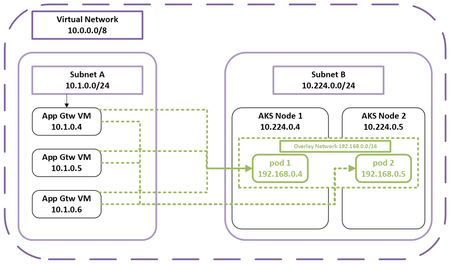
What are Azure CNI Overlay and Application Gateway? Azure CNI Overlay leverages logical network spaces for pod IP assignment management (IPAM). This provides enhanced IP scalability with reduced management responsibilities. Application Gateway for Containers is the latest and most recommended container L7 load-balancing solution. It introduces a new scalable control plane and data plane to address the performance demands and modern workloads being deployed to AKS clusters on Azure. Azure network control plane configures routing between Application Gateway and overlay pods. Why is the feature needed? As businesses increasingly use containerized solutions, managing container networks at scale has become a priority. Within container network management, IP address exhaustion, scalability and application load balancing performance are highly requested and discussed in many forums. Azure CNI Overlay is the default container networking IPAM mode on AKS. In the overlay design, AKS nodes use IPs from Azure virtual network (VNet) IP address range and pods are addressed from an overlay IP address range. The overlay pods can communicate with each other directly via a different routing domain. Overlay IP addresses can be reused across multiple clusters in the same VNet, provisioning a solution for IP exhaustion and increasing IP scale to over 1M. Azure CNI Overlay supporting Application Gateway for Containers provides customers with a more performant, reliable, and scalable container networking solution. Meanwhile, Azure CNI Overlay supporting AGIC provides customers with full feature parity if they choose to upgrade AKS clusters from kubenet to Azure CNI Overlay. Key Benefits High scale with Azure CNI Overlay combined with a high-performance ingress solution Azure CNI Overlay provides direct pod to pod routing with high IP scale using direct azure native routing with no encapsulation overhead. IPs can be reused across clusters in the same VNET allowing customers to conserve IP addresses. Application Gateway for Containers is the latest and most recommended container L7 load-balancing solution. Installing Application Gateway for Containers on AKS clusters with Azure CNI Overlay provides customers with the best solution combination of IP scalability and ingress solution on Azure. Feature parity between kubenet and Azure CNI Overlay With the retirement announcement of kubenet, we expect to see customers upgrade their AKS container networking solution from kubenet to Azure CNI Overlay soon. This feature allows customers to maintain business continuity during the transitioning process. Learn More Read more about Azure CNI Overlay and Application Gateway for Containers. Learn more on how to upgrade AKS clusters’ IPAM to Azure CNI Overlay. Learn more about Azure Kubernetes Service and Application Gateway.834Views2likes0Comments