compliance
68 TopicsAzure Government or Azure Commercial for CJIS 6.0: Choosing Your Compliance Path
Since 2014, United States criminal justice agencies have trusted Microsoft Azure Government to manage Criminal Justice Information (CJI). Built exclusively for regulated government data, it provides datacenters with physical, network, and logical isolation and is operated by CJIS-screened U.S. persons—the "gold standard" for compliance. However, we understand that flexibility is critical for modern agencies. As first announced with the release of CJIS Security Policy (CJISSECPOL) v5.9.1, agencies have the option to utilize Azure Commercial for CJIS workloads by leveraging advanced technical controls in place of traditional personnel screening. With the release of CJIS Security Policy 6.0, this hybrid landscape has evolved. The new policy moves beyond simple access control toward a "Zero Trust" framework which minimizes implicit trust, verifies all requests, and requires continuous monitoring. What’s New in CJIS 6.0? The 6.0 update (released late 2024) is a modernization overhaul. Key changes include: Phishing-Resistant MFA: Strict requirements for FIDO2 or certificate-based authentication for all privileged access. Continuous Monitoring: A shift from point-in-time audits to real-time threat detection and automated logging. Supply Chain Risk Management: Enhanced vetting of third-party software and vendors. The Choice: Azure Government or Azure Commercial: Criminal Justice Agencies can still choose between our two distinct offerings, but the "How" of compliance differs: Azure Government: The path of personnel screening. Microsoft executes CJIS Management Agreements with state CJIS Systems Agencies that include their screening of Microsoft personnel. This offers the broadest feature set with the simplest compliance burden. Azure Commercial: The path of technical controls. Because Azure Commercial support staff are not CJIS-screened, compliance relies on an agency implementing Customer Managed Keys (CMK) encryption. This way, Microsoft cannot access unencrypted criminal justice information, effectively removing Microsoft staff from the scope of trust. Our Commitment Whether you choose the physically secure location of Azure Government or the global scale of Azure Commercial, Microsoft provides the tools—Entra ID, Azure Key Vault, and Microsoft Sentinel—to meet the rigorous demands of CJIS 6.0. Step-by-Step Walkthrough for CJIS 6.0 in Azure Commercial Managing CJI in Azure Commercial requires you to bridge the gap between "standard commercial security" and "CJIS compliance" using your own configurations. Because Microsoft Commercial staff are not CJIS-screened, you must ensure they can never see unencrypted data. Phase 1: Foundation & Residency Step 1: Restrict Data Residency CJIS 6.0 mandates that CJI must not leave the United States. Action: Deploy all Azure resources (compute, storage, disks, networking, monitoring, logging, backups, etc.) exclusively in US regions (e.g., East US, West US, Central US). Policy: Use Azure Policy to deny the creation of resources in non-US regions to prevent accidental drift. o Documentation: Tutorial: Manage tag governance with Azure Policy (See the concept of "Allowed Locations" built-in policy). o Documentation: Azure Policy built-in definitions and assignment (Allowed locations) o Documentation: Details of the "Allowed locations" policy definition. Phase 2: The "Technical Control" (Encryption) This is the most critical step for Azure Commercial. Step 2: Implement Customer Managed Keys (CMK) To meet CJIS requirements in Azure Commercial, which is operated by Microsoft personnel who aren’t CJIS-screened, you must use encryption where you hold the keys, and Microsoft has no access. Action: Provision Azure Key Vault (Premium) or Managed HSM for FIPS 140-2 Level 2/3 compliance. o Documentation: About Azure Key Vault Premium and HSMs. o Documentation: Secure your Azure Managed HSM deployment. Action: Generate your encryption keys within your HSM or import them from on-premises. o Documentation: How to generate and transfer HSM-protected keys (BYOK). Action: Configure Disk Encryption Sets and Storage Account Encryption to use these keys. Do not use the default "Microsoft Managed Key" setting. o Documentation: Server-side encryption of Azure Disk Storage (CMK). o Documentation: Configure customer-managed keys for Azure Storage. o Documentation: Services that support customer-managed keys (CMKs) Step 3: Client-Side Encryption (For SaaS/PaaS) For data processing, encryption should happen before data reaches Azure. Action: Ensure applications encrypt CJI at the application layer before writing to databases (SQL Azure, Cosmos DB). This ensures that even a database admin with platform access sees only ciphertext. Step 3b: Protecting CJI While In Use (Confidential Compute) - Azure Commercial and Customer Managed Key (CMK) encryption satisfy the requirements of the CJIS Security Policy but customers can choose to add an additional control through a Confidential Computing enclave CJIS Security Policy 6.0 requires that Criminal Justice Information be protected while at rest, in transit, and in use. In Azure Commercial, once CJI is decrypted for processing by an application, traditional encryption controls (including CMK) no longer protect the data from platform-level access risks such as memory inspection, diagnostics, or hypervisor operations. To address this risk, agencies may implement Azure Confidential Computing, which uses hardware-backed Trusted Execution Environments (TEEs) to cryptographically isolate data in memory and prevent access by cloud provider personnel—even at the infrastructure layer. o Documentation: Always Encrypted for Azure SQL Database. o Documentation: Client-side encryption for Azure Cosmos DB. o Documentation: Confidential Computing o Documentation: Confidential Compute Offerings Phase 3: Identity & Access (CJIS 6.0 Focus) Step 4: Phishing-Resistant MFA CJIS 6.0 raises the bar for Multi-Factor Authentication (MFA). SMS and simple push notifications may no longer suffice for privileged roles. Action: Deploy Microsoft Entra ID (formerly Azure AD). o Documentation: What is Microsoft Entra ID?. Action: Enforce FIDO2 security keys (like YubiKeys) or Certificate-Based Authentication (CBA) for all users accessing CJI. o Documentation: Enable passkeys (FIDO2) for your organization. o Documentation: How to configure Certificate-Based Authentication in Entra ID. Phase 4: Continuous Monitoring Step 5: Unified Audit Logging You must retain audit logs for at least one year (or longer depending on state rules) and review them weekly. Action: Enable Diagnostic Settings on all CJIS resources to stream logs to an Azure Log Analytics Workspace. o Documentation: Create diagnostic settings in Azure Monitor. Action: Deploy Microsoft Sentinel on top of Log Analytics. o Documentation: Quickstart: Onboard Microsoft Sentinel. Action: Configure Sentinel analytic rules to detect anomalies (e.g., "Mass download of CJI," "Access from foreign IP"). o Documentation: Detect threats out-of-the-box with Sentinel analytics rules. Phase 5: Endpoint & Mobile Step 6: Mobile Device Management (MDM) If CJI is accessed on mobile devices (MDTs, tablets), CJIS 6.0 requires remote wipe and encryption capability. Action: Enroll devices in Microsoft Intune. o Documentation: Enroll Windows devices in Intune. o Documentation: Enroll iOS/iPadOS devices in Intune. Action: Create a Compliance Policy requiring BitLocker/FileVault encryption and complex PINs. o Documentation: Create a compliance policy in Microsoft Intune. o Documentation: Manage BitLocker policy for Windows devices with Intune. Action: Configure "App Protection Policies" to ensure CJI cannot be copied/pasted into unmanaged apps (like personal email). o Documentation: App protection policies overview. Phase 6: Personnel & Documentation Step 7: Update your SEIP/SSP Since you are using Azure Commercial, your System Security Plan (SSP) must explicitly state that you are using encryption as the compensating control for the lack of vendor personnel screening. Action: Document the CMK architecture in your CJIS audit packet. Action: Ensure your agency's "CJI Administrators" (who manage the Azure keys) have met the policy’s personnel screening requirements o Documentation: Microsoft CJIS Audit Scope & Personnel Screening (Reference).2.1KViews6likes1CommentFrom AI pilots to public decisions: what it really takes to close the intelligence gap
Across the public sector, the conversation about AI has shifted. The question is no longer whether AI can generate insight—most leaders have already seen impressive pilots. The harder question is whether those insights survive the realities of government: public scrutiny, auditability, cross‑department delivery, and the need to explain decisions in plain language. That challenge was recently articulated by Sadaf Mozaffarian, writing in Smart Cities World, in the context of city‑scale AI deployments. Governments don’t need more experiments. They need decision‑ready intelligence—intelligence that can be acted on safely, governed consistently, and defended when outcomes are questioned. What’s emerging now is a more operational lens on AI adoption, one that exposes two issues many pilots quietly avoid. Decision latency is the real enemy In government, decision latency is not about slow analytics, it’s the time lost between having a signal and being able to act on it with confidence. Much of the focus in AI discussions is on accuracy, bias, or model performance. But in cities, the more damaging problem is often this latency. When data is fragmented across departments, policies live in PDFs, and institutional knowledge walks out the door at 5pm, leaders may have insight but still can’t decide fast enough. AI pilots often demonstrate answers in isolation, but they don’t reduce the friction between insight, approval, and execution. Decision‑ready intelligence directly attacks this problem. It brings together: Operational data already trusted by the organization Policy and regulatory context that constrains decisions Human checkpoints that reflect how accountability actually works The result isn’t faster answers—it’s faster decisions that stick, because they align with how governments are structured to operate. Institutional memory is infrastructure Cities invest heavily in physical infrastructure—roads, pipes, facilities—but far less deliberately in institutional memory. Yet planning rationales, inspection notes, precedent cases, and prior decisions are often what make or break today’s choices. Consider a routine enforcement or permitting decision that looks reasonable on current data, but quietly contradicts a prior settlement, a regulator’s interpretation, or a lesson learned during a past inquiry. AI systems that don’t account for this history don’t just miss context, they create risk. Decision‑ready intelligence treats institutional memory as a first‑class asset. It ensures that when AI supports a decision, it does so with: Access to relevant historical records and prior outcomes Clear lineage back to source documents and policies Logging that preserves not just what was decided, but why This is what allows governments to move faster without relearning the same lessons under audit pressure. Why this matters now Public sector AI initiatives rarely fail because of a lack of ambition. They stall because trust questions—governance, records, explainability—arrive too late. By the time leaders ask, “Can we stand behind this decision?” the system was never designed to answer. Decision‑ready intelligence flips that sequence. Governance is not bolted on after the pilot; it’s built into the operating model from the start. That’s what allows agencies to scale from a single use case to repeatable patterns across departments. A practical starting point The cities making progress aren’t trying to transform everything at once. They start small but visible: Identify one cross‑department “moment of truth” Define what must be logged, retained, and explainable Connect just enough data, policy, and work context to support that decision From there, they reuse the same patterns—governed data products, policy knowledge bases, and human‑in‑the‑loop workflows—to scale responsibly. AI in government will ultimately be judged the same way every public investment is judged: by outcomes, fairness, and public confidence. Closing the intelligence gap isn’t about smarter models. It’s about designing decision systems that reflect how governments actually work—and are held accountable. Learn more by reading Sadaf's full article: Closing the intelligence gap: how cities turn AI experiments into operational impact310Views0likes0CommentsA CISO's Guide to Securing AI - Securing AI for Federal, DIB, and DoW Entities
Artificial Intelligence (AI) is rapidly reshaping federal missions, defense operations, and critical infrastructure. From intelligence analysis to logistics and cyber defense, AI’s transformative power is undeniable. Yet, with great power comes great responsibility and risk.1.4KViews0likes0CommentsHistory of Microsoft Cloud Offerings leading to the US Sovereign Cloud - July 2025 Update
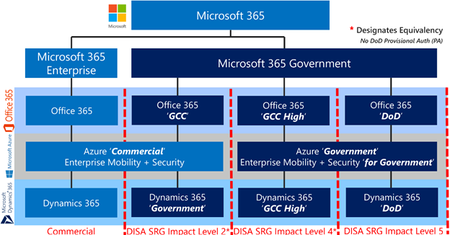
Microsoft has evolved our cloud service offerings to include the US Sovereign Cloud with Azure Government, Microsoft 365 Government (GCC High) and DoD. This article puts the history in perspective of how we ended up with multiple clouds, as opposed to one instance with many data enclaves.52KViews5likes3CommentsUnderstanding Compliance Between Commercial, Government and DoD Offerings - September 2023 Update
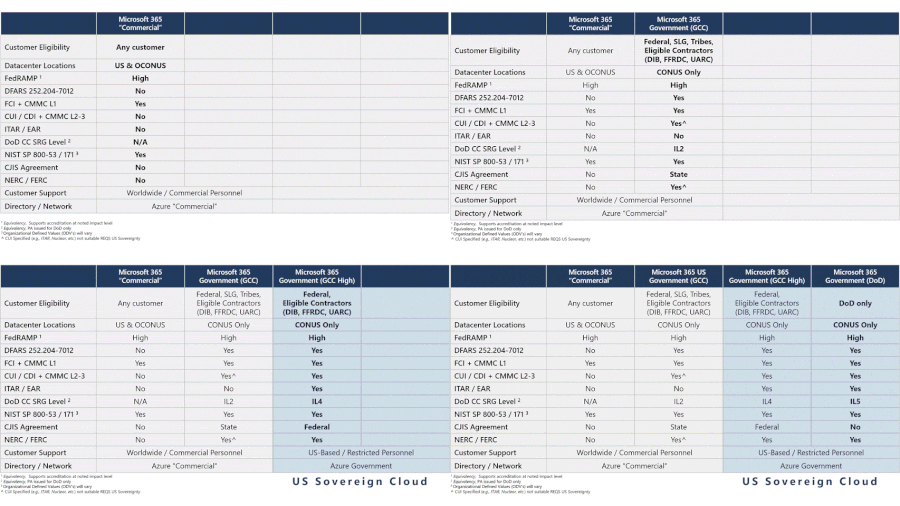
Understanding compliance between Commercial, Government and DoD offerings: There remains much confusion as to what service supports what standards best. If you have DFARS, ITAR, FedRAMP, CJIS, IRS and other regulatory requirements and you are trying to understand what service is the best fit for your organization then you should read this article.151KViews3likes11Comments