community
775 Topics
Win11 System tray Safely Remove Hardware icon disappears while a USB drive is still connected
Even if the USB flash drive is still connected to the computer, the Safely Remove Hardware and Eject Media icon in the system tray will disappear. Although the drive is still accessible in File Explorer, you cannot safely eject it. After unplugging and reinserting the drive, the icon will temporarily reappear, but it may disappear again after a short while.24Views0likes0CommentsLaptop hangs. Sometimes comes back. Other times a poweroff/reboot is necessary
I have a Dell 7506 I7 11th gen laptop. I upgraded to win11 in May '26. Since then, this problem has continually gotten worse. I don't know this is a windows problem for sure. I replaced the fan and put new thermal paste on the CPU and GPU, and the problem still occurs. My SSD died in Feb '26 and I put in a lower grade Intel one. I mention that because the last system events always seemed to be hard disk related. All the diagnostics I have run on the SSD say it is fine. I even tried to clean up any corrupted files. I have a couple of event viewer files from the last two problems, but I cannot attach them here. I'm getting tired of chasing loose ends to no avail. I am much more of a hardware person than software. I have not tried going back to Win10 yet. Any good suggestions on how to proceed to the fastest solution?8Views0likes0Comments
Having an Issue with Widows File Explorer Home Icon Popping Up On Desktop
No matter where I am working with windows file explorer in the directory structure, if I delete a folder a file explorer home icon appears on the desktop, it will disappear but I haven't noticed when that happens yet. See included image of the icon.... Any ideas from anybody? Tried Dism health, sfc /scannow, rebuils icon cache etc... HELP!13Views0likes0Comments
After updating KB5127648, only half of the archive history was restored.
For Microsoft engineers After fixing the update from Windows 11 KB5124010/Windows 10 KB5120249 to Windows 11 KB5127648/Windows 10 KB5126657, the File History can find and run the backup drive, but the last copy date of the files has not changed, and any new files can be backed up. This is my question: Click in and read carefully. File History timestamp sync bug still broken in KB5124010 - Anyone else? | Microsoft Community Hub After updating KB5127648, only half of the archive history was restored. | Microsoft Community Hub This is my opinion response center report. https://aka.ms/AA13n2f3 https://aka.ms/AA13n22w https://aka.ms/AA13ucfz https://aka.ms/AA13urx3 https://aka.ms/AA13ukxv Please click here. If you have the same problem as me, please agree, add a comment, or ask your question in the feedback post. You can also paste the URL in the comments section.135Views0likes1Comment
AQEMU: a native QEMU front end for Windows 11 on x64 and ARM64. Feedback welcome
Hi all, I'm Philip, the developer of AQEMU. It's a point-and-click Qt front end for QEMU, and I've been building it for Windows 11. It has native builds for both x64 and ARM64 (Snapdragon) PCs. It bundles QEMU 11, so there's nothing extra to install. It comes with 195 ready-made guest profiles across 29 architectures, from DOS and retro PCs to ARM, RISC-V and PowerPC. It uses WHPX acceleration on x64, with TCG as the fallback everywhere else. It's open source under GPL-2.0, and there's also a Linux build. I'd really like feedback from Windows 11 users, especially anyone on Arm, on what works, what breaks and which guests you'd like added. Microsoft Store (7-day free trial): https://apps.microsoft.com/detail/9P0HGKHQ9W19?cid=techcommunity Source: https://github.com/chronic8000/aqemu49Views0likes1Comment
The Surface Phone 2.0: The way to revive the past in a way everyone profits.
The tech industry is currently facing a massive user-experience crisis, particularly in mobile and tablet computing. As a student regularly using iPadOS for schoolwork, I experience this firsthand. Apple's 'walled garden' has become an unnecessary complication: transferring a simple file requires uploading it to an unreliable third-party cloud storage service and downloading it on the target device. Multitasking is deeply flawed—windows crush, stretch, and break UI layouts, while the system frequently lags and crashes. This artificial lock-in forces user dependency through restriction, rather than delivering genuine utility. Microsoft has a historic opportunity to counter this by introducing an 'open-loop' ecosystem that respects the user’s intelligence. A system where users stay not because they are trapped by a hardware lock, but because they simply don't want to leave. Microsoft's core strength has always been treating the user as an administrator of their own device—embracing a 'if you break it, you can easily reinstall it and learn from your mistakes' philosophy. This concept is proven by long-term device stability: my 2015 Lumia 430 Dual SIM, despite being packed to capacity with photos, music, and videos, still runs smoothly and navigates flawlessly. This is a testament to the unmatched core optimization Microsoft is capable of. The market does not need another restricted tablet or a repetitive Android skin. We need the revival of the Universal Windows Platform (UWP) and 'One Windows' philosophy under a new hardware standard: The Microsoft Surface Phone 2.0. Here is a structured business and technical blueprint for how Microsoft can commercialize its past innovations and deliver a truly seamless ecosystem: 1. Unified Interface Architecture (Versatility over Restrictions) Instead of forcing a single mobile layout, the device should adapt dynamically to the user's workload, bridging past achievements with current innovations: • Tile Mode: A modernized revival of the legendary Live Tiles interface for quick, glanceable mobile data. • Desktop Mode: A complete desktop environment with unconstrained floating windows, fully exploiting the capabilities of Windows on ARM. • Console Layout (XBOX Mode): Out-of-the-box integration of the newly introduced XBOX Mode (Compact Home Experience). When paired with a controller or running Xbox Cloud Gaming, the phone instantly transforms into a fully-fledged portable gaming console. 2. Commercializing Past 'Failures' and Abandoned Innovations Microsoft has spent billions developing revolutionary technologies that were abandoned prematurely due to market timing, rather than technical failure. The Surface Phone 2.0 should consolidate and ship these features directly to consumers: • The Revival of Continuum: This remains Microsoft's most powerful concept. Plugging the phone into a monitor should instantly launch a full desktop Windows 11 environment. The modern processing power of ARM chips makes this transition flawless today. • Reclaiming Abandoned Shells: The modular interface designs from Windows 10X, the user experience of Project Andromeda, and the spatial computing foundations of Windows Mixed Reality should be reintegrated. If a user wears an XR headset, the phone should seamlessly project UWP apps into a 3D environment. 3. Cross-Platform Infrastructure Integration The Surface Phone 2.0 must serve as the universal anchor for a frictionless, continuous workflow under a single Microsoft Account: • Windows in the Car: A native dashboard interface to directly challenge Apple CarPlay and Android Auto, linking Bing Maps, Outlook calendars, and media seamlessly. • Frictionless Cloud & Local Continuity: True cross-device synchronization. If a user is modifying a Word or PowerPoint document on their PC and needs to leave, a native 'Continue working from...' notification should instantly appear on the Surface Phone, opening the exact file at the precise position it was left. • Hardware Tiering: Maintaining a stable, highly-optimized mid-range hardware line alongside flagship devices. The Windows ecosystem has historically proven that superb software optimization beats a raw hardware spec race. 4. Solving the 'App Gap' with Multi-Layered Architecture To prevent the ecosystem stagnation that affected Windows 10 Mobile, the device must support a versatile environment: • Native ARM64 UWP & Win32 applications for full-scale desktop performance. • A Built-in Android APK Subsystem (a revived, optimized iteration of virtualization) as a fallback mechanism, ensuring users have immediate access to mainstream applications while developers transition to native tools. 5. Next-Generation System-Wide AI Utilizing modern hardware-level Neural Processing Units (NPUs), a deeply integrated Copilot must replace old voice assistants. A reliable, context-aware, system-wide 'Hey, Copilot' assistant that works locally to manage scheduling, cross-device file tracking, and automation would instantly differentiate this device from competitors. Conclusion By unifying XBOX Mode, enterprise continuity through Continuum, and an open infrastructure that trusts the user, Microsoft can deliver a device that scales from a phone to a desktop, a car dashboard, and a console. The hardware and cloud infrastructure are finally ready. It is time to execute. (compressed and turned into human text by AI)46Views0likes0Comments
VMware Workstation Error: Virtualized AMD-V/RVI Is Not Supported on Windows 11
I am trying to run Cisco Modeling Labs (CML) using VMware Workstation on a Lenovo laptop running Windows 11 Pro. When I power on the VMware virtual machine, I receive this exact message: Virtualized AMD-V/RVI is not supported on this platform. Continue without virtualized AMD-V/RVI? I need nested hardware virtualization for my CML environment. Continuing without virtualized AMD-V/RVI is not an acceptable solution for my intended setup. Microsoft Support previously recommended resetting Windows. I completed the reset, but the problem persists. System information Manufacturer: Lenovo Model: 21CRS10100 Operating system: Windows 11 Pro OS build: 10.0.26200 RAM: 16 GB Device is a standalone workstation. Troubleshooting and evidence 1. Microsoft hypervisor is still present Command: Get-CimInstance Win32_ComputerSystem | Select-Object Manufacturer, Model, HypervisorPresent Result: HypervisorPresent = True 2. Virtualization-based security remains active The Win32_DeviceGuard query returns: VirtualizationBasedSecurityStatus = 2 SecurityServicesConfigured = {2, 3} SecurityServicesRunning = {0} RequiredSecurityProperties = {1, 2, 3} System Information also reports that virtualization-based security is running and that a hypervisor has been detected. Memory Integrity is Off. 3. Microsoft VBS platform policy remains enforced CiTool.exe --list-policies lists the following policy: Friendly name: Microsoft Windows Virtualization Based Security Policy Policy ID: a072029f-588b-4b5e-b7f9-05aad67df687 Platform policy: True Signed: True Authorized: True Currently enforced: True This policy was present before and after the Windows reset. I am not assuming that the policy alone is responsible for starting the hypervisor. 4. Other checks No Group Policy Objects are applied. No work or school account is shown in Windows Settings. VBS is enabled in the system and policy registry locations. The current Windows boot entry does not explicitly list hypervisorlaunchtype or vsmlaunchtype. Previously setting both BCD options to Off did not resolve the problem.42Views0likes0Comments
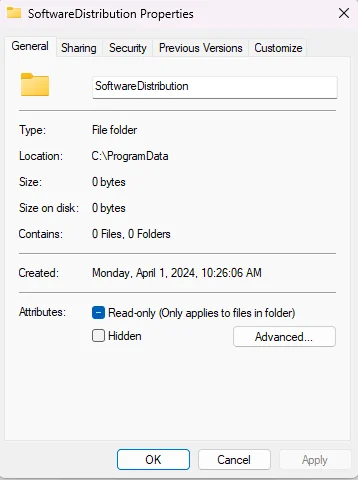
Why is there a SoftwareDistribution folder in ProgramData dated before I even got the PC?
Why is there a SoftwareDistribution folder sitting in my ProgramData directory when it's supposed to live in the Windows folder, and why does it show a creation date of April 1st, 2024—before I even received this PC on April 20th? The folder is completely empty, and I only noticed it while organizing things. I also did a clean Windows install a few months ago, so I don't understand why it's still there. There are two other folders in ProgramData with the same April 1st date: "ssh" and "USOShared." The ssh folder is empty too, and USOShared contains logs, which seems normal, but the 2024 creation date is odd. Could all three be leftovers from the prebuilt image, from the Ubuntu install that was on the machine before I wiped it, or from something else entirely? Is this just a harmless artifact of how the system was imaged, or could it mean something didn't get fully cleaned up during my reinstall? And is it safe to delete these folders, or should I leave them alone?39Views0likes0CommentsIntel Extension 2.0.10200.8 keeps reappearing after successful installation
Windows Update repeatedly offers Intel – Extension – 2.0.10200.8, even though update history shows it was successfully installed. After restarting, the same update returns and requires another restart. This causes repeated mandatory restarts under our organisation’s update policy and affects device compliance. How can we safely clear this update from the queue and stop it reappearing without disabling other Windows updates?53Views0likes0Comments