community
3921 Topics
Excel Chart Copy/Paste Resolution
I create charts in Excel, paste them into Photoshop to add a transparent background, then paste these into my web site. I've been doing this since 1999. Until today, the charts always copy/pasted at 96 dpi. The work flow depended on this. These charts are all sized to fit in the right places. 4" by 5" gave 385 x 481 pixels. They looked good. Hotspots (img maps) on the web page lined up properly with chart elements. Today they paste at 150 dpi which is too large. 4"x5" becomes 601 x 751 px. Nothing lines up. Reducing the size in Photoshop gives ugly results. The File>Options>Advanced>Image Size and Quality Default Resolution cannot be changed to 96. It immediately reverts back to High Fidelity. So this idea does not work. I know that I can start all over, but that is a lot of work. How do I set the default chart resolution for copy/paste back to 96 dpi where it was for 27 years and where I need it to be? What did MS change to break this? Windows 11, Microsoft® Excel® for Microsoft 365 MSO (Version 2610 Build 16.0.20527.20150) 64-bitSolved96Views0likes4Comments
Win11 "Alt + Tab" switcher shows outdated thumbnails for minimized windows
When switching between windows using Alt + Tab, the thumbnail preview of a minimized window displays an outdated image of the window's content rather than its current state. The correct preview appears only after the window is restored and you switch back to it. This issue occurs more frequently in browser windows and applications where content is updated dynamically.48Views0likes2Comments
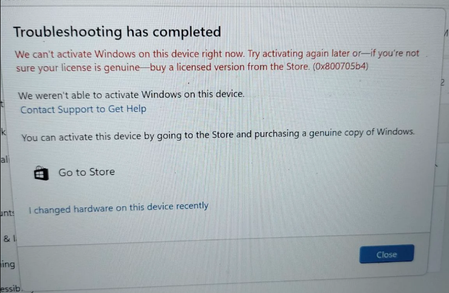
Windows license is not activation after motherboard change
Windows activation error following a motherboard replacement. After formatting, it now fails to activate even with the original product key. We have also checked by activating with the help of telephonic activation it also gives error52Views0likes1Comment
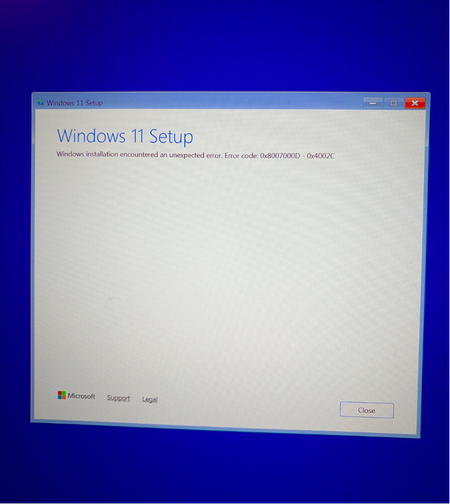
An error message appears when a Windows 11 installation USB drive is inserted into a new pc
I just finished setting up the computer and have successfully created a Windows 11 installation USB drive on another computer. When I plugged the USB drive into the new computer, a prompt appeared. I'm not sure if this is a common issue, so I'm looking for the cause and a solution.69Views0likes1Comment
Win11 "Notification Center" fails to open when clicking the clock or notification icon
Clicking the clock or notification bell icon in the system tray does not open the Notification Center. The icon appears to be responsive (the hover effect works normally), but the panel does not pop up. Pressing the Win + N key combination also fails to open it. Restarting File Explorer or restarting the computer temporarily resolves the issue, but it reoccurs after a few hours.60Views0likes1Comment
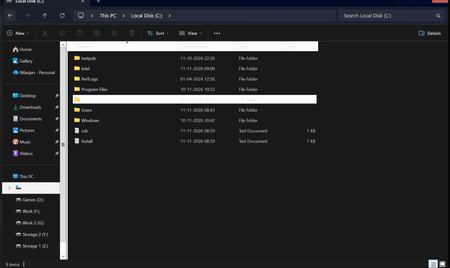
White Stripes Appear in File Explorer After a Fresh Installation of Windows 11
After a fresh installation of Windows 11, a white bar appears at the top of File Explorer. I have tried the following steps, but none of them worked: I tried setting "Locked" to 1 under HKEY_CURRENT_USER\Software\Microsoft\Internet Explorer\Toolbar, but there is no "Locked" entry at that path. I cannot find the "Always show menus" option under "Options → View." I set "AlwaysShowMenus" under HKEY_CURRENT_USER\Software\Microsoft\Windows\CurrentVersion\Explorer\Advanced to 0, but the "Always show menus" option is still not available. System configuration: i9-12900K, 64GB RAM, RTX 3080 (10GB), Intel UHD 770, system drive used: 3.01TB / 7.28TB, 64-bit OS. Please provide a solution.53Views0likes1CommentKB5132061 FAILS to Install
KB5132061 fails to install every time. Thru the Windows update and also fails after manually downloading KB5132061. Been through ALL the trouble shooters plus any web supposed fixes. Had this PC for two years and NO updates have Ever failed to install before. KB5132061 is obviously FAULTY.166Views2likes1Comment