communication site
23 TopicsAfter Communication Site upgrade of the root site full-width sections are limited
If you upgrade root site's team site template with a communication site template, the new home page (front page) contains one section that can have a full-width web part and it's the first section (uppermost). You cannot add a full-width section down on the page because it's not available in Add Section menu. Is there a possibility somehow to allow full-width sections also on other slots on the new homepage? The upgrade was done with Powershell: Enable-SPOComm... and it was otherwise successful.938Views0likes3Comments
SharePoint 2019(On Prem) - How to convert from classic publishing site to modern communication site
Hi, I am new to SharePoint modern view , we have requirement to convert the classic publishing site to modern communication site. I have created the site collection using classic publising site and now i want to convert to modern communication site. Is there any PnP Powershell command to convert the site template for SharePoint 2019 on prem. Thanks1.6KViews0likes1Comment
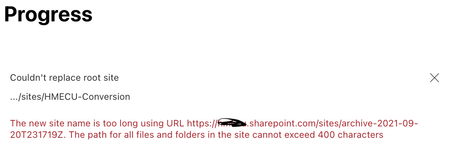
Cannot replace root site because new site URL is more than 400 characters?
I am trying to replace our current outdated Team site with the new modern communications site but when i to replace it, i get this error: How am i supposed to fix this? We have a Document Library with numerous folders and files in the new site. What does this even mean? How can i determine which files/folders are long? Are they adding ALL the files/folder paths up and they cannot be more than 400 or is it each separate file/folder path in a doc. library cannot be more than 400? I need this up live ASAP and this restriction is not helping out at all. I also do not want to lose the replacing site. SO does it go in the deleted sites section and can i restore it so that users can still link to it? I just don't want it to be the root anymore.1.6KViews0likes1Comment
UI bug when comments are off
We've recently found a UI bug in SharePoint Online. When comments are off on the homepage of a communication site, whitespace is displayed where the comment section usually appears above the footer. When you inspect the element using the developer tools in Google Chrome, you can see that the element is being rendered with no content. <div class="qz_bv_k"><div data-viewport-id="Page.CommentsWrapper.internal.2610b4b4-550c-4548-b431-aa3ab709c184" style=""><div class="sf_bs_k" data-sp-feature-tag="Comments" data-sp-feature-instance-id="_Comments"><aside class="y_e_k" role="complementary" aria-label="Comments"><div class="aa_e_k"></div></aside></div></div></div> Before this happened last week, the green section sat directly above the footer, without any whitespace. Is there anything I can do to remove the space? Thanks, Nathan1.5KViews2likes4CommentsCommunication Site & Comment Notifications
Hi, Apologies as I am sure this has been asked a number of times, but I cannot find an actual answer and I was unable to post in Communication Site AMA. We have recently setup a Communication Site for an internal news/blog site for articles to share within the company and it works great apart from not being notified when a comment is made on a post unless you are @mentioned I have seen various posts like https://support.office.com/en-gb/article/sharepoint-email-notifications-5bd63d8a-d43e-48cc-82b3-03a7687d5dc4 and on the release information that this functionality is coming/here/on its way. Can anyone shed any more light on this and if its possible? Now I have seen the setup using Power Automate and App Catalog but that is still a manual process for someone to click on the site to check if there are any comments and that just doesn't work for us. Thanks in advance Nick2.3KViews0likes1CommentCreate a library of documents with dropdowns to filter by keywords
Hello! I am building a Communication Site in SharePoint and want to build a page that allows me to have project files saved with certain keywords (e.g., project type), then to have a dropdown for "project type" that filters the resulting documents that appear. Is this search capability possible to include or develop? What would be the best way to do this? Any advice is greatly appreciated. Thank you!Solved3.4KViews0likes7CommentsSharePoint Tips and Resources for Your COVID-19 Communication Site
In the course of making COVID-19 sites and working with some amazing people, Susan Hanley has gathered some helpful and reliable resources for the pages in these sites. See what Susan has learned and much more in this week's http://www.sharepointfest.com/ newsletter: https://bit.ly/SPFestNewsApril7?fbclid=IwAR02FjTWUyIVfJisOTbmA2zK1rGaznvrKxbkd9JSTMLvaKai9MTrMXFeTWE1.1KViews0likes0CommentsSharePoint Tips and Resources for Your COVID-19 Communication Site
In the course of making COVID-19 sites and working with some amazing people, Susan Hanley has gathered some helpful and reliable resources for the pages in these sites. See what Susan has learned and much more in this week's http://www.sharepointfest.com newsletter: https://bit.ly/SPFestNewsApril7?fbclid=IwAR02FjTWUyIVfJisOTbmA2zK1rGaznvrKxbkd9JSTMLvaKai9MTrMXFeTWE1.4KViews0likes0CommentsCreating new SP communication site from existing SP document library
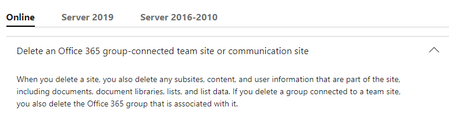
We have an existing Team Site that's built on top of a very important SP document library. The Team Site was created awhile ago on top of a pre-existing document library, and it's not what we need. We want to delete it completely, and start over again with a Communication Site. Can we delete simply delete the original Team Site and then create a new Communication Site on top of the same library — without affecting the original library in anyway? I https://support.office.com/en-us/article/delete-a-sharepoint-site-or-subsite-bc37b743-0cef-475e-9a8c-8fc4d40179fb , which seems to say that associated document libraries will go "poof" if the site is deleted. I don't know if it matters, but again, the document library pre-existed the site. It wasn't created by uploading files into the site, and building a document library that way.972Views0likes2Comments