color
14 Topics
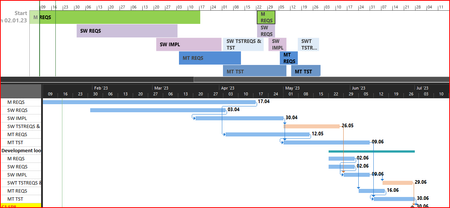
Color of tasks in Timeline based on color of task in Gantt Chart?
Hi all, I am new here and I hope you can help me! I want to know if it is possible that if a task is shown in the timeline view, the color of this task has automatically the same color like it has in the Gantt Chart. If it does not work automatically, can it be done using a macro and can someone help me with the code? Kind regards Thomas1.3KViews0likes1Comment
Task colors from Task List not persisting to My Day
Each Task List can have a theme, which changes the colors of the Tasks for that list. For example I have my personal lists set to blue and my work lists set to red. Before I updated to 2.77 today (or at least very recently), these colors would persist to My Day. This would allow me to easily see the general type of a Task according to the color of the Task completion circle. This is no longer happening, in My Day all tasks are blue. All the Task Lists themes are still correct.2.1KViews3likes1Commentsomething wrong with the color of Edge white on white font
I have reported this via feedback for my enterprise Windows 11 but now also see this in Edge Dev on a different Windows 11 22000.100 instance. tabs and top bar is very while and text is unreadable (white on white) the OS is of course set to dark mode. happens erratically.1.7KViews2likes0CommentsColor Code SharePoint List cell based on Due Date and Status columns
I am using the Javascript (at the bottom) on my SP 2013 site to color code a Due Date field. This code as written, does just that. However, if the Status column for the list item is set to Completed, then the Due Date field should not have color.. What can I do to not add color to the Due Date field if there is no Due Date entered or if the Status column is set to Completed. The below code works for setting the Due Date colors: <script type="text/javascript"> SP.SOD.executeFunc("clienttemplates.js", "SPClientTemplates", function () { var statusFieldCtx = {}; statusFieldCtx.Templates = {}; statusFieldCtx.Templates.Fields = { //internal column name between double quotes on the next line. If your column name has a space in its internal name use "_x0020_" in place of the space. "DueDate": { "View": ColorCodeDueDate } }; SPClientTemplates.TemplateManager.RegisterTemplateOverrides(statusFieldCtx); })(); function ColorCodeDueDate(ctx) { //update internal column name at the end of the next line var MyDateVar = new Date(ctx.CurrentItem.DueDate); MyDateVar.setHours(0,0,0,0); var today = new Date(); today.setHours(0,0,0,0); var then1 = new Date(); //use this to set how many days you want var then to be. then1.setHours(0,0,0,0); then1.setDate(then1.getDate() + 1); var then14 = new Date(); then14.setHours(0,0,0,0); //use this to set how many days you want var then to be. then14.setDate(then14.getDate() + 14); var then15 = new Date(); then15.setHours(0,0,0,0); //use this to set how many days you want var then to be. then15.setDate(then15.getDate() + 15); // if there's no due date don't render anything. Also update the column names in the else statements below. If your column name has a space in its internal name use "_x0020_" in place of the space. if (MyDateVar <= today) { return "<div style='background-color:red;color:white'>" + ctx.CurrentItem.DueDate + "</div>"; } else if (MyDateVar.getTime() >= then1.getTime() && MyDateVar.getTime() <= then14.getTime()) { return "<div style='background-color:yellow;color:black'>" + ctx.CurrentItem.DueDate + "</div>"; } else if (MyDateVar >= then15) { return "<div style='background-color:green;color:white'>" + ctx.CurrentItem.DueDate + "</div>"; } } </script>Solved4.3KViews0likes6CommentsSuggestion: Allow us to change the font color in Immersive Reader mode
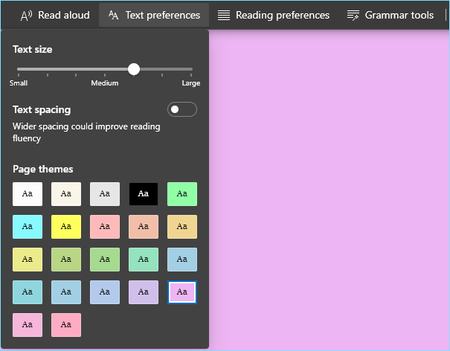
We have access to all of these colors for the background color in Immersive Reader mode in Edge but no option to change Font color. Font color only changes from black to white when background is black. It would help me make the text better for reading by choosing a different font color than black when I'm using a background color that is not white. https://streamable.com/pr5os2.9KViews7likes7CommentsSharePoint List color rows based upon date ranges relative to the Due Date
I would like to know how to color the rows on my SharePoint list. I have a Due Date column in my list Here is what I am looking to do: If Today's date is within 14 days of the Due Date then the entire row should be the color red If Today's date is between 15 days and 21 Days out from the Due Date, then the entire row color should be orange If Today's date is between 21 days and 30 days out from the Due Date, then the entire row should be yellow If Today's date is 31 days or more out from the Due Date, then the entire row should be Green I am assuming I will be using Client Side Rendering (I don't know I am guessing). 1. What files will I need to create (a .txt file or a .txt file that is converted to a .js file? 2. Will I have to use Content Editor Web Part to refernece the .txt or .js file?Solved26KViews0likes7CommentsEdge now has new Accent color themes
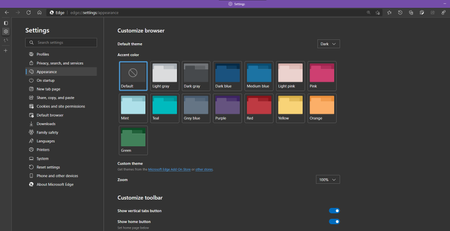
Microsoft Edge Version 89.0.731.0 (Official build) canary (64-bit) in order to get this, you need to enable this flag: edge://flags/#edge-color-theme-picker Enable picker for color based themes When enabled, gives a set of options for autogenerated themes based on a base color – Mac, Windows, Linux #edge-color-theme-picker19KViews6likes32Commentsjust my opinion with edge new icons
as you know edge changed the icons of the mac app. now they looks like https://imgur.com/a/eImIgtl Just my opinion about edge new icons. As you know new icons looks pretty similar especially if you use it in small size on the dock. For me it was much better the old version, we could better understand which version is what. now they seems all identical, there is just a small banner with different colors. obviously if you keep the icon at max size you notice the difference. i make a lot of chaos especially between dev and beta, because other browser use such color inverted. i wish the team could rethinking that and maybe use different icons like other browsers do too PS: i already liked your old version icons. this is not because it was much easier to switch app, but because the old icon was already just fine.1.7KViews0likes2CommentsMissing feature: Edge legacy VS new Edge | Address Bar style
on Edge legacy, the address bar highlight color is the same as Windows 10's accent color while on the new Edge it's a pale default white/blue color. Compare: Here is a video demo: https://streamable.com/ucs533 Edge legacy's Address bar was really beautiful because of this.. I really hope the new Edge gets the same style. sending the same post as feedback from Edge, if you like this please do the same.2.5KViews6likes6CommentsFeature suggestion to Improve Eraser tool for PDF Inking/Web page inking and other inkings
The eraser tool in Microsoft Whiteboard is really brilliant, unique and very convenient to use. on the other hand, eraser tool in Edge is static and needs SO much improvements. on Edge when you draw a big shape or write a long sentence etc, you can't erase only part of it like a letter or single line, the whole thing/shape/writing gets deleted when you touch any edge of it. so my suggestion is to implement this eraser tool and replace it with eraser tool in Edge which is for PDF inking, future web page inking and any other kinds of inking that needs an eraser please watch the video to see what I mean: https://streamable.com/ohyn6h1.9KViews2likes3Comments