cloud adoption framework
21 TopicsModern Azure Resilience with Mark Russinovich
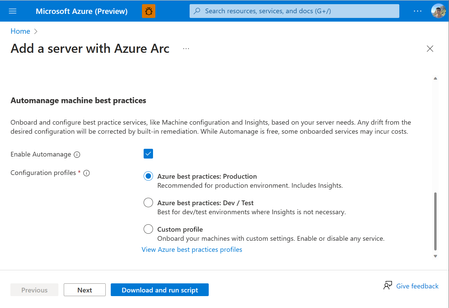
Resiliency in the cloud reflects different priorities from consistent performance, to withstanding failures, to predictable recovery. These map to reliability, resiliency, and recoverability, which together guide how workloads should be designed on Azure. This post extends foundational guidance with practical multi‑region design decisions, including when to use availability zones, paired regions, and non‑paired regions to meet business continuity goals. Reliability in Azure isn’t defined by a single recommendation, but by a set of architectural patterns designed to balance cost, complexity, recovery speed, and operational effort—because no single approach fits every workload. While disaster recovery is a common driver for multi‑region designs, long‑term scale planning also matters. Azure regions operate within defined physical and latency boundaries, and large-scale workloads may eventually approach the practical capacity limits of a single region. This post introduces four resilience patterns, outlining when and why to use each so you can assess options based on your non‑functional requirements. It also explains how availability zone–based designs can often provide an alternative to paired regions as a default choice. Here are a few common reliability and availability architecture patterns: In-region High Availability (HA) with Availability Zones (AZ): Maximize availability within a single Azure region by deploying across multiple availability zones. Regional Business Continuity and Disaster Recovery (BCDR): A primary/secondary region strategy implemented across separate Azure regions, selected based on geographic risk boundaries, regulatory requirements, and service availability. Recovery sequencing and failover behaviors are defined by workload dependencies and organizational requirements. Non-paired region BCDR: A primary/secondary region strategy where the secondary region is chosen based on requirements such as capacity, service availability, data residency, and network latency. This approach also supports long‑term scale planning, since Azure regions operate within physical datacenter footprints and latency boundaries and can reach practical capacity limits as workloads grow. See multi‑region solutions in non‑paired regions. Multi-region active/active: Deploy workloads across multiple regions simultaneously so that each region can serve production traffic. This approach can provide both high availability and disaster resilience while improving global performance, but it introduces additional architectural complexity and operational overhead. The rest of this post helps you understand the tradeoffs across these patterns, enabling you to select the right approach per workload while avoiding unnecessary cost and operational complexity. First post in this series: Achieve agility and scale in a dynamic cloud world Why did Azure launch with paired regions? Launched in 2010, but rebranded to Microsoft Azure in 2014, the regions were introduced in pairs (West US & East US, West Europe & North Europe, Southeast Asia & East Asia) to align with common enterprise business continuity practices at the time. Many organizations operated multiple datacenters within the same geographic boundary, separated by sufficient distance to reduce shared risk while maintaining regulatory and operational alignment. This design mirrored familiar enterprise BCDR practices at the time and offered: A familiar primary/secondary failover pattern consistent with enterprise BCDR strategies Support for regulatory or data residency requirements that required disaster recovery within a defined geographic boundary Turnkey replication capabilities for services such as Geo-Redundant Storage (GRS) Platform-level sequencing of updates to reduce the likelihood of simultaneous regional impact A defined regional recovery prioritization model for rare geography-wide incidents This model provided assurance that Azure could meet or exceed the resilience of legacy enterprise environments while simplifying early cloud adoption through predefined recovery patterns. However, Azure’s engineering strategy has evolved. Many services now support replication to a region of choice rather than being limited to predefined pairs. This provides architects with greater flexibility to select regions based on workload requirements, risk boundaries, compliance constraints, capacity considerations, and cost models. It’s important to recognize that regional parity is never guaranteed even between paired regions. Differences in service availability, supported SKUs, scale limits, capacity, cost and operational maturity must be explicitly accounted for in the workload design. How has cloud resilience evolved since launch? The introduction of Availability Zones in 2018 provides a significant advancement in Azure resilience. Availability Zones are physically isolated groups of data centers within a region; each zone has independent power, cooling and networking. Many Azure services (App Service, Storage, Azure SQL etc.) use zones to provide platform-managed resilience. In addition, customers can deploy zonal resources, such as virtual machines, into specific zones or distribute them across zones to design for higher availability. Where previously Azure regions were launched in pairs, since 2020, regions have been typically designed with multiple availability zones, without a paired region. This design enables: High availability within a single region Platform-managed resilience for most failure scenarios Reduced need for multi-region deployments for standard high-availability requirements How should customers design for resilience when using both paired and non-paired regions? To decide which resiliency model makes sense, customers should start by defining clear expectations including uptime targets, recovery time objectives (RTO), recovery point objectives (RPO), latency tolerance, and data residency. These non-functional requirements should directly influence architectural decisions. In practice, High Availability (HA) and Disaster Recovery (DR) are differentiated by recovery objectives rather than geography. HA architectures target near-zero downtime and minimal data loss, while DR solutions allow for defined recovery time and acceptable data loss. While HA is commonly established within a region using availability zones, it can also be achieved across regions through active-active designs. Similarly, DR is typically implemented across regions using replication and failover strategies. HA: Availability Zones When designing high availability within a region, Azure builds on AZs with 2 models: Zone-redundant resources are replicated across multiple availability zones to ensure data remains accessible even if one zone fails. Some services provide built-in zone redundancy, while others require manual configuration. Typically, Microsoft chooses the zones used for your resources, though some services allow you to select them. Zonal resources are deployed in a single availability zone and do not provide automatic resiliency against zone outages. While faults in other zones do not affect them, ensuring resiliency requires deploying separate resources across multiple zones. Microsoft does not handle this process; you are responsible for managing failover if an outage occurs. The decision to design a zone-resilient architecture is critical for balancing availability requirements with cost and regional capacity constraints. Designing workloads to be resilient across availability zones is generally the preferred approach for improving availability and protecting against zone-level failures. Deploying workloads across availability zones can enhance fault tolerance and reduce downtime when supported by the Azure service being used. However, architects should still consider workload characteristics, cost implications, and potential latency impacts, which may vary depending on the services and architecture patterns involved. Ultimately, zone resiliency is an architectural decision that should be strategically aligned with business priorities and risk tolerance, not simply treated as a checkbox to be ticked during deployment. DR: Paired and Non-Paired Regions Region pairs should be viewed as an architectural choice rather than a rule. Historically, paired regions played a key role in minimizing correlated failures and streamlining platform updates and recovery processes. However, as the Azure Safe Deployment Practices (SDP) have matured, the advantages of region pairs have become more nuanced. Over time, SDP has evolved to support safer and more flexible change management through longer and more adaptable bake times, richer operational signal integration, and an expanded understanding of regional deployment boundaries. These improvements enable Azure to release changes more safely across a growing and increasingly diverse regional footprint, while still balancing reliability with time‑to‑market. As a result, regional pairs are no longer the sole mechanism for managing correlated change risk, but one of several architectural tools customers can apply based on their resiliency and compliance needs. Using non-paired regions or a mix of paired and non-paired regions allows customers to design high availability and disaster recovery architectures that are driven by business, compliance, and application requirements rather than fixed regional relationships. This enables customers to optimize data residency, regulatory boundaries, latency to specific user populations, and provide differentiated recovery objectives across their workloads. This approach can also reduce exposure to rare but high-impact platform-level events by avoiding tightly coupled regional behaviors. While some Azure services natively simplify replication and recovery within paired regions, and others support replication across arbitrary regions (such as Azure SQL, Cosmos DB, and Azure Blob Storage with object replication), non-paired designs encourage explicit, workload-aware resiliency strategies such as application-level replication, asynchronous data sync, and failover orchestration. Although this introduces more architectural responsibility and may require compensating for paired region features, it delivers greater transparency, predictable recovery behavior, and alignment with business-driven RTO/RPO requirements rather than platform defaults. Regional failover is a customer‑orchestrated decision; customers should design, test, and operate their own failover and failback processes rather than assuming platform‑initiated regional failover. Designing for regional resilience requires distinguishing between workload mobility and data protection. Azure provides two complementary capabilities that address these needs differently: Azure Site Recovery (ASR) and Azure Backup. Azure Site Recovery (ASR) enables near‑continuous replication and orchestrated failover of virtual machine–based workloads to a region of choice, not limited to paired regions. ASR is the primary mechanism for customers who need low RPO, controlled failover, and workload restart in a secondary region. This is especially relevant for regions without a paired region or where the paired region does not meet capacity, service availability, or compliance needs. Azure Backup provides durable, policy‑based data protection, independent of compute availability. While Azure Backup is not a high‑availability or infrastructure failover solution, it plays a critical role when services do not support region‑of‑choice replication natively. In these scenarios, backup and restore become the recovery mechanism. These two services are often used together: ASR for VM‑level workload continuity, and Azure Backup for protecting and restoring data across regions, including to non‑paired regions. I am using paired regions today – does this mean I need to change my architecture? If your current architecture is built around paired regions for compliance, data residency, or strict disaster recovery objectives, that model stays valid and supported. Azure continues to support paired regions providing prioritized recovery sequencing, staggered platform updates, and geo-aligned data residency, all backed by Microsoft’s global infrastructure strategy. What has changed is that paired regions are no longer the only way to achieve enterprise-grade resilience. For many workloads that adopted a paired region (1+1) model primarily to protect against local datacenter failure, Availability Zones combined with geo-redundant services now provide equivalent or better protection with far less architectural complexity and cost. The shift to nonpaired regions is therefore not a forced migration, but an opportunity to simplify. Customers can continue using paired regions where business requirements demand it, while selectively modernizing other workloads to take advantage of platform-managed zone resilience. What’s coming up next for resilience in Azure? Resilience is evolving from static guidance to continuous, workload-aware execution. A multi-region strategy isn’t only about recovery; it’s also a practical hedge against regional capacity constraints (regions have physical limits within a latency boundary, so growth can eventually hit caps). Resiliency agent in Azure Copilot (preview) helps you spot missing resiliency coverage—such as zone alignment gaps or missing backup/DR—and provides automated guidance (including scripts) to remediate issues, configure Azure Backup and Azure Site Recovery, and define recovery drills. Resiliency in Azure brings zone resiliency, high availability, backup, DR, and ransomware protection together into a unified experience within Azure Copilot, enabling teams to set resiliency goals, receive proactive recommendations, and view service‑group insights via Azure portal. If you’re looking for service-specific BCDR and replication guidance, use these authoritative starting points: Cloud Adoption Framework (CAF) – Landing zone design area (BCDR): guidance to define platform DR requirements (RTO/RPO), data residency considerations, and operational readiness as part of landing zone design. Azure Well-Architected Framework (WAF) – Disaster recovery strategies: guidance for structuring, testing, and operating DR plans aligned to recovery targets, with links to companion DR planning resources. WAF design guide – Regions & Availability Zones: how to choose between zone- vs region-based approaches and understand reliability/cost/performance tradeoffs. Azure service reliability guides: service-by-service reliability/replication behavior and customer responsibilities. Non‑paired multi‑region configurations: examples of supported multi-region approaches when regions aren’t paired. Validate feasibility before you design: confirm service/SKU/zone availability in both regions. Next step: Explore Azure Essentials for guidance and tools to build secure, resilient, cost-efficient Azure projects. To see how shared responsibility and Azure Essentials come together in practice, read Resiliency in the cloud—empowered by shared responsibility and Azure Essentials and How to design reliable, resilient, and recoverable workloads on Azure on the Microsoft Azure Blog. For expert-led, outcome-based engagements to strengthen resiliency and operational readiness, Microsoft Unified provides end-to-end support across the Microsoft cloud. To move from guidance to execution, start your project with experts and investments through Azure Accelerate. Related Resources Architecture strategies for using Availability Zones and Region High Availability Architecture strategies for highly available multi-region design Disaster Recovery Architecture strategies for designing a Disaster Recovery strategy Multi-Region solutions in nonpaired Regions Develop a disaster recovery plan for multi-region deployments Azure Regions and Services Azure region pairs and nonpaired regions Reliability guides for Azure servicesAzure Best Practices delivered to machines anywhere with new Azure Arc and Automanage integration.
Tired of manually onboarding and configuring Azure services for your Arc-enabled servers? With Azure Automanage Machine Best Practices, you can point, click, set, and forget to extend Azure security, monitoring, and governance services to servers anywhere.6.1KViews6likes2CommentsLaunching the Arc Jumpstart Newsletter: October 2024 Edition
We are excited to kick off this monthly newsletter, where you can get the latest updates on everything happening in the Arc Jumpstart realm. Whether you are new to the community or a regular Jumpstart contributor, this newsletter will keep you informed about new releases, key events, and opportunities to get involved in within the Azure Adaptive Cloud ecosystem. Check back each month for new ways to connect, share your experiences, and learn from others in the Adaptive Cloud community.1.9KViews3likes0CommentsAnnouncing landing zone accelerator for Azure Arc-enabled Kubernetes
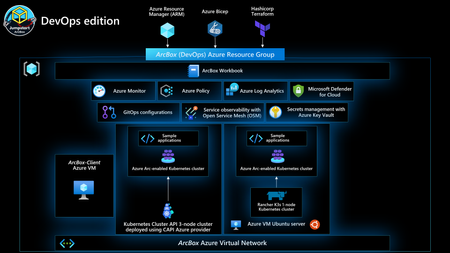
Following our release a few months back of the new landing zone accelerator for Azure Arc-enabled servers, today we’re launching the Azure Arc-enabled Kubernetes landing zone accelerator within the Azure Cloud Adoption Framework.14KViews3likes0CommentsPublic Preview: Workload orchestration simplifying edge deployment at scale
Public Preview Announcement - workload orchestration Introduction: As enterprises continue to scale their edge infrastructure, IT teams face growing complexity in deploying, managing, and monitoring workloads across distributed environments. Today, we are excited to announce the Public Preview of workload orchestration — a purpose-built platform that redefines configuration and deployment management across enterprise environments. Workload orchestration is designed to help you centrally manage configurations for applications deployed in diverse locations (from factories and retail stores to restaurants and hospitals) while empowering on-site teams with flexibility. Modern enterprises increasingly deploy Kubernetes-based applications at the edge, where infrastructure diversity and operational constraints are the norm. Managing these with site-specific configurations traditionally requires creating and maintaining multiple variants of the same application for different sites – a process that is costly, error-prone, and hard to scale. Workload orchestration addresses this challenge by introducing a centralized, template-driven approach to configuration. With this platform, central IT can define application configurations once and reuse them across many deployments, ensuring consistency and compliance, while still allowing site owners to adjust parameters for their local needs within controlled guardrails. The result is a significantly simplified deployment experience that maintains both central governance and localized flexibility. Key features of workload orchestration The public preview release of workload orchestration includes several key innovations and capabilities designed to simplify how IT manages complex workload deployments: Powerful Template Framework & Schema Inheritance: Define application configurations and schemas one time and reuse or extend them for multiple deployments. Workload orchestration introduces a templating framework that lets central IT teams create a single source of truth for app configurations, which can then be inherited and customized by different sites as needed. This ensures consistency across deployments and streamlines the authoring process by eliminating duplicate work. Dependent Application Management: Manage and deploy interdependent applications seamlessly using orchestrated workflows. The platform supports configuring and deploying apps with dependencies via a guided CLI or an intuitive portal experience, reducing deployment friction and minimizing errors when rolling out complex, multi-tier applications. Custom Validation Rules: Ensure every configuration is right before it’s applied. Administrators can define pre-deployment validation expressions (rules) that automatically check parameter inputs and settings. This means that when site owners customize configurations, all inputs are validated against predefined rules to prevent misconfigurations, helping to reduce rollout failures. External Validation Rules: External validation enables you to verify the solution template through an external service, such as an Azure Function or a webhook. The external validation service receives events from the workload orchestration service and can execute custom validation logic. This design pattern is commonly used when customers require complex validation rules that exceed data type and expression-based checks. It allows the implementation of business-specific validation logic, thereby minimizing runtime errors. Integrated Monitoring & Unified Control: Track and manage deployments from a single pane of glass. Workload orchestration includes an integrated monitoring dashboard that provides near real-time visibility into deployment progress and the health of orchestrated workloads. From this centralized interface, you can pause, retry, or roll back deployments as needed, with full logging and compliance visibility for all actions. Enhanced Authoring Experience (No-Code UI with RBAC): We’ve built a web-based orchestration portal that offers a no-code configuration authoring experience. Configuration managers can easily define or update application settings via an intuitive UI – comparing previous configuration revisions side by side, copying values between versions, and defining hierarchical parameters with just a few clicks. This portal is secured with role-based access control (RBAC) and full audit logging, so non-developers and local operators can safely make approved adjustments without risking security or compliance. CLI and Automation Support: For IT admins and DevOps engineers, workload orchestration provides a command-line interface (CLI) optimized for automation. This enables scripted deployments and environment bootstrapping. Power users can integrate the orchestration into CI/CD pipelines or use it to programmatically manage application lifecycles across sites, using familiar CLI commands to deploy or update configurations in bulk. Fast Onboarding and Setup: Getting started with orchestrating your edge environments is quick. The platform offers guided setup workflows to configure your organizational hierarchy of edge sites, define user roles, and set up access policies in minutes. This means you can onboard your team and prepare your edge infrastructure for orchestration without lengthy configuration processes. Architecture & Workflow: Workload orchestration is a service built with cloud and edge components. At a high level, the cloud control plane of workload orchestration provides customers and opportunity to use a dedicated resource provider to define templates centrally which WO edge agents consume and contextualize based on required customization needed at edge locations. The overall object model is embedded in Azure Resource Manager thus providing customers fine grained RBAC (Role Based Access Control) for all workload orchestration resources. The key actions to manage WO are governed by an intuitive CLI and portal experience. There is also a simplified no code experience for non-technical onsite staff for authoring, monitoring and deploying solution with contextualized configurations. Important Details & Limitations: Preview Scope: During public preview, workload orchestration supports Kubernetes-based workloads at the edge (e.g., AKS edge deployments or Arc-enabled Kubernetes clusters). Support for other types of workloads or cloud VMs is coming soon. Regions and Availability: The service is available in East US and East US2 regions during preview. Integration Requirements: Using workload orchestration with your edge Kubernetes clusters require them to be connected (e.g., via Azure Arc) for full functionality. Getting Started with workload orchestration Availability: Workload orchestration is available in public preview starting 19 th May, 2025. For access to public preview, please complete the form to get access for your subscription or share your subscription details over email at configmanager@service.microsoft.com. Once you have shared the details, the team will get back to you with an update on your request! Try it Out: We encourage you to try workload orchestration with one of your real-world scenarios. A great way to start is to pick a small application that you typically deploy to a few edge sites and use the orchestration to deploy it. Create a template for that app, define a couple of parameters (like a site name or a configuration toggle), and run a deployment to two or three test sites. This hands-on trial will let you experience first-hand how the process works and the value it provides. As you grow more comfortable, you can expand to more sites or more complex applications. Because this is a preview, feel free to experiment — you can deploy to non-production clusters or test environments to see how the orchestration fits your workflow. Feedback and Engagement We’d love to hear your feedback! As you try out workload orchestration, please share your experiences, questions, and suggestions. You can leave a comment below this blog post – our team will be actively monitoring and responding to comments throughout the preview. Let us know what worked well, what could be improved, and any features you’d love to see in the future. Your insights are incredibly valuable to us and will help shape the product as we progress toward General Availability. If you encounter any issues or have urgent feedback, you can also engage with us through the following channels: Email at configmanager@service.microsoft.com or fill up the form at WOfeedback for feedback Email at configmanager@service.microsoft.com or fill up the form at WOReportIssuees for reporting issues Contact your Microsoft account representative or support channel and mention “workload orchestration Public Preview” – they can route your feedback to us as well. Occasionally, we may reach out to select preview customers for deeper feedback sessions or to participate in user research. If you’re interested in that, please mention it in your comment or forum post. We truly consider our preview users as co-creators of the product. Many of the features and improvements in workload orchestration have been influenced by early customer input. So, thank you in advance for sharing your thoughts and helping us ensure that this platform meets your needs! (Reminder: Since this is a public preview, it is not meant for production use yet. If you do decide to use it in a production scenario, do so with caution and be aware of the preview limitations. We will do our best to assist with any issues during preview). Learn More To help you get started and dive deeper into workload orchestration, we’ve prepared a set of resources: Workload orchestration Documentation – Overview and how-to guides: Learn about the architecture, concepts, and step-by-step instructions for using workload orchestration in our official docs. [WO documentation] Quick Start: Deploy Your First Application – Tutorial: Follow a guided tutorial to create a template and deploy a sample application to a simulated edge cluster using workload orchestration. [Quickstart] CLI Reference – Command reference: Detailed documentation of all workload orchestration CLI commands with examples. [CLI reference] Conclusion: We’re thrilled for you to explore workload orchestration and see how it can transform your edge deployment strategy. This public preview is a major step towards simplifying distributed workload management, and your participation and feedback are key to its success.1.4KViews2likes0CommentsChallenges of Containerized App Portability in Kubernetes
Introduction As organizations embrace containerization and Kubernetes for their applications, the need for seamless portability across the Kubernetes ecosystem coupled with cloud object storage and local persistence has become a pressing concern. In this blog post, we will dive into the core problem and dissect the complex challenges that customers face in achieving containerized app portability. Challenges Local Persistence and High Availability Local persistence is crucial, but ensuring highly available Kubernetes volumes that can tolerate hardware failures presents a challenge. Organizations need a robust solution to maintain continuous operation and data integrity. Coordinating Consistency Across Apps Coordinating data consistency across all edge applications sharing data is imperative. Ensuring that data changes are propagated uniformly and reliably is a significant challenge in a distributed and dynamic Kubernetes environment. Once cloud storage is involved in your data management strategy, consistency handling between edge data bound for cloud processing becomes even more challenging. Data Upload at the Edge A suite of containerized apps deployed at the edge needs to upload data to cloud storage, introducing challenges related to data transfer, synchronization, and efficient utilization of bandwidth. Avoiding Cloud Storage API Coding for Every App It is not feasible for every app in the suite to code directly to the Cloud Storage API. Organizations need solutions that abstract this complexity, providing a unified interface for different applications without compromising on functionality. Disconnect/Reconnect Logic The need for disconnect/reconnect logic to handle network disconnections introduces an additional layer of complexity. Applications must seamlessly adapt to network disruptions, ensuring uninterrupted operation and data flow. Shared Filesystem Capability Implementing shared filesystem capability on top of high availability volumes is essential. Achieving this requires careful orchestration to avoid data inconsistencies and conflicts in a distributed environment. Addressing the Challenges Robust High-Availability Strategies Implement robust strategies for local persistence and high availability within Kubernetes clusters, minimizing the impact of compute hardware failures and maintaining continuous operations. Unified Filesystem Abstraction Ensures consistency across applications without compromising on the benefits of distributed storage. Edge-Focused Data Solutions Explore solutions tailored for edge computing that efficiently manage data upload, synchronization, and bandwidth utilization, ensuring optimal performance in edge environments. Smart Network Handling Implement intelligent disconnect/reconnect logic that enables applications to handle network disruptions gracefully. This ensures uninterrupted operation and minimizes the impact of transient network issues. If you choose to cloud-enable your application, you must consider cloud unavailability. Infrastructure Capability Differences between Kubernetes Environments Application developers must be aware of the inherited advertised capabilities of differing cloud and edge environments which are often not homogenous. Taking an application from Dev/Test environment to a different Production environment typically requires additional deployment customization. Conclusion In the landscape of containerized applications across Kubernetes, achieving portability across the ecosystem while leveraging cloud object storage and local persistence is a multifaceted challenge. By understanding and addressing the specific challenges related to high availability, shared filesystems, data upload, and network handling, organizations can pave the way for a more efficient and resilient containerized app deployment. As the industry continues to evolve, staying up to date on emerging solutions and best practices is essential for navigating the complexities of Kubernetes and ensuring a portable and robust application ecosystem. Check back shortly for a follow-on blog post talking about how you can build deployments that address some of these challenges.3.5KViews2likes0CommentsHow do AKS and AKS on Azure Stack HCI compare?
This blog is an update to the original blog published comparing AKS in Azure and on Azure Stack HCI, a year ago. Since then, we’ve released multiple features and fixes aimed at improving AKS consistency between Azure and on-premises that warranted a fresh blog 😊 Features in preview are marked by (*) Feature Set AKS on Azure Stack HCI & AKS on Windows Server AKS Kubernetes Management Cluster/AKS host AKS on Azure Stack HCI and Windows Server is a Cluster API based hosted Kubernetes offering. A management Kubernetes cluster is used to manage Kubernetes workload clusters. The management Kubernetes cluster runs in customer datacenters and is managed by the infrastructure administrator. AKS is a managed Kubernetes offering. AKS control plane is hosted and managed by Microsoft. AKS worker nodes are created in customer subscriptions. Kubernetes Target Cluster (lifecycle operations) Cloud Native Computing Foundation (CNCF) certification Yes Yes Who manages the cluster? Managed by you Managed by you Where is the cluster located? In your datacenter alongside your AKS hybrid management cluster. Azure Stack HCI 21H2 Windows Server 2019 Datacenter Windows Server 2022 Datacenter Windows 10/11 IoT Enterprise* Windows 10/11 Enterprise* Windows 10/11 Pro* Azure cloud K8s cluster lifecycle management tools (create, scale, update and delete clusters) PowerShell (PS) Windows Admin Center (WAC) Az CLI* Azure Portal* ARM templates* Az CLI Az PowerShell Azure Portal Bicep ARM templates Can you use kubectl and other open-source Kubernetes tools? Yes Yes Workload cluster updates K8s version upgrade through PowerShell or WAC. Initiated by you. Node OS image update initiated by you; Updates in a target cluster happen at the cluster level – control plane nodes + node pools updated. Azure CLI, Azure PS, Portal, ARM templates, GitHub Actions; OS image patch upgrade; Automatic upgrades; Planned maintenance windows; Kubernetes versions Continuous updates to supported Kubernetes versions. For latest version support, visit AKS hybrid releases on GitHub. Continuous updates to supported Kubernetes versions. For latest version support, run az aks get-versions. Can you start/stop K8s clusters to save costs? Yes, by stopping the underlying failover cluster Yes Azure Fleet Manager integration Not yet. Yes* Terraform support Not yet. Yes Node Pools Do you support running Linux and Windows node pools in the same cluster? Yes! Linux nodes: CBL-Mariner Windows nodes: Windows Server 2019 Datacenter, Windows Server 2022 Datacenter Yes. Linux nodes: Ubuntu 18.04, CBL-Mariner Windows nodes: Windows Server 2019 Datacenter Windows Server 2022 Datacenter What’s your container runtime? Linux nodes: containerd Windows nodes: containerd Linux nodes: containerd Windows nodes: containerd Can you scale node pools? Manually Cluster autoscaler Vertical pod autoscalar Manually Cluster autoscaler Vertical pod autoscalar Horizontal pod autoscalar Yes Yes What about virtual nodes? Azure container instance No Yes Can you upgrade a node pool? We do not support upgrading individual node pools. All upgrades happen at the K8s cluster level. You can perform node pool specific upgrades in an AKS cluster. GPU enabled node pools Yes* Yes Azure Container Registry Yes Yes KEDA support Not yet Yes* Networking Who creates and manages the networks? All networks (for both the management cluster and target K8s clusters) are created and managed by you By default, Azure creates the virtual network and subnet for you. You can also choose an existing virtual network to create your AKS clusters What type of network options are supported? DHCP networks with/without VLAN ID Static IP networks with/without VLAN ID SDN support for AKS on Azure Stack HCI Bring your own Azure virtual network for AKS clusters. Load balancers HAProxy (default) runs in a separate VM in the target K8s cluster kubeVIP – runs as a K8s service in the control plane K8s node Bring your own load balancer Load balancers are always given sIP addresses from a customer vip pool to ensure application and K8s cluster availability. You can create multiple instances of a LB (active-passive) for high availability Azure load balancer – Basic SKU or Standard SKU Can also use internal load balancer By default, load balancer IP address is tied to load balancer ARM resource. You can also assign a static public IP address directly to your Kubernetes service CNI/Network plugin Calico (default) Note: Network policies are covered in the Security and Authentication section. Azure CNI Calico Azure CNI Overlay Bring your own CNI Note: Network policies are covered in the Security and Authentication section. Ingress controllers No but you can use 3 rd party addons – Nginx. 3 rd party addons are not supported by Microsoft’s support policy. Support for Nginx with web app routing addon. Egress controls Egress is controlled by Network policies, by default all outbound traffic from pods is blocked. You can deploy additional egress controls and policies. You can use Azure Policy and NSGs to control network flow or use Calico policies. You can also use Azure FW and Azure Security Groups. Egress types Egress types and options depend on your network architecture. Azure load balancer, managed NAT gateway and user defined routes are the supported egress types. Customize CoreDNS Allowed Allowed Service Mesh Yes, Open Service Mesh (OSM) through Azure Arc enabled Kubernetes. 3 rd party addons – Istio, etc. 3 rd party addons are not supported by Microsoft’s support policy. Open Service Mesh Marketplace offering available for Istio Storage Where is the storage provisioned? On-premises Azure Storage. Azure Files and Azure Disk premium CSI drivers deployed by default. You can also deploy any custom storage class. What types of persistent volumes are supported? Read Write Once Read Write Many Read Write Once Read Write Many Do the storage drivers support Container Storage Interface (CSI)? Yes Yes Is dynamic provisioning supported? Yes Yes Is volume resizing supported? Yes Yes Are volume snapshots supported? No Yes Security and Authentication How do you access your Kubernetes cluster? Certificate based kubeconfig (default) AD based kubeconfig Azure AD and Kubernetes RBAC Azure AD and Azure RBAC* Certificate based kubeconfig (default) Azure AD and Kubernetes RBAC Azure AD and Azure RBAC Network Policies Yes, we support Calico network policies Yes, we support Calico and Azure CNI network policies Limit source networks that can access API server Yes, by using VIP pools. Yes, by using the “-api-server-authorized-ip-ranges” parameter and private clusters. Certificate rotation and secrets encryption Yes Yes Support for private cluster Not supported yet Yes! You can create private AKS clusters Secrets store CSI driver Yes Yes Support for disk encryption Yes, via bitlocker Disks are encrypted on the storage side with platform managed keys and with support for customer provided keys. Hosts and locally attached disks can also be encrypted with encryption at host. gMSA v2 support for Windows containers Yes Yes Azure Policy Yes, through Azure Arc enabled K8s Yes Azure Defender Yes, through Azure Arc enabled K8s* Yes Monitoring and Logging Collect logs Yes, through PS and WAC. All logs – management cluster, control plane nodes, target K8s clusters are collected. Yes, through Azure Portal, Az CLI, etc Support for Azure Monitor Yes, through Azure Arc enabled K8s. Yes 3 rd party addons for monitoring and logging AKS works with Azure managed Prometheus* and Azure managed Grafana* Subscribe to Azure Event Grid Events Yes, via Azure Arc enabled Kubernetes* Yes Develop and run applications Azure App service Yes, through Azure Arc enabled K8s* Yes Azure Functions Yes, through Azure Arc enabled K8s* Yes Azure Logic Apps Yes, through Azure Arc enabled K8s* You can directly create App Service, Functions, Logic Apps on Azure instead of creating on AKS Develop applications using Helm Yes Yes Develop applications using Dapr Yes, through Azure Arc enabled K8s* Yes DevOps Azure DevOps via Azure Arc enabled K8s. GitHub Actions via Azure Arc enabled K8s. GitOps Flux v2 via Azure Arc enabled K8s. 3 rd party addon: ArgoCD. 3 rd party addons are not supported by Microsoft’s support policy. GitOps Flux v2 through Azure Arc enabled Kubernetes is free for AKS-HCI customers. Azure DevOps GitHub Actions GitOps Flux v2 Product Pricing Product pricing If you have Azure Hybrid Benefit, you can use AKS-HCI at no additional cost. If you do not have Azure Hybrid Benefit pricing based on number of workload cluster vCPUs. Management cluster, control plane nodes, load balancers are free. Unlimited free clusters, pay for on-demand compute of the worker nodes. Paid tier available with uptime SLA, support for 5k nodes. Azure Support AKS-HCI is supported out of the Windows Server support organization aligned with Arc for Kubernetes and Azure Stack HCI. You can open support requests through the Azure portal and other support channels like Premier Support. AKS in Azure is supported through enterprise class support in the Azure team. You can open support requests in the Azure portal. SLA We do not offer SLAs since AKS-HCI runs in your environment. Paid uptime SLA clusters for production with fixed cost on the API + worker node compute, storage and networking costs.18KViews2likes3Comments
Sovereign Private Cloud: Bringing more choice and control to AI and cloud infrastructure
To identify which sovereign cloud solution may fit your organization’s needs, take the Microsoft Sovereign Cloud assessment Digital sovereignty is essential for organizations as they modernize critical infrastructure and bring AI into more sensitive and regulated environments. We’re hearing from our customers in Europe and beyond that they want to take advantage of cloud and AI innovation while maintaining greater control over where their data, applications, and infrastructure operate. Microsoft Sovereign Private Cloud, built on Azure Local, extends cloud capabilities into customer-controlled environments, helping organizations meet sovereignty, regulatory, and operational requirements while continuing to modernize applications, infrastructure, data, and AI. At Microsoft Frontier Tour stops this month in London, Paris and Cologne, we’re showcasing exciting new capabilities that expand what our customers can achieve with Sovereign Private Cloud and Azure Local. These advancements range from running frontier AI models locally to strengthening resiliency and workload isolation, enhancing security, and improving developer productivity. Run AI where your data lives with Foundry Local Foundry Local, generally available on Azure Local at Ignite, brings the Microsoft Foundry stack into customer-controlled environments, extending AI capabilities to on-premises infrastructure. Organizations can deploy and run AI models close to their data, enabling local inference while maintaining greater control over their infrastructure, data, and operations. With Foundry Local, organizations can bring the Foundry experience to connected and disconnected environments, giving them greater flexibility in where and how they deploy AI. This enables customers to bring AI to locations and workloads where cloud connectivity, data residency, latency, or operational requirements make local processing important. We’re continuing to expand the Foundry Local model catalog, giving organizations greater choice in the models they can deploy and run locally. Developers can select models based on the needs of their applications while keeping inference close to their data, applications, and operations. Beyond model inference, Foundry Local is expanding to support agentic AI scenarios on Azure Local into public preview. Agentic Retrieval provides local data ingestion, indexing and search, along with agents, tool calling, and Model Context Protocol (MCP) server, and a built-in chat experience with citations. Together, these capabilities enable developers to build AI applications that can use locally available enterprise knowledge, interact through conversational experiences, and connect agents with tools through MCP. This extends Foundry Local from local model inference to a broader foundation for building grounded AI applications and agents in customer-controlled environments. Learn more about Foundry Local on Azure Local. Strengthen resilience and operational flexibility across Azure Local environments Sovereign environments need to remain resilient and adaptable while supporting different teams, tenants, and workloads across shared infrastructure. We’re bringing more choice over how and where our customers can operate infrastructure based on their sovereignty, connectivity, and operational requirements. Azure Local is expanding the ways organizations can operate in their environments. The ability to move from connected to disconnected Azure Local operations is entering public preview, enabling organizations to rehome Azure-connected infrastructure and workloads to a fully disconnected Azure Local environment while maintaining operational continuity and governance. The process includes safeguards such as phased execution, user approval stages, and secure environment back-ups that ensure the safe and accurate migration of both infrastructure resources and workloads to the Azure Local disconnected environment. This empowers customers to more easily transition their environments to Azure Local disconnected operations and meet their evolving operational requirements related to connectivity to the cloud and data sovereignty. Multitenancy, coming soon to Azure Local, provides greater flexibility provides greater flexibility in how organizations use and allocate shared infrastructure. Through logical isolation, organizations can consolidate workloads and make more efficient use of available capacity while maintaining separation across tenants, teams, and workloads. Initial access will be limited to qualified customer opportunities. Together, these capabilities help organizations build Sovereign Private Cloud environments that are more resilient, adaptable, and capable of supporting a diverse range of workloads and operating models. Protect sensitive workloads with confidential computing Protecting data at rest and in transit is critical. For highly sensitive workloads, organizations may also need stronger protections while data is actively being processed. With confidential virtual machines on Azure Local, now generally available, organizations can extend confidential computing protections to customer-controlled infrastructure. Confidential virtual machines provide hardware-encrypted memory and hardware-based isolation between the virtual machine, hypervisor, and host management environment, helping protect sensitive data while it is in use. Hardware-rooted attestation provides additional assurance by enabling the integrity of the platform and workload to be verified before sensitive data or keys are released. Customers can also use integrity protection for the guest operating system to help protect the OS disk and boot chain from unauthorized modification. For organizations running regulated, sensitive, or mission-critical workloads, these capabilities provide an additional layer of protection within Sovereign Private Cloud. By combining customer-controlled infrastructure with hardware-enforced isolation and attestation, organizations can strengthen protection for sensitive workloads while maintaining greater control over where their data and applications run. Learn more about confidential virtual machines on Azure Local. Bring development and DevOps into the sovereign boundary with GitHub Enterprise Local Sovereignty extends beyond production infrastructure. Organizations also need to consider where applications are developed and how development environments are operated. GitHub Enterprise Local, entering general availability at Ignite, brings GitHub Enterprise Server into Azure Local and Sovereign Private Cloud environments. This enables organizations to support local development and DevOps while keeping development environments within their sovereign operational boundary. Delivered as a prebuilt virtual appliance on Azure Local, it keeps repositories, metadata, CI/CD workflows, and development artifacts within the organization’s infrastructure and security boundaries. Developers can use familiar GitHub capabilities including private repositories, pull requests, code reviews, issues, GitHub Actions with self-hosted runners, GitHub Packages, and GitHub Advanced Security, while organizations maintain control over identity, networking, security policies, upgrades, and administration. GitHub Enterprise Local supports both connected and fully disconnected environments. GitHub Enterprise Local supports AI-enabled developer experiences across connectivity models. In connected environments, developers can continue using cloud-connected capabilities such as GitHub Copilot, while in disconnected environments, Foundry Local on Azure Local can provide locally hosted AI models for AI-assisted development scenarios. The general availability of GitHub Enterprise Local expands Microsoft’s Sovereign Private Cloud platform beyond infrastructure and workloads to the tools developers use to build and manage applications. Learn more about GitHub Enterprise Local. Run critical data workloads locally At FabCon, we announced the general availability of SQL Server on Azure Local across connected and disconnected environments, expanding the options organizations have to run critical data workloads where they need greater control over their data and infrastructure. We are continuing to expand the data services available on Sovereign Private Cloud with DocumentDB on Azure Local and Blob Storage on Azure Local, both entering public preview at Ignite. DocumentDB on Azure Local brings a MongoDB-compatible, open-source document database to customer-controlled environments, giving organizations more flexibility to run document and JSON workloads locally. Blob Storage on Azure Local provides cloud-native object storage for unstructured data while keeping the data local, giving organizations more flexibility to store and access data within sovereign environments. Together with SQL Server, these capabilities expand Azure Local beyond infrastructure to support a broader data estate across relational databases, document databases, and object storage. For Sovereign Private Cloud customers, that means greater flexibility to modernize applications and data while keeping critical workloads and data in customer-controlled environments. Resources Learn more about Azure Local Explore digital sovereignty at Microsoft Learn more about Microsoft Sovereign Private Cloud Join us at Microsoft Ignite in San Francisco this November To identify which sovereign cloud solution may fit your organization’s needs, take the Microsoft Sovereign Cloud assessment202Views1like0CommentsWelcoming the Next Wave at Build: New Partners Join the Azure Arc ISV Program
We are thrilled to announce the second round of partners joining the Azure Arc ISV Partner Program for Microsoft Build. Following its successful launch at Ignite last fall, this innovative program continues to grow, enabling partners to publish their offers on the Azure Marketplace for deployment to Arc-enabled Kubernetes clusters. With this new wave, we’re also expanding the solution landscape by introducing four new categories—Security, Networking & Service Mesh, API Infrastructure & Management, and Monitoring & Observability. These additions reflect the evolving needs of hybrid and multi-cloud environments and highlight the breadth of innovation our partners bring to the Azure Arc ecosystem. This new wave of collaborations marks a significant milestone in our journey to foster a vibrant ecosystem of innovation and excellence. This expansion marks a significant step forward in building a dynamic and innovative ecosystem that drives success for both customers and partners alike. What is Azure Arc? Azure Arc is the bridge that extends Azure to on-premises, edge, or even multi-cloud environments. It simplifies governance and management by delivering the consistency of the Azure platform. The ability to create offerings for Azure Arc in the marketplace is a significant benefit to our partners, allowing them to integrate with Azure services and tools and access a large and diverse customer base. Azure Arc enables partners to validate their applications and offer them to customers so they can manage their Kubernetes cluster on Azure. Edge developers can leverage these building blocks to develop their enterprise applications, and we aim to provide them with a one-stop shop in Azure Marketplace. Meet our partners The Azure Arc ISV Partner Program is focusing on expanding categories such as security, networking & service mesh, API infrastructure & management, monitoring & observability. We are excited to introduce our esteemed partners, HashiCorp, Traefik Labs, Solo.io, and Dynatrace, who have Arc-enabled their applications and will now be available on the Azure Marketplace. Here’s a closer look at their offerings: HashiCorp HashiCorp is a leading provider of infrastructure automation and security solutions for modern, dynamic IT environments. HashiCorp Vault Enterprise for Azure Arc enables organizations to manage access to secrets and protect sensitive data using identity-based security principles. As enterprises shift to hybrid and multi-cloud architectures, traditional perimeter-based security models fall short. Vault helps to address this challenge by authenticating every user and application, authorizing access based on identity and policy, encrypting secrets, and injecting just-in-time credentials. It also helps to automate the rotation of secrets, certificates, and encryption keys—reducing operational risk and improving compliance. By integrating with Azure Arc, Vault Enterprise can be deployed and managed alongside other Azure Arc-enabled services. This allows organizations to consistently enforce zero trust security practices—whether workloads run on-premises, in Azure, or in other cloud environments—while benefiting from centralized governance and compliance visibility through the Azure control plane. To deploy HashiCorp Vault Enterprise for Azure Arc, visit aka.ms/HashiCorpForAzureArc. To learn more about HashiCorp Vault Enterprise on Azure Arc, visit HashiCorp Vault Traefik Labs Traefik for Azure Arc empowers organizations to modernize and scale their AI and API runtime infrastructure across any Kubernetes in hybrid and multi-cloud environments. With over 3.3 billion downloads and 250,000+ production nodes globally, Traefik can be deployed in three modular and progressive phases—Application Proxy, API & AI Gateway, and API Management—meeting users where they are on their journey and enabling seamless transitions without vendor lock-in or disruptive migrations. Traefik helps deliver zero-config service discovery across Kubernetes and other orchestrators, efficiently replacing legacy tools with simplified traffic routing and management. As needs grow, they more easily transition to comprehensive AI and API Gateway capabilities with centralized authentication and authorization, semantic caching for AI workloads, and data governance for responsible AI deployments. The final evolution helps introduce complete API governance, observability, self-service developer portals, and instant mock APIs—enabling unified management across both traditional and AI-enabled services without disruptive architectural changes. By combining Azure Arc with Traefik, organizations gain more unified control over API and AI workloads, enhanced by features like semantic caching and content guard. This integration helps bridge fragmented environments, accelerates deployment, and enable clearer versioning boundaries—fundamental for scaling AI and API services across distributed systems. To deploy Traefik for Azure Arc, visit aka.ms/TraefikForAzureArc. To learn more about Traefik for Azure Arc and get started, visit aka.ms/TraefikForArcJumpstart. Solo.io Solo.io is a leading provider of service mesh and API infrastructure solutions for cloud-native applications. Istio for Azure Arc, powered by Solo.io, helps deliver an enterprise-grade service mesh experience through Istio in Ambient Mode—specifically optimized for Azure Arc-enabled Kubernetes clusters. This modern, sidecar-less architecture helps to simplify deployment, reduces operational overhead, and improves resource efficiency while maintaining Istio’s advanced capabilities. The solution provides robust Layer 7 traffic management, zero-trust security with mutual TLS and fine-grained authorization, and deep observability through distributed tracing and logging. It’s ideal for IT operations, DevOps, and security teams managing workloads in regulated industries like finance, healthcare, retail, and technology—where resilience, security, and visibility are important. By using Istio for Azure Arc, organizations can deploy and manage service mesh consistently across hybrid and multi-cloud environments, accelerating application delivery while maintaining control and compliance. To deploy Istio for Azure Arc, visit aka.ms/IstioForAzureArc. To learn more about Istio for Azure Arc, visit Istio by Solo.io. Dynatrace Dynatrace is a leading provider of AI-driven monitoring and performance analytics solutions. Dynatrace Operator helps streamlines your processes, gains insights, and accelerates innovation with its powerful AI-driven platform. Now available through the Microsoft Azure Marketplace, this solution more easily integrates with your Microsoft ecosystem—from Azure to Arc-enabled Kubernetes Service and beyond. With Dynatrace Operator, you can build custom apps and automations tailored to your unique business needs, empowering you to work smarter, not harder. Visualize and fully understand your entire Hybrid cloud ecosystem in real time, plus benefit from automated identification and illustration of application dependencies and their underlying infrastructure, delivering enriched, contextualized data for more informed decisions. Designed to help enterprises automate, analyze, and innovate faster, Dynatrace Operator is your key to unlocking efficiency and growth. By combining Azure Arc with Dynatrace Operator, organizations can deploy and manage monitoring and performance analytics consistently across hybrid and multi-cloud environments, accelerating application delivery while maintaining control and compliance. To deploy Dynatrace Operator for Azure Arc, visit aka.ms/DynatraceOperatorForArc. To learn more about Dynatrace Operator for Azure Arc, visit Dynatrace | Kubernetes monitoring. Become an Arc-enabled Partner These partners have collaborated with Microsoft to join our ISV ecosystem, helping provide resilient and scalable applications more readily accessible for our Azure Arc customers via the Azure Marketplace. Joining forces with Microsoft enables partners to stay ahead of the technological curve, strengthen customer relationships, and contribute to transformative digital changes across industries. We look forward to expanding this program to include more ISVs, enhancing the experience for customers using Arc enabled Kubernetes clusters. As we continue to expand our Azure Arc ISV Partner Program, stay tuned for more blogs on the new partners being published to the Azure Marketplace. To reach out and learn more about the Azure Arc ISV Partner Program visit: What is the Azure Arc ISV Partner program? or reach out to us at https://aka.ms/AzureArcISV.575Views1like0CommentsArc Jumpstart Newsletter: April 2025 Edition
We’re thrilled to bring you the latest updates from the Arc Jumpstart team in this month’s newsletter. Whether you are new to the community or a regular Jumpstart contributor, this newsletter will keep you informed about new releases, key events, and opportunities to get involved in within the Azure Adaptive Cloud ecosystem. Check back each month for new ways to connect, share your experiences, and learn from others in the Adaptive Cloud community.673Views1like1Comment