cicd
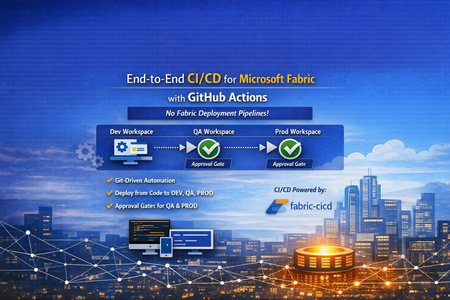
14 Topics🚀 Git-Driven Deployments for Microsoft Fabric Using GitHub Actions
👋 Introduction If you've been working with Microsoft Fabric, you've likely faced this question: "How do we promote Fabric items from DEV → QA → PROD reliably, consistently, and with proper governance?" Many teams default to the built-in Fabric Deployment Pipelines — and they work great for simpler scenarios. But what happens when your enterprise demands: 🔒 Centralized governance across all platforms (infra, app, and data) 📜 Full audit trail of every change tied to a Git commit ✅ Approval gates with reviewer-based promotion 🔑 Per-environment service principal isolation 🧩 Alignment with your existing DevOps standards That's exactly the problem we set out to solve. In this post, I'll walk you through a production-ready, enterprise-grade CI/CD solution for Microsoft Fabric using the fabric-cicd Python library and GitHub Actions — with zero dependency on Fabric Deployment Pipelines. 🎯 What Problem Are We Solving? Traditional Fabric promotion workflows often look like this: Step Method Problem Build in DEV workspace Fabric Portal UI ✅ Works fine Promote to QA Fabric Deployment Pipeline or manual copy ⚠️ No Git traceability Promote to PROD Fabric Deployment Pipeline with approval ⚠️ Separate governance model from app/infra CI/CD Rollback 🤷 Manual recreation ❌ No deterministic rollback path Audit "Who clicked what, when?" ❌ Limited trail The Core Issue Fabric Deployment Pipelines introduce a parallel governance model that's disconnected from how your platform and application teams already work. You end up with: 🔀 Two different promotion systems (GitHub Actions for apps, Fabric Pipelines for data) 🕳️ Governance blind spots between the two 😰 Cultural friction ("Why do data teams have a different process?") Our Approach: Git as the Single Source of Truth 📖 ┌─────────────┐ push to main ┌─────────────┐ │ Developer │ ──────────────────▶ │ GitHub │ │ commits to │ │ Actions │ │ Git repo │ │ Workflow │ └─────────────┘ └──────┬──────┘ │ ┌─────────────────┼─────────────────┐ ▼ ▼ ▼ ┌──────────┐ ┌──────────┐ ┌──────────┐ │ 🟢 DEV │ │ 🟡 QA │ │ 🔴 PROD │ │ Auto │────▶│ Approval │────▶│ Approval │ │ Deploy │ │ Required │ │ Required │ └──────────┘ └──────────┘ └──────────┘ Every deployment originates from Git. Every promotion is traceable to a commit SHA. Every environment has its own approval gate. One pipeline model — across everything. 🏗️ Solution Architecture 📁 Repository Structure fabric-cicd-project/ │ ├── 📂 .github/ │ ├── 📂 workflows/ │ │ └── 📄 fabric-cicd.yml # GitHub Actions pipeline │ ├── 📄 CODEOWNERS # Review enforcement │ └── 📄 dependabot.yml # Automated dependency updates │ ├── 📂 config/ │ └── 📄 parameter.yml # Environment-specific parameterization │ ├── 📂 deploy/ │ ├── 📄 deploy_workspace.py # Main deployment entrypoint │ └── 📄 validate_repo.py # Pre-deployment validation │ ├── 📂 workspace/ # Fabric items (Git-integrated / PBIP) │ ├── 📄 .env.example # Environment variable template ├── 📄 .gitignore ├── 📄 ruff.toml # Python linting config ├── 📄 requirements.txt # Pinned dependencies ├── 📄 SECURITY.md # Vulnerability disclosure policy └── 📄 README.md 🔧 Key Components Component Purpose fabric-cicd Python library Deploys Fabric items from Git to workspaces (handles all Fabric API calls internally) deploy_workspace.py CLI entrypoint — authenticates, configures, deploys, logs parameter.yml Find-and-replace rules for environment-specific values (connections, lakehouse IDs, etc.) validate_repo.py Pre-flight checks — validates repo structure, parameter.yml presence, .platform files fabric-cicd.yml GitHub Actions workflow — orchestrates validate → DEV → QA → PROD ✨ Feature Deep Dive 1️⃣ Per-Environment Service Principal Isolation 🔐 Instead of a single shared service principal, each environment gets its own: DEV_TENANT_ID / DEV_CLIENT_ID / DEV_CLIENT_SECRET QA_TENANT_ID / QA_CLIENT_ID / QA_CLIENT_SECRET PROD_TENANT_ID / PROD_CLIENT_ID / PROD_CLIENT_SECRET Why this matters: 🛡️ Least-privilege access — the DEV SP can't touch PROD 🔍 Audit clarity — you know which identity deployed where 💥 Blast radius reduction — a compromised DEV secret doesn't affect PROD The deploy script automatically resolves the correct credentials based on TARGET_ENVIRONMENT, with fallback to shared FABRIC_* variables for simpler setups. 2️⃣ Environment-Specific Parameterization 🎛️ A single parameter.yml drives all environment differences: find_replace: - find: "DEV_Lakehouse" replace_with: DEV: "DEV_Lakehouse" QA: "QA_Lakehouse" PROD: "PROD_Lakehouse" - find: "dev-sql-server.database.windows.net" replace_with: DEV: "dev-sql-server.database.windows.net" QA: "qa-sql-server.database.windows.net" PROD: "prod-sql-server.database.windows.net" ✅ Same Git artifacts → different runtime bindings per environment ✅ No manual edits between promotions ✅ Easy to review in pull requests 3️⃣ Approval-Gated Promotions ✅ The GitHub Actions workflow uses GitHub Environments with reviewer requirements: Environment Trigger Approval 🟢 DEV Automatic on push to main None — deploys immediately 🟡 QA After successful DEV deploy ✅ Requires reviewer approval 🔴 PROD After successful QA deploy ✅ Requires reviewer approval Reviewers see a rich job summary in GitHub showing: 📌 Git commit SHA being deployed 🎯 Target workspace and environment 📦 Item types in scope ⏱️ Deployment duration ✅ / ❌ Final status 4️⃣ Pre-Deployment Validation 🔍 Before any deployment runs, a dedicated validate job checks: Check What It Does 📂 workspace exists Ensures Fabric items are present 📄 parameter.yml exists Ensures parameterization is configured 📄 .platform files present Validates Fabric Git integration metadata 🐍 ruff check deploy/ Lints Python code for syntax errors and bad imports If validation fails, no deployment runs — across any environment. 5️⃣ Full Git SHA Traceability 📜 Every deployment logs and surfaces the exact Git commit being deployed: Why this matters: 🔄 Rollback = git revert <sha> + push → pipeline redeploys previous state 🕵️ Audit = every PROD deployment tied to a specific commit, reviewer, and timestamp 🔀 Diff = git diff v1..v2 shows exactly what changed between deployments 6️⃣ Concurrency Control 🚦 concurrency: group: fabric-deploy-${{ github.ref }} cancel-in-progress: false Two rapid pushes to main won't cause parallel deployments fighting over the same workspace. The second run queues until the first completes. 7️⃣ Smart Path Filtering 🧠 paths-ignore: - "**.md" - "docs/**" - ".vscode/**" A README-only commit? A docs update? No deployment triggered. This saves runner minutes and avoids unnecessary approval requests for QA/PROD. 8️⃣ Retry Logic with Exponential Backoff 🔁 The deploy script wraps fabric-cicd calls with retry logic: Attempt 1 → fails (HTTP 429 rate limit) ⏳ Wait 5 seconds Attempt 2 → fails (HTTP 503 transient) ⏳ Wait 15 seconds Attempt 3 → succeeds ✅ Transient Fabric service issues don't break your pipeline — the deployment retries automatically. 9️⃣ Orphan Cleanup 🧹 Set CLEAN_ORPHANS=true and items that exist in the workspace but not in Git get removed: Workspace has: Notebook_A, Notebook_B, Notebook_C Git repo has: Notebook_A, Notebook_B → Notebook_C gets removed (orphan) This ensures your workspace exactly matches your Git state — no drift, no surprises. 🔟 Dependency Management with Dependabot 🤖 # .github/dependabot.yml updates: - package-ecosystem: "pip" schedule: interval: "weekly" - package-ecosystem: "github-actions" schedule: interval: "weekly" fabric-cicd, azure-identity, and GitHub Actions versions are automatically monitored. When updates are available, Dependabot opens a PR — keeping your pipeline secure and current. 1️⃣1️⃣ CODEOWNERS Enforcement 👥 # .github/CODEOWNERS /deploy/ @platform-team /config/ @platform-team /.github/workflows/ @platform-team Changes to deployment scripts, parameterization, or the workflow require review from the platform team. No one accidentally modifies the pipeline without oversight. 1️⃣2️⃣ Job Timeouts ⏱️ Job Timeout Validate 10 minutes Deploy (DEV/QA/PROD) 30 minutes A hung process won't burn 6 hours of runner time. It fails fast, alerts the team, and frees the runner. 1️⃣3️⃣ Security Policy 🛡️ A dedicated SECURITY.md provides: 📧 Responsible vulnerability disclosure process ⏰ 48-hour acknowledgement SLA 📋 Best practices for contributors (no secrets in code, least-privilege SPs, 90-day rotation) 🔄 The Complete Workflow Here's what happens end-to-end when a developer merges a PR: 1. 👨💻 Developer merges PR to main │ 2. 🔍 VALIDATE job runs │ ✅ Repo structure checks │ ✅ Python linting (ruff) │ ✅ parameter.yml validation │ 3. 🟢 DEPLOY-DEV job runs (automatic) │ 🔑 Authenticates with DEV SP │ 📦 Deploys all items to DEV workspace │ 📝 Logs commit SHA + summary │ 4. 🟡 DEPLOY-QA job waits for approval │ 👀 Reviewer checks job summary │ ✅ Reviewer approves │ 🔑 Authenticates with QA SP │ 📦 Deploys all items to QA workspace │ 5. 🔴 DEPLOY-PROD job waits for approval │ 👀 Reviewer checks job summary │ ✅ Reviewer approves │ 🔑 Authenticates with PROD SP │ 📦 Deploys all items to PROD workspace │ 6. 🎉 Done — all environments in sync with Git 🆚 Comparison: This Approach vs. Fabric Deployment Pipelines Capability Fabric Deployment Pipelines This Solution (fabric-cicd + GitHub Actions) Source of truth Workspace ✅ Git Promotion trigger UI click / API call ✅ Git push + approval Approval gates Fabric-native ✅ GitHub Environments (same as app teams) Audit trail Fabric activity log ✅ Git commits + GitHub Actions history Rollback Manual ✅ git revert + auto-redeploy Cross-platform governance Separate model ✅ Unified with infra/app CI/CD Parameterization Deployment rules ✅ parameter.yml (reviewable in PR) Secret management Fabric-managed ✅ GitHub Secrets + per-env SP isolation Drift detection Limited ✅ Orphan cleanup (CLEAN_ORPHANS=true) 🚀 Getting Started Prerequisites 3 Fabric workspaces (DEV, QA, PROD) Service principal(s) with Contributor role on each workspace GitHub repository with Actions enabled GitHub Environments configured (dev, qa, prod) Quick Setup # 1. Clone the repo git clone https://github.com/<your-org>/fabric-cicd-project.git # 2. Install dependencies pip install -r requirements.txt # 3. Copy and fill environment variables cp .env.example .env # 4. Run locally against DEV python deploy/deploy_workspace.py GitHub Actions Setup Create GitHub Environments: dev, qa (add reviewers), prod (add reviewers) Add secrets to each environment: DEV_TENANT_ID, DEV_CLIENT_ID, DEV_CLIENT_SECRET QA_TENANT_ID, QA_CLIENT_ID, QA_CLIENT_SECRET PROD_TENANT_ID, PROD_CLIENT_ID, PROD_CLIENT_SECRET DEV_WORKSPACE_ID, QA_WORKSPACE_ID, PROD_WORKSPACE_ID Push to main — the pipeline takes over! 🎉 💡 Lessons Learned After implementing this pattern across several engagements, here are the key takeaways: ✅ What Works Well Teams love the Git traceability once they experience a clean rollback Approval gates in GitHub feel natural to platform engineers Parameter.yml changes in PRs create great review conversations about environment differences Job summaries give reviewers confidence to approve without digging into logs ⚠️ Watch Out For Cultural resistance is the #1 blocker — invest in enablement, not just automation Fabric items with runtime state (data in lakehouses, refresh history) aren't captured in Git Secret rotation across 3+ environments needs process discipline (consider OIDC federated credentials) Run a "portal vs. pipeline" side-by-side demo early — it changes minds fast 🤝 For CSAs: Sharing This With Customers This solution is ideal for customers who: ☑️ Already use GitHub Actions for application or infrastructure CI/CD ☑️ Have governance requirements that demand Git-based audit trails ☑️ Operate multiple Fabric workspaces across environments ☑️ Want to standardize their promotion model across all workloads ☑️ Are moving from Power BI Premium to Fabric and want to modernize their DevOps practices 🗣️ Conversation Starters "How are you promoting Fabric items between environments today?" "Is your data team using the same CI/CD patterns as your app teams?" "If something goes wrong in production, how quickly can you roll back to the previous version?" 📚 Resources 📦 fabric-cicd on PyPI 📖 fabric-cicd Documentation 🐙 GitHub Actions Documentation 🏗️ Microsoft Fabric Git Integration 🌐Git Repository URL: vinod-soni-microsoft/FABRIC-CICD-PROJECT: Enterprise-grade CI/CD solution for Microsoft Fabric using fabric-cicd Python library and GitHub Actions. Git-driven deployments across DEV → QA → PROD with environment approval gates, per-environment service principal isolation, and parameterized promotion — no Fabric Deployment Pipelines required. 🏁 Conclusion The shift from UI-driven promotion to Git-driven CI/CD for Microsoft Fabric isn't just a technical upgrade — it's a governance and cultural alignment decision. By using fabric-cicd with GitHub Actions, you get: 📖 One source of truth (Git) 🔄 One promotion model (GitHub Actions) ✅ One approval process (GitHub Environments) 🔍 One audit trail (Git history + Actions logs) 🔐 One security model (GitHub Secrets + per-env SPs) No parallel governance. No hidden drift. No "who clicked what in the portal." Just Git, code, and confidence. 💪 Have questions or want to share your experience? Drop a comment below — I'd love to hear how your team is approaching Fabric CI/CD! 👇
Azure Devops and Data Factory
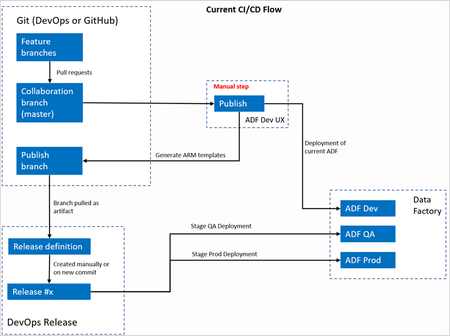
I have started a new job and taken over ADF. I know how to use Devops to integrate and deploy when everything is up and running. The problem is, it's all out of sync. I need to learn ADO/ADF as they work together so I can fix this. Any recommendations on where to start? Everything on YouTube is starting with a fresh environment which I'd be fine with. I'm not new to ADO, but I've never been the setup guy before. And I'm strong on ADO management, just using it. Here are some of the problems I have: A lot of work has been done directly in the DEV branch rather than creating feature branches. Setting up a pull request from DEV to PROD wants to pull everything. Even in-progress or abandoned code changes. Some changes were made in the PROD branch directly, so I'll need to pull those changes back to DEV. We have valid changes in both DEV and PROD. I'm having trouble cherry-picking. It only lets me select one commit, then says I need to use command-line. It doesn't tell me the error. I don't know what tool to use for the command line. I've tried using Visual Studio, and I can pull in the Data Factory code, but have all the same problems there. I'm not looking for an answer to the questions, but how to find the answer to these questions. Is this Data Factory, or should I be looking at Devops? I'm having no trouble managing the database code or Power BI in Devops, but I created that fresh. Thanks for any help!Solved463Views0likes4CommentsTechnical Walkthrough: Deploying a SQL DB like it's Terraform
Introduction This post will be a union of multiple topics. It is part of the SQL CI/CD series and as such will build upon Deploying .dacpacs to Multiple Environments via ADO Pipelines | Microsoft Community Hub and Managed SQL Deployments Like Terraform | Microsoft Community Hub while also crossing over with the YAML Pipeline series This is an advanced topic in regard to both Azure DevOps YAML and SQL CI/CD. If both of these concepts are newer to you, please refer to the links above as this is not designed to be a beginner's approach in either one of these domains. Assumptions To get the most out of this and follow along we are going to assume that you are 1.) On board with templating your Azure DevOps YAML Pipelines. By doing this we will see the benefit of quickly onboarding new pipelines, standardizing our deployment steps, and increasing our security. We also are going to assume you are on board with Managed SQL Deployments Like Terraform | Microsoft Community Hub for deploying your SQL Projects. By adopting this we can increase our data security, confidence in source control, and speed our time to deployment. For this post we will continue to leverage the example cicd-adventureWorks repository for the source of our SQL Project and where the pipeline definition will live. Road mapping the Templates Just like my other YAML posts let's outline the pieces required in this stage and we will then break down each job Build Stage Build .dacpac job run `dotnet build` and pass in appropriate arguments execute a Deploy Report from the dacpac produced by the build and the target environment copy the Deploy Report to the build output directory publish the pipeline artifact Deploy Stage Deploy .dacpac job run Deploy Report from dacpac artifact (optional) deploy dacpac, including pre/postscripts Build Stage For the purposes of this stage, we should think of building our .dacpac similar to a terraform or single page application build. What I am referring to is we will produce an artifact per environment, and this will be generated from the same codebase. Additionally, we will run a 'plan' which will be the proposed result of deploying our dacpac file. Build Job We will have one instance of the build job for each environment. Each instance will produce a different artifact as they will be passing different build configurations which in turn will result in a different .dacpac per environment. If you are familiar with YAML templating, then feel free to jump to the finish job template. One of the key differences with this job structure, as opposed to the one outlined in Deploying .dacpacs to Multiple Environments via ADO Pipelines is the need for a Deploy Report. This is the key to unlocking the CI/CD approach which aligns with Terraform. This Deploy Report detects our changes on build, similar to running a terraform plan. Creating a Deploy Report is achieved by setting the DeployAction attribute in the SQLAzureDacpacDeployment@1 action to 'DeployReport' Now there is one minor "bug" in the Microsoft SQLAzureDacpacDeployment task, which I have raised with the ADO task. It appears the output path for the Deploy Report as well as the Drift Report are hardcoded to the same location. To get around this I had to find out where the Deploy Report was being published and, for our purposes, have a task to copy the Deploy Report to the same location as the .dacpac and then publish them both as a single folder. Here is the code for the for a single environment to build the associated .dacpac and produce the Deploy Repo stages: - stage: adventureworksentra_build variables: - name: solutionPath value: $(Build.SourcesDirectory)// jobs: - job: build_publish_sql_sqlmoveme_dev_dev steps: - task: UseDotNet@2 displayName: Use .NET SDK vlatest inputs: packageType: 'sdk' version: '' includePreviewVersions: true - task: NuGetAuthenticate@1 displayName: 'NuGet Authenticate' - task: DotNetCoreCLI@2 displayName: dotnet build inputs: command: build projects: $(Build.SourcesDirectory)/src/sqlmoveme/*.sqlproj arguments: --configuration dev /p:NetCoreBuild=true /p:DacVersion=1.0.1 - task: SqlAzureDacpacDeployment@1 displayName: DeployReport sqlmoveme on sql-adventureworksentra-dev-cus.database.windows.net inputs: DeploymentAction: DeployReport azureSubscription: AzureDevServiceConnection AuthenticationType: servicePrincipal ServerName: sql-adventureworksentra-dev-cus.database.windows.net DatabaseName: sqlmoveme deployType: DacpacTask DacpacFile: $(Agent.BuildDirectory)\s/src/sqlmoveme/bin/dev/sqlmoveme.dacpac AdditionalArguments: '' DeleteFirewallRule: True - task: CopyFiles@2 inputs: SourceFolder: GeneratedOutputFiles Contents: '**' TargetFolder: $(Build.SourcesDirectory)/src/sqlmoveme/bin/dev/cus - task: PublishPipelineArtifact@1 displayName: 'Publish Pipeline Artifact sqlmoveme_dev_dev ' inputs: targetPath: $(Build.SourcesDirectory)/src/sqlmoveme/bin/dev artifact: sqlmoveme_dev_dev properties: '' The end result will be similar to: (I have two environments in the screenshot below) One can see I have configured this to run a Deploy Report across each regional instance, thus the `cus` folder, of a SQL DB I do this is to identify and catch any potential schema and data issues. The Deploy Reports are the keys to tie this to the thought of deploying and managing SQL Databases like Terraform. These reports will execute when a pull request is created as part of the Build and again at Deployment to ensure changes from PR to deployment that may have occurred. For the purposes of this blog here is a deployment report indicating a schema change: This is an important artifact for organizations whose auditing policy requires documentation around deployments. This information is also available in the ADO job logs: This experience should feel similar to Terraform CI/CD...THAT'S A GOOD THING! It means we are working on developing and refining practices and principals across our tech stacks when it comes to SDLC. If this feels new to you then please read Terraform, CI/CD, Azure DevOps, and YAML Templates - John Folberth Deploy Stage We will have a deploy stage for each environment and within that stage will be a job for each region and/or database we are deploying our dacpac to. This job can be a template because, in theory, our deploying process across environments is identical. We will run a deployment report and deploy the .dacpac which was built for the specific environment and will include any and all associated pre/post scripts. Again this process has already been walked through in Deploying .dacpacs to Multiple Environments via ADO Pipelines | Microsoft Community Hub Deploy Job The deploy job will take what we built in the deployment process in Deploying .dacpacs to Multiple Environments via ADO Pipelines | Microsoft Community Hub and we will add a perquisite job to create a second Deployment Report. This process is to ensure we are aware of any changes in the deployed SQL Database that may have occurred after the original dacpac and Deployment Report were created at the time of the Pull Request. By doing this we now have a tight log identifying any changes that were being made right before we deployed the code. Next, we need to make a few changes to override the default arguments of the .dacpac publish command in order to automatically deploy changes that may result in data loss. Here is a complete list of all the available properties SqlPackage Publish - SQL Server | Microsoft Learn. The ones we are most interested in are DropObjectsNotInSource and BlockOnPossibleDataLoss. DropObjectsNotInSource is defined as: Specifies whether objects that do not exist in the database snapshot (.dacpac) file will be dropped from the target database when you publish to a database. This value takes precedence over DropExtendedProperties. This is important as it will drop and delete objects that are not defined in our source code. As I've written about previously this will drop all those instances of "Shadow Data" or copies of tables we were storing. This value, by default, is set to false as a safeguard from a destructive data action. Our intention though is to ensure our deployed database objects match our definitions in source control, as such we want to enable this. BlockOnPossibleDataLoss is defined as: Specifies that the operation will be terminated during the schema validation step if the resulting schema changes could incur a loss of data, including due to data precision reduction or a data type change that requires a cast operation. The default (True) value causes the operation to terminate regardless if the target database contains data. An execution with a False value for BlockOnPossibleDataLoss can still fail during deployment plan execution if data is present on the target that cannot be converted to the new column type. This is another safeguard that has been put in place to ensure data isn't lost in the situation of type conversion or schema changes such as dropping a column. We want this set to `true` so that our deployment will actually deploy in an automated fashion. If this is set to `false` and we are wanting to update schemas/columns then we would be creating an anti-pattern of a manual deployment to accommodate. When possible, we want to automate our deployments and in this specific case we have already taken the steps of mitigating unintentional data loss through our implementation of a Deploy Report. Again, we should have confidence in our deployment and if we have this then we should be able to automate it. Here is that same deployment process, including now the Deploy Report steps: - stage: adventureworksentra_dev_cus_dacpac_deploy jobs: - deployment: adventureworksentra_app_dev_cus environment: name: dev dependsOn: [] strategy: runOnce: deploy: steps: - task: SqlAzureDacpacDeployment@1 displayName: DeployReport sqlmoveme on sql-adventureworksentra-dev-cus.database.windows.net inputs: DeploymentAction: DeployReport azureSubscription: AzureDevServiceConnection AuthenticationType: servicePrincipal ServerName: sql-adventureworksentra-dev-cus.database.windows.net DatabaseName: sqlmoveme deployType: DacpacTask DacpacFile: $(Agent.BuildDirectory)\sqlmoveme_dev_dev\**\*.dacpac AdditionalArguments: '' DeleteFirewallRule: False - task: CopyFiles@2 inputs: SourceFolder: GeneratedOutputFiles Contents: '**' TargetFolder: postDeploy/sql-adventureworksentra-dev-cus.database.windows.net/sqlmoveme - task: SqlAzureDacpacDeployment@1 displayName: Publish sqlmoveme on sql-adventureworksentra-dev-cus.database.windows.net inputs: DeploymentAction: Publish azureSubscription: AzureDevServiceConnection AuthenticationType: servicePrincipal ServerName: sql-adventureworksentra-dev-cus.database.windows.net DatabaseName: sqlmoveme deployType: DacpacTask DacpacFile: $(Agent.BuildDirectory)\sqlmoveme_dev_dev\**\*.dacpac AdditionalArguments: /p:DropObjectsNotInSource=true /p:BlockOnPossibleDataLoss=false DeleteFirewallRule: True Putting it Together Let's put together all these pieces. This example will show an expanded pipeline that has the following stages and jobs Build a stage Build Dev job Build Tst job Deploy Dev stage Deploy Dev Job Deploy tst stage Deploy tst Job And here is the code: resources: repositories: - repository: templates type: github name: JFolberth/TheYAMLPipelineOne endpoint: JFolberth trigger: branches: include: - none pool: vmImage: 'windows-latest' parameters: - name: projectNamesConfigurations type: object default: - projectName: 'sqlmoveme' environmentName: 'dev' regionAbrvs: - 'cus' projectExtension: '.sqlproj' buildArguments: '/p:NetCoreBuild=true /p:DacVersion=1.0.1' sqlServerName: 'adventureworksentra' sqlDatabaseName: 'moveme' resourceGroupName: adventureworksentra ipDetectionMethod: 'AutoDetect' deployType: 'DacpacTask' authenticationType: 'servicePrincipal' buildConfiguration: 'dev' dacpacAdditionalArguments: '/p:DropObjectsNotInSource=true /p:BlockOnPossibleDataLoss=false' - projectName: 'sqlmoveme' environmentName: 'tst' regionAbrvs: - 'cus' projectExtension: '.sqlproj' buildArguments: '/p:NetCoreBuild=true /p:DacVersion=1.0' sqlServerName: 'adventureworksentra' sqlDatabaseName: 'moveme' resourceGroupName: adventureworksentra ipDetectionMethod: 'AutoDetect' deployType: 'DacpacTask' authenticationType: 'servicePrincipal' buildConfiguration: 'tst' dacpacAdditionalArguments: '/p:DropObjectsNotInSource=true /p:BlockOnPossibleDataLoss=false' - name: serviceName type: string default: 'adventureworksentra' stages: - stage: adventureworksentra_build variables: - name: solutionPath value: $(Build.SourcesDirectory)// jobs: - job: build_publish_sql_sqlmoveme_dev_dev steps: - task: UseDotNet@2 displayName: Use .NET SDK vlatest inputs: packageType: 'sdk' version: '' includePreviewVersions: true - task: NuGetAuthenticate@1 displayName: 'NuGet Authenticate' - task: DotNetCoreCLI@2 displayName: dotnet build inputs: command: build projects: $(Build.SourcesDirectory)/src/sqlmoveme/*.sqlproj arguments: --configuration dev /p:NetCoreBuild=true /p:DacVersion=1.0.1 - task: SqlAzureDacpacDeployment@1 displayName: DeployReport sqlmoveme on sql-adventureworksentra-dev-cus.database.windows.net inputs: DeploymentAction: DeployReport azureSubscription: AzureDevServiceConnection AuthenticationType: servicePrincipal ServerName: sql-adventureworksentra-dev-cus.database.windows.net DatabaseName: sqlmoveme deployType: DacpacTask DacpacFile: $(Agent.BuildDirectory)\s/src/sqlmoveme/bin/dev/sqlmoveme.dacpac AdditionalArguments: '' DeleteFirewallRule: True - task: CopyFiles@2 inputs: SourceFolder: GeneratedOutputFiles Contents: '**' TargetFolder: $(Build.SourcesDirectory)/src/sqlmoveme/bin/dev/cus - task: PublishPipelineArtifact@1 displayName: 'Publish Pipeline Artifact sqlmoveme_dev_dev ' inputs: targetPath: $(Build.SourcesDirectory)/src/sqlmoveme/bin/dev artifact: sqlmoveme_dev_dev properties: '' - job: build_publish_sql_sqlmoveme_tst_tst steps: - task: UseDotNet@2 displayName: Use .NET SDK vlatest inputs: packageType: 'sdk' version: '' includePreviewVersions: true - task: NuGetAuthenticate@1 displayName: 'NuGet Authenticate' - task: DotNetCoreCLI@2 displayName: dotnet build inputs: command: build projects: $(Build.SourcesDirectory)/src/sqlmoveme/*.sqlproj arguments: --configuration tst /p:NetCoreBuild=true /p:DacVersion=1.0 - task: SqlAzureDacpacDeployment@1 displayName: DeployReport sqlmoveme on sql-adventureworksentra-tst-cus.database.windows.net inputs: DeploymentAction: DeployReport azureSubscription: AzureTstServiceConnection AuthenticationType: servicePrincipal ServerName: sql-adventureworksentra-tst-cus.database.windows.net DatabaseName: sqlmoveme deployType: DacpacTask DacpacFile: $(Agent.BuildDirectory)\s/src/sqlmoveme/bin/tst/sqlmoveme.dacpac AdditionalArguments: '' DeleteFirewallRule: True - task: CopyFiles@2 inputs: SourceFolder: GeneratedOutputFiles Contents: '**' TargetFolder: $(Build.SourcesDirectory)/src/sqlmoveme/bin/tst/cus - task: PublishPipelineArtifact@1 displayName: 'Publish Pipeline Artifact sqlmoveme_tst_tst ' inputs: targetPath: $(Build.SourcesDirectory)/src/sqlmoveme/bin/tst artifact: sqlmoveme_tst_tst properties: '' - stage: adventureworksentra_dev_cus_dacpac_deploy jobs: - deployment: adventureworksentra_app_dev_cus environment: name: dev dependsOn: [] strategy: runOnce: deploy: steps: - task: SqlAzureDacpacDeployment@1 displayName: DeployReport sqlmoveme on sql-adventureworksentra-dev-cus.database.windows.net inputs: DeploymentAction: DeployReport azureSubscription: AzureDevServiceConnection AuthenticationType: servicePrincipal ServerName: sql-adventureworksentra-dev-cus.database.windows.net DatabaseName: sqlmoveme deployType: DacpacTask DacpacFile: $(Agent.BuildDirectory)\sqlmoveme_dev_dev\**\*.dacpac AdditionalArguments: '' DeleteFirewallRule: False - task: CopyFiles@2 inputs: SourceFolder: GeneratedOutputFiles Contents: '**' TargetFolder: postDeploy/sql-adventureworksentra-dev-cus.database.windows.net/sqlmoveme - task: SqlAzureDacpacDeployment@1 displayName: Publish sqlmoveme on sql-adventureworksentra-dev-cus.database.windows.net inputs: DeploymentAction: Publish azureSubscription: AzureDevServiceConnection AuthenticationType: servicePrincipal ServerName: sql-adventureworksentra-dev-cus.database.windows.net DatabaseName: sqlmoveme deployType: DacpacTask DacpacFile: $(Agent.BuildDirectory)\sqlmoveme_dev_dev\**\*.dacpac AdditionalArguments: /p:DropObjectsNotInSource=true /p:BlockOnPossibleDataLoss=false DeleteFirewallRule: True - stage: adventureworksentra_tst_cus_dacpac_deploy jobs: - deployment: adventureworksentra_app_tst_cus environment: name: tst dependsOn: [] strategy: runOnce: deploy: steps: - task: SqlAzureDacpacDeployment@1 displayName: DeployReport sqlmoveme on sql-adventureworksentra-tst-cus.database.windows.net inputs: DeploymentAction: DeployReport azureSubscription: AzureTstServiceConnection AuthenticationType: servicePrincipal ServerName: sql-adventureworksentra-tst-cus.database.windows.net DatabaseName: sqlmoveme deployType: DacpacTask DacpacFile: $(Agent.BuildDirectory)\sqlmoveme_tst_tst\**\*.dacpac AdditionalArguments: '' DeleteFirewallRule: False - task: CopyFiles@2 inputs: SourceFolder: GeneratedOutputFiles Contents: '**' TargetFolder: postDeploy/sql-adventureworksentra-tst-cus.database.windows.net/sqlmoveme - task: SqlAzureDacpacDeployment@1 displayName: Publish sqlmoveme on sql-adventureworksentra-tst-cus.database.windows.net inputs: DeploymentAction: Publish azureSubscription: AzureTstServiceConnection AuthenticationType: servicePrincipal ServerName: sql-adventureworksentra-tst-cus.database.windows.net DatabaseName: sqlmoveme deployType: DacpacTask DacpacFile: $(Agent.BuildDirectory)\sqlmoveme_tst_tst\**\*.dacpac AdditionalArguments: /p:DropObjectsNotInSource=true /p:BlockOnPossibleDataLoss=false DeleteFirewallRule: True In ADO it will look like: We can see the important Deploy Report being created and can confirm that there are Deploy Reports for each environment/region combination: Conclusion With the inclusion of deploy reports we now have the ability to create Azure SQL Deployments that adhere to modern DevOps approaches. We can ensure our environments will be in sync with how we have defined them in source control. By doing this we achieve a higher level of security, confidence in our code, and reduction in shadow data. To learn more on these approaches with SQL Deployments be sure to check out my other blog articles on the topic "SQL Database Series" in "Healthcare and Life Sciences Blog" | Microsoft Community Hub and be sure to follow me on LinkedIn
Azure devops CI CD for azure machine learning designer pipelines
Hi I have azure machine learning designer pipelines in dev az ml worspace. Is there way I can promote dev to prod az ml using azure Devops pipelines. I did some googling all I can found is code based cicd for azure machine learning project and nothing on CI/CD for az ml designer pipelines. Thanks in advance.1.1KViews0likes0CommentsWingetCreate: Keeping WinGet packages up-to-date!
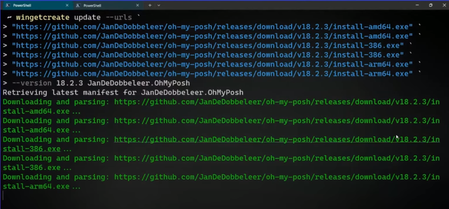
In the ever-evolving landscape of software development, efficiency is key. Windows users have long awaited an experience, where the simplicity of installing, updating, and managing software could be as seamless as executing a single command. Enter Windows Package Manager, or WinGet, a powerful tool that reshapes the way we handle software packages on the Windows platform. WinGet brings the simplicity of Linux package managers to the Windows environment, enabling users to use the command-line for installing their favorite packages.9.2KViews1like0Comments
Trying to automate Teams App development with Azure DevOps CI/CD
Hi Team, I have a sample Teams application which is generated using the yo teams generator. Now I would like to automate the development activities by doing CI/CD & publish the manifest zip package to Teams. It'll be useful if someone help me on this process.2.3KViews0likes3CommentsModernize DevSecOps and GitOps journey with Microsoft’s Unified solution (Azure DevOps + GitHub)
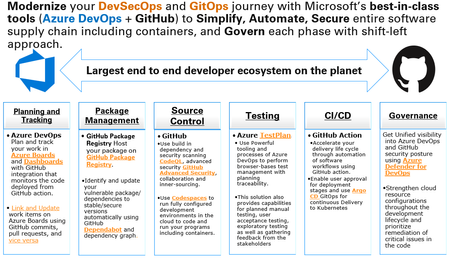
Modernize your DevSecOps and GitOps journey with Microsoft’s Unified solution and best-in-class tools (Azure DevOps + GitHub) to Simplify, Automate, Secure entire software supply chain including containers, and Govern each phase with shift-left approach.