chromium
30 TopicsUnable to share screen on MS Teams in Google Chrome 109.0.5414 on Ubuntu 22.10
Hello, I have not been able to share the screen (or other windows) like I used to share with MS Teams running inside Google Chrome 109.0.5414 on Ubuntu 22.10. The only thing I can share is other tabs inside Google Chrome. The same thing is happening inside Chromium 109.0.5414. The strange thing is that Google Chrome and Chromium display the following message: "Go to Security & Privacy > Screen Recording to give permission and start sharing." But I do not have these Security & Privacy Settings. I am not using macOS, where I know about these settings. On Linux, there are no such settings. Are there any other options on a Linux System to set to make sharing screens possible once more? Thanks in advance. Details: - Ubuntu 22.10 with GNOME 43.1, Wayland - Chromium 109.0.5414 (via snap) and Google Chrome 109.0.5414 (via dpkg/apt)17KViews1like7CommentsTab Search with Windows 10 Caption Button
Tab Search is in-browser feature included to Google Chrome since Chrome 87 that make user easier to search tab opened in same windows or different windows. In edge://flags does not have Enable Tab Search (#enable-tab-search) and Windows 10 Tab Search Caption Button (#win-10-tab-search-caption-button) option to enable Tab Search Feature. Although users can enable Tab Search by using the –enable-features=msTabSearch,Win10TabSearchCaptionButton command line switch, but keyboard shortcut (Ctrl+Shift+A) is not working.Solved4.9KViews0likes4CommentsNew Edge Canary Mobile version - Available Now - Updated Chromium version
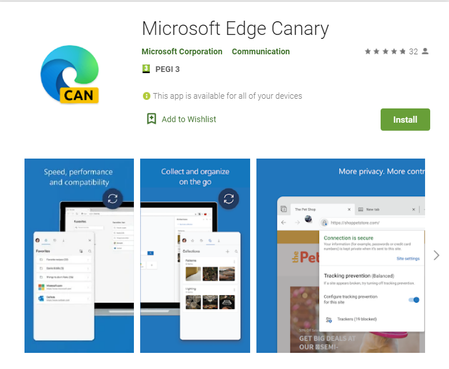
Microsoft Edge Canary is the newest Edge app on mobile. here is the app on Google play: https://play.google.com/store/apps/details?id=com.microsoft.emmx.canary The Chromium version is up to date, latest version, same as on Edge desktop. the UI has some different design elements. settings page is also different. sync is fully enabled and working. Flags are all available and working. you can set it as default browser on your phone. this has been promised a while ago, but now it's here. so go on and download it, comment down below what you think about it. https://www.youtube.com/watch?v=p2Ya2cfGDVI8.7KViews5likes15Comments[Resolved] Adding cookies to the Allow list makes them bypass the 3rd party cookie blocking !?
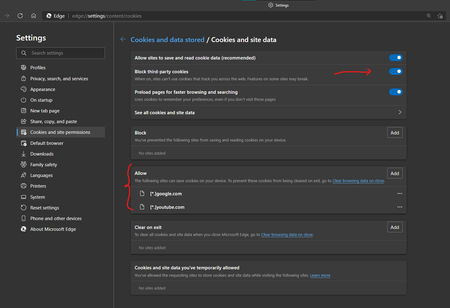
When I turn on 3rd party cookie blocking, and add [*.]youtube.com [*.]google.com to the allow list of cookies this causes Google and YouTube cookies to be read and accessed in Reddit and other sites, Even though 3rd party Cookie blocking is enabled. Edge (or Chromium in general, since it happens on Chrome 88 stable too) is confused. that Allow list is for allowing certain cookies to enter or stay in the browser, the Allow list is Not a 3rd party cookie bypass list. my actual setup and configuration was more complex but I had to do lots of testing to find out why Reddit still detects and asks me to sign into my Google account when 3rd party cookie blocking is enabled!3.9KViews3likes9Comments[FIXED] How long can Edge mobile keep using Chromium 77 and still receive updated security patches?
Edge on Android is now on the latest version, the same as Edge desktop, everything is new and up to date. https://techcommunity.microsoft.com/t5/discussions/new-edge-canary-mobile-version-available-now-updated-chromium/m-p/2275690 Edge beta mobile (Android) is using Chromium 77.0.3865.116 at the moment how long can it stick to version 77 and still receive security patches, bug fixes for zero-day threats etc.? like this one and what's so special about version 77 of Chromium? what made Edge team choose that and stick with it for such a long time!? lastly, is there ever going to be a time where we will be using up to date Chromium engine in Edge mobile, just like on computer? i really need someone from Edge team answer to this, I'm using it on my own device and also made others close to me to switch over to Edge too, so I'm a little concerned here. and this is something many people in different topics talked about.2.1KViews3likes3Comments
In-place build upgrade failure and workaround
I have noticed that, since the first build the new Microsoft Edge was bundled with Windows Server vNext, I could not upgrade from one weekly build to the next without re-installing from scratch. I could upgrade from an older build that did not include Edge to a newer one that did, but not from one with Edge to anther with Edge. I tought that Edge was the culprit, but I could not uninstall it through the regular means, for I have wound a guide to forcly uninstall it via command line. It was uninstalled, but Windows upgrade to the new build failed again. Then, I tought that enabling Network Sharing was the culprit. So, did a fresh install once again, but kept it disabled, as out of the box. The latest build came, it failed in-place upgrade, but at an earlier stage. Yet, Edge was updated after the fresh installation a few days ago and it was removable through Control Panel or Settings. So I did uninstall it, then tried an in-place upgrade and it worked. It had reinstalled Edge. So, I guess the update/upgrade system for the Chromium Edge between Windows builds (that upgrade like previous redstones, through a Windows re-install mechanism with documents, settings and programs being kept) it is not fully developed. Edge updates on a different way then the OS itself, in a way enherited from the Chromium browser, it is not fully integrated into Windows yet, altough I have looked via 7zip and the Windows Install.wim file contains it. Probably, due to that, especially when the installed version of the Chromium Edge browser is updated beyong what is in the install.wim, issues can appear. I guess that, if the update/upgrade mechanism for Edge in Windows it is not solved, that Edge should not be bundled with Windows until that, while still being available for users via the Microsoft Edge msi installer for Enterprise. A workaround, so far, seems to be uninstalling it before an in-place build upgrade..3.3KViews1like5CommentsPP3: deactivated extensions manager - notifications
PROBLEM (PP): 3 Classification: EXTENSIONS PRIORITY IN MY OPINION: 6 on a scale from 1 (low) to 10 (high) 1) Today i talk about a problem that i already reported to Google **1137157&hotlist_id=10394 and i see frequently in Edge too. I search i search and i search extension in the toolbar or extension box and i never find it. Since i have over 250 profiles, sometimes is difficult to remember if i installed it or not. So i try to reinstall the extension, and then i get such message. So Edge deactivated my extension. Like i asked to Google, i wish you could add a new panel for deactivated extensions and a way to reactivate at once all extensions. 2) Similar problem is ***1134182&hotlist_id=10394 about deactivated extension after sync activation which i have never seen until now in Edge (hope i will never see too). In case this happens in Edge too, add ability to approve all extensions at once, instead of showing me 20+ notifications for each edge profile. If you implement the deactivate panel like 1) we would fix this problem too. 3) since we are talking about extensions, i report you *1144126&hotlist_id=10394 another problem i noted recently in chrome, in the hope that edge dev can fix it, if this problem is available in edge too. i noted this problem even with 360chrome. 8+ minutes where you simply showed me 200 notifications about extensions crash. Please check that you avoid to show me 1000 messages if there is a total crash. At least in google was automatically, in 360chrome i needed to approve each crash one by one; after 20 i relaunched the browser (much faster). 4) about google chrome removed extension topic ***1143025&hotlist_id=10394 i haven't tested this in edge until now (or i have never seen such message), but would be cool that edge is able to sync deleted extensions (marked as malware by google) from chrome store (extensions, that are not available in edge store). Or to sync manual added extensions. we all know that google delete extensions in batch, would be cool that we can still use such extensions, that worked fine for months. Maybe you are already able to do that, or maybe not. I will test this in future. There are other problem with chrome, but not related to the topic extensions, so i prefer to report such problems only once i see in edge too.1.8KViews1like2Comments
Adding Chome Extension to Edge 85 with Selenium Java
I want to add chrome extension from Selenium Java to Newest Edge Version with msedgedriver. But when the browser instance opens the extension is not getting added and developer mode is not i. Edge Developer mode gets turned off when new instance is opened. ii. Allow extensions from other stores is also automatically turned off. I tried different codes with seleenium 4.0 alpha 6.0 as well as with the stable versions. public static WebDriver ini() { System.setProperty("webdriver.edge.driver", "D:\\SeleniumTest\\new\\msedgedriver.exe"); DesiredCapabilities desiredCapabilities = new DesiredCapabilities (); EdgeOptions options = new EdgeOptions(); ArrayList<String> extensionList=new ArrayList<String>(); String extensionLocation="C:\\Program Files (x86)\\Microsoft\\Edge\\Application\\85.0.564.51\\Extensions\\CombinedExtension"; extensionList.add(extensionLocation); options.setCapability( "disable-infobars", true); options.setCapability("extensionPaths", extensionList); options.merge(desiredCapabilities); WebDriver driver = new EdgeDriver(options); return driver; } The above code works fine with edge legacy. Also different other answers i have tried most of them doesnt work. I tried the below code too System.setProperty("webdriver.edge.driver", "<windowsMsEdgeChromiumDriverPath>"); final ChromeOptions chromeOptions = new ChromeOptions(); chromeOptions.setBinary("C:\\Program Files (x86)\\Microsoft\\Edge Beta\\Application\\msedge.exe"); chromeOptions.setExperimentalOption("useAutomationExtension", false); chromeOptions.setExperimentalOption("excludeSwitches", Collections.singletonList("enable-automation")); final EdgeOptions edgeOptions = new EdgeOptions().merge(chromeOptions); final WebDriver webDriver = new EdgeDriver(edgeOptions);Solved2.8KViews0likes4CommentsMicrosoft Edge Chromium and Chromium OS
From a few days, I have started using OS based on the Chromium OS open source project. The problem over there is that I have to use the Google Chrome or the Chromium browser but I have all of my data synced in Microsoft Edge for years. I tried to install Microsoft Edge from the official website but the result was as expected for me showing that Edge is not supported on Chrome OS. Deleted MissyQ Are there plans in the future for Microsoft Edge to support OS based on Chromium OS open source project?Solved2.6KViews0likes4Comments