chat
346 Topics
Can upload file from Teams chat files to Posts but not to Shared
I was working on an Excel file shared in a chat with members of a small workgroup. When it was ready to share with the larger team, I navigated to the appropriate Team > Channel, created a Post, clicked on + > Attach file > selected the file (which had been modified recently, so displayed on the pop-up). The team lead asked me to save it in a particular folder in the team's files, so I navigated to Shared (formerly Files)... and did not see it. I could briefly see it if I selected the "In messages" filter, but then after a moment that bugged out and displayed the "Something went wrong" error screen. This behavior persisted (briefly visible file list, then error screen) even after quitting Teams via the task bar and opening it back up. I did not want to create a separate version (especially now that the original file was linked in the Post), so I tried a few different methods to get it into Shared. I tried copying a link, but couldn't figure out a good way to paste it into Shared. I tried pasting it in a new Link, but that preserved it as a link/URL rather than a file -- serviceable but awkward. I checked whether there was an easier way to do it by opening in the web version, where Files is still active rather than Shared (same behavior, except no "In messages" filter so I couldn't test that). I poked around in SharePoint but didn't see anything interesting. I tried uploading a copy from within Shared by pasting the filepath from the "Save a Copy" dialog in Excel... ...and that's when I noticed a possible cause of the issue: another member of the original workgroup chat had created the file, and it was living in her Teams chat files, not mine. I then had her try doing it by navigating to her Teams chat files and selecting her copy, and then hallelujah, it appeared in Shared. I was able to drag it to the appropriate folder normally. Ultimately, I see two questions: Why does the file appear when the "In messages" filter is selected, but not otherwise? Why can I add a file saved in someone else's Teams chat files to a Post, but I can't upload it in Shared? Bonus: any idea why the "In messages" filter caused an error message to display?174Views0likes0CommentsTeams Gains Ability to Start Chat with Email Address
A new Teams feature allows users to initiate chats with any email address. This caused some commotion in the security community, but it’s not that bad. In fact, it’s an extension of existing functionality that allows Teams users to chat with guest accounts. All that’s happening is that initiating a chat causes a new guest account to be created in the tenant, and there’s lots of controls to make sure that guests are controlled. https://office365itpros.com/2025/11/10/chat-with-email-address-teams/1.2KViews1like3Comments
Support RTL Languages on MacOS
As now, It seems Microsoft teams on MacOS does not support RTL languages when texts are being typed. This makes bad feeling when users want to read the text they've typed. The issue becomes worst when the text contains English phrase (when the message is sent) As far as I remember, Skype did support RTL languages when the texts are being typed.405Views14likes2Comments
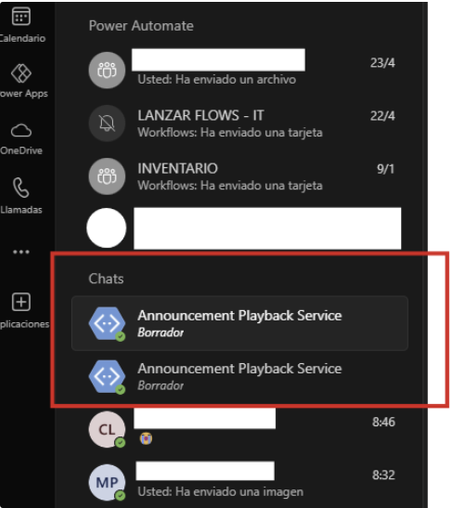
Announcement Playback Service chat ¡HEPL!
Hello, for a few weeks now, one or two chats with the same name "Announcement Playback Service" have been appearing in my recent chats without explanation. Since the new chat update, they have remained permanently static in recent chats. I can't remove them, delete them, move them, or hide them. They're very annoying. I want to remove them. Does anyone know how? I've attached photos. (desktop and web versions) is the same problem When trying to move them from container: When I hit "Discard" nothing happens:12KViews0likes4CommentsAnnouncement Playback Service chat ¡HEPL!
Hello, for a few weeks now, one or two chats with the same name "Announcement Playback Service" have been appearing in my recent chats without explanation. Since the new chat update, they have remained permanently static in recent chats. I can't remove them, delete them, move them, or hide them. They're very annoying. I want to remove them. Does anyone know how? I've attached photos. (desktop and web versions) is the same problem When trying to move them from container: When I hit "Discard" nothing happens:799Views0likes0CommentsUse AI to Automatically Translate Messages in Teams Chat
Microsoft Teams is widely used in international organizations, but currently, chat translation requires manual action for each message. I’d love to see an AI-powered feature that automatically translates messages in real time based on user preferences or system-detected language. Suggested Features: Auto-translate messages into the user's default language Option to view original text with one click Support for both 1:1 chats and group/channel conversations Allow users to opt-in/out or customize translation settings Smart detection of language context (e.g., if one person switches to Spanish, the system adapts)272Views0likes1CommentDealing with Teams Chat Messages When People Leave
Tenant administrators know that they need to deal with mailboxes and OneDrive accounts when people leave, but what about Teams chat messages? Or rather, the information stored in the compliance records captured in Exchange Online mailboxes? Reviewing chat messages can be an ardous task, so perhaps the solution might be to export the compliance records to a PST for long-term retention. https://office365itpros.com/2024/08/07/teams-chat-messages-leavers/596Views0likes0CommentsTeams Chat Gets the Shared Tab
The old Files tab in Teams chat is being replaced by the Shared tab. The new tab exposes both files and hyperlinks and Microsoft says that the Shared tab will support more types of objects in the future. No dates are given for the future enhancements, but the new Shared tab will roll out for Teams chat users in early July 2024. I like the new tab because I tend to share many hyperlinks in chats. https://office365itpros.com/2024/06/28/shared-tab-teams-chat/4.9KViews0likes2CommentsAccess to Channel Calendar Event Chat
I've created a Private Teams site and set up a Channel Calendar on the General Channel. I've invited both Channel Members and Non-Members to meetings set up on the Channel Calendar. I'm having a couple of issues relating to accessing the meeting chats: The Meeting Chat for events created on the Channel Calendar do not appear in anyones chat history Attendees who are not members of the Teams Channel are unable to view or participate in the chat during the meeting or access it after the event. Do all attendees need to be a member of the Teams Channel or the Teams site to access the chat? and is the only way to view the chat history via the meeting post in the Post Tab on the Channel? I've checked the Meeting options and all the engagement is unlocked so in theory all users should be able to access the chat. Thanks467Views1like0Comments