chat
614 Topics
Static Tab and Chat Tab Order Is Not Persisting in Microsoft Teams
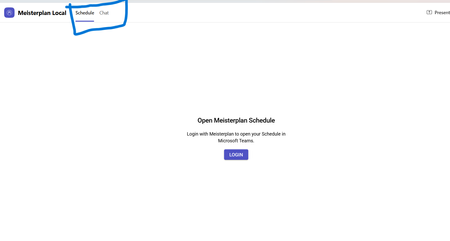
manifest file: "staticTabs": [ { "entityId": "schedule", "name": "Schedule", "contentUrl": "...", "websiteUrl": "...", "scopes": ["personal"] }, { "entityId": "conversations", "scopes": ["personal"] } ] the Schedule tab is intentionally place before conversations: it initially appears correctly, but after navigating away from the app and returning, Teams places Chat/Conversations before Shcedule. I'm using schema version 1.12. The tabs are configured in the specified order in the manifest file, and the expected tab order is displayed correctly when the app is initially opened. However, when I navigate to the Chat section, the tab order changes and does not persist as defined in the manifest file.121Views0likes0Comments
API: get video recording link via Microsoft Teams
Hi teams. What are some ways to get video recording link URLs of a teams meeting via API (Graph/Sharepoint/OneDrive)? Is it possible to get the recording URL from the calendar event? I do see the embedded video link when I am editing a recorded event in my calendar. Saw some previous post of getting access via Chat messages - callRecordingUrl: https://techcommunity.microsoft.com/t5/microsoft-365-developer-platform/get-the-link-to-the-recording-of-teams-meeting-from-the-graph/idi-p/2675306 (what are the auth required to make function calls to get this?) Wondering if there are any update on this, thanks1.6KViews0likes4CommentsHow to Download Video Clip from Microsoft Teams Programmatically
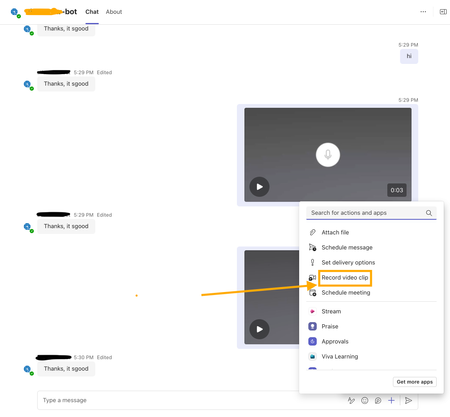
I’m developing a bot app for Microsoft Teams, and part of its functionality involves handling videos recorded using the Teams widget(see screenshot attached). I am receiving a video clip link in the bot app's backend message. Where is this video file uploaded and how can I download the video clip using that link? I have attempted the SSO auth via Entra ID to fetch the auth token and attached it against the GET request to the video clip link as the bearer token. But still getting 401 errors? Need help and guidance in this matter. Thanks.673Views0likes7Comments
Teams Personal Bot Identity Cache issue
Hi all — looking for guidance on a Teams custom app + bot naming issue. We have a custom Teams app with a bot. The app catalog/admin/dev portal surfaces show the correct app name, and the manifest + Azure Bot configuration appear correctly aligned, but the Teams personal chat surfaces still show the old/wrong bot name. What looks correct: Teams app manifest name.short / name.full have the correct app name Manifest bots[0].botId points to the expected bot ID Azure Bot resource → Configuration → Microsoft App ID matches that bot ID Azure Bot resource → Bot profile display name has the correct name Teams Developer Portal basic information shows the correct name Teams Admin Center shows the correct app short name What is still wrong: Teams left sidebar chat name shows the old/wrong name Chat top header shows the old/wrong name Inline bot sender/name in the conversation shows the old/wrong name The issue reproduces for multiple users It persists after sign out/sign in, uninstall/reinstall, republish, and retesting We may also be seeing a package/version propagation issue: after publishing an updated app package with a newer manifest version, Teams Admin Center still appears to show the previous version. Has anyone seen this before with personal bot apps? Specifically trying to understand: What is the authoritative source for the personal bot chat roster/header/sender display name?366Views0likes1CommentTeams Customer Connect: Now available globally in 26 languages
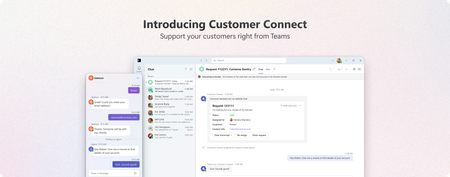
We're excited to announce that Customer Connect web chat in Microsoft Teams (previously called Live Chat) is now available globally, supporting 26 languages and bringing seamless customer engagement to businesses worldwide. For small and medium-sized businesses, every customer interaction matters. Whether someone discovers your business through a Google search, a social media post, or a friend's recommendation, the moment they land on your website is critical. With Customer Connect in Teams, you can now connect with these potential customers instantly no matter where your business is based in the world. A better way to connect with customers Your website is often the first-place potential customers interact with your business. When they have questions, waiting hours or days for an email response isn't ideal – neither for them nor for you. Customer Connect let you respond instantly to website visitors directly within Teams. No more switching tools. What's new with global availability With support for 26 languages, businesses can now provide customer support no matter where you operate. Whether you are based in Tokyo, São Paulo, or Berlin, you can set up Customer Connect to interact with customers in your preferred language. Supported languages Czech, Danish, German, English (Canada), English (United Kingdom), English (United States), Spanish (Chile), Spanish (Spain), Spanish (Mexico), French (Canada), French (France), Hungarian, Indonesian, Italian, Japanese, Korean, Norwegian Bokmål, Dutch, Polish, Portuguese (Brazil), Portuguese (Portugal), Swedish, Thai, Vietnamese, Chinese Simplified (China), Chinese Traditional (Taiwan) Key capabilities Simple setup Add the Customer Connect chat widget to your website in minutes. Configure your welcome message, set your availability, and you're ready to start conversations. Native Teams integration Chats appear alongside your regular Teams conversations. All customer interactions are automatically tracked and organized in Teams channels and Microsoft Lists, giving your team full visibility into every conversation. Customers can also book appointments directly with members of your team, making it easy to schedule follow-ups or provide high touch support. Getting started If you're already using Microsoft 365 Business, Customer Connect is included - no additional licensing required. To enable Customer Connect: Open the Admin app in Teams Configure your Customer Connect chat widget settings Add the chat widget to your website Start receiving and responding to customer chats in Teams Learn more Set up Customer Connect for your business Start a discussion with us Microsoft Teams - Small Business CommunityCS agent OK in M365 Copilot; Teams chat silent / no Studio session
We are troubleshooting a Copilot Studio agent that works correctly in Microsoft 365 Copilot and in the Copilot Studio test surface, but does not receive inbound activities from Microsoft Teams personal chat. Environment and evidence: - Agent: Copilot Studio agent (custom business assistant) - Copilot Studio agent ID: 88901b10-… (truncated) - Teams/Entra app ID: 7e4a53cc-… (truncated) - Manifest version: 1.0.8 - Channel configuration: Microsoft 365 Copilot + Microsoft Teams - Publish: Succeeded / Channel state: Synchronized - Agent Registry: Available - Authentication: Integrated / Tool credentials: Maker-provided - MCP/custom connector runtime: working (Studio tool test HTTP 200) - Microsoft 365 Copilot routing: working Failure specific to Teams: - Messages in Teams web and desktop appear delivered in the agent personal chat - Agent never replies - Studio monitor has M365 Copilot sessions, but no Teams session for those timestamps - Teams Admin Center Manage apps returns 0 results by name or exact app ID despite Agent Registry Available - Intentionally not republishing / reconnecting OAuth / rewiring connectors because M365 Copilot path proves the same agent+connection works Classification: FAIL — Teams inbound activity is not reaching the Copilot Studio agent. Questions focused on Teams delivery: 1. Why would Teams personal 1:1 messages never create a Studio conversation while M365 Copilot does? 2. Is a missing TAC Manage apps row expected under Unified App Management when Registry shows Available? 3. Known gaps: Agent Registry Available + channel Synchronized, but Teams client chat bound to a non-runtime endpoint? 4. Best diagnostic if Monitor shows 0 Teams sessions after a confirmed client send? Looking for production experience / documented workaround. Redacted evidence available; no tokens/secrets.419Views0likes2Comments
Copilot Studio in Teams sometimes wraps user input with HTML tags (e.g., <div>)
I’m using Copilot Studio deployed to Microsoft Teams, and I noticed that user messages are occasionally received with HTML tags. For example, when a user sends "get me the onboarding status", sometimes it displays in the dialog box as "<div>get me the onboarding status</div>" This does not happen consistently. I’m not sure whether this is caused by how Teams renders or sends messages (e.g., HTML vs plain text), or if it is something specific to Copilot Studio. Is this expected behavior for the Teams channel? Any clarification or recommended handling would be appreciated.702Views0likes5CommentsThe Chat Notification Badge That Won't Die
I know there's another thread on this, but literally none of those solutions worked, so I'm a starting a new thread. My chat notification won't go away. All of my chats are read. Here's everything I've done to fix this already (note- It's a corporate computer so I can't mess with the anti-virus): Signed out of the app every (desktop, web, phone) Restarted my computer Cleared the cache data from all 13 different locations Changed the setting to close the app when I shut down Closed it in the Task Manager Turned off all of my notifications Clicked on every chat I've received over the last week The only thing that seemed to maybe be the culprit was a very large company meeting and I was the last to leave. There was a lot of chat in that meeting, though I didn't participate in any of it. The reason I think this was when I went to log into to Teams from my browser, as I started to type "Microsoft Teams" I noticed in the suggested sites that there was a chat message from that meeting. So obviously I've left the meeting. I've deleted that chat. I've even left the teams channel that hosts those meetings. For what it's worth, I don't have any notifications on the phone app (android). It's just on the desktop and the web. Please, for the love of god, help. It's slowly driving me insane and I don't have the mental capacity to deal with anything else that makes me insane during quarantine. 🙂 *jk- I'm fine. It's a joke*160KViews4likes56Comments