chat
242 Topics
API: get video recording link via Microsoft Teams
Hi teams. What are some ways to get video recording link URLs of a teams meeting via API (Graph/Sharepoint/OneDrive)? Is it possible to get the recording URL from the calendar event? I do see the embedded video link when I am editing a recorded event in my calendar. Saw some previous post of getting access via Chat messages - callRecordingUrl: https://techcommunity.microsoft.com/t5/microsoft-365-developer-platform/get-the-link-to-the-recording-of-teams-meeting-from-the-graph/idi-p/2675306 (what are the auth required to make function calls to get this?) Wondering if there are any update on this, thanks1.4KViews0likes4CommentsHow to Download Video Clip from Microsoft Teams Programmatically
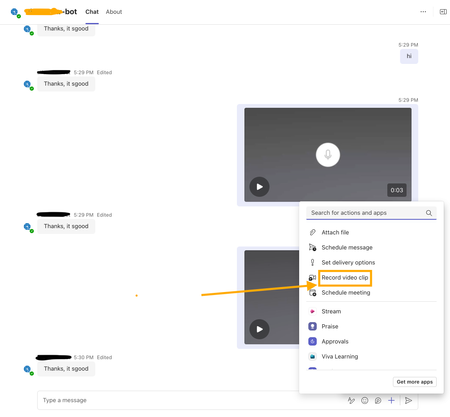
I’m developing a bot app for Microsoft Teams, and part of its functionality involves handling videos recorded using the Teams widget(see screenshot attached). I am receiving a video clip link in the bot app's backend message. Where is this video file uploaded and how can I download the video clip using that link? I have attempted the SSO auth via Entra ID to fetch the auth token and attached it against the GET request to the video clip link as the bearer token. But still getting 401 errors? Need help and guidance in this matter. Thanks.479Views0likes7Comments
Teams Personal Bot Identity Cache issue
Hi all — looking for guidance on a Teams custom app + bot naming issue. We have a custom Teams app with a bot. The app catalog/admin/dev portal surfaces show the correct app name, and the manifest + Azure Bot configuration appear correctly aligned, but the Teams personal chat surfaces still show the old/wrong bot name. What looks correct: Teams app manifest name.short / name.full have the correct app name Manifest bots[0].botId points to the expected bot ID Azure Bot resource → Configuration → Microsoft App ID matches that bot ID Azure Bot resource → Bot profile display name has the correct name Teams Developer Portal basic information shows the correct name Teams Admin Center shows the correct app short name What is still wrong: Teams left sidebar chat name shows the old/wrong name Chat top header shows the old/wrong name Inline bot sender/name in the conversation shows the old/wrong name The issue reproduces for multiple users It persists after sign out/sign in, uninstall/reinstall, republish, and retesting We may also be seeing a package/version propagation issue: after publishing an updated app package with a newer manifest version, Teams Admin Center still appears to show the previous version. Has anyone seen this before with personal bot apps? Specifically trying to understand: What is the authoritative source for the personal bot chat roster/header/sender display name?252Views0likes1Comment
CS agent OK in M365 Copilot; Teams chat silent / no Studio session
We are troubleshooting a Copilot Studio agent that works correctly in Microsoft 365 Copilot and in the Copilot Studio test surface, but does not receive inbound activities from Microsoft Teams personal chat. Environment and evidence: - Agent: Copilot Studio agent (custom business assistant) - Copilot Studio agent ID: 88901b10-… (truncated) - Teams/Entra app ID: 7e4a53cc-… (truncated) - Manifest version: 1.0.8 - Channel configuration: Microsoft 365 Copilot + Microsoft Teams - Publish: Succeeded / Channel state: Synchronized - Agent Registry: Available - Authentication: Integrated / Tool credentials: Maker-provided - MCP/custom connector runtime: working (Studio tool test HTTP 200) - Microsoft 365 Copilot routing: working Failure specific to Teams: - Messages in Teams web and desktop appear delivered in the agent personal chat - Agent never replies - Studio monitor has M365 Copilot sessions, but no Teams session for those timestamps - Teams Admin Center Manage apps returns 0 results by name or exact app ID despite Agent Registry Available - Intentionally not republishing / reconnecting OAuth / rewiring connectors because M365 Copilot path proves the same agent+connection works Classification: FAIL — Teams inbound activity is not reaching the Copilot Studio agent. Questions focused on Teams delivery: 1. Why would Teams personal 1:1 messages never create a Studio conversation while M365 Copilot does? 2. Is a missing TAC Manage apps row expected under Unified App Management when Registry shows Available? 3. Known gaps: Agent Registry Available + channel Synchronized, but Teams client chat bound to a non-runtime endpoint? 4. Best diagnostic if Monitor shows 0 Teams sessions after a confirmed client send? Looking for production experience / documented workaround. Redacted evidence available; no tokens/secrets.291Views0likes2Comments
Copilot Studio in Teams sometimes wraps user input with HTML tags (e.g., <div>)
I’m using Copilot Studio deployed to Microsoft Teams, and I noticed that user messages are occasionally received with HTML tags. For example, when a user sends "get me the onboarding status", sometimes it displays in the dialog box as "<div>get me the onboarding status</div>" This does not happen consistently. I’m not sure whether this is caused by how Teams renders or sends messages (e.g., HTML vs plain text), or if it is something specific to Copilot Studio. Is this expected behavior for the Teams channel? Any clarification or recommended handling would be appreciated.558Views0likes5CommentsCopilot Studio bot in Teams occasionally sends duplicate responses
I’m using a Copilot Studio bot deployed in Microsoft Teams, and I’m experiencing an intermittent issue where a single user message occasionally triggers two identical responses. This does not happen consistently, and there is no intentional duplicate logic in my bot design. I’m not sure whether this is caused by duplicate message delivery from Teams (e.g., retries or at-least-once delivery behavior), or something within Copilot Studio itself. Is this a known behavior for the Teams channel or Copilot Studio? Are there any recommended ways to detect or prevent duplicate responses at the bot level? Any insights or best practices would be appreciated.889Views0likes3CommentsIssue with Teams 'Add a User to Group Chat' API call?
I am getting a very strange error when trying to add a new user to an existing group chat using a GraphQL call. I have looked through the documentation, asked AI, and even contacted Microsoft support and no one can seem to explain why this API call is failing. Below is the API call that I am making. I can find no reason that I should be receiving the error message '#microsoft.graph.aadUserConversationMember' To get the basic questions out of the way.... Yes, the account making the API call DOES have permission to add users to the channel (and can do so using the frontend as normal.) Yes, the thread in question is a group chat, so adding members to that chat should be a valid command. Yes, ALL members in the group chat currently have the type '#microsoft.graph.aadUserConversationMember', so it is definitely a valid type for users in this channel. Yes, I have tried both the beta and stable channel; each gives the same error message. Yes, the invited user is internal to our organization, and is a valid target for the invite (invites work through frontend as well.) No, I cannot use the 'add member to channel' endpoint, because the chat is a group chat, not a channel. I can only assume, at this point, that the error message is a red herring and there's something else wrong with my API call?Why am I receiving this error message when trying to add a member to a pre-existing group chat? Thanks in advance for any assistance. POST to URL: https://graph.microsoft.com/beta/chats/[[THREAD_ID]]@thread.v2/members BODY: { "@odXXX.type": "#microsoft.graph.aadUserConversationMember", "roles": [], "email address removed for privacy reasons": "https://graph.microsoft.com/v1.0/users/[[USER_ID]]" } ERROR MESSAGE: {"error":{"code":"BadRequest","message":"The provided '#microsoft.graph.aadUserConversationMember' for 'odXXX.type' is not valid for this operation.","innerError":{"date":"2026-01-29T18:10:32","request-id":"<PII:moderator removed>","client-request-id":"<PII:moderator removed>"}}}662Views0likes9Comments
Bot not receiving message events in shared channels (RSC)
Hi folks, Running into an issue with a bot in Microsoft Teams shared channels. I've configured RSC permissions to listen for new messages. This works as expected in standard channels - I receive events for every new message. However, in shared channels, the behavior is different: I only receive events when the bot is explicitly tagged Regular messages in the channel don’t trigger any events Permissions currently granted: Channel.ReadBasic.All (Application) ChannelMember.Read.All (Application) ChannelMessage.Read.All (Application) Has anyone faced this with shared channels? Is this expected behavior or am I missing something in setup? Thanks!385Views0likes5Comments
How do I send a message to myself with PowerAutomate?
I am developing a PowerAutomate flow, I want to use the function "post message in chat or channel", I can send messages to anyone in "one to one" private chats but not on the private chat I have with myself. Has somebody found a way to message himself via power automate? I can't create it as a "new chat" in PA because it says users cannot be duplicate. Then I figured out I had to find the ID of the chat with myself. I tried using the microsoft graph api to retrieve the id from "me/chats" but the chat with myself is not shown. I tried many different filters and expansions with no success. I also tried analyzing the id itself and discovered that, in the case of "one to one" chats, it's made of {the sender id} and {the receiver id} I then tried constructing an id that contains 19:{myuserid}_{myuserid}@{domain} but it responds that there is no record. I tried many combinations, thanks for the help.18KViews0likes3Comments