business applications
18 TopicsGo to market faster with no-cost, user-friendly marketing resources
Go to market faster with no-cost, user-friendly marketing resources Take your marketing campaigns further with campaigns in a box (CiaB), collections of ready-made, high-quality marketing assets designed to deepen customer engagement, simplify your marketing efforts, and win customers. Microsoft offers both new and refreshed co-branded campaigns for the following solution areas: Data & AI (Azure), Modern Work, Business Applications, Digital & App Innovation (Azure), Infrastructure (Azure), and Security. Get started today by visiting the Partner Marketing Center, where you'll find resources such as execution guides, customizable nurture tactics, and more. Create interest in AI adoption among audiences. As AI technology grabs headlines and captures imaginations, use this campaign to illustrate your audiences' unique opportunity to harness the power of AI to deliver value faster. Learn more about the campaign: Era of AI: Show audiences how to take advantage of the potential of AI to drive business value and showcase the value in Microsoft AI solutions delivered and tailored by your organization Data & AI (Azure) Use one of the Data & AI campaigns to demonstrate how your customers can win customers with AI-enabled differentiation. Show how they can transform their businesses with generative AI, a unified data estate, and solutions like Microsoft Fabric, Microsoft Power BI, and Azure Databricks. Campaigns include: Innovate with the Azure AI Platform: Help your customers understand the potential of generative AI solutions to differentiate themselves in the market, and inspire them to build GenAI solutions with Azure AI Platform. Unify Your Intelligent Data and Analytics Platform (ENT): Show enterprise audiences how unifying data and analytics on an open foundation can help streamline data transformation and business intelligence. Unify Your Intelligent Data and Analytics Platform (SMB): Create awareness and urgency for SMBs to adopt Microsoft Fabric as the AI-powered, unified data platform that will suit their analytics needs. Modern Work Access the Modern Work campaign to help SMBs understand how they can effectively transform their businesses with AI capabilities. Learn more about the campaign: Microsoft 365 Copilot SMB: Increase your audience's understanding of the larger potential of Microsoft 365 Copilot and how AI capabilities can help accelerate growth and transform operations. Business Applications Nurture interest with customers ready to modernize and transform their business operations with these BizApps go-to-market resources. Campaigns include: Migrate and Modernize Your ERP with Microsoft Dynamics 365: Position yourself as the right partner to modernize or replace your customers' legacy on-premises ERP systems with a Copilot-powered ERP. Business Central for SMB: Offer customers Microsoft Dynamics 365, a comprehensive business management solution that connects finance, sales, service, and operations teams with a single application to boost productivity and improve decision-making. Digital & App Innovation (Azure) Position yourself as the strategic AI partner of choice and empower your customers to grow their businesses by helping them build new AI applications faster and gain agility with intelligent experiences. Campaigns include: Build and Modernize AI Apps: Help customers building new AI-infused applications and modernizing their application estate take advantage of the Azure AI application platform. Accelerate Developer Productivity: Engage decision-makers responsible for productive development and position your organization as uniquely suited to help customers take advantage of the power of AI-assisted development tools like GitHub Copilot and the Microsoft developer platform to innovate and deliver faster. Infrastructure (Azure) Work with your customers to transform their digital operations and help them tap into the cloud to expand capabilities and boost their return on investment. Campaigns include: Migrate VMware Workloads to Azure: Help partners capitalize on the partnership between VMware and Microsoft so they can migrate VMware workloads to Azure in an efficient and cost-effective manner. Migrate and Secure Windows Server and SQL Server to Azure (ENT): Showcase the high return on investment (ROI) of using an adaptive cloud purpose-built for AI workloads, and help customers understand the value of migrating to Azure at their own pace. Security Demonstrate the power of unified security solutions offered by Microsoft and help customers understand the importance of robust cybersecurity in today's tech landscape. Campaigns include: Defend Against Cybersecurity Threats: Increase your audience's understanding of the powerful, AI-driven Microsoft unified security platform, which integrates Microsoft Sentinel, Defender XDR, Security Exposure Management, Security Copilot, and Microsoft Threat Intelligence. Data Security: Show customers how Microsoft Purview can help fortify data security in a world facing increasing cybersecurity threats828Views1like0CommentsRegister for the Business Applications and Modern Work FY26 GTM Kickoff Event
Join us on July 22, 2025, at 8:00 AM Pacific Time—or watch on demand after 12:00 PM Pacific Time—to learn about the exciting go-to-market (GTM) priorities and initiatives planned for FY26 across the Business Applications and Modern Work solution areas. This year’s event will cover the investments we’re making to help you grow your business and deliver customer engagements that bring the value of AI to life. The event will be more accessible than ever before, with closed captions available in 32 languages. Plus, you’ll be able to: Engage with Business Applications and Modern Work leadership to understand the strategic initiatives planned for FY26. Align your business strategies with Microsoft to maximize your potential for success in FY26. Stay informed about the latest developments and resources available to support your business growth. Register early to reserve your spot—and get the agenda, session details, and updates sent directly to your inbox. Can’t attend the live event? Register anyway to get notified when the event content is available on demand. Register here!600Views1like0Comments
Introducing Everpure Cloud Azure Native for Azure VMs
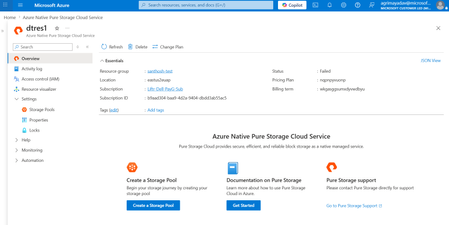
Overview We're excited to announce Everpure Cloud Azure Native for Azure Virtual Machines (VMs). With this release, Azure customers can provision enterprise-grade block storage volumes and attach it directly to their Azure VMs, all managed natively within the Azure portal. No appliances to manage, no complex storage stack to stitch together — just elastic, high-performance block storage that behaves like any other Azure disk. This release solves three persistent challenges Azure VM customers face with traditional Managed Disks: Pay for capacity what you actually use, not what you provision — Billing follows effective capacity after deduplication and compression, helping customers avoid overprovisioning and reduce storage costs (by up to 40%) Scale storage independently from compute — Grow capacity and tune performance without resizing your VM or touching the VM SKU, giving you finer control over both cost and performance. Enterprise data services built in — Thin provisioning, deduplication, and compression — all native to Everpure. What you can expect Familiar building blocks — storage pools, volume groups, and volumes that map cleanly to your applications and VMs. Independent scaling of capacity and IOPS — dial storage performance up or down without disturbing compute. Seamless guest-OS integration — mounted volumes appear as standard Windows disks; no special drivers or custom tooling required. Step-by-step: Setting up Everpure Cloud Azure Native storage for your Azure VM Step 1 — Deploy Everpure Cloud service Find Azure Native Everpure Cloud in the Azure Marketplace and deploy it into your subscription. The service is provisioned natively as an Azure resource and enables the service in selected region. Step 2 — Create a Storage Pool Create a storage pool — Choose an availability zone for resiliency and use the performance slider to set your desired IOPS independently of capacity Step 3 — Create a volume group Create a volume group — a logical container that groups related volumes together, for example all the disks belonging to a single application, database, or VM. Operating at the group level makes access control and day-2 management simpler at scale. Step 4 — Create volumes Within the volume group, create the volumes your VM will consume. Specify a name and size — this size is a logical limit, not pre-allocated capacity. Volumes can be resized live and shared across multiple VMs when needed. Step 5 — Mount to your Azure VM From the volume group, select Mount on VM. The Azure VM connection experience opens, letting you attach the volume to your chosen Azure Virtual Machine. Step 6 — Bring the disk online inside the guest OS Once mounted, the final step happens inside the VM. The Everpure volumes appear as standard, uninitialized Windows disks. Open Disk Management, initialize the disks with GPT, run the New Simple Volume Wizard, and format them as NTFS. Within seconds, the Everpure-backed volume becomes a regular drive letter (for example, F:) ready for any workload. Get Started Today Everpure Cloud Azure Native for Azure VMs is available now in the Azure Marketplace. Deploy it into your subscription to start bringing enterprise-grade Everpure to your Azure VMs Start Your Free Trial of Everpure Cloud Azure Native Check out the Everpure Cloud release notes for detailed guidance on supported configurations, capacity points, and operational considerations. Read the Everpure GA announcement blog to learn how Everpure Cloud Azure Native for Azure VMs helps reduce costs and simplify storage operations. Have feedback or questions? Drop a comment below — we'd love to hear how you plan to use Everpure Cloud for your Azure workloads.599Views2likes0Comments