business applications
111 TopicsWhen Intent Becomes the Interface: Why Applications Are No Longer the Starting Point
For decades, enterprise software has asked people to learn how applications work. Which screen to open. Which fields to complete. Which workflow to trigger. Which report to generate. And which application to visit next. Here is a situation I keep meeting. A sales executive is preparing a renewal proposal. Customer relationships live in CRM. Contract terms sit in SharePoint. Support issues are tracked elsewhere. Revenue data comes from finance. Relevant conversations are scattered across Outlook and Teams. The executive knows what needs to be accomplished. The software requires them to figure out how. But something interesting is happening. We are beginning to separate the intent to accomplish work from the applications traditionally required to perform it. Microsoft's developments across Copilot, Cowork, Code, Copilot Studio and Microsoft IQ suggest that this could become a defining shift in enterprise software. The question is no longer simply how to make applications more intelligent. What if enterprise software started with the work, rather than the application? Enterprise Software Was Built Around Navigation Traditional enterprise applications organize business capabilities into reliable systems. ERP manages transactions. CRM manages customer relationships. HR platforms manage employee processes. These systems aren't going away. Their data models, transaction controls and business rules remain essential. But their user experiences were designed for a world where software needed explicit instructions at almost every step. People became the integration layer. We retrieved information from one system, interpreted it, entered it into another, initiated approvals and followed up when something stalled. APIs and automation improved individual steps. Generative AI introduced conversational interfaces. But the underlying model often remained unchanged. People still needed to know which application to use and how to move the result into the next step. Now the architecture itself is beginning to change. Microsoft Is Bringing Three Capabilities Together One of Microsoft's more consequential recent developments is the convergence of applications, workflows and agents in Copilot Studio. These are fundamentally different capabilities. Applications provide structured experiences for people to view information, make decisions and act. Workflows provide predictable execution for repeatable processes, business rules and integrations. Agents bring reasoning and adaptation when the next step cannot always be predetermined. Not every business process needs an agent. Not every decision should be probabilistic. And not every interaction belongs in a chat window. A purchase approval may require deterministic policy enforcement. Evaluating an unusual supplier proposal may benefit from AI reasoning. A material exception may require human judgment through a purpose-built application. Microsoft Copilot Studio is bringing these capabilities into a more unified development experience, supported by agent orchestration, workflow execution, reusable skills and connected tools. And the audience for this convergence is already enormous: Microsoft noted on a recent earnings call that more than 80% of the Fortune 500 already have active agents built with its low-code tools. This suggests a useful architectural principle: Use reasoning where the path is uncertain. Use workflows where the rules are known. Use applications where human interaction adds value. I have started calling this the Composition Rule. The breakthrough isn't replacing one with another. It is combining them deliberately. From Application-Led to Intent-Led Work Return to our sales executive preparing a renewal proposal. Instead of visiting multiple systems, the executive could begin with a request: Prepare the renewal proposal. Incorporate the latest commercial terms, outstanding support issues and account commitments. Flag anything requiring approval. The system must interpret the request, retrieve authoritative information, apply business rules, assemble the deliverable and recognize where human judgment is necessary. Different Microsoft capabilities can contribute to that experience. Microsoft 365 Copilot Cowork enables delegation of complex, multi-step work across connected productivity experiences. Work IQ provides context from Microsoft 365 collaboration. Fabric IQ contributes business semantics and relationships across enterprise data. Foundry IQ supports reusable enterprise knowledge and retrieval. Together, they form the context layer I explored in The Context Advantage and intent-led work is where that investment begins to pay out. Dynamics 365 and Power Platform connect intelligence to operational records, business processes and actions. Copilot Studio enables agents to use tools and workflows, while applications can provide structured experiences for human review. These are complementary building blocks, not necessarily one automatically integrated execution path. Bringing them together requires deliberate solution architecture, connectors, permissions and orchestration. The executive receives a proposal, supporting evidence and decisions requiring attention. The underlying systems remain important. But navigating them is no longer necessarily the executive's responsibility. In traditional enterprise architecture, applications organize capabilities and users navigate between them. In an intent-led architecture, the desired outcome becomes the organizing principle. Applications, workflows, agents and enterprise services are composed around that intent. The application remains important. But it is no longer necessarily the primary unit of the user experience. When Software Can Be Assembled Another development deserves attention. Microsoft's Copilot Code and Copilot Studio capabilities are making it easier to create software experiences from natural-language requirements. Copilot Managed Runtime provides Microsoft-hosted infrastructure for running and governing supported applications. These capabilities are at different stages of availability, but their direction is significant. Traditionally, an enterprise application begins with a development project: requirements, design, engineering, testing, deployment and maintenance. That remains essential for complex, mission-critical systems. But not every business need justifies a conventional development cycle. A procurement manager may need a focused interface for comparing supplier proposals. A finance team may need a temporary application for reviewing reconciliation exceptions. Increasingly, some experiences can be generated, connected to governed data and shared with colleagues. The distance between recognizing a business need and creating a useful software experience may shrink dramatically. But faster creation also raises important questions. Who owns the generated application? How is it tested? Which identities and permissions does it use? How is it maintained or retired? Microsoft Copilot Managed Runtime, currently in preview, addresses part of this challenge through managed hosting, Microsoft Entra authentication and application governance capabilities. The ability to generate software is becoming easier. The ability to operate that software responsibly remains an engineering discipline. Software creation may become democratized. Software accountability cannot become optional. Reasoning Is Not Execution There is one distinction I find myself drawing on whiteboards more often than any other as AI moves deeper into enterprise processes. Large language models are useful when tasks require interpretation, synthesis and adaptation. But enterprises also depend on predictability. An invoice approval threshold shouldn't change because a model reasons differently. A financial transaction must preserve the integrity of the system recording it. Consider an insurance claim. An agent interprets submitted documentation and identifies missing information. A workflow applies established eligibility rules and routes the claim. A human reviewer examines complex exceptions through an application presenting the relevant evidence. The model contributes interpretation. The workflow contributes repeatability. The application supports human judgment. And the system of record preserves the authoritative transaction. This requires business capabilities to be accessible beyond application screens. APIs, Model Context Protocol (MCP) tools, Power Platform connectors and reusable services become building blocks through which intelligent workflows can operate across systems. Microsoft Copilot Studio supports this direction through workflow triggers, agent handoffs, connected tools and evaluation capabilities. Microsoft Foundry provides complementary capabilities for agent development, evaluation, tracing and operational monitoring. The quality of the experience increasingly depends on how well these capabilities can be composed - not simply on how intelligent the underlying model is. For enterprise architects, this introduces a more useful question than where to deploy another agent: Which parts of this process should be intelligent, which must be deterministic and which require human judgment? That is the Composition Rule at work. A New Architecture, Not Another Generation of Sprawl The counterargument comes up in almost every architecture conversation I am part of. If every employee can generate applications and every department can assemble workflows, enterprises could recreate decades of software fragmentation at unprecedented speed. A hundred individually useful applications don't necessarily create a coherent enterprise architecture. The answer isn't to prevent experimentation. It is to establish reusable foundations. Common identity through Microsoft Entra. Trusted business semantics through Fabric IQ. Approved connectors and MCP tools. Shared engineering standards. Managed execution environments. Clear ownership and lifecycle controls. Microsoft Agent 365 adds an enterprise control plane for discovering, securing and governing agents across supported environments. These capabilities address different parts of the challenge. They do not eliminate the need for enterprise architecture. The more accessible software creation becomes, the more important shared foundations become. Otherwise, we risk making software easier to build while making the enterprise harder to operate. When the Business Need Comes First I don't expect enterprise applications to disappear. Organizations will continue to need ERP, CRM, finance, HR and industry-specific platforms. Systems of record remain indispensable. But the relationship between people and applications is beginning to evolve. Today, enterprise users learn which application performs which function. Tomorrow, more experiences may begin with a desired result, with intelligence coordinating underlying capabilities and presenting the appropriate interface when needed. Sometimes that interface will be a conversation. Sometimes a generated application. Sometimes a familiar enterprise screen. And sometimes a workflow will complete a defined step without another interaction. Microsoft's convergence of Copilot, Copilot Studio, Microsoft IQ, Power Platform and managed execution infrastructure makes this architectural possibility increasingly tangible. We may be moving from a world where people navigate software to accomplish work toward one where software is assembled around the work people need to accomplish. That won't happen overnight. It requires strong architecture, trusted data, explicit execution boundaries and deliberate engineering choices. But it raises a question worth asking before the next enterprise software investment: Are we designing another application people must learn to operate or a capability that understands the work they are trying to accomplish? References Microsoft Copilot Studio Blog: “Build apps, workflows, and agents together” The Official Microsoft Blog: “Introducing the new Copilot with Home, Code and Autopilot” (September 25, 2026) Microsoft Copilot Studio Blog: “Microsoft Copilot Managed Runtime: Enterprise code execution for Microsoft 365” Microsoft 365 Blog: “Powering Frontier Transformation with Copilot and agents” (Copilot Cowork) Microsoft IQ Microsoft Agent 365 Microsoft FY26 Q2 earnings conference call — more than 80% of the Fortune 500 with active agents built using Microsoft's low-code tools Ashok Karania Articles on Microsoft Tech Community — “The Context Advantage”; “When AI Stops Waiting for Instructions”; “Beyond Tokens: Rethinking AI Economics with Microsoft Foundry” Image Credit: OpenAI35Views0likes0Comments
Earn the new Clinical Applications specialization for Dragon Copilot
Starting today, eligible partners can earn the new Clinical Applications specialization, which recognizes proven expertise in deploying Dragon Copilot for healthcare customers. Earning the specialization can unlock co-sell and referral eligibility with Microsoft sellers, along with funding opportunities, Azure bulk credits, deployment support, and go-to-market assets designed to support you as you scale your healthcare practice. Review the requirements now and start on the path to attainment today.178Views0likes0CommentsKeeping or earning four Business Applications specializations just got simpler
Starting on August 24, 2026, Microsoft is simplifying eligibility requirements for the Sales, Service, Finance, and Supply Chain specializations. Eligible deployments will be measured using monthly active users (MAU) instead of monthly consumption value (MCV), and the gross growth performance requirement is being removed. In addition, Microsoft Marketplace tags are also being refreshed to better align with current products. These updates are designed to align qualification requirements with market demand and apply across all four specializations, so there's no need to track separate changes for each one.294Views0likes0Comments
Introducing Everpure Cloud Azure Native for Azure VMs
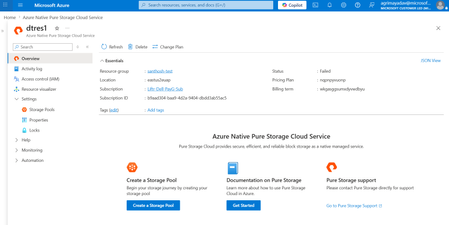
Overview We're excited to announce Everpure Cloud Azure Native for Azure Virtual Machines (VMs). With this release, Azure customers can provision enterprise-grade block storage volumes and attach it directly to their Azure VMs, all managed natively within the Azure portal. No appliances to manage, no complex storage stack to stitch together — just elastic, high-performance block storage that behaves like any other Azure disk. This release solves three persistent challenges Azure VM customers face with traditional Managed Disks: Pay for capacity what you actually use, not what you provision — Billing follows effective capacity after deduplication and compression, helping customers avoid overprovisioning and reduce storage costs (by up to 40%) Scale storage independently from compute — Grow capacity and tune performance without resizing your VM or touching the VM SKU, giving you finer control over both cost and performance. Enterprise data services built in — Thin provisioning, deduplication, and compression — all native to Everpure. What you can expect Familiar building blocks — storage pools, volume groups, and volumes that map cleanly to your applications and VMs. Independent scaling of capacity and IOPS — dial storage performance up or down without disturbing compute. Seamless guest-OS integration — mounted volumes appear as standard Windows disks; no special drivers or custom tooling required. Step-by-step: Setting up Everpure Cloud Azure Native storage for your Azure VM Step 1 — Deploy Everpure Cloud service Find Azure Native Everpure Cloud in the Azure Marketplace and deploy it into your subscription. The service is provisioned natively as an Azure resource and enables the service in selected region. Step 2 — Create a Storage Pool Create a storage pool — Choose an availability zone for resiliency and use the performance slider to set your desired IOPS independently of capacity Step 3 — Create a volume group Create a volume group — a logical container that groups related volumes together, for example all the disks belonging to a single application, database, or VM. Operating at the group level makes access control and day-2 management simpler at scale. Step 4 — Create volumes Within the volume group, create the volumes your VM will consume. Specify a name and size — this size is a logical limit, not pre-allocated capacity. Volumes can be resized live and shared across multiple VMs when needed. Step 5 — Mount to your Azure VM From the volume group, select Mount on VM. The Azure VM connection experience opens, letting you attach the volume to your chosen Azure Virtual Machine. Step 6 — Bring the disk online inside the guest OS Once mounted, the final step happens inside the VM. The Everpure volumes appear as standard, uninitialized Windows disks. Open Disk Management, initialize the disks with GPT, run the New Simple Volume Wizard, and format them as NTFS. Within seconds, the Everpure-backed volume becomes a regular drive letter (for example, F:) ready for any workload. Get Started Today Everpure Cloud Azure Native for Azure VMs is available now in the Azure Marketplace. Deploy it into your subscription to start bringing enterprise-grade Everpure to your Azure VMs Start Your Free Trial of Everpure Cloud Azure Native Check out the Everpure Cloud release notes for detailed guidance on supported configurations, capacity points, and operational considerations. Read the Everpure GA announcement blog to learn how Everpure Cloud Azure Native for Azure VMs helps reduce costs and simplify storage operations. Have feedback or questions? Drop a comment below — we'd love to hear how you plan to use Everpure Cloud for your Azure workloads.652Views2likes0CommentsAdoption and Change Management specialization retired June 25, 2026
The Adoption and Change Management specialization retired on June 25, 2026. Rather than maintain a standalone specialization, adoption and change management capabilities are now measured within AI Business Solutions product-aligned specializations, such as Microsoft 365 Copilot, Secure AI Productivity, and Modernize Endpoints. Spreading these change management skill requirements across several specializations gives partners the opportunity to showcase their expertise in the context of specific, in-demand solutions. What this means for partners The Adoption and Change Management specialization is no longer available for enrollment or renewal. If you currently hold the specialization, it remains active until your anniversary date. If you currently hold or are pursuing adoption and change management capabilities as part of your Solutions Partner or incentives strategy, review your specialization status in Partner Center and identify the AI Business Solutions specialization that supports your business goals. Assess any remaining requirements, create a transition plan, and enroll in or continue progressing toward that specialization to protect benefit continuity. If you work with a Partner Development Manager or Partner Technology Strategist, engage them to support your transition. Why this matters Adoption and change management capabilities are now evaluated within AI Business Solutions product-aligned specializations, so partners can demonstrate their expertise in the context of specific, in-demand solutions. Go to Specialization Dashboard in Partner Center to check your anniversary date and specialization status, and review the other AI Business Solutions-aligned specializations.235Views0likes0CommentsNew eligible workloads for the Solutions Partner designation for Business Applications
The pathway to attaining and renewing the Solutions Partner designation for Business Applications has been widened thanks to the addition of two new eligible workloads: Microsoft Dynamics 365 Contact Center and Copilot Studio. Contact Center has been added across both performance and customer success metrics, while Copilot Studio has been added to performance. A Business Applications designation demonstrates your capabilities delivering solutions on Dynamics 365 and Power Platform, so if you don't already hold this designation, we encourage you to pursue it now. Partners approaching their renewal window can start preparing for renewal today. Visit the Business Applications dashboard in Partner Center to view how this addition has affected your progress toward attaining or renewing the designation. Go to the Business Applications dashboard to learn more.261Views1like0Comments