bug
41 Topics
File History problems after installing KB5124008, KB5126052,KB5126146, KB5122878, and KB890830
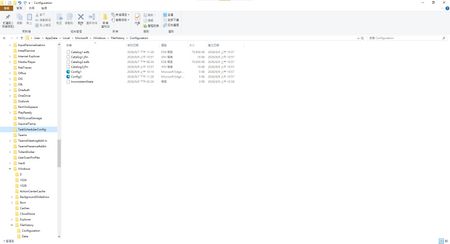
This morning, I ran Windows Update on two Windows 10/11 computers, but the file history feature stopped working completely after the update. Previously, after updating KB5120249 and KB5101684, files could still be backed up to the D: drive normally. The "Last Backup" time in "File History" is not updating correctly. Newly created or saved Word documents, pictures, videos, etc., still show "No previous version available" in "Content → Previous Versions". No folders were corrected; their dates are automatically updated. After running Windows Update again today, the file history feature stopped working on both computers. The File History panel pops up but cannot be used, prompting for a hard drive connection. (The hard drive is connected and I've confirmed it can read and write.) resulting in an "InconsistentState" entry in C:\Users\User\AppData\Local\Microsoft\Windows\FileHistory\Configuration. I'm very angry. If Microsoft doesn't address this, I'll keep complaining. If anyone else has encountered the same situation, please leave a comment below. You can also check Microsoft Q&A or the Microsoft Community Hub. The five updates installed are: September 8, 2026—KB5122878 (OS Builds 19045.7725 and 19044.7725) September 8, 2026-KB5126146 Cumulative Update for .NET Framework 3.5, 4.8 and 4.8.1 for Windows 10 Version 22H2 2026-09 Security Update (KB5124008) (26200.9445) 2026-09 .NET Framework Security Update (KB5126052) Windows Malicious Software Removal Tool x64 - v5.145 (KB890830) Deleting the %LocalAppData%\Microsoft\Windows\FileHistory folder also failed. Furthermore, "File History" itself is not listed in Microsoft's "Deprecated Features List." While other backup features suggest that Microsoft has no plans to discontinue it. Microsoft is going to pretend it doesn't exist. These worked normally before the update but stopped working afterward. This is to inform other users experiencing the same problem.6.5KViews5likes43Comments
RDCMan v3.21 crashing
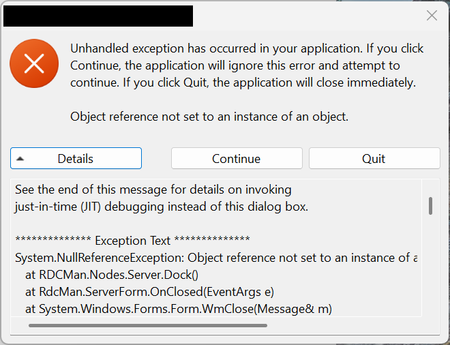
Getting the following error System.NullReferenceException: Object reference not set to an instance of an object. at RDCMan.Nodes.Server.Dock() at RdcMan.ServerForm.OnClosed(EventArgs e) at System.Windows.Forms.Form.WmClose(Message& m) at System.Windows.Forms.Form.WndProc(Message& m) at RdcMan.RdcBaseForm.WndProc(Message& m) at System.Windows.Forms.NativeWindow.Callback(HWND hWnd, UInt32 msg, WPARAM wparam, LPARAM lparam) The error seems to happen when I have an undocked session, I restart the remote machine on the the undocked window, and it stays open, when I try to reconnect, on the same undocked window, it opens another docked session, I can login to the new session, and undock it, so now I have two undocked windows, the old one (disconnected) and the new one. I try to close the old one and I get the error shown below, (details above). If I click Continue, nothing happens, if I hit Quit, it closes RDCMan, as stated in the window.578Views0likes4Comments
sigcheck64 2.92 output in UNICODE instead ANSI
Hi I Upgrade sigcheck64 from 2.90 to 2.92. Now lot of scripts can't evaluate the version of an exe. I redirect the output from sigcheck64.exe -AcceptEULA -nobanner -n excel.exe to a file and see that the file is unicode. with 2.90 it works fine. FOR /F %i IN ('sigcheck64.exe excel.exe') DO ECHO %i results in 1 instead 16.0..... Can you fix this soon?75Views0likes0CommentsBroken File History after July/August Updates (KB5101684 on Win11 25H2 / KB5120249 on Win10 22H2)
Hi everyone, I am writing to report a major regression bug with File History that was introduced in the recent Windows updates. This is happening across two entirely different machines with no settings changed, no system files modified, and no registry tweaks applied. The Issue: Windows 11 25H2 > after installing KB5101684 (July 29, 2026) Windows 10 22H2 > after installing KB5120249 (August 12, 2026) On both PCs backing up to a local drive (D:), the underlying files are actually being written to the drive, but the File History interface is completely broken: TheLast Backup time stamp in Control Panel frozen and fails to update automatically. In File Explorer, right-clicking new files > Properties> Previous Versions shows There are no previous versions available, making daily time-travel restoration impossible. Temporary Workaround: The only way to force it to sync is to go to Control Panel > File History > Select Drive, and re-select the D: drive again. This proves the backup engine works, but the automatic scheduling and catalog syncing are completely frozen by these updates. Please Help Upvote on Feedback Hub: I have already submitted this issue via the Feedback Hub but have received no official response yet. Since File History is critical for users who prefer local offline backups over OneDrive, we need to bring this to Microsoft’s attention immediately so they can patch it in the next cumulative update. If you are experiencing the same issue, please upvote my feedback link below:[Post your Feedback Hub sharing screenshot]455Views4likes1Comment
Bug na bateria após atualização em 06/05/2026
Olá, pessoal. Tenho um notebook com processador Intel Core i5 de 11ª geração e faço parte do Programa Windows Insider. Na quarta-feira, 06/05/2026, por volta das 16h, ao desligar o notebook, apareceu a opção de atualização. Selecionei “Atualizar e desligar”. Aguardei o desligamento, fechei a tampa e deixei o equipamento conectado ao carregador, com aproximadamente 80% de bateria. Por volta das 18h, ao sair para dar aula, levei o notebook sem o carregador. Ao chegar à instituição e ligar o equipamento, ele permitiu apenas digitar a senha de login e desligou completamente, sem possibilidade de religar. Ao retornar para casa, conectei o carregador e o sistema indicava bateria em 0%. Aguardei cerca de 30 minutos, mas o nível de bateria não aumentou. Depois de alguns minutos conectado, consegui iniciar o notebook, porém a bateria continuava marcando 0%. Verifiquei o Windows Update e havia uma atualização não concluída. Tentei corrigir removendo a atualização e baixando novamente, mas ela não finalizava. Durante todo o dia 07/05/2026, tentei atualizar novamente, sem sucesso. O notebook ficou muito lento e a bateria continuava em 0%. Na sexta-feira pela manhã, 08/05/2026, após deixar o equipamento durante a madrugada baixando a atualização, ela chegou a 99%, mas não concluiu. Resolvi então restaurar o sistema, escolhendo a opção de manter aplicativos e arquivos. A restauração foi concluída com sucesso. O equipamento voltou ao normal em desempenho e, no primeiro reinício, a bateria voltou a aparecer com 100%. Realizei testes de carga e descarga durante a manhã de 08/05/2026 e utilizei o equipamento normalmente à tarde. Na manhã de 09/05/2026, notei algo estranho: a bateria ainda estava em 100%, mesmo após o notebook passar a noite hibernado. Continuei trabalhando e, de repente, o equipamento desligou sem qualquer aviso de bateria fraca. Ao conectar novamente o carregador e iniciar a máquina, a bateria voltou a ficar travada em 0%, mesmo após mais de 2 horas conectada. Ao verificar as atualizações, percebi que as mesmas atualizações estavam novamente disponíveis. Já removi a inscrição no Programa Windows Insider e desinstalei as atualizações recentes, mas isso não alterou a situação. Entrei em contato com o suporte da Microsoft e fui orientado a relatar o caso aqui, pois, por participar do Programa Insider, pode se tratar de um bug relacionado a alguma versão que esteja em conflito com o gerenciamento da bateria. Pretendo restaurar novamente a máquina para verificar se o funcionamento volta ao normal. As atualizações relacionadas são: * KB5073032 - 2025.11 * KB5082257 * KB5082417 Gostaria de saber se outros usuários do Programa Insider tiveram problema semelhante envolvendo atualização, bateria travada em 0% ou falha no gerenciamento de energia após atualização recente.273Views0likes1CommentUrgent: Stuck KB5094126 (2026-06 Security Update) Loop on ASUS M413A
Hello, I have a very urgent issue. I am running an ASUS M413A Model M413IA-EB211T laptop running in the Windows 11 Insider Preview program. Right now, my machine is caught in a persistent and highly aggressive background update loop regarding the June 2026 Security Update KB5094126 for OS Build 26200.8655. The core background engines wuauserv and usosvc continually flip themselves back to Running and Manual/Automatic via background kernel self-healing routines. They are completely ignoring manual user flags to stay disabled via standard sc config commands. Because my system utilizes 8 GB of total RAM with shared integrated graphics, this ongoing background processing loop completely bottlenecks my remaining usable memory. This is throwing my processor usage to 100 percent and causing extreme, loud cooling fan strain whenever the AC charger is plugged in. Furthermore, the loop is continually eating 5 to 12 GBs of data at every single automatic download attempt, creating massive network usage and consuming massive storage bandwidth. My Exact System Specs: Device Name: LAPTOP-S4R984K2 Processor: AMD Ryzen 7 4700U with Radeon Graphics 2.00 GHz, 8 Cores Installed RAM: 8.00 GB 7.42 GB usable due to integrated hardware reservation Graphics Card: Integrated AMD Radeon Graphics 496 MB dedicated video cache System Type: 64-bit operating system, x64-based processor Storage Environment: 226 GB used out of 477 GB available total capacity What Actionable Steps I Am Seeking from the Community: Question 1. July Update Availability Check: Is there a way to safely skip this broken June patch and download the July updated version directly for my specific environment: Windows 11 Insider Preview Build 26200.8655? Question 2. Safe Standalone Roadmap: If I must install this, what is the exact method to download the correct standalone package for KB5094126 and initialize it manually without using the broken Windows Update pipeline? Question 3. Enforcement Command: What exact script can I deploy inside an elevated Administrator Command Prompt cmd or anywhere else to forcefully inject a registry block or anything else that stays active for as long as I put it? It must survive the aggressive Insider kernel health loops and hold the block long-term without risking database corruption or triggering automatic system overrides? Question 4. Cache and Datastore Maintenance Question: Is there any safe method to clear out the active transaction log database handles inside C:\Windows\SoftwareDistribution\DataStore\Logs? Could these lingering handles be the underlying reason why this build is failing to process the install, and how can they be purged without risking database corruption or a forced recovery loop? CRITICAL CONSTRAINT — Strict Risks I Must Avoid: I am completely refusing to do an In-Place Upgrade, a total system reset, or utilize the built-in Fix problems using Windows Update recovery utility. I need the forum experts to provide a path that completely guards against the following risks: Risk 1. System Freeze and Repair Loops: Falling into a mid-way installation freeze or an endless Automatic Repair boot loop where the machine fails to load back to the desktop. Risk 2. Display and Brightness Driver Corruption: Resetting, updating, or modifying my legacy display driver configuration. Any driver modification will immediately re-trigger unreadable thin system fonts, highly oversaturated display graphics, or high brightness spikes. Risk 3. Loss of Custom Profiles: Overriding my fine-tuned power slider behaviors, custom screen brightness thresholds, or my explicitly disabled auto-brightness/adaptive content feature tags. I must avoid resetting any of these features, as simply changing the brightness level itself causes a severe brightness spike. Complete Ledger of Troubleshooting Steps Taken So Far All Failed or Reversed: Step 1. Cache Purges: Cleared out the SoftwareDistribution Download folder, but the text entry remains stuck on the Settings app screen. Step 2. File-Level Permission Locks: Used icacls to deny the local SYSTEM account permission to execute wuaueng.dll. This successfully froze the loop for exactly 3 days until the automated 3-day Insider system health check forcefully restored factory permissions and restarted the services. Step 3. Firewall Barriers: Set up outbound Windows Defender Firewall block rules targeting the specific update services, which were actively bypassed by alternative network pipelines inside svchost.exe. Step 4. Service Configurations: Regularly deployed combination scripts to stop and disable wuauserv, usosvc, and bits via command line, which are immediately overwritten by the Insider kernel health loops. Step 5. System Health Restore and Scan Results: Ran standard administrative system repairs sfc /scannow and DISM /RestoreHealth. The tools reported that they successfully repaired something in the background, but the scan logs were completely unclear as to what was fixed, and it did not resolve the update loop. How can I safely acquire the standalone update package and force-install it without risking my current display profiles, causing a system freeze, or forcing an in-place operating system upgrade? Please let me know as soon as possible, I have been dealing with this for at least a month or longer.353Views1like2CommentsSearch Bar not using colour theme on rest of device.
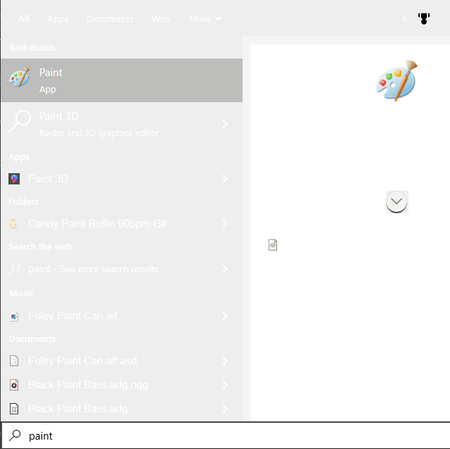
I restarted my computer today and this issue has suddenly occured, It doesnt matter what I change the colour theme too, when searching in the search menu I am presented with this light grey colour with white text which is incredibly hard to read, Online searches indicated stuff to do with Bing, Cortana and the Search registry keys, but I am not finding these keys anywhere in my registry to edit them. I have tried a few other solutions such as restarting the search services from task manager, but it is not applying the theme correctly. Had this computer for several years and never ran into this problem before, Any advice would be greatly appreciated.241Views0likes1CommentPascal (10 series) GPUs on Windows 11 encounter artifacting boot loop when HDR is enabled in Windows
Bug: Users with Pascal (10 series) GPUs on the latest builds of Windows 11 are encountering an issue with an infinite boot loop that shows artifacting on screen when HDR is enabled in Windows 11. Workaround: Disable HDR in Windows 11 User reports: https://www.reddit.com/r/WindowsHelp/comments/1t5nt0u/hdr_blackscreen_artifacts_on_boot_after_recent/ https://www.reddit.com/r/pchelp/comments/1ngqsze/artifacting_and_crash_during_windows_boot_caused/ https://www.reddit.com/r/pcmasterrace/comments/1u5qfoo/is_my_gpu_doing_or_what/ Report this to NVIDIA: https://nvidia.custhelp.com/app/ask https://www.nvidia.com/en-us/geforce/forums/geforce-graphics-cards/5/587167/pascal-10-series-gpus-on-windows-11-encounter-arti/ Report this to Microsoft: https://www.reddit.com/r/Windows11/comments/1s0tt03/tip_of_the_week_if_you_want_to_quickly_share/321Views0likes3CommentsHow to Stop the Win 11 KB5094126 Installation Loop and Safely Upgrade From March Baseline Risk-Free
Hello, I need some advice regarding a persistent Windows Update installation loop affecting my machine. My system is currently on a March baseline and is out of date. My primary goal is to completely stop this endless installation loop so I can successfully upgrade Windows to the latest version in a risk-free manner that doesn’t mess around with system files . 1. What is the most effective, safe and risk-free way to temporarily stop this automatic background update installation loop without it coming back in a few days or causing a lot of background strain, as I feel like when it’s in the background and disabled it is still hammering my hardware and causing high thermal strain, because it flucationing between abled/disabled a lot, this can’t go on, it’s already been a month. 2. Is it 100% safe to use the Microsoft WUShowHide utility (wushowhide.diagcab) as a block to stop the hardware strain, and will it prevent future brightness fluctuations? Will be permanently disable or come back? 3. How can I fix this loop, with absolutely zero risk to my custom graphics profiles, legacy driver stability, or screen brightness thresholds? 4. Does the newly released July Cumulative Update (KB5101650) wrapper contain the renewed firmware validation keys necessary to clear out this March-to-June servicing stack blockage cleanly? Or could it cause system crash or corruption if installed. 5. Are there known risks or side effects with attempting a repair upgrade or an in-place reinstall for this specific loop? I want to completely avoid anything that resets custom device properties, alters display configurations, or reverts stable graphics card driver profiles or potentially gets stuck, as both take up 20-30 on every attempt and harsh to the system. 6.Since my system is currently out of date on a March baseline, what is the safest path to install a newer, stable update without risking my custom display configurations? 7.Has anyone successfully applied a manual UEFI certificate renewal or a Secure Boot key variable override to bypass the expired Microsoft June 2026 validation timeline on general retail hardware? Any risks? My System Specs: -OS Edition: Windows 11 Home Single Language (Retail Channel) -Version / Build: 25H2 (OS Build 26200.8117 - March 2026 Baseline) -Hardware: ASUS Laptop (Model M413A) -Processor: AMD Ryzen 7 4700U with Radeon Graphics (2.00 GHz, 8 Cores) -Memory: 8.00 GB RAM (7.42 GB usable) -Storage: Local C: Drive has 226 GB used out of 477 GB total capacity (251 GB free) Symptoms I Am Experiencing: The 2026-06 Security Update (KB5094126) and the June Preview Update (KB5095093) download completely to 100%. During initialization, the engine throws error 0x80074101 and restarts the download pipeline. This creates a heavy background loop that pins the CPU to high utilization, causing noticeable thermal strain. When my AC power charger is connected, the cooling fans run at a very high audible RPM. I also experience temporary screen brightness flaring strictly when the charger is active, likely due to voltage shifts on the shared motherboard power tracks between the integrated AMD graphics and the system RAM channels when the update engine collides with my stop scripts. Other non- quality updates and daily Windows Defender definitions continue to download and install flawlessly when updates are enable. The issue is strictly isolated to this specific update package and sometimes previews. Tried So Far: Over the past few days, I have tried several methods to safely pause or stop this loop to protect my hardware from constant heat stress: Cache Resets: Cleared the contents of C:\Windows\SoftwareDistribution multiple times. The loop returns as soon as the folder is regenerated. System Scans: Executed SFC /scannow and DISM /Online /Cleanup-Image /RestoreHealth. Both reports show a completely clean component store with no local system file corruption. Service Management: Used temporary command-line scripts to stop 'wuauserv', 'usosvc', and 'bits', and adjusted service recovery actions to prevent them from instantly restarting in the background. These tend to come and go, but most are usually settled at stopped for 2-3 days, and then installation of this lopping security update will force a reattempt on the 2 or 3 day and I have reenter the commands. Built-in Safeguards: Used the "Pause updates for 5 weeks" toggle in Settings just yesterday, where it greyed out for weeks prior, not sure if it will force the reinstall at random again. However, the Windows 11 Home kernel continues to still run background queries every few hours, triggering the hardware strain and it produces loud sounds when charging or resisting disabled setting even if disabling quiets the fan a lot of the time. Cleaned the software distribution folder. Cross-Forum Context & Certificate Discovery: While researching this, I noticed some initial confusion regarding whether the 26200 build numbering indicated an Insider build, but it appears to be a general retail baseline constraint. Some common suggestions include performing a full clean reinstall or a repair upgrade via USB, but I am hesitant due to the risk of overwriting fine-tuned hardware configurations and custom driver properties. Through cross-referencing documentation uploaded by other users facing identical loops on Build 26200, we uncovered a likely root cause. Logs from 'Get-SecureBootUEFI' show that the motherboard's underlying security certificates (Microsoft KEK CA 2011 and Microsoft Corporation UEFI CA 2011) officially expired in late June 2026. Because the current date has passed the certificate validity timeline, the Secure Boot subsystem appears to reject the cryptographic handshake of the June update files, causing the 0x80074101 database error and the subsequent retry loop. As a temporary fix, I am looking into using the official Microsoft WUShowHide diagnostic utility ('wushowhide.diagcab') from my desktop to hide KB5094126 and stabilize my processor and fan noise while waiting for a working patch wrapper that lets me upgrade safely. I would deeply appreciate any verified engineering insight or workarounds the community has found to help me safely bring this system up to date without side effects. Thank you so much for your time!216Views0likes1Comment
KB5089573 forced install + Lenovo network stack degradation (HTTPS latency, build 26200.8524)
KB5089573 installed automatically on a Lenovo system despite updates being paused and no preview updates enabled. After installation, the system jumped to build 26200.8524 and the network stack degraded severely. Heavy HTTPS sites (LinkedIn, Google Finance, YouTube) take 20–60 seconds to load across all browsers. Speedtest is normal, other devices on the same network are unaffected, and both Edge and Chrome show identical latency. DISM shows no package for KB5089573 and the update cannot be uninstalled. Looking for correlation data from other Lenovo users.265Views0likes3Comments