bug
319 Topics
UI overflow in extension permission dialog on Linux (Gnome)
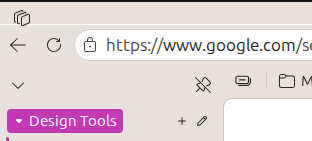
When installing an extension, the permission dialog renders incorrectly and overflows its container. The dialog content appears clipped and does not scale properly within the window. This affects usability because parts of the UI (text/buttons) may be partially hidden depending on window size and display scaling. MS Edge version: Version 149.0.3993.0 (Official build) dev (64-bit) To reproduce: Open Microsoft Edge on any Linux distro using Gnome Navigate to the extension store Attempt to install an extension (e.g. AdGuard AdBlocker) Observe the permission popup dialog43Views0likes1CommentBookmarks are being forced into the active Tab Group (New behavior)
Hi there, I’ve noticed a very frustrating change in the latest Edge update. When I open a bookmark from the Favorites bar, it is now automatically forced into the currently active Tab Group. This behavior is counter-intuitive. For example, if I am browsing in a "Social" group and click a bookmark for "Gmail," I want it to open as a standalone tab, not as a part of the "Social" group. Currently, I have to manually drag every new tab out of the group, which is a major workflow killer. Disabling experimental flags doesn't fix this anymore. Please provide a toggle in the Settings menu to disable "Tab Group Inheritance" for bookmarks or revert this change. It should be the user's choice whether to add a new tab to a group or not.46Views0likes0Comments
MS Edge - Sidebar and copilot not working on Linux Ubuntu v24 LTS
Sidebar not syncing or accepting new app additions (+). Copilot button is dead/inactive. Sidebar settings are well configured. Using the latest version of the Ubuntu OS and MS Edge. Functionality appears to be absent as product was released without full functionality....Lame!27KViews45likes59CommentsWhen the audio pipeline decides to act up 😂🤌
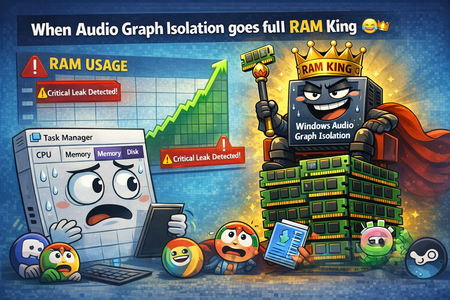
Ever since build 2820.x.x.x, I’ve been keeping an eye on one specific process — Audio Graph Isolation. And this little troublemaker 😂 sometimes decides it wants to “spice up your day.” Not by taking a few MB of RAM… Oh no, no — it goes straight for several gigabytes 😂 So you’re just sitting there, wondering why your system suddenly starts lagging, why the audio sounds like a corrupted Star Trek transmission after a virus attack 🙈😂 You open Task Manager, sort by RAM usage… And there it is, grinning at you, Audio Graph Isolation, quietly turning your system into its personal victim 🙈 How to deal with it until Microsoft finally fixes this regression? Honestly — the only thing that works is: 👉 force‑killing Audio Graph Isolation in Task Manager And boom, your system instantly gets its speed back. Unfortunately, because of this regression, you have to keep an eye on this process regularly, since the RAM leak can happen anytime during idle — whether you’re watching a movie, listening to music, or the system is just running with no user input.119Views0likes2CommentsMedia Player theme bugged
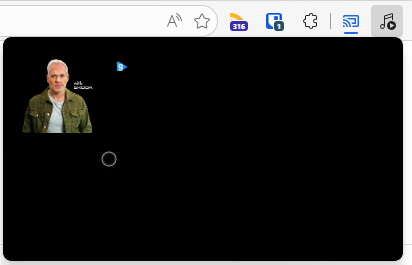
Noticed that the past couple of Dev builds have a broken media player where the theme is all black and it also looks like the layout is bugged, see screenshot below. I've also submitted feedback with a screen recording but wanted to see if anyone else was experiencing this.70Views0likes1Comment
Azure Tiles Not loading with MS Edge Beta v147.0.3912.16
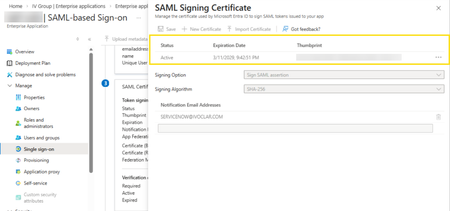
In the latest version of MS Edge, we cannot view or access the SAML Certificate data for Enterprise Applications hosted in Entra ID. Before: (v146.0.3856.62) After updating to v147.0.3912.16: As can be seen, the certificates cannot be displayed or accessed from this tile. This is affecting our test users who cannot rotate their SAML certificates but may have other impact for other Azure resources being accessed with MS Edge Beta.Solved93Views0likes2Comments