bug
68 Topics
Teams duplicates contacts until it maxed out at 15000
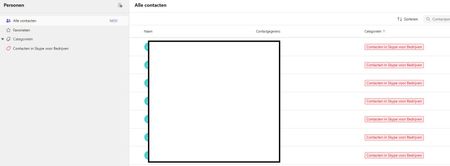
Hi, I have a weird issue with some users, Teams seems to be duplicating old Skype for Business contacts until it maxes out at 15000 contacts. I have been digging into it a bit and found out the location of the folder through Exchange powershell but I can't clear or delete it. Skype for Business is phased out and disabled in my tenant for a long time now so I couldn't do much there, I can't login to it through powershell. We've had Teams since like 2017 so I suspect this is a niche legacy issue popping up recently somehow. Manual deleting is possible through the browser environment but that is such a hassle because it keeps glitching if you delete per 100 and skipping pages and stuff, need to refresh constantly. Just a pain, it would take days. And no guarentee its not coming back either. See screenshots. Does anyone know why this is happening and how to fix this? Thanks for reading, cheers!311Views0likes3Comments
Microsft teams wont minimize on endevourOS (arch based)
Not sure if this is the correct place to put this since its my first time using this site but here we go Teams wont minimze when minize is pressed. Ive installed the Gnome look and added minimize, resize and close buttons to the install via cli Ive disabled boot on startup and keep running when closed if that matters20Views0likes0Comments
Announcement Playback Service chat ¡HEPL!
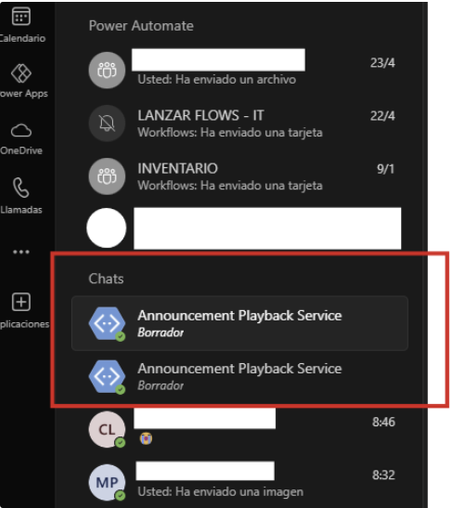
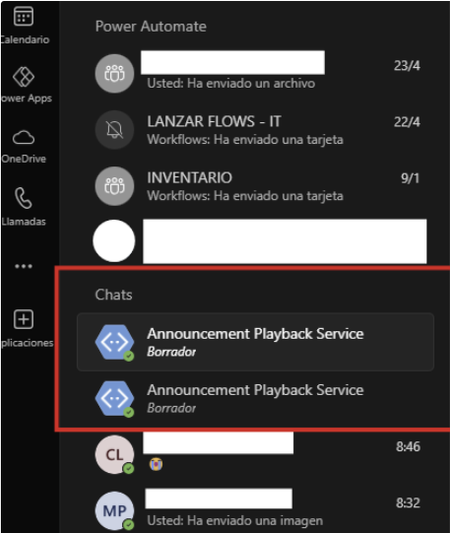
Hello, for a few weeks now, one or two chats with the same name "Announcement Playback Service" have been appearing in my recent chats without explanation. Since the new chat update, they have remained permanently static in recent chats. I can't remove them, delete them, move them, or hide them. They're very annoying. I want to remove them. Does anyone know how? I've attached photos. (desktop and web versions) is the same problem When trying to move them from container: When I hit "Discard" nothing happens:12KViews0likes4CommentsAnnouncement Playback Service chat ¡HEPL!
Hello, for a few weeks now, one or two chats with the same name "Announcement Playback Service" have been appearing in my recent chats without explanation. Since the new chat update, they have remained permanently static in recent chats. I can't remove them, delete them, move them, or hide them. They're very annoying. I want to remove them. Does anyone know how? I've attached photos. (desktop and web versions) is the same problem When trying to move them from container: When I hit "Discard" nothing happens:799Views0likes0Comments
BUG: Setting customised duration for status date broken (MacOS desktop app)
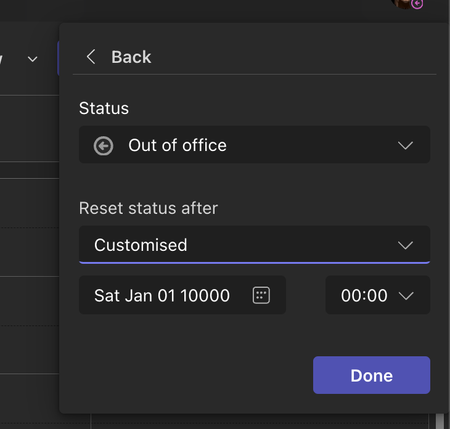
Steps to reproduce: Select avatar in top right Click status to change it Select Duration For Reset status after, choose Customised option Actual Result Date defaults to Sat Jan 01 10000 Expected Result Date defaults to today214Views0likes1CommentMeeting Login Button not working - for Anonymus attendees
Hello, i have setup that only loggedin User from my organisation can attend online meetings. This is working so far. After an anonymous user use the joinURL he get a info that he must login. But the Login Button is not working in Chrome or Edge Browser. In Firefox it is working. I used private mode so no Add In's are used that might block the button. Do you have the same problem and know anyone where i should adress this bug? See here the console message aand the complete Flow: THX702Views0likes2Comments
Teams v2 - Meet Now says 'Meeting Ended' in channel
Our org fully switched to Teams v2 last week - IT had been using it for the most part for ~2 months with no issues. Yesterday we started getting tickets from users that use the Meet Now functionality in their Team's General channel to have impromptu meetings throughout the day. On Teams v1 someone would start the meeting, and everyone else in the channel would get a toast notification that a meeting had started. If they missed the toast they could go to the channel and click 'Join'. In Teams v2 people are starting Meet Now meetings in the same channel, but no one is getting a toast notification, and when they asked people to join via chat, people would go to the channel and the meeting says 'Meeting ended'. Except, when they close and relaunch Teams v2, they can suddenly join the meeting. The bug is not apparent in either of the web versions of Teams either. Screenshots of behavior: https://imgur.com/a/x6viQ4j I've opened a ticket with Microsoft (2311280010000070) and I'll keep everyone posted on that, just wanted to see if anyone else was affected. A lot of our users are saying closing and relaunching Teams v2 breaks their workflow and want to switch back to Teams v1.8.9KViews6likes15CommentsIn a scenario no Files and Folders are displaying
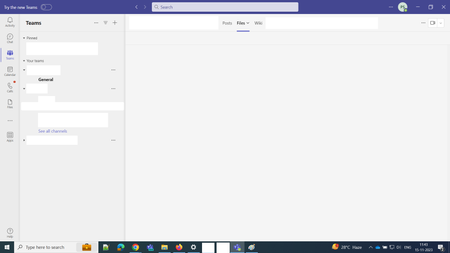
Steps to reproduce : * Launch 'Microsoft Teams classic' * Expand a 'Team' -> Click on 'Files' on navigation bar -> Click on 'More' icon button for a 13GB .zip file -> Click on 'Download' button * Again click on 'More' icon button for the same file ->Click on 'Copy link' button -> Observe progress bar displayed * Click on 'Posts' or 'Wiki' button on navigation bar -> Again click on 'Files' on navigation bar * Observe no Files and Folders are displaying until relaunch the application Note: Same issue observed in 'NEW Teams' PFA : In a scenario no Files and Folders are displaying.png455Views0likes0CommentsMacOS Teams - No Version Switcher and No 'Report a Problem'
I'm using MacOS Teams v1.6.00.27656 on MacOS 14.0 on my work O365 account. I do not see a toggle to switch the new Teams in the top-left of my Teams app. I also do not see an option to "Report a Problem" under the Help menu in the bottom-left (it only shows Topics, Training, What's New, Suggest a Feature, and Give Feedback).1.2KViews0likes3Comments