bug report
51 TopicsThe New Activation Portal Is Partly Broken But It Is a MAJOR Inconvenience For Me & Others.
I Run Windows 7 Ultimate x64 And I need to Activate Windows, I am used to the new aka.ms/aoh replacing the phone line. But I Have Activated Windows XP & Vista Without Any Problems Multiple Times, I Tested It Too, Tried 7, Starter, Home, Pro, Ultimate, Even x32 & x64. Though, No matter what, everything BUT Windows 7 Works. This Is Clearly a Server Sided Issue And I've Had This problem for the past months maybe even about a year. (The Product Key I Am Using Is Not Public on The Internet So It's Not Blocked/Used Publicly By Everyone, it is the same product key that came with the CD) And I Can Say For Certain This is a Server Sided Issue. Please Help. And Thank You For Your Time.322Views0likes0Comments
Windows 11 25H2 – Update KB506881 causes unexpected reboots (no BSOD, silent restart)
Hey everyone, just wanted to report a serious issue I encountered with Windows 11 25H2 related to the update KB506881. After installing KB506881 my PC randomly rebooted without warning — no BSOD, no crash report, no error on screen. Only the event log showed “unexpected shutdown / Kernel-Power (Event ID 41)”. Removing the update completely solved the issue. Since uninstalling it, my system has been 100% stable with zero unexpected restarts. Reproducibility: Install KB506881 → system performs unexpected shutdowns / reboots Uninstall KB506881 → issue disappears immediately System details: Windows 11 25H2 (Build: 26200) AMD Ryzen 7800X3D (but issue seems unrelated to hardware) No BSOD / no memory dump / no bugcheck created Reliability Monitor only shows “Unexpected Shutdown” What I already did: Removed KB506881 manually → issue gone Blocked the update using PowerShell + scheduled task (hourly) to prevent Windows from reinstalling it Logs: Event Viewer → Windows Logs → System Shows: Kernel-Power 41 (unexpected shutdown) immediately after KB506881 installation. Has anyone else experienced unexpected reboots after KB506881? If yes, please comment so Microsoft can see how widespread this is. I also reported it via Microsoft Feedback Hub. Thanks!6.8KViews3likes13Comments
Edge randomly gets reset and logs me out of every site
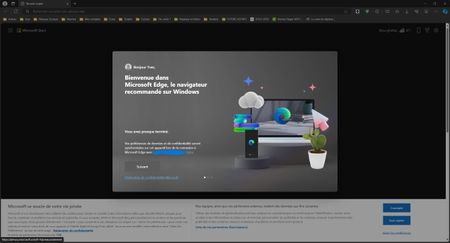
Hello, I need help, since some month, Edge automatically randomly resets and logs me out of every site. This always happens when the PC starts up, I launch the browser and Edge has just reset itself and shows me the following screen It keeps my account synchronised, my passwords and my favourites, but I have to log in again on all the sites. Do you know what the problem is? Regards, Yves2KViews2likes3Comments
Edge Workspaces sync BUGS
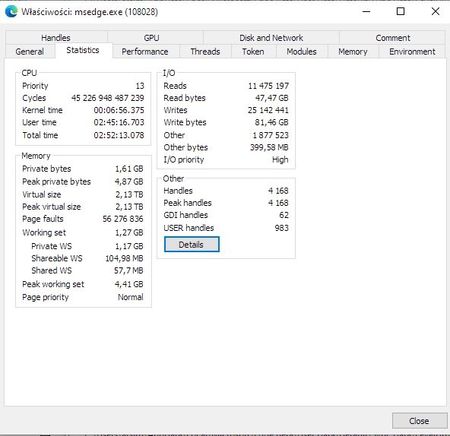
Hello First of all, I think that Workspaces in Edge is a very useful feature! Edge also has vertical tabs, which makes it the best tool for researchers using hundreds of tabs. I think other browsers can learn from this. With Workspaces, I can move windows I don’t currently use aside and open them again when needed without loading to RAM. Other browsers lack this feature, so I moved to Edge from Chrome. Edge is now my main tool for ongoing online research. However, after some months of use, I see that there are bugs that make me frustrated. With Workspaces, Edge is slow, it freezes, fails to synchronize, and reverts changes. 1. It does not update tabs and moves new tabs to the end. Let’s say that I have opened tabs: New Tab, facebook.com, A, B, C, D, E Later, I open links in new tabs from New Tab, Facebook, and A and leave them open. The tabs are: New Tab, msn.com/F, facebook.com, G, A, A2, B, C, D, E After some time, Workspaces synchronize, there is a short or longer Edge freeze. Then I see tabs are reorganized and F, G, H moved and changed addresses. The tabs are now: New Tab, facebook.com, A, B, C, D, E, New Tab, l.facebook.com/l.php?u=G, A2 It looks like Workspaces never update opened tabs when there was redirection through New Tab or l.facebook.com/l.php?u= or any other redirection on other websites. It only stores the first address it sees. When I refresh these tabs to see the description and go to the proper addresses, it still reverts it back! After I organize the order properly, it sometimes stays or is reverted back! This is frustrating when you need order and proper descriptions! 2. It is terribly slow, especially after opening another Workspace. I also encountered long freezes of Edge when opening another Workspace window or at random, probably when it synchronizes (a red dot appears next to the workspace name). Sometimes I have to wait 5 minutes, sometimes 15 minutes, sometimes I’m losing patience! I have plenty of PC power (12-core Ryzen 3900X, 32GB RAM, Samsung SSD 970 EVO Plus 1TB) and when I check Process Hacker, I see that Edge isn’t using 100% of CPU, but still is frozen. I noticed that when it’s frozen, there are around 200 disk writes, fast changing, 9MB/s total: C:\Users\me\AppData\Local\Microsoft\Edge\User Data\Default\Sync Data\LevelDB\256443.ldb ... ( edge_workspace_disk.xls ) When LevelDB writes stop, Edge is unfrozen. I’ve given msedge.exe processes high priority, but it doesn’t solve anything. I noticed this on previous versions starting from 122. I use Stable and Beta (to have two separate profiles) on PC and laptop. I waited hoping it will be solved, but nothing changed. It's possible that developers only tested Workspaces with a limited number of tabs and not with power users like myself, who manage 10 workspaces with 200-600 tabs in each. The consistent unreliability suggests there may be unresolved bugs present in each version. I examined the LOG.old file in the Sync Data>LevelDB folders of each browser and noticed that when a freeze occurs, there is a specific behavior logged: 2024/06/12-13:14:19.485 1a570 Generated table #365187@0: 40283 keys, 2109396 bytes 2024/06/12-13:14:19.485 1a570 Compacted 8@0 + 1@1 files => 2109396 bytes 2024/06/12-13:14:19.488 1a570 compacted to: files[ 4 6 7 0 0 0 0 ] 2024/06/12-13:14:19.489 1a570 Delete type=2 #365171 2024/06/12-13:14:19.489 1a570 Delete type=2 #365172 2024/06/12-13:14:19.489 1a570 Delete type=2 #365174 2024/06/12-13:14:19.489 1a570 Delete type=2 #365176 2024/06/12-13:14:19.489 1a570 Delete type=2 #365178 2024/06/12-13:14:19.489 1a570 Delete type=2 #365180 2024/06/12-13:14:19.489 1a570 Delete type=2 #365182 2024/06/12-13:14:19.489 1a570 Delete type=2 #365184 2024/06/12-13:14:19.489 1a570 Delete type=2 #365186 2024/06/12-13:14:19.491 179a0 Level-0 table #365197: started 2024/06/12-13:14:19.492 1a0a0 Current memtable full; waiting... 2024/06/12-13:14:19.500 179a0 Level-0 table #365197: 467718 bytes OK 2024/06/12-13:14:19.503 179a0 Delete type=0 #365194 2024/06/12-13:14:19.504 1a570 Level-0 table #365199: started 2024/06/12-13:14:19.505 1a0a0 Current memtable full; waiting... 2024/06/12-13:14:19.511 1a570 Level-0 table #365199: 467718 bytes OK 2024/06/12-13:14:19.514 1a570 Delete type=0 #365196 2024/06/12-13:14:19.515 179a0 Level-0 table #365201: started 2024/06/12-13:14:19.516 1a0a0 Current memtable full; waiting... 2024/06/12-13:14:19.524 179a0 Level-0 table #365201: 467718 bytes OK 2024/06/12-13:14:19.530 179a0 Delete type=0 #365198 2024/06/12-13:14:19.530 1a570 Level-0 table #365203: started 2024/06/12-13:14:19.531 1a0a0 Current memtable full; waiting... 2024/06/12-13:14:19.539 1a570 Level-0 table #365203: 467718 bytes OK 2024/06/12-13:14:19.542 1a570 Delete type=0 #365200 2024/06/12-13:14:19.542 179a0 Compacting 8@0 + 1@1 files 2024/06/12-13:14:19.556 179a0 Level-0 table #365206: started 2024/06/12-13:14:19.564 179a0 Level-0 table #365206: 467718 bytes OK 2024/06/12-13:14:19.568 179a0 Delete type=0 #365202 2024/06/12-13:14:19.572 179a0 Level-0 table #365208: started 2024/06/12-13:14:19.581 179a0 Level-0 table #365208: 467718 bytes OK 2024/06/12-13:14:19.584 179a0 Delete type=0 #365205 2024/06/12-13:14:19.588 179a0 Level-0 table #365210: started 2024/06/12-13:14:19.596 179a0 Level-0 table #365210: 467718 bytes OK 2024/06/12-13:14:19.600 179a0 Delete type=0 #365207 2024/06/12-13:14:19.604 179a0 Level-0 table #365212: started 2024/06/12-13:14:19.611 179a0 Level-0 table #365212: 467718 bytes OK 2024/06/12-13:14:19.615 179a0 Delete type=0 #365209 2024/06/12-13:14:19.620 1a0a0 Too many L0 files; waiting... 3. Workspaces sometimes stop syncing randomly and without notification. Occasionally, I notice a mismatch in the workspace between the PC and the laptop I use. If I close the workspace without checking, I will loose the tabs opened since the last sync! There's no notification, I must check if everything is synced or manually compare the opened tabs in the same workspace and then open them manually. After arranging them in the original order, I return to bug #1, which causes a mess when Edge moves tabs around. 4. Issues with Accessing Workspaces. This issue has occurred to me several times and is common among many users: "Error: Unable to load workspaces." Edge Workspaces error V114 - Microsoft Community Hub I tried many workarounds, sometimes they worked, yet they are not ideal and a definitive solution remains elusive. Now please tell me that Workspaces aren't still in beta phase. Workspaces are generally excellent tool, but in their current state of development, they are just a joke not worth the frustration and risk of data loss.2.6KViews2likes5Comments[SEMI-CRITICAL] Outlook rules aren't working when email encoding system is different
(First, note that I am a Korean, and my report may use a different term for the system because it's tedious to figure out the original term for what I am using. I believe you know the vibe I am talking about.) I figured using different character encoding system may result in failing outlook rules working. Basically, it appears Outlook is using UTF-8 based, but sometimes emails from other organisations use different. Let me show 2 receiver cases: To: =?utf-8?B?7ZmN6ri464+Z?= <johndoe@secret.secret> To: =?ks_c_5601-1987?B?yKux5rW/?= <johndoe@secret.secret> This is what you can see from an email header, and left encoded characters are a name of a person, and obviously right bracket ones are their email. You can see it uses different encoding system. Both are encoded from "홍길동" (this is identical to a random guy name as much as how john doe is.) We can guess the name of this outlook user is obviously "홍길동" and their email address is johndoe@secret.secret When you choose a rule [When an email has my name], the rule system will only work to the first case, the UTF-8 encoded one. It appears the rule [When an email has my name] only checks if an email has "?utf-8?B?7ZmN6ri464+Z?", but doesn't check "?ks_c_5601-1987?B?yKux5rW/?". However, both cases should work because both are their name. The only solution for this is adjusting senders' email system to use UTF-8 only, but that is not possible. Thus it fails checking those conditions. I am pretty sure this is why people have been complaining outlook rules doesn't work for years. I want rules having more possible case checks... but I have no idea where I can suggest this.316Views0likes2Comments
Edge 130.0.2849.46 (Official build) (64-bit) Broke Extension(s) - Ublock Origin in this case.
Hello, I know very well that Edge is also moving to MV3. But, there isn't any announcement about complete removal of MV2 yet. Since Edge updated to v130, it broke popular extension like Ublock Origin, for many people. We've reported the issue to extension devs, it but seems that while there are many people who are affected, there still be many that have extension working fine as expected. https://github.com/uBlockOrigin/uBlock-issues/issues/3419 Many people've reported this issue not only on github, but also on reddit as well. The extension was working fine before v130, so we suspect that the cause is Edge update itself. - Issue: The extension loads but cannot run, and its dashboard page cannot load, is completely empty. Turn on/off does not work. Removing/Reinstalling from MSEdge Store also does not work. The only "workaround" for this is setting up a completely new blank local profile, but that will cost all the synced settings and extensions data. Please help us looking into this issue, Thank you. --------------------------------- Browser: Edge 130.0.2849.46 (Official build) (64-bit) Extension: Ublock Origin v1.60.0 Extension source: MSEdge Store System: Windows 10 22H2 19045.5011 (I don't think system info matters because there're people who're on Win11 and have this issue as well)4.3KViews5likes5Comments
New Teams random chat switch when hovering reaction
Hi, I Report a bug when hovering a reaction on a message to view who's reacted to (Windows 10). Sometimes, with the new Teams version (24102.2223.2870.9480.), hovering over a message's reaction causes the chat list to switch from the current one to a random one in your chat history. OS: Edition Windows 10 Enterprise Version 22H2 Installed on 01-Jul-22 OS build 19045.4412 Experience Windows Feature Experience Pack 1000.19056.1000.04.8KViews9likes16Comments
"We just need you to sign in, and then we'll get you to your meeting" hell
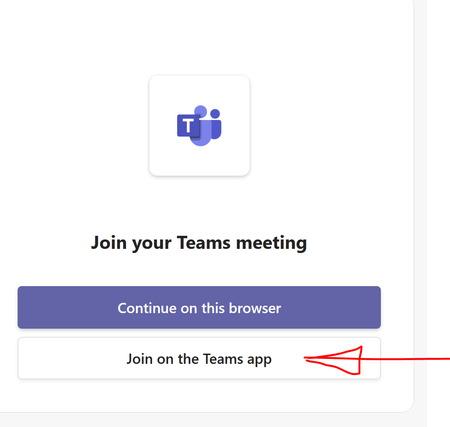
If I never had to use Teams, I'd be a happy user. Unfortunately some companies prefer it for video calling. So, say, I receive a meeting invite via email. I click it: and pick "Join on the teams app". Then this standalone app comes up: It wants you to log in at the bottom. Mind you I just had this thing open and had already logged in. OK, I click "Sign in" and then this GIF happens for about 2-3 minutes: and then eventually this: Clicking "Sign in" button repeats the cycle. I've seen this error about 6 months ago when I was forced to use teams. So I'm wondering, how many Microsoft engineers does it take to fix this?936Views0likes1Comment
Microsoft Teams preview, Video playback is broken
Video playback on the new teams is broken. I can see my own camera feed when going trough the device settings menu. When I initiate a call I can see my own video for like a couple of seconds, and then it goes grey, I can not see either my feed or the feed of anyone else in the meeting. Other people in the meeting can see me, but I can't see anything. This is not a camera issue or an OS permission issues, or any other issue other than broken software: 1. "classic teams" works just fine in 2. "preview teams" can get the camera feed while in the settings menu 3. "preview teams" can display video correctly for about a second before dying (won't comeback until restart). Note restarting doesn't help as video in meeting only works for a second I need the new teams because of its ability to use multiple accounts (important if you are a contractor), but I can't use it because video playback is broken. Please fix this.Bug in assignment due date, MS Teams Windows
There is a bug in MS Teams desktop windows related to the Assignment. I don't know why the assignment schedule is based on the timezone of the respective operating systems. Students can easily change the time on their computer in the Windows setting and bypass the assignment deadline. Sometimes, the time on their computer is quite earlier than the normal standard time, so the deadline for their assignment has passed and students can't submit it, even though the deadline has not passed on the other computer.542Views0likes0Comments