bug report
59 TopicsPerformance impacts the last 2 days
Hi techcommunity / moderators, anyone of you also experiencing very slow loading times when opening blogpost, editing blogposts or submitting changes. The delay can take up to 10 seconds or more. No timeouts happen. Region: EU. Yesterday night there was a (planned) maintenance happening. No improvements since.67Views0likes0CommentsThe New Activation Portal Is Partly Broken But It Is a MAJOR Inconvenience For Me & Others.
I Run Windows 7 Ultimate x64 And I need to Activate Windows, I am used to the new aka.ms/aoh replacing the phone line. But I Have Activated Windows XP & Vista Without Any Problems Multiple Times, I Tested It Too, Tried 7, Starter, Home, Pro, Ultimate, Even x32 & x64. Though, No matter what, everything BUT Windows 7 Works. This Is Clearly a Server Sided Issue And I've Had This problem for the past months maybe even about a year. (The Product Key I Am Using Is Not Public on The Internet So It's Not Blocked/Used Publicly By Everyone, it is the same product key that came with the CD) And I Can Say For Certain This is a Server Sided Issue. Please Help. And Thank You For Your Time.312Views0likes0CommentsOutbound Anti‑Spam Policy “Include/Exclude” Please Correct
Proposed Feedback to Microsoft: Outbound Anti‑Spam Policy UI Behavior Is Misleading and Needs Clarification Title: Outbound Anti‑Spam Policy “Include/Exclude” UI is Misleading — Policy Applies Globally Unless Exclusions Are Defined Summary of the Issue The Outbound Anti‑Spam Policy interface in the Microsoft 365 Defender portal presents an Include and Exclude user scope model that strongly implies modern scoping behavior: Include = users the policy applies to Exclude = users the policy does not apply to However, this is not how the backend policy engine behaves. In reality: If the Exclude list is empty, the policy applies to all users unless they are explicitly excluded. This is the opposite of what the UI suggests, and it leads to unexpected and incorrect assumptions by administrators. Actual Behavior (Backend Logic) The outbound anti‑spam engine still uses legacy logic: A policy applies to a user unless the user is explicitly excluded Being “not included” does not prevent the policy from applying The highest‑priority policy that does not explicitly exclude a user is the one that applies This means: If the Exclude list is empty, the policy effectively becomes global. This is not communicated anywhere in the UI. Impact on Administrators This behavior leads to: Users unintentionally being governed by the wrong policy External forwarding being allowed for users who were never intended to be included Confusion when removing a user from the Include list does not remove them from the policy Misinterpretation of policy priority and scope Hours of troubleshooting because the UI does not reflect the actual evaluation logic This is especially problematic when configuring forwarding exceptions, where security expectations are high. Example Scenario Demonstrating the Problem Admin creates a Priority 1 policy allowing external forwarding for a small set of users. Admin adds those users to Include. Admin leaves Exclude empty, assuming the policy applies only to the included users. A user not in the Include list still has forwarding allowed because the policy applies globally unless excluded. Removing a user from Include does not remove them from the policy. The admin is misled because the UI suggests the opposite behavior. This is counterintuitive and contradicts the scoping model used in other Microsoft 365 policies. Requested Fix Add a warning or informational banner when the Exclude list is empty. Suggested wording: Warning: No users or groups are excluded. This policy will apply to all users unless they are explicitly excluded. Users not listed in “Include” may still be affected by this policy. This one clarification would prevent the majority of misconfigurations and support cases related to outbound forwarding exceptions. Why This Matters Outbound forwarding is a high‑risk vector for data exfiltration. Admins rely on the UI to understand policy scope. The current UI leads to incorrect assumptions and unintended exposure. A simple warning would align the UI with the actual behavior of the policy engine and prevent misconfigurations. End of Feedback As you may have noticed, the above response is based on questions and answers I got from Copilot. This is a valid improvement that needs to be made, but furthermore Microsoft is losing a great deal of information by not allowing a direct route from Copilot to the correct area of your company when a solution or a correction to a current method is discovered. Best regards, Gary Huber241Views0likes1Comment
Windows 11 25H2 – Update KB506881 causes unexpected reboots (no BSOD, silent restart)
Hey everyone, just wanted to report a serious issue I encountered with Windows 11 25H2 related to the update KB506881. After installing KB506881 my PC randomly rebooted without warning — no BSOD, no crash report, no error on screen. Only the event log showed “unexpected shutdown / Kernel-Power (Event ID 41)”. Removing the update completely solved the issue. Since uninstalling it, my system has been 100% stable with zero unexpected restarts. Reproducibility: Install KB506881 → system performs unexpected shutdowns / reboots Uninstall KB506881 → issue disappears immediately System details: Windows 11 25H2 (Build: 26200) AMD Ryzen 7800X3D (but issue seems unrelated to hardware) No BSOD / no memory dump / no bugcheck created Reliability Monitor only shows “Unexpected Shutdown” What I already did: Removed KB506881 manually → issue gone Blocked the update using PowerShell + scheduled task (hourly) to prevent Windows from reinstalling it Logs: Event Viewer → Windows Logs → System Shows: Kernel-Power 41 (unexpected shutdown) immediately after KB506881 installation. Has anyone else experienced unexpected reboots after KB506881? If yes, please comment so Microsoft can see how widespread this is. I also reported it via Microsoft Feedback Hub. Thanks!6.7KViews3likes13CommentsTeams: Translation of "More meet now options"
Hi The button to converting a chat into a Video or Audio call, is named "More meet now options" in English. But the Swedish translation is "Fler möte bu-alternativ". "Now" is translated to "bu". "Bu" is a very scary word for small children in Sweden, as "Boo" is in English. Please correct to "Fler möte nu-alternativ" or better only "Fler mötesalternativ". Regards, Anna-Karin126Views0likes1CommentTranslation of Block arrows in Swedish Power BI Desktop
Hi The alternative Block Arrows under the menu Insert >Shapes, is translated to Blockera pilar in Swedish version Power BI Desktop and that means Prevent Arrows, instead of Blockpliar. In other Microsoft program are Block Arrows translated to Blockpliar in Swedish. Please use it in Power BI Desktop to. Version: 2.148.1226.0 64-bit (oktober 2025) Regards Anna-Karin123Views0likes1Comment
Allow own editing after posting a new question into any of Community Lounge Discussion Boards
Right after posting my new question into one of Community Lounge Discussion Boards I noticed that it was no more possible to edit it again in case any correction might have been needed. While I noticed doing the same editing was indeed allowed after adding a reply to my own question, so basically I'm just asking for some more consistency... 😇 Many thanks in advance for your attention. Best Regards Rob382Views0likes8CommentsEdge randomly gets reset and logs me out of every site
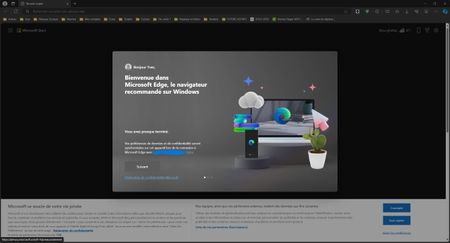
Hello, I need help, since some month, Edge automatically randomly resets and logs me out of every site. This always happens when the PC starts up, I launch the browser and Edge has just reset itself and shows me the following screen It keeps my account synchronised, my passwords and my favourites, but I have to log in again on all the sites. Do you know what the problem is? Regards, Yves1.9KViews2likes3Commentsaccess vba topindex example fail
listindex works topindex seems removed and focus was needed to add if text value not need focus not clear where initialize come from and how to use Private Sub CommandButton1_Click() ListBox1.TopIndex = ListBox1.ListIndex TextBox1.Text = ListBox1.TopIndex TextBox2.Text = ListBox1.ListIndex End Sub Private Sub ListBox1_Change() TextBox1.Text = ListBox1.TopIndex TextBox2.Text = ListBox1.ListIndex End Sub Private Sub UserForm_Initialize() Dim i As Integer For i = 0 To 24 ListBox1.AddItem "Choice " & (i + 1) Next i ListBox1.Height = 66 CommandButton1.Caption = "Move to top of list" CommandButton1.AutoSize = True CommandButton1.TakeFocusOnClick = False Label1.Caption = "Index of top item" TextBox1.Text = ListBox1.TopIndex Label2. Caption = "Index of current item" Label2.AutoSize = True Label2.WordWrap = False TextBox2.Text = ListBox1.ListIndex End Sub201Views0likes2Comments