bi & data analysis
2496 Topics
I'm looking for a practical way to calculate Pakistan salary income tax in Excel.
The goal would be to enter a monthly salary and have the spreadsheet estimate the applicable tax and resulting take-home amount. Ideally, the calculation should be easy to update when the applicable tax slabs or salary-related rules change. For someone building this in Excel, would you recommend keeping the tax slabs in a separate lookup table and using formulas against that table, rather than hard-coding the rates into one large formula? I'm particularly interested in approaches that make the spreadsheet easier to maintain when tax rules change.320Views0likes1CommentWhat's the simplest way to make a genuinely random name selection system using Microsoft tools?
For example, suppose I have a list of participants in Excel and want to randomly select one winner without manually choosing from the list. Would you use RAND/RANDBETWEEN in Excel, Power Automate, or another Microsoft 365 approach? I'm also interested in preventing the same person from being selected twice when several winners are needed. I'd appreciate an approach that's easy for someone without much Excel or Power Automate experience to understand.360Views0likes5CommentsReferenced cells do not identify themselves with color
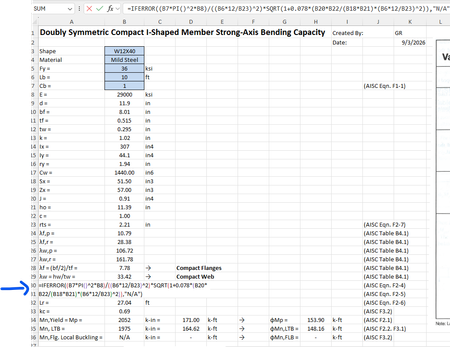
For some reason when I create a formula that references other cells, I cannot get those cells to "identify" themselves with a specific color. For example, in the image below the formula references cells B7, B8, B6, etc but they are just black text and don't show up in color per standard excel documents. Usually they "glow" with a specific color so you can find them easily in big spreadsheets. How do I get the colors back?Solved447Views0likes2Comments
GLSU Excel add-in fails to load after Office update from Version 2607 to 2608
Our Excel add-in, Process Runner GLSU , fails to load after Microsoft Office updates from Version 2607 to Version 2608. This started August 17, 2026 and is actively growing in scope. Error messages: Excel: Cannot run the macro 'onLoad' VBA: System Error &H80004005 (-2147467259). Unspecified error VBA: Compile error in hidden module: ThisWorkbook Has anyone encountered similar issue with their own custom add-on. If yes, any pointers to fix it. We are seeking help on priority. Thanks, Vrushali Pawale, Sr. Manager, Insightsoftware.990Views0likes1Comment
Getting data from Snowflake to Excel
Hello I have multiple no technical users and am trying to find a way to setup a snowflake query for them and then let them refresh it whenever they want or on a schedule, but I couldn't find a good solution this what i found so far: ODBC (Not great for non technical users needs setup on each user desktop) Power Automate (Needs Power Automate Premium which we don't have) Third Party tools (Expensive pricing models) Through Power BI (We want to separate this process from power bi) Any suggested solution please!Solved764Views0likes3Comments
Pivot Table
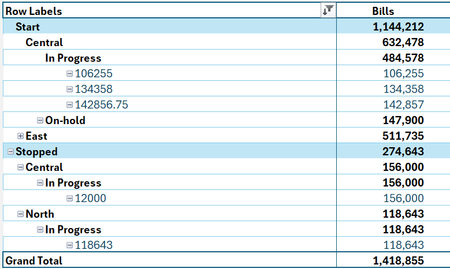
Hi everyone, I have an issue with the pivot table. There are filters from slicers and row labels in the table; when I double-click on any category from the table to see the filtered data, Excel fetches all data, not just what I filter on. Like below, I filtered from the slicer, and from the row labels, (Bills) should be between 100,000 and 200,000. I would like to see the (Bills) for (Central) in the (Start), but it gives me 632,478 and bills less than 100,000 and 200,000, not the 3 clients. Even if I tried from (In Progress), it's the same; it brings all data. The issue is only with the Bills column, but other filters come up correctly323Views0likes1Comment