beta
53 Topics
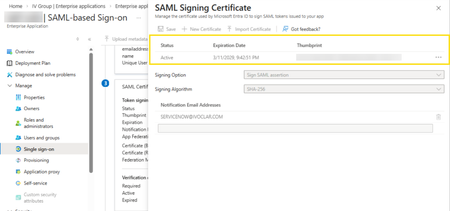
Azure Tiles Not loading with MS Edge Beta v147.0.3912.16
In the latest version of MS Edge, we cannot view or access the SAML Certificate data for Enterprise Applications hosted in Entra ID. Before: (v146.0.3856.62) After updating to v147.0.3912.16: As can be seen, the certificates cannot be displayed or accessed from this tile. This is affecting our test users who cannot rotate their SAML certificates but may have other impact for other Azure resources being accessed with MS Edge Beta.Solved156Views0likes2Comments
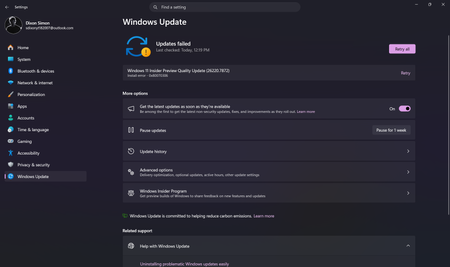
Unable to install the Windows Preview Update
I am unable to install the Windows Insider Preview update for the beta channel and I do not know how to fix it. I have retried around 5 or 6 times and still same error persists, It shows the following error. Windows 11 Insider Preview Quality Update (26220.7872) Install error - 0x80070306 Please help me fix this issue, Thank you.1.7KViews2likes9Comments
Technical Issue during AB-900 Beta Exam - Pearson VUE Queue System Failure - Case #14052082
Hello Support Team, I am writing to request assistance regarding a technical issue I experienced during my AB-900 Beta Exam appointment on January 2nd, 2026. I had a voucher providing an 80% discount valid exclusively for that date. I successfully completed the check-in process on time, and my system passed all pre-exam requirements. However, I was placed in a waiting queue with 24 people ahead of me. After waiting for over 15 minutes, the system displayed a "Reschedule" button. When I clicked it, no dates were available, and I was unable to return to the exam session. I immediately contacted Pearson VUE support via chat. Despite following their instructions to restart the check-in process, the system blocked my access, stating it was past the allowed start time. I opened a formal case with Pearson VUE, and their final resolution (Case #14052082) was that I should reach out to Microsoft Support for further guidance and a "new authorization," as they claimed they could not provide a new voucher for this expired promotion. I prepared extensively for this certification and I was unable to take it due to a failure in the Pearson VUE proctoring queue system. Since the original voucher has now expired, I kindly ask for a new voucher or authorization so I can reschedule and take the AB-900 exam at the discounted rate I previously paid for. Exam: AB-900 Date: January 2nd, 2026 Pearson VUE Case Number: 14052082 Thank you for your time and assistance.489Views0likes6CommentsPWA shortcuts don't keep asociated with window - Linux
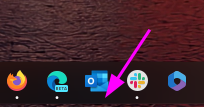
I recently upgraded to version140.0.3485.14 (Official build) beta (64-bit) and noticed that my PWA, even if they open correctly in a independent window, don't show the "running window counter" on the taskbar. So, for example, if a open Outlook, the window open and loads the app, but if a I click the icon again, it opens another window, wich is a little annoying. I tried removing the PWA from Edge, rebooting, and installing again, but didn't work. Because the only change I made is updating Edge, I think is related to this build. (too lazy to go back or install the stable release)2.8KViews10likes11CommentsInstall Issue - Windows 11 Insider Preview 10.0.26120.2705 (ge_release_upr)
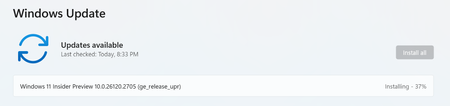
I joined windows insider, and before I start I wanted to note originally only wanted to be in the beta, not the DEV or CANARY builds as I am a beginner. However, at this moment in time, the DEV build downloaded and this build is trying to install, I have clicked download/install multiple times and it takes forever, (I know it takes time but normally is much faster on my device) but when it finally hits 100%, it requests the restart for the update process, whenever my system is rebooted windows update says "Attention Needed" and the install failed. Yet-- when I go to update history this is what shows: Here is what my insider page looks like currently for note: So I am confused and frankly would either like to get this update install gone, or just the beta. Any assistance would be very much appreciated, especially since I am a newbie.3.7KViews0likes3Comments
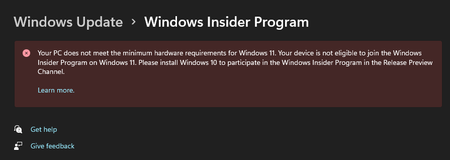
Bug@ Settings > Windows Update > Windows Insider Program
I joined the Windows Insider Program months ago, and I currently have Windows 11 activated. For some unknown reason, I have this on my screen, but I know as a matter of fact that this is false. I know that Windows 11 is officially released now, but this is not the kind of message that should be displayed here if the Windows Insider Program is obsolete now.984Views0likes1Comment
Windows Insider: Beta Channel (Discounted/Free 11 Home to 11 Pro)
Hey Everyone, I'm not sure I'm in the correct place. I've never posted on here before. I'm on Windows 11 Home Edition through the beta channel. I was wondering if anyone knows a way to move from 11 Home Edition to 11 Pro Edition (or is there another better suited?). I am a student. Majoring in software development. I have interests in joining the developer program here, I'm just a bit nervous it's too advanced for me. I would really like to access the features that are available on other versions of Windows. I was able to enable Hyper-V. But I would like to have access to the sandbox (Not sure if that's even available on the PRO edition), screencasting. I can sometimes cast a youtube and some other things, but not just screencast my full desktop, for example) and Bitlocker. My device is definitely capable. I checked and the status of my TPM, it says Status: Ready to use. I have 32gb RAM and 1tb SSD (also a couple external HDD/SSD) Anyways, I can't afford to pay for the pro version. I was wondering what the absolute cheapest way to get it would be. Or if there are work arounds like there is for enabling Hyper-V. Thank You, John841Views0likes0Comments