best practices
1705 TopicsMCP Demystified: Tools vs Resources vs Prompts Explained Simply
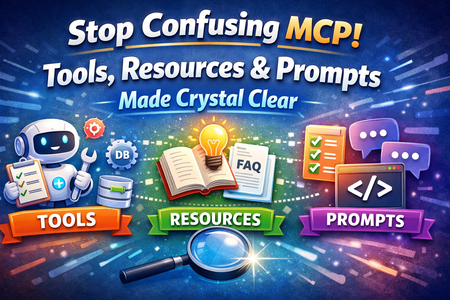
Introduction When developers start working with Model Context Protocol (MCP), one of the most confusing parts is understanding the difference between MCP Tools, Resources, and Prompts. All three are important components in modern AI application development, but they serve completely different purposes. In real-world AI systems like chatbots, AI agents, and copilots, using these components correctly can make your application scalable, clean, and easy to maintain. If used incorrectly, it can lead to confusion, bugs, and poor system design. In this article, we will clearly explain the difference between MCP Tools, Resources, and Prompts in simple words, using real-world examples and practical explanations. This guide is helpful for both beginner and intermediate developers working with AI and MCP. What Are MCP Tools? MCP Tools are functions or services that an AI model can use to perform real-world actions. These actions usually involve doing something outside the AI system, such as calling an API, updating a database, or sending a message. In simple terms, Tools represent what the AI can do. Real-World Analogy Think of MCP Tools like service workers in a company. For example, a delivery person delivers packages, a support agent updates tickets, and a payment system processes transactions. Similarly, MCP Tools perform specific tasks when requested by the AI. Examples of MCP Tools A tool that fetches user details from a database A tool that sends emails or notifications A tool that creates or updates support tickets A tool that calls third-party APIs like payment gateways A tool that triggers workflows in enterprise systems Key Understanding Tools are action-based. They execute operations and return results. Whenever your AI needs to "do something," you should use a Tool. What Are MCP Resources? MCP Resources are data sources that the AI model can access to read information. These are typically read-only and provide context or knowledge to the AI. In simple terms, Resources represent what the AI can read or see. Real-World Analogy Think of MCP Resources like books in a library or documents in a company. You can read and learn from them, but you cannot directly change their content. Examples of MCP Resources A database table containing customer information A knowledge base with FAQs and documentation System logs that track user activity Configuration files or static datasets Company policy documents or guidelines Key Understanding Resources are data-based. They provide information but do not perform any action. Whenever your AI needs information to make a decision, you should use a Resource. What Are MCP Prompts? MCP Prompts are structured instructions or templates that guide how the AI model should think, behave, and respond. In simple terms, Prompts represent how you instruct the AI. Real-World Analogy Think of Prompts like instructions given to an employee. For example, “Write a professional email,” “Summarize this report,” or “Answer politely to the customer.” These instructions shape how the output is generated. Examples of MCP Prompts A prompt to summarize customer feedback A prompt to generate a support response in a polite tone A prompt to analyze data and provide insights A prompt to translate text into another language A prompt to generate code based on requirements Key Understanding Prompts are instruction-based. They define how the AI should process input and generate output. Key Differences Between MCP Tools, Resources, and Prompts Understanding the difference between MCP Tools, Resources, and Prompts is important for building scalable AI systems. Tools vs Resources vs Prompts Tools are used for performing actions Resources are used for reading data Prompts are used for guiding AI behavior Detailed Comparison Tools interact with external systems and can change data or trigger operations Resources only provide data and do not modify anything Prompts control how the AI thinks, responds, and formats its output Comparison Table Aspect MCP Tools MCP Resources MCP Prompts Purpose Perform actions Provide data Guide behavior Nature Active Passive Instructional Usage API calls, updates Data reading AI response generation Output Action result Data Generated content How MCP Tools, Resources, and Prompts Work Together In real-world AI systems, these three components are used together to create powerful workflows. Step-by-Step Flow The user sends a request to the AI system The Prompt defines how the AI should understand and respond The AI fetches required information from Resources If an action is required, the AI uses a Tool The AI combines everything and generates a final response Practical Example Consider an AI customer support system: The Prompt ensures the response is polite and helpful The Resource provides customer history and previous tickets The Tool updates the ticket status or sends an email notification This combination helps build intelligent, real-world AI applications. Advantages of Understanding MCP Concepts Helps developers design clean and scalable AI architecture Improves clarity in system design and reduces confusion Enhances performance by separating responsibilities Makes debugging and maintenance easier Supports faster development of AI-powered applications Common Mistakes Developers Make Using Tools when only data retrieval is needed Treating Resources as editable systems Writing vague or unclear Prompts Mixing responsibilities between Tools, Resources, and Prompts Not structuring MCP components properly in applications Best Practices for Using MCP Tools, Resources, and Prompts Clearly define the role of each component before implementation Use Tools only for actions that change system state or trigger operations Use Resources strictly for reading and retrieving data Write clear, specific, and well-structured Prompts Test Tools, Resources, and Prompts independently before integration Keep your architecture modular and easy to scale Summary Understanding the difference between MCP Tools, Resources, and Prompts is essential for modern AI application development using Model Context Protocol. Tools allow AI systems to perform actions, Resources provide the necessary data, and Prompts guide how the AI behaves and generates responses. When these components are used correctly, developers can build scalable, efficient, and intelligent AI systems. Mastering these MCP concepts will help you design better architectures and create powerful AI-driven applications in today’s evolving technology landscape.
Notification Experience in Viva Engage
Our company has recently adopted Viva Engage, and we've been receiving a lot of feedback from our users regarding the notification system, particularly around how it affects their ability to stay informed without being overwhelmed. We have also noticed a significant reduction in engagement from users since moving from WorkPlace to Viva Engage. Here are the main concerns we've encountered: Users who have email notifications enabled are receiving far too many alerts. Many have expressed a desire to receive email notifications only for new posts, not for every comment or reply. Those who have turned off email notifications often forget to check Viva Engage because the only way to see new activity is to manually open the app and check The app icon doesn’t show any indication of new activity. We have not adopted using the announcement feature and we don't intend to as: Only defined community specialists and admins are allowed to use this feature and we do not want to make every employee a specialist/admin for every Engage Community It requires people to remember to use the feature for every new post There are no pop-up notifications like in Microsoft Teams. The counter in Viva Engage shows updates for both new posts and comments, which many users find distracting. They would prefer to have the option to see in-app counters only for new posts, not for every interaction. I have seen people suggest the following workaround: manually unfollowing each post to avoid comment notifications. This solution is not scalable or user-friendly IMO. A more elegant solution would be to reverse the logic: users should only receive comment notifications if they choose to follow a post. Suggested Improvements: Add granular notification settings (e.g., toggle for “new posts only” vs. “all activity”). Introduce pop-up notifications for new posts, similar to Teams. Allow users to follow posts only if they want updates, rather than being auto-subscribed. Improve visual indicators on the app icon to show unread activity. We believe these changes would significantly improve the user experience and help drive engagement without overwhelming users. Has anyone else faced similar issues? Would love to hear your thoughts or if Microsoft has any updates planned in this area. Thanks!269Views9likes2Comments
Architecting Secure and Trustworthy AI Agents with Microsoft Foundry
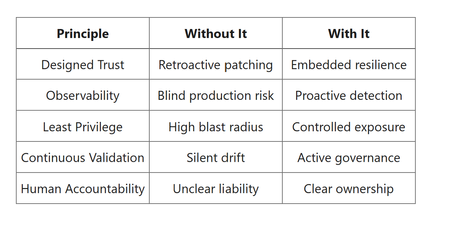
Co-Authored by Avneesh Kaushik Why Trust Matters for AI Agents Unlike static ML models, AI agents call tools and APIs, retrieve enterprise data, generate dynamic outputs, and can act autonomously based on their planning. This introduces expanded risk surfaces: prompt injection, data exfiltration, over-privileged tool access, hallucinations, and undetected model drift. A trustworthy agent must be designed with defense-in-depth controls spanning planning, development, deployment, and operations. Key Principles for Trustworthy AI Agents Trust Is Designed, Not Bolted On- Trust cannot be added after deployment. By the time an agent reaches production, its data flows, permissions, reasoning boundaries, and safety posture must already be structurally embedded. Trust is architecture, not configuration. Architecturally this means trust must exist across all layers: Layer Design-Time Consideration Model Safety-aligned model selection Prompting System prompt isolation & injection defenses Retrieval Data classification & access filtering Tools Explicit allowlists Infrastructure Network isolation Identity Strong authentication & RBAC Logging Full traceability Implementing trustworthy AI agents in Microsoft Foundry requires embedding security and control mechanisms directly into the architecture. Secure-by-design approach- includes using private connectivity where supported (for example, Private Link/private endpoints) to reduce public exposure of AI and data services, enforcing managed identities for tool and service calls, and applying strong security trimming for retrieval (for example, per-document ACL filtering and metadata filters), with optional separate indexes by tenant or data classification when required for isolation. Sensitive credentials and configuration secrets should be stored in Azure Key Vault rather than embedded in code, and content filtering should be applied pre-model (input), post-model (output), to screen unsafe prompts, unsafe generations, and unsafe tool actions in real time. Prompt hardening- further reduces risk by clearly separating system instructions from user input, applying structured tool invocation schemas instead of free-form calls, rejecting malformed or unexpected tool requests, and enforcing strict output validation such as JSON schema checks. Threat Modeling -Before development begins, structured threat modeling should define what data the agent can access, evaluate the blast radius of a compromised or manipulated prompt, identify tools capable of real-world impact, and assess any regulatory or compliance exposure. Together, these implementation patterns ensure the agent is resilient, controlled, and aligned with enterprise trust requirements from the outset. Observability Is Mandatory - Observability converts AI from a black box into a managed system. AI agents are non-deterministic systems. You cannot secure or govern what you cannot see. Unlike traditional APIs, agents reason step-by-step, call multiple tools, adapt outputs dynamically and generate unstructured content which makes deep observability non-optional. When implementing observability in Microsoft Foundry, organizations must monitor the full behavioral footprint of the AI agent to ensure transparency, security, and reliability. This begins with Reasoning transparency includes capturing prompt inputs, system instructions, tool selection decisions, and high-level execution traces (for example, tool call sequence, retrieved sources, and policy outcomes) to understand how the agent arrives at outcomes, without storing sensitive chain-of-thought verbatim. Security signals should also be continuously analyzed, including prompt injection attempts, suspicious usage patterns, repeated tool retries, and abnormal token consumption spikes that may indicate misuse or exploitation. From a performance and reliability standpoint, teams should measure latency at each reasoning step, monitor timeout frequency, and detect drift in output distribution over time. Core telemetry should include prompt and completion logs, detailed tool invocation traces, safety filter scores, and model version metadata to maintain traceability. Additionally, automated alerting should be enabled for anomaly detection, predefined drift thresholds, and safety score regressions, ensuring rapid response to emerging risks and maintaining continuous trust in production environments. Least Privilege Everywhere- AI agents amplify the consequences of over-permissioned systems. Least privilege must be enforced across every layer of an AI agent’s architecture to reduce blast radius and prevent misuse. Identity controls should rely on managed identities instead of shared secrets, combined with role-based access control (RBAC) and conditional access policies to tightly scope who and what can access resources. At the tooling layer, agents should operate with an explicit tool allowlist, use scope-limited API endpoints, and avoid any wildcard or unrestricted backend access. Network protections should include VNet isolation, elimination of public endpoints, and routing all external access through API Management as a controlled gateway. Without these restrictions, prompt injection or agent manipulation could lead to serious consequences such as data exfiltration, or unauthorized transactions, making least privilege a foundational requirement for trustworthy AI . Continuous Validation Beats One-Time Approval- Unlike traditional software that may pass QA testing and remain relatively stable, AI systems continuously evolve—models are updated, prompts are refined, and data distributions shift over time. Because of this dynamic nature, AI agents require ongoing validation rather than a single approval checkpoint. Continuous validation should include automated safety regression testing such as bias evaluation, and hallucination detection to ensure outputs remain aligned with policy expectations. Drift monitoring is equally important, covering semantic drift, response distribution changes, and shifts in retrieval sources that could alter agent behavior. Red teaming should also be embedded into the lifecycle, leveraging injection attack libraries, adversarial test prompts, and edge-case simulations to proactively identify vulnerabilities. These evaluations should be integrated directly into CI/CD pipelines so that prompt updates automatically trigger evaluation runs, model upgrades initiate regression testing, and any failure to meet predefined safety thresholds blocks deployment. This approach ensures that trust is continuously enforced rather than assumed. Humans Remain Accountable - AI agents can make recommendations, automate tasks, or execute actions, but they cannot bear accountability themselves. Organizations must retain legal responsibility, ethical oversight, and governance authority over every decision and action performed by the agent. To enforce accountability, mechanisms such as immutable audit logs, detailed decision trace storage, user interaction histories, and versioned policy documentation should be implemented. Every action taken by an agent must be fully traceable to a specific model version, prompt version, policy configuration, and ultimately a human owner. Together, these five principles—trust by design, observability, least privilege, continuous validation, and human accountability—form a reinforcing framework. When applied within Microsoft Foundry, they elevate AI agents from experimental tools to enterprise-grade, governed digital actors capable of operating reliably and responsibly in production environments. Principle Without It With It Designed Trust Retroactive patching Embedded resilience Observability Blind production risk Proactive detection Least Privilege High blast radius Controlled exposure Continuous Validation Silent drift Active governance Human Accountability Unclear liability Clear ownership The AI Agent Lifecycle - We can structure trust controls across five stages: Design & Planning Development Pre-Deployment Validation Deployment & Runtime Operations & Continuous Governance Design & Planning: Establishing Guardrails Early. Trustworthy AI agents are not created by adding controls at the end of development, they are architected deliberately from the very beginning. In platforms such as Microsoft Foundry, trust must be embedded during the design and planning phase, before a single line of code is written. This stage defines the security boundaries, governance structure, and responsible AI commitments that will shape the agent’s entire lifecycle. From a security perspective, planning begins with structured threat modeling of the agent’s capabilities. Teams should evaluate what the agent is allowed to access and what actions it can execute. This includes defining least-privilege access to tools and APIs, ensuring the agent can only perform explicitly authorized operations. Data classification is equally critical. identifying whether information is public, confidential, or regulated determines how it can be retrieved, stored, and processed. Identity architecture should be designed using strong authentication and role-based access controls through Microsoft Entra ID, ensuring that both human users and system components are properly authenticated and scoped. Additionally, private networking strategies such as VNet integration and private endpoints should be defined early to prevent unintended public exposure of models, vector stores, or backend services. Governance checkpoints must also be formalized at this stage. Organizations should clearly define the intended use cases of the agent, as well as prohibited scenarios to prevent misuse. A Responsible AI impact assessment should be conducted to evaluate potential societal, ethical, and operational risks before development proceeds. Responsible AI considerations further strengthen these guardrails. Finally, clear human-in-the-loop thresholds should be defined, specifying when automated outputs require review. By treating design and planning as a structured control phase rather than a preliminary formality, organizations create a strong foundation for trustworthy AI. Development: Secure-by-Default Agent Engineering During development in Microsoft Foundry, agents are designed to orchestrate foundation models, retrieval pipelines, external tools, and enterprise business APIs making security a core architectural requirement rather than an afterthought. Secure-by-default engineering includes model and prompt hardening through system prompt isolation, structured tool invocation and strict output validation schemas. Retrieval pipelines must enforce source allow-listing, metadata filtering, document sensitivity tagging, and tenant-level vector index isolation to prevent unauthorized data exposure. Observability must also be embedded from day one. Agents should log prompts and responses, trace tool invocations, track token usage, capture safety classifier scores, and measure latency and reasoning-step performance. Telemetry can be exported to platforms such as Azure Monitor, Azure Application Insights, and enterprise SIEM systems to enable real-time monitoring, anomaly detection, and continuous trust validation. Pre-Deployment: Red Teaming & Validation Before moving to production, AI agents must undergo reliability, and governance validation. Security testing should include prompt injection simulations, data leakage assessments, tool misuse scenarios, and cross-tenant isolation verification to ensure containment boundaries are intact. Responsible AI validation should evaluate bias, measure toxicity and content safety scores, benchmark hallucination rates, and test robustness against edge cases and unexpected inputs. Governance controls at this stage formalize approval workflows, risk sign-off, audit trail documentation, and model version registration to ensure traceability and accountability. The outcome of this phase is a documented trustworthiness assessment that confirms the agent is ready for controlled production deployment. Deployment: Zero-Trust Runtime Architecture Deploying AI agents securely in Azure requires a layered, Zero Trust architecture that protects infrastructure, identities, and data at runtime. Infrastructure security should include private endpoints, Network Security Groups, Web Application Firewalls (WAF), API Management gateways, secure secret storage in Azure Key Vault, and the use of managed identities. Following Zero Trust principles verify explicitly, enforce least privilege, and assume breach ensures that every request, tool call, and data access is continuously validated. Runtime observability is equally critical. Organizations must monitor agent reasoning traces, tool execution outcomes, anomalous usage patterns, prompt irregularities, and output drift. Key telemetry signals include safety indicators (toxicity scores, jailbreak attempts), security events (suspicious tool call frequency), reliability metrics (timeouts, retry spikes), and cost anomalies (unexpected token consumption). Automated alerts should be configured to detect spikes in unsafe outputs, tool abuse attempts, or excessive reasoning loops, enabling rapid response and containment. Operations: Continuous Governance & Drift Management Trust in AI systems is not static, rather it should be continuously monitored, validated, and enforced throughout production. Organizations should implement automated evaluation pipelines that perform regression testing on new model versions, apply safety scoring to production logs, detect behavioral or data drift, and benchmark performance over time. Governance in production requires immutable audit logs, a versioned model registry, controlled policy updates, periodic risk reassessments, and well-defined incident response playbooks. Strong human oversight remains essential, supported by escalation workflows, manual review queues for high-risk outputs, and kill-switch mechanisms to immediately suspend agent capabilities if abnormal or unsafe behavior is detected. To conclude - AI agents unlock powerful automation but those same capabilities can introduce risk if left unchecked. A well-architected trust framework transforms agents from experimental chatbots into enterprise-ready autonomous systems. By coupling Microsoft Foundry’s flexibility with layered security, observability, and continuous governance, organizations can confidently deliver AI agents that are: Secure Reliable Compliant Governed TrustworthyPlanner task comments no longer send email notifications – critical regression
This change removed a previously existing core functionality without providing an adequate replacement. With the new Planner experience, task comments no longer trigger automatic email notifications to assigned users. This breaks a critical communication mechanism that many teams relied on for reliable task coordination. As a result, assigned users are no longer consistently informed about updates, introducing a high risk of missed information and operational issues in day-to-day work. There is currently no supported or enforceable alternative to ensure users are notified. Previous behavior: Task comments triggered automatic email notifications Assigned users were reliably informed Communication was traceable and consistent Current behavior: No automatic email notifications No configuration to restore this @mentions required (manual, error-prone, not enforceable) Microsoft Support has confirmed that this is by design and cannot be reverted. From an enterprise perspective, this is not just a design change, but a regression of critical functionality without an equivalent replacement. Request: Please restore automatic email notifications for task discussions or provide a reliable, enforceable alternative for notifying assigned users. Question to the community: How are you handling this change in real-world scenarios? Switching tools? Enforcing @mentions? Moving communication out of Planner? Would appreciate hearing how others are dealing with this.17Views1like0CommentsThe Agent that investigates itself
Azure SRE Agent handles tens of thousands of incident investigations each week for internal Microsoft services and external teams running it for their own systems. Last month, one of those incidents was about the agent itself. Our KV cache hit rate alert started firing. Cached token percentage was dropping across the fleet. We didn't open dashboards. We simply asked the agent. It spawned parallel subagents, searched logs, read through its own source code, and produced the analysis. First finding: Claude Haiku at 0% cache hits. The agent checked the input distribution and found that the average call was ~180 tokens, well below Anthropic’s 4,096-token minimum for Haiku prompt caching. Structurally, these requests could never be cached. They were false positives. The real regression was in Claude Opus: cache hit rate fell from ~70% to ~48% over a week. The agent correlated the drop against the deployment history and traced it to a single PR that restructured prompt ordering, breaking the common prefix that caching relies on. It submitted two fixes: one to exclude all uncacheable requests from the alert, and the other to restore prefix stability in the prompt pipeline. That investigation is how we develop now. We rarely start with dashboards or manual log queries. We start by asking the agent. Three months earlier, it could not have done any of this. The breakthrough was not building better playbooks. It was harness engineering: enabling the agent to discover context as the investigation unfolded. This post is about the architecture decisions that made it possible. Where we started In our last post, Context Engineering for Reliable AI Agents: Lessons from Building Azure SRE Agent, we described how moving to a single generalist agent unlocked more complex investigations. The resolution rates were climbing, and for many internal teams, the agent could now autonomously investigate and mitigate roughly 50% of incidents. We were moving in the right direction. But the scores weren't uniform, and when we dug into why, the pattern was uncomfortable. The high-performing scenarios shared a trait: they'd been built with heavy human scaffolding. They relied on custom response plans for specific incident types, hand-built subagents for known failure modes, and pre-written log queries exposed as opaque tools. We weren’t measuring the agent’s reasoning – we were measuring how much engineering had gone into the scenario beforehand. On anything new, the agent had nowhere to start. We found these gaps through manual review. Every week, engineers read through lower-scored investigation threads and pushed fixes: tighten a prompt, fix a tool schema, add a guardrail. Each fix was real. But we could only review fifty threads a week. The agent was handling ten thousand. We were debugging at human speed. The gap between those two numbers was where our blind spots lived. We needed an agent powerful enough to take this toil off us. An agent which could investigate itself. Dogfooding wasn't a philosophy - it was the only way to scale. The Inversion: Three bets The problem we faced was structural - and the KV cache investigation shows it clearly. The cache rate drop was visible in telemetry, but the cause was not. The agent had to correlate telemetry with deployment history, inspect the relevant code, and reason over the diff that broke prefix stability. We kept hitting the same gap in different forms: logs pointing in multiple directions, failure modes in uninstrumented paths, regressions that only made sense at the commit level. Telemetry showed symptoms, but not what actually changed. We'd been building the agent to reason over telemetry. We needed it to reason over the system itself. The instinct when agents fail is to restrict them: pre-write the queries, pre-fetch the context, pre-curate the tools. It feels like control. In practice, it creates a ceiling. The agent can only handle what engineers anticipated in advance. The answer is an agent that can discover what it needs as the investigation unfolds. In the KV cache incident, each step, from metric anomaly to deployment history to a specific diff, followed from what the previous step revealed. It was not a pre-scripted path. Navigating towards the right context with progressive discovery is key to creating deep agents which can handle novel scenarios. Three architectural decisions made this possible – and each one compounded on the last. Bet 1: The Filesystem as the Agent's World Our first bet was to give the agent a filesystem as its workspace instead of a custom API layer. Everything it reasons over – source code, runbooks, query schemas, past investigation notes – is exposed as files. It interacts with that world using read_file, grep, find, and shell. No SearchCodebase API. No RetrieveMemory endpoint. This is an old Unix idea: reduce heterogeneous resources to a single interface. Coding agents already work this way. It turns out the same pattern works for an SRE agent. Frontier models are trained on developer workflows: navigating repositories, grepping logs, patching files, running commands. The filesystem is not an abstraction layered on top of that prior. It matches it. When we materialized the agent’s world as a repo-like workspace, our human "Intent Met" score - whether the agent's investigation addressed the actual root cause as judged by the on-call engineer - rose from 45% to 75% on novel incidents. But interface design is only half the story. The other half is what you put inside it. Code Repositories: the highest-leverage context Teams had prewritten log queries because they did not trust the agent to generate correct ones. That distrust was justified. Models hallucinate table names, guess column schemas, and write queries against the wrong cluster. But the answer was not tighter restriction. It was better grounding. The repo is the schema. Everything else is derived from it. When the agent reads the code that produces the logs, query construction stops being guesswork. It knows the exact exceptions thrown, and the conditions under which each path executes. Stack traces start making sense, and logs become legible. But beyond query grounding, code access unlocked three new capabilities that telemetry alone could not provide: Ground truth over documentation. Docs drift and dashboards show symptoms. The code is what the service actually does. In practice, most investigations only made sense when logs were read alongside implementation. Point-in-time investigation. The agent checks out the exact commit at incident time, not current HEAD, so it can correlate the failure against the actual diffs. That's what cracked the KV cache investigation: a PR broke prefix stability, and the diff was the only place this was visible. Without commit history, you can't distinguish a code regression from external factors. Reasoning even where telemetry is absent. Some code paths are not well instrumented. The agent can still trace logic through source and explain behavior even when logs do not exist. This is especially valuable in novel failure modes – the ones most likely to be missed precisely because no one thought to instrument them. Memory as a filesystem, not a vector store Our first memory system used RAG over past session learnings. It had a circular dependency: a limited agent learned from limited sessions and produced limited knowledge. Garbage in, garbage out. But the deeper problem was retrieval. In SRE Context, embedding similarity is a weak proxy for relevance. “KV cache regression” and “prompt prefix instability” may be distant in embedding space yet still describe the same causal chain. We tried re-ranking, query expansion, and hybrid search. None fixed the core mismatch between semantic similarity and diagnostic relevance. We replaced RAG with structured Markdown files that the agent reads and writes through its standard tool interface. The model names each file semantically: overview.md for a service summary, team.md for ownership and escalation paths, logs.md for cluster access and query patterns, debugging.md for failure modes and prior learnings. Each carry just enough context to orient the agent, with links to deeper files when needed. The key design choice was to let the model navigate memory, not retrieve it through query matching. The agent starts from a structured entry point and follows the evidence toward what matters. RAG assumes you know the right query before you know what you need. File traversal lets relevance emerge as context accumulates. This removed chunking, overlap tuning, and re-ranking entirely. It also proved more accurate, because frontier models are better at following context than embeddings are at guessing relevance. As a side benefit, memory state can be snapshotted periodically. One problem remains unsolved: staleness. When two sessions write conflicting patterns to debugging.md, the model must reconcile them. When a service changes behavior, old entries can become misleading. We rely on timestamps and explicit deprecation notes, but we do not have a systemic solution yet. This is an active area of work, and anyone building memory at scale will run into it. The sandbox as epistemic boundary The filesystem also defines what the agent can see. If something is not in the sandbox, the agent cannot reason about it. We treat that as a feature, not a limitation. Security boundaries and epistemic boundaries are enforced by the same mechanism. Inside that boundary, the agent has full execution: arbitrary bash, python, jq, and package installs through pip or apt. That scope unlocks capabilities we never would have built as custom tools. It opens PRs with gh cli, like the prompt-ordering fix from KV cache incident. It pushes Grafana dashboards, like a cache-hit-rate dashboard we now track by model. It installs domain-specific CLI tools mid-investigation when needed. No bespoke integration required, just a shell. The recurring lesson was simple: a generally capable agent in the right execution environment outperforms a specialized agent with bespoke tooling. Custom tools accumulate maintenance costs. Shell commands compose for free. Bet 2: Context Layering Code access tells the agent what a service does. It does not tell the agent what it can access, which resources its tools are scoped to, or where an investigation should begin. This gap surfaced immediately. Users would ask "which team do you handle incidents for?" and the agent had no answer. Tools alone are not enough. An integration also needs ambient context so the model knows what exists, how it is configured, and when to use it. We fixed this with context hooks: structured context injected at prompt construction time to orient the agent before it takes action. Connectors - what can I access? A manifest of wired systems such as Log Analytics, Outlook, and Grafana, along with their configuration. Repositories - what does this system do? Serialized repo trees, plus files like AGENTS.md, Copilot.md, and CLAUDE.md with team-specific instructions. Knowledge map - what have I learned before? A two-tier memory index with a top-level file linking to deeper scenario-specific files, so the model can drill down only when needed. Azure resource topology - where do things live? A serialized map of relationships across subscriptions, resource groups, and regions, so investigations start in the right scope. Together, these context hooks turn a cold start into an informed one. That matters because a bad early choice does not just waste tokens. It sends the investigation down the wrong trajectory. A capable agent still needs to know what exists, what matters, and where to start. Bet 3: Frugal Context Management Layered context creates a new problem: budget. Serialized repo trees, resource topology, connector manifests, and a memory index fill context fast. Once the agent starts reading source files and logs, complex incidents hit context limits. We needed our context usage to be deliberately frugal. Tool result compression via the filesystem Large tool outputs are expensive because they consume context before the agent has extracted any value from them. In many cases, only a small slice or a derived summary of that output is actually useful. Our framework exposes these results as files to the agent. The agent can then use tools like grep, jq, or python to process them outside the model interface, so that only the final result enters context. The filesystem isn't just a capability abstraction - it's also a budget management primitive. Context Pruning and Auto Compact Long investigations accumulate dead weight. As hypotheses narrow, earlier context becomes noise. We handle this with two compaction strategies. Context Pruning runs mid-session. When context usage crosses a threshold, we trim or drop stale tool calls and outputs - keeping the window focused on what still matters. Auto-Compact kicks in when a session approaches its context limit. The framework summarizes findings and working hypotheses, then resumes from that summary. From the user's perspective, there's no visible limit. Long investigations just work. Parallel subagents The KV cache investigation required reasoning along two independent hypotheses: whether the alert definition was sound, and whether cache behavior had actually regressed. The agent spawned parallel subagents for each task, each operating in its own context window. Once both finished, it merged their conclusions. This pattern generalizes to any task with independent components. It speeds up the search, keeps intermediate work from consuming the main context window, and prevents one hypothesis from biasing another. The Feedback loop These architectural bets have enabled us to close the original scaling gap. Instead of debugging the agent at human speed, we could finally start using it to fix itself. As an example, we were hitting various LLM errors: timeouts, 429s (too many requests), failures in the middle of response streaming, 400s from code bugs that produced malformed payloads. These paper cuts would cause investigations to stall midway and some conversations broke entirely. So, we set up a daily monitoring task for these failures. The agent searches for the last 24 hours of errors, clusters the top hitters, traces each to its root cause in the codebase, and submits a PR. We review it manually before merging. Over two weeks, the errors were reduced by more than 80%. Over the last month, we have successfully used our agent across a wide range of scenarios: Analyzed our user churn rate and built dashboards we now review weekly. Correlated which builds needed the most hotfixes, surfacing flaky areas of the codebase. Ran security analysis and found vulnerabilities in the read path. Helped fill out parts of its own Responsible AI review, with strict human review. Handles customer-reported issues and LiveSite alerts end to end. Whenever it gets stuck, we talk to it and teach it, ask it to update its memory, and it doesn't fail that class of problem again. The title of this post is literal. The agent investigating itself is not a metaphor. It is a real workflow, driven by scheduled tasks, incident triggers, and direct conversations with users. What We Learned We spent months building scaffolding to compensate for what the agent could not do. The breakthrough was removing it. Every prewritten query was a place we told the model not to think. Every curated tool was a decision made on its behalf. Every pre-fetched context was a guess about what would matter before we understood the problem. The inversion was simple but hard to accept: stop pre-computing the answer space. Give the model a structured starting point, a filesystem it knows how to navigate, context hooks that tell it what it can access, and budget management that keeps it sharp through long investigations. The agent that investigates itself is both the proof and the product of this approach. It finds its own bugs, traces them to root causes in its own code, and submits its own fixes. Not because we designed it to. Because we designed it to reason over systems, and it happens to be one. We are still learning. Staleness is unsolved, budget tuning remains largely empirical, and we regularly discover assumptions baked into context that quietly constrain the agent. But we have crossed a new threshold: from an agent that follows your playbook to one that writes the next one. Thanks to visagarwal for co-authoring this post.13KViews6likes0Comments
Estimate Microsoft Sentinel Costs with Confidence Using the New Sentinel Cost Estimator
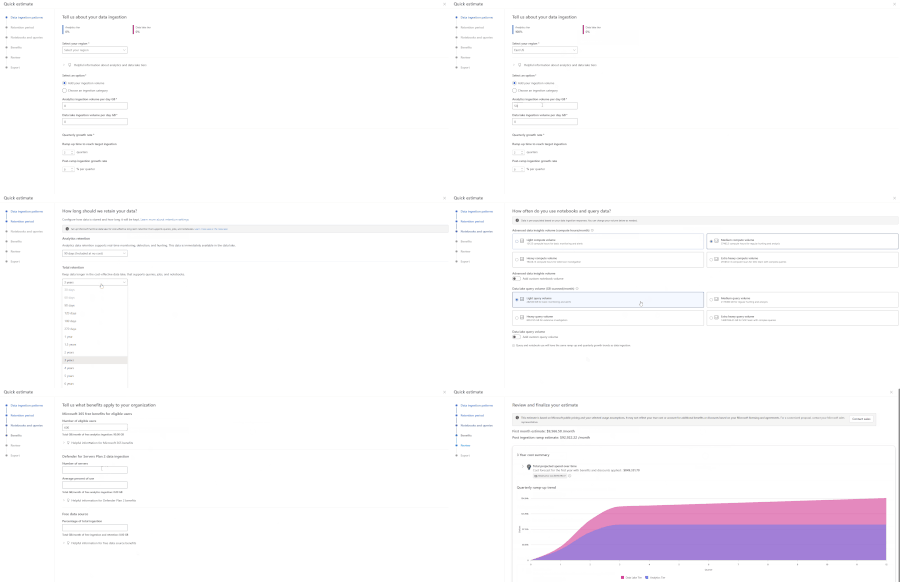
One of the first questions teams ask when evaluating Microsoft Sentinel is simple: what will this actually cost? Today, many customers and partners estimate Sentinel costs using the Azure Pricing Calculator, but it doesn’t provide the Sentinel-specific usage guidance needed to understand how each Sentinel meter contributes to overall spend. As a result, it can be hard to produce accurate, trustworthy estimates, especially early on, when you may not know every input upfront. To make these conversations easier and budgets more predictable, Microsoft is introducing the new Sentinel Cost Estimator (public preview) for Microsoft customers and partners. The Sentinel Cost Estimator gives organizations better visibility into spend and more confidence in budgeting as they operate at scale. You can access the Microsoft Sentinel Cost Estimator here: https://microsoft.com/en-us/security/pricing/microsoft-sentinel/cost-estimator What the Sentinel Cost Estimator does The new Sentinel Cost Estimator makes pricing transparent and predictable for Microsoft customers and partners. The Sentinel Cost Estimator helps you understand what drives costs at a meter level and ensures your estimates are accurate with step-by-step guidance. You can model multi-year estimates with built-in projections for up to three years, making it easy to anticipate data growth, plan for future spend, and avoid budget surprises as your security operations mature. Estimates can be easily shared with finance and security teams to support better budgeting and planning. When to Use the Sentinel Cost Estimator Use the Sentinel Cost Estimator to: Model ingestion growth over time as new data sources are onboarded Explore tradeoffs between Analytics and Data Lake storage tiers Understand the impact of retention requirements on total spend Estimate compute usage for notebooks and advanced queries Project costs across a multi‑year deployment timeline For broader Azure infrastructure cost planning, the Azure Pricing Calculator can still be used alongside the Sentinel Cost Estimator. Cost Estimator Example Let’s walk through a practical example using the Cost Estimator. A medium-sized company that is new to Microsoft Sentinel wants a high-level estimate of expected costs. In their previous SIEM, they performed proactive threat hunting across identity, endpoint, and network logs; ran detections on high-security-value data sources from multiple vendors; built a small set of dashboards; and required three years of retention for compliance and audit purposes. Based on their prior SIEM, they estimate they currently ingest about 2 TB per day. In the Cost Estimator, they select their region and enter their daily ingestion volume. As they are not currently using Sentinel data lake, they can explore different ways of splitting ingestion between tiers to understand the potential cost benefit of using the data lake. Their retention requirement is three years. If they choose to use Sentinel data lake, they can plan to retain 90 days in the Analytics tier (included with Microsoft Sentinel) and keep the remaining data in Sentinel data lake for the full three years. As notebooks are new to them, they plan to evaluate notebooks for SOC workflows and graph building. They expect to start in the light usage tier and may move to medium as they mature. Since they occasionally query data older than 90 days to build trends—and anticipate using the Sentinel MCP server for SOC workflows on Sentinel lake data—they expect to start in the medium query volume tier. Note: These tiers are for estimation purposes only; they do not lock in pricing when using the Microsoft Sentinel platform. Because this customer is upgrading from Microsoft 365 E3 to E5, they may be eligible for free ingestion based on their user count. Combined with their eligible server data from Defender for Servers, this can reduce their billable ingestion. In the review step, the Cost Estimator projects costs across a three-year window and breaks down drivers such as data tiers, commitment tiers, and comparisons with alternative storage options. From there, the customer can go back to earlier steps to adjust inputs and explore different scenarios. Once done, the estimate report can be exported for reference with Microsoft representatives and internal leadership when discussing the deployment of Microsoft Sentinel and Sentinel Platform. Finalize Your Estimate with Microsoft The Microsoft Sentinel Cost Estimator is designed to provide directional guidance and help organizations understand how architectural decisions may influence cost. Final pricing may vary based on factors such as deployment architecture, commitment tiers, and applicable discounts. We recommend working with your Microsoft account team or a Security sales specialist to develop a formal proposal tailored to your organization’s requirements. Try the Microsoft Sentinel Cost Estimator Start building your Microsoft Sentinel cost estimate today: https://microsoft.com/en-us/security/pricing/microsoft-sentinel/cost-estimator.1.7KViews0likes1CommentAn AI led SDLC: Building an End-to-End Agentic Software Development Lifecycle with Azure and GitHub.
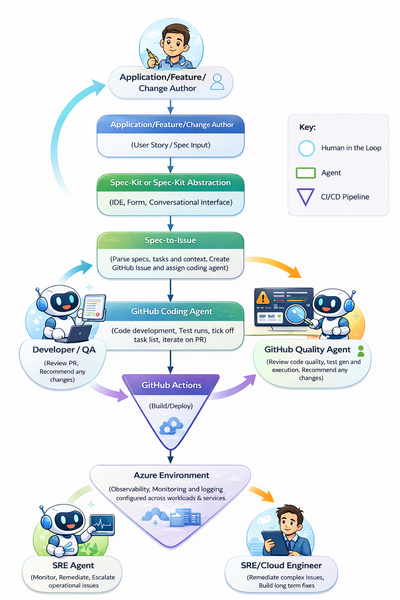
This is due to the inevitable move towards fully agentic, end-to-end SDLCs. We may not yet be at a point where software engineers are managing fleets of agents creating the billion-dollar AI abstraction layer, but (as I will evidence in this article) we are certainly on the precipice of such a world. Before we dive into the reality of agentic development today, let me examine two very different modules from university and their relevance in an AI-first development environment. Manual Requirements Translation. At university I dedicated two whole years to a unit called “Systems Design”. This was one of my favourite units, primarily focused on requirements translation. Often, I would receive a scenario between “The Proprietor” and “The Proprietor’s wife”, who seemed to be in a never-ending cycle of new product ideas. These tasks would be analysed, broken down, manually refined, and then mapped to some kind of early-stage application architecture (potentially some pseudo-code and a UML diagram or two). The big intellectual effort in this exercise was taking human intention and turning it into something tangible to build from (BA’s). Today, by the time I have opened Notepad and started to decipher requirements, an agent can already have created a comprehensive list, a service blueprint, and a code scaffold to start the process (*cough* spec-kit *cough*). Manual debugging. Need I say any more? Old-school debugging with print()’s and breakpoints is dead. I spent countless hours learning to debug in a classroom and then later with my own software, stepping through execution line by line, reading through logs, and understanding what to look for; where correlation did and didn’t mean causation. I think back to my year at IBM as a fresh-faced intern in a cloud engineering team, where around 50% of my time was debugging different issues until it was sufficiently “narrowed down”, and then reading countless Stack Overflow posts figuring out the actual change I would need to make to a PowerShell script or Jenkins pipeline. Already in Azure, with the emergence of SRE agents, that debug process looks entirely different. The debug process for software even more so… #terminallastcommand WHY IS THIS NOT RUNNING? #terminallastcommand Review these logs and surface errors relating to XYZ. As I said: breakpoints are dead, for now at least. Caveat – Is this a good thing? One more deviation from the main core of the article if you would be so kind (if you are not as kind skip to the implementation walkthrough below). Is this actually a good thing? Is a software engineering degree now worthless? What if I love printf()? I don’t know is my answer today, at the start of 2026. Two things worry me: one theoretical and one very real. To start with the theoretical: today AI takes a significant amount of the “donkey work” away from developers. How does this impact cognitive load at both ends of the spectrum? The list that “donkey work” encapsulates is certainly growing. As a result, on one end of the spectrum humans are left with the complicated parts yet to be within an agent’s remit. This could have quite an impact on our ability to perform tasks. If we are constantly dealing with the complex and advanced, when do we have time to re-root ourselves in the foundations? Will we see an increase in developer burnout? How do technical people perform without the mundane or routine tasks? I often hear people who have been in the industry for years discuss how simple infrastructure, computing, development, etc. were 20 years ago, almost with a longing to return to a world where today’s zero trust, globally replicated architectures are a twinkle in an architect’s eye. Is constantly working on only the most complex problems a good thing? At the other end of the spectrum, what if the performance of AI tooling and agents outperforms our wildest expectations? Suddenly, AI tools and agents are picking up more and more of today’s complicated and advanced tasks. Will developers, architects, and organisations lose some ability to innovate? Fundamentally, we are not talking about artificial general intelligence when we say AI; we are talking about incredibly complex predictive models that can augment the existing ideas they are built upon but are not, in themselves, innovators. Put simply, in the words of Scott Hanselman: “Spicy auto-complete”. Does increased reliance on these agents in more and more of our business processes remove the opportunity for innovative ideas? For example, if agents were football managers, would we ever have graduated from Neil Warnock and Mick McCarthy football to Pep? Would every agent just augment a ‘lump it long and hope’ approach? We hear about learning loops, but can these learning loops evolve into “innovation loops?” Past the theoretical and the game of 20 questions, the very real concern I have is off the back of some data shared recently on Stack Overflow traffic. We can see in the diagram below that Stack Overflow traffic has dipped significantly since the release of GitHub Copilot in October 2021, and as the product has matured that trend has only accelerated. Data from 12 months ago suggests that Stack Overflow has lost 77% of new questions compared to 2022… Stack Overflow democratises access to problem-solving (I have to be careful not to talk in past tense here), but I will admit I cannot remember the last time I was reviewing Stack Overflow or furiously searching through solutions that are vaguely similar to my own issue. This causes some concern over the data available in the future to train models. Today, models can be grounded in real, tested scenarios built by developers in anger. What happens with this question drop when API schemas change, when the technology built for today is old and deprecated, and the dataset is stale and never returning to its peak? How do we mitigate this impact? There is potential for some closed-loop type continuous improvement in the future, but do we think this is a scalable solution? I am unsure. So, back to the question: “Is this a good thing?”. It’s great today; the long-term impacts are yet to be seen. If we think that AGI may never be achieved, or is at least a very distant horizon, then understanding the foundations of your technical discipline is still incredibly important. Developers will not only be the managers of their fleet of agents, but also the janitors mopping up the mess when there is an accident (albeit likely mopping with AI-augmented tooling). An AI First SDLC Today – The Reality Enough reflection and nostalgia (I don’t think that’s why you clicked the article), let’s start building something. For the rest of this article I will be building an AI-led, agent-powered software development lifecycle. The example I will be building is an AI-generated weather dashboard. It’s a simple example, but if agents can generate, test, deploy, observe, and evolve this application, it proves that today, and into the future, the process can likely scale to more complex domains. Let’s start with the entry point. The problem statement that we will build from. “As a user I want to view real time weather data for my city so that I can plan my day.” We will use this as the single input for our AI led SDLC. This is what we will pass to promptkit and watch our app and subsequent features built in front of our eyes. The goal is that we will: - Spec-kit to get going and move from textual idea to requirements and scaffold. - Use a coding agent to implement our plan. - A Quality agent to assess the output and quality of the code. - GitHub Actions that not only host the agents (Abstracted) but also handle the build and deployment. - An SRE agent proactively monitoring and opening issues automatically. The end to end flow that we will review through this article is the following: Step 1: Spec-driven development - Spec First, Code Second A big piece of realising an AI-led SDLC today relies on spec-driven development (SDD). One of the best summaries for SDD that I have seen is: “Version control for your thinking”. Instead of huge specs that are stale and buried in a knowledge repository somewhere, SDD looks to make them a first-class citizen within the SDLC. Architectural decisions, business logic, and intent can be captured and versioned as a product evolves; an executable artefact that evolves with the project. In 2025, GitHub released the open-source Spec Kit: a tool that enables the goal of placing a specification at the centre of the engineering process. Specs drive the implementation, checklists, and task breakdowns, steering an agent towards the end goal. This article from GitHub does a great job explaining the basics, so if you’d like to learn more it’s a great place to start (https://github.blog/ai-and-ml/generative-ai/spec-driven-development-with-ai-get-started-with-a-new-open-source-toolkit/). In short, Spec Kit generates requirements, a plan, and tasks to guide a coding agent through an iterative, structured development process. Through the Spec Kit constitution, organisational standards and tech-stack preferences are adhered to throughout each change. I did notice one (likely intentional) gap in functionality that would cement Spec Kit’s role in an autonomous SDLC. That gap is that the implement stage is designed to run within an IDE or client coding agent. You can now, in the IDE, toggle between task implementation locally or with an agent in the cloud. That is great but again it still requires you to drive through the IDE. Thinking about this in the context of an AI-led SDLC (where we are pushing tasks from Spec Kit to a coding agent outside of my own desktop), it was clear that a bridge was needed. As a result, I used Spec Kit to create the Spec-to-issue tool. This allows us to take the tasks and plan generated by Spec Kit, parse the important parts, and automatically create a GitHub issue, with the option to auto-assign the coding agent. From the perspective of an autonomous AI-led SDLC, Speckit really is the entry point that triggers the flow. How Speckit is surfaced to users will vary depending on the organisation and the context of the users. For the rest of this demo I use Spec Kit to create a weather app calling out to the OpenWeather API, and then add additional features with new specs. With one simple prompt of “/promptkit.specify “Application feature/idea/change” I suddenly had a really clear breakdown of the tasks and plan required to get to my desired end state while respecting the context and preferences I had previously set in my Spec Kit constitution. I had mentioned a desire for test driven development, that I required certain coverage and that all solutions were to be Azure Native. The real benefit here compared to prompting directly into the coding agent is that the breakdown of one large task into individual measurable small components that are clear and methodical improves the coding agents ability to perform them by a considerable degree. We can see an example below of not just creating a whole application but another spec to iterate on an existing application and add a feature. We can see the result of the spec creation, the issue in our github repo and most importantly for the next step, our coding agent, GitHub CoPilot has been assigned automatically. Step 2: GitHub Coding Agent - Iterative, autonomous software creation Talking of coding agents, GitHub Copilot’s coding agent is an autonom ous agent in GitHub that can take a scoped development task and work on it in the background using the repository’s context. It can make code changes and produce concrete outputs like commits and pull requests for a developer to review. The developer stays in control by reviewing, requesting changes, or taking over at any point. This does the heavy lifting in our AI-led SDLC. We have already seen great success with customers who have adopted the coding agent when it comes to carrying out menial tasks to save developers time. These coding agents can work in parallel to human developers and with each other. In our example we see that the coding agent creates a new branch for its changes, and creates a PR which it starts working on as it ticks off the various tasks generated in our spec. One huge positive of the coding agent that sets it apart from other similar solutions is the transparency in decision-making and actions taken. The monitoring and observability built directly into the feature means that the agent’s “thinking” is easily visible: the iterations and steps being taken can be viewed in full sequence in the Agents tab. Furthermore, the action that the agent is running is also transparently available to view in the Actions tab, meaning problems can be assessed very quickly. Once the coding agent is finished, it has run the required tests and, even in the case of a UI change, goes as far as calling the Playwright MCP server and screenshotting the change to showcase in the PR. We are then asked to review the change. In this demo, I also created a GitHub Action that is triggered when a PR review is requested: it creates the required resources in Azure and surfaces the (in this case) Azure Container Apps revision URL, making it even smoother for the human in the loop to evaluate the changes. Just like any normal PR, if changes are required comments can be left; when they are, the coding agent can pick them up and action what is needed. It’s also worth noting that for any manual intervention here, use of GitHub Codespaces would work very well to make minor changes or perform testing on an agent’s branch. We can even see the unit tests that have been specified in our spec how been executed by our coding agent. The pattern used here (Spec Kit -> coding agent) overcomes one of the biggest challenges we see with the coding agent. Unlike an IDE-based coding agent, the GitHub.com coding agent is left to its own iterations and implementation without input until the PR review. This can lead to subpar performance, especially compared to IDE agents which have constant input and interruption. The concise and considered breakdown generated from Spec Kit provides the structure and foundation for the agent to execute on; very little is left to interpretation for the coding agent. Step 3: GitHub Code Quality Review (Human in the loop with agent assistance.) GitHub Code Quality is a feature (currently in preview) that proactively identifies code quality risks and opportunities for enhancement both in PRs and through repository scans. These are surfaced within a PR and also in repo-level scoreboards. This means that PRs can now extend existing static code analysis: Copilot can action CodeQL, PMD, and ESLint scanning on top of the new, in-context code quality findings and autofixes. Furthermore, we receive a summary of the actual changes made. This can be used to assist the human in the loop in understanding what changes have been made and whether enhancements or improvements are required. Thinking about this in the context of review coverage, one of the challenges sometimes in already-lean development teams is the time to give proper credence to PRs. Now, with AI-assisted quality scanning, we can be more confident in our overall evaluation and test coverage. I would expect that use of these tools alongside existing human review processes would increase repository code quality and reduce uncaught errors. The data points support this too. The Qodo 2025 AI Code Quality report showed that usage of AI code reviews increased quality improvements to 81% (from 55%). A similar study from Atlassian RovoDev 2026 study showed that 38.7% of comments left by AI agents in code reviews lead to additional code fixes. LLM’s in their current form are never going to achieve 100% accuracy however these are still considerable, significant gains in one of the most important (and often neglected) parts of the SDLC. With a significant number of software supply chain attacks recently it is also not a stretch to imagine that that many projects could benefit from "independently" (use this term loosely) reviewed and summarised PR's and commits. This in the future could potentially by a specialist/sub agent during a PR or merge to focus on identifying malicious code that may be hidden within otherwise normal contributions, case in point being the "near-miss" XZ Utils attack. Step 4: GitHub Actions for build and deploy - No agents here, just deterministic automation. This step will be our briefest, as the idea of CI/CD and automation needs no introduction. It is worth noting that while I am sure there are additional opportunities for using agents within a build and deploy pipeline, I have not investigated them. I often speak with customers about deterministic and non-deterministic business process automation, and the importance of distinguishing between the two. Some processes were created to be deterministic because that is all that was available at the time; the number of conditions required to deal with N possible flows just did not scale. However, now those processes can be non-deterministic. Good examples include IVR decision trees in customer service or hard-coded sales routines to retain a customer regardless of context; these would benefit from less determinism in their execution. However, some processes remain best as deterministic flows: financial transactions, policy engines, document ingestion. While all these flows may be part of an AI solution in the future (possibly as a tool an agent calls, or as part of a larger agent-based orchestration), the processes themselves are deterministic for a reason. Just because we could have dynamic decision-making doesn’t mean we should. Infrastructure deployment and CI/CD pipelines are one good example of this, in my opinion. We could have an agent decide what service best fits our codebase and which region we should deploy to, but do we really want to, and do the benefits outweigh the potential negatives? In this process flow we use a deterministic GitHub action to deploy our weather application into our “development” environment and then promote through the environments until we reach production and we want to now ensure that the application is running smoothly. We also use an action as mentioned above to deploy and surface our agents changes. In Azure Container Apps we can do this in a secure sandbox environment called a “Dynamic Session” to ensure strong isolation of what is essentially “untrusted code”. Often enterprises can view the building and development of AI applications as something that requires a completely new process to take to production, while certain additional processes are new, evaluation, model deployment etc many of our traditional SDLC principles are just as relevant as ever before, CI/CD pipelines being a great example of that. Checked in code that is predictably deployed alongside required services to run tests or promote through environments. Whether you are deploying a java calculator app or a multi agent customer service bot, CI/CD even in this new world is a non-negotiable. We can see that our geolocation feature is running on our Azure Container Apps revision and we can begin to evaluate if we agree with CoPilot that all the feature requirements have been met. In this case they have. If they hadn't we'd just jump into the PR and add a new comment with "@copilot" requesting our changes. Step 5: SRE Agent - Proactive agentic day two operations. The SRE agent service on Azure is an operations-focused agent that continuously watches a running service using telemetry such as logs, metrics, and traces. When it detects incidents or reliability risks, it can investigate signals, correlate likely causes, and propose or initiate response actions such as opening issues, creating runbook-guided fixes, or escalating to an on-call engineer. It effectively automates parts of day two operations while keeping humans in control of approval and remediation. It can be run in two different permission models: one with a reader role that can temporarily take user permissions for approved actions when identified. The other model is a privileged level that allows it to autonomously take approved actions on resources and resource types within the resource groups it is monitoring. In our example, our SRE agent could take actions to ensure our container app runs as intended: restarting pods, changing traffic allocations, and alerting for secret expiry. The SRE agent can also perform detailed debugging to save human SREs time, summarising the issue, fixes tried so far, and narrowing down potential root causes to reduce time to resolution, even across the most complex issues. My initial concern with these types of autonomous fixes (be it VPA on Kubernetes or an SRE agent across your infrastructure) is always that they can very quickly mask problems, or become an anti-pattern where you have drift between your IaC and what is actually running in Azure. One of my favourite features of SRE agents is sub-agents. Sub-agents can be created to handle very specific tasks that the primary SRE agent can leverage. Examples include alerting, report generation, and potentially other third-party integrations or tooling that require a more concise context. In my example, I created a GitHub sub-agent to be called by the primary agent after every issue that is resolved. When called, the GitHub sub-agent creates an issue summarising the origin, context, and resolution. This really brings us full circle. We can then potentially assign this to our coding agent to implement the fix before we proceed with the rest of the cycle; for example, a change where a port is incorrect in some Bicep, or min scale has been adjusted because of latency observed by the SRE agent. These are quick fixes that can be easily implemented by a coding agent, subsequently creating an autonomous feedback loop with human review. Conclusion: The journey through this AI-led SDLC demonstrates that it is possible, with today’s tooling, to improve any existing SDLC with AI assistance, evolving from simply using a chat interface in an IDE. By combining Speckit, spec-driven development, autonomous coding agents, AI-augmented quality checks, deterministic CI/CD pipelines, and proactive SRE agents, we see an emerging ecosystem where human creativity and oversight guide an increasingly capable fleet of collaborative agents. As with all AI solutions we design today, I remind myself that “this is as bad as it gets”. If the last two years are anything to go by, the rate of change in this space means this article may look very different in 12 months. I imagine Spec-to-issue will no longer be required as a bridge, as native solutions evolve to make this process even smoother. There are also some areas of an AI-led SDLC that are not included in this post, things like reviewing the inner-loop process or the use of existing enterprise patterns and blueprints. I also did not review use of third-party plugins or tools available through GitHub. These would make for an interesting expansion of the demo. We also did not look at the creation of custom coding agents, which could be hosted in Microsoft Foundry; this is especially pertinent with the recent announcement of Anthropic models now being available to deploy in Foundry. Does today’s tooling mean that developers, QAs, and engineers are no longer required? Absolutely not (and if I am honest, I can’t see that changing any time soon). However, it is evidently clear that in the next 12 months, enterprises who reshape their SDLC (and any other business process) to become one augmented by agents will innovate faster, learn faster, and deliver faster, leaving organisations who resist this shift struggling to keep up.21KViews9likes2Comments