best practices
13 Topics
Microsoft Azure Defender for Cloud Regulatory Compliance
Could you configure Microsoft Defender to monitor regulatory compliance by resource group (default) instead of by subscription level? Is this possible? All documentation on this points out that it's by subscription level (default) and management group. You can set default policy, edit/create custom initiatives, and enable/disable regulations/standard on settings.Solved2.5KViews0likes3Comments
Missing scan data on Endpoint protection should be installed on virtual machine scale sets
Hi everyone, I have enabled Defender for Cloud on one of our Azure Subscriptions as we are looking to test it's capabilities to report on Defender for Windows. I'm looking at the metric "Endpoint protection should be installed on virtual machine scale sets" however all of my VMSS instances are "Missing Scan Data". If I look at the scale sets on the Inventory page of Defender for Cloud I can see the Monitoring Agent is Installed and Defender for Cloud is On. Is there anything else I need to do to start scanning? How can I tell why these VMSS's are not being scanned.Using Lighthouse to monitor MDC
This Cross-tenant management experiences - Azure Lighthouse | Microsoft Learn states that "the entire subscription must be delegated to the managing tenant; Microsoft Defender for Cloud scenarios are not supported with delegated resource groups" does this mean that every subscription monitored by MDC must be delegated to the managed service provider? Also what happens if MDC is monitoring another cloud? how does this affect the service provider?1.7KViews0likes1CommentDefender and Plans
Hi What is considered before enabling the various Microsoft Defender plans? - enable all by resources type or enable the specific ones? (what your subscription contains) There are no cost if you e.g. enable the 'Containers plan' and you don't have any Containers deployed in the Subscription? What happens on the subscription level when enabling the containers plan?1.4KViews0likes2CommentsCentralize remediation for defender reccomendations
Hi, I have a question. Can I apply the remediation of Microsoft defender reccomendation one time for all subscription that I have? For example I want to resolve MFA reccomendation for all subscription (15) but apply the remediation one time. (I‘’m referring to all the reccomendation that not provide quick fix button). DeployIfNotExist can help me? Or blueprint? Thanks974Views0likes1Commentassign default initiative not showing
Hi Trying to Creating default initiative, but its not showing under default (after several hours) When Assigning there's this notification: Creating initiative assignment succeeded Creating initiative assignment 'Azure Security Benchmark' in 'sub1' was successful. Please note that the assignment takes around 30 minutes to take effect.737Views0likes0Comments
Unable to resolve - A vulnerability assessment solution should be enabled on your virtual machines
We currently have a mix of approximately 45 Windows / Linux Servers and AVD machines which are not successfully being marked as compliant with the Defender recommendation "A vulnerability assessment solution should be enabled on your virtual machines". On the subscription level we have Defender for Servers Plan 2 enabled and Agentless Scanning CSPM enabled. Within a subscription some of the of these VMs are compliant and others are not. Their compliance state doesn't appear to have any relevance to if the Qualys or MDE extensions are installed. We have servers that are healthy that have Qualys, MDE, or none installed and are healthy. Our VMs are not using the full feature set of Defender Plan 2 as we use CrowdStrike so the Defender for Endpoint functionality of the Defender for Servers Plan 2 has been disabled, but to my knowledge this shouldn't impact Vulnerability assessments. In Security Portal it does seem that generally all the VMs that healthy for this recommendation are visible in the devices section. Whereas these 45 that are not, are either not searchable or have sensor health state "inactive". We have an Azure Policy generated to onboard devices to Vulnerability assessment using MDE.Tvm and it seems to be generally working but not for these 45 devices. The Microsoft Documentation is really unclear, what do we need to make these systems compliant?699Views0likes6Comments
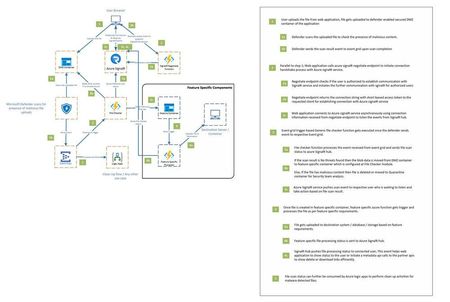
E2E Bootstrap Solution for Malicious File Scanning Using Microsoft Defender for Storage in Azure
The following blog post elucidates one of the architectural patterns that can be employed for efficiently monitoring the malware scan status while utilizing Microsoft Defender for storage malware scanning. Read the full blog here: Malicious File Scanning Using Microsoft Defender for Storage in Azure683Views0likes0Comments