benefits
95 TopicsCompensation request IUR licenses because of MSFT error
I would like to express my disappointment about how Microsoft handles issues with their partners. We merged a lot of companies (location ID's) with our Global ID. We had confirmation of Microsoft support that this would not impact membership and internal use rights beneits. However, since the merge we had one issue after another, and 3 months of back and forth with support with no solution at all. Issue: Our membership renewal date was overwritten with the renewal date of one of the partner locations that was merged. This caused us to not being able to renew our partner membership in July, when this was due before the merge. This caused us to loose our benefits, which meant we had to buy all those licenses ourselves, which comes down to an investment of 143K euro's. The only "help" we got was "this is by design, the acquiring company is leading. But when I said this was not the case, it suddenly was not true that the acquiring partner data were leading... Conclusion: I request a compensation for the licenses we had to buy, because of a backend error at the side of Microsoft and the poor support that is given to us as "valued partner".87Views1like3Comments"GitHub Copilot Enterprise (via Azure Credits)" benefit on Billing Profile, but GitHub rejects it
Hi all, Posting here because we are stuck between three support teams and hoping someone has already been through this. Context We are a Microsoft Solutions Partner. Every year we redeem the "GitHub Copilot Enterprise (via Azure Credits)" benefit from Partner Center. Until last year, redeeming it meant assigning the benefit to a user, opening an activation link and getting a new Azure Sponsorship subscription (quotaId Sponsored_2016-01-01). We linked that subscription to our GitHub Enterprise under Billing and licensing, Payment information, Metered billing via Azure, and it worked fine. What changed After our renewal this year, Partner Center uses the new modernized redemption flow. The credits are deposited directly onto our MCA Billing Profile (the one tied to the partner program purchase). Partner Center confirms the redemption was successful and the credits are visible in Azure. The problem The only subscription offer we can create under that Billing Profile is Pay As You Go (0003P, quotaId PayAsYouGo_2014-09-01). Other offers say we are not eligible. When we try to add any of these subscriptions in GitHub, they are greyed out as "not supported". Our old Sponsorship subscription has expired, so we have the credits but no way to spend them on GitHub Copilot. What we already checked We are Owner on the Azure subscription and owner on the GitHub enterprise. The subscription permission validation app has admin consent. Marketplace purchases are enabled on the Billing Profile. GitHub and Azure use the same Entra tenant. Support so far Partner Center says the benefit was redeemed correctly and the issue is on the Azure side. Azure Billing says they cannot change the subscription offer or create a Sponsorship subscription, and points us to GitHub. GitHub says the subscription type is not supported as a payment method. Our distributor told us they are seeing the same issue and have escalated it with Microsoft. Questions Has anyone managed to use the Partner Center GitHub Copilot credits with GitHub after the move to Billing Profile redemption? Is there a specific Azure offer or subscription type under an MCA Billing Profile that GitHub accepts? Did GitHub Support manually enable a PAYG subscription for metered billing in your case? Is there a support path or escalation contact that owns this end to end across Partner Center, Azure and GitHub? Any pointers are appreciated, even "same here". Thanks!81Views1like5Comments
Microsoft 365 EDU A5 in Partner Benefits
What are the terms and conditions for using Microsoft 365 EDU A5 in Partner Benefits? What purposes can we use these licenses for? For what purposes is this license provided to partners? We want to launch a tenant (non-production) in which our employees will be able to test available services within the O365 platform.358Views0likes3CommentsMicrosoft Action Pack Retirement: An Unfair Transition for Longtime Small Business Partners
As a longtime Microsoft Action Pack subscriber and the owner of a small, independent IT business, I would like to express my serious disappointment with Microsoft's decision to discontinue the Action Pack program and replace it with the new Partner Launch and Partner Success benefits packages. For years, Action Pack provided tremendous value to independent IT consultants, sole proprietors, and small businesses. It offered affordable access to Microsoft 365, Windows client operating systems, Windows Server, and other essential Microsoft products, allowing us to maintain legitimate IT environments, develop our technical expertise, and support Microsoft's ecosystem. The problem is not simply the increased subscription cost. It is the removal of essential benefits and the lack of a reasonable transition path for existing subscribers. I am currently considering Partner Success Core Benefits at $925 annually, nearly double the cost of the former Action Pack subscription. While this package includes Microsoft 365 Business Premium, Teams, and Windows Server 2025, it conspicuously excludes Windows 10/11 Pro and Enterprise client operating system licenses. For independent IT professionals who maintain physical Windows workstations, Active Directory environments, Hyper-V servers, and on-premises infrastructure, this omission is significant. What Happens to Our Existing Windows Installations? Perhaps the most troubling aspect of this transition is Microsoft's policy regarding software licenses obtained through Action Pack. According to Microsoft's published guidance, the on-premises software licenses provided through Action Pack are not perpetual, and their usage rights expire when the membership benefits end. Consider what this means for a longtime subscriber. We paid Microsoft for years, obtained legitimate product keys, activated Windows on our computers, and maintained our systems in accordance with the benefits provided at the time. Now, because Microsoft has discontinued the program, we are effectively expected to purchase replacement Windows client licenses for machines that were already legitimately activated, or discontinue using those installations. How is this a reasonable way to treat longtime, loyal Microsoft partners? I recognize that subscription-based licensing has contractual limitations. However, acknowledging those terms does not mean the resulting transition policy is fair, practical, or beneficial to Microsoft's partner ecosystem. Microsoft's Shift Toward Cloud Services The replacement packages place considerable emphasis on Azure, Dynamics 365, cloud services, and subscription-based business applications. These technologies certainly have their place, but not every Microsoft partner operates a cloud-focused business. Many independent consultants continue to install, configure, troubleshoot, and support physical Windows computers, on-premises domain controllers, Windows Server, Group Policy, DNS, Hyper-V, and traditional business networks. These professionals remain an important part of Microsoft's ecosystem. Action Pack recognized their needs. Unfortunately, the replacement programs appear to have largely overlooked them. My Recommendations to Microsoft I respectfully encourage Microsoft's partner-program leadership to consider the following changes: 1. Grandfather Existing Action Pack Windows Client Licenses Allow former Action Pack subscribers to continue using Windows client installations that were legitimately deployed and activated during an active membership, without requiring additional purchases solely because Microsoft retired the program. 2. Restore Windows Client Licensing to Partner Success Core Include a reasonable allocation of Windows 11 Pro and Enterprise licenses in Partner Success Core Benefits. Even a smaller allocation than the original Action Pack would demonstrate recognition of partners who support traditional Windows infrastructure. 3. Introduce a Loyalty or Transition Program Offer former Action Pack subscribers discounted perpetual Windows licenses or another affordable migration option for their existing installations. 4. Provide an On-Premises-Focused Partner Package Recognize that many independent IT professionals do not need substantial Azure credits or extensive cloud-service allocations. A reasonably priced package focused on Windows clients, Windows Server, and traditional infrastructure would better serve this segment of Microsoft's partner community. A Question of Partner Loyalty Microsoft has benefited enormously from the dedication of independent IT professionals who have spent decades learning, deploying, recommending, and supporting its products. Action Pack was more than an inexpensive software subscription. It was an investment in the technical community that helped sustain Microsoft's presence in businesses of every size. Removing these benefits without a practical transition arrangement risks alienating the very professionals who have consistently supported Microsoft's technologies. It may also discourage smaller consultants from maintaining Microsoft-based test environments, potentially accelerating interest in alternative platforms such as Linux. I am not asking Microsoft to provide software for free. I am willing to continue paying for a reasonably priced partner subscription. What I am asking for is a fair, sensible licensing arrangement that recognizes the needs and longstanding contributions of independent IT professionals. I would welcome feedback from other former Action Pack subscribers. Have these changes affected your business or IT environment? How are you addressing the loss of Windows client operating system licenses? Would you support a grandfathering policy or a dedicated on-premises partner benefits package? I hope Microsoft will take these concerns seriously and engage constructively with the partner community. Longtime Microsoft Action Pack Subscriber Owner, Typhoon PC100Views1like1CommentMS Funding FA for Copilot - Another change to the process !
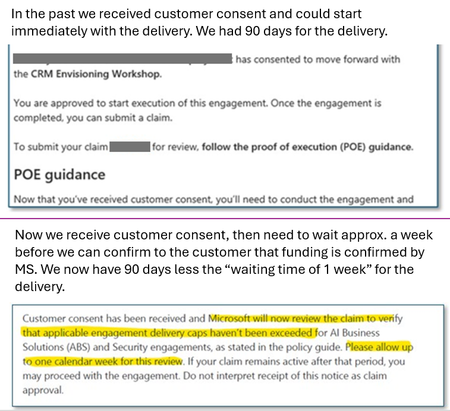
Hi all, it appears that Microsoft has introduced an additional approval step for the “Frontier for Copilot” funding. This change appears to be very recent. MS Support had no information about this change, the change was not mentioned during last week's Asia/ANZ Copilot partner meeting, and it is not documented in the incentives guide. Key points of this change Previously, we could start with our funded Copilot activities once customer consent was received. There is now an additional Microsoft approval step after consent. Microsoft will inform us partners if funding is approved or if it is declined. This review appears to take up to ~1 week. It is currently unclear what Microsoft is validating during this additional review. Impact A simple Partner Centre check (*) is no longer sufficient to assume funding has been approved. (*) Pages where we partners submit our customer claim/funding claim under Incentives. We must get customer consent, then WAIT ~1 week, and only then we can confirm to our customer that the selected Copilot engagement is funded by MS (or not). This delay does not appear to extend the 90-day delivery window, which still seems to start from customer consent. Could the MS Community moderators please share some additional insights into this? As mentioned above, this change appears to be done in a rush with a complete lack of communication to values partners! It impacts the conversation with customers - so I appreciate a clear response. Ralf362Views2likes2Comments
Purchase a membership
Hi everyone, I am trying to purchase a membership, but I am completely stuck and hoping someone in the community can help. Every time I try to complete the checkout process, I get the following error: Error ID: 2100037 We regret to inform you that your order cannot be processed at this moment. Please retry purchasing the membership from the membership offers page by clicking the 'Back to Membership' button after some time. If this issue persists, please contact the Support team. (CorrelationId: ce8bd334-01e6-4b58-8b7e-8d02287fddf4) 23 Sep 2026 10:21:07 GMT I have done everything on my end to troubleshoot this, including: Switching accounts: I tried purchasing the membership from completely different user accounts. Waiting it out: I have tried multiple times at different moments of the day to see if it was just a temporary server overload. Changing payment methods: I used two entirely different cards to rule out a bank decline. I already reached out to the official support team, but it has been incredibly frustrating. They are very slow to reply, and we just keep going in circles with automated-sounding responses that don't actually solve the problem. Has anyone else run into this specific error code? If you managed to get past it, how did you do it? Any advice or workarounds would be hugely appreciated because right now, nothing is working!166Views1like1Comment
Modernized Azure Credits Redemption Unavailable Despite Official Launch
Hello Microsoft Partner Community, I would like to raise a concern regarding the transparency and regional availability of Microsoft's modernized Azure Credits redemption experience. I am a Microsoft partner registered in China and purchased Solutions Partner designation (SPD) benefits for the first time. My order was placed on September 29, 2026, and payment was completed on October 8, 2026. However, after payment, I discovered that my Partner Center account still only supports the legacy "Assign user" Azure Credits redemption method. IMPORTANT: NO BENEFITS HAVE BEEN REDEEMED OR USED. I want to emphasize the following facts: I have NOT redeemed a single benefit. I have NOT activated or used any benefit. I have NOT opened, revealed, or viewed ANY license key or product key. I have NOT assigned any Azure Credits to a user. I have NOT activated any Azure sponsorship subscription. ALL purchased benefits remain completely untouched. I intentionally stopped all redemption activities after discovering that the modernized experience was unavailable. WHY IS THIS CONCERNING? On August 3, 2026, Microsoft officially announced that the updated benefits redemption process was live, identifying "All partners" as the affected audience. Furthermore, on September 21, 2026, Microsoft Community Manager JillArmourMicrosoft stated in the Partner Benefits Forum: "Microsoft recently modernized the Azure benefits redemption experience." Both announcements were published BEFORE I purchased my SPD benefits. However, Microsoft's documentation also states that modernized Azure Credits redemption is only available in countries and regions where the rollout has been completed. Unfortunately, Microsoft has not published a clear list of supported countries or regions. As a result, partners cannot reliably determine whether the modernized experience will actually be available before making a purchase. WHY DOES THE REDEMPTION METHOD MATTER? I already operate production workloads on existing Azure subscriptions that have approved service quotas. These quotas are essential to my production environment and cannot currently be requested or obtained on newly created standard Azure subscriptions. The modernized redemption experience would allow eligible Azure Credits to be applied to an existing MCA billing profile, enabling me to use the credits with my established subscriptions. However, the legacy redemption method requires creating a separate Azure subscription that does not have access to these approved quotas. Therefore, the legacy redemption method is not a practical alternative for my existing production environment. MY QUESTIONS FOR MICROSOFT Regional availability: Which countries and regions currently support modernized Azure Credits redemption? Has the modernized redemption experience launched for partners registered in China? If not, when is it expected to become available? Official announcements: Why did Microsoft announce that the updated redemption experience was live while regional restrictions remained in place? Why is there no clear regional availability warning before purchasing SPD benefits? Existing purchase: Since I purchased my benefits after Microsoft's official announcements, can my existing purchase be converted to the modernized redemption experience? Refund and repurchase: If migration is not possible, can Microsoft approve a full refund? Again, I have NOT redeemed any benefits, activated anything, or viewed a single product key. If a refund is approved, will I be able to purchase the same SPD benefits again after modernized redemption becomes available in China, provided I still meet the qualification requirements? Will the refunded order affect any purchase frequency restrictions or future eligibility? Refund deadline: Given the limited refund request window, can Microsoft confirm how my eligibility will be handled while this issue is being investigated? MY REQUEST I understand that global feature rollouts may take place in phases. However, the availability of a paid benefit's redemption method should be clearly disclosed before purchase. I am not requesting additional benefits. I am requesting accurate information and a fair resolution. I have already contacted Microsoft Support, but I believe this issue deserves public clarification because other partners may face the same situation. Most importantly, 100% of my purchased benefits remain unused and unredeemed, and NO product or license keys have ever been viewed. I would greatly appreciate a response from a Microsoft Community Manager or Partner Center product team representative. Thank you.215Views1like1CommentAzure sponsorship and cost management challenge
I am listening for years that Azure Sponsorship type of Azure subscriptions will get Azure Cost Management. This includes the view of prices inside portal.azure.com, managing budgets, checking each individual resources etc. Current / old portal - https://www.microsoftazuresponsorships.com/Usage , does not show costs per each resource (name), instead only per resources type. Not possible to set budgets, alerts, limits, and other things. So, again, when does Microsoft plans to upgrade Azure sponsorships to use Cost Management? Any reference (roadmap) link on this please?Solved1.5KViews12likes14Comments