benefits
113 Topics
Windows 11 in benefit
Do tej pory klucze do Windows 11 były normalnie dostępne w ramach benefitów. Mam obecnie Partner Success Core Benefits i w opisie w opisie benefitów do programu Windows 11 jest normalnie dostępny, ale w praktyce nie ma możliwości go pobrać i aktywować. Szukałem przez dłuższą chwilę i nie znalazłem, a AI się całkiem pogubiła i totalne bzdury pisała. Robiłem to już kilka razy wcześniej i tak samo chciałem teraz - zainstalować nową wirtualną maszynę z Windows 11 - wygląda na to, że już się nie da. Proszę o pomoc/wyjaśnienie - czy faktycznie tak jest, że Microsoft zabrał podstawowe benefity? Jeśli jednak nie, to jak pobrać ISO i klucz do Windows 11?23Views0likes0Comments"GitHub Copilot Enterprise (via Azure Credits)" benefit on Billing Profile, but GitHub rejects it
Hi all, Posting here because we are stuck between three support teams and hoping someone has already been through this. Context We are a Microsoft Solutions Partner. Every year we redeem the "GitHub Copilot Enterprise (via Azure Credits)" benefit from Partner Center. Until last year, redeeming it meant assigning the benefit to a user, opening an activation link and getting a new Azure Sponsorship subscription (quotaId Sponsored_2016-01-01). We linked that subscription to our GitHub Enterprise under Billing and licensing, Payment information, Metered billing via Azure, and it worked fine. What changed After our renewal this year, Partner Center uses the new modernized redemption flow. The credits are deposited directly onto our MCA Billing Profile (the one tied to the partner program purchase). Partner Center confirms the redemption was successful and the credits are visible in Azure. The problem The only subscription offer we can create under that Billing Profile is Pay As You Go (0003P, quotaId PayAsYouGo_2014-09-01). Other offers say we are not eligible. When we try to add any of these subscriptions in GitHub, they are greyed out as "not supported". Our old Sponsorship subscription has expired, so we have the credits but no way to spend them on GitHub Copilot. What we already checked We are Owner on the Azure subscription and owner on the GitHub enterprise. The subscription permission validation app has admin consent. Marketplace purchases are enabled on the Billing Profile. GitHub and Azure use the same Entra tenant. Support so far Partner Center says the benefit was redeemed correctly and the issue is on the Azure side. Azure Billing says they cannot change the subscription offer or create a Sponsorship subscription, and points us to GitHub. GitHub says the subscription type is not supported as a payment method. Our distributor told us they are seeing the same issue and have escalated it with Microsoft. Questions Has anyone managed to use the Partner Center GitHub Copilot credits with GitHub after the move to Billing Profile redemption? Is there a specific Azure offer or subscription type under an MCA Billing Profile that GitHub accepts? Did GitHub Support manually enable a PAYG subscription for metered billing in your case? Is there a support path or escalation contact that owns this end to end across Partner Center, Azure and GitHub? Any pointers are appreciated, even "same here". Thanks!269Views2likes8CommentsMS Funding FA for Copilot - Another change to the process !
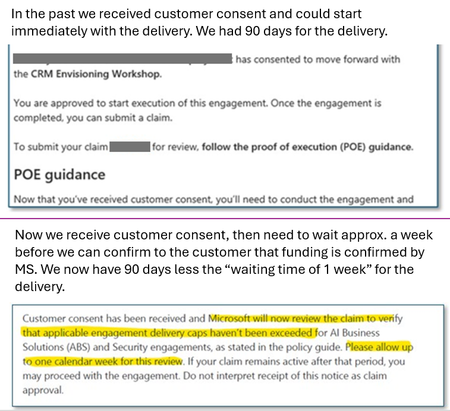
Hi all, it appears that Microsoft has introduced an additional approval step for the “Frontier for Copilot” funding. This change appears to be very recent. MS Support had no information about this change, the change was not mentioned during last week's Asia/ANZ Copilot partner meeting, and it is not documented in the incentives guide. Key points of this change Previously, we could start with our funded Copilot activities once customer consent was received. There is now an additional Microsoft approval step after consent. Microsoft will inform us partners if funding is approved or if it is declined. This review appears to take up to ~1 week. It is currently unclear what Microsoft is validating during this additional review. Impact A simple Partner Centre check (*) is no longer sufficient to assume funding has been approved. (*) Pages where we partners submit our customer claim/funding claim under Incentives. We must get customer consent, then WAIT ~1 week, and only then we can confirm to our customer that the selected Copilot engagement is funded by MS (or not). This delay does not appear to extend the 90-day delivery window, which still seems to start from customer consent. Could the MS Community moderators please share some additional insights into this? As mentioned above, this change appears to be done in a rush with a complete lack of communication to values partners! It impacts the conversation with customers - so I appreciate a clear response. RalfSolved476Views2likes3Comments
Partner Success Story nomination: is a business profile enough for a services partner?
Hi everyone, We are a services partner in the Microsoft AI Cloud Partner Program with a published business profile in Partner Center, and we would like to nominate a customer story through the Partner Success Story program. As a services partner, we have a business profile but no Marketplace offer yet. Transactable professional service offers are currently limited to US, UK and Canadian seller IDs, so this requirement is hard to meet for partners based in the EU. Questions: Which requirements are current for services partners? Is a published business profile sufficient to nominate a success story, or is a Marketplace offer required? If an offer is required, would a listing-only professional service offer count? Thank you in advance!42Views0likes0CommentsPartner Blog | Turn Microsoft Ignite announcements into your next growth opportunity
The most important question after Microsoft Ignite is not which announcement to follow. It is which business priority you will advance next. Whether you are building an AI practice, expanding a proven offer, or scaling through co-sell, the Microsoft AI Cloud Partner Program now provides more ways to invest in capability, demonstrate expertise, and bring differentiated solutions to market. Start with the customer outcomes and growth model you want to lead. Then choose the benefits, designations, specializations, and incentives that can strengthen execution. The opportunity is to turn program investments into repeatable capability, clear market differentiation, and durable customer value. New partner benefits announced at Microsoft Ignite More AI value is now available with our partner benefits packages at no additional cost to partners. We’ve also added a brand-new package to give partners more choice as they grow. Partner Launch Benefits and Partner Success Core Benefits now include Microsoft 365 Copilot Business, while Partner Success Expanded Benefits offers more Microsoft 365 Copilot licenses and twice the number of Microsoft Dragon Copilot licenses. We also introduced the Partner Success Advanced Benefits pack, a $3,000 annual package that sits between Core and Expanded, with significant Microsoft 365 Copilot and Dragon Copilot licenses, Azure credits, Copilot Studio capacity, and enhanced security benefits. Exclusive to Microsoft partners, these bundled offerings deliver discounted licenses, Azure credits, technical support, and advisory resources partners can use to become Customer Zero while reducing costs, accelerating innovation, and driving growth. In fact, Omdia research found that 88% of partners said their partner benefits package significantly strengthened their business and 90% indicated a positive ROI. Starting at $350 USD per year, explore and compare partner benefits packages to find the right fit for your business, then your Partner Center admin can purchase and activate in Partner Center. Make your capabilities visible to customers In a crowded AI market, customers need credible signals of capability. Solutions Partner designations recognize broad capability and proven customer success in Microsoft solution areas. Specializations go further by validating advanced performance, skilling, and customer success in focused scenarios. Together, they can strengthen discoverability, create clearer customer conversations, and unlock benefits and incentives tied to verified expertise. Explore Solutions Partner designations and specializations. For commercial device partners, two previously announced designations reflect distinct roles in the ecosystem. The Solutions Partner designation for Windows Device Original Equipment Manufacturers (OEMs) is for manufacturers building Copilot+ PCs, while the Solutions Partner designation for Windows Device Providers is for partners that sell, deploy, and modern-manage Windows devices. Select the path that best represents how your organization creates customer value. Read the FY27 device designation overview. Continue reading here297Views0likes0CommentsCompensation request IUR licenses because of MSFT error
I would like to express my disappointment about how Microsoft handles issues with their partners. We merged a lot of companies (location ID's) with our Global ID. We had confirmation of Microsoft support that this would not impact membership and internal use rights beneits. However, since the merge we had one issue after another, and 3 months of back and forth with support with no solution at all. Issue: Our membership renewal date was overwritten with the renewal date of one of the partner locations that was merged. This caused us to not being able to renew our partner membership in July, when this was due before the merge. This caused us to loose our benefits, which meant we had to buy all those licenses ourselves, which comes down to an investment of 143K euro's. The only "help" we got was "this is by design, the acquiring company is leading. But when I said this was not the case, it suddenly was not true that the acquiring partner data were leading... Conclusion: I request a compensation for the licenses we had to buy, because of a backend error at the side of Microsoft and the poor support that is given to us as "valued partner".168Views1like4Comments
Microsoft 365 EDU A5 in Partner Benefits
What are the terms and conditions for using Microsoft 365 EDU A5 in Partner Benefits? What purposes can we use these licenses for? For what purposes is this license provided to partners? We want to launch a tenant (non-production) in which our employees will be able to test available services within the O365 platform.415Views0likes3CommentsMicrosoft Action Pack Retirement: An Unfair Transition for Longtime Small Business Partners
As a longtime Microsoft Action Pack subscriber and the owner of a small, independent IT business, I would like to express my serious disappointment with Microsoft's decision to discontinue the Action Pack program and replace it with the new Partner Launch and Partner Success benefits packages. For years, Action Pack provided tremendous value to independent IT consultants, sole proprietors, and small businesses. It offered affordable access to Microsoft 365, Windows client operating systems, Windows Server, and other essential Microsoft products, allowing us to maintain legitimate IT environments, develop our technical expertise, and support Microsoft's ecosystem. The problem is not simply the increased subscription cost. It is the removal of essential benefits and the lack of a reasonable transition path for existing subscribers. I am currently considering Partner Success Core Benefits at $925 annually, nearly double the cost of the former Action Pack subscription. While this package includes Microsoft 365 Business Premium, Teams, and Windows Server 2025, it conspicuously excludes Windows 10/11 Pro and Enterprise client operating system licenses. For independent IT professionals who maintain physical Windows workstations, Active Directory environments, Hyper-V servers, and on-premises infrastructure, this omission is significant. What Happens to Our Existing Windows Installations? Perhaps the most troubling aspect of this transition is Microsoft's policy regarding software licenses obtained through Action Pack. According to Microsoft's published guidance, the on-premises software licenses provided through Action Pack are not perpetual, and their usage rights expire when the membership benefits end. Consider what this means for a longtime subscriber. We paid Microsoft for years, obtained legitimate product keys, activated Windows on our computers, and maintained our systems in accordance with the benefits provided at the time. Now, because Microsoft has discontinued the program, we are effectively expected to purchase replacement Windows client licenses for machines that were already legitimately activated, or discontinue using those installations. How is this a reasonable way to treat longtime, loyal Microsoft partners? I recognize that subscription-based licensing has contractual limitations. However, acknowledging those terms does not mean the resulting transition policy is fair, practical, or beneficial to Microsoft's partner ecosystem. Microsoft's Shift Toward Cloud Services The replacement packages place considerable emphasis on Azure, Dynamics 365, cloud services, and subscription-based business applications. These technologies certainly have their place, but not every Microsoft partner operates a cloud-focused business. Many independent consultants continue to install, configure, troubleshoot, and support physical Windows computers, on-premises domain controllers, Windows Server, Group Policy, DNS, Hyper-V, and traditional business networks. These professionals remain an important part of Microsoft's ecosystem. Action Pack recognized their needs. Unfortunately, the replacement programs appear to have largely overlooked them. My Recommendations to Microsoft I respectfully encourage Microsoft's partner-program leadership to consider the following changes: 1. Grandfather Existing Action Pack Windows Client Licenses Allow former Action Pack subscribers to continue using Windows client installations that were legitimately deployed and activated during an active membership, without requiring additional purchases solely because Microsoft retired the program. 2. Restore Windows Client Licensing to Partner Success Core Include a reasonable allocation of Windows 11 Pro and Enterprise licenses in Partner Success Core Benefits. Even a smaller allocation than the original Action Pack would demonstrate recognition of partners who support traditional Windows infrastructure. 3. Introduce a Loyalty or Transition Program Offer former Action Pack subscribers discounted perpetual Windows licenses or another affordable migration option for their existing installations. 4. Provide an On-Premises-Focused Partner Package Recognize that many independent IT professionals do not need substantial Azure credits or extensive cloud-service allocations. A reasonably priced package focused on Windows clients, Windows Server, and traditional infrastructure would better serve this segment of Microsoft's partner community. A Question of Partner Loyalty Microsoft has benefited enormously from the dedication of independent IT professionals who have spent decades learning, deploying, recommending, and supporting its products. Action Pack was more than an inexpensive software subscription. It was an investment in the technical community that helped sustain Microsoft's presence in businesses of every size. Removing these benefits without a practical transition arrangement risks alienating the very professionals who have consistently supported Microsoft's technologies. It may also discourage smaller consultants from maintaining Microsoft-based test environments, potentially accelerating interest in alternative platforms such as Linux. I am not asking Microsoft to provide software for free. I am willing to continue paying for a reasonably priced partner subscription. What I am asking for is a fair, sensible licensing arrangement that recognizes the needs and longstanding contributions of independent IT professionals. I would welcome feedback from other former Action Pack subscribers. Have these changes affected your business or IT environment? How are you addressing the loss of Windows client operating system licenses? Would you support a grandfathering policy or a dedicated on-premises partner benefits package? I hope Microsoft will take these concerns seriously and engage constructively with the partner community. Longtime Microsoft Action Pack Subscriber Owner, Typhoon PC174Views1like1Comment
Purchase a membership
Hi everyone, I am trying to purchase a membership, but I am completely stuck and hoping someone in the community can help. Every time I try to complete the checkout process, I get the following error: Error ID: 2100037 We regret to inform you that your order cannot be processed at this moment. Please retry purchasing the membership from the membership offers page by clicking the 'Back to Membership' button after some time. If this issue persists, please contact the Support team. (CorrelationId: ce8bd334-01e6-4b58-8b7e-8d02287fddf4) 23 Sep 2026 10:21:07 GMT I have done everything on my end to troubleshoot this, including: Switching accounts: I tried purchasing the membership from completely different user accounts. Waiting it out: I have tried multiple times at different moments of the day to see if it was just a temporary server overload. Changing payment methods: I used two entirely different cards to rule out a bank decline. I already reached out to the official support team, but it has been incredibly frustrating. They are very slow to reply, and we just keep going in circles with automated-sounding responses that don't actually solve the problem. Has anyone else run into this specific error code? If you managed to get past it, how did you do it? Any advice or workarounds would be hugely appreciated because right now, nothing is working!212Views1like1Comment
Modernize Together: The Power of Partner Community in the AI Era
Enterprise transformation is moving faster than ever. As organizations modernize applications, migrate critical workloads, and prepare their data for AI, they need more than technology. They need trusted guidance, proven experience, and a clear path from strategy to measurable business outcomes. Microsoft partners play a vital role in that journey. Yet even the strongest partner practices benefit from being connected to a broader community—one where peers can exchange ideas, learn from real-world experiences, stay current on Microsoft innovations, and work through the challenges that accompany complex enterprise frontier transformation. Why partner community matters Modernization and AI opportunities rarely follow a single, predictable path. Customer environments are complex, business priorities evolve, and new technologies and programs continue to emerge. A strong partner community helps members navigate that change together rather than in isolation. By participating actively, partners can: Learn from the field: Hear how peers are approaching customer conversations, assessments, migrations, and modernization programs—and apply those lessons to their own practices. Stay close to Microsoft: Receive timely updates on strategic priorities, skilling and sales programs, product roadmap, resources, and opportunities that can help strengthen customer engagements. Build trusted relationships: Connect with organizations facing similar challenges, exchange practical guidance, and identify opportunities to collaborate. Accelerate execution: Use shared insights and proven approaches to reduce reinvention, improve delivery confidence, and move customer opportunities forward faster. Shape what comes next: Bring field perspectives into the conversation and help inform how the broader ecosystem supports enterprise modernization. Community participation is not simply about receiving information. Its greatest value comes from contribution: asking questions, sharing what works, discussing what does not, and helping peers solve problems. That exchange turns individual experience into collective capability—and helps the entire partner ecosystem deliver greater customer impact. Join the Azure Migration & Modernization Partner community The Azure Migration & Modernization Partner community is a closed community of enterprise partners that meets monthly. It brings together Microsoft Enterprise partners focused on helping customers modernize their IT and data estates, establish secure cloud foundations, and create the conditions for AI and Analytics innovation. Each session creates space to hear updates, exchange insights, discuss common challenges, and connect with peers who understand the realities of enterprise frontier transformation. For partners building or expanding a modernization practice, this is an opportunity to strengthen capabilities, discover new approaches, and remain connected to the evolving Microsoft ecosystem. We invite eligible enterprise partners to join, participate, and contribute by clicking on Azure Migration and Modernization Partner Forum, Don't miss these new FY27 opportunities Organizations across industries are looking to modernize to innovate with AI and as you work with your customers, do not miss the chance to leverage two new Frontier Accelerate offers: Databases Presales Assessment + Proof of Value, which rewards strategic work to assess databases for modernization and AI use cases. Databases Conversion Bonus, which rewards eligible migrations from AWS and Google Cloud to Azure Databases. Together, these offers can help partners shape data opportunities earlier, carry them into execution, grow services revenue and Azure consumption, and help customers establish a trusted data foundation for AI. Review Frontier Accelerate partner-nominated resources and explore Frontier Accelerate for Azure to learn more. Modernization is a team effort. Join the community, learn from the ecosystem, and help enterprise customers move from AI ambition to impact.186Views1like0Comments