azure
7927 TopicsLog Ingestion to Azure Log Analytics Workspace with Logic App Standard
Currently, to send logs to Azure Log Analytics, the recommended method involves using the Azure Log Analytics Data Collector. This is a managed connector that typically requires public access to your Log Analytics Workspace (LAW). Consequently, this connector does not function if your LAW has Virtual Network (VNet) integration, as outlined in the Azure Monitor private link security documentation. Solution: Logic App Standard for VNet Integrated Log Analytics Workspace To address this limitation, a solution has been developed using Logic App Standard to directly connect to the LAW ingestion http endpoint. The relevant API documentation for this endpoint can be found here: Log Analytics REST API | Microsoft Learn. It's important to note that the current version of this endpoint exclusively supports authentication via a shared key, as detailed in the Log Analytics REST API Reference | Microsoft Learn. Any request to the Log Analytics HTTP Data Collector API must include the Authorization header. To authenticate a request, you must sign the request with either the primary or secondary key for the workspace that is making the request and pass that signature as part of the request. Implementing Shared Key Authentication with C# Inline Script The proposed solution involves building a small C# inline script within the Logic App Standard to handle the shared key authentication process. Sample code for this implementation has been uploaded to my GitHub: LAWLogIngestUsingHttp string dateString = DateTime.UtcNow.ToString("r"); byte[] content = Encoding.UTF8.GetBytes(jsonData); int contentLength = content.Length; string method = "POST"; string contentType = "application/json"; string resource = "/api/logs"; string stringToSign = $"{method}\n{contentLength}\n{contentType}\nx-ms-date:{dateString}\n{resource}"; byte[] sharedKeyBytes = Convert.FromBase64String(connection.SharedKey); using HMACSHA256 hmac = new HMACSHA256(sharedKeyBytes); byte[] stringToSignBytes = Encoding.UTF8.GetBytes(stringToSign); byte[] signatureBytes = hmac.ComputeHash(stringToSignBytes); string signature = Convert.ToBase64String(signatureBytes); HTTP Action Configuration Subsequently, an HTTP action within the Logic App Standard is configured to call the Log Analytics ingestion endpoint using an HTTP POST method. The endpoint URL follows this format: https://{WorkspaceId}.ods.opinsights.azure.com/api/logs?api-version=2016-04-01 Remember to replace {WorkspaceId} with your actual Log Analytics Workspace ID. the custom table name will be in the log-type headerTutorial: Building AI Agents That Talk to Your Azure Database for MySQL
What if you could ask your database a question in plain English and get the answer instantly, without writing a single line of SQL? In this tutorial, you'll build a Python-based AI agent that connects to Azure Database for MySQL server and uses OpenAI's function calling to translate natural language questions into SQL queries, execute them, and return human-readable answers. The agent can explore your schema, answer business questions, and even self-correct when it writes invalid SQL. What you'll build: An Azure Database for MySQL server with sample data A Python AI agent with three tools: list_tables, describe_table, and run_sql_query In the context of AI agents, tools are functions the agent can call to interact with external systems like querying a database, fetching a file, or calling an API. Here, our agent has three tools that let it explore and query your MySQL database. An interactive chat interface where you ask questions and the agent auto-generates and runs SQL Prerequisites Before you begin, make sure you have: An Azure account — Sign up for free (includes 12 months of free MySQL hosting) An OpenAI API key — Get one here (you'll need a few dollars of credit) Python 3.10+ — Download here (check "Add to PATH" during install) A code editor — VS Code recommended Optional: You can download the complete project from this GitHub repository, or follow the step‑by‑step instructions below to build it from scratch. Step 1 — Create the Azure Database for MySQL server Go to the Azure Portal Search for "Azure Database for MySQL server" and click + Create Configure the following settings: Setting Value Resource group rg-mysql-ai-agent (create new) Server name mysql-ai-agent (or any unique name) Region Your nearest region MySQL version 8.4 Workload type Dev/Test (Burstable B1ms — free for 12 months) Admin username mysqladmin Password A strong password — save it! 4. ✅ Check "Add firewall rule for current IP address" ⚠️ Important: If you skip the firewall settings, you won't be able to connect from Cloud Shell or your local machine. 5. Click Review + create → Create and wait 3–5 minutes Once deployment finishes, navigate to your server and note the hostname from the Connection details: mysql-ai-agent.mysql.database.azure.com Step 2 — Load Sample Data Open Azure Cloud Shell by clicking the >_ icon in the portal's top toolbar. Select Bash if prompted. Connect to your MySQL server. You can copy the exact connection command from the "Connect from browser or locally" section on your server's overview page in the Azure portal: mysql -h mysql-ai-agent.mysql.database.azure.com -u mysqladmin -p Enter your password when prompted (the cursor won't move — just type and press Enter). Now paste the following SQL to create a sample sales database: CREATE DATABASE demo_sales; USE demo_sales; CREATE TABLE customers ( id INT AUTO_INCREMENT PRIMARY KEY, name VARCHAR(100), email VARCHAR(100), city VARCHAR(50), signup_date DATE ); CREATE TABLE orders ( id INT AUTO_INCREMENT PRIMARY KEY, customer_id INT, product VARCHAR(100), amount DECIMAL(10,2), order_date DATE, FOREIGN KEY (customer_id) REFERENCES customers(id) ); INSERT INTO customers (name, email, city, signup_date) VALUES ('Sara Ahmed', 'sara@example.com', 'Cairo', '2024-06-15'), ('John Smith', 'john@example.com', 'London', '2024-08-22'), ('Priya Patel', 'priya@example.com', 'Mumbai', '2025-01-10'); INSERT INTO orders (customer_id, product, amount, order_date) VALUES (1, 'Azure Certification Voucher', 150.00, '2025-03-01'), (2, 'MySQL Workbench Pro License', 99.00, '2025-03-10'), (1, 'Power BI Dashboard Template', 45.00, '2025-04-05'), (3, 'Data Analysis Course', 200.00, '2025-05-20'); Verify the data: SELECT * FROM customers; SELECT * FROM orders; Type exit to leave MySQL. Step 3 — Set Up the Python Project Open a terminal on your local machine and create the project: mkdir mysql-ai-agent cd mysql-ai-agent python -m venv venv Activate the virtual environment: Windows (PowerShell): venv\Scripts\Activate.ps1 macOS/Linux: source venv/bin/activate Install the required packages: pip install openai mysql-connector-python python-dotenv Step 4 — Configure Environment Variables Create a file named .env in your project folder: OPENAI_API_KEY=sk-proj-xxxxxxxxxxxxxxxxxxxxxxxx MYSQL_HOST=mysql-ai-agent.mysql.database.azure.com MYSQL_USER=mysqladmin MYSQL_PASSWORD=YourPasswordHere MYSQL_DATABASE=demo_sales 🔒 Security: Never commit this file to Git. Add .env to your .gitignore Step 5 — Build the Agent Open VS Code, create a new file called mysql_agent.py in your mysql-ai-agent folder, and paste the following code. Let's walk through each section. 5.1 — Imports and Database Connection import os import json import mysql.connector from openai import OpenAI from dotenv import load_dotenv load_dotenv() def get_db_connection(): return mysql.connector.connect( host=os.getenv("MYSQL_HOST"), user=os.getenv("MYSQL_USER"), password=os.getenv("MYSQL_PASSWORD"), database=os.getenv("MYSQL_DATABASE"), ssl_disabled=False ) This loads your secrets from .env and creates a reusable MySQL connection function with SSL encryption. 5.2 — Define the Three Tools These are the functions the AI agent can call: def list_tables(): conn = get_db_connection() cursor = conn.cursor() cursor.execute("SHOW TABLES") tables = [row[0] for row in cursor.fetchall()] cursor.close() conn.close() return json.dumps({"tables": tables}) def describe_table(table_name): conn = get_db_connection() cursor = conn.cursor() cursor.execute(f"DESCRIBE `{table_name}`") columns = [] for row in cursor.fetchall(): columns.append({ "field": row[0], "type": row[1], "null": row[2], "key": row[3] }) cursor.close() conn.close() return json.dumps({"table": table_name, "columns": columns}) def run_sql_query(query): if not query.strip().upper().startswith("SELECT"): return json.dumps({"error": "Only SELECT queries are allowed."}) conn = get_db_connection() cursor = conn.cursor() try: cursor.execute(query) columns = [desc[0] for desc in cursor.description] rows = cursor.fetchall() results = [] for row in rows: results.append(dict(zip(columns, row))) return json.dumps({"columns": columns, "rows": results}, default=str) except mysql.connector.Error as e: return json.dumps({"error": str(e)}) finally: cursor.close() conn.close() A few things to note: run_sql_query only allows SELECT statements — this is a safety guardrail that prevents the AI from modifying data The try/except block is critical — if the AI generates invalid SQL (e.g., a bad GROUP BY), the error message is returned to OpenAI, and the model automatically corrects its query and retries. Without this, the script would crash. 5.3 — Register Tools with OpenAI This tells OpenAI what tools the agent has access to: tools = [ { "type": "function", "function": { "name": "list_tables", "description": "List all tables in the connected MySQL database.", "parameters": {"type": "object", "properties": {}, "required": []} } }, { "type": "function", "function": { "name": "describe_table", "description": "Get the schema (columns and types) of a specific table.", "parameters": { "type": "object", "properties": { "table_name": {"type": "string", "description": "Name of the table to describe"} }, "required": ["table_name"] } } }, { "type": "function", "function": { "name": "run_sql_query", "description": "Execute a read-only SQL SELECT query and return results.", "parameters": { "type": "object", "properties": { "query": {"type": "string", "description": "The SQL SELECT query to execute"} }, "required": ["query"] } } } ] def call_tool(name, args): if name == "list_tables": return list_tables() elif name == "describe_table": return describe_table(args["table_name"]) elif name == "run_sql_query": return run_sql_query(args["query"]) else: return json.dumps({"error": f"Unknown tool: {name}"}) 5.4 — The Agent Loop This is the core logic. It sends the user's message to OpenAI, processes any tool calls, and loops until the model produces a final text response: def chat(user_message, conversation_history): client = OpenAI() conversation_history.append({"role": "user", "content": user_message}) print(f"\n{'='*60}") print(f"🧑 You: {user_message}") print(f"{'='*60}") while True: response = client.chat.completions.create( model="gpt-4o-mini", messages=conversation_history, tools=tools, tool_choice="auto" ) assistant_message = response.choices[0].message if assistant_message.tool_calls: conversation_history.append(assistant_message) for tool_call in assistant_message.tool_calls: fn_name = tool_call.function.name fn_args = json.loads(tool_call.function.arguments) print(f" 🔧 Calling tool: {fn_name}({json.dumps(fn_args)})") result = call_tool(fn_name, fn_args) print(f" ✅ Tool returned: {result[:200]}...") conversation_history.append({ "role": "tool", "tool_call_id": tool_call.id, "content": result }) else: final_answer = assistant_message.content conversation_history.append({"role": "assistant", "content": final_answer}) print(f"\n🤖 Agent:\n{final_answer}") return conversation_history The while True loop is what makes self-correction possible. When a tool returns an error, the model sees it in the conversation and generates a corrected tool call in the next iteration. 5.5 — Main Entry Point if __name__ == "__main__": print("\n" + "=" * 60) print(" 🤖 MySQL AI Agent") print(" Powered by OpenAI + Azure Database for MySQL") print(" Type 'quit' to exit") print("=" * 60) system_message = { "role": "system", "content": ( "You are a helpful data analyst agent connected to an Azure Database for MySQL. " "You have 3 tools: list_tables, describe_table, and run_sql_query. " "ALWAYS start by listing tables and describing their schema before writing queries. " "Only generate SELECT statements. Never write INSERT, UPDATE, DELETE, or DROP. " "Present query results in clean, readable tables. " "If the user asks a question, figure out the right SQL to answer it." ) } conversation_history = [system_message] while True: user_input = input("\n🧑 You: ").strip() if user_input.lower() in ("quit", "exit", "q"): print("\n👋 Goodbye!") break if not user_input: continue conversation_history = chat(user_input, conversation_history) Your final project folder should look like this: Step 6 — Run and Test the Agent python mysql_agent.py Test: Prompt: Which product generated the most revenue and who bought it? How Self-Correction Works One of the most powerful aspects of this agent is its ability to recover from SQL errors automatically. Azure Database for MySQL has sql_mode=only_full_group_by enabled by default, which rejects queries where non-aggregated columns aren't in the GROUP BY clause. When the AI generates an invalid query, here's what happens: The run_sql_query function catches the MySQL error It returns the error message as the tool result OpenAI sees the error in the conversation context The model generates a corrected query automatically The agent retries — and succeeds Without the try/except error handling, the entire script would crash. This is a key design pattern for production AI agents. Security Best Practices When building AI agents that interact with databases, security is critical: Read-only enforcement — The run_sql_query function rejects anything that isn't a SELECT statement SSL encryption — All connections use ssl_disabled=False, ensuring data in transit is encrypted Environment variables — Credentials are stored in .env, never hardcoded Principle of least privilege — For production, create a dedicated MySQL user with SELECT-only permissions: CREATE USER 'ai_agent'@'%' IDENTIFIED BY 'AgentPass123!'; GRANT SELECT ON demo_sales.* TO 'ai_agent'@'%'; FLUSH PRIVILEGES; Network isolation — For production workloads, consider using Azure Private Link instead of public access. Conclusion In this tutorial, you built a Python AI agent that connects to Azure Database for MySQL and answers natural language questions by auto-generating SQL - complete with self-correction and security guardrails. Clone the GitHub repo, spin up your own server, and start experimenting! If you'd like to connect to Azure Database for MySQL using the Model Context Protocol (MCP), see Unlocking AI-Driven Data Access: Azure Database for MySQL Support via the Azure MCP Server. If you have any feedback or questions about the information provided above, please leave a comment below. Thank you!69Views0likes0Comments
Microsoft Finland - Software Developing Companies monthly community series.
Tervetuloa jälleen mukaan Microsoftin webinaarisarjaan teknologiayrityksille! Microsoft Finlandin järjestämä Software Development monthly Community series on webinaarisarja, joka tarjoaa ohjelmistotaloille ajankohtaista tietoa, konkreettisia esimerkkejä ja strategisia näkemyksiä siitä, miten yhteistyö Microsoftin kanssa voi vauhdittaa kasvua ja avata uusia liiketoimintamahdollisuuksia. Sarja on suunnattu kaikenkokoisille ja eri kehitysvaiheissa oleville teknologiayrityksille - startupeista globaaleihin toimijoihin. Jokaisessa jaksossa pureudutaan käytännönläheisesti siihen, miten ohjelmistoyritykset voivat hyödyntää Microsoftin ekosysteemiä, teknologioita ja kumppanuusohjelmia omassa liiketoiminnassaan. Huom. Microsoft Software Developing Companies monthly community webinars -webinaarisarja järjestetään Cloud Champion -sivustolla, josta webinaarit ovat kätevästi saatavilla tallenteina pari tuntia live-lähetyksen jälkeen. Muistathan rekisteröityä Cloud Champion -alustalle ensimmäisellä kerralla, jonka jälkeen pääset aina sisältöön sekä tallenteisiin käsiksi. Pääset rekisteröitymään, "Register now"-kohdasta. Täytä tietosi ja valitse Distributor kohtaan - Other, mikäli et tiedä Microsoft-tukkurianne. Webinaarit: 27.3.2026 klo 09:00-09:30 - Agent Factory Microsoft Foundryllä – miten rakennat ja viet AI-agentteja tuotantoon AI‑agentit ovat nopeasti nousemassa enterprise‑ohjelmistojen keskeiseksi rakennuspalikaksi, mutta monilla organisaatioilla haasteena on agenttien vieminen tuotantoon asti. Todellinen kilpailuetu syntyy siitä, miten agentit rakennetaan hallitusti, integroidaan osaksi kokonaisarkkitehtuuria ja skaalataan luotettavasti. Tässä webinaarissa käymme läpi ja näytämme käytännön demolla, miten AI-agentti rakennetaan Microsoft Foundry:n Agent Service -palvelulla. Näytämme miten agentin rooli ja ohjeet määritellään, miten agentille liitetään tietolähteitä ja työkaluja sekä katsomme miten tämä asemoituu Microsoft Agent Factoryyn. Katso nauhoite: Microsoft Finland – Software Developing Companies monthly community series: Agent Factory Microsoft Foundryllä – miten rakennat ja viet AI-agentteja tuotantoon – Finland Cloud Champion Puhujat: Juha Karvonen, Sr Partner Tech Strategist Eetu Roponen, Sr Partner Development Manager, Microsoft 27.2.2026 klo 09:00-09:30 - M-Files polku menestykseen yhdessä Microsoftin kanssa Mitä globaalin kumppanuuden rakentaminen M-Files:in ja Microsoft:in välillä on vaatinut – ja mitä hyötyä siitä on syntynyt? Tässä webinaarissa kuulet insiderit suoraan M-Filesin Kimmo Järvensivulta, Stategic Alliances Director: miten kumppanuus Microsoft kanssa on rakennettu, mitä matkalla on opittu ja miten yhteistyö on vauhdittanut kasvua. M-Files on älykäs tiedonhallinta-alusta, joka auttaa organisaatioita hallitsemaan dokumentteja ja tietoa metatiedon avulla sijainnista riippumatta. Se tehostaa tiedon löytämistä, parantaa vaatimustenmukaisuutta ja tukee modernia työtä Microsoft-ekosysteemissä. Tule kuulemaan, mitä menestyksekäs kumppanuus todella vaatii, ja miten siitä tehdään strateginen kilpailuetu. Katso nauhoite: Microsoft Finland – Software Developing Companies Monthly Community Series – M-Files polku menestykseen yhdessä Microsoftin kanssa – Finland Cloud Champion Asiantuntijat: Kimmi Järvensivu, Strategic Alliances Director, M-Files Mikko Marttinen, Sr Partner Development Manager, Microsoft Eetu Roponen, Sr Partner Development Manager, Microsoft 30.1.2026 klo 09:00-09:30 - Model Context Protocol (MCP)—avoin standardi, joka mullistaa AI-integraatiot Webinaarissa käymme läpi, mikä on Model Context Protocol (MCP), miten se mahdollistaa turvalliset ja skaalautuvat yhteydet AI‑mallien ja ulkoisten järjestelmien välillä ilman räätälöityä koodia, mikä on Microsoftin lähestyminen MCP‑protokollan hyödyntämiseen sekä miten softayritykset voivat hyödyntää MCP‑standardin tarjoamia liiketoimintamahdollisuuksia. Webinaarissa käymme läpi: Mikä MCP on ja miksi se on tärkeä nykyaikaisissa AI‑prosesseissa Kuinka MCP vähentää integraatioiden monimutkaisuutta ja nopeuttaa kehitystä Käytännön esimerkkejä Webiinarin asiaosuus käydään läpi englanniksi. Katso nauhoite: 30.1.2026 klo 09:00-09:30 – Model Context Protocol (MCP)—avoin standardi, joka mullistaa AI-integraatiot – Finland Cloud Champion Asiantuntijat: Massimo Caterino, Kumppaniteknologiastrategisti, Microsoft Europe North Mikko Marttinen, Sr Partner Development Manager, Microsoft Eetu Roponen, Sr Partner Development Manager, Microsoft 12.12. klo 09:00-09:30 - Mitä Suomen Azure-regioona tarkoittaa ohjelmistotaloille? Microsoftin uusi datakeskusalue Suomeen tuo pilvipalvelut lähemmäksi suomalaisia ohjelmistotaloja – olipa kyseessä startup, scaleup tai globaali toimija. Webinaarissa pureudumme siihen, mitä mahdollisuuksia uusi Azure-regioona avaa datan sijainnin, suorituskyvyn, sääntelyn ja asiakasvaatimusten näkökulmasta. Keskustelemme muun muassa: Miten datan paikallinen sijainti tukee asiakasvaatimuksia ja sääntelyä? Mitä hyötyä ohjelmistotaloille on pienemmästä latenssista ja paremmasta suorituskyvystä? Miten Azure-regioona tukee yhteismyyntiä ja skaalautumista Suomessa? Miten valmistautua teknisesti ja kaupallisesti uuden regioonan avaamiseen? Puhujat: Fama Doumbouya, Sales Director, Cloud Infra and Security, Microsoft Mikko Marttinen, Sr Partner Development Manager, Microsoft Eetu Roponen, Sr Partner Development Manager, Microsoft Katso nauhoite: Microsoft Finland – Software Developing Companies Monthly Community Series – Mitä Suomen Azure-regioona tarkoittaa ohjelmistotaloille? – Finland Cloud Champion 28.11. klo 09:00-09:30 - Pilvipalvelut omilla ehdoilla – mitä Microsoftin Sovereign Cloud tarkoittaa ohjelmistotaloille? Yhä useampi ohjelmistotalo kohtaa vaatimuksia datan sijainnista, sääntelyn noudattamisesta ja operatiivisesta kontrollista – erityisesti julkisella sektorilla ja säädellyillä toimialoilla. Tässä webinaarissa pureudumme siihen, miten Microsoftin uusi Sovereign Cloud -tarjonta vastaa näihin tarpeisiin ja mitä mahdollisuuksia se avaa suomalaisille ohjelmistoyrityksille. Keskustelemme muun muassa: Miten Sovereign Public ja Private Cloud eroavat ja mitä ne mahdollistavat? Miten datan hallinta, salaus ja operatiivinen suvereniteetti toteutuvat eurooppalaisessa kontekstissa? Mitä tämä tarkoittaa ohjelmistoyrityksille, jotka rakentavat ratkaisuja julkiselle sektorille tai säädellyille toimialoille? Puhujat: Juha Karppinen, National Security Officer, Microsoft Mikko Marttinen, Sr Partner Development Manager, Microsoft Eetu Roponen, Sr Partner Development Manager, Microsoft Katso nauhoite: Microsoft Finland – Software Developing Companies Monthly Community Series – Pilvipalvelut omilla ehdoilla – mitä Microsoftin Sovereign Cloud tarkoittaa ohjelmistotaloille? – Finland Cloud Champion 31.10. klo 09:00-09:30 - Kasvua ja näkyvyyttä ohjelmistotaloille – hyödynnä ISV Success ja Azure Marketplace rewards -ohjelmia Tässä webinaarissa pureudumme ohjelmistotaloille suunnattuihin Microsoftin keskeisiin kiihdytinohjelmiin, jotka tukevat kasvua, skaalautuvuutta ja kansainvälistä näkyvyyttä. Käymme läpi, miten ISV Success -ohjelma tarjoaa teknistä ja kaupallista tukea ohjelmistoyrityksille eri kehitysvaiheissa, ja miten Azure Marketplace toimii tehokkaana myyntikanavana uusien asiakkaiden tavoittamiseen. Lisäksi esittelemme Marketplace Rewards -edut, jotka tukevat markkinointia, yhteismyyntiä ja asiakashankintaa Microsoftin ekosysteemissä. Webinaari tarjoaa: Konkreettisia esimerkkejä ohjelmien hyödyistä Käytännön vinkkejä ohjelmiin liittymiseen ja hyödyntämiseen Näkemyksiä siitä, miten ohjelmistotalot voivat linjata strategiansa Microsoftin tarjoamiin mahdollisuuksiin Puhujat: Mikko Marttinen, Sr Partner Development Manager, Microsoft Eetu Roponen, Sr Partner Development Manager, Microsoft Nauhoite: Microsoft Finland – Software Developing Companies Monthly Community Series – Kasvua ja näkyvyyttä ohjelmistotaloille – hyödynnä ISV Success ja Azure Marketplace rewards -ohjelmia – Finland Cloud Champion 3.10. klo 09:00-09:30 - Autonomiset ratkaisut ohjelmistotaloille – Azure AI Foundry ja agenttiteknologioiden uudet mahdollisuudet Agenttiteknologiat mullistavat tapaa, jolla ohjelmistotalot voivat rakentaa älykkäitä ja skaalautuvia ratkaisuja. Tässä webinaarissa tutustumme siihen, miten Azure AI Foundry tarjoaa kehittäjille ja tuoteomistajille työkalut autonomisten agenttien rakentamiseen – mahdollistaen monimutkaisten prosessien automatisoinnin ja uudenlaisen asiakasarvon tuottamisen. Kuulet mm. Miten agenttiteknologiat muuttavat ohjelmistokehitystä ja liiketoimintaa. Miten Azure AI Foundry tukee agenttien suunnittelua, kehitystä ja käyttöönottoa. Miten ohjelmistotalot voivat hyödyntää agentteja kilpailuetuna. Puhujat: Juha Karvonen, Sr Partner Tech Strategist Mikko Marttinen, Sr Partner Development Manager, Microsoft Eetu Roponen, Sr Partner Development Manager, Microsoft Katso nauhoite täältä: Microsoft Finland – Software Developing Companies Monthly Community Series – Autonomiset ratkaisut ohjelmistotaloille – Azure AI Foundry ja agenttiteknologioiden uudet mahdollisuudet – Finland Cloud Champion 5.9.2025 klo 09:00-09:30 - Teknologiayritysten ja Microsoftin prioriteetit syksylle 2025. Tervetuloa jälleen mukaan Microsoftin webinaarisarjaan teknologiayrityksille! Jatkamme sarjassa kuukausittain pureutumista siihen, miten yhteistyö Microsoftin kanssa voi vauhdittaa kasvua ja avata uusia mahdollisuuksia eri vaiheissa oleville ohjelmistotaloille – olipa yritys sitten start-up, scale-up tai globaalia toimintaa harjoittava. Jokaisessa jaksossa jaamme konkreettisia esimerkkejä, näkemyksiä ja strategioita, jotka tukevat teknologia-alan yritysten liiketoiminnan kehitystä ja innovaatioita. Elokuun lopun jaksossa keskitymme syksyn 2025 prioriteetteihin ja uusiin mahdollisuuksiin, jotka tukevat ohjelmistoyritysten oman toiminnan suunnittelua, kehittämistä ja kasvun vauhdittamista. Käymme läpi, mitkä ovat Microsoftin strategiset painopisteet tulevalle tilikaudelle – ja ennen kaikkea, miten ohjelmistotalot voivat hyödyntää niitä omassa liiketoiminnassaan. Tavoitteena on tarjota kuulijoille selkeä ymmärrys siitä, miten oma tuote, palvelu tai markkinastrategia voidaan linjata ekosysteemin kehityksen kanssa, ja miten Microsoft voi tukea tätä matkaa konkreettisin keinoin. Puhujat: Mikko Marttinen, Sr Partner Development Manager, Microsoft Eetu Roponen, Sr Partner Development Manager, Microsoft Katso nauhoitus täältä: Teknologiayritysten ja Microsoftin prioriteetit syksylle 2025. – Finland Cloud Champion438Views0likes0CommentsCombining pgvector and Apache AGE - knowledge graph & semantic intelligence in a single engine
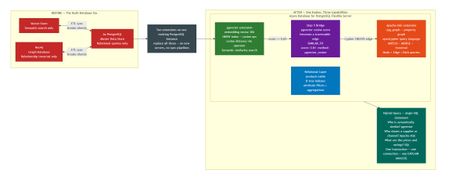
Inspired by GraphRAG and PostgreSQL Integration in Docker with Cypher Query and AI Agents, which demonstrated how Apache AGE brings Cypher based graph querying into PostgreSQL for GraphRAG pipelines. This post takes that idea further combining AGE's graph traversal with pgvector's semantic search to build a unified analytical engine where vectors and graphs reinforce each other in a single PostgreSQL instance. This post targets workloads where entity types, relationship semantics, and schema cardinality are known before ingestion. Embeddings are generated from structured attribute fields; graph edges are typed and written by deterministic ETL. No LLM is involved at any stage. You should use this approach when you have structured data and need operational query performance, and deterministic, auditable, sub-millisecond retrieval. The problem nobody talks about the multi database/ multi hop tax If you run technology for a large enterprise, you already know the data problem. It is not that you do not have enough data. It is that your data lives in too many places, connected by too many fragile pipelines, serving too many conflicting views of the same reality. Here is a pattern that repeats across industries. One team needs to find entities "similar to" a reference item — not by exact attribute match, but by semantic meaning derived from unstructured text like descriptions, reviews, or specifications. That is a vector similarity problem. Another team needs to traverse relationships trace dependency chains, map exposure paths, or answer questions like "if this node is removed, what downstream nodes are affected?" That is a graph traversal problem. Meanwhile, the authoritative master data of IDs, attributes, pricing, transactional history already lives in Postgres. Now you are operating three databases. Three bills. Three sets of credentials. Three backup strategies. A fragile ETL layer stitching entity IDs across systems, breaking silently whenever someone adds a new attribute to the master table. And worst of all, nobody can ask a question that spans all three systems without custom application code. Azure PostgreSQL database can already do all three jobs. Two extensions pgvector for vector similarity search and Apache AGE extension for graph traversal bringing these capabilities natively into the database. No new infrastructure. No sync pipelines. No multi database tax! This post walks through exactly how to combine them, why each piece matters at scale, and what kinds of queries become possible when you stop treating vectors and graphs as separate concerns. The architecture: Two extensions, One engine pgvector adds a native vector data type and distance operators (<=>, <->, <#>) with HNSW and IVFFlat index support. pg_diskann adds a third index type that keeps the index on disk instead of in memory, enabling large scale vector search without proportional RAM. example 1 - to run a product similarity query such as the one below which corelates products sold across multiple markets which are related (cosine similarity). - The limit clause in sub query limits the similarity search to closest 1 product recommendation - High similarity score of > 0.75 (aka 75% similarity in embeddings) -- Table DDL - for illuatration purposes only CREATE TABLE IF NOT EXISTS products ( id SERIAL PRIMARY KEY, sku TEXT UNIQUE NOT NULL, name TEXT NOT NULL, brand TEXT NOT NULL, category TEXT NOT NULL, subcategory TEXT, market TEXT NOT NULL, region TEXT, description TEXT, ingredients TEXT, avg_rating FLOAT DEFAULT 0.0, review_count INT DEFAULT 0, price_usd FLOAT, launch_year INT, status TEXT DEFAULT 'active', embedding vector(384) ); SELECT us.name AS us_product, us.brand AS us_brand, in_p.name AS india_match, in_p.brand AS india_brand, Round((1 - (us.embedding <=> in_p.embedding))::NUMERIC, 4) AS similarity FROM products us cross join lateral ( SELECT name, brand, embedding FROM products WHERE market = 'India' AND category = us.category ORDER BY embedding <=> us.embedding limit 1 ) in_p WHERE us.market = 'US' AND us.category = 'Skincare' AND us.avg_rating >= 4.0 AND round((1 - (us.embedding <=> in_p.embedding))::NUMERIC, 4)> 0.75 ORDER BY similarity DESC limit 20; AGE adds a cypher() function that executes cypher queries against a labeled property graph stored in the database managed and maintained under the ag_catalog schema. Vertices and edges become first class PostgreSQL rows with agtype properties. The age extension supports MATCH, CREATE, MERGE, WITH, and aggregations. example 2 - to run a product similarity query such as the one below which returns common products sold via multiple retail channels. SET search_path = ag_catalog, "$user", public; SELECT * FROM cypher('cpg_graph', $$ MATCH (p:Product)-[:SOLD_AT]->(walmart:RetailChannel {name: 'Walmart'}) MATCH (p)-[:SOLD_AT]->(target:RetailChannel {name: 'Target'}) MATCH (b:Brand)-[:MANUFACTURES]->(p) RETURN b.name AS brand, p.name AS product, p.category AS category, p.market AS market, p.price_usd AS price ORDER BY p.category, b.name $$) AS (brand agtype, product agtype, category agtype, market agtype, price agtype); The critical point and takeaway here is that both extensions participate in the same query planner and executor. A CTE that calls pgvector's <=> operator can feed results into a cypher() call in the next CTE all within a single transaction, sharing all available processes and control the database has to offer. Finally, you are looking at code that looks like - CREATE EXTENSION IF NOT EXISTS vector; CREATE EXTENSION IF NOT EXISTS age; SET search_path = ag_catalog, "$user", public; SELECT create_graph('knowledge_graph'); The bridge: pgvector → Apache AGE This is the architectural centrepiece where the mechanism that turns vector similarity scores into traversable graph edges. Without this “bridge” pgvector and AGE are two isolated extensions. Why bridge at all? pgvector answers: "What is similar to X?" AGE answers: "What is connected to Y, and how?" These are fundamentally different questions operating on fundamentally different data structures. pgvector works on a flat vector space and every query is a distance calculation against an ANN index. AGE works on a labelled property graph where every query is a pattern match across typed nodes and edges. What if now the question is – What is like X and connected to Y and how? This is where the bridge gets activated comes into life. This takes cosine similarity distance scores from pgvector and writes them as SIMILAR_TO edges in the AGE property graph turning a distance computation into a traversable relationship. Once similarity is an edge, cypher queries can then combine it with structural edges in a single declarative pattern. for ind_prod_id, us_prod_id, similarity in pairs: execute_cypher(cur, f""" MATCH (a:Product {{product_id: { ind_prod_id }}}), (b:Product {{product_id: { us_prod_id }}}) CREATE (a)-[:SIMILAR_TO {{score: {score:.4f}, method: 'pgvector_cosine'}}]->(b) CREATE (b)-[:SIMILAR_TO {{score: {score:.4f}, method: 'pgvector_cosine'}}]->(a) """) The cypher() function translates Cypher into DML against ag_catalog tables under the hood, these are plain PostgreSQL heap inserts just like another row. The score property is the edge weight on the SIMILAR_TO relationship. Its value is the similarity score computed from pgvector using cosine similarity, so a higher score means the two products are more semantically similar. The method property is metadata on that same edge. It records how the score was produced. In this case, pgvector_cosine is just a string label indicating that the relationship was derived using pgvector based cosine similarity. Cosine similarity is symmetric, but property graph traversal is directional i.e. MATCH (a)-[:SIMILAR_TO]->(b) won't find the reverse path unless both directional edges exist. Why this combination matters One backup strategy. One monitoring stack. One connection pool. One failover target. One set of credentials. One database restore considerations - for teams already running Az PostgreSQL databases in production this adds capabilities without adding any net new infrastructure. Unified cost model The planner assigns cost estimates to index scan for both execution engines using the same cost framework it uses for B-tree lookups and sequential scans. It can decide whether to use the HNSW index or fall back to a sequential scan based on table statistics and server parameters. As you have learnt so far, there is no separate storage or database engine to learn. Bringing all this knowledge together Examples 1 and 2 were all about native vector search and native graph search example in a classic product catalog scenario, respectively. Now, let’s bring this to life - What if now the question is – What is like X and connected to Y and how? In this use case - pgvector finds the cross market matches (as shown in example 1), then Cypher checks which of those matches are sold at both Walmart and Target: SET search_path = ag_catalog, "$user", public; -- Cross-market matching (pgvector) → Retail channel overlap (graph) WITH cross_market AS ( SELECT us.id AS us_id, us.name AS us_product, us.brand AS us_brand, in_p.id AS india_id, in_p.name AS india_match, in_p.brand AS india_brand, ROUND((1 - (us.embedding <=> in_p.embedding))::numeric, 4) AS similarity FROM products us CROSS JOIN LATERAL ( SELECT id, name, brand, embedding FROM products WHERE market = 'India' AND category = us.category ORDER BY embedding <=> us.embedding LIMIT 1 ) in_p WHERE us.market = 'US' AND us.category = 'Skincare' AND us.avg_rating >= 4.0 AND ROUND((1 - (us.embedding <=> in_p.embedding))::numeric, 4) > 0.75 ), dual_channel AS ( SELECT (pid::text)::int AS product_id, brand::text AS brand FROM cypher('cpg_graph', $$ MATCH (p:Product)-[:SOLD_AT]->(w:RetailChannel {name: 'Walmart'}) MATCH (p)-[:SOLD_AT]->(t:RetailChannel {name: 'Target'}) MATCH (b:Brand)-[:MANUFACTURES]->(p) RETURN p.product_id AS pid, b.name AS brand $$) AS (pid agtype, brand agtype) ) SELECT cm.us_product, cm.us_brand, cm.india_match, cm.india_brand, cm.similarity, CASE WHEN dc.product_id IS NOT NULL THEN 'Yes' ELSE 'No' END AS india_match_at_walmart_and_target FROM cross_market cm LEFT JOIN dual_channel dc ON dc.product_id = cm.india_id ORDER BY cm.similarity DESC LIMIT 20; Conclusion The Azure PostgreSQL database ecosystem has quietly assembled the components for a unified semantic + structural analytics engine in form of extensions. pgvector with pg_diskann delivers production grade approximate nearest-neighbour search with ANN indexes. Apache AGE delivers cypher based property graph traversal. Together with a “bridge,” they enable query patterns that are impossible in either system alone and they do it within the ACID guarantees, operational tooling, and SQL vocabulary knowledge you already have. Stop paying for three databases when one will do!44Views0likes0CommentsPartner Case Study | Infosys
Managing student and teacher data at scale is a high-stakes challenge. Modernizing a Student Information System (SIS) that tracks daily attendance, enrollment, academic records, scheduling, and other student data requires deep technical expertise, a structured approach to cloud migration, and a strong foundation in security and governance. Infosys, a Microsoft partner for over 25 years, has long been a leader in these secure modernizations and cloud transformations. Infosys holds Solutions Partner designations spanning Data and AI, Digital and App Innovation, Infrastructure, Modern Work, and Security. As a leading adopter of GitHub Copilot and Microsoft 365 Copilot, Infosys has delivered enterprise-scale transformations. Leveraging Infosys Cobalt, a proprietary set of solutions for cloud transformation, and Infosys Topaz, an AI-first suite of offerings, Infosys has been able to support multiple large enterprises in their AI-first, cloud-first transformation journeys. With deep expertise across Microsoft Azure, GitHub Copilot, and Microsoft 365, Infosys has built a reputation for delivering scalable, secure, and cost-effective solutions. This experience and collaborative history are part of what made Infosys a 2025 Microsoft Partner of the Year for Azure – Secure Migration and Modernization. It’s also what made the company so successful when they were tapped to stabilize, modernize, and migrate the SIS for one of the largest districts in the country to Azure—creating one of the largest SIS cloud deployments for any US school district in the process. Stabilizing and scaling a strained system Each morning, teachers and students generate a massive amount of data for Infosys’s client, with 30,000 teachers taking attendance for more than half a million students. The district’s legacy SIS was creating intense traffic spikes and exposing the limits of their infrastructure. “There were 1,400-plus schools, 500,000 students,” said Sambit Mohanty, AVP Education Practice at Infosys. “You can imagine the traffic between 7:00 AM and 10:00 AM.” Originally built on a legacy Microsoft .NET framework and deployed on premises, the SIS was designed to support a vast and complex student population. But the system was not easy to scale, and it had begun to show its age, with disruptive performance issues that made it difficult for teachers to submit attendance and that caused delays when administrators tried to access student records. During school openings each semester—one of the most critical periods for any district—the instability of the SIS could present major issues. “The school opening is the biggest event for a school district,” Mohanty explained. “Everything has to be fine. You should have proper enrollment, grades should be moved to the next level, students should be scheduled, and teachers should be able to take attendance.” In addition to the suboptimal performance, the SIS was also costly and inefficient. To manage the start-of-the-year chaos, the district assembled war rooms with more than 50 experts across IT, network, and security teams trying to juggle and fix issues in real time. But they needed a partner who could support efforts to stabilize the system and modernize it for long-term scalability and security. Continue reading here Explore all case studies or submit your own Subscribe to case studies tag to follow all new case study posts. Don't forget to follow this blog to receive email notifications of new stories!39Views0likes0Comments
[Architecture Pattern] Scaling Sync-over-Async Edge Gateways by Bypassing Service Bus Sessions
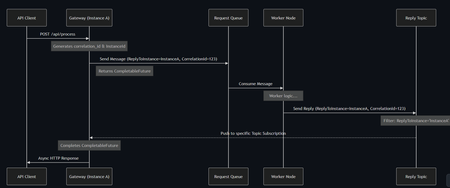
Hi everyone, I wanted to share an architectural pattern and an open-source implementation we recently built to solve a major scaling bottleneck at the edge: bridging legacy synchronous HTTP clients to long-running asynchronous AI workers. The Problem: Stateful Bottlenecks at the Edge When dealing with slow AI generation tasks (e.g., 45+ seconds), standard REST APIs will drop the connection resulting in 504 Gateway Timeouts. The standard integration pattern here is Sync-over-Async. The Gateway accepts the HTTP request, drops a message onto Azure Service Bus, waits for the worker to reply, and maps the reply back to the open HTTP connection. However, the default approach is to use Service Bus Sessions for request-reply correlation. At scale, this introduces severe limitations: 1. Stateful Gateways: The Gateway pod must request an exclusive lock on the session. It becomes tightly coupled to that specific request. 2. Horizontal Elasticity is Broken: If a reply arrives, it must go to the specific pod holding the lock. Other idle pods cannot assist. 3. Hard Limits: A traffic spike easily exhausts the namespace concurrent session limits (especially on the Standard tier). The Solution: Stateless Filtered Topics To achieve true horizontal scale, the API Gateway layer must be 100% stateless. We bypassed Sessions entirely by pushing the routing logic down to the broker using a Filtered Topic Pattern. How it works: 1. The Gateway injects a CorrelationId property (e.g., Instance-A-Req-1) into the outbound request. 2. Instead of locking a session, the Gateway spins up a lightweight, dynamic subscription on a shared Reply Topic with a SQL Filter: CorrelationId = 'Instance-A-Req-1'. 3. The AI worker processes the task and drops the reply onto the shared topic with the same property. 4. The Azure Service Bus broker evaluates the SQL filter and pushes the message directly to the correct Gateway pod. No session locks. No implicit instance affinity. Complete horizontal scalability. If a pod crashes, its temporary subscription simply drops—preventing locked poison messages. Open Source Implementation Implementing dynamic Service Bus Administration clients and receiver lifecycles is complex, so I abstracted this pattern into a Spring Boot starter for the community. It handles all the dynamic subscription and routing logic under the hood, allowing developers to execute highly scalable Sync-over-Async flows with a single line of code returning a CompletableFuture. GitHub Repository: https://github.com/ShivamSaluja/sentinel-servicebus-starter Full Technical Write-up: https://dev.to/shivamsaluja/sync-over-async-bypassing-azure-service-bus-session-limits-for-ai-workloads-269d I would love to hear from other architects in this hub. Have you run into similar session exhaustion limits when building Edge API Gateways? Have you adopted similar stateless broker-side routing, or do you rely on sticky sessions at your load balancers?20Views0likes0CommentsKerberos and the End of RC4: Protocol Hardening and Preparing for CVE‑2026‑20833
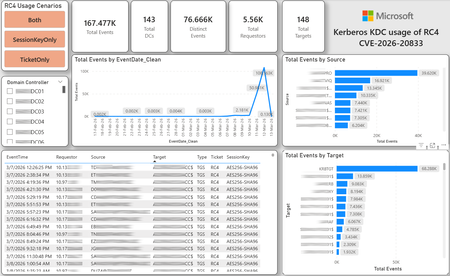
CVE-2026-20833 addresses the continued use of the RC4‑HMAC algorithm within the Kerberos protocol in Active Directory environments. Although RC4 has been retained for many years for compatibility with legacy systems, it is now considered cryptographically weak and unsuitable for modern authentication scenarios. As part of the security evolution of Kerberos, Microsoft has initiated a process of progressive protocol hardening, whose objective is to eliminate RC4 as an implicit fallback, establishing AES128 and AES256 as the default and recommended algorithms. This change should not be treated as optional or merely preventive. It represents a structural change in Kerberos behavior that will be progressively enforced through Windows security updates, culminating in a model where RC4 will no longer be implicitly accepted by the KDC. If Active Directory environments maintain service accounts, applications, or systems dependent on RC4, authentication failures may occur after the application of the updates planned for 2026, especially during the enforcement phases introduced starting in April and finalized in July 2026. For this reason, it is essential that organizations proactively identify and eliminate RC4 dependencies, ensuring that accounts, services, and applications are properly configured to use AES128 or AES256 before the definitive changes to Kerberos protocol behavior take effect. Official Microsoft References CVE-2026-25177 - Security Update Guide - Microsoft - Active Directory Domain Services Elevation of Privilege Vulnerability Microsoft Support – How to manage Kerberos KDC usage of RC4 for service account ticket issuance changes related to CVE-2026-20833 (KB 5073381) Microsoft Learn – Detect and Remediate RC4 Usage in Kerberos AskDS – What is going on with RC4 in Kerberos? Beyond RC4 for Windows authentication | Microsoft Windows Server Blog So, you think you’re ready for enforcing AES for Kerberos? | Microsoft Community Hub Risk Associated with the Vulnerability When RC4 is used in Kerberos tickets, an authenticated attacker can request Service Tickets (TGS) for valid SPNs, capture these tickets, and perform offline brute-force attacks, particularly Kerberoasting scenarios, with the goal of recovering service account passwords. Compared to AES, RC4 allows significantly faster cracking, especially for older accounts or accounts with weak passwords. Technical Overview of the Exploitation In simplified terms, the exploitation flow occurs as follows: The attacker requests a TGS for a valid SPN. The KDC issues the ticket using RC4, when that algorithm is still accepted. The ticket is captured and analyzed offline. The service account password is recovered. The compromised account is used for lateral movement or privilege escalation. Official Timeline Defined by Microsoft Important clarification on enforcement behavior Explicit account encryption type configurations continue to be honored even during enforcement mode. The Kerberos hardening associated with CVE‑2026‑20833 focuses on changing the default behavior of the KDC, enforcing AES-only encryption for TGS ticket issuance when no explicit configuration exists. This approach follows the same enforcement model previously applied to Kerberos session keys in earlier security updates (for example, KB5021131 related to CVE‑2022‑37966), representing another step in the progressive removal of RC4 as an implicit fallback. January 2026 – Audit Phase Starting in January 2026, Microsoft initiated the Audit Phase related to changes in RC4 usage within Kerberos, as described in the official guidance associated with CVE-2026-20833. The primary objective of this phase is to allow organizations to identify existing RC4 dependencies before enforcement changes are applied in later phases. During this phase, no functional breakage is expected, as RC4 is still permitted by the KDC. However, additional auditing mechanisms were introduced, providing greater visibility into how Kerberos tickets are issued in the environment. Analysis is primarily based on the following events recorded in the Security Log of Domain Controllers: Event ID 4768 – Kerberos Authentication Service (AS request / Ticket Granting Ticket) Event ID 4769 – Kerberos Service Ticket Operations (Ticket Granting Service – TGS) Additional events related to the KDCSVC service These events allow identification of: the account that requested authentication the requested service or SPN the source host of the request the encryption algorithm used for the ticket and session key This information is critical for detecting scenarios where RC4 is still being implicitly used, enabling operations teams to plan remediation ahead of the enforcement phase. If these events are not being logged on Domain Controllers, it is necessary to verify whether Kerberos auditing is properly enabled. For Kerberos authentication events to be recorded in the Security Log, the corresponding audit policies must be configured. The minimum recommended configuration is to enable Success auditing for the following subcategories: Kerberos Authentication Service Kerberos Service Ticket Operations Verification can be performed directly on a Domain Controller using the following commands: auditpol /get /subcategory:"Kerberos Service Ticket Operations" auditpol /get /subcategory:"Kerberos Authentication Service" In enterprise environments, the recommended approach is to apply this configuration via Group Policy, ensuring consistency across all Domain Controllers. The corresponding policy can be found at: Computer Configuration - Policies - Windows Settings - Security Settings - Advanced Audit Policy Configuration - Audit Policies - Account Logon Once enabled, these audits record events 4768 and 4769 in the Domain Controllers’ Security Log, allowing analysis tools—such as inventory scripts or SIEM/Log Analytics queries—to accurately identify where RC4 is still present in the Kerberos authentication flow. April 2026 – Enforcement with Manual Rollback With the April 2026 update, the KDC begins operating in AES-only mode (0x18) when the msDS-SupportedEncryptionTypes attribute is not defined. This means RC4 is no longer accepted as an implicit fallback. During this phase, applications, accounts, or computers that still implicitly depend on RC4 may start failing. Manual rollback remains possible via explicit configuration of the attribute in Active Directory. July 2026 – Final Enforcement Starting in July 2026, audit mode and rollback options are removed. RC4 will only function if explicitly configured—a practice that is strongly discouraged. This represents the point of no return in the hardening process. Official Monitoring Approach Microsoft provides official scripts in the repository: https://github.com/microsoft/Kerberos-Crypto/tree/main/scripts The two primary scripts used in this analysis are: Get-KerbEncryptionUsage.ps1 The Get-KerbEncryptionUsage.ps1 script, provided by Microsoft in the Kerberos‑Crypto repository, is designed to identify how Kerberos tickets are issued in the environment by analyzing authentication events recorded on Domain Controllers. Data collection is primarily based on: Event ID 4768 – Kerberos Authentication Service (AS‑REQ / TGT issuance) Event ID 4769 – Kerberos Service Ticket Operations (TGS issuance) From these events, the script extracts and consolidates several relevant fields for authentication flow analysis: Time – when the authentication occurred Requestor – IP address or host that initiated the request Source – account that requested the ticket Target – requested service or SPN Type – operation type (AS or TGS) Ticket – algorithm used to encrypt the ticket SessionKey – algorithm used to protect the session key Based on these fields, it becomes possible to objectively identify which algorithms are being used in the environment, both for ticket issuance and session establishment. This visibility is essential for detecting RC4 dependencies in the Kerberos authentication flow, enabling precise identification of which clients, services, or accounts still rely on this legacy algorithm. Example usage: .\Get-KerbEncryptionUsage.ps1 -Encryption RC4 -Searchscope AllKdcs | Export-Csv -Path .\KerbUsage_RC4_All_ThisDC.csv -NoTypeInformation -Encoding UTF8 Data Consolidation and Analysis In enterprise environments, where event volumes may be high, it is recommended to consolidate script results into analytical tools such as Power BI to facilitate visualization and investigation. The presented image illustrates an example dashboard built from collected results, enabling visibility into: Total events analyzed Number of Domain Controllers involved Number of requesting clients (Requestors) Most frequently involved services or SPNs (Targets) Temporal distribution of events RC4 usage scenarios (Ticket, SessionKey, or both) This type of visualization enables rapid identification of RC4 usage patterns, remediation prioritization, and progress tracking as dependencies are eliminated. Additionally, dashboards help answer key operational questions, such as: Which services still depend on RC4 Which clients are negotiating RC4 for sessions Which Domain Controllers are issuing these tickets Whether RC4 usage is decreasing over time This combined automated collection + analytical visualization approach is the recommended strategy to prepare environments for the Microsoft changes related to CVE‑2026‑20833 and the progressive removal of RC4 in Kerberos. Visualizing Results with Power BI To facilitate analysis and monitoring of RC4 usage in Kerberos, it is recommended to consolidate script results into a Power BI analytical dashboard. 1. Install Power BI Desktop Download and install Power BI Desktop from the official Microsoft website 2. Execute data collection After running the Get-KerbEncryptionUsage.ps1 script, save the generated CSV file to the following directory: C:\Temp\Kerberos_KDC_usage_of_RC4_Logs\KerbEncryptionUsage_RC4.csv 3. Open the dashboard in Power BI Open the file RC4-KerbEncryptionUsage-Dashboards.pbix using Power BI Desktop. If you are interested, please leave a comment on this post with your email address, and I will be happy to share with you. 4. Update the data source If the CSV file is located in a different directory, it will be necessary to adjust the data source path in Power BI. As illustrated, the dashboard uses a parameter named CsvFilePath, which defines the path to the collected CSV file. To adjust it: Open Transform Data in Power BI. Locate the CsvFilePath parameter in the list of Queries. Update the value to the directory where the CSV file was saved. Click Refresh Preview or Refresh to update the data. Click Home → Close & Apply. This approach allows rapid identification of RC4 dependencies, prioritization of remediation actions, and tracking of progress throughout the elimination process. List-AccountKeys.ps1 This script is used to identify which long-term keys are present on user, computer, and service accounts, enabling verification of whether RC4 is still required or whether AES128/AES256 keys are already available. Interpreting Observed Scenarios Microsoft recommends analyzing RC4 usage by jointly considering two key fields present in Kerberos events: Ticket Encryption Type Session Encryption Type Each combination represents a distinct Kerberos behavior, indicating the source of the issue, risk level, and remediation point in the environment. In addition to events 4768 and 4769, updates released starting January 13, 2026, introduce new Kdcsvc events in the System Event Log that assist in identifying RC4 dependencies ahead of enforcement. These events include: Event ID 201 – RC4 usage detected because the client advertises only RC4 and the service does not have msDS-SupportedEncryptionTypes defined. Event ID 202 – RC4 usage detected because the service account does not have AES keys and the msDS-SupportedEncryptionTypes attribute is not defined. Event ID 203 – RC4 usage blocked (enforcement phase) because the client advertises only RC4 and the service does not have msDS-SupportedEncryptionTypes defined. Event ID 204 – RC4 usage blocked (enforcement phase) because the service account does not have AES keys and msDS-SupportedEncryptionTypes is not defined. Event ID 205 – Detection of explicit enablement of insecure algorithms (such as RC4) in the domain policy DefaultDomainSupportedEncTypes. Event ID 206 – RC4 usage detected because the service accepts only AES, but the client does not advertise AES support. Event ID 207 – RC4 usage detected because the service is configured for AES, but the service account does not have AES keys. Event ID 208 – RC4 usage blocked (enforcement phase) because the service accepts only AES and the client does not advertise AES support. Event ID 209 – RC4 usage blocked (enforcement phase) because the service accepts only AES, but the service account does not have AES keys. https://support.microsoft.com/en-gb/topic/how-to-manage-kerberos-kdc-usage-of-rc4-for-service-account-ticket-issuance-changes-related-to-cve-2026-20833-1ebcda33-720a-4da8-93c1-b0496e1910dc They indicate situations where RC4 usage will be blocked in future phases, allowing early detection of configuration issues in clients, services, or accounts. These events are logged under: Log: System Source: Kdcsvc Below are the primary scenarios observed during the analysis of Kerberos authentication behavior, highlighting how RC4 usage manifests across different ticket and session encryption combinations. Each scenario represents a distinct risk profile and indicates specific remediation actions required to ensure compliance with the upcoming enforcement phases. Scenario A – RC4 / RC4 In this scenario, both the Kerberos ticket and the session key are issued using RC4. This is the worst possible scenario from a security and compatibility perspective, as it indicates full and explicit dependence on RC4 in the authentication flow. This condition significantly increases exposure to Kerberoasting attacks, since RC4‑encrypted tickets can be subjected to offline brute-force attacks to recover service account passwords. In addition, environments remaining in this state have a high probability of authentication failure after the April 2026 updates, when RC4 will no longer be accepted as an implicit fallback by the KDC. Events Associated with This Scenario During the Audit Phase, this scenario is typically associated with: Event ID 201 – Kdcsvc Indicates that: the client advertises only RC4 the service does not have msDS-SupportedEncryptionTypes defined the Domain Controller does not have DefaultDomainSupportedEncTypes defined This means RC4 is being used implicitly. This event indicates that the authentication will fail during the enforcement phase. Event ID 202 – Kdcsvc Indicates that: the service account does not have AES keys the service does not have msDS-SupportedEncryptionTypes defined This typically occurs when: legacy accounts have never had their passwords reset only RC4 keys exist in Active Directory Possible Causes Common causes include: the originating client (Requestor) advertises only RC4 the target service (Target) is not explicitly configured to support AES the account has only legacy RC4 keys the msDS-SupportedEncryptionTypes attribute is not defined Recommended Actions To remediate this scenario: Correctly identify the object involved in the authentication flow, typically: a service account (SPN) a computer account or a Domain Controller computer object Verify whether the object has AES keys available using analysis tools or scripts such as List-AccountKeys.ps1. If AES keys are not present, reset the account password, forcing generation of modern cryptographic keys (AES128 and AES256). Explicitly define the msDS-SupportedEncryptionTypes attribute to enable AES support. Recommended value for modern environments: 0x18 (AES128 + AES256) = 24 As illustrated below, this configuration can be applied directly to the msDS-SupportedEncryptionTypes attribute in Active Directory. AES can also be enabled via Active Directory Users and Computers by explicitly selecting: This account supports Kerberos AES 128 bit encryption This account supports Kerberos AES 256 bit encryption These options ensure that new Kerberos tickets are issued using AES algorithms instead of RC4. Temporary RC4 Usage (Controlled Rollback) In transitional scenarios—during migration or troubleshooting—it may be acceptable to temporarily use: 0x1C (RC4 + AES) = 28 This configuration allows the object to accept both RC4 and AES simultaneously, functioning as a controlled rollback while legacy dependencies are identified and corrected. However, the final objective must be to fully eliminate RC4 before the final enforcement phase in July 2026, ensuring the environment operates exclusively with AES128 and AES256. Scenario B – AES / RC4 In this case, the ticket is protected with AES, but the session is still negotiated using RC4. This typically indicates a client limitation, legacy configuration, or restricted advertisement of supported algorithms. Events Associated with This Scenario During the Audit Phase, this scenario may generate: Event ID 206 Indicates that: the service accepts only AES the client does not advertise AES in the Advertised Etypes In this case, the client is the issue. Recommended Action Investigate the Requestor Validate operating system, client type, and advertised algorithms Review legacy GPOs, hardening configurations, or settings that still force RC4 For Linux clients or third‑party applications, review krb5.conf, keytabs, and Kerberos libraries Scenario C – RC4 / AES Here, the session already uses AES, but the ticket is still issued using RC4. This indicates an implicit RC4 dependency on the Target or KDC side, and the environment may fail once enforcement begins. Events Associated with This Scenario This scenario may generate: Event ID 205 Indicates that the domain has explicit insecure algorithm configuration in: DefaultDomainSupportedEncTypes This means RC4 is explicitly allowed at the domain level. Recommended Action Correct the Target object Explicitly define msDS-SupportedEncryptionTypes with 0x18 = 24 Revalidate new ticket issuance to confirm full migration to AES / AES Conclusion CVE‑2026‑20833 represents a structural change in Kerberos behavior within Active Directory environments. Proper monitoring is essential before April 2026, and the msDS-SupportedEncryptionTypes attribute becomes the primary control point for service accounts, computer accounts, and Domain Controllers. July 2026 represents the final enforcement point, after which there will be no implicit rollback to RC4.5.3KViews3likes8CommentsPower Up Your Open WebUI with Azure AI Speech: Quick STT & TTS Integration
Introduction Ever found yourself wishing your web interface could really talk and listen back to you? With a few clicks (and a bit of code), you can turn your plain Open WebUI into a full-on voice assistant. In this post, you’ll see how to spin up an Azure Speech resource, hook it into your frontend, and watch as user speech transforms into text and your app’s responses leap off the screen in a human-like voice. By the end of this guide, you’ll have a voice-enabled web UI that actually converses with users, opening the door to hands-free controls, better accessibility, and a genuinely richer user experience. Ready to make your web app speak? Let’s dive in. Why Azure AI Speech? We use Azure AI Speech service in Open Web UI to enable voice interactions directly within web applications. This allows users to: Speak commands or input instead of typing, making the interface more accessible and user-friendly. Hear responses or information read aloud, which improves usability for people with visual impairments or those who prefer audio. Provide a more natural and hands-free experience especially on devices like smartphones or tablets. In short, integrating Azure AI Speech service into Open Web UI helps make web apps smarter, more interactive, and easier to use by adding speech recognition and voice output features. If you haven’t hosted Open WebUI already, follow my other step-by-step guide to host Ollama WebUI on Azure. Proceed to the next step if you have Open WebUI deployed already. Learn More about OpenWeb UI here. Deploy Azure AI Speech service in Azure. Navigate to the Azure Portal and search for Azure AI Speech on the Azure portal search bar. Create a new Speech Service by filling up the fields in the resource creation page. Click on “Create” to finalize the setup. After the resource has been deployed, click on “View resource” button and you should be redirected to the Azure AI Speech service page. The page should display the API Keys and Endpoints for Azure AI Speech services, which you can use in Open Web UI. Settings things up in Open Web UI Speech to Text settings (STT) Head to the Open Web UI Admin page > Settings > Audio. Paste the API Key obtained from the Azure AI Speech service page into the API key field below. Unless you use different Azure Region, or want to change the default configurations for the STT settings, leave all settings to blank. Text to Speech settings (TTS) Now, let's proceed with configuring the TTS Settings on OpenWeb UI by toggling the TTS Engine to Azure AI Speech option. Again, paste the API Key obtained from Azure AI Speech service page and leave all settings to blank. You can change the TTS Voice from the dropdown selection in the TTS settings as depicted in the image below: Click Save to reflect the change. Expected Result Now, let’s test if everything works well. Open a new chat / temporary chat on Open Web UI and click on the Call / Record button. The STT Engine (Azure AI Speech) should identify your voice and provide a response based on the voice input. To test the TTS feature, click on the Read Aloud (Speaker Icon) under any response from Open Web UI. The TTS Engine should reflect Azure AI Speech service! Conclusion And that’s a wrap! You’ve just given your Open WebUI the gift of capturing user speech, turning it into text, and then talking right back with Azure’s neural voices. Along the way you saw how easy it is to spin up a Speech resource in the Azure portal, wire up real-time transcription in the browser, and pipe responses through the TTS engine. From here, it’s all about experimentation. Try swapping in different neural voices or dialing in new languages. Tweak how you start and stop listening, play with silence detection, or add custom pronunciation tweaks for those tricky product names. Before you know it, your interface will feel less like a web page and more like a conversation partner.2KViews3likes2Comments
Passwordless AKS Secrets: Sync Azure Key Vault with ESO + Workload Identity
Architecture High-level flow The solution uses a User-Assigned Managed Identity (UAMI) federated to a Kubernetes Service Account via AKS OIDC—then ESO uses that identity to read secrets from Key Vault and write them into Kubernetes as Opaque secrets. Flow: Azure Key Vault → ESO → Kubernetes Secret (Opaque) → Rancher / App Prerequisites From AKS Rancher Secrets from Azure Key Vault using Workload Identity, you need: AKS cluster with OIDC issuer enabled External Secrets Operator (ESO) deployed and operational Azure Key Vault with required secrets present UAMI + Federated Identity Credential trusting an AKS namespace Service Account Appropriate Key Vault roles (e.g., Key Vault Secrets Officer/User) depending on what you need to do Rancher access to the target namespace Note: The AKS Workload Identity setup requires enabling OIDC/workload identity, creating a managed identity, creating a Service Account annotated with the client-id, and creating a federated identity credential. Step-by-step: End-to-end implementation Step 1 — Enable AKS OIDC issuer + Workload Identity If you’re creating or updating a cluster, Microsoft’s AKS guidance is to enable both flags. The example below is from Deploy and Configure an Azure Kubernetes Service (AKS) Cluster with Microsoft Entra Workload ID. # Create a new cluster (example) az aks create \ --resource-group "${RESOURCE_GROUP}" \ --name "${CLUSTER_NAME}" \ --enable-oidc-issuer \ --enable-workload-identity \ --generate-ssh-keys If you already have a cluster: az aks update \ --resource-group "${RESOURCE_GROUP}" \ --name "${CLUSTER_NAME}" \ --enable-oidc-issuer \ --enable-workload-identity Retrieve the cluster OIDC issuer URL: export AKS_OIDC_ISSUER="$(az aks show \ --name "${CLUSTER_NAME}" \ --resource-group "${RESOURCE_GROUP}" \ --query "oidcIssuerProfile.issuerUrl" \ --output tsv)"export AKS_OIDC_ISSUER="$(az aks show \ --name "${CLUSTER_NAME}" \ --resource-group "${RESOURCE_GROUP}" \ --query "oidcIssuerProfile.issuerUrl" \ --output tsv)" Step 2 — Create a User-Assigned Managed Identity (UAMI) az identity create \ --name "${USER_ASSIGNED_IDENTITY_NAME}" \ --resource-group "${RESOURCE_GROUP}" \ --location "${LOCATION}" \ --subscription "${SUBSCRIPTION}" Capture the identity clientId (used in Service Account annotation): export USER_ASSIGNED_CLIENT_ID="$(az identity show \ --resource-group "${RESOURCE_GROUP}" \ --name "${USER_ASSIGNED_IDENTITY_NAME}" \ --query 'clientId' \ --output tsv)" Step 3 — Create/annotate a Kubernetes Service Account (namespace-scoped) Service Account (Optional if already exists) apiVersion: v1 kind: ServiceAccount metadata: name: <NAME> namespace: <NAMESPACE> annotations: azure.workload.identity/client-id: "<UAMI_CLIENT_ID>" Apply: kubectl apply -f serviceaccount.yaml Step 4 — Create the Federated Identity Credential (UAMI ↔ ServiceAccount) This binds: issuer = AKS_OIDC_ISSUER subject = system:serviceaccount:<namespace>:<serviceaccount> audience = api://AzureADTokenExchange az identity federated-credential create \ --name "${FEDERATED_IDENTITY_CREDENTIAL_NAME}" \ --identity-name "${USER_ASSIGNED_IDENTITY_NAME}" \ --resource-group "${RESOURCE_GROUP}" \ --issuer "${AKS_OIDC_ISSUER}" \ --subject system:serviceaccount:"<NAMESPACE>":"<SERVICEACCOUNT>" \ --audience api://AzureADTokenExchange Step 5 — Grant Key Vault permissions to the UAMI export KEYVAULT_RESOURCE_ID=$(az keyvault show \ --resource-group "${RESOURCE_GROUP}" \ --name "${KEYVAULT_NAME}" \ --query id --output tsv) export IDENTITY_PRINCIPAL_ID=$(az identity show \ --name "${USER_ASSIGNED_IDENTITY_NAME}" \ --resource-group "${RESOURCE_GROUP}" \ --query principalId --output tsv) az role assignment create \ --assignee-object-id "${IDENTITY_PRINCIPAL_ID}" \ --role "Key Vault Secrets User" \ --scope "${KEYVAULT_RESOURCE_ID}" \ --assignee-principal-type ServicePrincipal Step 6 — Create the SecretStore (ESO → Azure Key Vault) in Rancher Example SecretStore YAML from the document: apiVersion: external-secrets.io/v1beta1 kind: SecretStore metadata: name: <NAME> namespace: <NAMESPACE> spec: provider: azurekv: tenantId: "<tenantID>" vaultUrl: "https://<keyvaultname>.vault.azure.net/" authType: WorkloadIdentity serviceAccountRef: name: <SERVICEACCOUNT> This matches ESO’s Azure Key Vault provider model: ESO integrates with Azure Key Vault using SecretStore / ClusterSecretStore, and supports authentication methods including Workload Identity. Apply (if you’re using kubectl instead of Rancher UI): kubectl apply -f secretstore.yaml Step 7 — Create the ExternalSecret (Pattern-based or “sync all”) Option A: Sync secrets matching a name pattern (password/secret/key) apiVersion: external-secrets.io/v1beta1 kind: ExternalSecret metadata: name: <NAME> namespace: <NAMESPACE> spec: refreshInterval: 30s secretStoreRef: kind: SecretStore name: <SECRETSTORENAME> target: name: <ANYNAME> creationPolicy: Owner dataFrom: - find: name: regexp: ".*(password|secret|key).*" Option B: Sync all secrets from the Key Vault apiVersion: external-secrets.io/v1beta1 kind: ExternalSecret metadata: name: <NAME> namespace: <NAMESPACE> spec: refreshInterval: 30s secretStoreRef: kind: SecretStore name: <SECRETSTORENAME> target: name: <ANYNAME> creationPolicy: Owner dataFrom: - find: name: {} ESO fetches secrets from Azure Key Vault ESO creates an Opaque Kubernetes Secret in the namespace Rancher exposes it to the app Changes propagate on next refresh interval Apply: kubectl apply -f externalsecret.yaml Validation checklist (what devs should verify) SecretStore + ExternalSecret CRDs exist and are healthy kubectl get secretstore -n <NAMESPACE> kubectl get externalsecret -n <NAMESPACE> The Kubernetes Secret is created kubectl get secret <SECRETNAME> -n <NAMESPACE> # or kubectl get secret <SECRETNAME> -n <NAMESPACE> Workload Identity plumbing is correct AKS cluster has OIDC issuer and workload identity enabled. ServiceAccount has annotation azure.workload.identity/client-id. Federated identity credential exists and matches issuer+subject Operational notes & best practices (practical guidance) 1) “No code change” strategy Key advantage: If Azure Key Vault secret names are created the same as Rancher Secrets, applications can keep using the same secret references with no code changes. 2) Prefer Azure RBAC model with least privilege For ESO read-only sync, Key Vault Secrets User is typically sufficient (per AKS workload identity walkthrough). 3) Refresh intervals Adjust this based on your rotation policy and Key Vault throttling considerations (org-dependent). Troubleshooting quick hits Symptom: Access denied from Key Vault Ensure the UAMI has Key Vault roles assigned at the vault scope (e.g., Key Vault Secrets User) Ensure Key Vault URL and tenant ID are correct in SecretStore Symptom: Token exchange issues Ensure cluster OIDC issuer and workload identity are enabled. Ensure federated credential subject matches system:serviceaccount:<ns>:<sa>. Key benefits No client secrets stored (uses Workload Identity). Automatic discovery via regex filters. No code changes when secret naming aligns. Future-proof: new Key Vault secrets matching patterns can auto-sync.Customer Offerings: Azure Local - Implementation, Migration, and Management
Hi everyone! Brandon here, back once again to talk to you about a couple of new offerings that have just been released to assist our Unified customers with their on-premises virtualization needs! I continue to have the privilege of leading a great program and team helping customers to migrate from VMware to more cost-effective and/or modern solutions. These new offerings are <drum roll>: Hyper-V - Implementation, Migration, and Management Azure Local - Implementation, Migration, and Management NOTE: These offerings do not provide hands on keyboard support, do not create custom documentation for customers, and cannot provide direct support for any 3 rd party products that may be used in the process of migrations. Many customers are reassessing their virtualization strategies and are actively exploring alternatives to VMware that align with long‑term hybrid cloud goals. Azure Local offers a purpose‑built platform that combines proven Windows Server–based virtualization with Azure services and management tooling, enabling customers to modernize on‑premises infrastructure while maintaining tight integration with Azure management, security, and governance capabilities. Whether driven by changing licensing models, cost optimization, or the need for deeper hybrid cloud integration, a successful transition requires more than a technology shift—it requires a structured, outcome‑focused approach. While we are providing these new offerings to customers, you do also have the option of more extended engagements as well that are broader in scope and more tailored to the end goals while we work side by side with you. If you are a Unified customer and looking to move off of VMware to Azure Local, or you just need help with your on-premises Microsoft virtualization technologies in general, have your account manager (CSAM) reach out to me! Planning to go at it alone?? Virtually (no pun intended) every environment reviewed by my team (and that is a LOT) that was set up prior to our review will have configuration issues, at times warranting extensive efforts to correct. Problem 1: There are some potentially significant differences between the way VMware and Azure Local are architected from the start, especially in areas of networking and storage, where mimicking methods used in the VMware world can actually lead to performance degradation in your target Azure Local environment. Problem 2: Your management method must also change. Additionally, if you are converting/migrating to Azure Local, the available methods need to be determined, the terminology and functional differences identified and learned…there can be a lot to unpack in this area. Problem 3: Perhaps the most obvious is that this may be a new platform for your team, and its important for them to gain experience through guided actions and knowledge transfer on the fly for those questions they really have, which is exactly what we aim to provide in guiding implementations and migrations! A Structured Engagement Model Successful Azure Local implementations are built around a guided engagement model rather than a one‑size‑fits‑all checklist. Each engagement is tailored to the customer environment, acknowledging that differences in scale, workloads, hardware, and operational maturity directly influence the migration approach. The framework emphasizes collaboration, clarity of expectations, and incremental progress instead of disruptive “lift‑and‑shift” execution. Whether we are talking about migration from another virtualization platform, or simply trying to reduce costs by implementing a new virtualization infrastructure, we’re here to help! Key Phases of an Azure Local Implementation and/or Migration Most Azure Local implementation and migration engagements progress through a common set of phases: Engagement scoping and technical discovery to understand goals and current state (this is the conversation I, or one of the TZ Leads in the VMware Migration Program have with customers) Planning and design aligned to business and operational outcomes, with a limited scope Deployment and configuration validation to ensure platform readiness Security and migration testing to reduce risk and confirm workload compatibility Feature enablement, including Azure Arc, to extend governance and management While these phases provide structure, the sequence and depth of each stage are adapted based on the customer environment and objectives. Key Outcomes for Customers Organizations that engage in Azure Local implementation or migration efforts commonly achieve: Deeper familiarity with Microsoft virtualization technologies Successful deployment of PoC, pilot, or production environments Validated test migrations of virtual machines Identification and resolution of technical blockers Increased confidence in operational readiness These engagements are advisory and collaborative in nature, prioritizing customer enablement and success. Knowledge Transfer and Operational Readiness A central focus of the Azure Local engagements is ensuring that IT teams are prepared to operate the platform long after deployment completes. Knowledge transfer is embedded throughout the engagement through working sessions and direct participation in implementation activities. This approach helps organizations move confidently into steady‑state operations without relying on long‑term external support. As I mentioned above, if you do feel you will need longer term support, we have your back on that front as well. Looking Beyond Migration An Azure Local migration is often the first step in a broader transformation journey. Many organizations use this transition to enable hybrid management, strengthen security posture, and prepare for future application or cloud modernization initiatives. When approached strategically, Azure Local becomes a platform for long‑term innovation and a step to modernizing your infrastructure, not just a replacement hypervisor. Conclusion Moving from VMware to Azure Local is not simply a technical migration—it is an opportunity to modernize how infrastructure is managed and governed. With structured planning, guided execution, and a focus on operational readiness, organizations can transition with confidence to a virtualization platform built for today’s hybrid cloud realities and tomorrow’s growth. Thanks for reading, and maybe we’ll talk soon!