azure
39 TopicsAzure HorizonDB: Enterprise-Ready Postgres, Engineered for the AI Era
Affan Dar, Vice President of Engineering, PostgreSQL at Microsoft Charles Feddersen, Partner Director of Program Management, PostgreSQL at Microsoft Today at Microsoft Build, we’re pleased to announce the public preview of Azure HorizonDB, a new enterprise-ready Postgres-compatible database service designed to meet the needs of modern AI applications, alongside a set of enhancements to our PostgreSQL tooling in Visual Studio Code to further streamline the developer experience. Postgres is rapidly solidifying its role as a foundational layer in modern data architectures, with accelerating adoption across industries. For developers, it has become the preferred platform for new application development, driven by its extensible architecture, mature extension ecosystem, and adherence to open standards and APIs. At the same time, enterprises are choosing Postgres to re-platform and modernize existing systems, taking advantage of its ability to support a broad range of operational workloads while enabling advanced capabilities such as vector-based data access all within a single, interoperable platform. A Postgres Platform Grounded in Security, Resilience, Scale, and Performance Azure HorizonDB is purpose-built to meet these demands, combining the flexibility developers expect from Postgres with the operational rigor enterprises require. It extends the core Postgres engine with cloud-native capabilities such as integrated identity, fine-grained network and security controls, and seamless lifecycle management, while preserving full compatibility with the open ecosystem of extensions and tools. At the same time, HorizonDB introduces advanced, natively integrated capabilities like vector data support and AI model management, enabling new classes of intelligent applications without sacrificing transactional integrity or developer productivity. These capabilities are backed by a platform designed for enterprise performance and scale. HorizonDB supports databases up to 128 TB, scales out with up to 15 read replicas for high-throughput workloads, and delivers sub-millisecond commit latency across availability zones for low-latency transactions and high availability. This combination is critical for modern applications that require consistent performance under load, including high-concurrency transactional systems, real-time AI-driven interactions, and globally distributed services. The result is a unified platform that scales from the first line of code to globally distributed, mission-critical systems. Enterprise adoption ultimately depends on trust in the platform itself. Azure HorizonDB delivers this with native integration into Microsoft Entra ID for centralized identity and access control, private endpoints for network isolation, and built-in encryption to protect data at rest and in transit. These capabilities are essential for meeting compliance requirements and enabling organizations to run mission-critical workloads with confidence, without added complexity. This foundation is critical for any application, but it becomes indispensable for AI, where secure access to data and controlled model interaction underpin every intelligent experience. Building on this, HorizonDB introduces a set of integrated AI capabilities designed to bring intelligence directly into the database. Run Fast, Memory-Efficient Vector Search with DiskANN HorizonDB brings high-performance vector search directly into Postgres through DiskANN with spherical quantization. This enables efficient, low-latency similarity search at scale while significantly reducing memory and storage overhead. Spherical quantization works by normalizing vectors and encoding them into compact representations that preserve angular distance, allowing the system to compare vectors efficiently with minimal loss in accuracy. The result is the ability to index and query large embedding datasets within the transactional engine itself, making vector search a first-class capability rather than an external dependency. "HorizonDB is compelling because it brings a PostgreSQL-compatible foundation, AI-native capabilities and enterprise-grade controls closer to the operational data layer." Jennings Balavari, Founder, Opsen AI Build Smarter Apps with Hybrid Search in Postgres HorizonDB supports hybrid search by combining vector similarity through pgvector with full-text search enabled via the pg_textsearch extension, allowing applications to match both semantic meaning and precise keyword relevance in a single query. This enables more accurate, context-aware results, such as blending intent-driven retrieval with exact term matching for search, recommendations, or RAG scenarios. By unifying these capabilities within Postgres, HorizonDB improves result quality while simplifying application design without the need for external search systems. Operationalize AI with Built-In AI Model Management Working with vectors requires models to generate, interpret, and evolve embeddings, making model lifecycle a core part of the application stack. HorizonDB introduces integrated AI model management to simplify how models are registered, versioned, and governed alongside data, including built-in support for generative GPT models and ranking models. For example, GPT models can be used to generate summaries, responses, or structured outputs directly from application data, while ranking models enable relevance scoring for search results or recommendations over vector results. By managing these models alongside the data they operate on, HorizonDB ensures consistency, traceability, and control, creating a unified environment where models and data evolve together. “As we build a multi-tenant, AI-driven commerce platform, HorizonDB has been particularly compelling in two areas: scale and how close AI capabilities are to the data itself. Running vector search, filtering, and model-driven workflows directly inside the database removes a lot of the complexity we’d normally manage across separate services." James Frawley, CIAO, ReFiBuy Bring AI into SQL with AI Functions With models managed in place, AI Functions provide a direct way to invoke them from within SQL and application logic. These functions are implemented through the azure_ai extension, which brings model invocation directly into the Postgres engine. This allows developers to embed inference into queries and transactions, eliminating the need for external orchestration. By bringing model execution closer to the data, AI Functions reduce latency, simplify application design, and make intelligent behavior a natural extension of existing Postgres workloads. "What stood out with HorizonDB is that it aligns closely with how we already think about the problem. Instead of stitching together multiple components, it brings transactional data, vector search, and AI capabilities into a single platform, which simplifies the architecture without forcing a complete rethink." Mohsin Shafqat, Director Software Engineering for Nasdaq Boardvantage®, Nasdaq Run Reliable, Event-Driven Workflows with AI Pipelines Finally, AI Pipelines operationalize these capabilities through reliable, event-driven workflows for model execution and data processing. Pipelines execute on data changes, enabling real-time asynchronous reactions without external orchestration and ensuring consistent, repeatable behavior as data evolves. Combined with model management and AI Functions, they turn embedded intelligence into something that can be run, scaled, and trusted in production, while inheriting the database’s high availability and failover characteristics for resilience. Pipelines can also be visualized and observed in real time through the Visual Studio Code extension for PostgreSQL, giving developers and operators immediate visibility into execution flow, state, and outcomes Modern Unified Experience for Data, AI, and Operations in VS Code As intelligence becomes a core part of the data platform, the developer and operator experience becomes equally critical. HorizonDB extends seamlessly into Visual Studio Code with enhanced PostgreSQL tooling that works across any Postgres deployment, not just HorizonDB. Features like AI-assisted query plans and integrated monitoring enable faster debugging and optimization, helping teams understand both database performance and AI-driven behaviors. At the same time, for Azure-based deployments, the experience is deeply integrated with platform capabilities, enabling management of networking configuration, server parameters, and server logs directly from the development environment, streamlining operations across application and infrastructure layers. Azure HorizonDB brings together enterprise-grade security, deep Postgres compatibility, and a modern AI-native data platform, all engineered for developers. It scales efficiently across workloads, from transactional systems to intelligent applications, while delivering a world-class, Azure-integrated experience in Visual Studio Code for both developers and operators. Ready to get started with Azure HorizonDB? Azure HorizonDB is now available in public preview in Australia East, Central US, Sweden Central, West US 2, and West US 3 regions. Additionally, East US, Canada Central, Indonesia Central, Italy North, Japan East, Korea Central, and Poland Central will be available in the coming weeks. You can get started today by creating a new HorizonDB instance using the Azure portal, API’s, or the Visual Studio Code extension for PostgreSQL to begin exploring these capabilities firsthand. To learn more, dive deeper into our documentation and sign-up today to try AI model management in a limited preview.SELECT * FROM build2026_sessions WHERE postgres = true;
Microsoft Build 2026 is around the corner, and this year it’s shaping up to be a big one for PostgreSQL experts and enthusiasts. If you’re a developer working with Postgres, or just love exploring new database technology, there's plenty to get excited about. Microsoft’s new cloud-first evolution of PostgreSQL, Azure HorizonDB, alongside sessions featuring Azure Database for PostgreSQL, will highlight how Postgres is powering the next wave of AI-driven applications. A new horizon in Postgres Build 2026 arrives at a time when the role of databases in modern apps is evolving rapidly. From enabling AI model integration to scaling seamlessly across the cloud, PostgreSQL developers today are dealing with more complex demands than ever. That’s why Azure HorizonDB – Microsoft’s new cloud-native PostgreSQL service – is generating so much buzz ahead of Build. What is Azure HorizonDB? In short, it’s a reimagined version of PostgreSQL designed for cloud-scale performance and AI-era workloads. Azure HorizonDB, introduces a distributed architecture that decouples compute and storage, delivering sub-millisecond latencies and three times the throughput of self-managed Postgres at massive scale. It aims to preserve Postgres’s beloved features and SQL ecosystem while adding next-generation capabilities: built-in vector indexing for high-speed AI/ML retrieval, the ability to run AI models and vector operations directly in the database, and multi-zone replication for resilience. For Postgres developers, this means less time stitching together external data stores or machine learning services – and more time building powerful apps on a unified platform that’s both familiar and built for the future. The bottom line: Microsoft Build 2026 is an ideal opportunity for developers to see Azure HorizonDB in action, learn best practices for modern PostgreSQL architectures, and understand how to leverage Postgres in new scenarios like generative AI and multi-agent applications. Read on for a rundown of sessions covering these topics, complete with what you’ll learn from each one. Top sessions for PostgreSQL databases on Azure Below are key sessions tailored for PostgreSQL users and those interested in Azure HorizonDB, with session types and highlights of what you’ll gain by attending. 🎤 Breakout: From Rows to Reasoning: Designing Databases for AI Apps and Agents (BRK223, 45 min, in-person and digital options) Discover how to architect databases that can power tomorrow’s intelligent applications. This technical breakout will show how AI-ready databases can move beyond plain transactions. You’ll see live demos of integrating transactional, analytical, and vector data in one unified platform, with Azure’s new database capabilities, including Azure HorizonDB. Learn how to simplify your stack by eliminating separate analytics engines or vector stores. The session will highlight patterns that reduce data movement and latency so your apps can efficiently reason over live data with minimal complexity. 🧪 Hands-on lab: Create Advanced Postgres-Powered Agentic Apps with Azure HorizonDB (LAB511, 75 min, in person and digital options) Roll up your sleeves and get hands-on building a real multi-agent AI application with Postgres. In this advanced lab, you’ll create a production-ready AI agent powered by Azure HorizonDB as an all-in-one data, search, and intelligence layer. Experiment with retrieval-augmented generation (RAG) by combining semantic vector search (DiskANN) with traditional SQL queries right inside the database. Implement hybrid search and agent workflows without resorting to external vector databases or glue code – thanks to HorizonDB’s built-in vector indexing and in-database AI model capabilities. This lab is perfect for developers who want to experience how HorizonDB can simplify your stack and boost performance for AI-driven apps. Multiple hands-on labs are offered to suite your schedule. 💻 Demo: Simplify App Dev with Cloud-Native PostgreSQL in Azure HorizonDB (DEM364, 25 min, in-person and digital options) See how to cut your development time and complexity with built-in AI and search features in Postgres. This fast-paced demo shows how Azure HorizonDB helps eliminate the need for separate search engines and AI services by pulling those capabilities straight into PostgreSQL. Expect to learn how you can run hybrid vector + keyword queries using SQL, integrate AI models directly from within the database, and apply full-text search (BM25) and semantic ranking to get smarter results. If you’re eager to deliver intelligent apps faster, with fewer moving parts, this session will show how HorizonDB simplifies your architecture without sacrificing performance. ⚡Lightning Talk: Cloud-Native PostgreSQL, Rebuilt for Scale: Azure HorizonDB (LTG413, 15 min, in-person only) Get a rapid-fire introduction to the architecture behind HorizonDB’s eye-popping performance. This short talk dives into how HorizonDB re-architects core PostgreSQL to deliver effortless scale out and blazing speed. Learn how decoupled compute and storage, predictive caching, and multi-region replication combine to achieve sub-millisecond query latencies and 3× higher throughput than standard Postgres. If you care about performance tuning and high-scale database design, don’t miss this quick primer on the tech under HorizonDB’s hood. 👥 Interactive Table Talk: Scaling PostgreSQL for AI Apps: Patterns and Tradeoffs (TT622, 45 min, in-person only) Bring your questions and ideas to this collaborative discussion. In this open round-table session with community and Microsoft experts, you’ll explore architecture patterns for scaling PostgreSQL to meet the demands of agent-based and AI-driven applications. Discuss real-world strategies for handling vector embeddings in Postgres, unifying relational and document data, integrating with AI models, and more. Compare the trade-offs between different scaling approaches – from monolithic to microservices, sharding strategies, and new technologies like HorizonDB – and learn where each design shines or struggles in production. Come ready to share your experiences and learn from others in the room. ▶️ On-Demand: Smarter PostgreSQL Migrations to Power Modern, Intelligent Apps (OD822, 30 min, digital only) Planning to migrate to Postgres or move your databases to Azure? Start here. This on-demand session focuses on new tools and proven strategies to migrate large-scale databases to Azure Database for PostgreSQL quickly and safely. You’ll see AI-assisted migration tools in action that minimize downtime and risk when moving terabytes of data. Just as importantly, you’ll learn how migrating to Azure unlocks advanced capabilities – from boosted performance and enhanced security to AI-ready features – helping you turn your newly migrated data into intelligent apps and services. On-demand session will be available to stream on the first day of Build. Meet the team: PostgreSQL expert meetups If you’re attending Build in person, stop by the Expert Meetup (EMU) area and head to the relational cloud databases booth. This is your chance to talk directly with the engineers and product teams behind PostgreSQL on Azure. Bring your questions about architecture decisions, scaling patterns, migrations, AI workloads, or anything else on your mind. Whether you want to sanity-check a design, dig deeper into something you saw in a session, or give direct feedback, the EMU space is designed for exactly that convo. How to get the most out of Build (and what to do next) With so much great content lined up, how do you decide where to start? It really depends on what you’re most excited about: Curious about AI and agentic apps: Start with From Rows to Reasoning, then go deeper with the Simplify App Dev with HorizonDB demo or get hands-on at the Azure HorizonDB labs to see how these ideas work in practice. Performance and scale are your focus: The short Lightning Talk on HorizonDB’s cloud-native architecture and the Table Talk on scaling Postgres will both provide unique insights and pro tips for running Postgres at massive scale. Planning a migration to PostgreSQL on Azure: Watch the Smarter PostgreSQL Migrations on-demand session to learn how to migrate large workloads with minimal downtime, and the benefits you can unlock after moving to Azure. Looking for real answers to your specific questions: Make time for the PostgreSQL Expert Meetup area to connect directly with the team. No matter which sessions you choose, Build 2026 promises to be an exciting event for the PostgreSQL developer community. Browse the session catalog, save the sessions that match your interests, and we’ll see you at Build.918Views2likes0CommentsReal-World Success Stories with PostgreSQL on Azure
Organizations rarely leap into cloud migrations or AI-powered systems overnight. They progress in deliberate stages, establishing a reliable data foundation, optimizing for performance, and then accelerating innovation. Across healthcare, financial services, and AI startups, companies are navigating this journey on Azure Database for PostgreSQL: a fully managed, enterprise-ready PostgreSQL environment with 58% lower total cost of ownership (TCO) compared to on-premises deployments. This post walks through real customer stories that span the full arc, from lift-and-shift migration to production-grade AI agent development, illustrating how Azure Database for PostgreSQL supports scalability, performance, security, and AI-readiness at every stage. Migrating with Confidence: Apollo Hospitals & August AI Apollo Hospitals operates a network of more than 74 hospitals and needed to move beyond a legacy on-premises Oracle system that had become difficult to manage and couldn't keep pace with growing data volumes. IT teams were spending their time on maintenance rather than innovation. Apollo migrated its core hospital information system backend to Azure Database for PostgreSQL. Working with partner Quadrant Technologies, the team lifted and shifted critical applications while using Azure DevOps to orchestrate CI/CD pipelines and Azure Application Insights for telemetry and observability. The results: 99.95% availability across hospital systems Database transactions executing within 5 seconds 40% reduction in deployment times via modern CI/CD pipelines Decreased operational overhead, freeing IT staff for higher-value work With a stable, scalable PostgreSQL backend in place, Apollo is now exploring real-time analytics and AI-enabled tools like Microsoft 365 Copilot to advance patient care. "We saw Azure Database for PostgreSQL as the right foundation for the future. It's open, cost-effective, and capable of supporting the hospital information system we built in-house." — Shankar Krishna A., General Manager of IT, Apollo Hospitals Apollo's experience is not unique. August AI, a healthcare-tech startup offering an AI-driven medical companion, migrated its entire stack to Azure—with Azure Database for PostgreSQL storing mission-critical patient data while meeting strict compliance requirements such as HIPAA. The result: scaling from roughly 500,000 users to 3.5 million+ users worldwide, with zero downtime during the cutover, completed in just three months. As Founder and CEO Anuruddh Mishra noted: "We receive a log of queries that are not performing optimally, and within a couple of minutes we can optimize that query with PostgreSQL on Azure and move on". Modernizing at Scale: Nasdaq Migration is often the first step. Nasdaq demonstrates what becomes possible when organizations modernize their architecture on a scalable data foundation. To improve its Nasdaq Boardvantage platform—used by corporate boards to collaborate on governance documents—Nasdaq re-architected on Azure. The team containerized services with Azure Kubernetes Service (AKS) and adopted Azure Database for PostgreSQL alongside Azure Database for MySQL as persistent data stores for governance workloads. This architecture provided the flexibility, performance, and security required for a multitenant platform handling sensitive board materials. With the data layer in place, Nasdaq integrated Microsoft Foundry and Azure OpenAI to deliver AI-powered summarization and workflow automation. The measurable outcomes: 60% reduction in reading time through AI-powered document summarization 25% decrease in administrative preparation time across board workflows Up to 97% accuracy in AI-generated summaries and meeting minutes A reusable AI framework established for future extensibility "Both Azure Database for PostgreSQL and Azure Database for MySQL gave us the right balance of performance, security, and control. The governance workloads we handle are unique, so we needed something that could meet those isolation and encryption requirements." — Scott Ellison, Vice President of Technology, Nasdaq Building Intelligent Applications: SubgenAI and OpenAI Azure Database for PostgreSQL now supports native vector search via pgvector, high-performance DiskANN indexing, semantic operators and AI model management, and integrated graph capabilities for relationship reasoning—making it a production-ready foundation for intelligent applications. SubgenAI, a European generative AI company, built its flagship platform Serenity Star on Azure Database for PostgreSQL and Microsoft Foundry to transform AI agent development from a code-heavy, fragmented process into a streamlined, no-code experience. A core technical requirement: the platform's retrieval-augmented generation (RAG) system needs efficient vector search against embedded content while maintaining enterprise-grade reliability. After evaluating several database options, SubgenAI chose Azure Database for PostgreSQL with pgvector for its accurate and scalable vector similarity search. Serenity Star customers can now: Launch AI agents in as little as 15 minutes Cut coding and development time by 50% Resolve most AI agent queries in under 60 seconds [ "With Microsoft and Azure Database for PostgreSQL we have total control and an environment that is truly dynamic and can adapt to the evolution we're looking for." — Julia Schröder Langhaeuser, VP of Product Serenity Star, SubgenAI At the extreme end of scale, OpenAI runs PostgreSQL on Azure to support production systems behind ChatGPT. As write scalability limits emerged on an initially unsharded single primary instance, OpenAI offloaded write-heavy operations to other systems and optimized read workloads using PgBouncer for connection pooling. The Azure Database for PostgreSQL team responded by developing the elastic clusters feature, enabling horizontal scaling through row-based and schema-based sharding. The team reduced connection latency from approximately 50 ms to under 5 ms, scaled reads horizontally with multiple replicas, and improved reliability by prioritizing critical requests—all achieved by a small team making systematic optimizations on open-source PostgreSQL. "After all the optimization we did, we are super happy with Postgres right now for our read-heavy workloads. It's really scalable and reliable." — Bohan Zhang, Member of the Technical Staff, OpenAI Meeting You Where You Are Beyond these stories, organizations like BMW Group (cloud-native applications at global scale), Ahold Delhaize (highly available retail applications), Mott MacDonald (an AI agent accelerating onboarding and spreading best practices across 220,000 employees), and Multitude (scaling responsibly in regulated environments) all run on Azure Database for PostgreSQL. The service offers 99.99% availability with automatic failover and SLA, independent compute and storage scaling, and intelligent performance recommendations, available across 60+ Azure regions. Developer tooling including the PostgreSQL extension for Visual Studio Code with GitHub Copilot further accelerates productivity. Whether you are planning your first migration or building production AI agents, these stories share a clear signal: Azure Database for PostgreSQL delivers a scalable, secure, AI-ready data foundation at every stage of growth. Explore full customer stories in depth in the eBook: Customer Success Stories with Azure Database for PostgreSQL.451Views2likes0CommentsCombining pgvector and Apache AGE - knowledge graph & semantic intelligence in a single engine
Inspired by GraphRAG and PostgreSQL Integration in Docker with Cypher Query and AI Agents, which demonstrated how Apache AGE brings Cypher based graph querying into PostgreSQL for GraphRAG pipelines. This post takes that idea further combining AGE's graph traversal with pgvector's semantic search to build a unified analytical engine where vectors and graphs reinforce each other in a single PostgreSQL instance. This post targets workloads where entity types, relationship semantics, and schema cardinality are known before ingestion. Embeddings are generated from structured attribute fields; graph edges are typed and written by deterministic ETL. No LLM is involved at any stage. You should use this approach when you have structured data and need operational query performance, and deterministic, auditable, sub-millisecond retrieval. The problem nobody talks about the multi database/ multi hop tax If you run technology for a large enterprise, you already know the data problem. It is not that you do not have enough data. It is that your data lives in too many places, connected by too many fragile pipelines, serving too many conflicting views of the same reality. Here is a pattern that repeats across industries. One team needs to find entities "similar to" a reference item — not by exact attribute match, but by semantic meaning derived from unstructured text like descriptions, reviews, or specifications. That is a vector similarity problem. Another team needs to traverse relationships trace dependency chains, map exposure paths, or answer questions like "if this node is removed, what downstream nodes are affected?" That is a graph traversal problem. Meanwhile, the authoritative master data of IDs, attributes, pricing, transactional history already lives in Postgres. Now you are operating three databases. Three bills. Three sets of credentials. Three backup strategies. A fragile ETL layer stitching entity IDs across systems, breaking silently whenever someone adds a new attribute to the master table. And worst of all, nobody can ask a question that spans all three systems without custom application code. Azure PostgreSQL database can already do all three jobs. Two extensions pgvector for vector similarity search and Apache AGE extension for graph traversal bringing these capabilities natively into the database. No new infrastructure. No sync pipelines. No multi database tax! This post walks through exactly how to combine them, why each piece matters at scale, and what kinds of queries become possible when you stop treating vectors and graphs as separate concerns. The architecture: Two extensions, One engine pgvector adds a native vector data type and distance operators (<=>, <->, <#>) with HNSW and IVFFlat index support. pg_diskann adds a third index type that keeps the index on disk instead of in memory, enabling large scale vector search without proportional RAM. example 1 - to run a product similarity query such as the one below which corelates products sold across multiple markets which are related (cosine similarity). - The limit clause in sub query limits the similarity search to closest 1 product recommendation - High similarity score of > 0.75 (aka 75% similarity in embeddings) -- Table DDL - for illuatration purposes only CREATE TABLE IF NOT EXISTS products ( id SERIAL PRIMARY KEY, sku TEXT UNIQUE NOT NULL, name TEXT NOT NULL, brand TEXT NOT NULL, category TEXT NOT NULL, subcategory TEXT, market TEXT NOT NULL, region TEXT, description TEXT, ingredients TEXT, avg_rating FLOAT DEFAULT 0.0, review_count INT DEFAULT 0, price_usd FLOAT, launch_year INT, status TEXT DEFAULT 'active', embedding vector(384) ); SELECT us.name AS us_product, us.brand AS us_brand, in_p.name AS india_match, in_p.brand AS india_brand, Round((1 - (us.embedding <=> in_p.embedding))::NUMERIC, 4) AS similarity FROM products us cross join lateral ( SELECT name, brand, embedding FROM products WHERE market = 'India' AND category = us.category ORDER BY embedding <=> us.embedding limit 1 ) in_p WHERE us.market = 'US' AND us.category = 'Skincare' AND us.avg_rating >= 4.0 AND round((1 - (us.embedding <=> in_p.embedding))::NUMERIC, 4)> 0.75 ORDER BY similarity DESC limit 20; AGE adds a cypher() function that executes cypher queries against a labeled property graph stored in the database managed and maintained under the ag_catalog schema. Vertices and edges become first class PostgreSQL rows with agtype properties. The age extension supports MATCH, CREATE, MERGE, WITH, and aggregations. example 2 - to run a product similarity query such as the one below which returns common products sold via multiple retail channels. SET search_path = ag_catalog, "$user", public; SELECT * FROM cypher('cpg_graph', $$ MATCH (p:Product)-[:SOLD_AT]->(walmart:RetailChannel {name: 'Walmart'}) MATCH (p)-[:SOLD_AT]->(target:RetailChannel {name: 'Target'}) MATCH (b:Brand)-[:MANUFACTURES]->(p) RETURN b.name AS brand, p.name AS product, p.category AS category, p.market AS market, p.price_usd AS price ORDER BY p.category, b.name $$) AS (brand agtype, product agtype, category agtype, market agtype, price agtype); The critical point and takeaway here is that both extensions participate in the same query planner and executor. A CTE that calls pgvector's <=> operator can feed results into a cypher() call in the next CTE all within a single transaction, sharing all available processes and control the database has to offer. Finally, you are looking at code that looks like - CREATE EXTENSION IF NOT EXISTS vector; CREATE EXTENSION IF NOT EXISTS age; SET search_path = ag_catalog, "$user", public; SELECT create_graph('knowledge_graph'); The bridge: pgvector → Apache AGE This is the architectural centrepiece where the mechanism that turns vector similarity scores into traversable graph edges. Without this “bridge” pgvector and AGE are two isolated extensions. Why bridge at all? pgvector answers: "What is similar to X?" AGE answers: "What is connected to Y, and how?" These are fundamentally different questions operating on fundamentally different data structures. pgvector works on a flat vector space and every query is a distance calculation against an ANN index. AGE works on a labelled property graph where every query is a pattern match across typed nodes and edges. What if now the question is – What is like X and connected to Y and how? This is where the bridge gets activated comes into life. This takes cosine similarity distance scores from pgvector and writes them as SIMILAR_TO edges in the AGE property graph turning a distance computation into a traversable relationship. Once similarity is an edge, cypher queries can then combine it with structural edges in a single declarative pattern. for ind_prod_id, us_prod_id, similarity in pairs: execute_cypher(cur, f""" MATCH (a:Product {{product_id: { ind_prod_id }}}), (b:Product {{product_id: { us_prod_id }}}) CREATE (a)-[:SIMILAR_TO {{score: {score:.4f}, method: 'pgvector_cosine'}}]->(b) CREATE (b)-[:SIMILAR_TO {{score: {score:.4f}, method: 'pgvector_cosine'}}]->(a) """) The cypher() function translates Cypher into DML against ag_catalog tables under the hood, these are plain PostgreSQL heap inserts just like another row. The score property is the edge weight on the SIMILAR_TO relationship. Its value is the similarity score computed from pgvector using cosine similarity, so a higher score means the two products are more semantically similar. The method property is metadata on that same edge. It records how the score was produced. In this case, pgvector_cosine is just a string label indicating that the relationship was derived using pgvector based cosine similarity. Cosine similarity is symmetric, but property graph traversal is directional i.e. MATCH (a)-[:SIMILAR_TO]->(b) won't find the reverse path unless both directional edges exist. Why this combination matters One backup strategy. One monitoring stack. One connection pool. One failover target. One set of credentials. One database restore considerations - for teams already running Az PostgreSQL databases in production this adds capabilities without adding any net new infrastructure. Unified cost model The planner assigns cost estimates to index scan for both execution engines using the same cost framework it uses for B-tree lookups and sequential scans. It can decide whether to use the HNSW index or fall back to a sequential scan based on table statistics and server parameters. As you have learnt so far, there is no separate storage or database engine to learn. Bringing all this knowledge together Examples 1 and 2 were all about native vector search and native graph search example in a classic product catalog scenario, respectively. Now, let’s bring this to life - What if now the question is – What is like X and connected to Y and how? In this use case - pgvector finds the cross market matches (as shown in example 1), then Cypher checks which of those matches are sold at both Walmart and Target: SET search_path = ag_catalog, "$user", public; -- Cross-market matching (pgvector) → Retail channel overlap (graph) WITH cross_market AS ( SELECT us.id AS us_id, us.name AS us_product, us.brand AS us_brand, in_p.id AS india_id, in_p.name AS india_match, in_p.brand AS india_brand, ROUND((1 - (us.embedding <=> in_p.embedding))::numeric, 4) AS similarity FROM products us CROSS JOIN LATERAL ( SELECT id, name, brand, embedding FROM products WHERE market = 'India' AND category = us.category ORDER BY embedding <=> us.embedding LIMIT 1 ) in_p WHERE us.market = 'US' AND us.category = 'Skincare' AND us.avg_rating >= 4.0 AND ROUND((1 - (us.embedding <=> in_p.embedding))::numeric, 4) > 0.75 ), dual_channel AS ( SELECT (pid::text)::int AS product_id, brand::text AS brand FROM cypher('cpg_graph', $$ MATCH (p:Product)-[:SOLD_AT]->(w:RetailChannel {name: 'Walmart'}) MATCH (p)-[:SOLD_AT]->(t:RetailChannel {name: 'Target'}) MATCH (b:Brand)-[:MANUFACTURES]->(p) RETURN p.product_id AS pid, b.name AS brand $$) AS (pid agtype, brand agtype) ) SELECT cm.us_product, cm.us_brand, cm.india_match, cm.india_brand, cm.similarity, CASE WHEN dc.product_id IS NOT NULL THEN 'Yes' ELSE 'No' END AS india_match_at_walmart_and_target FROM cross_market cm LEFT JOIN dual_channel dc ON dc.product_id = cm.india_id ORDER BY cm.similarity DESC LIMIT 20; Conclusion The Azure PostgreSQL database ecosystem has quietly assembled the components for a unified semantic + structural analytics engine in form of extensions. pgvector with pg_diskann delivers production grade approximate nearest-neighbour search with ANN indexes. Apache AGE delivers cypher based property graph traversal. Together with a “bridge,” they enable query patterns that are impossible in either system alone and they do it within the ACID guarantees, operational tooling, and SQL vocabulary knowledge you already have. Stop paying for three databases when one will do!1.4KViews1like0CommentsBidirectional Replication with pglogical on Azure Database for PostgreSQL - a VNET guide
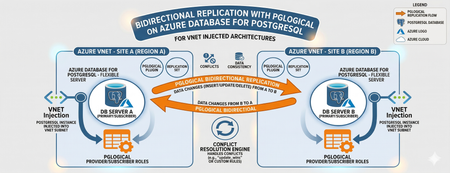
Editor’s Note: This article was written by Raunak Jhawar, a Chief Architect. Paula Berenguel and Guy Bowerman assisted with the final review, formatting and publication. Overview Bidirectional replication is one of the most requested topologies requiring writes in multiple locations, selective sync, geo-distributed active-active, or even accepting eventual consistency. This is a deep technical walkthrough for implementing bidirectional (active‑active) replication on private Azure Database for PostgreSQL Server using pglogical, with a strong emphasis on VNET‑injected architectures. It explains the underlying networking and execution model covering replication worker placement, DNS resolution paths, outbound connectivity, and conflict resolution mechanics to show why true private, server‑to‑server replication is only achievable with VNET injection and not with Private Endpoints. It also analyzes the operational and architectural trade‑offs needed to safely run geo distributed, multi write PostgreSQL workloads in production. This blog post focus on pglogical however, if you are looking for steps to implement it with logical replication or pros and cons of which approach, please refer to my definitive guid to bi-directional replication in Azure Database for PostgreSQL blog post Why this is important? This understanding prevents fundamental architectural mistakes (such as assuming Private Endpoints provide private outbound replication), reduces deployment failures caused by hidden networking constraints, and enables teams to design secure, compliant, low‑RPO active/active or migration architectures that behave predictably under real production conditions. It turns a commonly misunderstood problem into a repeatable, supportable design pattern rather than a trial‑and‑error exercise. Active-Active bidirectional replication between instances Architecture context This scenario targets a multi-region active-active write topology where both nodes are injected into the same Azure VNET (example - peered VNETs on Azure or even peered on-premises), both accept writes. Common use case: Geo distributed OLTP with regional write affinity. Step 1: Azure Infrastructure Prerequisites Both server instances must be deployed with VNET injection. This is a deploy time decision and you cannot migrate a publicly accessible instance (with or without private endpoint) to VNET injection post creation without rebuilding it. Each instance must live in a delegated subnet: Microsoft.DBforPostgreSQL/Servers. The subnet delegation is non-negotiable and prevents you from placing other resource types in the same subnet, so plan your address space accordingly. If nodes are in different VNETs, configure VNET peering before continuing along with private DNS integration. Ensure there are no overlapping address spaces amongst the peered networks. NSG rules must allow port 5432 between the two delegated subnets, both inbound and outbound. You may choose to narrow down the NSG rules to meet your organization requirements and policies to a specific source/target combination allow or deny list. Step 2: Server Parameter Configuration On both nodes, configure the following server parameters via the Azure Portal (Server Parameters blade) or Azure CLI. These cannot be set via ALTER SYSTEM SET commands. wal_level = logical -- This setting enables logical replication, which is required for pglogical to function. max_worker_processes = 16 -- This setting allows for more worker processes, which can help with replication performance. max_replication_slots = 10 -- This setting allows for more replication slots, which are needed for pglogical to manage replication connections. max_wal_senders = 10 -- This setting allows for more WAL sender processes, which are responsible for sending replication data to subscribers. track_commit_timestamp = on -- This setting allows pglogical to track commit timestamps, which can be useful for conflict resolution and monitoring replication lag. shared_preload_libraries = pglogical -- This setting loads the pglogical extension at server startup, which is necessary for it to function properly. azure.extensions = pglogical -- This setting allows the pglogical extension to be used in the Azure Postgres PaaS environment. Both nodes require a restart after shared_preload_libraries and wal_level changes. Note that max_worker_processes is shared across all background workers in the instance. Each pglogical subscription consumes workers. If you are running other extensions, account for their worker consumption here or you will hit startup failures for pglogical workers. Step 3: Extension and Node Initialization Create a dedicated replication user on both nodes. Do not use the admin account for replication. CREATE ROLE replication_user WITH LOGIN REPLICATION PASSWORD 'your_password'; GRANT USAGE ON SCHEMA public TO replication_user; GRANT SELECT ON ALL TABLES IN SCHEMA public TO replication_user; ALTER DEFAULT PRIVILEGES IN SCHEMA public GRANT SELECT ON TABLES TO replication_user; Log into Server A either via a VM in the specified VNET or Azure Bastion Host and run the following which creates the extension, a replication set and policies. CREATE EXTENSION IF NOT EXISTS pglogical; SELECT pglogical.create_node(node_name := 'node_a', dsn := 'host.fqdn-for-server-a port=5432 dbname=preferred-database user=replication_user password=<strong_password>'); -- Define the replication set for Server A, specifying which tables to replicate and the types of operations to include (inserts, updates, deletes). SELECT pglogical.create_replication_set(set_name := 'node_a_set', replicate_insert := true, replicate_update := true, replicate_delete := true, replicate_truncate := false); -- Add sales_aus_central table explicitly SELECT pglogical.replication_set_add_table(set_name := 'node_a_set', relation := 'public.sales_aus_central', synchronize_data := true); -- Add purchase_aus_central table explicitly SELECT pglogical.replication_set_add_table(set_name := 'node_a_set', relation := 'public.purchase_aus_central', synchronize_data := true); -- OR add all tables in the public schema SELECT pglogical.replication_set_add_all_tables('default', ARRAY['public']); -- This command adds all tables in the public schema to the default replication set. -- Now, repeat this on Server B using the same method above i.e. via a VM in the specified VNET or Azure Bastion Host CREATE EXTENSION IF NOT EXISTS pglogical; -- Define the replication set for Server B, specifying which tables to replicate and the types of operations to include (inserts, updates, deletes) SELECT pglogical.create_node(node_name := 'node_b', dsn := 'host-fqdn-for-server-b port=5432 dbname=preferred-database user=replication_user password=<strong_password>'); SELECT pglogical.create_replication_set( set_name := 'node_b_set', replicate_insert := true, replicate_update := true, replicate_delete := true, replicate_truncate := false); -- Add sales_aus_east table explicitly SELECT pglogical.replication_set_add_table( set_name := 'node_b_set', relation := 'public.sales_aus_east', synchronize_data := true); -- Add purchase_aus_east table explicitly SELECT pglogical.replication_set_add_table( set_name := 'node_b_set', relation := 'public.purchase_aus_east', synchronize_data := true); -- OR add all tables in the public schema SELECT pglogical.replication_set_add_all_tables('default', ARRAY['public']); -- This command adds all tables in the public schema to the default replication set. It is recommended that you confirm the DNS resolution on all server’s involved as part of the replication process. For a VNET injected scenarios – you must get back the private IP. As a sanity check, you can run the nslookup on the target server’s FQDN or even use the \conninfo command to see the connection details. One such example is here: Step 4: Configuring the subscribers SELECT pglogical.create_subscription ( -- Create a subscription on Server A to receive changes from Server B subscription_name := 'node_a_to_node_b', replication_sets := array['default'], synchronize_data := true, forward_origins := '{}', provider_dsn := 'host=fqdn-for-server-b port=5432 dbname=preferred-database user=replication_user password=<strong_password>'); -- Run this on Server B to subscribe to changes from Server A SELECT pglogical.create_subscription ( -- Create a subscription on Server B to receive changes from Server A subscription_name := 'node_b_to_node_a', replication_sets := array['default'], synchronize_data := true, forward_origins := '{}', provider_dsn := 'host=fqdn-for-server-a port=5432 dbname=preferred-database user=replication_user password=<strong_password>'); For most OLTP workloads, last_update_wins using the commit timestamp is the most practical choice. It requires track_commit_timestamp = on, which you must set as a server parameter. The FQDN must be used rather than using the direct private IP of the server itself. Bidirectional replication between server instances with private endpoints – does this work and will this make your server security posture weak? Where do pglogical workers run? With VNET injection, the server's network interface lives inside your delegated subnet which is a must do. The PostgreSQL process including all pglogical background workers starts connections from within your VNET (delegated subnet). The routing tables, NSGs, and peering apply to both inbound and outbound traffic from the server. With Private Endpoint, the architecture is fundamentally different: Private endpoint is a one-way private channel for your clients or applications to reach the server securely. It does not give the any of server’s internal processes access to your VNET for outbound connectivity. pglogical subscription workers trying to connect to another server are starting those connections from Microsoft's managed infrastructure and not from your VNET. What works? Scenario A: Client connectivity via private endpoint Here you have application servers or VMs in your VNET connecting to a server configured with a private endpoint, your app VM connects to 10.0.0.15 (the private endpoint NIC), traffic flows over Private Link to the server, and everything stays private. This is not server-to-server replication. Scenario B: Two servers, both with private endpoints Here both servers are in Microsoft's managed network. They can reach each other's public endpoints, but not each other's private endpoints (which are in customer VNETs). The only path for bidirectional replication worker connections is to enable public network access on both servers with firewall rules locked down to Azure service IP. Here you have private endpoints deployed alongside public access. Inside your VNET, SERVER A resolves to the private endpoint IP via the privatelink.postgres.database.azure.com private DNS zone. But the pglogical worker running in Microsoft's network does not have access to your private DNS zone and it resolves via public DNS, which returns the public IP. This means if you are using the public FQDN for replication, the resolution path is consistent from the server's perspective (always public DNS, always public IP using the allow access to Azure services flag as shown above). Your application clients in the VNET will still resolve to the private endpoint. If your requirement is genuinely private replication with no public endpoint exposure, VNET injection is the correct answer, and private endpoint cannot replicate that capability for pglogical. Conclusion The most compelling benefit in the VNET-injected topology is network isolation without sacrificing replication capability. You get the security posture of private connectivity i.e. no public endpoints, NSG controlled traffic, private DNS resolution all while keeping a live bidirectional data pipeline. This satisfies most enterprise compliance requirements around data transit encryption and network boundary control. The hub/spoke migration (specifically, on-premises or external cloud to Azure) scenarios are where this approach shines. The ability to run both systems in production simultaneously, with live bidirectional sync during the cutover window, reduces migration risk when compared to a hard cutover. From a DR perspective, bidirectional pglogical gives you an RPO measured in seconds (replication lag dependent) without the cost of synchronous replication. For workloads that can tolerate eventual consistency and have well-designed conflict avoidance this is a compelling alternative to synchronous streaming replication via read replicas, which are strictly unidirectional.729Views2likes0CommentsSupporting ChatGPT on PostgreSQL in Azure
Affan Dar, Vice President of Engineering, PostgreSQL at Microsoft Adam Prout, Partner Architect, PostgreSQL at Microsoft Panagiotis Antonopoulos, Distinguished Engineer, PostgreSQL at Microsoft The OpenAI engineering team recently published a blog post describing how they scaled their databases by 10x over the past year, to support 800 million monthly users. To do so, OpenAI relied on Azure Database for PostgreSQL to support important services like ChatGPT and the Developer API. Collaborating with a customer experiencing rapid user growth has been a remarkable journey. One key observation is that PostgreSQL works out of box for very large-scale points. As many in the public domain have noted, ChatGPT grew to 800M+ users before OpenAI started moving new and shardable workloads to Azure Cosmos DB. Nevertheless, supporting the growth of one of the largest Postgres deployments was a great learning experience for both of our teams. Our OpenAI friends did an incredible job at reacting fast and adjusting their systems to handle the growth. Similarly, the Postgres team at Azure worked to further tune the service to support the increasing OpenAI workload. The changes we made were not limited to OpenAI, hence all our Azure Database for PostgreSQL customers with demanding workloads have benefited. A few of the enhancements and the work that led to these are listed below. Changing the network congestion protocol to reduce replication lag Azure Database for PostgreSQL used the default CUBIC congestion control algorithm for replication traffic to replicas both within and outside the region. Leading up to one of the OpenAI launch events, we observed that several geo-distributed read replicas occasionally experienced replication lag. Replication from the primary server to the read replicas would typically operate without issues; however, at times, the replicas would unexpectedly begin falling behind the primary for reasons that were not immediately clear. This lag would not recover on its own and would grow to a point when, eventually, automation would restart the read replica. Once restarted, the read replica would once again catch up, only to repeat this cycle again within a day or less. After an extensive debugging effort, we traced the root cause to how the TCP congestion control algorithm handled a higher rate of packet drops. These drops were largely a result of high point-to-point traffic between the primary server and its replicas, compounded by the existing TCP window settings. Packet drops across regions are not unexpected; however, the default congestion control algorithm (CUBIC) treats packet loss as a sign of congestion and does an aggressive backoff. In comparison, the Bottleneck Bandwidth and Round-trip propagation time (BBR) congestion control algorithm is less sensitive to packet drops. Switching to BBR, adding SKU specific TCP window settings, and switching to fair queuing network discipline (which can control pacing of outgoing packets at hardware level) resolved this issue. We’ll also note that one of our seasoned PostgreSQL committers provided invaluable insights during this process, helping us pinpoint the issue more effectively. Scaling out with Read replicas PostgreSQL primaries, if configured properly, work amazingly well in supporting a large number of read replicas. In fact, as noted in the OpenAI engineering blog, a single primary has been able to power around 50+ replicas across multiple regions. However, going beyond this increases the chance of impacting the primary. For this reason, we added the cascading replica support to scale out reads even further. But this brings in a number of additional failure modes that need to be handled. The system must carefully orchestrate repairs around lagging and failing intermediary nodes, safely repointing replicas to new intermediary nodes while performing catch up or rewind in a mission critical setup. Furthermore, disaster recovery (DR) scenarios can require a fast rebuild of a replica and as data movement across regions is a costly and time-consuming operation, we developed the ability to create a geo replica from a snapshot of another replica in the same region. This feature avoids the traditional full data copy process, which may take hours or even days depending on the size of the data, by leveraging data for that cluster that already exists in that region. This feature will soon be available for all our customers as well. Scaling out Writes These improvements solved the read replica lag problems and read scale but did not help address the growing write scale for OpenAI. At some point, the balance tipped and it was obvious that the IOPs limits of a single PostgreSQL primary instance will not cut it anymore. As a result OpenAI decided to move new and shardable workloads to Azure Azure Cosmos DB, which is our default recommended NoSQL store for fully elastic workloads. However, some workloads, as noted in the OpenAI blog are much harder to shard. While OpenAI is using Azure Database for PostgreSQL flexible server, several of the write scaling requirements that came up have been baked into our new Azure HorizonDB offering, which entered private preview in November 2025. Some of the architectural innovations are described in the following sections. Azure HorizonDB scalability design To better support more demanding workloads, Azure HorizonDB introduces a new storage layer for Postgres that delivers significant performance and reliability enhancements: More efficient read scale out. Postgres read replicas no longer need to maintain their own copy of the data. They can read pages from the single copy maintained by the storage layer. Lower latency Write-Ahead Logging (WAL) writes and higher throughput page reads via two purpose-built storage services designed for WAL storage and Page storage. Durability and high availability responsibilities are shifted from the Postgres primary to the storage layer, allowing Postgres to dedicate more resources to executing transactions and queries. Postgres failovers are faster and more reliable. To understand how Azure HorizonDB delivers these capabilities, let’s look at its high‑level architecture as shown in Figure 1. It follows a log-centric storage model, where the PostgreSQL writeahead log (WAL) is the sole mechanism used to durably persist changes to storage. PostgreSQL compute nodes never write data pages to storage directly in Azure HorizonDB. Instead, pages and other on-disk structures are treated as derived state and are reconstructed and updated from WAL records by the data storage fleet. Azure HorizonDB storage uses two separate storage services for WAL and data pages. This separation allows each to be designed and optimized for the very different patterns of reads and writes PostgreSQL does against WAL files in contrast to data pages. The WAL server is optimized for very low latency writes to the tail of a sequential WAL stream and the Page server is designed for random reads and writes across potentially many terabytes of pages. These two separate services work together to enable Postgres to handle IO intensive OLTP workloads like OpenAI’s. The WAL server can durably write a transaction across 3 availability zones using a single network hop. The typical PostgreSQL replication setup with a hot standby (Figure 2) requires 4 hops to do the same work. Each hop is a component that can potentially fail or slow down and delay a commit. Azure HorizonDB page service can scale out page reads to many hundreds of thousands of IOPs for each Postgres instance. It does this by sharding the data in Postgres data files across a fleet of page servers. This spreads the reads across many high performance NVMe disks on each page server. 2 - WAL Writes in HorizonDB Another key design principle for Azure HorizonDB was to move durability and high availability related work off PostgreSQL compute allowing it to operate as a stateless compute engine for queries and transactions. This approach gives Postgres more CPU, disk and network to run your application’s business logic. Table 1 summarizes the different tasks that community PostgreSQL has to do, which Azure HorizonDB moves to its storage layer. Work like dirty page writing and checkpointing are no longer done by a Postgres primary. The work for sending WAL files to read replicas is also moved off the primary and into the storage layer – having many read replicas puts no load on the Postgres primary in Azure HorizonDB. Backups are handled by Azure Storage via snapshots, Postgres isn’t involved. Task Resource Savings Postgres Process Moved WAL sending to Postgres replicas Disk IO, Network IO Walsender WAL archiving to blob storage Disk IO, Network IO Archiver WAL filtering CPU, Network IO Shared Storage Specific (*) Dirty Page Writing Disk IO background writer Checkpointing Disk IO checkpointer PostgreSQL WAL recovery Disk IO, CPU startup recovering PostgreSQL read replica redo Disk IO, CPU startup recovering PostgreSQL read replica shared storage Disk IO background, checkpointer Backups Disk IO pg_dump, pg_basebackup, pg_backup_start, pg_backup_stop Full page writes Disk IO Backends doing WAL writing Hot standby feedback Vacuum accuracy walreceiver Table 1 - Summary of work that the Azure HorizonDB storage layer takes over from PostgreSQL The shared storage architecture of Azure HorizonDB is the fundamental building block for delivering exceptional read scalability and elasticity which are critical for many workloads. Users can spin up read replicas instantly without requiring any data copies. Page Servers are able to scale and serve requests from all replicas without any additional storage costs. Since WAL replication is entirely handled by the storage service, the primary’s performance is not impacted as the number of replicas changes. Each read replica can scale independently to serve different workloads, allowing for workload isolation. Finally, this architecture allows Azure HorizonDB to substantially improve the overall experience around high availability (HA). HA replicas can now be added without any data copying or storage costs. Since the data is shared between the replicas and continuously updated by Page Servers, secondary replicas only replay a portion of the WAL and can easily keep up with the primary, reducing failover times. The shared storage also guarantees that there is a single source of truth and the old primary never diverges after a failover. This prevents the need for expensive reconciliation, using pg_rewind, or other techniques and further improves availability. Azure HorizonDB was designed from the ground up with learnings from large scale customers, to meet the requirements of the most demanding workloads. The improved performance, scalability and availability of the Azure HorizonDB architecture make Azure a great destination for Postgres workloads.5.2KViews11likes0CommentsPostgreSQL for the enterprise: scale, secure, simplify
This week at Microsoft Ignite, along with unveiling the new Azure HorizonDB cloud native database service, we’re announcing multiple improvements to our fully managed open-source Azure Database for PostgreSQL service, delivering significant advances in performance, analytics, security, and AI-assisted migration. Let’s walk through nine of the top Azure Database for PostgreSQL features and improvements we’re announcing at Microsoft Ignite 2025. Feature Highlights New Intel and AMD v6-series SKUs (Preview) Scale to multiple nodes with Elastic Clusters (GA) PostgreSQL 18 (GA) Realtime analytics with Fabric Mirroring (GA) Analytical queries inside PostgreSQL with the pg_duckdb extension (Preview) Adding Parquet to the azure_storage extension (GA) Meet compliance requirements with the credcheck, anon & ip4r extensions (GA) Integrated identity with Entra token-refresh libraries for Python AI-Assisted Oracle to PostgreSQL Migration Tool (Preview) Performance and scale New Intel and AMD v6 series SKUs (Preview) You can run your most demanding Postgres workloads on new Intel and AMD v6 General Purpose and Memory Optimized hardware SKUs, now availble in preview These SKUs deliver massive scale for high-performance OLTP, analytics and complex queries, with improved price performance and higher memory ceilings. AMD Confidential Compute v6 SKUs are also in Public Preview, enabling enhanced security for sensitive workloads while leveraging AMD’s advanced hardware capabilities. Here’s what you need to know: Processors: Powered by 5th Gen Intel® Xeon® processor (code-named Emerald Rapids) and AMD's fourth Generation EPYC™ 9004 processors Scale: VM size options scale up to 192 vCores and 1.8 TiB IO: Using the NVMe protocol for data disk access, IO is parallelized to the number of CPU cores and processed more efficiently, offering significant IO improvements Compute tier: Available in our General Purpose and Memory Optimized tiers. You can scale up to these new compute SKUs as needed with minimal downtime. Learn more: Here's a quick summary of the v6 SKUs we’re launching, with links to more information: Processor SKU Max vCores Max Mem Intel Ddsv6 192 768 GiB Edsv6 192 1.8 TiB AMD Dadsv6 96 384 GiB Eadsv6 96 672 GiB DCadsv6 96 386 GiB ECadsv6 96 672 GiB Scale to multiple nodes with Elastic clusters (GA) Elastic clusters are now generally available in Azure Database for PostgreSQL. Built on Citus open-source technology, elastic clusters bring the horizontal scaling of a distributed database to the enterprise features of Azure Database for PostgreSQL. Elastic clusters enable horizontal scaling of databases running across multiple server nodes in a “shared nothing” architecture. This is ideal for workloads with high-throughput and storage-intensive demands such as multi-tenant SaaS and IoT-based workloads. Elastic clusters come with all the enterprise-level capabilities that organizations rely upon in Azure Database for PostgreSQL, including high availability, read replicas, private networking, integrated security and connection pooling. Built-in sharding support at both row and schema level enables you to distribute your data across a cluster of compute resources and run queries in parallel, dramatically increasing throughput and capacity. Learn more: Elastic clusters in Azure Database for PostgreSQL PostgreSQL 18 (GA) When PostgreSQL 18 was released in September, we made a preview available on Azure on the same day. Now we’re announcing that PostgreSQL 18 is generally available on Azure Database for PostgreSQL, with full Major Version Upgrade (MVU) support, marking our fastest-ever turnaround from open-source release to managed service general availability. This release reinforces our commitment to delivering the latest PostgreSQL community innovations to Azure customers, so you can adopt the latest features, performance improvements, and security enhancements on a fully managed, production-ready platform without delay. ^Note: MVU to PG18 is currently available in the NorthCentralUS and WestCentralUS regions, with additional regions being enabled over the next few weeks Now you can: Deploy PostgreSQL 18 in all public Azure regions. Perform in-place major version upgrades to PG18 with no endpoint or connection string changes. Use Microsoft Entra ID authentication for secure, centralized identity management in all PG versions. Enable Query Store and Index Tuning for built-in performance insights and automated optimization. Leverage the 90+ Postgres extensions supported by Azure Database for PostgreSQL. PostgreSQL 18 also delivers major improvements under the hood, ranging from asynchronous I/O and enhanced vacuuming to improved indexing and partitioning, ensuring Azure continues to lead as the most performant, secure, and developer-friendly PostgreSQL managed service in the cloud. Learn more: PostgreSQL 18 open-source release announcement Supported versions of PostgreSQL in Azure Database for PostgreSQL Analytics Real-time analytics with Fabric Mirroring (GA) With Fabric mirroring in Azure Database for PostgreSQL, now generally available, you can run your Microsoft Fabric analytical workloads and capabilities on near-real-time replicated data, without impacting the performance of your production PostgreSQL databases, and at no extra cost. Mirroring in Fabric connects your operational and analytical platforms with continuous data replication from PostgreSQL to Fabric. Transactions are mirrored to Fabric in near real-time, enabling advanced analytics, machine learning, and reporting on live data sets without waiting for traditional batch ETL processes to complete. This approach eliminates the overhead of custom integrations or data pipelines. Production PostgreSQL servers can run mission-critical transactional workloads without being affected by surges in analytical queries and reporting. With our GA announcement Fabric mirroring is ready for production workloads, with secure networking (VNET integration and Private Endpoints supported), Entra ID authentication for centralized identity management, and support for high availability enabled servers, ensuring business continuity for mirroring sessions. Learn more: Mirroring Azure Database for PostgreSQL flexible server Adding Parquet support to the azure_storage extension (GA) In addition to mirroring data directly to Microsoft Fabric, there are many other scenarios that require moving operational data into data lakes for analytics or archival. The complexity of building and maintaining ETL pipelines can be expensive and time-consuming. Azure Database for PostgreSQL now natively supports Parquet via the azure_storage extension, enabling direct SQL-based read/write to Parquet files in Azure Storage. This makes it easy to import and export data in Postgres without external tools or scripts. Parquet is a popular columnar storage format often used in big data and analytics environments (like Spark and Azure Data Lake) because of its efficient compression and query performance for large datasets. Now you can use the azure_storage extension to can skip an entire step: just issue a SQL command to write to and query from a Parquet file in Azure Blob Storage. Learn more: Azure storage extension in Azure Database for PostgreSQL Analytical queries inside PostgreSQL with the pg_duckdb extension (Preview) DuckDB’s columnar engine excels at high performance scans, aggregations and joins over large tables, making it particularly well-suited for analytical queries. The pg_duckdb extension, now available in preview for Azure Database for PostgreSQL combines PostgreSQL’s transactional performance and reliability with DuckDB’s analytical speed for large datasets. Together pg_duckdb and PostgreSQL are an ideal combination for hybrid OLTP + OLAP environments where you need to run analytical queries directly in PostgreSQL without sacrificing performance., To see the pg_duckdb extension in action check out this demo video: https://aka.ms/pg_duckdb Learn more: pg_duckdb – PostgreSQL extension for DuckDB Security Meet compliance requirements with the credcheck, anon & ip4r extensions (GA) Operating in a regulated industry such as Finance, Healthcare and Government means negotiating compliance requirements like HIPAA and PCI-DSS, GDPR that include protection for personalized data and password complexity, expiration and reuse. This week the anon extension, previously in preview, is now generally available for Azure Database for PostgreSQL adding support for dynamic and static masking, anonymized exports, randomization and many other advanced masking techniques. We’ve also added GA support for the credcheck extension, which provides credential checks for usernames, and password complexity, including during user creation, password change and user renaming. This is particularly useful if your application is not using Entra ID and needs to rely on native PostgreSQL users and passwords. If you need to store and query IP ranges for scenarios like auditing, compliance, access control lists, intrusion detection and threat intelligence, another useful extension announced this week is the ip4r extension which provides a set of data types for IPv4 and IPv6 network addresses. Learn more: PostgreSQL Anonymizer credcheck – PostgreSQL username/password checks IP4R - IPv4/v6 and IPv4/v6 range index type for PostgreSQL The Azure team maintains an active pipeline of new PostgreSQL extensions to onboard and upgrade to Azure Database for PostgreSQL For example, another important extension upgraded this week is pg_squeeze which removes unused space from a table. The updated 1.9.1 version adds important stability improvements. Learn more: List of extensions and modules by name Integrated identity with Entra token-refresh libraries for Python In a modern cloud-connected enterprise, identity becomes the most important security perimeter. Azure Database for PostgreSQL is the only managed PostgreSQL service with full Entra integration, but coding applications to take care of Entra token refresh can be complex. This week we’re announcing a new Python library to simplify Entra token refresh. The library automatically refreshes authentication tokens before they expire, eliminating manual token handling and reducing connection failures. The new python_azure_pg_auth library provides seamless Azure Entra ID authentication and supports the latest psycopg and SQLAlchemy drivers with automatic token acquisition, validation, and refresh. Built-in connection pooling is available for both synchronous and asynchronous workloads. Designed for cross-platform use (Windows, Linux, macOS), the package features clean architecture and flexible installation options for different driver combinations. This is our first milestone in a roadmap to add token refresh for additional programming languages and frameworks. Learn more, with code samples to get started here: https://aka.ms/python-azure-pg-auth Migration AI-Assisted Oracle to PostgreSQL Migration Tool (Preview) Database migration is a challenging and time-consuming process, with multiple manual steps requiring schema and apps specific information. The growing popularity, maturity and low cost of PostgreSQL has led to a healthy demand for migration tooling to simplify these steps. The new AI-assisted Oracle Migration Tool preview announced this week greatly simplifies moving from Oracle databases to Azure Database for PostgreSQL. Available in the VS Code PostgreSQL extension the new migration tool combines GitHub Copilot, Azure OpenAI, and custom Language Model Tools to convert Oracle schema, database code and client applications into PostgreSQL-compatible formats. Unlike traditional migration tools that rely on static rules, Azure’s approach leverages Large Language Models (LLMs) and validates every change against a running Azure Database for PostgreSQL instance. This system not only translates syntax but also detects and fixes errors through iterative re-compilation, flagging any items that require human review. Application codebases like Spring Boot and other popular frameworks are refactored and converted. The system also understands context by querying the target Postgres instance for version and installed extensions. It can even invoke capabilities from other VS Code extensions to validate the converted code. The new AI-assisted workflow reduces risk, eliminates significant manual effort, and enables faster modernization while lowering costs. Learn more: https://aka.ms/pg-migration-tooling Be sure to follow the Microsoft Blog for PostgreSQL for regular updates from the Postgres on Azure team at Microsoft. We publish monthly recaps about new features in Azure Database for PostgreSQL, as well as an annual blog about what’s new in Postgres at Microsoft.4KViews9likes0CommentsAnnouncing Azure HorizonDB
Affan Dar, Vice President of Engineering, PostgreSQL at Microsoft Charles Feddersen, Partner Director of Program Management, PostgreSQL at Microsoft Today at Microsoft Ignite, we’re excited to unveil the preview of Azure HorizonDB, a fully managed Postgres-compatible database service designed to meet the needs of modern enterprise workloads. The cloud native architecture of Azure HorizonDB delivers highly scalable shared storage, elastic scale-out compute, and a tiered cache optimized for running cloud applications of any scale. Postgres is transforming industries worldwide and is emerging as the foundation of modern data solutions across all sectors at an unprecedented pace. For developers, it is the database of choice for building new applications with its rich set of extensions, open-source API, and expansive ecosystems of tools and libraries. At the same time, but at the opposite end of the workload spectrum, enterprises around the world are also increasingly turning to Postgres to modernize their existing applications. Azure HorizonDB is designed to support applications across the entire workload spectrum from the first line of code in a new app to the migration of large-scale, mission-critical solutions. Developers benefit from the robust Postgres ecosystem and seamless integration with Azure’s advanced AI capabilities, while enterprises can gain a secure, highly available, and performant cloud database to host their business applications. Whether you’re building from scratch or transforming legacy infrastructure, Azure HorizonDB empowers you to innovate and scale with confidence, today and into the future. Azure HorizonDB introduces new levels of performance and scalability to PostgreSQL. The scale-out compute architecture supports up to 3,072 vCores across primary and replica nodes, and the auto-scaling shared storage supports up to 128TB databases while providing sub-millisecond multi-zone commit latencies. This storage innovation enables Azure HorizonDB to deliver up to 3x more throughput when compared with open-source Postgres for transactional workloads. Azure HorizonDB is enterprise ready on day one. With native support for Entra ID, Private Endpoints, and data encryption, it provides compliance and security for sensitive data stored in the cloud. All data is replicated across availability zones by default and maintenance operations are transparent with near-zero downtime. Backups are fully automated, and integration with Azure Defender for Cloud provides additional protection for highly sensitive data. All up, Azure HorizonDB offers enterprise-grade security, compliance, and reliability, making it ready for business use today. Since the launch of ChatGPT, there has been an explosion of new AI apps being built, and Postgres has become the database of choice due in large part to its vector index support. Azure HorizonDB extends the AI capabilities of Postgres further with two key features. We are introducing advanced filtering capabilities to the DiskANN vector index which enable query predicate pushdowns directly into the vector similarity search. This provides significant performance and scalability improvements over pgvector HNSW while maintaining accuracy and is ideal for similarity search over transactional data in Postgres. The second feature is built-in AI model management that seamlessly integrates generative, embedding, and reranking models from Microsoft Foundry for developers to use in the database with zero configuration. In addition to enhanced vector indexing and simplified model management to build powerful new AI apps, we’re also pleased to announce the general availability of Microsoft’s PostgreSQL Extension for VS Code that provides the tooling for Postgres developers to maximize their productivity. Using this extension, GitHub Copilot is context aware of the Postgres database which means less prompting and higher quality answers, and in the Ignite release, we’ve added live monitoring with one-click GitHub Copilot debugging where Agent mode can launch directly from the performance monitoring dashboard to diagnose Postgres performance issues and guide users to a fix. Alpha Life Sciences are an existing Azure customers “I’m truly excited about how Azure HorizonDB empowers our AI development. Its seamless support for Vector DB, RAG, and Agentic AI allows us to build intelligent features directly on a reliable Postgres foundation. With Azure HorizonDB, I can focus on advancing AI capabilities instead of managing infrastructure complexities. It’s a smart, forward-looking solution that perfectly aligns with how we design and deliver AI-powered applications.” Pengcheng Xu, CTO Alpha Life Sciences For enterprises that are modernizing their applications to Postgres in the cloud, the security and availability of Azure HorizonDB make it an ideal platform. However, these migrations are often complex and time consuming for large legacy codebase conversions. To simplify this and reduce the risk, we’re pleased to announce the preview of GitHub Copilot powered Oracle migration built into the PostgreSQL Extension for VS Code. Built into VS Code, teams of engineers can work with GitHub Copilot to automate the end-to-end conversion of complex database code using rich code editing, version control, text authoring, and deployment in an integrated development environment. Azure HorizonDB is the next generation of fully managed, cloud native PostgreSQL database service. Built on the latest Azure infrastructure with state-of-the-art cloud architecture, Azure HorizonDB is ready to for the most demanding application workloads. In addition to our portfolio of managed Postgres services in Azure, Microsoft is deeply invested into the open source Postgres project and is one of the top corporate upstream contributors and sponsors for the PostgreSQL project, with 19 Postgres project contributors employed by Microsoft. As a hyperscale Postgres vendor, it’s critical to actively participate in the open-source project. It enables us to better support our customers down to the metal in Azure, and to contribute our learnings from running Postgres at scale back to the community. We’re committed to continuing our investment to push the Postgres project forward, and the team is already active in making contributions to Postgres 19 to be released in 2026. Ready to explore Azure HorizonDB? Azure HorizonDB is initially available in Central US, West US3, UK South and Australia East regions. Customers are invited to apply for early preview access to Azure HorizonDB and get hands-on experience with this new service. Participation is limited, apply now at aka.ms/PreviewHorizonDB